key fob RAM 1500 2022 Owner's Manual
[x] Cancel search | Manufacturer: RAM, Model Year: 2022, Model line: 1500, Model: RAM 1500 2022Pages: 496, PDF Size: 18.03 MB
Page 62 of 496
60GETTING TO KNOW YOUR VEHICLE
NOTE:The courtesy/reading lights will remain on until the
switch is pushed a second time, so be sure they
have been turned off before exiting the vehicle. If
the interior lights are left on after the ignition is
turned off, they will automatically turn off after
10 minutes.
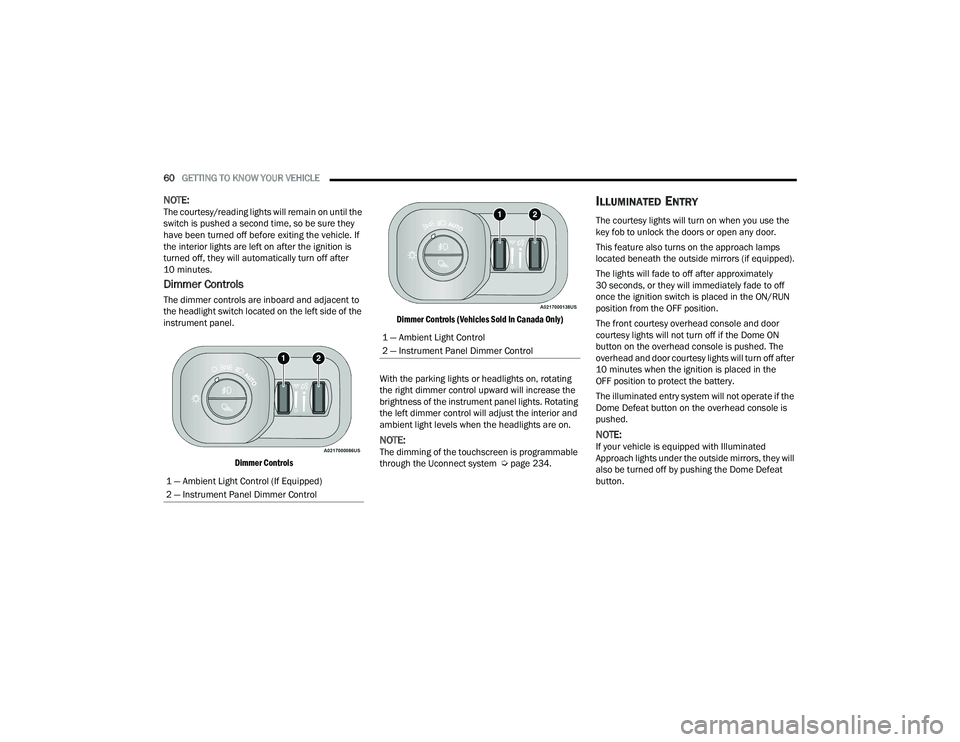
Dimmer Controls
The dimmer controls are inboard and adjacent to
the headlight switch located on the left side of the
instrument panel.
Dimmer Controls Dimmer Controls (Vehicles Sold In Canada Only)
With the parking lights or headlights on, rotating
the right dimmer control upward will increase the
brightness of the instrument panel lights. Rotating
the left dimmer control will adjust the interior and
ambient light levels when the headlights are on.
NOTE:The dimming of the touchscreen is programmable
through the Uconnect system Ú page 234.
ILLUMINATED ENTRY
The courtesy lights will turn on when you use the
key fob to unlock the doors or open any door.
This feature also turns on the approach lamps
located beneath the outside mirrors (if equipped).
The lights will fade to off after approximately
30 seconds, or they will immediately fade to off
once the ignition switch is placed in the ON/RUN
position from the OFF position.
The front courtesy overhead console and door
courtesy lights will not turn off if the Dome ON
button on the overhead console is pushed. The
overhead and door courtesy lights will turn off after
10 minutes when the ignition is placed in the
OFF position to protect the battery.
The illuminated entry system will not operate if the
Dome Defeat button on the overhead console is
pushed.
NOTE:If your vehicle is equipped with Illuminated
Approach lights under the outside mirrors, they will
also be turned off by pushing the Dome Defeat
button.
1 — Ambient Light Control (If Equipped)
2 — Instrument Panel Dimmer Control
1 — Ambient Light Control
2 — Instrument Panel Dimmer Control
22_DT_OM_EN_USC_t.book Page 60
Page 81 of 496
GETTING TO KNOW YOUR VEHICLE79
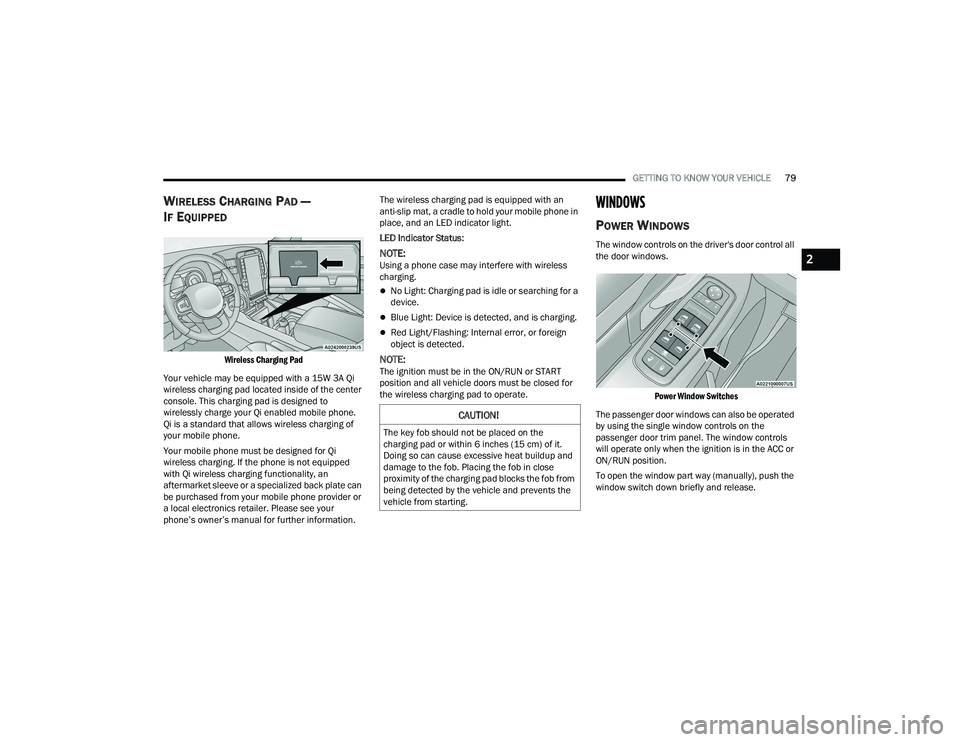
WIRELESS CHARGING PAD —
I
F EQUIPPED
Wireless Charging Pad
Your vehicle may be equipped with a 15W 3A Qi
wireless charging pad located inside of the center
console. This charging pad is designed to
wirelessly charge your Qi enabled mobile phone.
Qi is a standard that allows wireless charging of
your mobile phone.
Your mobile phone must be designed for Qi
wireless charging. If the phone is not equipped
with Qi wireless charging functionality, an
aftermarket sleeve or a specialized back plate can
be purchased from your mobile phone provider or
a local electronics retailer. Please see your
phone’s owner’s manual for further information. The wireless charging pad is equipped with an
anti-slip mat, a cradle to hold your mobile phone in
place, and an LED indicator light.
LED Indicator Status:
NOTE:Using a phone case may interfere with wireless
charging.
No Light: Charging pad is idle or searching for a
device.
Blue Light: Device is detected, and is charging.
Red Light/Flashing: Internal error, or foreign
object is detected.
NOTE:The ignition must be in the ON/RUN or START
position and all vehicle doors must be closed for
the wireless charging pad to operate.
WINDOWS
POWER WINDOWS
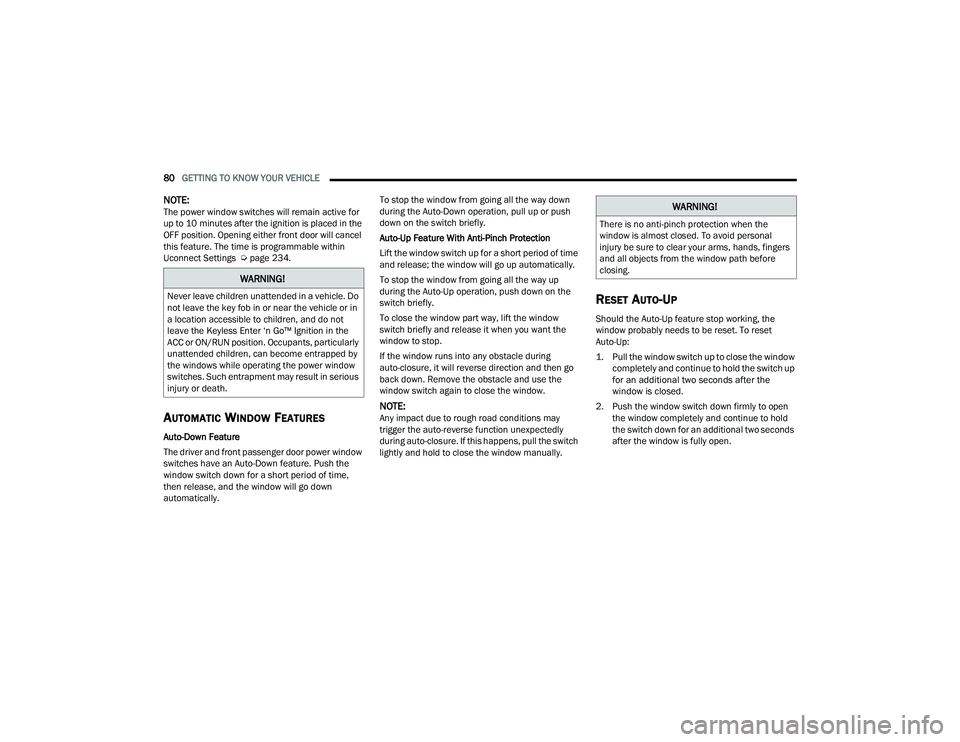
The window controls on the driver's door control all
the door windows.
Power Window Switches
The passenger door windows can also be operated
by using the single window controls on the
passenger door trim panel. The window controls
will operate only when the ignition is in the ACC or
ON/RUN position.
To open the window part way (manually), push the
window switch down briefly and release.
CAUTION!
The key fob should not be placed on the
charging pad or within 6 inches (15 cm) of it.
Doing so can cause excessive heat buildup and
damage to the fob. Placing the fob in close
proximity of the charging pad blocks the fob from
being detected by the vehicle and prevents the
vehicle from starting.
2
22_DT_OM_EN_USC_t.book Page 79
Page 82 of 496
80GETTING TO KNOW YOUR VEHICLE
NOTE:The power window switches will remain active for
up to 10 minutes after the ignition is placed in the
OFF position. Opening either front door will cancel
this feature. The time is programmable within
Uconnect Settings Úpage 234.
AUTOMATIC WINDOW FEATURES
Auto-Down Feature
The driver and front passenger door power window
switches have an Auto-Down feature. Push the
window switch down for a short period of time,
then release, and the window will go down
automatically. To stop the window from going all the way down
during the Auto-Down operation, pull up or push
down on the switch briefly.
Auto-Up Feature With Anti-Pinch Protection
Lift the window switch up for a short period of time
and release; the window will go up automatically.
To stop the window from going all the way up
during the Auto-Up operation, push down on the
switch briefly.
To close the window part way, lift the window
switch briefly and release it when you want the
window to stop.
If the window runs into any obstacle during
auto-closure, it will reverse direction and then go
back down. Remove the obstacle and use the
window switch again to close the window.
NOTE:Any impact due to rough road conditions may
trigger the auto-reverse function unexpectedly
during auto-closure. If this happens, pull the switch
lightly and hold to close the window manually.
RESET AUTO-UP
Should the Auto-Up feature stop working, the
window probably needs to be reset. To reset
Auto-Up:
1. Pull the window switch up to close the window
completely and continue to hold the switch up
for an additional two seconds after the
window is closed.
2. Push the window switch down firmly to open the window completely and continue to hold
the switch down for an additional two seconds
after the window is fully open.
WARNING!
Never leave children unattended in a vehicle. Do
not leave the key fob in or near the vehicle or in
a location accessible to children, and do not
leave the Keyless Enter ‘n Go™ Ignition in the
ACC or ON/RUN position. Occupants, particularly
unattended children, can become entrapped by
the windows while operating the power window
switches. Such entrapment may result in serious
injury or death.
WARNING!
There is no anti-pinch protection when the
window is almost closed. To avoid personal
injury be sure to clear your arms, hands, fingers
and all objects from the window path before
closing.
22_DT_OM_EN_USC_t.book Page 80
Page 84 of 496
82GETTING TO KNOW YOUR VEHICLE
POWER SUNROOF — IF EQUIPPED
SINGLE PANE POWER SUNROOF —
I
F EQUIPPED
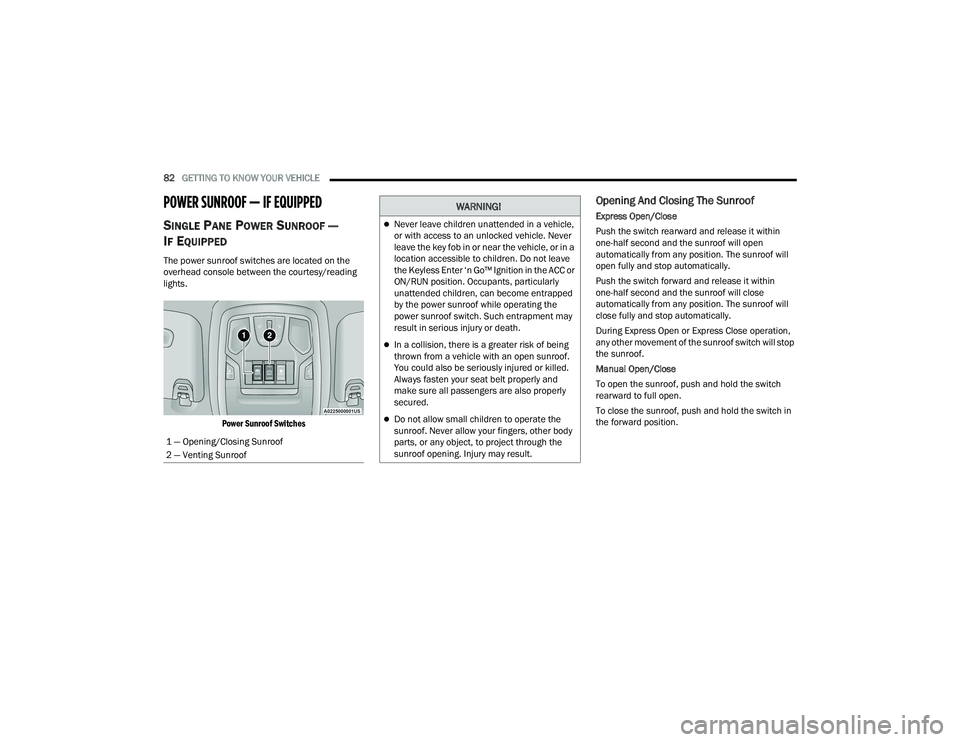
The power sunroof switches are located on the
overhead console between the courtesy/reading
lights.
Power Sunroof Switches
Opening And Closing The Sunroof
Express Open/Close
Push the switch rearward and release it within
one-half second and the sunroof will open
automatically from any position. The sunroof will
open fully and stop automatically.
Push the switch forward and release it within
one-half second and the sunroof will close
automatically from any position. The sunroof will
close fully and stop automatically.
During Express Open or Express Close operation,
any other movement of the sunroof switch will stop
the sunroof.
Manual Open/Close
To open the sunroof, push and hold the switch
rearward to full open.
To close the sunroof, push and hold the switch in
the forward position.
1 — Opening/Closing Sunroof
2 — Venting SunroofWARNING!
Never leave children unattended in a vehicle,
or with access to an unlocked vehicle. Never
leave the key fob in or near the vehicle, or in a
location accessible to children. Do not leave
the Keyless Enter ‘n Go™ Ignition in the ACC or
ON/RUN position. Occupants, particularly
unattended children, can become entrapped
by the power sunroof while operating the
power sunroof switch. Such entrapment may
result in serious injury or death.
In a collision, there is a greater risk of being
thrown from a vehicle with an open sunroof.
You could also be seriously injured or killed.
Always fasten your seat belt properly and
make sure all passengers are also properly
secured.
Do not allow small children to operate the
sunroof. Never allow your fingers, other body
parts, or any object, to project through the
sunroof opening. Injury may result.
22_DT_OM_EN_USC_t.book Page 82
Page 86 of 496
84GETTING TO KNOW YOUR VEHICLE
Opening And Closing The Sunroof
The sunroof has two programmed automatic stops
for the sunroof open position; a comfort stop
position and a full open position. The comfort stop
position has been optimized to minimize wind
buffeting. Express Open/Close
Push the switch rearward and release it within
one-half second and the sunroof will open
automatically from any position. The sunroof will
open fully and stop automatically.
Push the switch forward and release it within
one-half second and the sunroof will close
automatically from any position. The sunroof will
close fully and stop automatically.
During Express Open or Express Close operation,
any other movement of the sunroof switch will stop
the sunroof.
Manual Open/Close
To open the sunroof, push and hold the switch
rearward to full open.
To close the sunroof, push and hold the switch in
the forward position.
Any release of the switch during open or close
operation will stop the sunroof movement. The
sunroof will remain in a partially opened position
until the switch is operated and held again.
NOTE:If the sunshade is in the closed position when
Express or Manual Open operation is initiated the
sunshade will automatically open to the half open
position prior to the sunroof opening.
Opening And Closing The Power Sunshade
The sunshade has two programmed positions: half
open and full open positions. When operating the
sunshade from the closed position, the sunshade
will always stop at the half open position
regardless of express or manual open operation.
The switch must be actuated again to continue on
to full open position.
If the sunroof is open or vented, the sunshade
cannot be closed beyond the half open position.
Pushing the sunshade close switch when the
sunroof is open/vented and the sunshade is at half
open position will first automatically close the
sunroof prior to the sunshade closing.
Express Open/Close
Push the sunshade switch rearward and release it
within one-half second, the sunshade will open to
the half open position and stop automatically.
Push and release the switch again from the half
open position and the sunshade will open to the
full open position and stop automatically.
Push the sunshade switch forward and release it
within one-half second and the sunshade will close
automatically.
During Express Open or Express Close operation,
any other actuation of the sunroof switches will
stop the sunshade in a partially open position.WARNING!
Never leave children unattended in a vehicle,
or with access to an unlocked vehicle. Never
leave the key fob in or near the vehicle, or in a
location accessible to children. Do not leave
the Keyless Enter ‘n Go™ Ignition in the ACC or
ON/RUN position. Occupants, particularly
unattended children, can become entrapped
by the power sunroof while operating the
power sunroof switch. Such entrapment may
result in serious injury or death.
In a collision, there is a greater risk of being
thrown from a vehicle with an open sunroof.
You could also be seriously injured or killed.
Always fasten your seat belt properly and
make sure all passengers are also properly
secured.
Do not allow small children to operate the
sunroof. Never allow your fingers, other body
parts, or any object, to project through the
sunroof opening. Injury may result.
22_DT_OM_EN_USC_t.book Page 84
Page 88 of 496
86GETTING TO KNOW YOUR VEHICLE
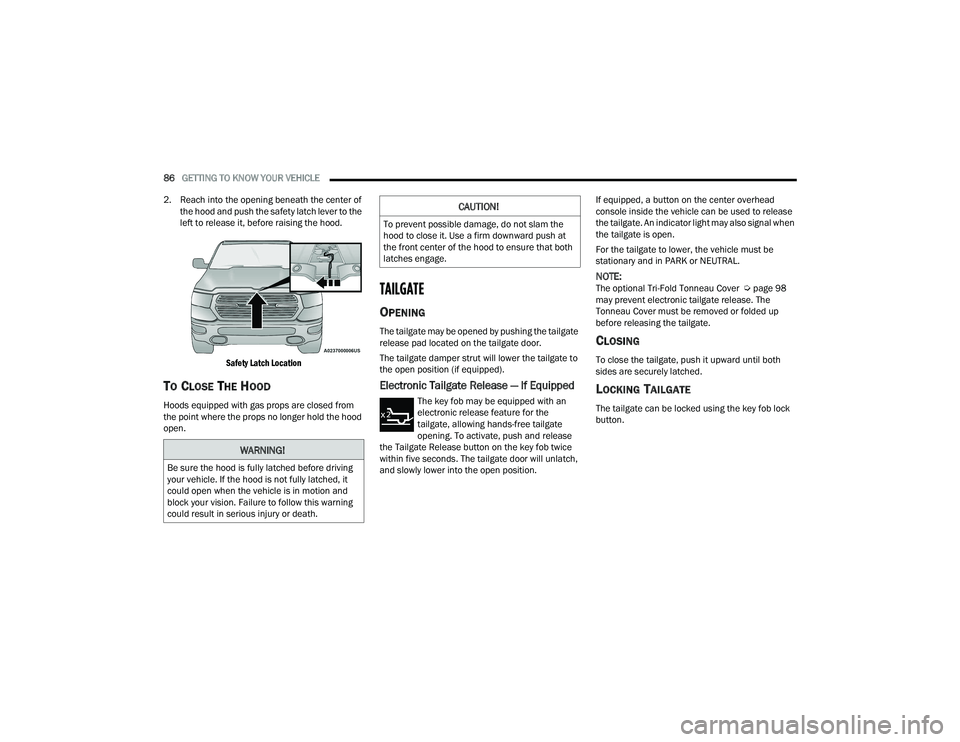
2. Reach into the opening beneath the center of the hood and push the safety latch lever to the
left to release it, before raising the hood.
Safety Latch Location
TO CLOSE THE HOOD
Hoods equipped with gas props are closed from
the point where the props no longer hold the hood
open.
TAILGATE
OPENING
The tailgate may be opened by pushing the tailgate
release pad located on the tailgate door.
The tailgate damper strut will lower the tailgate to
the open position (if equipped).
Electronic Tailgate Release — If Equipped
The key fob may be equipped with an
electronic release feature for the
tailgate, allowing hands-free tailgate
opening. To activate, push and release
the Tailgate Release button on the key fob twice
within five seconds. The tailgate door will unlatch,
and slowly lower into the open position. If equipped, a button on the center overhead
console inside the vehicle can be used to release
the tailgate. An indicator light may also signal when
the tailgate is open.
For the tailgate to lower, the vehicle must be
stationary and in PARK or NEUTRAL.
NOTE:The optional Tri-Fold Tonneau Cover Ú
page 98
may prevent electronic tailgate release. The
Tonneau Cover must be removed or folded up
before releasing the tailgate.
CLOSING
To close the tailgate, push it upward until both
sides are securely latched.
LOCKING TAILGATE
The tailgate can be locked using the key fob lock
button.
WARNING!
Be sure the hood is fully latched before driving
your vehicle. If the hood is not fully latched, it
could open when the vehicle is in motion and
block your vision. Failure to follow this warning
could result in serious injury or death.
CAUTION!
To prevent possible damage, do not slam the
hood to close it. Use a firm downward push at
the front center of the hood to ensure that both
latches engage.
22_DT_OM_EN_USC_t.book Page 86
Page 96 of 496

94GETTING TO KNOW YOUR VEHICLE
(Continued)
Cleat Removal (Without Tonneau Cover)
Remove the end cap by pushing upward on the
release button located beneath the end cap while
pulling the cap away from the rail. The cleat can
now be removed by sliding it off the end of the rail.
End Cap Release Button Without Tonneau Cover
Pull End Cap Away From Rail
RAMBOX — IF EQUIPPED
The RamBox system is an integrated pickup box
storage and cargo management system consisting
of three features:
Cargo storage bins
Cargo divider
Bed rail tie-down system Ú page 93
NOTE:Bed rail tie-down system is also available for
vehicles not equipped with a RamBox.
LOCKING AND UNLOCKING RAMBOX
Push and release the lock or unlock button on the
key fob to lock and unlock all doors, the tailgate
and the RamBox Úpage 19. To unlatch the
storage bin manually, insert the emergency key
into the keyhole and turn clockwise. Always return
the key to the upright (vertical) position before
removing it from the keyhole.
RAMBOX CARGO STORAGE BINS
Cargo storage bins are located on both sides of the
pickup box. The cargo storage bins provide
watertight, lockable, illuminated storage for up to
150 lb (68 kg) of evenly distributed cargo.
RamBox Cargo Storage Bins
CAUTION!
Ensure cargo bin lids are closed and latched
before moving or driving vehicle.
Loads applied to the top of the bin lid should
be minimized to prevent damage to the lid and
latching/hinging mechanisms.
Damage to the RamBox bin may occur due to
heavy/sharp objects placed in bin that shift
due to vehicle motion. In order to minimize
potential for damage, secure all cargo to
prevent movement and protect inside
surfaces of bin from heavy/sharp objects with
appropriate padding.
CAUTION!
22_DT_OM_EN_USC_t.book Page 94
Page 142 of 496
140 (Continued)
STARTING AND OPERATING
STARTING THE ENGINE
GASOLINE ENGINE
Before starting your vehicle, adjust your seat,
adjust both inside and outside mirrors, and fasten
your seat belt.
The starter should not be operated for more than
10-second intervals. Waiting at least 10 to 15
seconds between such intervals will protect the
starter from overheating. DIESEL ENGINE
Before starting your vehicle, adjust your seat, both
inside and outside mirrors, and fasten your seat
belts.
The starter is allowed to crank for up to 25-second
intervals. Waiting at least two minutes between
such intervals will protect the starter from
overheating.
WARNING!
When leaving the vehicle, always make sure
the keyless ignition node is in the OFF posi-
tion, remove the key fob from the vehicle and
lock the vehicle.
Never leave children alone in a vehicle, or with
access to an unlocked vehicle. Allowing chil -
dren to be in a vehicle unattended is
dangerous for a number of reasons. A child or
others could be seriously or fatally injured.
Children should be warned not to touch the
parking brake, brake pedal or the gear
selector.
Do not leave the key fob in or near the vehicle,
or in a location accessible to children, and do
not leave the ignition of a vehicle equipped
with Keyless Enter ‘n Go™ in the ACC or
ON/RUN position. A child could operate power
windows, other controls, or move the vehicle.
Do not leave children or animals inside parked
vehicles in hot weather. Interior heat buildup
may cause serious injury or death.
WARNING!WARNING!
Before exiting a vehicle, always come to a
complete stop, then shift the automatic trans -
mission into PARK and apply the parking brake.
Always make sure the ENGINE START/STOP
button is in the OFF position, key fob is removed
from the vehicle and vehicle is locked.
Never leave children alone in a vehicle, or with
access to an unlocked vehicle. Leaving chil -
dren in a vehicle unattended is dangerous for
a number of reasons. A child or others could
be seriously or fatally injured. Children should
be warned not to touch the parking brake,
brake pedal or the gear selector.
Do not leave the key fob in or near the vehicle,
or in a location accessible to children, and do
not leave the ignition of a vehicle equipped
with Keyless Enter ‘n Go™ in the ACC or ON/
RUN position. A child could operate power
windows, other controls, or move the vehicle.
Do not leave children or animals inside parked
vehicles in hot weather. Interior heat buildup
may cause serious injury or death.
22_DT_OM_EN_USC_t.book Page 140
Page 143 of 496

STARTING AND OPERATING141
NOTE:Engine start-up in very low ambient temperature
could result in evident white smoke. This condition
will disappear as the engine warms up.
AUTOMATIC TRANSMISSION
Start the engine with the transmission in PARK
position. Apply the brake before shifting into any
driving range.
NOTE:
This vehicle is equipped with a transmission
shift interlocking system. The brake pedal must
be pressed to shift out of PARK.
If equipped with an 8-speed transmission,
starting the vehicle in NEUTRAL is not possible
unless the Manual Park Release has been acti -
vated Ú page 388.
TIP START FEATURE
Do not press the accelerator. Cycle the ignition
switch briefly to the START position and release it.
The starter motor will continue to run and will
automatically disengage when the engine is
running.
KEYLESS ENTER ‘N GO™ — IGNITION
This feature allows the driver to operate the
ignition switch with the push of a button, as long as
the Remote Start/Keyless Enter ‘n Go™ key fob is
in the passenger compartment.
NORMAL STARTING USING ENGINE
START/STOP B
UTTON — GASOLINE
E
NGINE
To Turn On The Engine Using The ENGINE START/
STOP Button
1. The transmission must be in PARK.
2. Press and hold the brake pedal while pushing
the ENGINE START/STOP button once.
3. The system starts the vehicle. If the vehicle fails to start, the starter will disengage
automatically after 10 seconds.
4. If you wish to stop the cranking of the engine prior to the engine starting, push the button
again. To Turn Off The Engine Using The ENGINE START/
STOP Button
1. Place the gear selector in PARK, then push
and release the ENGINE START/STOP button.
The ignition will return to the OFF position.
2. If the gear selector is not in PARK, the ENGINE START/STOP button must be held for two
seconds or three short pushes in a row with
the vehicle speed above 5 mph (8 km/h) before the engine will shut off. The ignition will
remain in the ACC position until the gear
selector is in PARK and the button is pushed
twice to the OFF position.
3. If the gear selector is not in PARK and the ENGINE START/STOP button is pushed once
with the vehicle speed above 5 mph (8 km/h), the instrument cluster will display a “ Vehicle
Not In Park ” message and the engine will
remain running. Never leave a vehicle out of
the PARK position, or it could roll.
NOTE:If the gear selector is not in PARK, and the ENGINE
START/STOP button is pushed once with the
vehicle speed below 5 mph (8 km/h), the engine
will shut off and the ignition will remain in the ACC
position. If vehicle speed drops below 1.2 mph
(1.9 km/h), the vehicle may AutoPark
Ú page 142.
CAUTION!
The engine is allowed to crank as long as
25 seconds. If the engine fails to start during
this period, please wait at least two minutes
for the starter to cool before repeating start
procedure.
If the Water in Fuel Indicator Light remains on,
DO NOT START engine before you drain the
water from the fuel filter to avoid engine
damage Ú page 412.
4
22_DT_OM_EN_USC_t.book Page 141
Page 147 of 496

STARTING AND OPERATING145
(Continued)
ENGINE START/STOP Button Functions — With
Driver’s Foot OFF The Brake Pedal (In PARK Or
NEUTRAL Position)
The ENGINE START/STOP button operates similar
to an ignition switch. It has three positions: OFF,
ACC, and ON/RUN. To change the ignition modes
without starting the vehicle and use the
accessories, follow these directions:
1. Start with the ignition in the OFF position.
2. Push the ENGINE START/STOP button once to
place the ignition to the ACC position.
3. Push the ENGINE START/STOP button a second time to place the ignition to the ON/
RUN position.
4. Push the ENGINE START/STOP button a third time to return the ignition to the OFF position.
COLD WEATHER OPERATION (BELOW
–22°F O
R −30°C)
To ensure reliable starting at these temperatures,
use of an externally powered electric engine block
heater (available from an authorized dealer) is
recommended.
AFTER STARTING
The idle speed is controlled automatically, and it
will decrease as the engine warms up.
STARTING FLUIDS — DIESEL ENGINE
O
NLY
The engine is equipped with a glow plug preheating
system. If the instructions in this manual are
followed, the engine should start in all conditions
and no type of starting fluid should be used.
WARNING!
Do not leave children or animals inside parked
vehicles in hot weather. Interior heat build up
may cause serious injury or death.
When leaving the vehicle, always make sure
the wireless ignition node is in the OFF posi -
tion, remove the key fob from the vehicle and
lock the vehicle.
Never leave children alone in a vehicle, or with
access to an unlocked vehicle. Allowing
children to be in a vehicle unattended is
dangerous for a number of reasons. A child or
others could be seriously or fatally injured.
Children should be warned not to touch the
parking brake, brake pedal or the gear
selector.
Do not leave the key fob in or near the vehicle,
or in a location accessible to children, and do
not leave the ignition of a vehicle equipped
with Keyless Enter ‘n Go™ in the ACC or ON/
RUN position. A child could operate power
windows, other controls, or move the vehicle.
WARNING!
4
22_DT_OM_EN_USC_t.book Page 145