key fob RAM 1500 2022 User Guide
[x] Cancel search | Manufacturer: RAM, Model Year: 2022, Model line: 1500, Model: RAM 1500 2022Pages: 496, PDF Size: 18.03 MB
Page 31 of 496
GETTING TO KNOW YOUR VEHICLE29
knob is down when the door is closed, the door will
lock. Therefore, make sure the key fob is not inside
the vehicle before closing the door.
NOTE:Manually locking the vehicle will not arm the
Vehicle Security system.
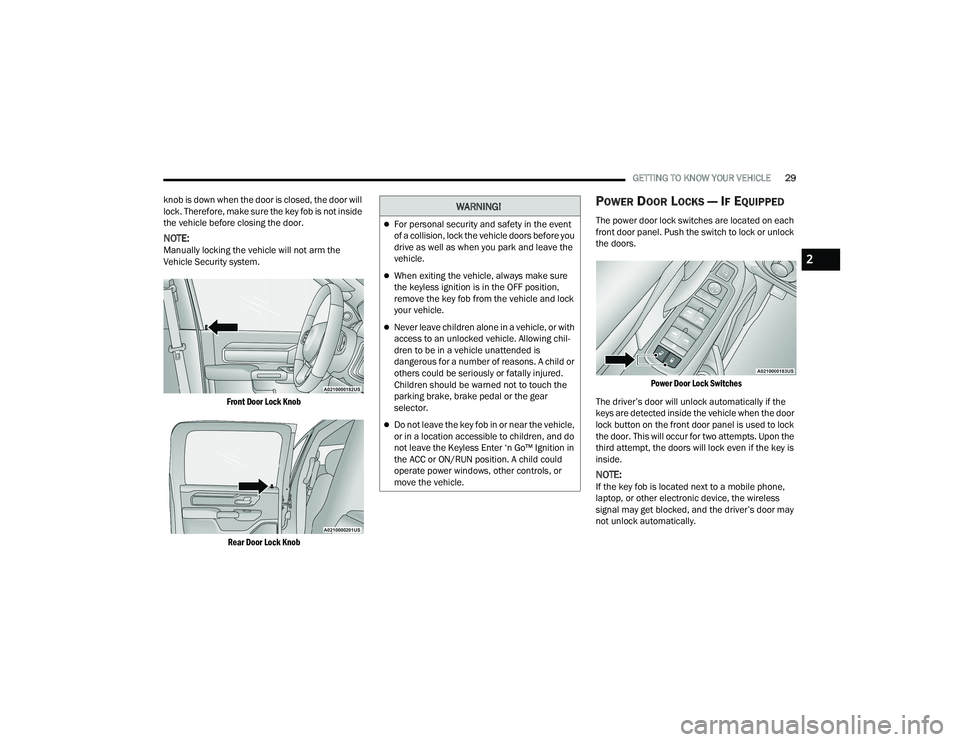
Front Door Lock Knob
Rear Door Lock Knob
POWER DOOR LOCKS — IF EQUIPPED
The power door lock switches are located on each
front door panel. Push the switch to lock or unlock
the doors.
Power Door Lock Switches
The driver’s door will unlock automatically if the
keys are detected inside the vehicle when the door
lock button on the front door panel is used to lock
the door. This will occur for two attempts. Upon the
third attempt, the doors will lock even if the key is
inside.
NOTE:If the key fob is located next to a mobile phone,
laptop, or other electronic device, the wireless
signal may get blocked, and the driver’s door may
not unlock automatically.
WARNING!
For personal security and safety in the event
of a collision, lock the vehicle doors before you
drive as well as when you park and leave the
vehicle.
When exiting the vehicle, always make sure
the keyless ignition is in the OFF position,
remove the key fob from the vehicle and lock
your vehicle.
Never leave children alone in a vehicle, or with
access to an unlocked vehicle. Allowing chil -
dren to be in a vehicle unattended is
dangerous for a number of reasons. A child or
others could be seriously or fatally injured.
Children should be warned not to touch the
parking brake, brake pedal or the gear
selector.
Do not leave the key fob in or near the vehicle,
or in a location accessible to children, and do
not leave the Keyless Enter ‘n Go™ Ignition in
the ACC or ON/RUN position. A child could
operate power windows, other controls, or
move the vehicle.
2
22_DT_OM_EN_USC_t.book Page 29
Page 32 of 496

30GETTING TO KNOW YOUR VEHICLE
If the door lock switch is pushed while the ignition
is in ACC or ON/RUN and the driver's door is open,
the doors will not lock.
If a rear door is locked, it cannot be opened from
inside the vehicle without first unlocking the door.
The door may be unlocked manually by raising the
lock knob.
POWER SIDE STEPS — IF EQUIPPED
The Power Side Steps will extend a step for easier
entry and exit of the vehicle.
When configured for “Auto” mode, the Power Side
Steps will deploy when any of the doors are
opened, or when the deploy setting is activated
through the touchscreen. When configured for
“Store” mode, the steps will not deploy unless the
setting is selected manually through the “Controls”
menu within the touchscreen.
If the vehicle speed exceeds 5 mph (8 km/h), or if the retract setting is selected within Uconnect
Settings Ú page 234, the steps will retract.
KEYLESS ENTER ‘N GO™ — PASSIVE
E
NTRY
The Passive Entry system is an enhancement to
the vehicle’s key fob and a feature of Keyless
Enter ‘n Go™ — Passive Entry. This feature allows you to lock and unlock the vehicle’s door(s) without
having to push the key fob lock or unlock buttons.
NOTE:
Passive Entry may be programmed on or off
within Uconnect Settings Ú
page 234.
The key fob may not be detected by the vehicle
Passive Entry system if it is located next to a
mobile phone, laptop, or other electronic device;
these devices may block the key fob’s wireless
signal and prevent the Passive Entry system
from locking/unlocking the vehicle.
Passive Entry Unlock initiates illuminated
approach (low beams, license plate lamp, posi -
tion lamps) for whichever time duration is set
between 0, 30, 60 or 90 seconds. Passive Entry
Unlock also initiates two flashes of the turn
signal lamps.
If wearing gloves, or if it has been raining/
snowing on the Passive Entry door handle, the
unlock sensitivity can be affected, resulting in a
slower response time.
If the vehicle is unlocked by Passive Entry and
no door is opened within 60 seconds, the
vehicle will relock and (if equipped) will arm the
Vehicle Security system. To Unlock From The Driver Or Passenger Side
With a valid Passive Entry key fob within 5 ft
(1.5 m) of the door handle, grab the handle to
unlock the vehicle. Grabbing the driver’s door
handle will unlock the driver door automatically.
Grabbing the passenger door handle will unlock all
doors and the tailgate automatically.
Grab The Door Handle To Unlock
NOTE:
Either the driver door only or all doors will unlock
when you grab hold of the front driver’s door
handle, depending on the selected setting in the
Uconnect system Ú page 234.
All doors will unlock when the front passenger
door handle is grabbed regardless of the
driver’s door unlock preference setting.
22_DT_OM_EN_USC_t.book Page 30
Page 33 of 496

GETTING TO KNOW YOUR VEHICLE31
Frequency Operated Button Integrated Key
(FOBIK-Safe)
To minimize the possibility of unintentionally
locking a Passive Entry key fob inside your vehicle,
the Passive Entry system is equipped with an
automatic door unlock feature which will function if
the ignition is in the OFF position.
There are five situations that trigger a FOBIK-Safe
search in any passive entry vehicle:
A lock request is made by a valid Passive Entry
key fob while a door is open.
A lock request is made by the Passive Entry door
handle while a door is open.
A lock request is made by the door panel switch
while the door is open.
When the Vehicle Security system is in pre-arm
or armed status and the tailgate transitions
from opened to closed.
When the tailgate transitions from open to
closed and remote start is active. When any of these situations occur, after all open
doors are shut, the FOBIK-Safe search will be
executed. If it detects a Passive Entry key fob
inside the vehicle, the vehicle will unlock and alert
the customer.
NOTE:The vehicle will only unlock the doors when a valid
Passive Entry key fob is detected inside the
vehicle. The vehicle will not unlock the doors when
any of the following conditions are true:
The doors are manually locked using the door
lock knobs.
Three attempts are made to lock the doors
using the door panel switch and then the doors
are closed.
There is a valid Passive Entry key fob outside the
vehicle within 5 ft (1.5 m) of a Passive Entry
door handle.
To Lock The Vehicle’s Doors And Tailgate
With one of the vehicle’s Passive Entry key fobs
within 5 ft (1.5 m) of either front door handle,
pushing the Passive Entry lock button will lock the
vehicle.
Push The Door Handle Button To Lock
NOTE:DO NOT grab the door handle when pushing the
door handle lock button. This could unlock the
door(s).
Do NOT Grab The Door Handle When Locking
2
22_DT_OM_EN_USC_t.book Page 31
Page 34 of 496

32GETTING TO KNOW YOUR VEHICLE
NOTE:
After pushing the door handle button, you must
wait two seconds before you can lock or unlock
the doors, using either Passive Entry door
handle. This is done to allow you to check if the
vehicle is locked by pulling the door handle
without the vehicle unlocking.
If Passive Entry is disabled using the Uconnect
Settings, the key protection described in
"Frequency Operated Button Integrated Key
(FOBIK-Safe)" remains active/functional.
The Passive Entry system will not operate if the
key fob battery is depleted.
The LED light on the key fob will not blink if
the key fob battery is low or fully depleted,
but a low key fob battery condition will still
support the Passive Entry system function -
ality. When the key fob battery is low, the
instrument cluster will display a message
indicating that the key fob battery is low
Ú page 480.
AUTOMATIC UNLOCK DOORS ON EXIT —
I
F EQUIPPED
The doors will unlock automatically on vehicles
with power door locks after the following sequence
of actions:
1. The Automatic Unlock Doors On Exit feature is
enabled within the Uconnect system.
2. All doors are closed.
3. The gear selector was not in PARK, then is placed in PARK.
4. Any door is opened.
AUTOMATIC DOOR LOCKS —
I
F EQUIPPED
The auto door lock feature default condition is
enabled. When enabled, the door locks will lock
automatically when the vehicle's speed exceeds
15 mph (24 km/h). The auto door lock feature is
enabled/disabled in the Uconnect Settings
Ú page 234.
CHILD-PROTECTION DOOR LOCK
S
YSTEM — REAR DOORS
To provide a safer environment for small children
riding in the rear seats, the rear doors are equipped
with a Child-Protection Door Lock system.
To use the system, open each rear door, use a flat
blade screwdriver, and rotate the dial to the lock or
unlock position. When the system on a door is
engaged, that door can only be opened by using
the outside door handle even if the inside door lock
is in the unlocked position.
Child Lock Control
22_DT_OM_EN_USC_t.book Page 32
Page 36 of 496

34GETTING TO KNOW YOUR VEHICLE
HEATED STEERING WHEEL —
I
F EQUIPPED
The steering wheel contains a heating
element that helps warm your hands in
cold weather. The heated steering wheel
has only one temperature setting. Once
the heated steering wheel has been turned on, it
will stay on until the operator turns it off. The
heated steering wheel may not turn on when it is
already warm.
The heated steering wheel button is located on the
center of the instrument panel below the radio
screen, and within the Climate or Controls screen
of the touchscreen.
Press the heated steering wheel button once to
turn the heating element on.
Press the heated steering wheel button a
second time to turn the heating element off.
NOTE:The engine must be running for the heated
steering wheel to operate.
For information on use with the Remote Start
system, see Ú page 26.
DRIVER MEMORY SETTINGS — IF EQUIPPED
This feature allows the driver to save up to two
different memory profiles for easy recall through a
memory switch. Each memory profile saves
desired position settings for the following features:
Driver’s seat
Easy Entry/Exit seat operation (if equipped)
Adjustable pedals (if equipped)
Side mirrors
NOTE:Your vehicle is equipped with two key fobs, each
can be linked to either memory position 1 or 2.
The driver memory settings switch is located on the
driver door, next to the door handle, and consists
of three buttons:
The set (S) button, which is used to activate the
memory save function.
The (1) and (2) buttons which are used to recall
either of two saved memory profiles.
Memory Settings Switch
WARNING!
Persons who are unable to feel pain to the
skin because of advanced age, chronic illness,
diabetes, spinal cord injury, medication,
alcohol use, exhaustion, or other physical
conditions must exercise care when using the
steering wheel heater. It may cause burns
even at low temperatures, especially if used
for long periods.
Do not place anything on the steering wheel
that insulates against heat, such as a blanket
or steering wheel covers of any type or mate -
rial. This may cause the steering wheel heater
to overheat.
22_DT_OM_EN_USC_t.book Page 34
Page 37 of 496

GETTING TO KNOW YOUR VEHICLE35
PROGRAMMING THE MEMORY FEATURE
To create a new memory profile, perform the
following:
NOTE:Saving a new memory profile will erase the
selected profile from memory.
1. Place the vehicle’s ignition in the ON/RUN
position (do not start the engine).
2. Adjust all memory profile settings to desired preferences (i.e., driver’s seat, outside mirrors,
adjustable pedals (if equipped), and radio
station presets).
3. Push the set (S) button on the memory switch, and then push the desired memory button
(1 or 2) within five seconds. The instrument
cluster display will display which memory
position has been set.
NOTE:Memory profiles can be set without the vehicle in
PARK, but the vehicle must be in PARK to recall a
memory profile.
LINKING AND UNLINKING THE KEY FOB
T
O MEMORY
Your key fob can be programmed to recall one of
two saved memory profiles.
NOTE:Before programming your key fob you must select
the “Personal Settings Linked to Key Fob” feature
through the Uconnect system Ú page 234.
To program your key fob, perform the following:
1. Place the vehicle’s ignition in the OFF position.
2. Select a desired memory profile 1 or 2.
3. Once the profile has been recalled, push and release the set (S) button on the memory
switch.
4. Push and release button (1) or (2) accordingly. “Memory Profile Set” (1 or 2) will display in the
instrument cluster.
5. Push and release the lock button on the key fob within 10 seconds.
NOTE:Your key fob can be unlinked from your memory
settings by pushing the set (S) button, followed by
pushing the unlock button on the key fob within
10 seconds.
MEMORY POSITION RECALL
NOTE:If a recall is attempted when the vehicle is not in
PARK, a message will display in the instrument
cluster display. To recall the memory settings for driver one or two,
push the desired memory button number (1 or 2)
or the unlock button on the key fob linked to the
desired memory position.
A recall can be canceled by pushing any of the
memory buttons (S, 1, or 2) during a recall. When
a recall is canceled, the driver seat will stop
moving. A delay of one second will occur before
another recall can be selected.
SEATS
Seats are a part of the Occupant Restraint system
of the vehicle.
WARNING!
It is dangerous to ride in a cargo area, inside
or outside of a vehicle. In a collision, people
riding in these areas are more likely to be seri
-
ously injured or killed.
Do not allow people to ride in any area of your
vehicle that is not equipped with seats and
seat belts. In a collision, people riding in these
areas are more likely to be seriously injured or
killed.
Be sure everyone in your vehicle is in a seat
and using a seat belt properly.
2
22_DT_OM_EN_USC_t.book Page 35
Page 41 of 496

GETTING TO KNOW YOUR VEHICLE39
Power Lumbar — If Equipped
Vehicles equipped with power driver or passenger
seats may also be equipped with a 2-way or a
4-way power lumbar adjustment. The power
lumbar switch is located on the outboard side of
the power seat. Push the switch forward to
increase the lumbar support. Push the switch
rearward to decrease the lumbar support. If
equipped with a 4-way adjustment, pushing
upward or downward on the switch will raise and
lower the position of the support.
Power Lumbar Switch
Easy Entry/Exit Seat — If Equipped
This feature provides automatic driver’s seat
positioning to enhance driver mobility when
entering and exiting the vehicle.
The distance the driver’s seat moves depends on
where you have the driver’s seat positioned when
you place the vehicle’s ignition in the OFF position.
When you place the vehicle’s ignition in the
OFF position, the driver’s seat will move about
2.4 inches (6 cm) rearward if the driver’s seat
position is greater than or equal to 2.7 inches
(6.77 cm) forward of the rear stop. The seat will
return to its previously set position when you
place the ignition into the ACC or ON/RUN posi -
tion.
When you remove the key fob from the ignition,
the driver’s seat will move to a position
0.3 inches (0.77 cm) forward of the rear stop if
the driver’s seat position is between 0.9 inches
and 2.7 inches (2.27 cm and 6.77 cm) forward
of the rear stop. The seat will return to its previ -
ously set position when you place the ignition to
the ACC or ON/RUN position.
The Easy Entry/Easy Exit feature is disabled
when the driver’s seat position is less than
0.9 inches (2.27 cm) forward of the rear stop. At
this position, there is no benefit to the driver by
moving the seat for Easy Exit or Easy Entry. When enabled in Uconnect Settings, Easy Entry
and Easy Exit positions are stored in each memory
setting profile Ú
page 34.
NOTE:The Easy Entry/Exit feature is enabled or disabled
through the programmable features in the
Uconnect system Ú page 234.
HEATED SEATS — IF EQUIPPED
WARNING!
Persons who are unable to feel pain to the
skin because of advanced age, chronic illness,
diabetes, spinal cord injury, medication,
alcohol use, exhaustion or other physical
condition must exercise care when using the
seat heater. It may cause burns even at low
temperatures, especially if used for long
periods of time.
Do not place anything on the seat or seatback
that insulates against heat, such as a blanket
or cushion. This may cause the seat heater to
overheat. Sitting in a seat that has been over -
heated could cause serious burns due to the
increased surface temperature of the seat.
2
22_DT_OM_EN_USC_t.book Page 39
Page 47 of 496
GETTING TO KNOW YOUR VEHICLE45
For vehicles equipped with Driver Memory
Settings Úpage 34, you can use your key fob or
the memory switch on the driver’s door trim
panel to return the adjustable pedals to
pre-programmed positions.MIRRORS
INSIDE REARVIEW MIRROR
Manual Mirror — If Equipped
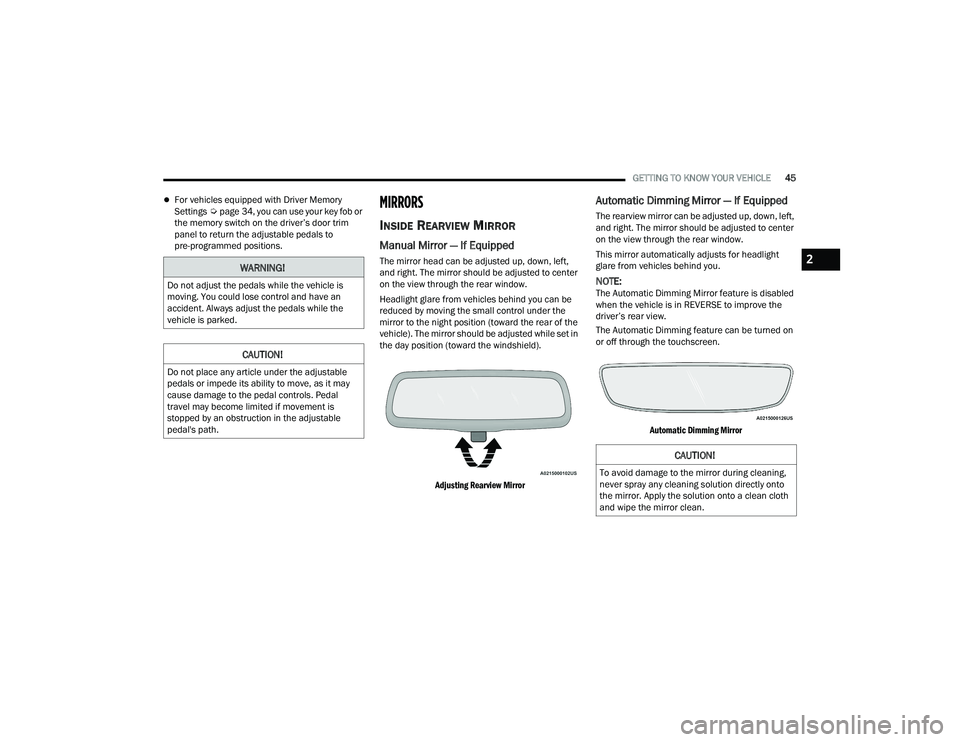
The mirror head can be adjusted up, down, left,
and right. The mirror should be adjusted to center
on the view through the rear window.
Headlight glare from vehicles behind you can be
reduced by moving the small control under the
mirror to the night position (toward the rear of the
vehicle). The mirror should be adjusted while set in
the day position (toward the windshield).
Adjusting Rearview Mirror
Automatic Dimming Mirror — If Equipped
The rearview mirror can be adjusted up, down, left,
and right. The mirror should be adjusted to center
on the view through the rear window.
This mirror automatically adjusts for headlight
glare from vehicles behind you.
NOTE:The Automatic Dimming Mirror feature is disabled
when the vehicle is in REVERSE to improve the
driver’s rear view.
The Automatic Dimming feature can be turned on
or off through the touchscreen.
Automatic Dimming Mirror
WARNING!
Do not adjust the pedals while the vehicle is
moving. You could lose control and have an
accident. Always adjust the pedals while the
vehicle is parked.
CAUTION!
Do not place any article under the adjustable
pedals or impede its ability to move, as it may
cause damage to the pedal controls. Pedal
travel may become limited if movement is
stopped by an obstruction in the adjustable
pedal's path.
CAUTION!
To avoid damage to the mirror during cleaning,
never spray any cleaning solution directly onto
the mirror. Apply the solution onto a clean cloth
and wipe the mirror clean.
2
22_DT_OM_EN_USC_t.book Page 45
Page 60 of 496

58GETTING TO KNOW YOUR VEHICLE
Cargo/Bed Lights Button On Headlight Switch (Vehicles Sold In Canada)
Cargo Lights
When the vehicle is stationary, these lights can
also be turned on using the switch located just
inside the pickup box, on the lower part of the bed
light lens. A telltale will illuminate in the instrument
cluster display when these lights are on. Pushing
the switch a second time will turn the lights off.
Bed Light Switch (Without RamBox)
The cargo light and bed lights (if equipped) will turn
on for approximately 30 seconds when a key fob
unlock button is pushed, as part of the Illuminated
Entry feature. When these lights are activated using the button
on the headlight switch the cargo lights, trailer
spotter lights, and trailer hitch light will remain
illuminated when the vehicle transmission is in
PARK, NEUTRAL, or REVERSE. The lights will turn
off when the vehicle transmission is placed in
DRIVE.
When the vehicle is placed in the REVERSE
position, the trailer hitch light will turn on
automatically. The trailer hitch light will turn off
when the vehicle is placed in the DRIVE position.
NOTE:The bed lights are not affected by gear selection.
NOTE:For vehicles shipped to or sold in the states of
California or Mississippi, the cargo, bed, and mirror
spotter lights will not work while the vehicle is in
motion. In every other state, the cargo and mirror
spotter lights will turn off when the vehicle is in
motion, but the bed light will remain on.
22_DT_OM_EN_USC_t.book Page 58
Page 61 of 496

GETTING TO KNOW YOUR VEHICLE59
BATTERY SAVER
Timers are set to both the interior and exterior
lights to protect the life of your vehicle’s battery.
After 10 minutes, if the ignition is OFF and any door
is left open or the dimmer control is rotated all the
way up to the topmost position, the interior lights
will automatically turn off.
NOTE:Battery saver mode is canceled if the ignition is ON.
The headlights will automatically turn off after
eight minutes while the ignition is in the OFF
position.
INTERIOR LIGHTS
COURTESY LIGHTS
Courtesy and dome lights are turned on when the
doors are opened or the Dome ON button is
pushed on the overhead console. If your vehicle is
equipped with Remote Keyless Entry and the
unlock button is pushed on the key fob, the
courtesy and dome lights will turn on. When a door
is open and the interior lights are on, and the Dome
Defeat button on the overhead console is pressed,
the interior lights will turn off.
Front Map/Reading Lights
The overhead console lights can also be operated
individually as reading lights by pushing the
corresponding buttons.
Front Courtesy/Reading Lights Front Courtesy/Reading Lights
Three types of rear courtesy/reading lights are
available for your vehicle.
Push button on/off
Push lens on/off
Push round puck lens on/off (if equipped with
Dual Pane Sunroof)
1 — Reading Light On/Off Buttons
2 — Dome Defeat Button
3 — Dome ON Button
1 — Driver’s Reading Light On/Off Button
2 — Dome Defeat Button
3 — Passenger’s Reading Light On/Off Button
4 — Dome On Button
2
22_DT_OM_EN_USC_t.book Page 59