park assist RAM 1500 2022 Owner's Manual
[x] Cancel search | Manufacturer: RAM, Model Year: 2022, Model line: 1500, Model: RAM 1500 2022Pages: 496, PDF Size: 18.03 MB
Page 244 of 496
242MULTIMEDIA
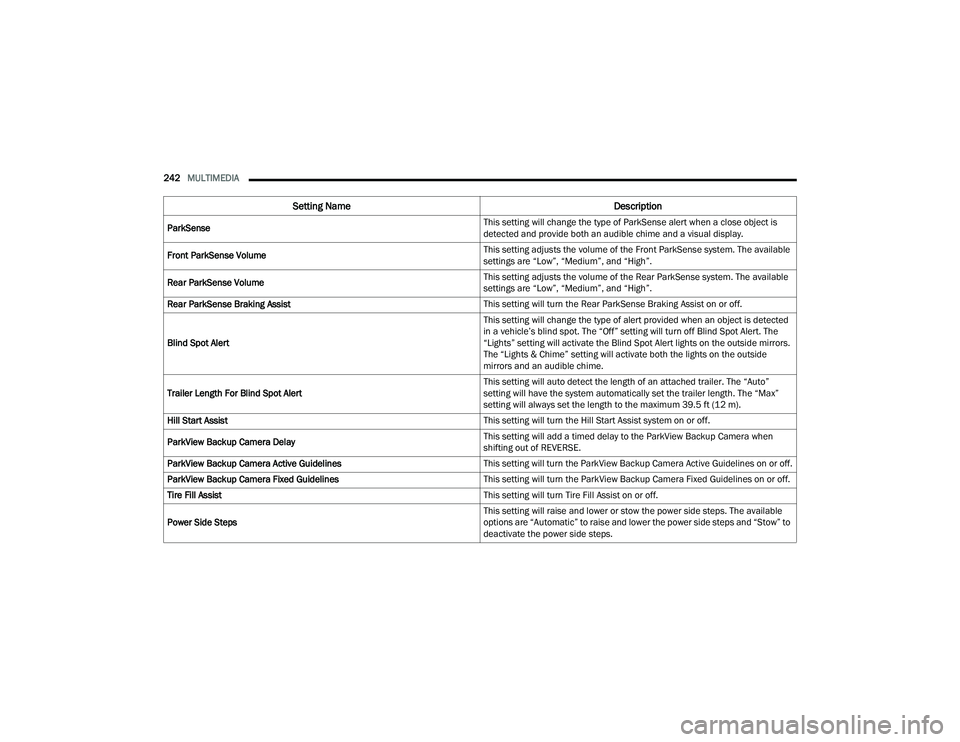
ParkSense This setting will change the type of ParkSense alert when a close object is
detected and provide both an audible chime and a visual display.
Front ParkSense Volume This setting adjusts the volume of the Front ParkSense system. The available
settings are “Low”, “Medium”, and “High”.
Rear ParkSense Volume This setting adjusts the volume of the Rear ParkSense system. The available
settings are “Low”, “Medium”, and “High”.
Rear ParkSense Braking Assist This setting will turn the Rear ParkSense Braking Assist on or off.
Blind Spot Alert This setting will change the type of alert provided when an object is detected
in a vehicle’s blind spot. The “Off” setting will turn off Blind Spot Alert. The
“Lights” setting will activate the Blind Spot Alert lights on the outside mirrors.
The “Lights & Chime” setting will activate both the lights on the outside
mirrors and an audible chime.
Trailer Length For Blind Spot Alert This setting will auto detect the length of an attached trailer. The “Auto”
setting will have the system automatically set the trailer length. The “Max”
setting will always set the length to the maximum 39.5 ft (12 m).
Hill Start Assist This setting will turn the Hill Start Assist system on or off.
ParkView Backup Camera Delay This setting will add a timed delay to the ParkView Backup Camera when
shifting out of REVERSE.
ParkView Backup Camera Active Guidelines This setting will turn the ParkView Backup Camera Active Guidelines on or off.
ParkView Backup Camera Fixed Guidelines This setting will turn the ParkView Backup Camera Fixed Guidelines on or off.
Tire Fill Assist This setting will turn Tire Fill Assist on or off.
Power Side Steps This setting will raise and lower or stow the power side steps. The available
options are “Automatic” to raise and lower the power side steps and “Stow” to
deactivate the power side steps.
Setting Name
Description
22_DT_OM_EN_USC_t.book Page 242
Page 286 of 496
284MULTIMEDIA
SiriusXM Guardian™ provides:
The ability to remotely lock/unlock and remote
start your vehicle from virtually anywhere by
using the Mobile App or your computer.
If equipped — Send & Go capability with the
Mobile App. Use the Mobile App to easily search,
map and send your locations directly to your
Uconnect Navigation.
The ability to locate your vehicle, when you
forget where you parked, using the Vehicle
Finder function of the Mobile App.
Before you drive, familiarize yourself with the
easy-to-use Uconnect system and SiriusXM
Guardian™ connected services.
The ASSIST and SOS Call Buttons On Your
Rearview Mirror Or Overhead Console
If equipped, the ASSIST Button is used for
contacting Roadside Assistance, Vehicle Care,
Uconnect Care, and SiriusXM Guardian™
Customer Care. The SOS Call button connects you
directly to SiriusXM Guardian™ Customer Care for
assistance in an emergency.
Activation — If Equipped
To unlock the full potential of SiriusXM Guardian™
in your vehicle, you must activate your SiriusXM
Guardian™ connected services.
1. Press the Apps icon on the bottom of your in-vehicle touchscreen.
2. Select the Activate Services icon from your list of apps.
3. For customers in the United States , select
“Customer Care” to speak with a SiriusXM
Guardian™ Customer Care agent who will
activate services in your vehicle, or select
“Enter Email” to activate on the web.
For customers in Canada , enter your email
address to activate services in your vehicle.
Included Trial Period For New Vehicles
Your new vehicle may come with an included trial
period for use of the SiriusXM Guardian™
connected services starting on the date of vehicle
purchase. To get started with your trial, enrollment
in SiriusXM Guardian™ is required. Your Uconnect
system includes a trial* of SiriusXM Guardian™
connected services from your date of purchase.
* Included trial applies to new vehicles only.
Features And Packages
After the trial period, you must purchase a
subscription to continue your services by calling a
SiriusXM Guardian™ Customer Care agent.
GETTING STARTED WITH CONNECTED
V
EHICLE SERVICES
Download The Mobile App
Once you have activated your services, you’re only
a few steps away from using connected services.
Download the Mobile App to your mobile device.
Use your Owner Account login and password to
open the app and then set up a PIN.
22_DT_OM_EN_USC_t.book Page 284
Page 293 of 496
MULTIMEDIA291
Working Vehicle Conditions
The vehicle must be off or in ACC mode.
The vehicle has been started with the key fob
within the last 14 days.
The vehicle must be in PARK or at a standstill.
The vehicle’s security system has been armed
and not triggered since the last vehicle start.
The doors, hood, and trunk/liftgate are closed.
The vehicle’s check engine light must be off.
The vehicle must have at least a quarter tank of
fuel, along with oil and battery power.
The vehicle’s hazard lights must be off.
If equipped, the vehicle must have an automatic
transmission.
The vehicle must be in an open area with cell
tower reception.
Your mobile device must have a cellular or Wi-Fi
connection.
If the Panic button has been pressed, the
vehicle must be started at least once after
alarming the system.
NOTE:The SiriusXM Guardian™ Customer Care agents
are not authorized for Remote Vehicle Start
services. Contact the Uconnect Care Team for
assistance.
Remote Horn & Lights
Description
It is easy to locate a vehicle in a dark, crowded or
noisy parking area by activating the horn and
lights. It may also help if you need to draw attention
to your vehicle for any reason.
If you want, you can set up push notifications every
time a command is sent to turn on the horn and
lights.
Working Vehicle Conditions
The vehicle must in PARK or at a standstill.
The vehicle must be in an open area with cell
tower reception.
Your mobile device must have a cellular or Wi-Fi
connection.
NOTE:The Remote Horn & Lights feature is designed to
be loud and get noticed. Please keep in mind the
surroundings when using this feature. You are
responsible for compliance with local laws, rules
and ordinances in the location of your vehicle
when using Remote Horn & Lights.
Assist — If Equipped
Description
Vehicles equipped with the SiriusXM Guardian™
connected services feature may contain an ASSIST
button in the vehicle. Once your SiriusXM
Guardian™ connected services have been
activated, the ASSIST button can connect you
directly to a Customer Care call center (if
equipped). You will be directed to one of the four
services below:
Roadside Assistance — If you get a flat tire or
need a tow, you’ll be connected to someone
who can help anytime.
Connected Services — Contact the SiriusXM
Guardian™ Customer Care call center to acti -
vate your services, renew after your trial has
expired, for in-vehicle support for your SiriusXM
Guardian™ connected services, or help
answering any general questions surrounding
your connected services.
Uconnect Care — In-vehicle support for all
non-connected Uconnect system features, such
as radio and Bluetooth® connections.
Vehicle Care — Total support for your vehicle.
5
22_DT_OM_EN_USC_t.book Page 291
Page 320 of 496

318SAFETY
The cluster icon and switch lamp will flash for
several seconds, then extinguish when HDC
disables due to excess speed.
The cluster icon and switch lamp will flash when
HDC deactivates due to overheated brakes. The
flashing will stop and HDC will activate again
once the brakes have cooled sufficiently.
Hill Start Assist (HSA)
HSA is designed to mitigate roll back from a
complete stop while on an incline. If the driver
releases the brake while stopped on an incline,
HSA will continue to hold the brake pressure for a
short period. If the driver does not apply the
throttle before this time expires, the system will
release brake pressure and the vehicle will roll
down the hill as normal.
The following conditions must be met in order for
HSA to activate:
The feature must be enabled.
The vehicle must be stopped.
The parking brake must be off.
The driver door must be closed.
The vehicle must be on a sufficient grade.
The gear selection must match vehicle uphill
direction (i.e., vehicle facing uphill is in forward
gear; vehicle backing uphill is in REVERSE gear).
HSA will work in REVERSE gear and all forward
gears. The system will not activate if the trans -
mission is in PARK or NEUTRAL.
Disabling And Enabling HSA
This feature can be turned on or turned off. To
change the current setting, proceed as follows:
If disabling HSA using Uconnect Settings
Ú page 234.
Towing With HSA
HSA will also provide assistance to mitigate roll
back while towing a trailer.WARNING!
HDC is only intended to assist the driver in
controlling vehicle speed when descending hills.
The driver must remain attentive to the driving
conditions and is responsible for maintaining a
safe vehicle speed.
WARNING!
There may be situations where the Hill Start
Assist (HSA) will not activate and slight rolling
may occur, such as on minor hills or with a
loaded vehicle, or while pulling a trailer. HSA is
not a substitute for active driving involvement. It
is always the driver’s responsibility to be
attentive to distance to other vehicles, people,
and objects, and most importantly brake
operation to ensure safe operation of the vehicle
under all road conditions. Your complete
attention is always required while driving to
maintain safe control of your vehicle. Failure to
follow these warnings can result in a collision or
serious personal injury.
WARNING!
If you use a trailer brake controller with your
trailer, the trailer brakes may be activated and
deactivated with the brake switch. If so, there
may not be enough brake pressure to hold
both the vehicle and the trailer on a hill when
the brake pedal is released. In order to avoid
rolling down an incline while resuming accel -
eration, manually activate the trailer brake or
apply more vehicle brake pressure prior to
releasing the brake pedal.
HSA is not a parking brake. Always apply the
parking brake fully when exiting your vehicle.
Also, be certain to place the transmission in
PARK.
Failure to follow these warnings can result in a
collision or serious personal injury.
22_DT_OM_EN_USC_t.book Page 318
Page 326 of 496
324SAFETY
Automatic Trailer Detection
There are two modes of operation for the detection
of the trailer length:
Automatic Mode — When “Auto Mode” is
selected, the system will use the blind spot
sensors to automatically determine the pres -
ence and length of a trailer. The presence of a
trailer will be detected using the blind spot radar
within 90 seconds of forward movement of the
vehicle. The vehicle must be moving above
6 mph (10 km/h) to activate the feature. Once
the trailer has been detected, the system will
default to the maximum blind spot zone until the
length has been verified. You will see “Auto” in
the instrument panel cluster .
Maximum Mode — When “Max Mode” is
selected, the system will default to the
maximum blind spot zone regardless of what
size trailer is attached .
NOTE:Selected setting is stored when the ignition is
placed in the OFF position. To change this setting,
it must be selected through the Uconnect Settings
Ú page 234. Trailer Length Detection
Once the trailer presence has been established,
the trailer length will be established (by making a
90 degree turn) and then the trailer length
category (example 10-20 ft (3 m to 6 m)) will be
displayed. This can take up to 30 seconds after
completing the turn.
NOTE:During the same ignition cycle, if the vehicle is at a
standstill for a minimum of 90 seconds, a new
“trailer detection request” is enabled by the
system once the vehicle resumes motion.
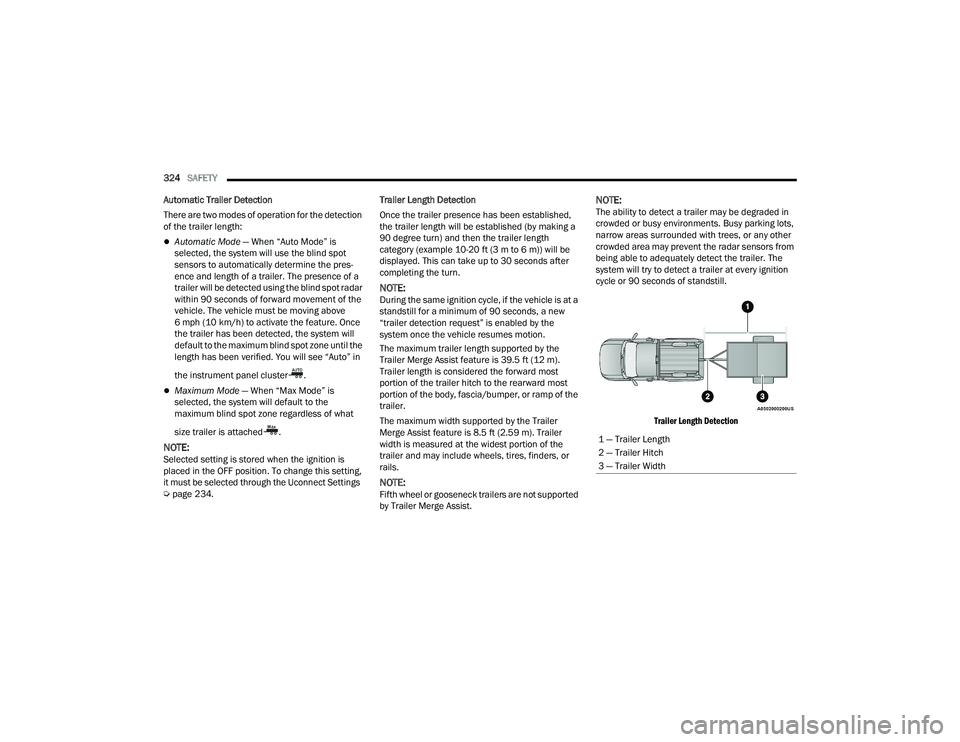
The maximum trailer length supported by the
Trailer Merge Assist feature is 39.5 ft (12 m).
Trailer length is considered the forward most
portion of the trailer hitch to the rearward most
portion of the body, fascia/bumper, or ramp of the
trailer.
The maximum width supported by the Trailer
Merge Assist feature is 8.5 ft (2.59 m). Trailer
width is measured at the widest portion of the
trailer and may include wheels, tires, finders, or
rails.
NOTE:Fifth wheel or gooseneck trailers are not supported
by Trailer Merge Assist.
NOTE:The ability to detect a trailer may be degraded in
crowded or busy environments. Busy parking lots,
narrow areas surrounded with trees, or any other
crowded area may prevent the radar sensors from
being able to adequately detect the trailer. The
system will try to detect a trailer at every ignition
cycle or 90 seconds of standstill.
Trailer Length Detection
1 — Trailer Length
2 — Trailer Hitch
3 — Trailer Width
22_DT_OM_EN_USC_t.book Page 324
Page 377 of 496

IN CASE OF EMERGENCY375
NOTE:
Your vehicle may be transmitting data as autho -
rized by the subscriber.
Never place anything on or near the vehicle’s
LTE (voice/data) or 4G (data) and GPS
antennas. You could prevent LTE (voice/data) or
4G (data) and GPS signal reception, which can
prevent your vehicle from placing an emergency
call. An operable LTE (voice/data) or 4G (data)
network connection and a GPS signal is
required for the SOS Call system to function
properly.
NOTE:Changes or modifications not expressly approved
by the party responsible for compliance could void
the user's authority to operate the equipment.
Automatic SOS — If Equipped
Automatic SOS is a hands-free safety service that
can immediately connect you with help in the event
that your vehicle’s airbags deploy. Please refer to
your provided radio supplement for complete
information.
JACKING AND TIRE CHANGING NOTE:If your vehicle is equipped with an air suspension
system, there is a feature which allows the auto -
matic leveling to be disabled to assist with
changing a tire. This feature can be activated
through the Uconnect system Ú page 253.
PREPARATIONS FOR JACKING
NOTE:
If your vehicle is equipped with Air Suspension, you
will need to enable Tire Jack Mode in the Uconnect
system Úpage 165 before changing the tire.
1. Park on a firm, level surface. Avoid ice or slippery areas.
2. Turn on the Hazard Warning Flashers.
3. Apply the parking brake.
4. Shift the transmission into Park (P).
5. Turn the ignition OFF.
WARNING!
Do not attempt to change a tire on the side of
the vehicle close to moving traffic. Pull far
enough off the road to avoid the danger of
being hit when operating the jack or changing
the wheel.
Being under a jacked-up vehicle is dangerous.
The vehicle could slip off the jack and fall on
you. You could be crushed. Never put any part
of your body under a vehicle that is on a jack.
If you need to get under a raised vehicle, take
it to a service center where it can be raised on
a lift.
Never start or run the engine while the vehicle
is on a jack.
The jack is designed to be used as a tool for
changing tires only. The jack should not be
used to lift the vehicle for service purposes.
The vehicle should be jacked on a firm level
surface only. Avoid ice or slippery areas.
WARNING!
Do not attempt to change a tire on the side of
the vehicle close to moving traffic. Pull far
enough off the road to avoid being hit when
operating the jack or changing the wheel.
7
22_DT_OM_EN_USC_t.book Page 375
Page 471 of 496

TECHNICAL SPECIFICATIONS469
(Continued)
METHYLCYCLOPENTADIENYL
M
ANGANESE TRICARBONYL (MMT) IN
G
ASOLINE
MMT is a manganese-containing metallic additive
that is blended into some gasoline to increase
octane. Gasoline blended with MMT provides no
performance advantage beyond gasoline of the
same octane number without MMT. Gasoline
blended with MMT reduces spark plug life and
reduces emissions system performance in some
vehicles. The manufacturer recommends that
gasoline without MMT be used in your vehicle. The
MMT content of gasoline may not be indicated on
the gasoline pump; therefore, you should ask the
gasoline retailer whether the gasoline contains
MMT. MMT is prohibited in Federal and California
reformulated gasoline.
FUEL SYSTEM CAUTIONSNOTE:Intentional tampering with the emissions control
system can result in civil penalties being assessed
against you.
FUEL REQUIREMENTS – DIESEL ENGINE
Federal law requires that you must fuel this vehicle
with Ultra Low Sulfur Highway Diesel fuel (15 ppm
Sulfur maximum) and prohibits the use of Low
Sulfur Highway Diesel fuel (500 ppm Sulfur
maximum) to avoid damage to the emissions
control system.
Use good quality diesel fuel from a reputable
supplier in your vehicle. For most year-round
service, No. 2 diesel fuel meeting ASTM (formerly
known as the American Society for Testing and
Materials) specification D-975 Grade S15 will
provide good performance. If the vehicle is
exposed to extreme cold (below 20°F or -7°C), or
is required to operate at colder-than-normal
conditions for prolonged periods, use Climatized
Number 2 diesel fuel or dilute the Number 2 diesel
fuel with 50% Number 1 diesel fuel. This will
provide better protection from fuel gelling or
wax-plugging of the fuel filters.
CAUTION!
Follow these guidelines to maintain your
vehicle’s performance:
The use of leaded gasoline is prohibited by
Federal law. Using leaded gasoline can impair
engine performance and damage the emis -
sions control system.
An out-of-tune engine or certain fuel or ignition
malfunctions can cause the catalytic
converter to overheat. If you notice a pungent
burning odor or some light smoke, your engine
may be out of tune or malfunctioning and may
require immediate service. Contact an autho -
rized dealer for service assistance.
The use of fuel additives, which are now being
sold as octane enhancers, is not recom -
mended. Most of these products contain high
concentrations of methanol. Fuel system
damage or vehicle performance problems
resulting from the use of such fuels or addi -
tives is not the responsibility of the manufac-
turer and may void or not be covered under
the New Vehicle Limited Warranty.
CAUTION!
WARNING!
Do not use alcohol or gasoline as a fuel blending
agent. They can be unstable under certain
conditions and hazardous or explosive when
mixed with diesel fuel.9
22_DT_OM_EN_USC_t.book Page 469
Page 483 of 496

481
INDEX
A
Accessory Drive Belt Inspection..................... 418Adaptive Cruise Control (ACC)
(Cruise Control).........131, 136, 137, 176, 178Adding Engine Coolant (Antifreeze)............... 422Adding Fuel.......................................... 207, 208Additives, Fuel............................................... 468AdjustDown........................................................... 38Forward....................................................... 38Rearward..................................................... 38Up................................................................ 38Adjustable Pedals............................................ 44Advance Phone Connectivity......................... 280Air BagAir Bag Operation...................................... 344Air Bag Warning Light...................... 342, 344Enhanced Accident Response......... 352, 392Event Data Recorder (EDR)....................... 392Front Air Bag............................................. 344If Deployment Occurs................................ 351Knee Impact Bolsters................................ 349Maintaining Your Air Bag System.............. 353Maintenance............................................. 353Redundant Air Bag Warning Light.............342Transporting Pets...................................... 368
Air Bag Light................................ 128, 342, 368Air Cleaner, Engine
(Engine Air Cleaner Filter)............................. 410Air Conditioner Maintenance........................ 415Air Conditioner Refrigerant........................... 415Air Conditioner System................................. 415Air Conditioning......................................... 62, 65Air Conditioning Filter..............................68, 416Air Conditioning System................................... 67Air Conditioning, Operating Tips....................... 68Air Filter............................................... 410, 412Air PressureTires......................................................... 452Air Suspension......... 131, 134, 135, 165, 169AlarmSecurity Alarm....................................27, 131Alterations/ModificationsVehicle......................................................... 13Antifreeze (Engine Coolant)................. 422, 472Disposal................................................... 423Anti-Lock Brake System (ABS)...................... 312Anti-Lock Warning Light................................ 131Assist, Hill Start............................................. 318Audio Settings............................................... 268Audio Systems (Radio).................................. 233Auto Down Power Windows............................. 80
Automatic Door Locks......................................32Automatic Headlights.......................................56Automatic High Beams.....................................55Automatic Tailgate Release.............................86Automatic Temperature Control (ATC)..............67Automatic Transmission....................... 154, 426Adding Fluid.............................................. 426Fluid And Filter Change............................. 426Fluid Change............................................. 426Fluid Level Check...................................... 426Fluid Type........................................ 426, 476Special Additives...................................... 426Automatic Transmission Limp Home Mode... 158AutoPark....................................................... 142AUX Camera.................................................. 203Auxiliary Driving Systems.............................. 319Axle Fluid.............................................. 427, 476Axle Locker System....................................... 172Axle Lubrication............................................ 427
B
Back-Up Camera........................................... 199Battery................................................. 129, 408Charging System Light.............................. 129Keyless Key Fob Replacement....................21Battery Saver Feature......................................59
11
22_DT_OM_EN_USC_t.book Page 481
Page 484 of 496
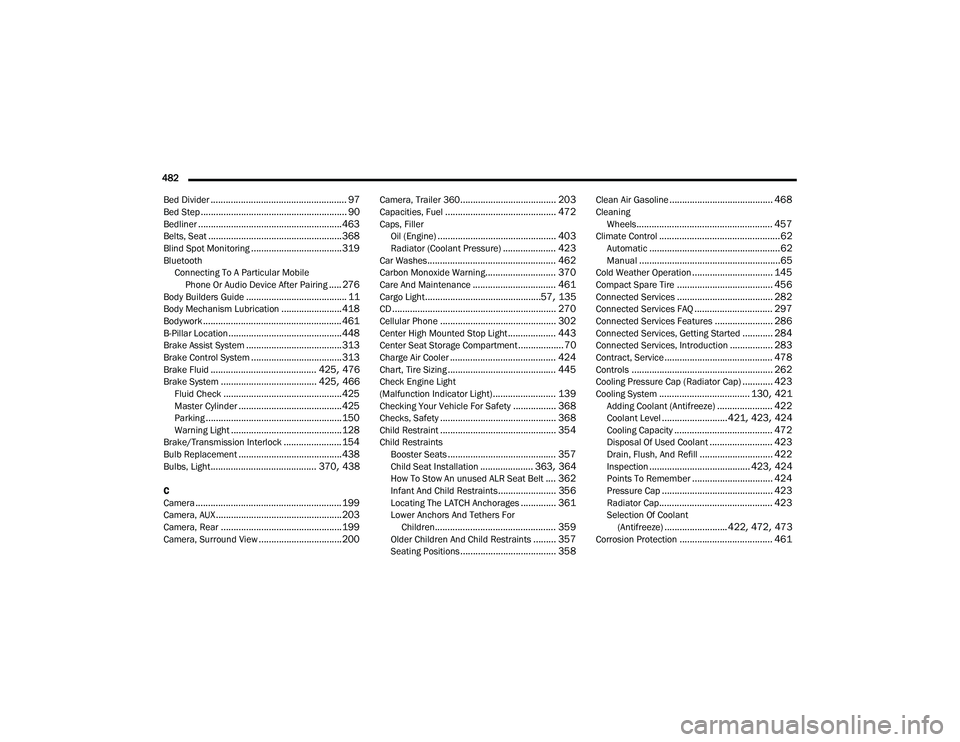
482 Bed Divider
...................................................... 97Bed Step.......................................................... 90Bedliner......................................................... 463Belts, Seat..................................................... 368Blind Spot Monitoring.................................... 319Bluetooth Connecting To A Particular MobilePhone Or Audio Device After Pairing
..... 276Body Builders Guide........................................ 11Body Mechanism Lubrication........................ 418Bodywork....................................................... 461B-Pillar Location............................................. 448Brake Assist System...................................... 313Brake Control System.................................... 313Brake Fluid.......................................... 425, 476Brake System...................................... 425, 466Fluid Check............................................... 425Master Cylinder......................................... 425Parking...................................................... 150Warning Light............................................ 128Brake/Transmission Interlock....................... 154Bulb Replacement......................................... 438Bulbs, Light.......................................... 370, 438
C
Camera.......................................................... 199Camera, AUX.................................................. 203Camera, Rear................................................ 199Camera, Surround View................................. 200
Camera, Trailer 360...................................... 203Capacities, Fuel............................................ 472Caps, FillerOil (Engine)............................................... 403Radiator (Coolant Pressure)..................... 423Car Washes................................................... 462Carbon Monoxide Warning............................ 370Care And Maintenance................................. 461Cargo Light..............................................57, 135CD................................................................. 270Cellular Phone.............................................. 302Center High Mounted Stop Light................... 443Center Seat Storage Compartment.................. 70Charge Air Cooler.......................................... 424Chart, Tire Sizing........................................... 445Check Engine Light
(Malfunction Indicator Light)......................... 139Checking Your Vehicle For Safety................. 368Checks, Safety.............................................. 368Child Restraint.............................................. 354Child RestraintsBooster Seats........................................... 357Child Seat Installation..................... 363, 364How To Stow An unused ALR Seat Belt.... 362Infant And Child Restraints....................... 356Locating The LATCH Anchorages.............. 361Lower Anchors And Tethers ForChildren................................................ 359Older Children And Child Restraints......... 357Seating Positions...................................... 358
Clean Air Gasoline......................................... 468CleaningWheels...................................................... 457Climate Control................................................62Automatic....................................................62Manual........................................................65Cold Weather Operation................................ 145Compact Spare Tire...................................... 456Connected Services...................................... 282Connected Services FAQ............................... 297Connected Services Features....................... 286Connected Services, Getting Started............ 284Connected Services, Introduction................. 283Contract, Service........................................... 478Controls........................................................ 262Cooling Pressure Cap (Radiator Cap)............ 423Cooling System.................................... 130, 421Adding Coolant (Antifreeze)...................... 422Coolant Level..........................421, 423, 424Cooling Capacity....................................... 472Disposal Of Used Coolant......................... 423Drain, Flush, And Refill............................. 422Inspection........................................ 423, 424Points To Remember................................ 424Pressure Cap............................................ 423Radiator Cap............................................. 423Selection Of Coolant (Antifreeze)......................... 422, 472, 473Corrosion Protection..................................... 461
22_DT_OM_EN_USC_t.book Page 482
Page 485 of 496

483
Cruise Control Accel/Decel
............................................... 177Cancel....................................................... 177Resume..................................................... 177Cruise Control (Speed Control)... 133, 176, 178Cruise Light......................................... 136, 137Customer Assistance..................................... 477Cybersecurity................................................. 233
D
Daytime Running Lights................................... 55Dealer Service............................................... 408Defroster, Windshield...................... 62, 65, 368Deleting A Phone........................................... 276Diagnostic System, Onboard......................... 138Diesel Exhaust Fluid...................................... 209Adding....................................................... 209Fill Procedure............................................ 210Storage...................................................... 209Diesel Fuel..................................................... 469Diesel Fuel Requirements............................. 469Bulk Storage Of......................................... 209Diesel Fuel System, Re-Priming..................... 414Differential, Limited Slip................................ 173Dimmer Control Switch.................................... 60Disable Vehicle Towing.................................. 390
Disc Drive..................................................... 270Disconnecting............................................... 276DisposalAntifreeze (Engine Coolant)...................... 423Disturb.......................................................... 279Door Ajar Light..................................... 129, 130Door LocksAutomatic.................................................... 32Doors............................................................... 28Draining Fuel/Water Separator Filter............ 412Driver Memory Presets................................. 268Driver’s Seat Back Tilt...................................... 35DrivingThrough Flowing, Rising, Or ShallowStanding Water
.................................... 231Driving Tips................................................... 230Dual Rear Wheels......................................... 466
E
Electric Brake Control System....................... 313Anti-Lock Brake System............................ 312Electronic Roll Mitigation................. 314, 319Electric Parking Brake................................... 150Electric Power Steering................................. 173Electrical Power Outlets................................... 76Electronic Range Select (ERS)...................... 158Electronic Stability Control
(ESC)........................................... 131, 132, 314
Electronic Throttle Control Warning Light...... 129Electronically Shifted Transfer Case.... 160, 162Emergency Braking....................................... 327Emergency Gas Can Refueling...................... 386Emergency, In Case OfFreeing Vehicle When Stuck..................... 389Hazard Warning Flasher........................... 371Jump Starting........................................... 384Emission Control System Maintenance......... 139Engine........................................................... 403Air Cleaner................................................ 410Block Heater............................................. 149Break-In Recommendations..................... 150Compartment............... 403, 404, 405, 406CompartmentIdentification............ 403, 404, 405, 406Coolant (Antifreeze).................................. 473Exhaust Gas Caution................................ 370Fails To Start............................................. 143Flooded, Starting...................................... 143Fuel Requirements.......................... 467, 472Idling......................................................... 147Jump Starting........................................... 384Oil...........................................409, 472, 473Oil Filler Cap............................................. 403Oil Filter.................................................... 409
11
22_DT_OM_EN_USC_t.book Page 483