tailgate RAM 1500 2022 Owner's Manual
[x] Cancel search | Manufacturer: RAM, Model Year: 2022, Model line: 1500, Model: RAM 1500 2022Pages: 496, PDF Size: 18.03 MB
Page 201 of 496
STARTING AND OPERATING199
PARKVIEW REAR BACK UP CAMERA
The ParkView Rear Back Up Camera allows you to
see an on-screen image of the rear surroundings of
your vehicle whenever the gear selector is put into
REVERSE. The image will be displayed on the
Navigation/Multimedia radio display screen along
with a caution note to “Check Entire Surroundings”
across the top of the screen. After five seconds this
note will disappear. The ParkView Camera is
located in the center of the tailgate handle.
NOTE:Removing the tailgate will disable the rearview
camera function.
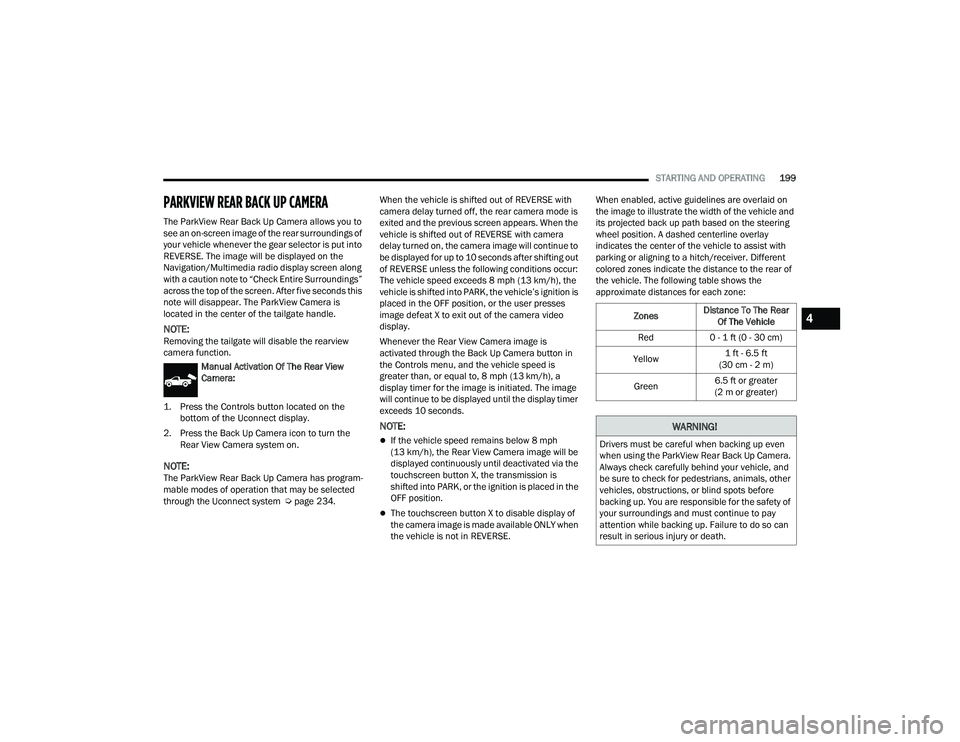
Manual Activation Of The Rear View
Camera:
1. Press the Controls button located on the bottom of the Uconnect display.
2. Press the Back Up Camera icon to turn the Rear View Camera system on.
NOTE:The ParkView Rear Back Up Camera has program -
mable modes of operation that may be selected
through the Uconnect system Ú page 234.When the vehicle is shifted out of REVERSE with
camera delay turned off, the rear camera mode is
exited and the previous screen appears. When the
vehicle is shifted out of REVERSE with camera
delay turned on, the camera image will continue to
be displayed for up to 10 seconds after shifting out
of REVERSE unless the following conditions occur:
The vehicle speed exceeds 8 mph (13 km/h), the
vehicle is shifted into PARK, the vehicle’s ignition is
placed in the OFF position, or the user presses
image defeat X to exit out of the camera video
display.
Whenever the Rear View Camera image is
activated through the Back Up Camera button in
the Controls menu, and the vehicle speed is
greater than, or equal to, 8 mph (13 km/h), a
display timer for the image is initiated. The image
will continue to be displayed until the display timer
exceeds 10 seconds.
NOTE:
If the vehicle speed remains below 8 mph
(13 km/h), the Rear View Camera image will be
displayed continuously until deactivated via the
touchscreen button X, the transmission is
shifted into PARK, or the ignition is placed in the
OFF position.
The touchscreen button X to disable display of
the camera image is made available ONLY when
the vehicle is not in REVERSE. When enabled, active guidelines are overlaid on
the image to illustrate the width of the vehicle and
its projected back up path based on the steering
wheel position. A dashed centerline overlay
indicates the center of the vehicle to assist with
parking or aligning to a hitch/receiver. Different
colored zones indicate the distance to the rear of
the vehicle. The following table shows the
approximate distances for each zone:
Zones
Distance To The Rear
Of The Vehicle
Red 0 - 1 ft (0 - 30 cm)
Yellow 1 ft - 6.5 ft
(30 cm - 2 m)
Green 6.5 ft or greater
(2 m or greater)
WARNING!
Drivers must be careful when backing up even
when using the ParkView Rear Back Up Camera.
Always check carefully behind your vehicle, and
be sure to check for pedestrians, animals, other
vehicles, obstructions, or blind spots before
backing up. You are responsible for the safety of
your surroundings and must continue to pay
attention while backing up. Failure to do so can
result in serious injury or death.
4
22_DT_OM_EN_USC_t.book Page 199
Page 202 of 496
200STARTING AND OPERATING
NOTE:If snow, ice, mud, or any foreign substance builds
up on the camera lens, clean the lens, rinse with
water, and dry with a soft cloth. Do not cover the
lens.
Zoom View
When the Rear View Camera image is being
displayed, and the vehicle speed is below 8 mph
(13 km/h) while in any gear, Zoom View is
available. By pressing the “magnifying glass” icon
in the upper left of the display screen, the image
will zoom in to four times the standard view.
Pressing the icon a second time will return the view
to the standard Back Up Camera display. When Zoom View is selected while the vehicle is in
REVERSE, then shifted to DRIVE, the camera delay
view will display the standard Back Up Camera
view. If the vehicle is then returned to REVERSE
gear from DRIVE, the Zoom View selection will
automatically resume.
NOTE:The Zoom View button and AUX button (if
equipped) will not be available when the vehicle is
shifted into REVERSE and the Trailer Reverse
Steering Control (TRSC) feature (if equipped) is
activated.
Shifting to NEUTRAL from any gear will maintain
the selected view (Zoom or Standard) as long as
the vehicle is below 8 mph (13 km/h).
If the vehicle is in PARK, Zoom View is available
until the gear selector is placed in DRIVE or
REVERSE and speeds are at or above 8 mph
(13 km/h).
NOTE:
If the vehicle is in DRIVE, NEUTRAL, or REVERSE,
and speed is greater than or equal to 8 mph
(13 km/h), Zoom View is unavailable and the
icon will appear grey.
While in Zoom View, the guidelines will not be
visible.
For information on Auxiliary Cameras (if equipped),
see Ú page 206.
SURROUND VIEW CAMERA SYSTEM —
IF EQUIPPED
The Surround View Camera system allows you to
see an on-screen image of the surroundings and
the Top View of your vehicle. This occurs whenever
the gear selector is in REVERSE or when enabled
through the Uconnect system. The Top View of the
vehicle will also show if any doors are open. The
image will be displayed on the touchscreen along
with a caution note “Check Entire Surroundings”.
After five seconds, this note will disappear. The
Surround View Camera system is comprised of four
cameras located in the front grille, rear tailgate
and side mirrors.
NOTE:
Removing the tailgate will disable the rearview
camera function.
The Surround View Camera system has
programmable settings that may be selected
through the Uconnect system Ú page 234.
Press this button on the touchscreen to
enter the Surround View Camera menu in
the Uconnect system.
When the vehicle is shifted into REVERSE, the Rear
View and Top View is the default view of the
system.
CAUTION!
To avoid vehicle damage, ParkView should
only be used as a parking aid. The ParkView
camera is unable to view every obstacle or
object in your drive path.
To avoid vehicle damage, the vehicle must be
driven slowly when using ParkView to be able
to stop in time when an obstacle is seen. It is
recommended that the driver look frequently
over his/her shoulder when using ParkView.
22_DT_OM_EN_USC_t.book Page 200
Page 221 of 496
STARTING AND OPERATING219
(Continued)
Instrument Cluster Messages:
“Calibrate Trailer ” will display when a trailer
is not calibrated and the vehicle is at a standstill
while the button is pushed.
“Calibrating Trailer” will display when the trailer
is not calibrated and the vehicle is moving while
the button is pushed.
“To Activate Trailer Steering Shift To P” will
display when the trailer is calibrated success
-
fully, the TRSC activation button is pushed and
the vehicle is not in PARK.
“Trailer Steering Ready, Shift To Reverse” will
display when the button is pushed, trailer is cali -
brated and the vehicle is in PARK.
“Trailer Steering Active” will display after the
driver shifts to REVERSE and indicates the
feature is active.
“Trailer Steering Unavailable” will display if
there is a fault in the system preventing activa -
tion, the driver’s door is open, the driver’s seat
belt is unbuckled, or the tailgate is open. Other reasons the feature may cancel:
The driver overrides steering by placing hands
on the steering wheel.
Trailer tracking is lost.
If the trailer angle becomes excessive, the
brakes apply bringing the vehicle to a stop and
then applying the parking brake.
Trailer steering button is pushed while active.
Vehicle speed goes over 8 mph (12 km/h).
Driver door is open and seat belt is unbuckled.
Transmission shifted to PARK.
Trailer Memory
The trailer steering system will automatically retain
the calibration of the previous five trailers
connected, so recalibration will not be necessary
when hooking up. The next time the vehicle is
started, place the vehicle in DRIVE and drive a
short distance. The TRSC system can then be
activated.
NOTE:Trailers may look different during day and night
conditions. In such cases, the trailer may need to
recalibrate. Some trailers (such as boat trailers) will need to
recalibrate while loaded and unloaded.
NOTE:
The system may not detect a trailer in low light
conditions. In sunny conditions, the perfor
-
mance may be degraded as shadows pass over
the trailer.
The driver is always responsible for safe opera -
tion of truck and trailer.
The driver is always in control of the truck as
well as the trailer and is responsible for
controlling the throttle and brakes.
The system may not function when the camera
lens is blocked, blurred (covered with water,
snow, ice, dirt, etc) and will not work unless the
tailgate is upright and fully latched.
TOWING REQUIREMENTS
To promote proper break-in of your new vehicle
drivetrain components, the following guidelines
are recommended.
CAUTION!
Do not tow a trailer at all during the first
500 miles (805 km) the new vehicle is driven.
The engine, axle or other parts could be
damaged.
4
22_DT_OM_EN_USC_t.book Page 219
Page 379 of 496
IN CASE OF EMERGENCY377
Release the tool bag straps from the jack and
remove tools from bag.
Jack And Tool Bag
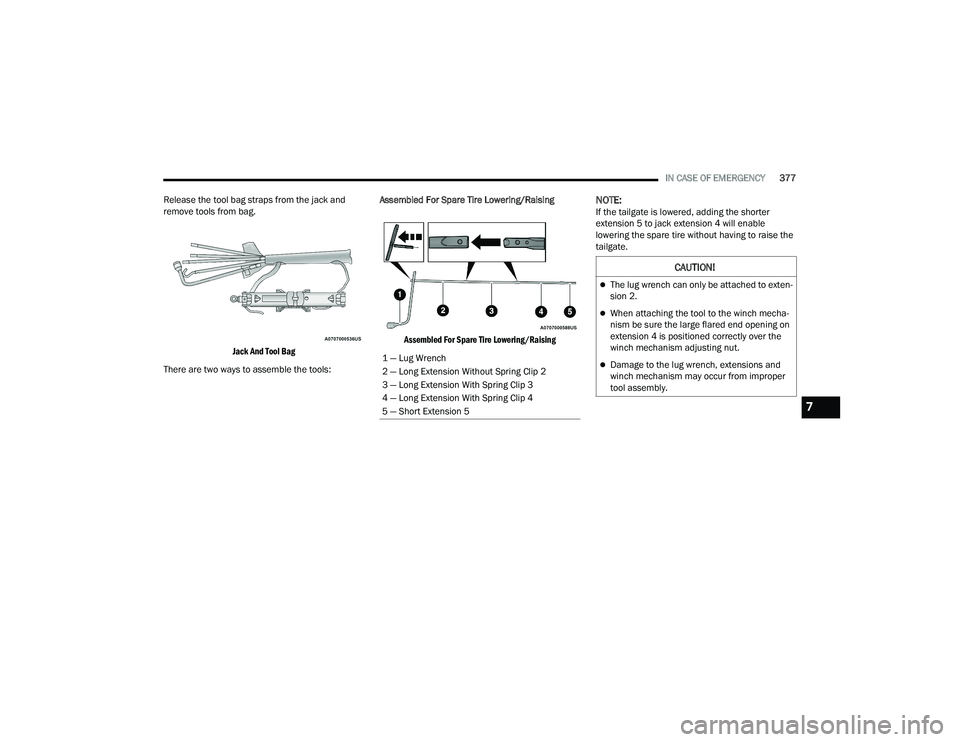
There are two ways to assemble the tools: Assembled For Spare Tire Lowering/Raising
Assembled For Spare Tire Lowering/Raising
NOTE:If the tailgate is lowered, adding the shorter
extension 5 to jack extension 4 will enable
lowering the spare tire without having to raise the
tailgate.
1 — Lug Wrench
2 — Long Extension Without Spring Clip 2
3 — Long Extension With Spring Clip 3
4 — Long Extension With Spring Clip 4
5 — Short Extension 5
CAUTION!
The lug wrench can only be attached to exten -
sion 2.
When attaching the tool to the winch mecha -
nism be sure the large flared end opening on
extension 4 is positioned correctly over the
winch mechanism adjusting nut.
Damage to the lug wrench, extensions and
winch mechanism may occur from improper
tool assembly.
7
22_DT_OM_EN_USC_t.book Page 377
Page 380 of 496
378IN CASE OF EMERGENCY
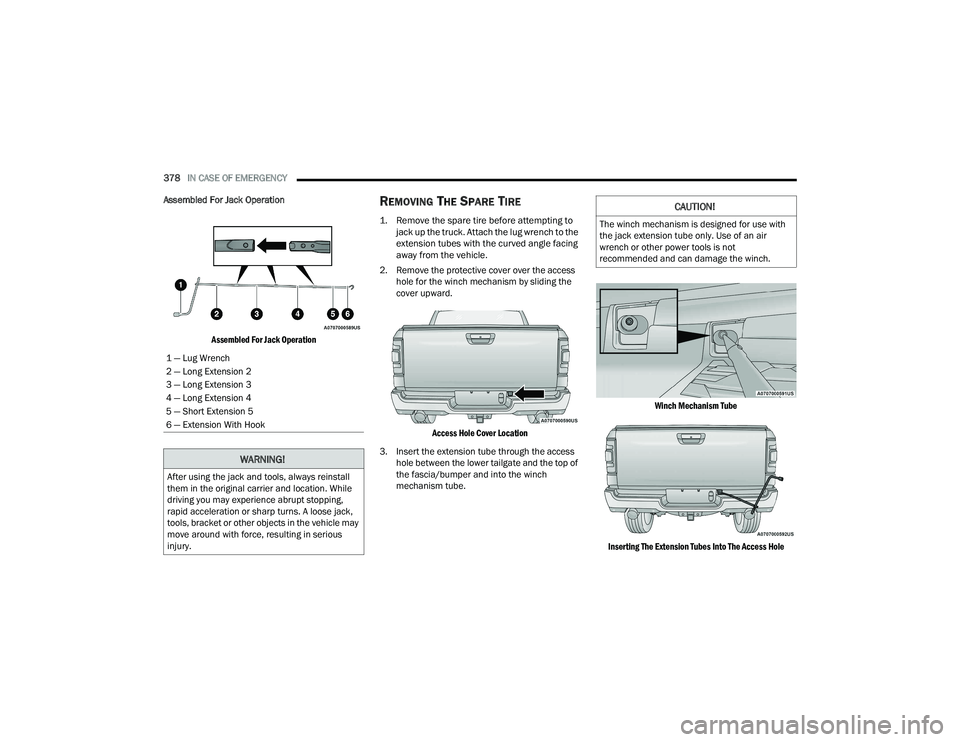
Assembled For Jack Operation
Assembled For Jack Operation
REMOVING THE SPARE TIRE
1. Remove the spare tire before attempting to jack up the truck. Attach the lug wrench to the
extension tubes with the curved angle facing
away from the vehicle.
2. Remove the protective cover over the access hole for the winch mechanism by sliding the
cover upward.
Access Hole Cover Location
3. Insert the extension tube through the access hole between the lower tailgate and the top of
the fascia/bumper and into the winch
mechanism tube.
Winch Mechanism Tube
Inserting The Extension Tubes Into The Access Hole
1 — Lug Wrench
2 — Long Extension 2
3 — Long Extension 3
4 — Long Extension 4
5 — Short Extension 5
6 — Extension With Hook
WARNING!
After using the jack and tools, always reinstall
them in the original carrier and location. While
driving you may experience abrupt stopping,
rapid acceleration or sharp turns. A loose jack,
tools, bracket or other objects in the vehicle may
move around with force, resulting in serious
injury.
CAUTION!
The winch mechanism is designed for use with
the jack extension tube only. Use of an air
wrench or other power tools is not
recommended and can damage the winch.
22_DT_OM_EN_USC_t.book Page 378
Page 384 of 496
382IN CASE OF EMERGENCY
7. Lower the vehicle to the ground and finish tightening the lug nuts. Push down on the
wrench handle for increased leverage. Tighten
the lug nuts in a star pattern until each lug nut
has been tightened twice Ú page 466. If in
doubt about the correct tightness, have them
checked with a torque wrench by an
authorized dealer or at a service station.
8. If your vehicle is equipped with a wheel center cap, install the cap and remove the wheel
blocks. Do not install chrome or aluminum
wheel center caps on the spare wheel. This
may result in cap damage.
9. Lower the jack to its fully closed position. Stow the replaced tire, and secure the jack and tools
in the proper location.
10. Adjust the tire pressure when possible.
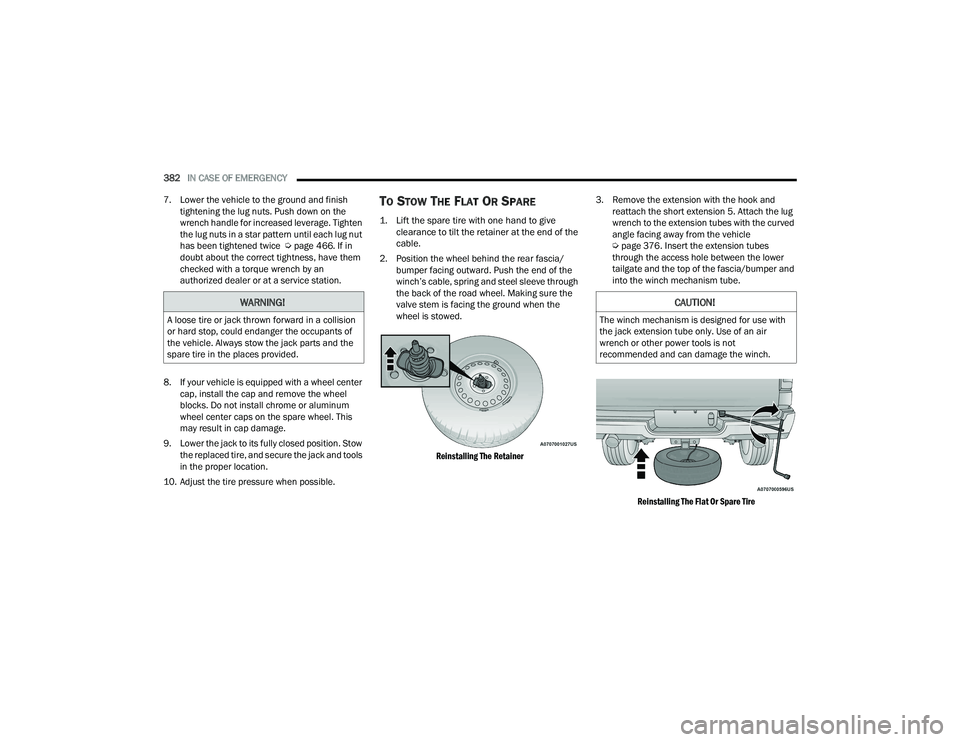
TO STOW THE FLAT OR SPARE
1. Lift the spare tire with one hand to give clearance to tilt the retainer at the end of the
cable.
2. Position the wheel behind the rear fascia/ bumper facing outward. Push the end of the
winch’s cable, spring and steel sleeve through
the back of the road wheel. Making sure the
valve stem is facing the ground when the
wheel is stowed.
Reinstalling The Retainer
3. Remove the extension with the hook and
reattach the short extension 5. Attach the lug
wrench to the extension tubes with the curved
angle facing away from the vehicle
Úpage 376. Insert the extension tubes
through the access hole between the lower
tailgate and the top of the fascia/bumper and
into the winch mechanism tube.
Reinstalling The Flat Or Spare Tire
WARNING!
A loose tire or jack thrown forward in a collision
or hard stop, could endanger the occupants of
the vehicle. Always stow the jack parts and the
spare tire in the places provided.
CAUTION!
The winch mechanism is designed for use with
the jack extension tube only. Use of an air
wrench or other power tools is not
recommended and can damage the winch.
22_DT_OM_EN_USC_t.book Page 382
Page 420 of 496
418SERVICING AND MAINTENANCE
ACCESSORY DRIVE BELT INSPECTION
When inspecting accessory drive belts, small
cracks that run across the ribbed surface of the
belt from rib to rib, are considered normal. This is
not a reason to replace the belt. However, cracks
running along a rib (not across) are not normal. Any
belt with cracks running along a rib must be
replaced. Also have the belt replaced if it has
excessive wear, frayed cords or severe glazing.
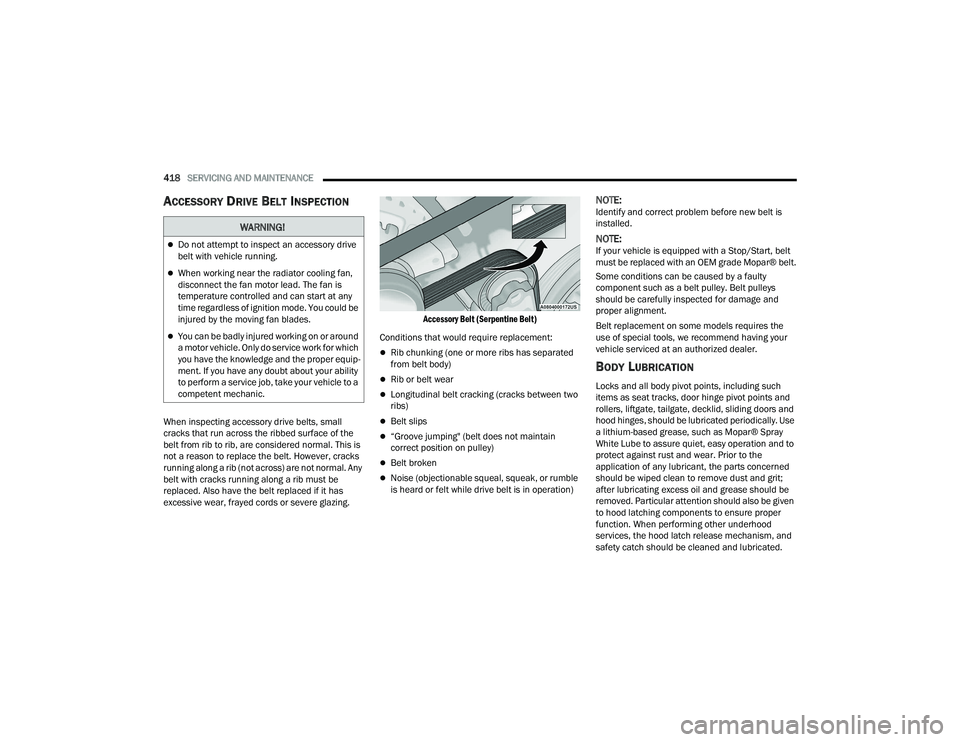
Accessory Belt (Serpentine Belt)
Conditions that would require replacement:
Rib chunking (one or more ribs has separated
from belt body)
Rib or belt wear
Longitudinal belt cracking (cracks between two
ribs)
Belt slips
“Groove jumping" (belt does not maintain
correct position on pulley)
Belt broken
Noise (objectionable squeal, squeak, or rumble
is heard or felt while drive belt is in operation)
NOTE:Identify and correct problem before new belt is
installed.
NOTE:If your vehicle is equipped with a Stop/Start, belt
must be replaced with an OEM grade Mopar® belt.
Some conditions can be caused by a faulty
component such as a belt pulley. Belt pulleys
should be carefully inspected for damage and
proper alignment.
Belt replacement on some models requires the
use of special tools, we recommend having your
vehicle serviced at an authorized dealer.
BODY LUBRICATION
Locks and all body pivot points, including such
items as seat tracks, door hinge pivot points and
rollers, liftgate, tailgate, decklid, sliding doors and
hood hinges, should be lubricated periodically. Use
a lithium-based grease, such as Mopar® Spray
White Lube to assure quiet, easy operation and to
protect against rust and wear. Prior to the
application of any lubricant, the parts concerned
should be wiped clean to remove dust and grit;
after lubricating excess oil and grease should be
removed. Particular attention should also be given
to hood latching components to ensure proper
function. When performing other underhood
services, the hood latch release mechanism, and
safety catch should be cleaned and lubricated.
WARNING!
Do not attempt to inspect an accessory drive
belt with vehicle running.
When working near the radiator cooling fan,
disconnect the fan motor lead. The fan is
temperature controlled and can start at any
time regardless of ignition mode. You could be
injured by the moving fan blades.
You can be badly injured working on or around
a motor vehicle. Only do service work for which
you have the knowledge and the proper equip -
ment. If you have any doubt about your ability
to perform a service job, take your vehicle to a
competent mechanic.
22_DT_OM_EN_USC_t.book Page 418
Page 437 of 496
SERVICING AND MAINTENANCE435
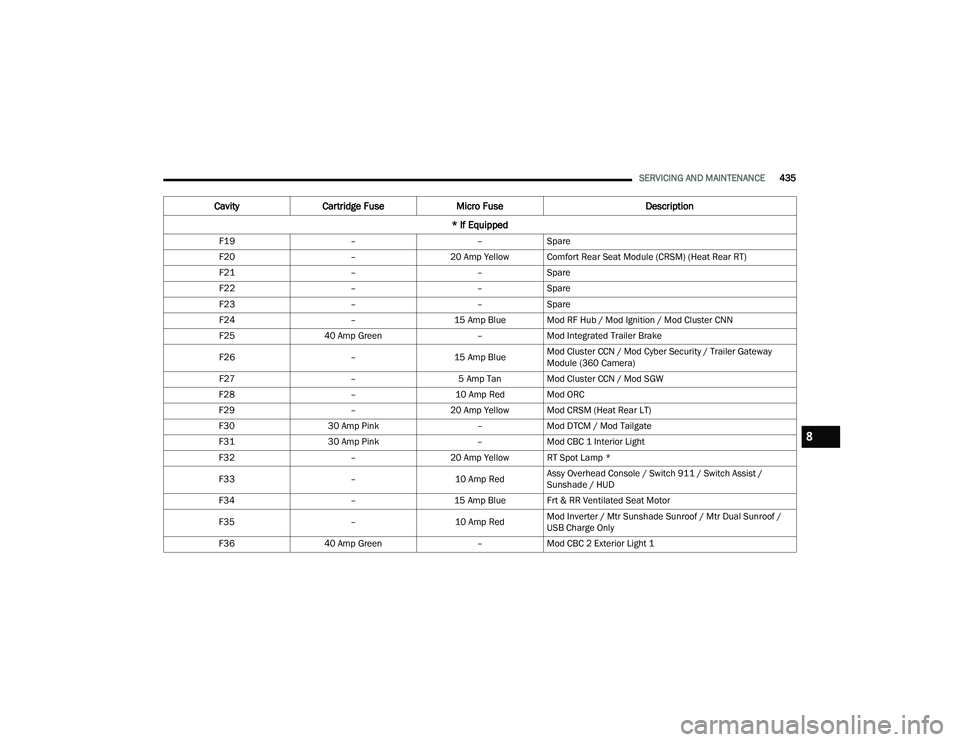
F19 ––Spare
F20 –20 Amp Yellow Comfort Rear Seat Module (CRSM) (Heat Rear RT)
F21 ––Spare
F22 ––Spare
F23 ––Spare
F24 –15 Amp Blue Mod RF Hub / Mod Ignition / Mod Cluster CNN
F25 40 Amp Green –Mod Integrated Trailer Brake
F26 –15 Amp BlueMod Cluster CCN / Mod Cyber Security / Trailer Gateway
Module (360 Camera)
F27 –5 Amp Tan Mod Cluster CCN / Mod SGW
F28 –10 Amp Red Mod ORC
F29 –20 Amp Yellow Mod CRSM (Heat Rear LT)
F30 30 Amp Pink –Mod DTCM / Mod Tailgate
F31 30 Amp Pink –Mod CBC 1 Interior Light
F32 –20 Amp Yellow RT Spot Lamp *
F33 –10 Amp RedAssy Overhead Console / Switch 911 / Switch Assist /
Sunshade / HUD
F34 –15 Amp Blue Frt & RR Ventilated Seat Motor
F35 –10 Amp RedMod Inverter / Mtr Sunshade Sunroof / Mtr Dual Sunroof /
USB Charge Only
F36 40 Amp Green –Mod CBC 2 Exterior Light 1
Cavity Cartridge Fuse Micro Fuse Description
* If Equipped
8
22_DT_OM_EN_USC_t.book Page 435
Page 483 of 496

481
INDEX
A
Accessory Drive Belt Inspection..................... 418Adaptive Cruise Control (ACC)
(Cruise Control).........131, 136, 137, 176, 178Adding Engine Coolant (Antifreeze)............... 422Adding Fuel.......................................... 207, 208Additives, Fuel............................................... 468AdjustDown........................................................... 38Forward....................................................... 38Rearward..................................................... 38Up................................................................ 38Adjustable Pedals............................................ 44Advance Phone Connectivity......................... 280Air BagAir Bag Operation...................................... 344Air Bag Warning Light...................... 342, 344Enhanced Accident Response......... 352, 392Event Data Recorder (EDR)....................... 392Front Air Bag............................................. 344If Deployment Occurs................................ 351Knee Impact Bolsters................................ 349Maintaining Your Air Bag System.............. 353Maintenance............................................. 353Redundant Air Bag Warning Light.............342Transporting Pets...................................... 368
Air Bag Light................................ 128, 342, 368Air Cleaner, Engine
(Engine Air Cleaner Filter)............................. 410Air Conditioner Maintenance........................ 415Air Conditioner Refrigerant........................... 415Air Conditioner System................................. 415Air Conditioning......................................... 62, 65Air Conditioning Filter..............................68, 416Air Conditioning System................................... 67Air Conditioning, Operating Tips....................... 68Air Filter............................................... 410, 412Air PressureTires......................................................... 452Air Suspension......... 131, 134, 135, 165, 169AlarmSecurity Alarm....................................27, 131Alterations/ModificationsVehicle......................................................... 13Antifreeze (Engine Coolant)................. 422, 472Disposal................................................... 423Anti-Lock Brake System (ABS)...................... 312Anti-Lock Warning Light................................ 131Assist, Hill Start............................................. 318Audio Settings............................................... 268Audio Systems (Radio).................................. 233Auto Down Power Windows............................. 80
Automatic Door Locks......................................32Automatic Headlights.......................................56Automatic High Beams.....................................55Automatic Tailgate Release.............................86Automatic Temperature Control (ATC)..............67Automatic Transmission....................... 154, 426Adding Fluid.............................................. 426Fluid And Filter Change............................. 426Fluid Change............................................. 426Fluid Level Check...................................... 426Fluid Type........................................ 426, 476Special Additives...................................... 426Automatic Transmission Limp Home Mode... 158AutoPark....................................................... 142AUX Camera.................................................. 203Auxiliary Driving Systems.............................. 319Axle Fluid.............................................. 427, 476Axle Locker System....................................... 172Axle Lubrication............................................ 427
B
Back-Up Camera........................................... 199Battery................................................. 129, 408Charging System Light.............................. 129Keyless Key Fob Replacement....................21Battery Saver Feature......................................59
11
22_DT_OM_EN_USC_t.book Page 481
Page 489 of 496

487
Power Folding
.............................................. 48Rearview............................................ 45, 372Tilt Side In Reverse..................................... 49Trailer Towing.............................................. 49Vanity.......................................................... 46Mobile App.................................................... 284Modifications/Alterations Vehicle........................................................ 13Monitor, Tire Pressure System....................... 328Mopar Parts................................................... 479MP3 Control.................................................... 75Multi-Function Control Lever............................ 55Multifunction Tailgate...................................... 87
N
New Vehicle Break-In Period.......................... 150
O
Occupant Restraints...................................... 334Octane Rating, Gasoline (Fuel)...................... 467Off Road Pages.............................................. 306Accessory Gauges..................................... 309Pitch And Roll............................................ 310Status Bar................................................. 307Vehicle Dynamics...................................... 308Off-Pavement Driving (Off-Road).................... 232Off-Road Driving (Off-Pavement).................... 232Oil Filter, Change........................................... 409Oil Filter, Selection......................................... 409
Oil Pressure Light.......................................... 130Oil, Engine............................................ 409, 473Capacity.................................................... 472Dipstick.................................................... 407Disposal................................................... 409Filter................................................ 409, 473Filter Disposal........................................... 409Identification Logo.................................... 409Materials Added To.................................. 409Pressure Warning Light............................ 130Recommendation............................ 409, 472Synthetic.................................................. 409Viscosity................................................... 472Onboard Diagnostic System.......................... 138Operating Precautions.................................. 138Operator ManualOwner's Manual........................................ 480Outside Rearview Mirrors................................ 47Overheating, Engine...................................... 387
P
Paddle Shifters............................................. 159Paint Care..................................................... 461Pair (Link) Uconnect Phone To A
Mobile Phone
b
........................................ 274Parallel Parking............................................. 193Parking Brake...................................... 131, 150Parking Lights.................................................. 56ParkSense Active Park Assist........................ 192
ParkSense System, Rear............................... 186Passive Entry....................................................30Pedals, Adjustable...........................................44Pedestrian Warning System.......................... 327Performance Features.................................. 118Pets............................................................... 368Phone Mode.................................................. 272Pickup Box................................................92, 94Pinch Protection........................................83, 85Placard, Tire And Loading Information.......... 448PowerDistribution Center (Fuses).............. 428, 433Door Locks...................................................29Mirrors.........................................................48Outlet (Auxiliary Electrical Outlet)..........76, 77Seats...........................................................38Side Steps...................................................30Sliding Rear Window....................................81Steering........................................... 130, 173Sunroof.................................................82, 83Windows......................................................79Power SeatsDown...........................................................38Forward.......................................................38Rearward.....................................................38Recline.........................................................38Tilt................................................................38Up................................................................3811
22_DT_OM_EN_USC_t.book Page 487