tailgate RAM 1500 2022 User Guide
[x] Cancel search | Manufacturer: RAM, Model Year: 2022, Model line: 1500, Model: RAM 1500 2022Pages: 496, PDF Size: 18.03 MB
Page 90 of 496
88GETTING TO KNOW YOUR VEHICLE
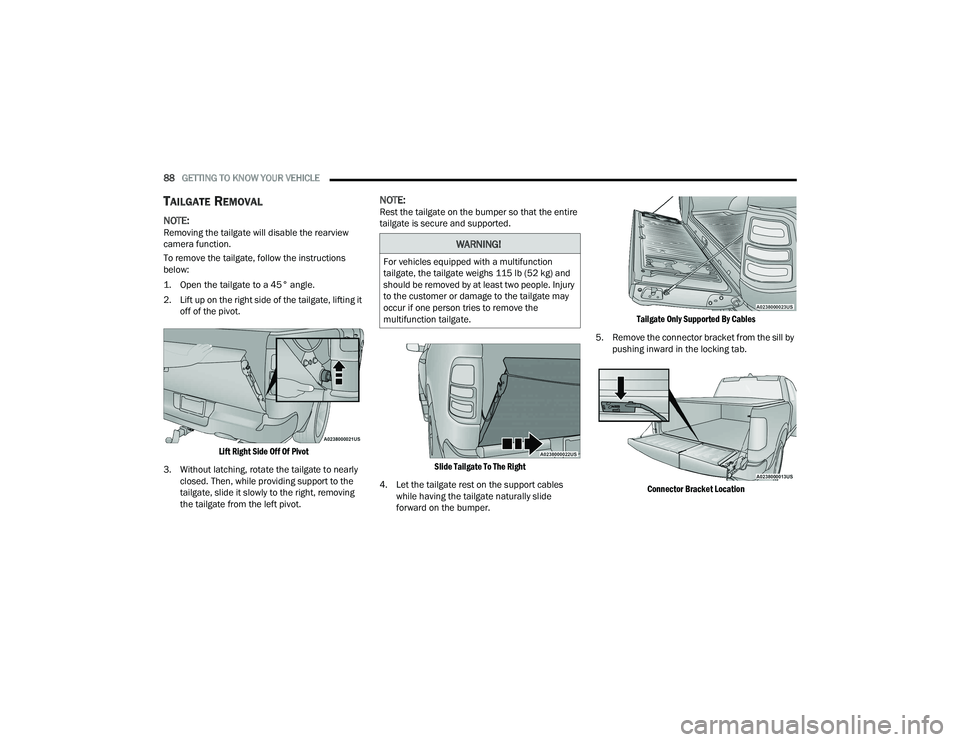
TAILGATE REMOVAL
NOTE:Removing the tailgate will disable the rearview
camera function.
To remove the tailgate, follow the instructions
below:
1. Open the tailgate to a 45° angle.
2. Lift up on the right side of the tailgate, lifting it
off of the pivot.
Lift Right Side Off Of Pivot
3. Without latching, rotate the tailgate to nearly closed. Then, while providing support to the
tailgate, slide it slowly to the right, removing
the tailgate from the left pivot.
NOTE:Rest the tailgate on the bumper so that the entire
tailgate is secure and supported.
Slide Tailgate To The Right
4. Let the tailgate rest on the support cables while having the tailgate naturally slide
forward on the bumper.
Tailgate Only Supported By Cables
5. Remove the connector bracket from the sill by pushing inward in the locking tab.
Connector Bracket Location
WARNING!
For vehicles equipped with a multifunction
tailgate, the tailgate weighs 115 lb (52 kg) and
should be removed by at least two people. Injury
to the customer or damage to the tailgate may
occur if one person tries to remove the
multifunction tailgate.
22_DT_OM_EN_USC_t.book Page 88
Page 91 of 496
GETTING TO KNOW YOUR VEHICLE89
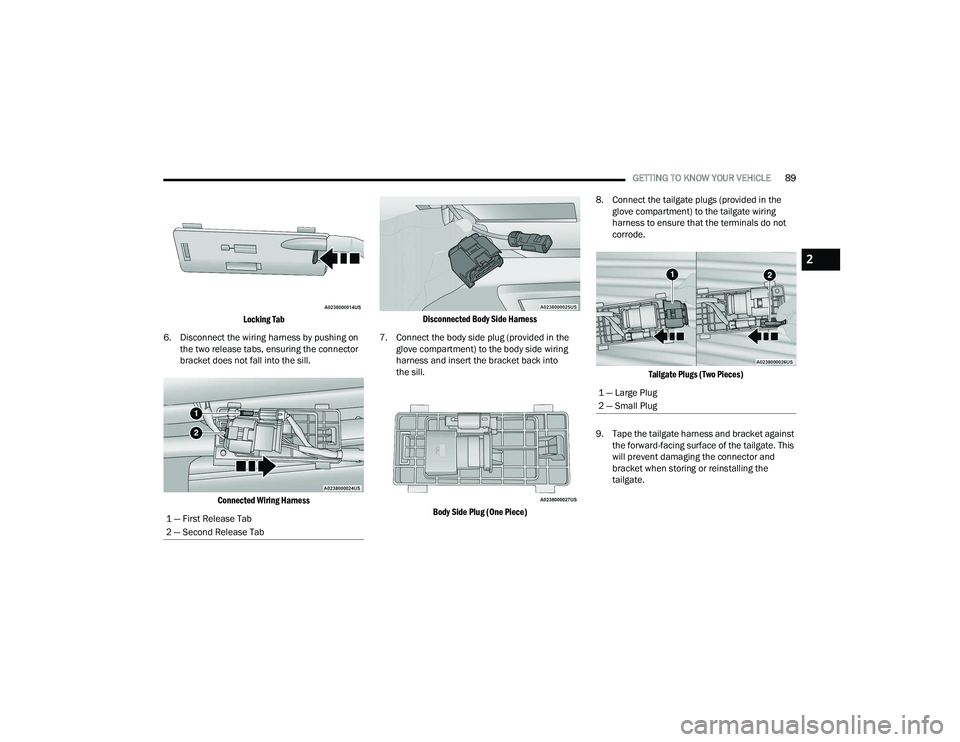
Locking Tab
6. Disconnect the wiring harness by pushing on the two release tabs, ensuring the connector
bracket does not fall into the sill.
Connected Wiring Harness Disconnected Body Side Harness
7. Connect the body side plug (provided in the glove compartment) to the body side wiring
harness and insert the bracket back into
the sill.
Body Side Plug (One Piece)
8. Connect the tailgate plugs (provided in the
glove compartment) to the tailgate wiring
harness to ensure that the terminals do not
corrode.
Tailgate Plugs (Two Pieces)
9. Tape the tailgate harness and bracket against the forward-facing surface of the tailgate. This
will prevent damaging the connector and
bracket when storing or reinstalling the
tailgate.
1 — First Release Tab
2 — Second Release Tab
1 — Large Plug
2 — Small Plug
2
22_DT_OM_EN_USC_t.book Page 89
Page 92 of 496
90GETTING TO KNOW YOUR VEHICLE
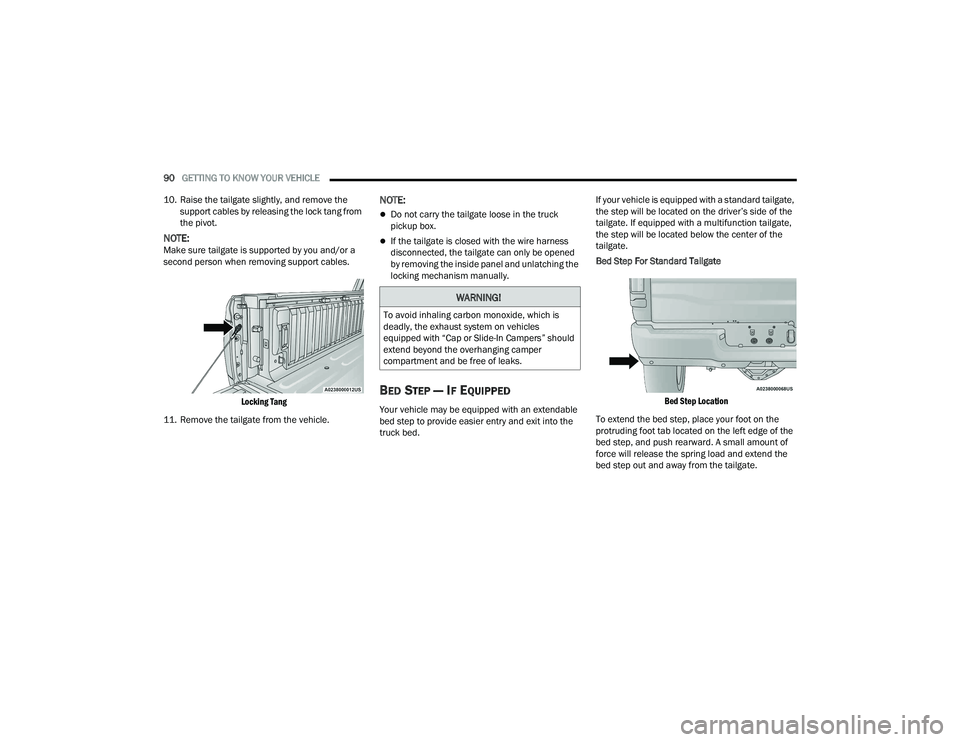
10. Raise the tailgate slightly, and remove the support cables by releasing the lock tang from
the pivot.
NOTE:Make sure tailgate is supported by you and/or a
second person when removing support cables.
Locking Tang
11. Remove the tailgate from the vehicle.
NOTE:
Do not carry the tailgate loose in the truck
pickup box.
If the tailgate is closed with the wire harness
disconnected, the tailgate can only be opened
by removing the inside panel and unlatching the
locking mechanism manually.
BED STEP — IF EQUIPPED
Your vehicle may be equipped with an extendable
bed step to provide easier entry and exit into the
truck bed. If your vehicle is equipped with a standard tailgate,
the step will be located on the driver’s side of the
tailgate. If equipped with a multifunction tailgate,
the step will be located below the center of the
tailgate.
Bed Step For Standard Tailgate
Bed Step Location
To extend the bed step, place your foot on the
protruding foot tab located on the left edge of the
bed step, and push rearward. A small amount of
force will release the spring load and extend the
bed step out and away from the tailgate.
WARNING!
To avoid inhaling carbon monoxide, which is
deadly, the exhaust system on vehicles
equipped with “Cap or Slide-In Campers” should
extend beyond the overhanging camper
compartment and be free of leaks.
22_DT_OM_EN_USC_t.book Page 90
Page 93 of 496

GETTING TO KNOW YOUR VEHICLE91
Bed Step Components (Standard Tailgate)
Bed Step Extended
NOTE:Once the spring load is overcome, the bed step will
extend out quickly, so be sure to stand in a position that will avoid coming into contact with the step as
it extends.
To stow the bed step back under the tailgate, push
the bed step forward with your foot until the bed
step is retracted by the spring load.
Bed Step For Multifunction Tailgate
Bed Step Location
To extend the bed step, place your foot on the top
center of the bed step, and push down while
pulling rearward. A small amount of force will release the spring load and extend the bed step
out and away from the tailgate.
Bed Step Extended
NOTE:Once the spring load is overcome, the bed step will
extend out quickly. Be sure to stand in a position
that will avoid coming into contact with the step as
it extends.
To stow the bed step back under the tailgate, push
the bed step forward with your foot until the bed
step is retracted by the spring load.
1 — Bed Step
2 — Foot Tab
WARNING!
Do not attempt to stow the bed step with your
hands. The low clearance space between the
bed step and the rear bumper as the bed step
returns to the stowed position could result in
injury to your hands or fingers.
WARNING!
Do not attempt to stow the bed step with your
hands. The low clearance space between the
bed step and the rear bumper as the bed step
returns to the stowed position could result in
injury to your hands or fingers.
2
22_DT_OM_EN_USC_t.book Page 91
Page 96 of 496

94GETTING TO KNOW YOUR VEHICLE
(Continued)
Cleat Removal (Without Tonneau Cover)
Remove the end cap by pushing upward on the
release button located beneath the end cap while
pulling the cap away from the rail. The cleat can
now be removed by sliding it off the end of the rail.
End Cap Release Button Without Tonneau Cover
Pull End Cap Away From Rail
RAMBOX — IF EQUIPPED
The RamBox system is an integrated pickup box
storage and cargo management system consisting
of three features:
Cargo storage bins
Cargo divider
Bed rail tie-down system Ú page 93
NOTE:Bed rail tie-down system is also available for
vehicles not equipped with a RamBox.
LOCKING AND UNLOCKING RAMBOX
Push and release the lock or unlock button on the
key fob to lock and unlock all doors, the tailgate
and the RamBox Úpage 19. To unlatch the
storage bin manually, insert the emergency key
into the keyhole and turn clockwise. Always return
the key to the upright (vertical) position before
removing it from the keyhole.
RAMBOX CARGO STORAGE BINS
Cargo storage bins are located on both sides of the
pickup box. The cargo storage bins provide
watertight, lockable, illuminated storage for up to
150 lb (68 kg) of evenly distributed cargo.
RamBox Cargo Storage Bins
CAUTION!
Ensure cargo bin lids are closed and latched
before moving or driving vehicle.
Loads applied to the top of the bin lid should
be minimized to prevent damage to the lid and
latching/hinging mechanisms.
Damage to the RamBox bin may occur due to
heavy/sharp objects placed in bin that shift
due to vehicle motion. In order to minimize
potential for damage, secure all cargo to
prevent movement and protect inside
surfaces of bin from heavy/sharp objects with
appropriate padding.
CAUTION!
22_DT_OM_EN_USC_t.book Page 94
Page 101 of 496

GETTING TO KNOW YOUR VEHICLE99
Tonneau Cover Latch Components Position One
(Front Latches Latched And Stowage Straps Secured)
Position Two (Front And Rear Latches Latched)
TRI-FOLD TONNEAU COVER FOLDING
F
OR DRIVING OR REMOVAL
To remove the Tonneau Cover use the following
steps:
1. Open the tailgate to access the rear pair of
Tonneau Cover latches located on the
underside of the Cover.
Location Of Rear Latches
1 — Handle
2 — Slide Locking Lever
3 — Locating Bumper
4 — Truck Flange Bead
5 — Latch Bumper
6 — J Hook
1 — Panel 1
2 — Panel 2
3 — Panel 3
2
22_DT_OM_EN_USC_t.book Page 99
Page 132 of 496

130GETTING TO KNOW YOUR INSTRUMENT PANEL
Electric Power Steering (EPS) Fault
Warning Light
This warning light will turn on when
there's a fault with the EPS system
Úpage 173.
Engine Coolant Temperature Warning
Light
This warning light warns of an
overheated engine condition. If the
engine coolant temperature is too high,
this indicator will illuminate and a single
chime will sound. If the temperature reaches the
upper limit, a continuous chime will sound for four
minutes or until the engine is able to cool,
whichever comes first.
If the light turns on while driving, safely pull over
and stop the vehicle. If the Air Conditioning (A/C)
system is on, turn it off. Also, shift the transmission
into NEUTRAL (N) and idle the vehicle. If the
temperature reading does not return to normal,
turn the engine off immediately and call for service
Ú page 387.
Hood Open Warning Light
This warning light will illuminate when the
hood is ajar/open and not fully closed.
NOTE:If the vehicle is moving, there will also be a single
chime.
Oil Pressure Warning Light
This warning light will illuminate, and a
chime will sound, to indicate low engine
oil pressure. If the light and chime turn on
while driving, safely stop the vehicle and
turn off the engine as soon as possible. After the
vehicle is safely stopped, restart the engine and
monitor the Oil Pressure Warning Light. If the Oil
Pressure Warning Light is still illuminated, turn the
engine OFF and contact an authorized dealer for
further assistance. Do not operate the vehicle until
the cause is corrected. If the lamp is no longer
illuminated, the engine can be operated but it is
recommended to take the vehicle to an authorized
dealer as soon as possible.
Do not operate the vehicle until the cause is
corrected. This light does not indicate how much oil
is in the engine. The engine oil level must be
checked under the hood.
Oil Temperature Warning Light
This warning light will illuminate to
indicate the engine oil temperature is
high. If the light turns on while driving,
stop the vehicle and shut off the engine
as soon as possible. Wait for oil temperature to
return to normal levels.
Seat Belt Reminder Warning Light
This warning light indicates when the
driver or passenger seat belt is
unbuckled. When the ignition is first
placed in the ON/RUN or ACC/ON/RUN
position and if the driver’s seat belt is unbuckled,
a chime will sound and the light will turn on. When
driving, if the driver or front passenger seat belt
remains unbuckled, the Seat Belt Reminder Light
will flash or remain on continuously and a chime
will sound Ú page 334.
Tailgate Open Warning Light
This warning light will illuminate when the
tailgate is open.
NOTE:If the vehicle is moving, there will also be a single
chime.
WARNING!
Continued operation with reduced assist could
pose a safety risk to yourself and others. Service
should be obtained as soon as possible.
22_DT_OM_EN_USC_t.book Page 130
Page 193 of 496

STARTING AND OPERATING191
PARKSENSE SYSTEM USAGE
P
RECAUTIONS
NOTE:
Ensure that the front and rear fascias/bumpers
are free of snow, ice, mud, dirt and debris to
keep the ParkSense system operating properly.
Jackhammers, large trucks, and other vibra -
tions could affect the performance of Park -
Sense.
When you turn Front or Rear ParkSense off, the
instrument cluster display will show a vehicle
graphic of the Front or Rear ParkSense on/off
state for two seconds. Furthermore, once you
turn Front or Rear ParkSense off, it remains off
until you turn it on again, even if you cycle the
ignition.
When you move the gear selector to the
REVERSE position and Front or Rear ParkSense
is turned off, the instrument cluster display will
show a vehicle graphic with "OFF" in the corre -
sponding side. This vehicle graphic will be
displayed for as long as the vehicle is in
REVERSE.
ParkSense, when on, will reduce the volume of
the radio when it is sounding a tone.
Clean the ParkSense sensors regularly, taking
care not to scratch or damage them. The
sensors must not be covered with ice, snow,
slush, mud, dirt or debris. Failure to do so can
result in the system not working properly. The
ParkSense system might not detect an obstacle
behind or in front of the fascia/bumper, or it
could provide a false indication that an obstacle
is behind or in front of the fascia/bumper.
Use the ParkSense switch to turn the ParkSense
system off if obstacles such as bicycle carriers,
trailer hitches, etc. are placed near the rear
fascia/bumper. Failure to do so can result in the
system misinterpreting a close obstacle as a
sensor problem, causing the “PARKSENSE
UNAVAILABLE SERVICE REQUIRED” message to
be appear in the instrument cluster display.
ParkSense should be disabled when the tailgate
is in the lowered or open position. A lowered tail -
gate could provide a false indication that an
obstacle is behind the vehicle and could also
cause a false braking event.
The Rear ParkSense system will automatically
disable when the system detects that a trailer
with trailer brakes has been connected to the
Integrated Trailer Brake Module.
The Front ParkSense system will automatically
disable if a snow plow has been connected to
the vehicle.
WARNING!
Drivers must be careful when backing up even
when using ParkSense. Always check carefully
behind your vehicle, look behind you, and be
sure to check for pedestrians, animals, other
vehicles, obstructions, and blind spots before
backing up. You are responsible for safety and
must continue to pay attention to your
surroundings. Failure to do so can result in
serious injury or death.
Before using ParkSense, it is strongly recom -
mended that the ball mount and hitch ball
assembly be disconnected from the vehicle
when the vehicle is not used for towing.
Failure to do so can result in injury or damage
to vehicles or obstacles because the hitch ball
will be much closer to the obstacle than the
rear fascia/bumper when the vehicle sounds
the continuous tone. Also, the sensors could
detect the ball mount and hitch ball assembly,
depending on its size and shape, and give a
false indication that an obstacle is behind the
vehicle, and could cause false braking.
4
22_DT_OM_EN_USC_t.book Page 191
Page 195 of 496
STARTING AND OPERATING193
The ParkSense Active Park Assist system will turn
off automatically for any of the following
conditions:
Parking maneuver is completed.
Vehicle speed is greater than 18 mph (30 km/h)
when searching for a parking space.
Vehicle speed is greater than 5 mph (7 km/h) during active steering guidance into the parking
space.
Steering wheel is touched during active steering
guidance into the parking space.
ParkSense Front/Rear Park Assist switch is
pushed.
Driver's door is opened.
Tailgate is opened.
Electronic Stability Control/Anti-Lock Braking
System intervention.
Vehicle is in 4WD Low.
Axle Locker is active.
Trailer is connected.
Trailer Reverse Steering Control (TRSC) is
active.
Snow plow is connected.
NOTE:The ParkSense Active Park Assist system will allow
a maximum of eight shifts between DRIVE and
REVERSE. If the maneuver cannot be completed within eight shifts, the system will cancel and the
instrument cluster display will instruct the driver to
complete the maneuver manually.
The ParkSense Active Park Assist system will only
operate and search for a parking space when the
following conditions are present:
Gear selector is in DRIVE.
The ignition is in the ON/RUN position.
The ParkSense Active Park Assist switch is acti
-
vated.
Driver's door is closed.
Tailgate is closed.
Vehicle speed is less than 15 mph (25 km/h).
The outer surface and the underside of the front
and rear fascias/bumpers are clean and clear
of snow, ice, mud, dirt or other obstruction.
NOTE:If the vehicle is driven above approximately
15 mph (25 km/h), the instrument cluster display
will instruct the driver to slow down. If the vehicle
is driven above approximately 18 mph (30 km/h),
the system will cancel. The driver must then reac -
tivate the system by pushing the ParkSense Active
Park Assist switch.
When pushed, the LED on the ParkSense Active
Park Assist switch will blink momentarily, and then
the LED will turn off if any of the above conditions
are not present.
PARALLEL/PERPENDICULAR PARKING
S
PACE ASSISTANCE OPERATION
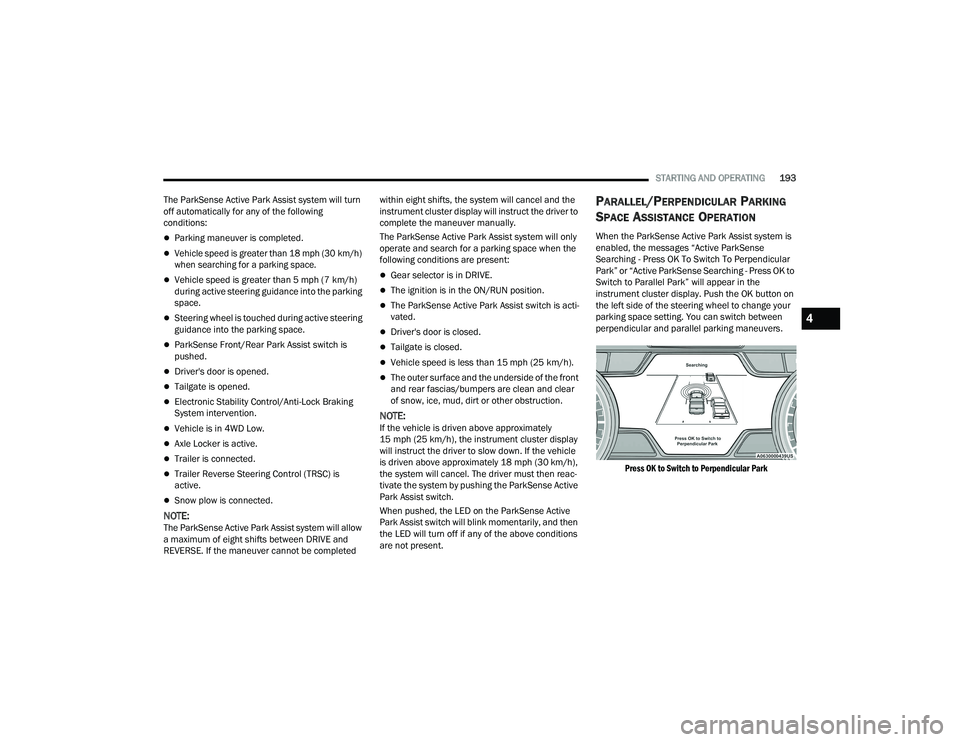
When the ParkSense Active Park Assist system is
enabled, the messages “Active ParkSense
Searching - Press OK To Switch To Perpendicular
Park” or “Active ParkSense Searching - Press OK to
Switch to Parallel Park” will appear in the
instrument cluster display. Push the OK button on
the left side of the steering wheel to change your
parking space setting. You can switch between
perpendicular and parallel parking maneuvers.
Press OK to Switch to Perpendicular Park
4
22_DT_OM_EN_USC_t.book Page 193
Page 196 of 496

194STARTING AND OPERATING
Press OK to Switch to Parallel Park
NOTE:
When searching for a parking space, use the
turn signal indicator to select which side of the
vehicle you want to perform the parking
maneuver. The ParkSense Active Park Assist
system will automatically search for a parking
space on the passenger's side of the vehicle if
the turn signal is not activated.
The driver needs to make sure that the selected
parking space for the maneuver remains free
and clear of any obstructions (e.g. pedestrians,
bicycles, etc.).
The driver is responsible to ensure that the
selected parking space is suitable for the
maneuver and free/clear of anything that may
be overhanging or protruding into the parking
space (e.g., ladders, tailgates, etc. from
surrounding objects/vehicles).
When searching for a parking space, the driver
should drive as parallel or perpendicular
(depending on the type of maneuver) to other
vehicles as possible.
The feature will only indicate the last detected
parking space (example: if passing multiple
available parking spaces, the system will only
indicate the last detected parking space for the
maneuver). A parking space is considered
invalid after the vehicle is 32 ft (10 m) or more
away from it. When an available parking space has been found,
and the vehicle is not in position, you will be
instructed to move forward to position the vehicle
for a perpendicular or parallel parking sequence
(depending on the type of maneuver being
performed).
Space Found — Keep Moving Forward
Once the vehicle is in position, you will be
instructed to stop the vehicle’s movement and
remove your hands from the steering wheel. When
the vehicle comes to a standstill (your hands still
removed from the steering wheel), you will be
instructed to place the gear selector into the
REVERSE position.
22_DT_OM_EN_USC_t.book Page 194