emergency key RAM 1500 2022 Owners Manual
[x] Cancel search | Manufacturer: RAM, Model Year: 2022, Model line: 1500, Model: RAM 1500 2022Pages: 496, PDF Size: 18.03 MB
Page 21 of 496
19
GETTING TO KNOW YOUR VEHICLE
KEYS
KEY FOB
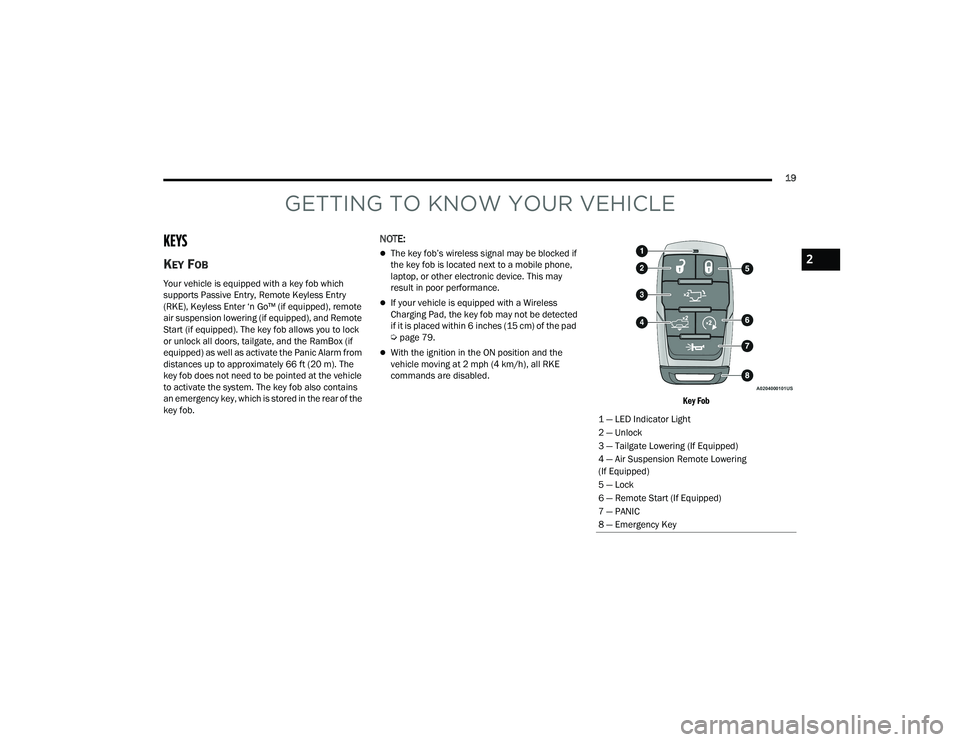
Your vehicle is equipped with a key fob which
supports Passive Entry, Remote Keyless Entry
(RKE), Keyless Enter ‘n Go™ (if equipped), remote
air suspension lowering (if equipped), and Remote
Start (if equipped). The key fob allows you to lock
or unlock all doors, tailgate, and the RamBox (if
equipped) as well as activate the Panic Alarm from
distances up to approximately 66 ft (20 m). The
key fob does not need to be pointed at the vehicle
to activate the system. The key fob also contains
an emergency key, which is stored in the rear of the
key fob.
NOTE:
The key fob’s wireless signal may be blocked if
the key fob is located next to a mobile phone,
laptop, or other electronic device. This may
result in poor performance.
If your vehicle is equipped with a Wireless
Charging Pad, the key fob may not be detected
if it is placed within 6 inches (15 cm) of the pad
Úpage 79.
With the ignition in the ON position and the
vehicle moving at 2 mph (4 km/h), all RKE
commands are disabled.
Key Fob
1 — LED Indicator Light
2 — Unlock
3 — Tailgate Lowering (If Equipped)
4 — Air Suspension Remote Lowering
(If Equipped)
5 — Lock
6 — Remote Start (If Equipped)
7 — PANIC
8 — Emergency Key
2
22_DT_OM_EN_USC_t.book Page 19
Page 23 of 496
GETTING TO KNOW YOUR VEHICLE21
Replacing The Battery In The Key Fob
The replacement battery model is one CR2450
battery.
NOTE:
Customers are recommended to use a battery
obtained from Mopar®. Aftermarket coin
battery dimensions may not meet the original
OEM coin battery dimensions.
Perchlorate Material — special handling may
apply. See www.dtsc.ca.gov/hazard-
ouswaste/perchlorate for further information.
Do not touch the battery terminals that are on
the back housing or the printed circuit board.
Do not replace the coin battery if the LED on the
key fob above the top row buttons blinks when
a button is pressed. The coin battery should last
a minimum of three years with normal vehicle
usage.
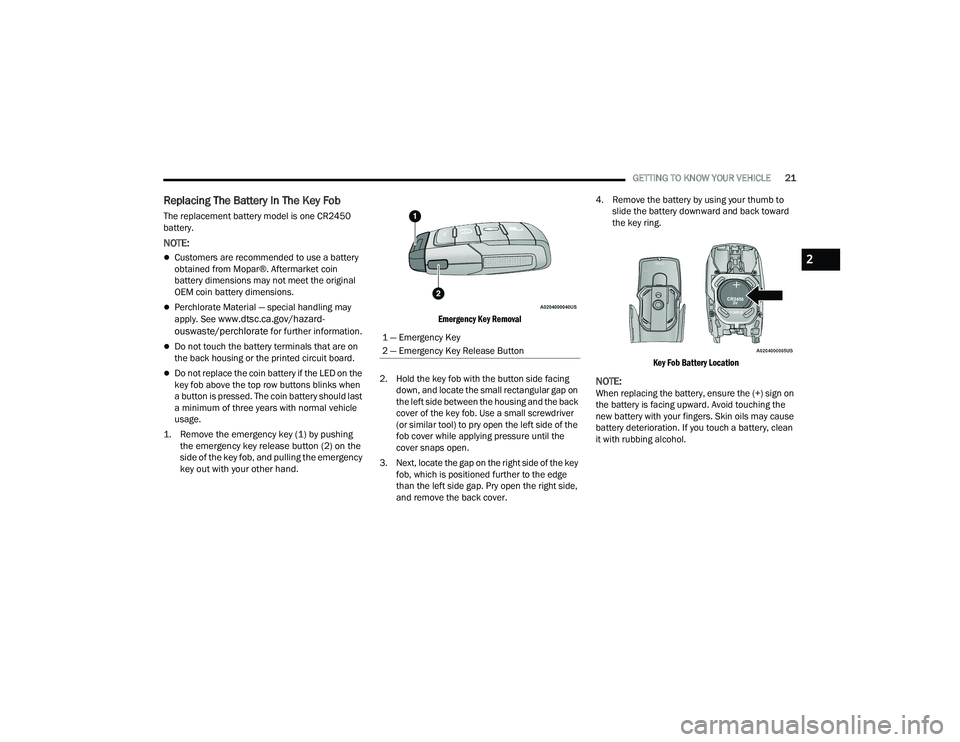
1. Remove the emergency key (1) by pushing the emergency key release button (2) on the
side of the key fob, and pulling the emergency
key out with your other hand.
Emergency Key Removal
2. Hold the key fob with the button side facing down, and locate the small rectangular gap on
the left side between the housing and the back
cover of the key fob. Use a small screwdriver
(or similar tool) to pry open the left side of the
fob cover while applying pressure until the
cover snaps open.
3. Next, locate the gap on the right side of the key fob, which is positioned further to the edge
than the left side gap. Pry open the right side,
and remove the back cover. 4. Remove the battery by using your thumb to
slide the battery downward and back toward
the key ring.
Key Fob Battery Location
NOTE:When replacing the battery, ensure the (+) sign on
the battery is facing upward. Avoid touching the
new battery with your fingers. Skin oils may cause
battery deterioration. If you touch a battery, clean
it with rubbing alcohol.
1 — Emergency Key
2 — Emergency Key Release Button
2
22_DT_OM_EN_USC_t.book Page 21
Page 24 of 496
22GETTING TO KNOW YOUR VEHICLE
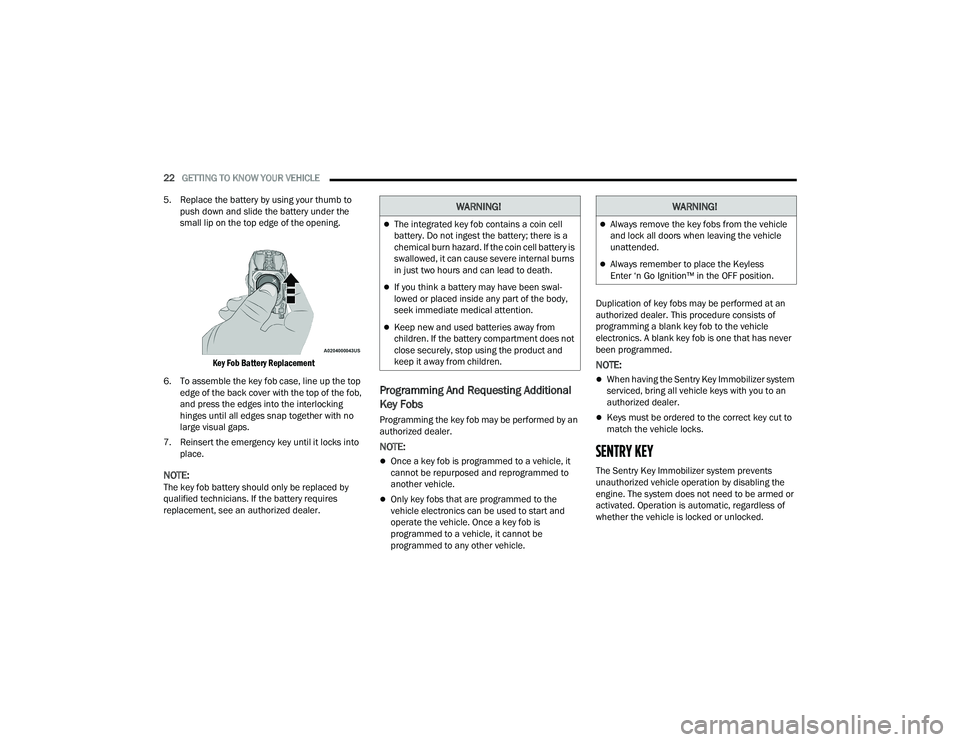
5. Replace the battery by using your thumb to push down and slide the battery under the
small lip on the top edge of the opening.
Key Fob Battery Replacement
6. To assemble the key fob case, line up the top edge of the back cover with the top of the fob,
and press the edges into the interlocking
hinges until all edges snap together with no
large visual gaps.
7. Reinsert the emergency key until it locks into place.
NOTE:The key fob battery should only be replaced by
qualified technicians. If the battery requires
replacement, see an authorized dealer.
Programming And Requesting Additional
Key Fobs
Programming the key fob may be performed by an
authorized dealer.
NOTE:
Once a key fob is programmed to a vehicle, it
cannot be repurposed and reprogrammed to
another vehicle.
Only key fobs that are programmed to the
vehicle electronics can be used to start and
operate the vehicle. Once a key fob is
programmed to a vehicle, it cannot be
programmed to any other vehicle. Duplication of key fobs may be performed at an
authorized dealer. This procedure consists of
programming a blank key fob to the vehicle
electronics. A blank key fob is one that has never
been programmed.
NOTE:
When having the Sentry Key Immobilizer system
serviced, bring all vehicle keys with you to an
authorized dealer.
Keys must be ordered to the correct key cut to
match the vehicle locks.
SENTRY KEY
The Sentry Key Immobilizer system prevents
unauthorized vehicle operation by disabling the
engine. The system does not need to be armed or
activated. Operation is automatic, regardless of
whether the vehicle is locked or unlocked.
WARNING!
The integrated key fob contains a coin cell
battery. Do not ingest the battery; there is a
chemical burn hazard. If the coin cell battery is
swallowed, it can cause severe internal burns
in just two hours and can lead to death.
If you think a battery may have been swal-
lowed or placed inside any part of the body,
seek immediate medical attention.
Keep new and used batteries away from
children. If the battery compartment does not
close securely, stop using the product and
keep it away from children.
WARNING!
Always remove the key fobs from the vehicle
and lock all doors when leaving the vehicle
unattended.
Always remember to place the Keyless
Enter ‘n Go Ignition™ in the OFF position.
22_DT_OM_EN_USC_t.book Page 22
Page 25 of 496
GETTING TO KNOW YOUR VEHICLE23
The system uses a key fob, keyless push button
ignition and a Radio Frequency (RF) receiver to
prevent unauthorized vehicle operation. Therefore,
only key fobs that are programmed to the vehicle
can be used to start and operate the vehicle. The
system cannot reprogram a key fob obtained from
another vehicle.
After placing the ignition in the ON/RUN position,
the Vehicle Security Light will turn on for three
seconds for a bulb check. If the light remains on
after the bulb check, it indicates that there is a
problem with the electronics. In addition, if the light
begins to flash after the bulb check, it indicates
that someone attempted to start the engine with
an invalid key fob. In the event that a valid key fob
is used to start the engine but there is an issue
with the vehicle electronics, the engine will start
and shut off after two seconds.
If the Vehicle Security Light turns on during normal
vehicle operation (vehicle running for longer than
10 seconds), it indicates that there is a fault in the
electronics. Should this occur, have the vehicle
serviced as soon as possible by an authorized
dealer. All of the key fobs provided with your new vehicle
have been programmed to the vehicle electronics
Ú
page 480.
IGNITION SWITCH
KEYLESS ENTER ‘N GO™ IGNITION
This feature allows the driver to operate the
ignition switch with the push of a button as long as
the key fob is in the passenger compartment.
The START/STOP ignition button has several
operating modes that are labeled and will
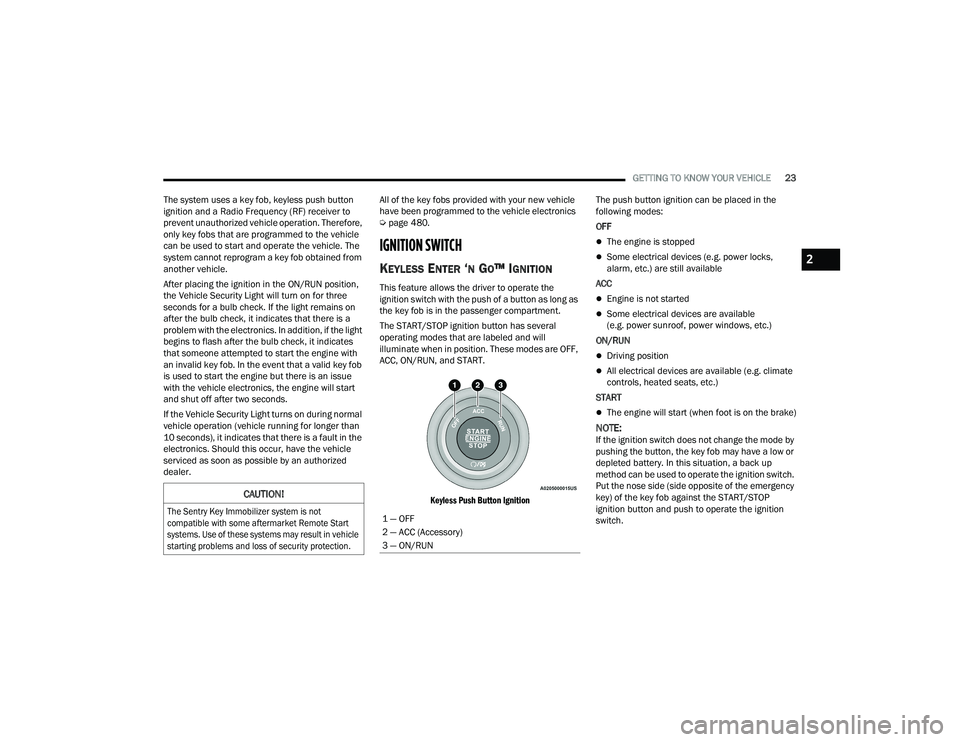
illuminate when in position. These modes are OFF,
ACC, ON/RUN, and START.
Keyless Push Button Ignition
The push button ignition can be placed in the
following modes:
OFF
The engine is stopped
Some electrical devices (e.g. power locks,
alarm, etc.) are still available
ACC
Engine is not started
Some electrical devices are available
(e.g. power sunroof, power windows, etc.)
ON/RUN
Driving position
All electrical devices are available (e.g. climate
controls, heated seats, etc.)
START
The engine will start (when foot is on the brake)
NOTE:If the ignition switch does not change the mode by
pushing the button, the key fob may have a low or
depleted battery. In this situation, a back up
method can be used to operate the ignition switch.
Put the nose side (side opposite of the emergency
key) of the key fob against the START/STOP
ignition button and push to operate the ignition
switch.
CAUTION!
The Sentry Key Immobilizer system is not
compatible with some aftermarket Remote Start
systems. Use of these systems may result in vehicle
starting problems and loss of security protection.
1 — OFF
2 — ACC (Accessory)
3 — ON/RUN
2
22_DT_OM_EN_USC_t.book Page 23
Page 96 of 496

94GETTING TO KNOW YOUR VEHICLE
(Continued)
Cleat Removal (Without Tonneau Cover)
Remove the end cap by pushing upward on the
release button located beneath the end cap while
pulling the cap away from the rail. The cleat can
now be removed by sliding it off the end of the rail.
End Cap Release Button Without Tonneau Cover
Pull End Cap Away From Rail
RAMBOX — IF EQUIPPED
The RamBox system is an integrated pickup box
storage and cargo management system consisting
of three features:
Cargo storage bins
Cargo divider
Bed rail tie-down system Ú page 93
NOTE:Bed rail tie-down system is also available for
vehicles not equipped with a RamBox.
LOCKING AND UNLOCKING RAMBOX
Push and release the lock or unlock button on the
key fob to lock and unlock all doors, the tailgate
and the RamBox Úpage 19. To unlatch the
storage bin manually, insert the emergency key
into the keyhole and turn clockwise. Always return
the key to the upright (vertical) position before
removing it from the keyhole.
RAMBOX CARGO STORAGE BINS
Cargo storage bins are located on both sides of the
pickup box. The cargo storage bins provide
watertight, lockable, illuminated storage for up to
150 lb (68 kg) of evenly distributed cargo.
RamBox Cargo Storage Bins
CAUTION!
Ensure cargo bin lids are closed and latched
before moving or driving vehicle.
Loads applied to the top of the bin lid should
be minimized to prevent damage to the lid and
latching/hinging mechanisms.
Damage to the RamBox bin may occur due to
heavy/sharp objects placed in bin that shift
due to vehicle motion. In order to minimize
potential for damage, secure all cargo to
prevent movement and protect inside
surfaces of bin from heavy/sharp objects with
appropriate padding.
CAUTION!
22_DT_OM_EN_USC_t.book Page 94
Page 289 of 496
MULTIMEDIA287
(Continued)
2. Once a connection between the vehicle and a
SiriusXM Guardian™ Customer Care agent is
made, the agent will stay on the line with you.
NOTE:Calls between the vehicle occupants and the
SiriusXM Guardian™ Customer Care center may be
recorded or monitored for quality assurance
purposes. Through your enrollment in and use of
the SiriusXM Guardian™ connected services, you
consent to being recorded.
SOS Call System Limitations
Vehicles that have been purchased in the US and
that travel into Mexico and Canada may have
limited services. In particular, responses to SOS
calls or other emergency services may be
unavailable or very limited. Vehicles purchased
outside the United States and Canada are unable
to receive SiriusXM Guardian™ connected
services.
If the SOS Call system detects a malfunction, any
of the following may occur at the time the
malfunction is detected:
The light will continuously be illuminated red.
The screen will display the following message
“Vehicle phone requires service. Please contact
your dealer.”
An in-vehicle audio message will state “Vehicle
phone requires service. Please contact your
dealer.”
Even if the SOS Call system is fully functional,
factors beyond FCA US LLC’s control may prevent
or stop SOS Call system operation. These include,
but are not limited to, the following factors:
The ignition key is in OFF position.
The vehicle’s electrical systems are not intact.
The vehicle battery loses power or becomes
disconnected during a vehicle crash.
The SOS Call system software and/or hardware
is damaged during a vehicle crash.
LTE (voice/data) or 3G or 4G (data) coverage
and/or GPS signals are unavailable or
obstructed.
Network congestion.
Weather conditions.
Buildings, structures, geographic terrain, or
tunnels.
If your vehicle loses battery power for any reason
(including during or after an accident), the SOS Call
system, among other vehicle systems, will not
operate. Requirements
This feature is available only on vehicles sold in
the US or Canada.
Vehicle must be properly equipped with the Siri
-
usXM Guardian™ system. Vehicle must be regis -
tered with SiriusXM Guardian™ and have an
active subscription that includes the applicable
feature.
Vehicle must have an operable LTE (voice/data)
or 3G or 4G (data) network connection compat -
ible with your device.
Vehicle must be powered in the ON/RUN or ACC
(Accessory) position with a properly functioning
electrical system.
WARNING!
Never place anything on or near the vehicle’s
LTE (voice/data) or 3G or 4G (data) and GPS
antennas. You could prevent LTE (voice/data)
or 4G (data) and GPS signal reception, which
can prevent your vehicle from placing an
emergency call.
5
22_DT_OM_EN_USC_t.book Page 287
Page 291 of 496
MULTIMEDIA289
SiriusXM Guardian™ connected services are
dependent upon an operative telematics
device, a cellular connection, navigation map
data, and GPS satellite reception, which can
limit the ability to reach the response center or
reach emergency support.Terms of service of the Uconnect and the Siri -
usXM Guardian™ subscriber agreement apply.
See terms of services for complete service
limitation.Remote Commands
On the Remote Commands screen, you have
access to several vehicle features that can be
controlled remotely from your mobile device. These
features include locking/unlocking, remote
starting, and activating the horn and lights of the
vehicle.
Remote Commands lets you send a request to your
vehicle in one of three ways:
Anywhere using your mobile device and Mobile
App
From your computer on the Owner’s Site (not
available on all functions)
Contacting SiriusXM Guardian™ Customer Care
(not available on all functions) Using A Remote Command Through Your Mobile
Device And The Mobile App
1. Press the desired Remote Command icon on
your mobile device.
2. A pop-up screen will appear asking for your SiriusXM Guardian™ Security PIN (this is the
same four-digit code established when you
activated your SiriusXM Guardian™ system).
Enter the SiriusXM Guardian™ Security PIN on
the keypad.
3. It may take 30 seconds or more for the command to go through to your vehicle.
4. A message will let you know if the command was received by your vehicle. Using A Remote Command Through Your Owner’s
Site
1. Log on to your Owner’s Site using the username and password you used when
activating your SiriusXM Guardian™
connected services in your vehicle.
NOTE:If you forgot your username or password, links are
provided on the website to help you retrieve them.
2. If you have more than one vehicle registered into your Owner’s Site, select the vehicle you
want to send the command to by clicking on its
image along the top.
Lock
Press this button to lock your vehicle.
Vehicle Start Press this button to start your vehicle.
Horn & Lights Press this button to sound the horn and activate your lights.
Unlock Press this button to unlock your vehicle.
Cancel Vehicle Start Press this button to cancel remote start.
5
22_DT_OM_EN_USC_t.book Page 289
Page 292 of 496
290MULTIMEDIA
3. On your dashboard, you will see remote commands. Press the desired icon to activate
that feature.
4. You will then be asked to enter your SiriusXM Guardian™ Security PIN (this is the same
four-digit code established when you activated
your SiriusXM Guardian™ system). Please
enter your SiriusXM Guardian™ Security PIN.
5. A message will appear on the screen to let you know if the command was received by your
vehicle.
Contacting SiriusXM Guardian™ Customer Care
(for example, in case of an accidental lock-out):
1. Contact SiriusXM Guardian™ Customer Care if you are unable to lock your vehicle through
the Mobile App or your key fob.
2. For security purposes, the SiriusXM Guardian™ Customer Care agent will verify
your identity by asking for your four-digit
SiriusXM Guardian™ Security PIN.
3. After providing your SiriusXM Guardian™ Security PIN, you can ask them to perform a
remote command.
NOTE:Anyone with access to your PIN may request
Remote Door Lock/Unlock. It is your responsibility
to protect your PIN appropriately.
Remote Door Lock/Unlock
Description
The Remote Door Lock/Unlock feature provides
you the ability to lock or unlock the door on your
vehicle without the keys and from virtually any
distance.
Working Vehicle Conditions
The vehicle must in PARK or at a standstill.
The vehicle must be in an open area with cell
tower reception.
Your mobile device must have a cellular or Wi-Fi
connection.
Requirements
Vehicle must be properly equipped with Siri -
usXM Guardian™.
Vehicle must have an operable LTE (voice/data)
or 3G or 4G (data) network connection. If using
the Mobile App to command your vehicle, your
device must be compatible and be connected to
an operable LTE (voice/data) or 3G or 4G (data)
network connection.
Vehicle must be registered with SiriusXM
Guardian™ and have an active subscription that
includes the applicable feature.
An ignition cycle is required for some remote
commands, such as Remote Vehicle Start and
Remote Door Lock/Unlock if following a Remote
Horn & Lights activation.
Your Remote Door Lock/Unlock request will not
be processed if the vehicle is in motion, the igni -
tion key is on or during an emergency call.
NOTE:All other remote services should be performed via
your Owner’s Site or through the Mobile App on
your compatible device.
Remote Vehicle Start
Description
The Remote Vehicle Start feature provides you with
the ability to start the engine on your vehicle
without the keys and from virtually any distance.
Once started, the preset climate controls in your
vehicle can warm up or cool down the interior.
You can also send a command to turn off an
engine that has been started using Remote Vehicle
Start. After 15 minutes, if you have not entered
your vehicle with the key, the engine will shut off
automatically.
This remote function requires your vehicle to be
equipped with a factory-installed Remote Start
system.
You can set up push notifications every time a
command is sent to activate or cancel Remote
Start.
22_DT_OM_EN_USC_t.book Page 290
Page 300 of 496

298MULTIMEDIA
CONNECTED SERVICES SOS FAQS — IF
E
QUIPPED
1.
What happens if I accidentally push the SOS
Call button on the mirror or overhead console?
You have 10 seconds after pushing the SOS
Call button to cancel the call. To cancel the
call, either push the SOS Call button again, or
press the Cancel button on the in-vehicle
touchscreen.
2. What type of information is sent when I use the
SOS Call button from my vehicle? Certain
vehicle information, such as make and model,
is transmitted along with the last known GPS
location.
3. When could I use the SOS Call button? You can
use the SOS Call button to make a call if you or
someone else needs emergency assistance.
CONNECTED SERVICES REMOTE DOOR
L
OCK/UNLOCK FAQS
1.
How long does it take to unlock or lock the
door?
Depending on various conditions, it can
take up to three minutes or more for the
request to get to your vehicle.
2.
Which is faster, my key fob or the Mobile App?
Your key fob will lock/unlock the door more
quickly, however its range is limited and your
Mobile App comes in handy for these and
other situations.
3. Will my vehicle be safe if I lose my device?
People sometimes lose their mobile devices,
which is why security measures have been
engineered into the Mobile App. Asking for
your username, password and SiriusXM
Guardian™ Security PIN are required for the
activation of Remote services through your
mobile device. It is your responsibility to
protect your passwords and PINs.
4. Why can’t all mobile devices use the Mobile
App? The Mobile App is compatible with most
devices with the Apple® and Android™
operating systems. The capabilities of these
devices allow us to remotely command your
vehicle. Other operating systems may be
supported in the future.
5. Why is the Mobile App running slow? The
Mobile App relies on a mobile network
connection from your device to send
commands to your vehicle which must have an
operable LTE (voice/data) or 3G, 4G (data), or
5G (data) network connection. If either your
device or your vehicle is in an area with below
average coverage, it may take longer to log in
and send commands.
CONNECTED SERVICES ROADSIDE
A
SSISTANCE FAQS
1.
What is the phone number for roadside
assistance call? The phone number is:
US: 1-800-521-2779
Canada: 1-800-363-4869
2. If I am subscribed to SiriusXM Guardian™,
does it cover towing or other expenses
incurred by using roadside assistance? No,
however your new vehicle may include
Roadside Assistance Call services.
CONNECTED SERVICES SEND & GO
FAQ
S — IF EQUIPPED
1.
How long does it take to send the route and
destination to my vehicle?
Depending on
various conditions, it can take up to three
minutes for the request to get through to your
vehicle.
2. Can I cancel a route I sent to my vehicle? Yes,
once you enter your vehicle, and start the
engine, the pop-up message stating that you
have a new route will appear. There is an exit
button on the pop-up that will cancel the route
if selected.
22_DT_OM_EN_USC_t.book Page 298
Page 393 of 496

IN CASE OF EMERGENCY391
Proper towing or lifting equipment is required to
prevent damage to your vehicle. Use only tow bars
and other equipment designed for this purpose,
following equipment per FCA US LLC instructions.
Use of safety chains is mandatory. Attach a tow bar
or other towing device to main structural members
of the vehicle, not to fascia/bumpers or associated
brackets. State and local laws regarding vehicles
under tow must be observed.
If you must use the accessories (wipers,
defrosters, etc.) while being towed, the ignition
must be in the ON/RUN mode, not the ACC mode.
If the key fob is unavailable or the vehicle's battery
is discharged, find Instructions on shifting the
transmission out of PARK in order to move the
vehicle Ú page 388.
TWO-WHEEL DRIVE MODELS
FCA US LLC recommends towing your vehicle with
all four wheels OFF the ground using a flatbed.
If flatbed equipment is not available, and the
transmission is operable, the vehicle may be towed
(with front wheels on the ground) under the
following conditions:
The transmission must be in NEUTRAL (N).
Instructions on shifting the transmission to
NEUTRAL (N) when the engine is OFF
Ú page 388.
The towing speed must not exceed 30 mph
(48 km/h).
The towing distance must not exceed 30 miles
(48 km).
If the transmission is not operable, or the vehicle
must be towed faster than 30 mph (48 km/h) and farther than 30 miles (48 km), tow with the rear
wheels OFF the ground. An acceptable method to
tow the vehicle on a flatbed are as follows:
Using a suitable steering wheel stabilizer to hold
the front wheels in the straight position with the
rear wheels raised and the front wheels ON the
ground.
Towing Condition
Wheels OFF The
Ground 2WD Models
4WD Models
Flat Tow NONENOT ALLOWED
Ú page 227
• Automatic Transmission in PARK
• Transfer Case in NEUTRAL (N)
• Tow in forward direction
Wheel Lift Or Dolly Tow Front
NOT ALLOWED NOT ALLOWED
Rear OK NOT ALLOWED
Flatbed ALL BEST METHOD BEST METHOD
CAUTION!
Do not use sling type equipment when towing.
Vehicle damage may occur.
When securing the vehicle to a flatbed truck,
do not attach to front or rear suspension
components. Damage to your vehicle may
result from improper towing.
7
22_DT_OM_EN_USC_t.book Page 391