trailer RAM 1500 2022 User Guide
[x] Cancel search | Manufacturer: RAM, Model Year: 2022, Model line: 1500, Model: RAM 1500 2022Pages: 496, PDF Size: 18.03 MB
Page 111 of 496

GETTING TO KNOW YOUR INSTRUMENT PANEL109
PREMIUM INSTRUMENT CLUSTER
D
ESCRIPTIONS — GASOLINE
1. Tachometer
Indicates the engine speed in revolutions
per minute (RPM x 1000).
2. Instrument Cluster Display
When the appropriate conditions exist, this
display shows the instrument cluster
display messages Ú page 114.
The display always shows one of the main
menu items after ignition on.
3. Speedometer
Indicates vehicle speed. 4. Temperature Gauge
The pointer shows engine coolant tempera
-
ture. The pointer positioned within the
normal range indicates that the engine
cooling system is operating satisfactorily.
The pointer will likely indicate a higher
temperature when driving in hot weather,
up mountain grades, or when towing a
trailer. It should not be allowed to exceed
the upper limits of the normal operating
range. 5. Fuel Gauge
The pointer shows the level of fuel in the
fuel tank when the ignition is in the ON/RUN
position.
The fuel pump symbol points to
the side of the vehicle where the
fuel door is located.
WARNING!
A hot engine cooling system is dangerous. You or
others could be badly burned by steam or boiling
coolant. You may want to call an authorized
dealer for service if your vehicle overheats
Ú page 423.
CAUTION!
Driving with a hot engine cooling system could
damage your vehicle. If the temperature gauge
reads “H,” pull over and stop the vehicle. Idle the
vehicle with the air conditioner turned off until
the pointer drops back into the normal range. If
the pointer remains on the “H,” turn the engine
off immediately and call an authorized dealer for
service.
3
22_DT_OM_EN_USC_t.book Page 109
Page 123 of 496

GETTING TO KNOW YOUR INSTRUMENT PANEL121
Trailer Tow — If Equipped
Push and release the up or down arrow
button until the Trailer Tow menu item is
highlighted in the instrument cluster display. Push
and release the right or left arrow button to
cycle through the following trailer tow information:
Trip (trailer specific) Distance: Push and hold
the OK button to reset the distance.
Integrated Trailer Brake Module (ITBM):
Braking Output
Trailer Type
ITBM Gain
Trailer Light Check: Push and hold the OK
button to begin the Trailer Light Test sequence
Ú page 223.
Trailer Tire Pressure Monitoring: The Instrument
Cluster Display will display the Trailer Tire Pres -
sure for a connected trailer with sensors that
match the active trailer profile. When a low tire
is present, the low tire value will be displayed in
red, and the affected low tire will have a red
glow. “Trailer Tire Low“ will be displayed on the
center bottom of the Instrument Cluster Display
screen.
Audio
Push and release the up or down arrow
button until the Audio Menu icon/title is
highlighted in the instrument cluster display. This
menu will display the audio source information,
including the Song name, Artist name, and audio
source with an accompanying graphic.
Phone Call Status
When a call is incoming, a Phone Call Status
pop-up will display on the screen. The pop-up will
remain until the phone is answered or ignored.
NOTE:The call status will temporarily replace the
previous media source information displayed on
the screen. When the pop-up is no longer
displayed, the display will return to the last used
screen.
Stored Messages
Push and release the up or down arrow
button until the Messages Menu item is
highlighted. This feature shows the number of
stored warning messages. Push and release the
right or left arrow button to cycle through
stored messages.
Settings
Head-Up Display (HUD) – If Equipped
NOTE:The HUD feature Settings are available at any
vehicle speed Úpage 122.
Screen Setup Driver Selectable Items
Push and release the up or down arrow
button until the Settings Menu Icon/Title is
highlighted in the instrument cluster display. Push
and release the OK button to enter the submenus
and follow the prompts on the screen as needed.
The Settings feature allows you to change what
information is displayed in the instrument cluster
as well as the location that information is
displayed.
NOTE:The Settings feature is only available when the
vehicle speed is less than 5 mph.
3
22_DT_OM_EN_USC_t.book Page 121
Page 124 of 496

122GETTING TO KNOW YOUR INSTRUMENT PANEL
Current Gear
Off (D)
On (D1, D2, D3,...) Odometer
No Decimal Point
Decimal Point
Defaults (Restores All Settings To Default Settings)
Cancel
Restore
HEAD-UP DISPLAY (HUD) —
I
F EQUIPPED
NOTE:The HUD feature Settings are available at any
vehicle speed.
Push and release the up or down arrow
button until the Settings Menu icon/title is
highlighted in the instrument cluster display. Push
and release the left or right arrow button
until the HUD Menu icon/title is highlighted in the
instrument cluster display. Push and release the
OK button to enter HUD. Use the up or down
arrow button to select a setting, then push and
release the OK button to adjust the setting.
Upper Left or Right
None Time Current Econ
Compass Range Trip A Distance
Outside Temp Average Econ Trip B Distance
Trailer Trip –
If Equipped Oil Pressure –
If EquippedOil
Temperature –
If Equipped
Trailer Brake –
If Equipped Coolant Temp
– If EquippedBattery
Voltage –
If Equipped
Transmission
Temperature –
If Equipped Oil Life –
If Equipped
Favorite Menus
Speedometer Vehicle Info Performance
Off Road
Driver Assist
(show/hide) –
If EquippedFuel Economy
(show/hide)
Trip Info
(show/hide) Trailer Tow –
If Equipped
(show/hide)Audio (show/
hide)
Messages
(Stored) Settings Diagnostics
Left Side and Right Side – If Equipped
NoneRange To
EmptyAverage Econ
Oil Temp Transmission
TempCoolant Temp
Oil Life Menu Icon
Lower Left and Lower Right – If Equipped
None Time Current Econ
Compass Range To
EmptyTrip A Distance
Outside Temp Average Econ Trip B Distance
Trailer Trip – If
Equipped Trailer Brake –
If Equipped
Oil Pressure
Coolant
Temperature Oil
TemperatureBattery
Voltage
Transmission
Temperature Oil Life
22_DT_OM_EN_USC_t.book Page 122
Page 133 of 496

GETTING TO KNOW YOUR INSTRUMENT PANEL131
Trailer Brake Disconnected Warning Light
This warning light will illuminate when the
Trailer Brake has been disconnected.
Transmission Temperature Warning Light —
If Equipped
This warning light will illuminate to warn
of a high transmission fluid temperature.
This may occur with strenuous usage
such as trailer towing. If this light turns
on, stop the vehicle and run the engine at idle or
slightly faster, with the transmission in PARK or
NEUTRAL, until the light turns off. Once the light
turns off, you may continue to drive normally.
Vehicle Security Warning Light —
If Equipped
This light will flash at a fast rate for
approximately 15 seconds when the
vehicle security system is arming, and
then will flash slowly until the vehicle
is disarmed.
YELLOW WARNING LIGHTS
Adaptive Cruise Control (ACC) Fault
Warning Light — If Equipped
This warning light will illuminate to
indicate a fault in the ACC system.
Contact an authorized dealer for service
Ú page 178.
Air Suspension Fault Warning Light —
If Equipped
This light will illuminate when a fault is
detected with the air suspension system.
Anti-Lock Brake System (ABS) Warning
Light
This warning light monitors the ABS.
The light will turn on when the ignition is
placed in the ON/RUN or ACC/ON/RUN
position and may stay on for as long as
four seconds. If the ABS light remains on or turns on while
driving, then the Anti-Lock portion of the brake
system is not functioning and service is required as
soon as possible. However, the conventional brake
system will continue to operate normally,
assuming the Brake Warning Light is not also on.
If the ABS light does not turn on when the ignition
is placed in the ON/RUN or ACC/ON/RUN position,
have the brake system inspected by an authorized
dealer.
Electronic Park Brake Warning Light
This warning light will illuminate to
indicate the Electronic Park Brake is not
functioning properly and service is
required. Contact an authorized dealer.
Electronic Stability Control (ESC) Active
Warning Light — If Equipped
This warning light will indicate when the
ESC system is Active. The ESC Indicator
Light in the instrument cluster will come
on when the ignition is placed in the
ON/RUN or ACC/ON/RUN position, and when ESC
is activated. It should go out with the engine
running. If the ESC Indicator Light comes on
continuously with the engine running, a
malfunction has been detected in the ESC system.
If this warning light remains on after several
ignition cycles, and the vehicle has been driven
WARNING!
If you continue operating the vehicle when the
Transmission Temperature Warning Light is
illuminated you could cause the fluid to boil over,
come in contact with hot engine or exhaust
components and cause a fire.
CAUTION!
Continuous driving with the Transmission
Temperature Warning Light illuminated will
eventually cause severe transmission damage
or transmission failure.
3
22_DT_OM_EN_USC_t.book Page 131
Page 137 of 496
GETTING TO KNOW YOUR INSTRUMENT PANEL135
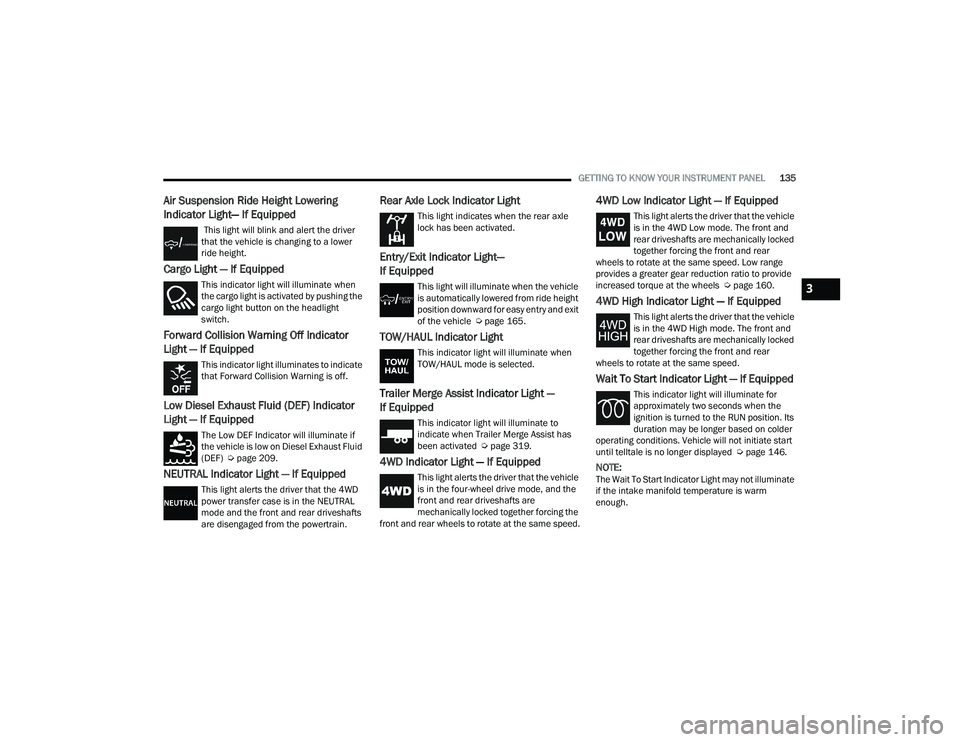
Air Suspension Ride Height Lowering
Indicator Light— If Equipped
This light will blink and alert the driver
that the vehicle is changing to a lower
ride height.
Cargo Light — If Equipped
This indicator light will illuminate when
the cargo light is activated by pushing the
cargo light button on the headlight
switch.
Forward Collision Warning Off Indicator
Light — If Equipped
This indicator light illuminates to indicate
that Forward Collision Warning is off.
Low Diesel Exhaust Fluid (DEF) Indicator
Light — If Equipped
The Low DEF Indicator will illuminate if
the vehicle is low on Diesel Exhaust Fluid
(DEF) Úpage 209.
NEUTRAL Indicator Light — If Equipped
This light alerts the driver that the 4WD
power transfer case is in the NEUTRAL
mode and the front and rear driveshafts
are disengaged from the powertrain.
Rear Axle Lock Indicator Light
This light indicates when the rear axle
lock has been activated.
Entry/Exit Indicator Light—
If Equipped
This light will illuminate when the vehicle
is automatically lowered from ride height
position downward for easy entry and exit
of the vehicle Ú page 165.
TOW/HAUL Indicator Light
This indicator light will illuminate when
TOW/HAUL mode is selected.
Trailer Merge Assist Indicator Light —
If Equipped
This indicator light will illuminate to
indicate when Trailer Merge Assist has
been activated Ú page 319.
4WD Indicator Light — If Equipped
This light alerts the driver that the vehicle
is in the four-wheel drive mode, and the
front and rear driveshafts are
mechanically locked together forcing the
front and rear wheels to rotate at the same speed.
4WD Low Indicator Light — If Equipped
This light alerts the driver that the vehicle
is in the 4WD Low mode. The front and
rear driveshafts are mechanically locked
together forcing the front and rear
wheels to rotate at the same speed. Low range
provides a greater gear reduction ratio to provide
increased torque at the wheels Ú page 160.
4WD High Indicator Light — If Equipped
This light alerts the driver that the vehicle
is in the 4WD High mode. The front and
rear driveshafts are mechanically locked
together forcing the front and rear
wheels to rotate at the same speed.
Wait To Start Indicator Light — If Equipped
This indicator light will illuminate for
approximately two seconds when the
ignition is turned to the RUN position. Its
duration may be longer based on colder
operating conditions. Vehicle will not initiate start
until telltale is no longer displayed Ú page 146.
NOTE:The Wait To Start Indicator Light may not illuminate
if the intake manifold temperature is warm
enough.
3
22_DT_OM_EN_USC_t.book Page 135
Page 152 of 496

150STARTING AND OPERATING
ENGINE BREAK-IN RECOMMENDATIONS —
GASOLINE ENGINE
A long break-in period is not required for the engine
and drivetrain (transmission and axle) in your
vehicle.
Drive moderately during the first 300 miles
(500 km). After the initial 60 miles (100 km),
speeds up to 50 or 55 mph (80 or 90 km/h) are
desirable.
While cruising, brief full-throttle acceleration within
the limits of local traffic laws contributes to a good
break-in. Wide-open throttle acceleration in low
gear can be detrimental and should be avoided.
The engine oil installed in the engine at the factory
is a high-quality energy conserving type lubricant.
Oil changes should be consistent with anticipated
climate conditions under which vehicle operations
will occur. For the recommended viscosity and
quality grades Ú page 473.
NOTE:A new engine may consume some oil during its first
few thousand miles (kilometers) of operation. This
should be considered a normal part of the break-in
and not interpreted as a problem. Please check
your oil level with the engine oil indicator often
during the break-in period. Add oil as required.
ENGINE BREAK-IN RECOMMENDATIONS —
DIESEL ENGINE
The diesel engine does not require a break-in
period due to its construction. Normal operation is
allowed, providing the following recommendations
are followed:
Warm up the engine before placing it under
load.
Do not operate the engine at idle for prolonged
periods.
Observe vehicle oil pressure and temperature
indicators.
Check the coolant and oil levels frequently.
Vary throttle position at highway speeds when
carrying or towing significant weight.
NOTE:Light duty operation such as light trailer towing or
no load operation will extend the time before the
engine is at full efficiency. Reduced fuel economy
and power may be seen at this time. The engine oil installed in the engine at the factory
is a high-quality energy conserving type lubricant.
Oil changes should be consistent with anticipated
climate conditions under which vehicle operations
will occur. For the recommended viscosity and
quality grades Ú
page 473.
NOTE:NON-DETERGENT OR STRAIGHT MINERAL OILS
MUST NEVER BE USED.
PARKING BRAKE
ELECTRIC PARK BRAKE (EPB)
Your vehicle is equipped with an EPB that offers
simple operation, and some additional features
that make the parking brake more convenient and
useful.
The parking brake is primarily intended to prevent
the vehicle from rolling while parked. Before
leaving the vehicle, make sure that the parking
brake is applied. Also, be certain to leave the
transmission in PARK.
You can engage the parking brake in two ways:
Manually, by applying the parking brake switch.
Automatically, by enabling the Auto Park Brake
feature in the Customer Programmable
Features section of the Uconnect settings.
CAUTION!
Never use Non-Detergent Oil or Straight Mineral
Oil in the engine or damage may result.
22_DT_OM_EN_USC_t.book Page 150
Page 160 of 496

158STARTING AND OPERATING
DRIVE (D)
This range should be used for most city and
highway driving. It provides the smoothest upshifts
and downshifts, and the best fuel economy. The
transmission automatically upshifts through all
forward gears.
When frequent transmission shifting occurs (such
as when operating the vehicle under heavy loading
conditions, in hilly terrain, traveling into strong
head winds, or while towing a heavy trailer), select
TOW/HAUL mode or use the Electronic Range
Select (ERS) shift control to select a lower gear
range Úpage 158. Under these conditions, using
a lower gear range will improve performance and
extend transmission life by reducing excessive
shifting and heat buildup.
During extremely cold temperatures (-22°F
[-30°C] or below), transmission operation may be
modified depending on engine and transmission
temperature as well as vehicle speed. Normal
operation will resume once the transmission
temperature has risen to a suitable level.
Transmission Limp Home Mode
Transmission function is monitored electronically
for abnormal conditions. If a condition is detected
that could result in transmission damage,
Transmission Limp Home Mode is activated. In this
mode, the transmission may operate only in
certain gears, or may not shift at all. Vehicle performance may be severely degraded
and the engine may stall. In some situations, the
transmission may not re-engage if the engine is
turned off and restarted. The Malfunction Indicator
Light (MIL) may be illuminated. A message in the
instrument cluster will inform the driver of the
more serious conditions, and indicate what actions
may be necessary.
In the event of a momentary problem, the
transmission can be reset to regain all forward
gears by performing the following steps:
NOTE:In cases where the instrument cluster message
indicates the transmission may not re-engage after
engine shutdown, perform this procedure only in a
desired location (preferably, at an authorized
dealer).
1. Stop the vehicle.
2. Shift the transmission into PARK, if possible.
If not, shift the transmission to NEUTRAL.
3. Push and hold the ignition switch until the engine turns off.
4. Wait approximately 30 seconds.
5. Restart the engine.
6. Shift into the desired gear range. If the problem is no longer detected, the
transmission will return to normal operation.
NOTE:Even if the transmission can be reset, we
recommend that you visit an authorized dealer at
your earliest possible convenience. An authorized
dealer has diagnostic equipment to assess the
condition of your transmission. If the transmission
cannot be reset, an authorized dealer service is
required.
Electronic Range Select (ERS) Operation —
If Equipped
The ERS shift control allows the driver to limit the
highest available gear when the transmission is in
DRIVE and ERS mode is not active. For example, if
you set the transmission gear limit to FOURTH
gear, the transmission will hold that gear and not
shift above FOURTH gear, but will shift through the
lower gears normally.
NOTE:ERS will only upshift during a FIRST to SECOND
gear shift when in 4WD LOW. All other ranges will
hold the gear.
You can switch between DRIVE and ERS mode at
any vehicle speed. When the transmission gear
selector is in DRIVE, the transmission will operate
automatically, shifting between all available gears.
Tapping the “-” button (on the steering wheel) will
activate ERS mode, display the current gear in the
instrument cluster, and set that gear as the top
available gear. Once in ERS mode, tapping the “-”
or “+” button will change the top available gear.
22_DT_OM_EN_USC_t.book Page 158
Page 161 of 496

STARTING AND OPERATING159
Electronic Range Select (ERS)
To exit ERS mode, simply push and hold the “+”
button until the gear limit display disappears from
the instrument cluster.
AutoStick — If Equipped
AutoStick is a driver-interactive transmission
feature providing manual shift control, giving you
more control of the vehicle. AutoStick allows you to maximize engine braking, eliminate undesirable
upshifts and downshifts, and improve overall
vehicle performance. This feature can also provide
you with more control during passing, city driving,
cold slippery conditions, mountain driving, trailer
towing, and many other situations.
Paddle Shifters
Operation
In AutoStick mode, you can use the gear selector
(in the SPORT position), or the paddle shifters, to
manually shift the transmission. To activate
AutoStick mode, move the gear selector into the
SPORT (S) position (beside the DRIVE position), or
tap one of the paddle shifters on the steering
wheel. Tapping the “-” shift paddle to enter AutoStick mode will downshift the transmission to
the next lower gear, while tapping “+” to enter
AutoStick mode will retain the current gear. The
current transmission gear will be displayed in the
instrument cluster.
AutoStick mode has the following operational
benefits:
The transmission will automatically downshift
as the vehicle slows (to prevent engine lugging)
and will display the current gear.
The transmission will automatically downshift to
FIRST gear when coming to a stop. After a stop,
the driver should manually upshift “+” the trans
-
mission as the vehicle is accelerated.
You can start out, from a stop, in FIRST or
SECOND gear (or THIRD gear, in 4WD LOW).
Tapping “+” (at a stop) will allow starting in
SECOND gear. Starting out in SECOND or THIRD
gear can be helpful in snowy or icy conditions.
If a requested downshift would cause the
engine to over-speed, that shift will not occur.
The system will ignore attempts to upshift at too
low of a vehicle speed.
Holding the “-” paddle pressed, or holding the
gear selector in the “-” position, will downshift
the transmission to the lowest gear possible at
the current speed.
1 — Shift Up “+”
2 — Shift Down “–”
WARNING!
Do not downshift for additional engine braking
on a slippery surface. The drive wheels could
lose their grip and the vehicle could skid,
causing a collision or personal injury.
1 — “-” Paddle
2 — “+” Paddle
4
22_DT_OM_EN_USC_t.book Page 159
Page 162 of 496
160STARTING AND OPERATING
Transmission shifting will be more noticeable
when AutoStick is enabled.
The system may revert to automatic shift mode
if a fault or overheat condition is detected.
NOTE:When Selec-Speed or Hill Descent Control is
enabled, AutoStick is not active.
To disengage AutoStick, return the gear selector to
the DRIVE position, or press and hold the “+”
paddle shifter (and the gear selector is already in
DRIVE) until "D" is once again indicated in the
instrument cluster. You can shift in or out of
AutoStick at any time without taking your foot off
the accelerator pedal.
When to Use TOW/HAUL Mode
Select TOW/HAUL mode when driving in conditions
such as: driving in hilly areas, towing a trailer,
carrying a heavy load, etc. This mode will improve
performance and reduce the potential for
transmission overheating or failure due to
excessive shifting.
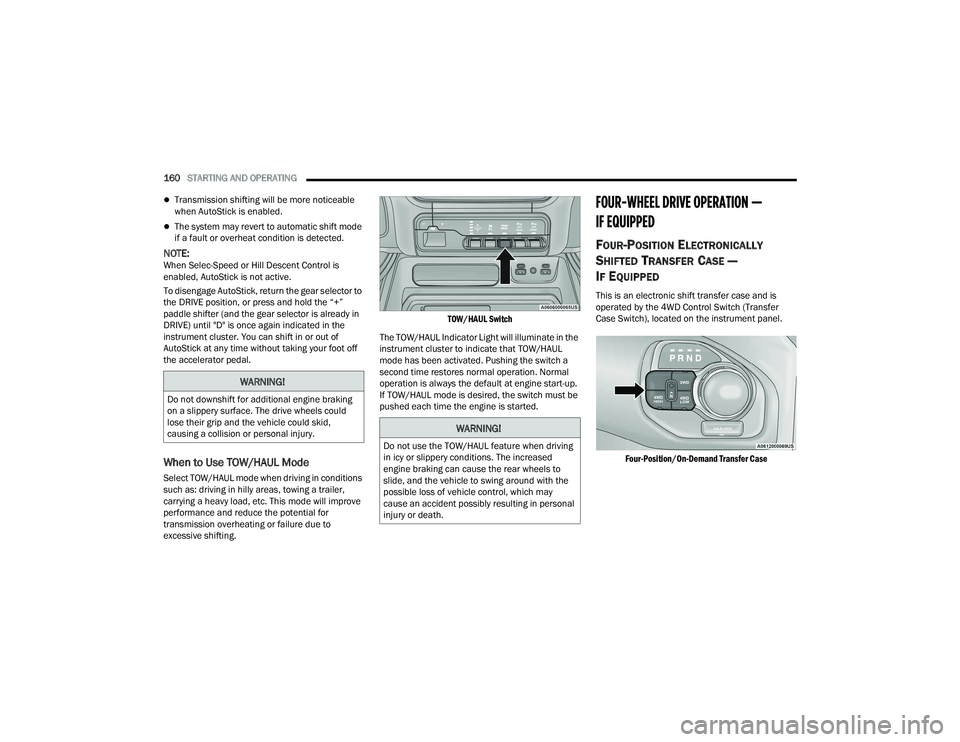
TOW/HAUL Switch
The TOW/HAUL Indicator Light will illuminate in the
instrument cluster to indicate that TOW/HAUL
mode has been activated. Pushing the switch a
second time restores normal operation. Normal
operation is always the default at engine start-up.
If TOW/HAUL mode is desired, the switch must be
pushed each time the engine is started.
FOUR-WHEEL DRIVE OPERATION —
IF EQUIPPED
FOUR-POSITION ELECTRONICALLY
S
HIFTED TRANSFER CASE —
I
F EQUIPPED
This is an electronic shift transfer case and is
operated by the 4WD Control Switch (Transfer
Case Switch), located on the instrument panel.
Four-Position/On-Demand Transfer Case
WARNING!
Do not downshift for additional engine braking
on a slippery surface. The drive wheels could
lose their grip and the vehicle could skid,
causing a collision or personal injury.
WARNING!
Do not use the TOW/HAUL feature when driving
in icy or slippery conditions. The increased
engine braking can cause the rear wheels to
slide, and the vehicle to swing around with the
possible loss of vehicle control, which may
cause an accident possibly resulting in personal
injury or death.
22_DT_OM_EN_USC_t.book Page 160
Page 168 of 496
![RAM 1500 2022 User Guide
166STARTING AND OPERATING
Aero Height (Lowers the vehicle approximately
0.6 inch [15 mm]) – This position provides
improved aerodynamics by lowering the vehicle.
The vehicle will automatica](/img/34/59196/w960_59196-167.png "RAM 1500 2022 User Guide
166STARTING AND OPERATING
Aero Height (Lowers the vehicle approximately
0.6 inch [15 mm]) – This position provides
improved aerodynamics by lowering the vehicle.
The vehicle will automatica")
166STARTING AND OPERATING
Aero Height (Lowers the vehicle approximately
0.6 inch [15 mm]) – This position provides
improved aerodynamics by lowering the vehicle.
The vehicle will automatically enter Automatic
Aero Mode when the vehicle speed remains
between 62 mph (100 km/h) and 66 mph
(106 km/h) for greater than 20 seconds or if the
vehicle speed exceeds 66 mph (106 km/h). The
vehicle will return to NRH from Aero Mode if the
vehicle speed remains between 30 mph
(48 km/h) and 35 mph (56 km/h) for greater
than 20 seconds or if the vehicle speed falls
below 30 mph (48 km/h).
NOTE:
Automatic Aero mode will be disabled if a
trailer is detected to prevent shifting loads.
Speed thresholds for raising/lowering the
vehicle automatically at higher speeds only
apply if Automatic Aero Mode is enabled in
your Uconnect Radio settings.
To enter Aero Height manually push the height
selector switch down once from NRH at any
vehicle speed. To return to NRH push the height
selector switch up once while vehicle speed is
less than 56 mph (90 km/h).
NOTE:Automatic Aero Mode may be disabled through
vehicle settings in the instrument cluster display
Ú page 114 or through your Uconnect Radio (if
equipped) Ú page 234.
Entry/Exit Height (Lowers the vehicle approxi -
mately 2 inches [51 mm]) – This position lowers
the vehicle for easier passenger entry and exit
as well as lowering the vehicle for easier loading
and unloading of cargo. To enter Entry/Exit
Mode, push the height selector switch down
once from the NRH while the vehicle speed is
below 33 mph (53 km/h). Once the vehicle
speed goes below 15 mph (24 km/h) the
vehicle height will begin to lower. If the vehicle
speed remains between 15 mph (24 km/h) and
25 mph (40 km/h) for greater than 60 seconds,
or the vehicle speed exceeds 25 mph (40 km/h)
the Entry/Exit change will be canceled. To return
to Normal Height Mode, push the height
selector switch up once while in Entry/Exit or
drive the vehicle over 15 mph (24 km/h).
NOTE:Entry/Exit Height may be achieved using the
Remote Lowering feature on your key fob for easier
entry/loading Ú page 19. The system requires that the ignition be in the ON/
RUN position or the engine running for all user
requested changes. When lowering the vehicle, all
of the doors must be closed. If a door is opened at
any time while the vehicle is lowering, the change
will not be completed until the open door(s) is
closed.
This system uses a lifting and lowering pattern
which keeps the headlights from incorrectly
shining into oncoming traffic. When raising the
vehicle, the rear of the vehicle will move up first
and then the front. When lowering the vehicle, the
front will move down first and then the rear.
After the engine is turned off, it may be noticed that
the air suspension system operates briefly; this is
normal. The system is correcting the position of the
vehicle to ensure a proper appearance.
To assist with changing a spare tire, the air
suspension system has a feature which allows the
automatic leveling to be disabled Ú
page 114.
CAUTION!
When in ENTRY/EXIT Height, be aware of your
surroundings, you may not have the clearance
required for certain areas and vehicle damage
may occur.
22_DT_OM_EN_USC_t.book Page 166