belt RAM 1500 2023 User Guide
[x] Cancel search | Manufacturer: RAM, Model Year: 2023, Model line: 1500, Model: RAM 1500 2023Pages: 416, PDF Size: 20.59 MB
Page 124 of 416
122STARTING AND OPERATING
ENGINE BREAK-IN RECOMMENDATIONS
A long break-in period is not required for the engine and
drivetrain (transmission and axle) in your vehicle.
Drive moderately during the first 300 miles (500 km).
After the initial 60 miles (100 km), speeds up to 50 or
55 mph (80 or 90 km/h) are desirable.
While cruising, brief full-throttle acceleration within the
limits of local traffic laws contributes to a good break-in.
Wide-open throttle acceleration in low gear can be
detrimental and should be avoided.
The engine oil installed in the engine at the factory is a
high-quality energy conserving type lubricant. Oil changes
should be consistent with anticipated climate conditions
under which vehicle operations will occur. For the
recommended viscosity and quality grades
Úpage 396.
NOTE:A new engine may consume some oil during its first few
thousand miles (kilometers) of operation. This should be
considered a normal part of the break-in and not inter -
preted as a problem. Please check your oil level with the
engine oil indicator often during the break-in period. Add
oil as required.
PARKING BRAKE
ELECTRIC PARK BRAKE (EPB)
Your vehicle is equipped with an EPB that offers simple
operation, and some additional features that make the
parking brake more convenient and useful.
The parking brake is primarily intended to prevent the
vehicle from rolling while parked. Before leaving the
vehicle, make sure that the parking brake is applied. Also,
be certain to leave the transmission in PARK.
You can engage the parking brake in two ways:
Manually, by applying the parking brake switch.
Automatically, by enabling the Auto Park Brake feature
in the Customer Programmable Features section of the
Uconnect settings.
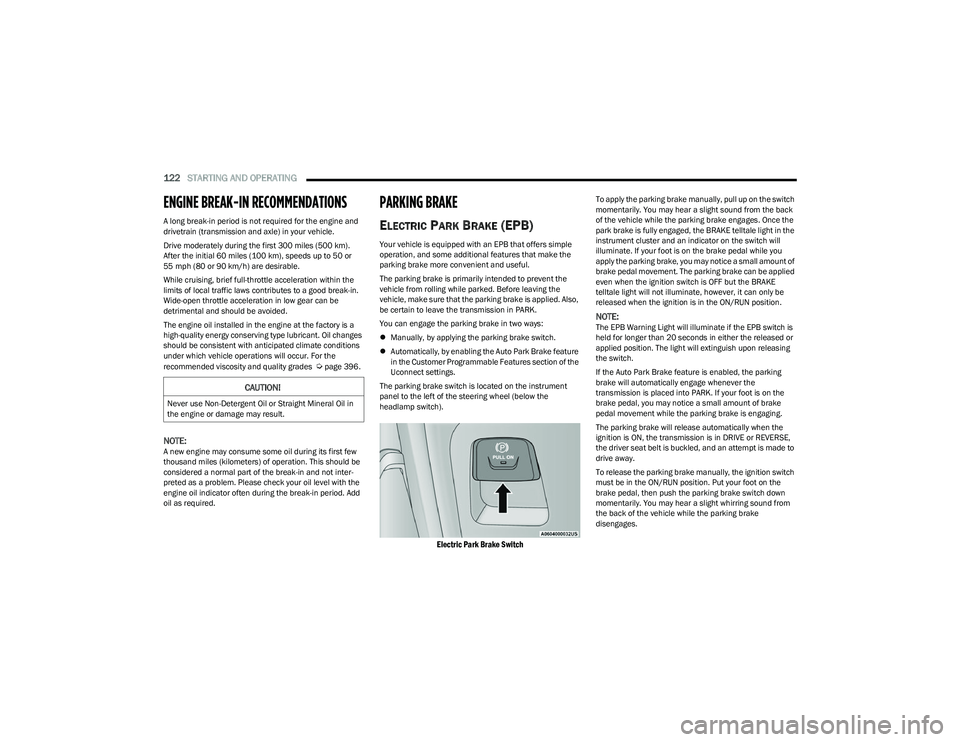
The parking brake switch is located on the instrument
panel to the left of the steering wheel (below the
headlamp switch).
Electric Park Brake Switch
To apply the parking brake manually, pull up on the switch
momentarily. You may hear a slight sound from the back
of the vehicle while the parking brake engages. Once the
park brake is fully engaged, the BRAKE telltale light in the
instrument cluster and an indicator on the switch will
illuminate. If your foot is on the brake pedal while you
apply the parking brake, you may notice a small amount of
brake pedal movement. The parking brake can be applied
even when the ignition switch is OFF but the BRAKE
telltale light will not illuminate, however, it can only be
released when the ignition is in the ON/RUN position.
NOTE:The EPB Warning Light will illuminate if the EPB switch is
held for longer than 20 seconds in either the released or
applied position. The light will extinguish upon releasing
the switch.
If the Auto Park Brake feature is enabled, the parking
brake will automatically engage whenever the
transmission is placed into PARK. If your foot is on the
brake pedal, you may notice a small amount of brake
pedal movement while the parking brake is engaging.
The parking brake will release automatically when the
ignition is ON, the transmission is in DRIVE or REVERSE,
the driver seat belt is buckled, and an attempt is made to
drive away.
To release the parking brake manually, the ignition switch
must be in the ON/RUN position. Put your foot on the
brake pedal, then push the parking brake switch down
momentarily. You may hear a slight whirring sound from
the back of the vehicle while the parking brake
disengages.
CAUTION!
Never use Non-Detergent Oil or Straight Mineral Oil in
the engine or damage may result.
23_DT_OM_EN_USC_t.book Page 122
Page 126 of 416

124STARTING AND OPERATING
(Continued)
SafeHold
SafeHold is a safety feature of the Electric Park Brake
(EPB) system that will engage the parking brake
automatically if the vehicle is left unsecured while the
ignition is in ON/RUN.
The parking brake will automatically engage if all of the
following conditions are met:
The vehicle is at a standstill.
There is no attempt to press the brake pedal and accel -
erator pedal.
The seat belt is unbuckled.
The driver door is open.
SafeHold can be temporarily bypassed by pushing the EPB
switch while the driver door is open. Once manually
bypassed, SafeHold will be enabled again once the vehicle
reaches 12 mph (20 km/h) or the ignition is turned to the
OFF position and back to ON again.
Brake Service Mode
We recommend having your brakes serviced by an
authorized dealer. You should only make repairs for which
you have the knowledge and the right equipment.
You should only enter Brake Service mode during
brake service. When servicing your rear brakes, it may be necessary for
you or your technician to push the rear piston into the rear
caliper bore. With the Electric Park Brake (EPB) system,
this can only be done after retracting the EPB actuator.
Fortunately, actuator retraction can be done easily by
entering the Brake Service mode through the Uconnect
Settings in your vehicle. This menu-based system will
guide you through the steps necessary to retract the EPB
actuator in order to perform rear brake service.
Service Mode has requirements that must be met in order
to be activated:
The vehicle must be at a standstill.
The parking brake must be unapplied.
The transmission must be in PARK or NEUTRAL.
While in Service Mode, the EPB Warning Light will flash
continuously while the ignition is in ON/RUN.
When brake service work is complete, the following steps
must be followed to reset the park brake system to normal
operation:
Ensure the vehicle is at a standstill.
Press the brake pedal with moderate force.
Apply the EPB Switch.
AUTOMATIC TRANSMISSION
You must press and hold the brake pedal while shifting out
of PARK.
WARNING!
You can be badly injured working on or around a motor
vehicle. Do only that service work for which you have
the knowledge and the right equipment. If you have any
doubt about your ability to perform a service job, take
your vehicle to a competent mechanic.
WARNING!
Never use the PARK position as a substitute for the
parking brake. Always apply the parking brake fully
when exiting the vehicle to guard against vehicle
movement and possible injury or damage.
Your vehicle could move and injure you and others if
it is not in PARK. Check by trying to move the trans -
mission gear selector out of PARK with the brake
pedal released. Make sure the transmission is in
PARK before exiting the vehicle.
The transmission may not engage PARK if the vehicle
is moving. Always bring the vehicle to a complete
stop before shifting to PARK, and verify that the
transmission gear position indicator solidly indicates
PARK (P) without blinking. Ensure that the vehicle is
completely stopped, and the PARK position is prop -
erly indicated, before exiting the vehicle.
It is dangerous to shift out of PARK or NEUTRAL if the
engine speed is higher than idle speed. If your foot is
not firmly pressing the brake pedal, the vehicle could
accelerate quickly forward or in reverse. You could
lose control of the vehicle and hit someone or
something. Only shift into gear when the engine is
idling normally and your foot is firmly pressing the
brake pedal.
23_DT_OM_EN_USC_t.book Page 124
Page 144 of 416

142STARTING AND OPERATING
To Activate The Autostop Mode, The Following Must Occur:
1. The system must be in STOP/START READY state. A
STOP/START READY message is displayed in the
instrument cluster within the Stop/Start section
Ú
page 98.
2. The vehicle must be decelerating and likely coming to a complete stop.
3. The transmission gear selector must be in DRIVE and the brake pedal pressed.
The engine will shut down, the tachometer will move to the
zero position and the Stop/Start telltale will illuminate
indicating you are in an Autostop. While in an Autostop,
the Climate Controls system may automatically adjust
airflow to maintain cabin comfort. Customer settings will
be maintained upon return to an engine running condition.
POSSIBLE REASONS THE ENGINE DOES
N
OT AUTOSTOP
Prior to engine shut down, the system will check many
safety and comfort conditions to see if they are fulfilled.
In following situations, the engine will not Autostop:
Driver’s seat belt is not buckled
Driver’s door is not closed
The vehicle is on a steep grade
Cabin heating or cooling is in process and an accept -
able cabin temperature has not been achieved
HVAC is set to full defrost mode at a high blower speed
Engine has not reached normal operating temperature
Engine or exhaust temperature is too high
The battery is charging
The transmission is not in DRIVE
Hood is open
Transfer case is in 4WD LOW
TOW/HAUL mode is selected
Accelerator pedal input
Excessive 12 Volt loads
Brake application is adequate to obtain and maintain
a stop
It may be possible to operate the vehicle several
consecutive times in extreme conditions and not meet all
criteria to enable an Autostop state.TO START THE ENGINE WHILE IN
A
UTOSTOP MODE
While in DRIVE, the engine will start when the brake pedal
is released or the accelerator pedal is pressed and the
transmission will automatically reengage upon engine
restart. Conditions That Will Cause The Engine To Start
Automatically While In Autostop Mode
The engine will start automatically when:
The transmission selector is moved from DRIVE to
REVERSE, NEUTRAL, or PARK
To maintain cabin temperature near the HVAC settings
HVAC is set to full defrost mode
12 Volt demand requires engine restart
Stop/Start OFF switch is pushed
Transfer case is in 4WD LOW
The emissions system override is present
A Stop/Start system error is present
Conditions That Force An Automatic Shift To Park While In
Autostop Mode
The engine will not start automatically and the
transmission will be placed in PARK if:
The driver door is open and brake pedal released
The driver door is open and the driver seat belt is
unbuckled
The engine hood has been opened
A Stop/Start system error is present
The engine may then be restarted by moving the
transmission shift selector out of PARK (e.g., to DRIVE) or,
in some cases, only by a key start. The instrument cluster
will display a “SHIFT OUT OF PARK” message, or a
“STOP/START KEY START REQUIRED” message, to
indicate which action is required
Úpage 98.
23_DT_OM_EN_USC_t.book Page 142
Page 148 of 416
146STARTING AND OPERATING
Adaptive Cruise Control (ACC) Operation
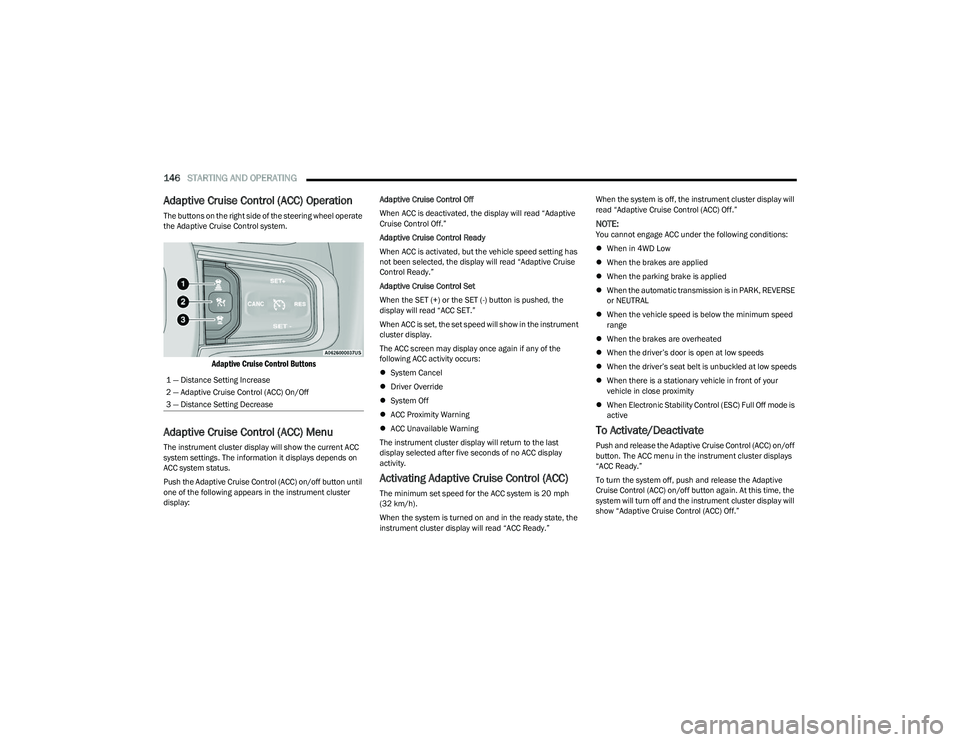
The buttons on the right side of the steering wheel operate
the Adaptive Cruise Control system.
Adaptive Cruise Control Buttons
Adaptive Cruise Control (ACC) Menu
The instrument cluster display will show the current ACC
system settings. The information it displays depends on
ACC system status.
Push the Adaptive Cruise Control (ACC) on/off button until
one of the following appears in the instrument cluster
display: Adaptive Cruise Control Off
When ACC is deactivated, the display will read “Adaptive
Cruise Control Off.”
Adaptive Cruise Control Ready
When ACC is activated, but the vehicle speed setting has
not been selected, the display will read “Adaptive Cruise
Control Ready.”
Adaptive Cruise Control Set
When the SET (+) or the SET (-) button is pushed, the
display will read “ACC SET.”
When ACC is set, the set speed will show in the instrument
cluster display.
The ACC screen may display once again if any of the
following ACC activity occurs:
System Cancel
Driver Override
System Off
ACC Proximity Warning
ACC Unavailable Warning
The instrument cluster display will return to the last
display selected after five seconds of no ACC display
activity.
Activating Adaptive Cruise Control (ACC)
The minimum set speed for the ACC system is 20 mph
(32 km/h).
When the system is turned on and in the ready state, the
instrument cluster display will read “ACC Ready.” When the system is off, the instrument cluster display will
read “Adaptive Cruise Control (ACC) Off.”
NOTE:You cannot engage ACC under the following conditions:
When in 4WD Low
When the brakes are applied
When the parking brake is applied
When the automatic transmission is in PARK, REVERSE
or NEUTRAL
When the vehicle speed is below the minimum speed
range
When the brakes are overheated
When the driver’s door is open at low speeds
When the driver’s seat belt is unbuckled at low speeds
When there is a stationary vehicle in front of your
vehicle in close proximity
When Electronic Stability Control (ESC) Full Off mode is
active
To Activate/Deactivate
Push and release the Adaptive Cruise Control (ACC) on/off
button. The ACC menu in the instrument cluster displays
“ACC Ready.”
To turn the system off, push and release the Adaptive
Cruise Control (ACC) on/off button again. At this time, the
system will turn off and the instrument cluster display will
show “Adaptive Cruise Control (ACC) Off.”
1 — Distance Setting Increase
2 — Adaptive Cruise Control (ACC) On/Off
3 — Distance Setting Decrease
23_DT_OM_EN_USC_t.book Page 146
Page 149 of 416
STARTING AND OPERATING147
To Set A Desired ACC Speed
When the vehicle reaches the speed desired, push the
SET (+) button or the SET (-) button and release. The
instrument cluster display will show the set speed.
NOTE:Fixed Speed Cruise Control can be used without ACC
enabled. To change between the different modes, push
the ACC on/off button which turns the ACC and the Fixed
Speed Cruise Control off. Pushing the Fixed Speed Cruise
Control on/off button will result in turning on (changing to)
Fixed Speed Cruise Control mode. If ACC is set when the vehicle speed is
below 20 mph
(32 km/h), the set speed will default to 20 mph
(32 km/h).
NOTE:Fixed Speed Cruise Control cannot be set below 20 mph
(32 km/h).
If either system is set when the vehicle speed is above
20 mph (32 km/h), the set speed shall be the current speed of the vehicle.
NOTE:
Keeping your foot on the accelerator pedal can cause
the vehicle to continue to accelerate beyond the set
speed. If this occurs, the message “ACC DRIVER
OVERRIDE” will display in the instrument cluster
display.
If you continue to accelerate beyond the set speed
while ACC is enabled, the system will not control the
distance between your vehicle and the vehicle ahead.
The vehicle speed will only be determined by the posi -
tion of the accelerator pedal.
To Cancel
The following conditions cancel the ACC or Fixed Speed
Cruise Control systems:
The brake pedal is applied
The CANC (cancel) button is pushed
The Anti-Lock Brake System (ABS) activates
The trailer brake is applied manually (if equipped)
The gear selector is removed from the DRIVE position
The Electronic Stability Control/Traction Control
System (ESC/TCS) activates
The vehicle parking brake is applied
The Trailer Sway Control (TSC) activates
The driver switches ESC to Full Off mode
The braking temperature exceeds normal range
(overheated)
The following conditions will only cancel the ACC system:
Driver seat belt is unbuckled at low speeds
Driver door is opened at low speeds
To Turn Off
The system will turn off and clear the set speed in
memory if:
The Adaptive Cruise Control (ACC) on/off button is
pushed
The Fixed Speed Cruise Control on/off button is pushed
The ignition is placed in the OFF position
4WD Low is engaged
To Resume
If there is a set speed in memory, push the RES (resume)
button and then remove your foot from the accelerator
pedal. The instrument cluster display will show the last set
speed.
Resume can be used at any speed above 20 mph
(32 km/h) when only Fixed Speed Cruise Control is being
used.
WARNING!
Leaving the Adaptive Cruise Control (ACC) system on
when not in use is dangerous. You could accidentally
set the system or cause it to go faster than you want.
You could lose control and have a collision. Always leave
the system off when you are not using it.
WARNING!
In Fixed Speed Cruise Control mode, the system will not
react to vehicles ahead. In addition, the proximity
warning does not activate and no alarm will sound even
if you are too close to the vehicle ahead since neither
the presence of the vehicle ahead nor the
vehicle-to-vehicle distance is detected. Be sure to
maintain a safe distance between your vehicle and the
vehicle ahead. Always be aware which mode is
selected.
4
23_DT_OM_EN_USC_t.book Page 147
Page 151 of 416

STARTING AND OPERATING149
Distance Settings
To increase the distance setting, push the Distance
Increase button and release. Each time the button is
pushed, the distance setting increases by one bar (longer).
To decrease the distance setting, push the Distance
Decrease button and release. Each time the button is
pushed, the distance setting decreases by one bar
(shorter).
If there is no vehicle ahead, the vehicle will maintain the
set speed. If a slower moving vehicle is detected in the
same lane, the instrument cluster displays the ACC Set
With Target Detected Indicator Light, and the system
adjusts vehicle speed automatically to maintain the
distance setting, regardless of the set speed. The vehicle will then maintain the set distance until:
The vehicle ahead accelerates to a speed above the
set speed.
The vehicle ahead moves out of your lane or view of the
sensor.
The distance setting is changed.
The system disengages.
The maximum braking applied by ACC is limited; however,
the driver can always apply the brakes manually, if
necessary.
NOTE:The brake lights will illuminate whenever the ACC system
applies the brakes.
A Proximity Warning will alert the driver if ACC predicts that
its maximum braking level is not sufficient to maintain the
set distance. If this occurs, a visual alert “BRAKE!” will
flash in the instrument cluster display and a chime will
sound while ACC continues to apply its maximum braking
capacity.
NOTE:The “BRAKE!” screen in the instrument cluster display is a
warning for the driver to take action and does not mean
that the Forward Collision Warning system is applying the
brakes autonomously.
Overtake Aid
When driving with Adaptive Cruise Control (ACC) engaged,
and following a vehicle, the system will provide an
additional acceleration up to the ACC set speed to assist
in passing the vehicle. This additional acceleration is
triggered when the driver utilizes the left turn signal and
will only be active when passing on the left hand side.
ACC Operation At Stop
In the event that the ACC system brings your vehicle to a
standstill while following the vehicle in front, if the vehicle
in front starts moving within two seconds of your vehicle
coming to a standstill, your vehicle will resume motion
without the need for any driver action.
If the vehicle in front does not start moving within two
seconds of your vehicle coming to a standstill, the driver
will either have to push the RES (resume) button, or apply
the accelerator pedal to reengage the ACC to the existing
set speed.
NOTE:After the ACC system holds your vehicle at a standstill for
approximately three consecutive minutes, the parking
brake will be activated, and the ACC system will be
canceled.
While ACC is holding your vehicle at a standstill, if the
driver seat belt is unbuckled or the driver door is opened,
the parking brake will be activated, and the ACC system
will be canceled.
1 — Longest Distance Setting (Four Bars)
2 — Medium Distance Setting (Two Bars)
3 — Long Distance Setting (Three Bars)
4 — Short Distance Setting (One Bar)
WARNING!
When the ACC system is resumed, the driver must
ensure that there are no pedestrians, vehicles or
objects in the path of the vehicle. Failure to follow these
warnings can result in a collision and death or serious
personal injury.
4
23_DT_OM_EN_USC_t.book Page 149
Page 180 of 416
178STARTING AND OPERATING
Using TRSC
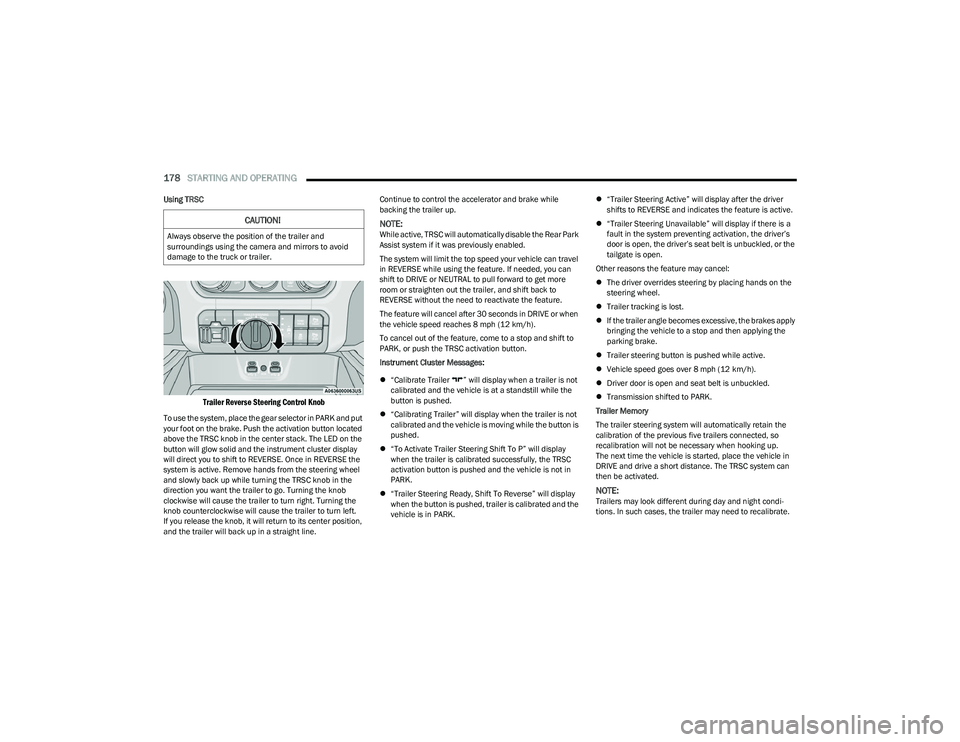
Trailer Reverse Steering Control Knob
To use the system, place the gear selector in PARK and put
your foot on the brake. Push the activation button located
above the TRSC knob in the center stack. The LED on the
button will glow solid and the instrument cluster display
will direct you to shift to REVERSE. Once in REVERSE the
system is active. Remove hands from the steering wheel
and slowly back up while turning the TRSC knob in the
direction you want the trailer to go. Turning the knob
clockwise will cause the trailer to turn right. Turning the
knob counterclockwise will cause the trailer to turn left.
If you release the knob, it will return to its center position,
and the trailer will back up in a straight line. Continue to control the accelerator and brake while
backing the trailer up.
NOTE:While active, TRSC will automatically disable the Rear Park
Assist system if it was previously enabled.
The system will limit the top speed your vehicle can travel
in REVERSE while using the feature. If needed, you can
shift to DRIVE or NEUTRAL to pull forward to get more
room or straighten out the trailer, and shift back to
REVERSE without the need to reactivate the feature.
The feature will cancel after 30 seconds in DRIVE or when
the vehicle speed reaches 8 mph (12 km/h).
To cancel out of the feature, come to a stop and shift to
PARK, or push the TRSC activation button.
Instrument Cluster Messages:
“Calibrate Trailer ” will display when a trailer is not
calibrated and the vehicle is at a standstill while the
button is pushed.
“Calibrating Trailer” will display when the trailer is not
calibrated and the vehicle is moving while the button is
pushed.
“To Activate Trailer Steering Shift To P” will display
when the trailer is calibrated successfully, the TRSC
activation button is pushed and the vehicle is not in
PARK.
“Trailer Steering Ready, Shift To Reverse” will display
when the button is pushed, trailer is calibrated and the
vehicle is in PARK.
“Trailer Steering Active” will display after the driver
shifts to REVERSE and indicates the feature is active.
“Trailer Steering Unavailable” will display if there is a
fault in the system preventing activation, the driver’s
door is open, the driver’s seat belt is unbuckled, or the
tailgate is open.
Other reasons the feature may cancel:
The driver overrides steering by placing hands on the
steering wheel.
Trailer tracking is lost.
If the trailer angle becomes excessive, the brakes apply
bringing the vehicle to a stop and then applying the
parking brake.
Trailer steering button is pushed while active.
Vehicle speed goes over 8 mph (12 km/h).
Driver door is open and seat belt is unbuckled.
Transmission shifted to PARK.
Trailer Memory
The trailer steering system will automatically retain the
calibration of the previous five trailers connected, so
recalibration will not be necessary when hooking up.
The next time the vehicle is started, place the vehicle in
DRIVE and drive a short distance. The TRSC system can
then be activated.
NOTE:Trailers may look different during day and night condi -
tions. In such cases, the trailer may need to recalibrate.
CAUTION!
Always observe the position of the trailer and
surroundings using the camera and mirrors to avoid
damage to the truck or trailer.
23_DT_OM_EN_USC_t.book Page 178
Page 189 of 416

STARTING AND OPERATING187
(Continued)
RECREATIONAL TOWING —
F
OUR-WHEEL DRIVE MODELS
NOTE:The transfer case must be shifted into N (Neutral) for
recreational towing. The transmission must be shifted into
PARK for recreational towing. Refer to the following for the
proper transfer case N (Neutral) shifting procedure for
your vehicle.
Shifting Into N (Neutral)
Use the following procedure to prepare your vehicle for
recreational towing.
1. Bring the vehicle to a complete stop on level ground,
with the engine running. Apply the parking brake.
2. Press and hold the brake pedal.
3. Shift the transmission to NEUTRAL. The driver's door must be closed (or the driver's seat belt buckled) so
that the transmission will remain in NEUTRAL when
the brake pedal is released.
NOTE:If vehicle is equipped with air suspension, ensure the
vehicle is set to Normal Ride Height.
4. Using a ballpoint pen or similar object, push and hold the recessed transfer case N (Neutral) button (at the
center of the transfer case switches). The N (Neutral)
indicator light will illuminate, and remain lit, when the
shift to N (Neutral) is complete. After the shift is
completed and the N (Neutral) light stays on, release
the N (Neutral) button.
CAUTION!
DO NOT dolly tow any 4WD vehicle. Towing with only
one set of wheels on the ground (front or rear) will
cause severe transmission and/or transfer case
damage. Tow with all four wheels either ON the
ground, or OFF the ground (using a vehicle trailer).
Tow only in the forward direction. Towing this vehicle
backwards can cause severe damage to the transfer
case.
Before recreational towing, the transfer case must
be in N (Neutral). To be certain the transfer case is
fully in N (Neutral), perform the procedure outlined
under “Shifting Into N (Neutral)”. Internal transmis -
sion damage will result, if the transfer case is not in
N (Neutral) during towing.
The transmission must be in PARK for recreational
towing.
Ensure that the Electric Park Brake is released, and
remains released, while being towed.
Towing this vehicle in violation of the above require -
ments can cause severe transmission and/or
transfer case damage. Damage from improper
towing is not covered under the New Vehicle Limited
Warranty.
Do not disconnect the rear driveshaft because fluid
will leak from the transfer case, causing damage to
internal parts.
Do not use a fascia/bumper-mounted clamp-on tow
bar on your vehicle. The fascia/bumper face bar will
be damaged.
WARNING!
You or others could be injured or killed if you leave the
vehicle unattended with the transfer case in the N
(Neutral) position without first fully engaging the
parking brake. The transfer case N (Neutral) position
disengages both the front and rear driveshafts from the
powertrain and will allow the vehicle to roll, even if the
transmission is in PARK. The parking brake should
always be applied when the driver is not in the vehicle.
CAUTION!CAUTION!
It is necessary to follow these steps to be certain that
the transfer case is fully in N (Neutral) before
recreational towing to prevent damage to internal parts.
4
23_DT_OM_EN_USC_t.book Page 187
Page 284 of 416
282SAFETY
OCCUPANT RESTRAINT SYSTEMS
Some of the most important safety features in your vehicle
are the restraint systems:
OCCUPANT RESTRAINT SYSTEMS
F
EATURES
Seat Belt Systems
Supplemental Restraint Systems (SRS) Air Bags
Child Restraints
Some of the safety features described in this section may
be standard equipment on some models, or may be
optional equipment on others. If you are not sure, ask an
authorized dealer.
IMPORTANT SAFETY PRECAUTIONS
Please pay close attention to the information in this
section. It tells you how to use your restraint system
properly, to keep you and your passengers as safe as
possible.
Here are some simple steps you can take to minimize the
risk of harm from a deploying air bag:
1. Children 12 years old and under should always ride buckled up in the rear seat of a vehicle with
a rear seat.
2. A child who is not big enough to wear the vehicle seat belt properly must be secured in the appropriate child
restraint or belt-positioning booster seat in a rear
seating position
Úpage 298. 3. If a child from 2 to 12 years old (not in a rear-facing
child restraint) must ride in the front passenger seat,
move the seat as far back as possible and use the
proper child restraint
Úpage 298.
4. Never allow children to slide the shoulder belt behind them or under their arm.
5. You should read the instructions provided with your child restraint to make sure that you are using it
properly.
6. All occupants should always wear their lap and shoulder belts properly.
7. The driver and front passenger seats should be moved back as far as practical to allow the front air
bags room to inflate.
8. Do not lean against the door or window. If your vehicle has side air bags, and deployment occurs, the side air
bags will inflate forcefully into the space between
occupants and the door and occupants could be
injured.
9. If the air bag system in this vehicle needs to be modified to accommodate a disabled person, see
Úpage 398 for customer service contact
information.
SEAT BELT SYSTEMS
Buckle up even though you are an excellent driver, even
on short trips. Someone on the road may be a poor driver
and could cause a collision that includes you. This can
happen far away from home or on your own street.
Research has shown that seat belts save lives, and they
can reduce the seriousness of injuries in a collision. Some
of the worst injuries happen when people are thrown from
the vehicle. Seat belts reduce the possibility of ejection
and the risk of injury caused by striking the inside of the
vehicle. Everyone in a motor vehicle should be belted at all
times.
WARNING!
Never place a rear-facing child restraint in front of an
air bag. A deploying passenger front air bag can
cause death or serious injury to a child 12 years or
younger, including a child in a rear-facing child
restraint.
Never install a rear-facing child restraint in the front
seat of a vehicle. Only use a rear-facing child
restraint in the rear seat. If the vehicle does not have
a rear seat, do not transport a rear-facing child
restraint in that vehicle.
23_DT_OM_EN_USC_t.book Page 282
Page 285 of 416
SAFETY283
(Continued)
Enhanced Seat Belt Use Reminder System
(BeltAlert)
Driver And Passenger BeltAlert — If Equipped
BeltAlert is a feature intended to remind the
driver and outboard front seat passenger (if
equipped with outboard front passenger seat
BeltAlert) to buckle their seat belts. The
BeltAlert feature is active whenever the ignition switch is
in the START or ON/RUN position.
Initial Indication
If the driver is unbuckled when the ignition switch is first in
the START or ON/RUN position, a chime will signal for a
few seconds. If the driver or outboard front seat passenger
(if equipped with outboard front passenger seat BeltAlert)
is unbuckled when the ignition switch is first in the START
or ON/RUN position the Seat Belt Reminder Light will turn
on and remain on until both outboard front seat belts are
buckled. The outboard front passenger seat BeltAlert is
not active when an outboard front passenger seat is
unoccupied.
BeltAlert Warning Sequence
The BeltAlert warning sequence is activated when the
vehicle is moving above a specified vehicle speed range
and the driver or outboard front seat passenger is
unbuckled (if equipped with outboard front passenger
seat BeltAlert) (the outboard front passenger seat
BeltAlert is not active when the outboard front passenger
seat is unoccupied). The BeltAlert warning sequence
starts by blinking the Seat Belt Reminder Light and
sounding an intermittent chime. Once the BeltAlert
warning sequence has completed, the Seat Belt Reminder
Light will remain on until the seat belts are buckled. The BeltAlert warning sequence may repeat based on
vehicle speed until the driver and occupied outboard front
seat passenger seat belts are buckled. The driver should
instruct all occupants to buckle their seat belts.
Change Of Status
If the driver or outboard front seat passenger
(if equipped with outboard front passenger seat BeltAlert)
unbuckles their seat belt while the vehicle is traveling, the
BeltAlert warning sequence will begin until the seat belts
are buckled again.
The outboard front passenger seat BeltAlert is not active
when the outboard front passenger seat is unoccupied.
BeltAlert may be triggered when an animal or other items
are placed on the outboard front passenger seat or when
the seat is folded flat (if equipped). It is recommended that
pets be restrained in the rear seat (if equipped) in pet
harnesses or pet carriers that are secured by seat belts,
and cargo is properly stowed.
BeltAlert can be activated or deactivated by an authorized
dealer. FCA US LLC does not recommend deactivating
BeltAlert.
NOTE:If BeltAlert has been deactivated and the driver or
outboard front seat passenger (if equipped with outboard
front passenger seat BeltAlert) is unbuckled the Seat Belt
Reminder Light will turn on and remain on until the driver
and outboard front seat passenger seat belts are buckled.
Lap/Shoulder Belts
All seating positions in your vehicle are equipped with lap/
shoulder belts.
The seat belt webbing retractor will lock only during very
sudden stops or collisions. This feature allows the
shoulder part of the seat belt to move freely with you
under normal conditions. However, in a collision the seat
belt will lock and reduce your risk of striking the inside of
the vehicle or being thrown out of the vehicle.
WARNING!
Relying on the air bags alone could lead to more
severe injuries in a collision. The air bags work with
your seat belt to restrain you properly. In some colli -
sions, the air bags won’t deploy at all. Always wear
your seat belt even though you have air bags.
In a collision, you and your passengers can suffer
much greater injuries if you are not properly buckled
up. You can strike the interior of your vehicle or other
passengers, or you can be thrown out of the vehicle.
Always be sure you and others in your vehicle are
buckled up properly.
It is dangerous to ride in a cargo area, inside or
outside of a vehicle. In a collision, people riding in
these areas are more likely to be seriously injured
or killed.
6
23_DT_OM_EN_USC_t.book Page 283