weight RAM 1500 2023 Owners Manual
[x] Cancel search | Manufacturer: RAM, Model Year: 2023, Model line: 1500, Model: RAM 1500 2023Pages: 416, PDF Size: 20.59 MB
Page 7 of 416
5
VEHICLE LOADING .......................................................... 172Gross Vehicle Weight Rating (GVWR) ..................... 172
Payload ...................................................................... 172
Gross Axle Weight Rating (GAWR)............................ 172
Tire Size ..................................................................... 172Rim Size ..................................................................... 172Inflation Pressure ...................................................... 172Curb Weight ............................................................... 172
Loading ...................................................................... 172
TRAILER TOWING ............................................................ 173 Common Towing Definitions .................................... 173
Trailer Hitch Type and Maximum Trailer Weight ..... 176Trailer Towing Weights
(Maximum Trailer Weight Ratings) .......................... 176Trailer And Tongue Weight ...................................... 176
Trailer Reverse Steering
Control — If Equipped................................................ 177Towing Requirements .............................................. 179
Towing Tips ............................................................... 184
SNOWPLOW ..................................................................... 184 Before Plowing .......................................................... 185
Snowplow Prep Package Model Availability ............ 185Over The Road Operation With Snowplow
Attached .................................................................... 185Operating Tips ........................................................... 185
General Maintenance ............................................... 185
RECREATIONAL TOWING (BEHIND MOTORHOME) .... 186 Towing This Vehicle Behind Another Vehicle .......... 186
Recreational Towing — Two-Wheel Drive Models ... 186
Recreational Towing — Four-Wheel Drive Models... 187 DRIVING TIPS ................................................................... 189
Driving On Slippery Surfaces .................................. 189
Driving Through Water ............................................. 189
Off-Road Driving Tips ............................................... 190
MULTIMEDIA
UCONNECT SYSTEMS ..................................................... 191
CYBERSECURITY ............................................................. 191
UCONNECT SETTINGS .................................................... 191 Customer Programmable Features ........................ 192
UCONNECT INTRODUCTION............................................ 215 System Overview....................................................... 215
Safety And General Information ............................. 217
UCONNECT MODES ......................................................... 218 Steering Wheel Audio Controls ............................... 218
Radio Mode .............................................................. 218
Media Mode ............................................................. 226
Phone Mode ............................................................. 228
CONNECTED VEHICLE SERVICES —
IF EQUIPPED .................................................................... 236 Is My Vehicle Connected? ........................................ 236
Introduction To Connected Vehicle Services ......... 237
Getting Started With Connected Vehicle
Services .................................................................... 238
Using SiriusXM Guardian™ ..................................... 239
Manage My SiriusXM Guardian™ Account ............. 248
CONNECTED SERVICES FAQS ....................................... 248 Connected Services SOS FAQs — If Equipped ....... 248Connected Services Remote Door
Lock/Unlock FAQs ................................................... 249 Connected Services Roadside Assistance FAQs .... 249
Connected Services Send & Go FAQs —
If Equipped ................................................................ 249
Connected Services Vehicle Finder FAQs ............... 249
Connected Services Stolen Vehicle
Assistance FAQs — If Equipped ............................... 250Connected Services Remote Vehicle
Start FAQs ................................................................. 250
Connected Services Remote Horn & Lights
FAQs ........................................................................... 250Connected Services Account FAQs —
If Equipped................................................................. 251
Data Collection & Privacy.......................................... 252
RADIO OPERATION AND MOBILE PHONES .................252 Regulatory And Safety Information .......................... 253
PERFORMANCE PAGES — IF EQUIPPED .......................253 Timers ........................................................................ 253
Gauges ....................................................................... 254
G-Force ....................................................................... 254
Dynamometer (Dyno)/Engine ................................... 255
Vehicle Dynamics ...................................................... 255
OFF-ROAD PAGES — IF EQUIPPED ................................256 Off-Road Pages Status Bar ...................................... 257Vehicle Dynamics ..................................................... 258Accessory Gauge ....................................................... 259
Pitch & Roll ................................................................ 260
Suspension — If Equipped ........................................ 261Forward Facing Camera — If Equipped .................... 261
23_DT_OM_EN_USC_t.book Page 5
Page 11 of 416

9
SYMBOLS KEY
If you do not read the entire Owner’s Manual, you may miss important information.
Observe all Cautions and Warnings.
VAN CONVERSIONS/CAMPERS
The New Vehicle Limited Warranty does not apply to body modifications or special
equipment installed by van conversion/camper manufacturers/body builders.
US residents refer to the Warranty Information, Section 2.1.C. Canadian residents refer to
the “What Is Not Covered” section of the Warranty Information. Such equipment includes
video monitors, DVD/Blu-Ray™, heaters, stoves, refrigerators, etc. For warranty coverage
and service on these items, contact the applicable manufacturer.
CONSUMER INFORMATION — TRUCK-CAMPER LOADING
This information is provided in fulfillment of the requirement by the United States
Government, Department of Transportation, National Highway Traffic Safety
Administration, that “every manufacturer of trucks that are capable of accommodating
slide-in campers, manufactured on or after April 1, 1973 shall provide... at the time of
original purchase to the first person who purchases the truck”... information on Truck
Camper Loading.
A slide-in camper document is provided in your vehicle’s glove compartment that contains
your Vehicle Identification Number, truck model, cargo weight rating, and the forward/
rearward limit of a camper. To obtain additional dimensional and technical specifications
for your vehicle, please visit https://www.ramtrucks.com.
WARNING!
These statements apply to operating procedures that
could result in a collision, bodily injury and/or death.
CAUTION! These statements apply to procedures that could result in
damage to your vehicle.
NOTE: A suggestion which will improve installation, operation,
and reliability. If not followed, may result in damage.
TIP: General ideas/solutions/suggestions on easier use of the
product or functionality.
PAGE REFERENCE ARROW
Follow this reference for additional information on a
particular feature.
FOOTNOTE Supplementary and relevant information pertaining to
the topic.
1
23_DT_OM_EN_USC_t.book Page 9
Page 13 of 416
11
When the truck is used to carry a slide-in camper, the total cargo load of the truck consists
of the manufacturer’s camper weight figure, the weight of installed additional camper
equipment not included in the manufacturer’s camper weight figure, the weight of camper
cargo, and the weight of passengers in the camper. The total cargo load should not exceed
the truck’s cargo weight rating and the camper’s CG should fall within the truck’s
recommended CG zone when installed.
Secure loose items to prevent weight shifts that could affect the balance of your vehicle.
When the truck camper is loaded, drive to a scale and weigh the front and rear wheels
separately, to determine axle loads. Individual axle loads should not exceed either of the
Gross Axle Weight Ratings (GAWR). The total of the axle loads should not exceed the Gross
Vehicle Weight Rating (GVWR). If weight ratings are exceeded, move or remove items to
get the total weight below the ratings.
NOTE:These ratings are also provided on the Vehicle Certification Label located on the driver’s
side B-pillar. See Úpage 172 for more information.
For any additional instructions, please contact your conversion/camper manufacturer or
an authorized dealer.
VEHICLE MODIFICATIONS/ALTERATIONS
SYMBOL GLOSSARY
Some car components have colored labels with symbols indicating precautions to be
observed when using this component. It is important to follow all warnings when operating
your vehicle. See below for the definition of each symbol
Úpage 107.
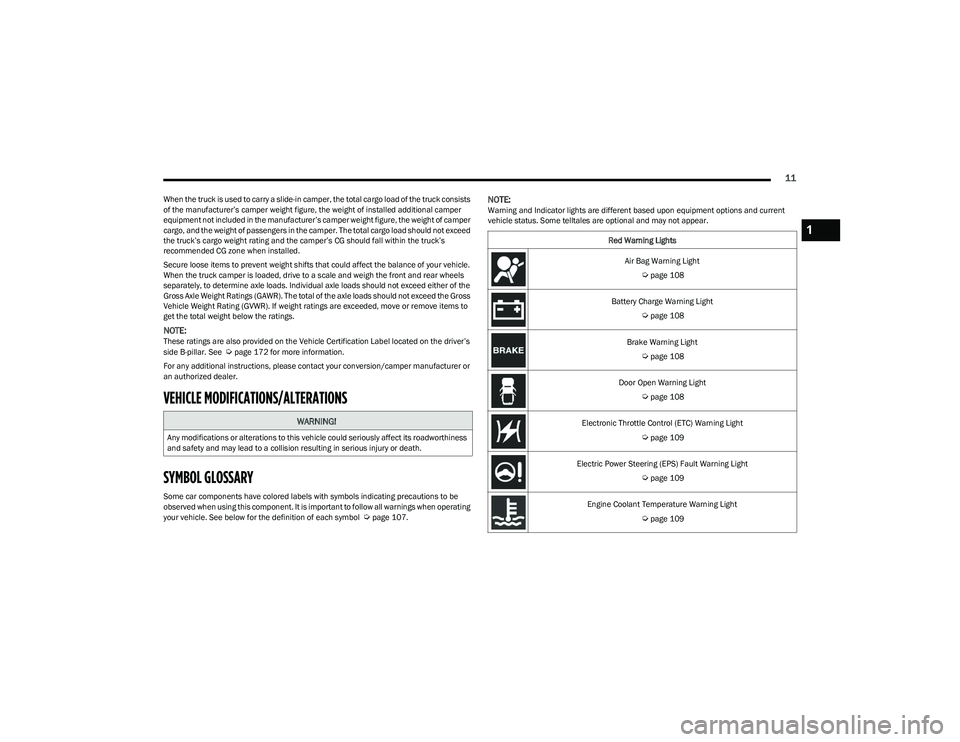
NOTE:Warning and Indicator lights are different based upon equipment options and current
vehicle status. Some telltales are optional and may not appear.
WARNING!
Any modifications or alterations to this vehicle could seriously affect its roadworthiness
and safety and may lead to a collision resulting in serious injury or death.
Red Warning Lights
Air Bag Warning Light
Úpage 108
Battery Charge Warning Light
Úpage 108
Brake Warning Light
Úpage 108
Door Open Warning Light
Úpage 108
Electronic Throttle Control (ETC) Warning Light
Úpage 109
Electric Power Steering (EPS) Fault Warning Light
Úpage 109
Engine Coolant Temperature Warning Light
Úpage 109
1
23_DT_OM_EN_USC_t.book Page 11
Page 63 of 416
GETTING TO KNOW YOUR VEHICLE61
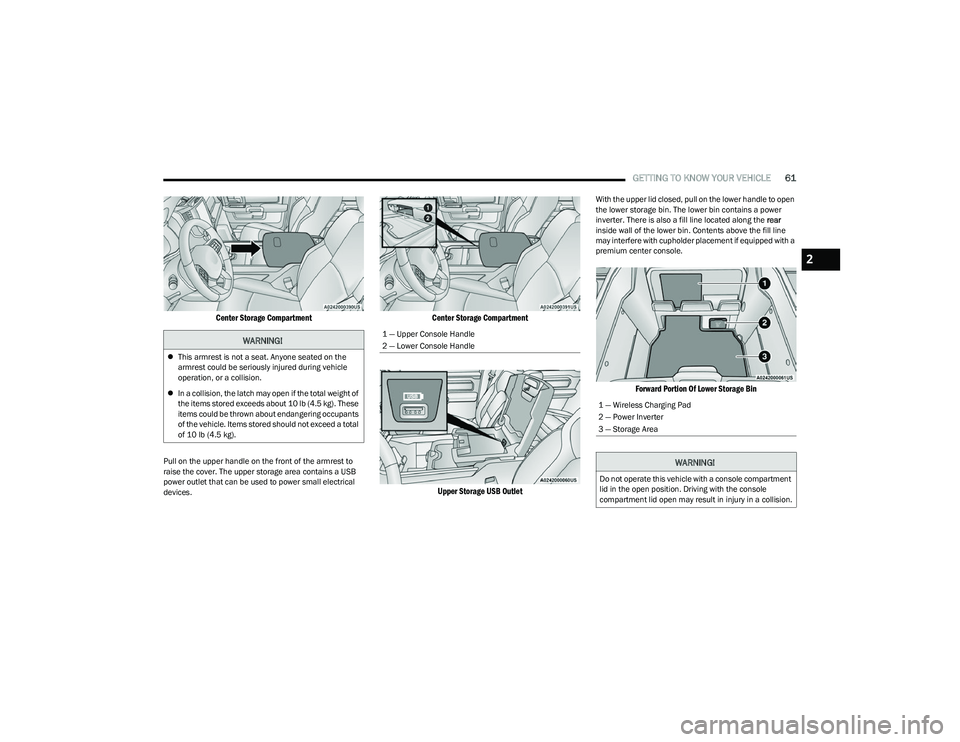
Center Storage Compartment
Pull on the upper handle on the front of the armrest to
raise the cover. The upper storage area contains a USB
power outlet that can be used to power small electrical
devices.
Center Storage Compartment
Upper Storage USB Outlet
With the upper lid closed, pull on the lower handle to open
the lower storage bin. The lower bin contains a power
inverter. There is also a fill line located along the rear
inside wall of the lower bin. Contents above the fill line
may interfere with cupholder placement if equipped with a
premium center console.
Forward Portion Of Lower Storage Bin
WARNING!
This armrest is not a seat. Anyone seated on the
armrest could be seriously injured during vehicle
operation, or a collision.
In a collision, the latch may open if the total weight of
the items stored exceeds about 10 lb (4.5 kg). These
items could be thrown about endangering occupants
of the vehicle. Items stored should not exceed a total
of 10 lb (4.5 kg).
1 — Upper Console Handle
2 — Lower Console Handle
1 — Wireless Charging Pad
2 — Power Inverter
3 — Storage Area
WARNING!
Do not operate this vehicle with a console compartment
lid in the open position. Driving with the console
compartment lid open may result in injury in a collision.
2
23_DT_OM_EN_USC_t.book Page 61
Page 82 of 416
80GETTING TO KNOW YOUR VEHICLE
You can carry wide building materials (sheets of plywood,
etc.) by building a raised load floor. Place lumber across
the box in the indentations provided above the wheel
housings and in the bulkhead dividers to form the floor.
There are stampings in the sheet metal on the inner side
bulkheads of the box in front of and behind both wheel
housings. Place wooden boards across the box from side
to side to create separate load compartments in the
pickup box. There are four tie-down cleats bolted to the lower sides of
the pickup box that can sustain loads up to 1,000 lb
(450 kg) total.
BED RAIL TIE-DOWN SYSTEM —
I
F EQUIPPED
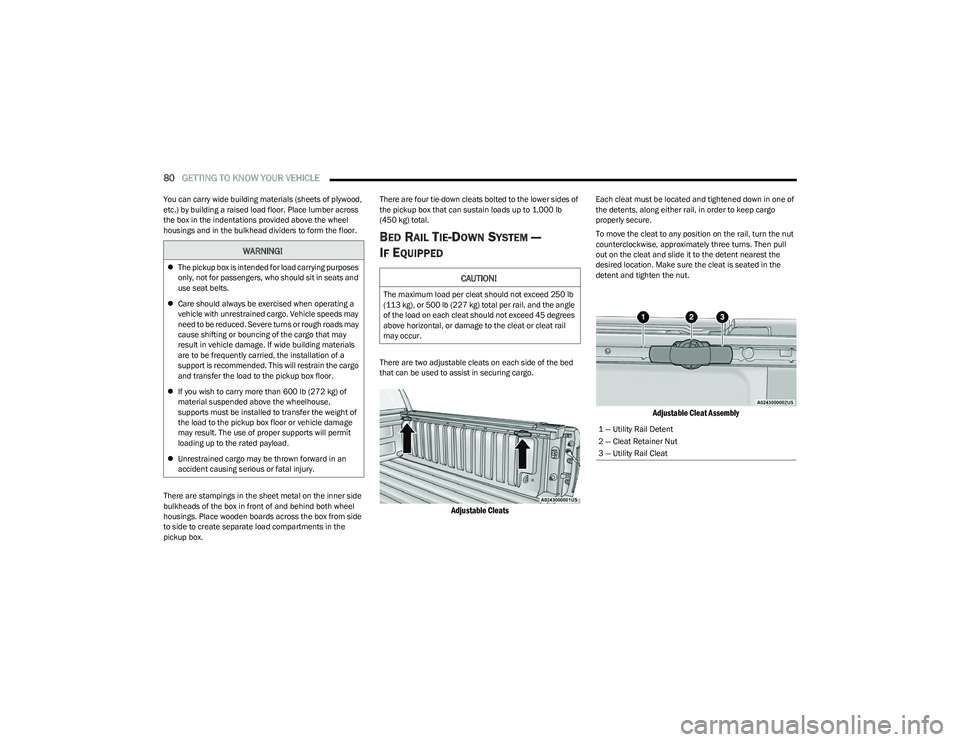
There are two adjustable cleats on each side of the bed
that can be used to assist in securing cargo.
Adjustable Cleats
Each cleat must be located and tightened down in one of
the detents, along either rail, in order to keep cargo
properly secure.
To move the cleat to any position on the rail, turn the nut
counterclockwise, approximately three turns. Then pull
out on the cleat and slide it to the detent nearest the
desired location. Make sure the cleat is seated in the
detent and tighten the nut.
Adjustable Cleat Assembly
WARNING!
The pickup box is intended for load carrying purposes
only, not for passengers, who should sit in seats and
use seat belts.
Care should always be exercised when operating a
vehicle with unrestrained cargo. Vehicle speeds may
need to be reduced. Severe turns or rough roads may
cause shifting or bouncing of the cargo that may
result in vehicle damage. If wide building materials
are to be frequently carried, the installation of a
support is recommended. This will restrain the cargo
and transfer the load to the pickup box floor.
If you wish to carry more than 600 lb (272 kg) of
material suspended above the wheelhouse,
supports must be installed to transfer the weight of
the load to the pickup box floor or vehicle damage
may result. The use of proper supports will permit
loading up to the rated payload.
Unrestrained cargo may be thrown forward in an
accident causing serious or fatal injury.CAUTION!
The maximum load per cleat should not exceed 250 lb
(113 kg), or 500 lb (227 kg) total per rail, and the angle
of the load on each cleat should not exceed 45 degrees
above horizontal, or damage to the cleat or cleat rail
may occur.
1 — Utility Rail Detent
2 — Cleat Retainer Nut
3 — Utility Rail Cleat
23_DT_OM_EN_USC_t.book Page 80
Page 84 of 416
82GETTING TO KNOW YOUR VEHICLE
LOCKING AND UNLOCKING RAMBOX
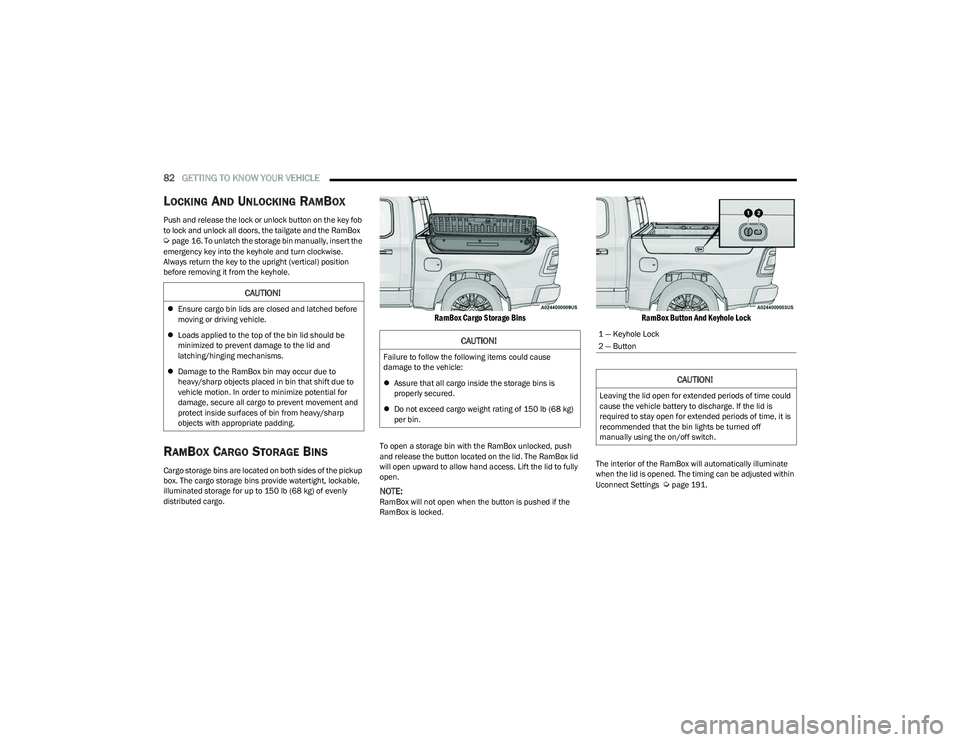
Push and release the lock or unlock button on the key fob
to lock and unlock all doors, the tailgate and the RamBox
Úpage 16. To unlatch the storage bin manually, insert the
emergency key into the keyhole and turn clockwise.
Always return the key to the upright (vertical) position
before removing it from the keyhole.
RAMBOX CARGO STORAGE BINS
Cargo storage bins are located on both sides of the pickup
box. The cargo storage bins provide watertight, lockable,
illuminated storage for up to 150 lb (68 kg) of evenly
distributed cargo.
RamBox Cargo Storage Bins
To open a storage bin with the RamBox unlocked, push
and release the button located on the lid. The RamBox lid
will open upward to allow hand access. Lift the lid to fully
open.
NOTE:RamBox will not open when the button is pushed if the
RamBox is locked.
RamBox Button And Keyhole Lock
The interior of the RamBox will automatically illuminate
when the lid is opened. The timing can be adjusted within
Uconnect Settings
Úpage 191.
CAUTION!
Ensure cargo bin lids are closed and latched before
moving or driving vehicle.
Loads applied to the top of the bin lid should be
minimized to prevent damage to the lid and
latching/hinging mechanisms.
Damage to the RamBox bin may occur due to
heavy/sharp objects placed in bin that shift due to
vehicle motion. In order to minimize potential for
damage, secure all cargo to prevent movement and
protect inside surfaces of bin from heavy/sharp
objects with appropriate padding.
CAUTION!
Failure to follow the following items could cause
damage to the vehicle:
Assure that all cargo inside the storage bins is
properly secured.
Do not exceed cargo weight rating of 150 lb (68 kg)
per bin.
1 — Keyhole Lock
2 — Button
CAUTION!
Leaving the lid open for extended periods of time could
cause the vehicle battery to discharge. If the lid is
required to stay open for extended periods of time, it is
recommended that the bin lights be turned off
manually using the on/off switch.
23_DT_OM_EN_USC_t.book Page 82
Page 90 of 416
88GETTING TO KNOW YOUR VEHICLE
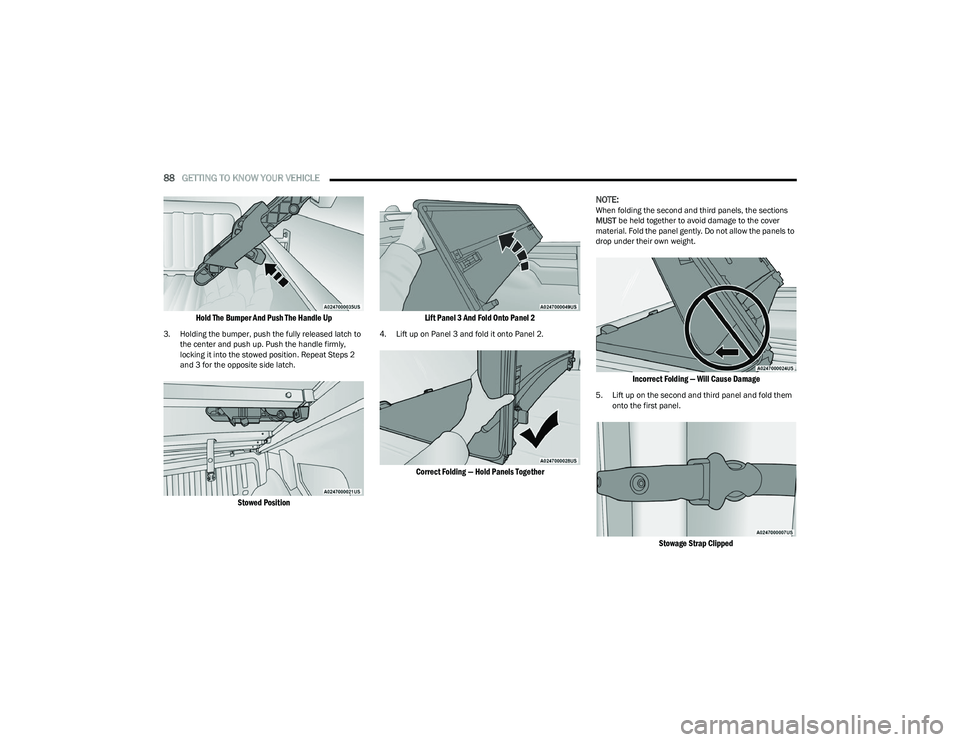
Hold The Bumper And Push The Handle Up
3. Holding the bumper, push the fully released latch to
the center and push up. Push the handle firmly,
locking it into the stowed position. Repeat Steps 2
and 3 for the opposite side latch.
Stowed Position Lift Panel 3 And Fold Onto Panel 2
4. Lift up on Panel 3 and fold it onto Panel 2.
Correct Folding — Hold Panels Together
NOTE:
When folding the second and third panels, the sections
MUST
be held together to avoid damage to the cover
material. Fold the panel gently. Do not allow the panels to
drop under their own weight.
Incorrect Folding — Will Cause Damage
5. Lift up on the second and third panel and fold them onto the first panel.
Stowage Strap Clipped
23_DT_OM_EN_USC_t.book Page 88
Page 93 of 416
GETTING TO KNOW YOUR VEHICLE91
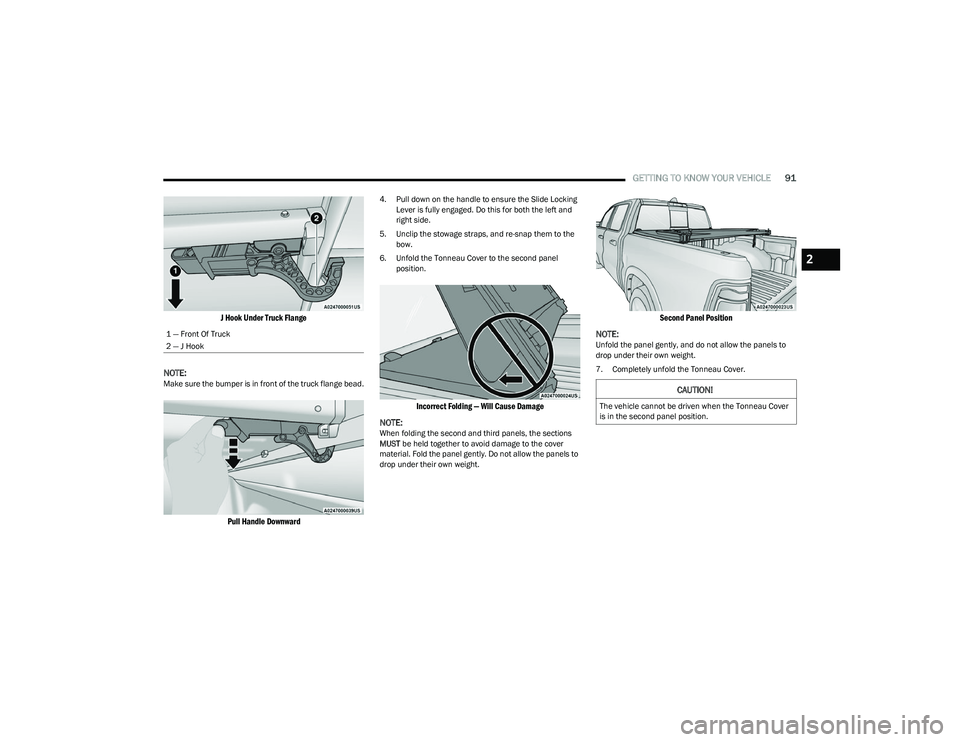
J Hook Under Truck Flange
NOTE:
Make sure the bumper is in front of the truck flange bead.
Pull Handle Downward
4. Pull down on the handle to ensure the Slide Locking Lever is fully engaged. Do this for both the left and
right side.
5. Unclip the stowage straps, and re-snap them to the bow.
6. Unfold the Tonneau Cover to the second panel position.
Incorrect Folding — Will Cause Damage
NOTE:
When folding the second and third panels, the sections
MUST be held together to avoid damage to the cover
material. Fold the panel gently. Do not allow the panels to
drop under their own weight.
Second Panel Position
NOTE:
Unfold the panel gently, and do not allow the panels to
drop under their own weight.
7. Completely unfold the Tonneau Cover.
1 — Front Of Truck
2 — J Hook
CAUTION!
The vehicle cannot be driven when the Tonneau Cover
is in the second panel position.
2
23_DT_OM_EN_USC_t.book Page 91
Page 174 of 416
172STARTING AND OPERATING
VEHICLE LOADING
GROSS VEHICLE WEIGHT RATING
(GVWR)
The GVWR is the total permissible weight of your vehicle
including driver, passengers, vehicle, options and cargo.
The label also specifies maximum capacities of front and
rear Gross Axle Weight Rating (GAWR). Total load must be
limited so GVWR and front and rear GAWR are not
exceeded.
PAYLOAD
The payload of a vehicle is defined as the allowable load
weight a truck can carry, including the weight of the driver,
all passengers, options and cargo.
GROSS AXLE WEIGHT RATING (GAWR)
The GAWR is the maximum permissible load on the front
and rear axles. The load must be distributed in the cargo
area so that the GAWR of each axle is not exceeded.
Each axle GAWR is determined by the components in the
system with the lowest load carrying capacity (axle,
springs, tires or wheels). Heavier axles, or suspension
components sometimes specified by purchasers for
increased durability, do not necessarily increase the
vehicle's GVWR.
TIRE SIZE
The tire size on the Vehicle Certification Label represents
the actual tire size on your vehicle. Replacement tires
must be equal to the load capacity of this tire size.
RIM SIZE
This is the rim size that is appropriate for the tire size
listed.
INFLATION PRESSURE
This is the cold tire inflation pressure for your vehicle for
all loading conditions up to full Gross Axle Weight Rating
(GAWR).
CURB WEIGHT
The curb weight of a vehicle is defined as the total weight
of the vehicle with all fluids, including vehicle fuel, at full
capacity conditions, and with no occupants or cargo
loaded into the vehicle. The front and rear curb weight
values are determined by weighing your vehicle on a
commercial scale before any occupants or cargo are
added.
LOADING
The actual total weight and the weight of the front and rear
of your vehicle at the ground can best be determined by
weighing it when it is loaded and ready for operation. The entire vehicle should first be weighed on a commercial
scale to ensure that the Gross Vehicle Weight Rating
(GVWR) has not been exceeded. The weight on the front
and rear of the vehicle should then be determined
separately to be sure that the load is properly distributed
over the front and rear axle. Weighing the vehicle may
show that the Gross Axle Weight Rating (GAWR) of either
the front or rear axles has been exceeded but the total
load is within the specified GVWR. If so, weight must be
shifted from front to rear or rear to front as appropriate
until the specified weight limitations are met. Store the
heavier items down low and be sure that the weight is
distributed equally. Stow all loose items securely before
driving.
Improper weight distributions can have an adverse effect
on the way your vehicle steers and handles and the way
the brakes operate.
WARNING!
Do not load your vehicle any heavier than the GVWR or
the maximum front and rear GAWR. If you do, parts on
your vehicle can break, or it can change the way your
vehicle handles. This could cause you to lose control.
Overloading can shorten the life of your vehicle.
23_DT_OM_EN_USC_t.book Page 172
Page 175 of 416

STARTING AND OPERATING173
TRAILER TOWING
In this section you will find safety tips and information on
limits to the type of towing you can reasonably do with your
vehicle. Before towing a trailer, carefully review this
information to tow your load as efficiently and safely as
possible.
To maintain the New Vehicle Limited Warranty coverage,
follow the requirements and recommendations in this
manual concerning vehicles used for trailer towing.
COMMON TOWING DEFINITIONS
The following trailer towing related definitions will assist
you in understanding the following information:
Gross Vehicle Weight Rating (GVWR)
The GVWR is the total allowable weight of your vehicle.
This includes driver, passengers, cargo and tongue
weight. The total load must be limited so that you do not
exceed the GVWR
Úpage 172.
Gross Trailer Weight (GTW)
The GTW is the weight of the trailer plus the weight of all
cargo, consumables and equipment (permanent or
temporary) loaded in or on the trailer in its “loaded and
ready for operation” condition.
The recommended way to measure GTW is to put your fully
loaded trailer on a vehicle scale. The entire weight of the
trailer must be supported by the scale.
Gross Combination Weight Rating (GCWR)
The GCWR is the total allowable weight of your vehicle and
trailer when weighed in combination.
Gross Axle Weight Rating (GAWR)
The GAWR is the maximum capacity of the front and rear
axles. Distribute the load over the front and rear axles
evenly. Make sure that you do not exceed either front or
rear GAWR
Úpage 172.
Tongue Weight (TW)
The TW is the downward force exerted on the hitch ball by
the trailer. You must consider this as part of the load on
your vehicle.
Trailer Frontal Area
The frontal area is the maximum height multiplied by the
maximum width of the front of a trailer.
Trailer Sway Control (TSC)
The TSC can be a mechanical telescoping link that can be
installed between the hitch receiver and the trailer tongue
that typically provides adjustable friction associated with
the telescoping motion to dampen any unwanted trailer
swaying motions while traveling.
The electronic TSC (If equipped) recognizes a swaying
trailer and automatically applies individual wheel brakes
and/or reduces engine power to attempt to eliminate the
trailer sway.
Weight-Carrying Hitch
A weight-carrying hitch supports the trailer tongue weight,
just as if it were luggage located at a hitch ball or some
other connecting point of the vehicle. These kinds of
hitches are commonly used to tow small and medium
sized trailers.
WARNING!
If the gross trailer weight is 5,000 lb (2,267 kg) or
more, it is recommended to use a weight-distributing
hitch to ensure stable handling of your vehicle. If you
use a standard weight-carrying hitch, you could lose
control of your vehicle and cause a collision.
WARNING!
It is important that you do not exceed the maximum
front or rear GAWR. A dangerous driving condition can
result if either rating is exceeded. You could lose control
of the vehicle and have a collision.
4
23_DT_OM_EN_USC_t.book Page 173