change wheel RAM 1500 2023 User Guide
[x] Cancel search | Manufacturer: RAM, Model Year: 2023, Model line: 1500, Model: RAM 1500 2023Pages: 416, PDF Size: 20.59 MB
Page 130 of 416

128STARTING AND OPERATING
Transmission Limp Home Mode
Transmission function is monitored electronically for
abnormal conditions. If a condition is detected that could
result in transmission damage, Transmission Limp Home
Mode is activated. In this mode, the transmission may
operate only in certain gears, or may not shift at all.
Vehicle performance may be severely degraded and the
engine may stall. In some situations, the transmission may
not re-engage if the engine is turned off and restarted.
The Malfunction Indicator Light (MIL) may be illuminated.
A message in the instrument cluster will inform the driver
of the more serious conditions, and indicate what actions
may be necessary.
In the event of a momentary problem, the transmission
can be reset to regain all forward gears by performing the
following steps:
NOTE:In cases where the instrument cluster message indicates
the transmission may not re-engage after engine
shutdown, perform this procedure only in a desired
location (preferably, at an authorized dealer).
1. Stop the vehicle.
2. Shift the transmission into PARK, if possible. If not,
shift the transmission to NEUTRAL.
3. Push and hold the ignition switch until the engine turns off.
4. Wait approximately 30 seconds.
5. Restart the engine.
6. Shift into the desired gear range. If the problem is no longer detected, the transmission will return to
normal operation.
NOTE:Even if the transmission can be reset, we recommend that
you visit an authorized dealer at your earliest possible
convenience. An authorized dealer has diagnostic
equipment to assess the condition of your transmission.
If the transmission cannot be reset, an authorized dealer
service is required.
Electronic Range Select (ERS) Operation —
If Equipped
The ERS shift control allows the driver to limit the highest
available gear when the transmission is in DRIVE and ERS
mode is not active. For example, if you set the
transmission gear limit to FOURTH gear, the transmission
will hold that gear and not shift above FOURTH gear, but
will shift through the lower gears normally.
NOTE:ERS will only upshift during a FIRST to SECOND gear shift
when in 4WD LOW. All other ranges will hold the gear.
You can switch between DRIVE and ERS mode at any
vehicle speed. When the transmission gear selector is in
DRIVE, the transmission will operate automatically,
shifting between all available gears. Tapping the “-” button
(on the steering wheel) will activate ERS mode, display the
current gear in the instrument cluster, and set that gear as
the top available gear. Once in ERS mode, tapping the “-”
or “+” button will change the top available gear.
Electronic Range Select (ERS)
To exit ERS mode, simply push and hold the “+” button
until the gear limit display disappears from the instrument
cluster.1 — Shift Up “+”
2 — Shift Down “–”
WARNING!
Do not downshift for additional engine braking on a
slippery surface. The drive wheels could lose their grip
and the vehicle could skid, causing a collision or
personal injury.
23_DT_OM_EN_USC_t.book Page 128
Page 138 of 416

136STARTING AND OPERATING
Automatic Aero Mode
To improve aerodynamics, the air suspension system has
a feature which will put the vehicle into Aero Height
automatically at higher speeds
Úpage 98.
Automatic Aero Mode may be disabled through vehicle
settings in the Uconnect Radio (if equipped)
Úpage 191.
Tire Jack Mode
To assist with changing a tire, the air suspension system
has a feature which allows the automatic leveling to be
disabled
Úpage 191.
Transport Mode
For towing your vehicle with four wheels off the road, the
air suspension system has a feature which will put the
vehicle into Entry/Exit height and disable the automatic
load leveling system
Úpage 191.
Wheel Alignment Mode
Before performing a wheel alignment, this mode must be
enabled which will put the vehicle into NRH and disable
automatic leveling
Úpage 191.
Protection Strategy
In order to protect the air suspension system, the vehicle
will disable load leveling as required (suspension
overloaded, battery charge low, etc.). Load leveling will
automatically resume as soon as system operation
requirements are met. See an authorized dealer if system
does not resume.
NOTE:For towing with air suspension Úpage 173.
INSTRUMENT CLUSTER DISPLAY
M
ESSAGES
When the appropriate conditions exist, a message will
appear in the instrument cluster display Úpage 98.
An audible chime will be heard whenever a system error
has been detected.
See an authorized dealer for system service if normal
operation does not resume.
OPERATION
Air Suspension Switch
The indicator lamps 1 through 5 will illuminate to show the
current position of the vehicle. Flashing indicator lamps
will show a position which the system is working to
achieve. When raising, if multiple indicator lamps are
flashing, the highest flashing indicator lamp is the position
the system is working to achieve.
When lowering, if multiple indicators are flashing, the
lowest solid indicator lamp is the position the system is
working to achieve. Pushing the height selector up once will move the
suspension one position higher from the current position,
assuming all conditions are met (i.e., ignition in ON/RUN
position, engine running, speed below threshold, etc.).
The height selector switch can be pushed up multiple
times, each push will raise the requested level by one
position up to a maximum position of OR2 or the highest
position allowed based on current conditions
(i.e., vehicle speed, etc.).
Pushing the height selector down once will move the
suspension one position lower from the current level,
assuming all conditions are met (i.e., ignition in ON/RUN
position, engine running, doors closed, speed below
threshold, etc.). The height selector switch can be pushed
down multiple times, each push will lower the requested
level by one position down to a minimum of Entry/Exit
Mode or the lowest position allowed based on current
conditions (i.e., vehicle speed, etc.).
Automatic height changes will occur based on vehicle
speed and the current vehicle height. The indicator lamps
and instrument cluster display messages will operate the
same for automatic changes and user requested changes.
Off-Road 2 (OR2) – Indicator lamps 5, 4, 3, 2 and 1 will
be illuminated.
Off-Road 1 (OR1) – Indicator lamps 5, 4, 3 and 2 will be
illuminated.
Normal Ride Height (NRH) – Indicator lamps 5, 4 and 3
will be illuminated.
23_DT_OM_EN_USC_t.book Page 136
Page 140 of 416
![RAM 1500 2023 User Guide
138STARTING AND OPERATING
Entry/Exit Height (Lowers the vehicle approximately
3 inches [73 mm]) – This position lowers the vehicle
for easier passenger entry and exit as well as lowering
t](/img/34/59197/w960_59197-139.png "RAM 1500 2023 User Guide
138STARTING AND OPERATING
Entry/Exit Height (Lowers the vehicle approximately
3 inches [73 mm]) – This position lowers the vehicle
for easier passenger entry and exit as well as lowering
t")
138STARTING AND OPERATING
Entry/Exit Height (Lowers the vehicle approximately
3 inches [73 mm]) – This position lowers the vehicle
for easier passenger entry and exit as well as lowering
the vehicle for easier loading and unloading of cargo.
To enter Entry/Exit Mode, push the height selector
switch down twice from the NRH while the vehicle
speed is below 33 mph (53 km/h). Once the vehicle
speed goes below 15 mph (24 km/h) the vehicle
height will begin to lower. If the vehicle speed remains
between 15 mph (24 km/h) and 25 mph (40 km/h) for
greater than 60 seconds, or the vehicle speed exceeds
25 mph (40 km/h) the Entry/Exit change will be canceled. To return to Normal Height Mode, push the
height selector switch up twice while in Entry/Exit or
drive the vehicle over 15 mph (24 km/h). Entry/Exit Height may not be available due to vehicle payload, an
instrument cluster display message is shown when this
occurs
Úpage 98.
The system requires that the ignition be in the ON/RUN
position or the engine running for all user requested
changes. When lowering the vehicle, all of the doors must
be closed. If a door is opened at any time while the vehicle
is lowering, the change will not be completed until the
open door(s) is closed. This system uses a lifting and lowering pattern which
keeps the headlights from incorrectly shining into
oncoming traffic. When raising the vehicle, the rear of the
vehicle will move up first and then the front. When
lowering the vehicle, the front will move down first and
then the rear.
After the engine is turned off, it may be noticed that the air
suspension system operates briefly; this is normal.
The system is correcting the position of the vehicle to
ensure a proper appearance.
To assist with changing a spare tire, the air suspension
system has a feature which allows the automatic leveling
to be disabled
Úpage 191.
Default Ride Height:
Select Aero Height or Normal Ride Height as the default
for all vehicle speeds and operation. This is the
selected height that the suspension will level for speed
changes (e.g. raising from Entry/Exit Height at speed,
lowering from Off-Road Height at speed, etc.).
Default ride height can be changed by manually
adjusting the Air Suspension switch to Normal Ride
Height or Aero Ride Height and staying in the selected
height for 2.5 seconds. It will be stored as the default
ride height and the height will be maintained until a
new default ride height is selected.
NOTE:If equipped with a touchscreen radio, all enabling/
disabling of air suspension features must be done through
the radio
Úpage 191.
AIR SUSPENSION MODES
The air suspension system has multiple modes to protect
the system in unique situations:
Automatic Aero Mode
To improve aerodynamics, the air suspension system has
a feature which will put the vehicle into Aero height
automatically at higher speeds
Úpage 98.
Tire Jack Mode
To assist with changing a tire, the air suspension system
has a feature which allows the automatic leveling to be
disabled
Úpage 191.
Transport Mode
For towing your vehicle with four wheels off the road, the
air suspension system has a feature which will put the
vehicle into Entry/Exit height and disable the automatic
load leveling system
Úpage 191.
CAUTION!
When in Entry/Exit Height, be aware of your
surroundings, you may not have the clearance required
for certain areas and vehicle damage may occur.
WARNING!
The air suspension system uses a high pressure
volume of air to operate the system. To avoid personal
injury or damage to the system, see an authorized
dealer for service.
23_DT_OM_EN_USC_t.book Page 138
Page 141 of 416

STARTING AND OPERATING139
Wheel Alignment Mode
Before performing a wheel alignment, this mode must be
enabled which moves the vehicle to normal ride height
and disables the automatic leveling
Úpage 191.
Protection Strategy
In order to protect the air suspension system, the vehicle
will disable load leveling as required (suspension
overloaded, battery charge low, etc.). Load leveling will
automatically resume as soon as system operation
requirements are met. See an authorized dealer if system
does not resume.
NOTE:For towing with air suspension Úpage 173.
INSTRUMENT CLUSTER DISPLAY
M
ESSAGES
When the appropriate conditions exist, a message will
appear in the instrument cluster display Úpage 98.
An audible chime will be heard whenever a system error
has been detected.
See an authorized dealer for system service if normal
operation does not resume.
OPERATION
Air Suspension Switch
The indicator lamps 1 through 4 will illuminate to show the
current position of the vehicle. Flashing indicator lamps
will show a position which the system is working to
achieve. When raising or lowering, the flashing indicator
lamp is the position the system is working to achieve.
Pushing the height selector switch up once will move the
suspension one position higher from the current position,
assuming all conditions are met (i.e., key in ON/RUN
position, engine running, speed below threshold, etc.).
The height selector switch can be pushed up multiple
times, each push will raise the requested level by one
position up to a maximum position of OR or the highest
position allowed based on current conditions
(i.e., vehicle speed, etc.). Pushing the height selector switch down once will move
the suspension one position lower from the current level,
assuming all conditions are met (i.e., key in ON/RUN
position, engine running, doors closed, speed below
threshold, etc.). The height selector switch can be pushed
down multiple times, each push will lower the requested
level by one position down to a minimum of Entry/Exit
Mode or the lowest position allowed based on current
conditions (i.e., vehicle speed, etc.).
Automatic height changes will occur based on vehicle
speed and the current vehicle height. The indicator lamps
and instrument cluster display messages will operate the
same for automatic changes and user requested changes.
Off-Road 1 (OR1) – Indicator lamps 4, 3, 2, and 1 will
be illuminated.
Normal Ride Height (NRH) – Indicator lamps 4, 3, and
2 will be illuminated.
Aero Height– Indicator lamps 4 and 3 will be
illuminated.
Entry/Exit – Indicator lamp 4 will be illuminated.
Entry/Exit can be requested up to 33 mph (53 km/h).
If vehicle speed is reduced to, and kept below, 15 mph
(24 km/h) indicator lamp 3 will flash and indicator
lamp 4 will remain solid until Entry/Exit is achieved at
which point indicator lamp 3 will turn off.
Automatic Aero Mode – Indicator lamps 5 and 4 will be
illuminated.
Transport Mode – No indicator lamps will be illumi -
nated. Transport Mode is disabled by driving the
vehicle or disabling through the Uconnect settings.
4
23_DT_OM_EN_USC_t.book Page 139
Page 161 of 416
STARTING AND OPERATING159
When pushed, the LED on the ParkSense Active Park
Assist switch will blink momentarily, and then the LED will
turn off if any of the above conditions are not present.
PARALLEL/PERPENDICULAR PARKING
S
PACE ASSISTANCE OPERATION
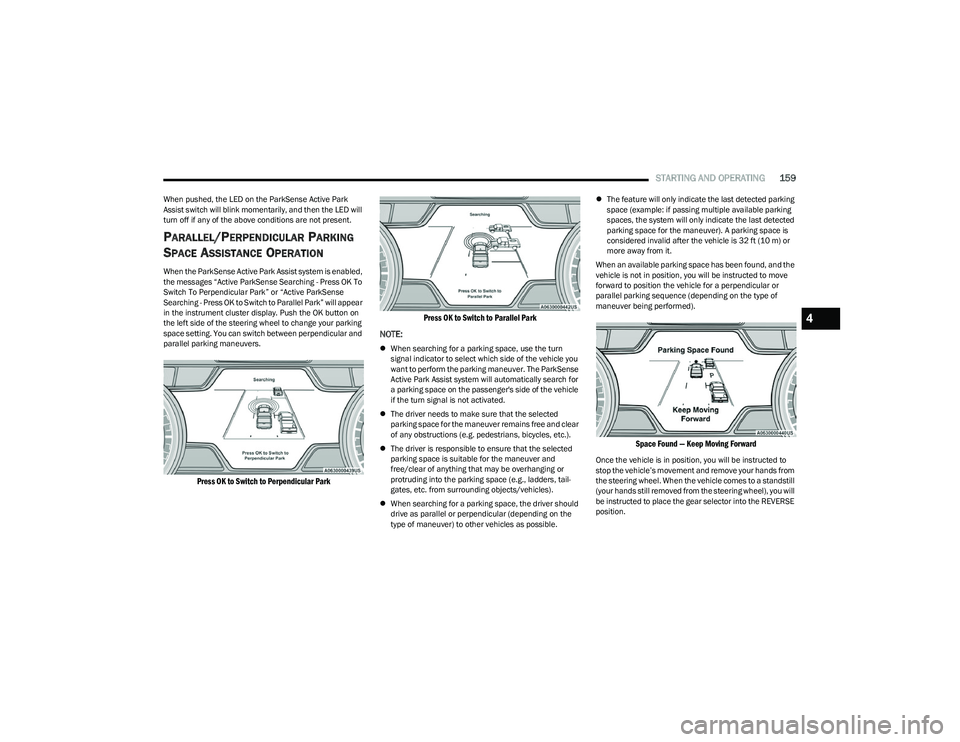
When the ParkSense Active Park Assist system is enabled,
the messages “Active ParkSense Searching - Press OK To
Switch To Perpendicular Park” or “Active ParkSense
Searching - Press OK to Switch to Parallel Park” will appear
in the instrument cluster display. Push the OK button on
the left side of the steering wheel to change your parking
space setting. You can switch between perpendicular and
parallel parking maneuvers.
Press OK to Switch to Perpendicular Park Press OK to Switch to Parallel Park
NOTE:
When searching for a parking space, use the turn
signal indicator to select which side of the vehicle you
want to perform the parking maneuver. The ParkSense
Active Park Assist system will automatically search for
a parking space on the passenger's side of the vehicle
if the turn signal is not activated.
The driver needs to make sure that the selected
parking space for the maneuver remains free and clear
of any obstructions (e.g. pedestrians, bicycles, etc.).
The driver is responsible to ensure that the selected
parking space is suitable for the maneuver and
free/clear of anything that may be overhanging or
protruding into the parking space (e.g., ladders, tail-
gates, etc. from surrounding objects/vehicles).
When searching for a parking space, the driver should
drive as parallel or perpendicular (depending on the
type of maneuver) to other vehicles as possible.
The feature will only indicate the last detected parking
space (example: if passing multiple available parking
spaces, the system will only indicate the last detected
parking space for the maneuver). A parking space is
considered invalid after the vehicle is 32 ft (10 m) or
more away from it.
When an available parking space has been found, and the
vehicle is not in position, you will be instructed to move
forward to position the vehicle for a perpendicular or
parallel parking sequence (depending on the type of
maneuver being performed).
Space Found — Keep Moving Forward
Once the vehicle is in position, you will be instructed to
stop the vehicle’s movement and remove your hands from
the steering wheel. When the vehicle comes to a standstill
(your hands still removed from the steering wheel), you will
be instructed to place the gear selector into the REVERSE
position.
4
23_DT_OM_EN_USC_t.book Page 159
Page 164 of 416
162STARTING AND OPERATING
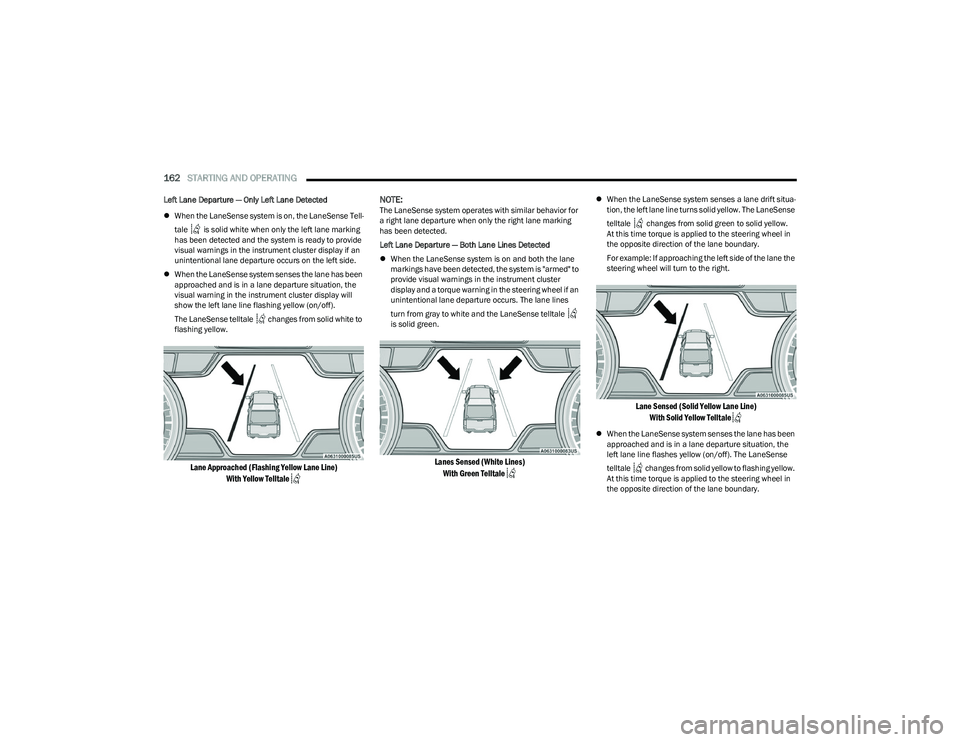
Left Lane Departure — Only Left Lane Detected
When the LaneSense system is on, the LaneSense Tell -
tale is solid white when only the left lane marking
has been detected and the system is ready to provide
visual warnings in the instrument cluster display if an
unintentional lane departure occurs on the left side.
When the LaneSense system senses the lane has been
approached and is in a lane departure situation, the
visual warning in the instrument cluster display will
show the left lane line flashing yellow (on/off).
The LaneSense telltale changes from solid white to
flashing yellow.
Lane Approached (Flashing Yellow Lane Line)
With Yellow Telltale
NOTE:
The LaneSense system operates with similar behavior for
a right lane departure when only the right lane marking
has been detected.
Left Lane Departure — Both Lane Lines Detected
When the LaneSense system is on and both the lane
markings have been detected, the system is "armed" to
provide visual warnings in the instrument cluster
display and a torque warning in the steering wheel if an
unintentional lane departure occurs. The lane lines
turn from gray to white and the LaneSense telltale
is solid green.
Lanes Sensed (White Lines)
With Green Telltale
When the LaneSense system senses a lane drift situa -
tion, the left lane line turns solid yellow. The LaneSense
telltale changes from solid green to solid yellow.
At this time torque is applied to the steering wheel in
the opposite direction of the lane boundary.
For example: If approaching the left side of the lane the
steering wheel will turn to the right.
Lane Sensed (Solid Yellow Lane Line)
With Solid Yellow Telltale
When the LaneSense system senses the lane has been
approached and is in a lane departure situation, the
left lane line flashes yellow (on/off). The LaneSense
telltale changes from solid yellow to flashing yellow.
At this time torque is applied to the steering wheel in
the opposite direction of the lane boundary.
23_DT_OM_EN_USC_t.book Page 162
Page 174 of 416
172STARTING AND OPERATING
VEHICLE LOADING
GROSS VEHICLE WEIGHT RATING
(GVWR)
The GVWR is the total permissible weight of your vehicle
including driver, passengers, vehicle, options and cargo.
The label also specifies maximum capacities of front and
rear Gross Axle Weight Rating (GAWR). Total load must be
limited so GVWR and front and rear GAWR are not
exceeded.
PAYLOAD
The payload of a vehicle is defined as the allowable load
weight a truck can carry, including the weight of the driver,
all passengers, options and cargo.
GROSS AXLE WEIGHT RATING (GAWR)
The GAWR is the maximum permissible load on the front
and rear axles. The load must be distributed in the cargo
area so that the GAWR of each axle is not exceeded.
Each axle GAWR is determined by the components in the
system with the lowest load carrying capacity (axle,
springs, tires or wheels). Heavier axles, or suspension
components sometimes specified by purchasers for
increased durability, do not necessarily increase the
vehicle's GVWR.
TIRE SIZE
The tire size on the Vehicle Certification Label represents
the actual tire size on your vehicle. Replacement tires
must be equal to the load capacity of this tire size.
RIM SIZE
This is the rim size that is appropriate for the tire size
listed.
INFLATION PRESSURE
This is the cold tire inflation pressure for your vehicle for
all loading conditions up to full Gross Axle Weight Rating
(GAWR).
CURB WEIGHT
The curb weight of a vehicle is defined as the total weight
of the vehicle with all fluids, including vehicle fuel, at full
capacity conditions, and with no occupants or cargo
loaded into the vehicle. The front and rear curb weight
values are determined by weighing your vehicle on a
commercial scale before any occupants or cargo are
added.
LOADING
The actual total weight and the weight of the front and rear
of your vehicle at the ground can best be determined by
weighing it when it is loaded and ready for operation. The entire vehicle should first be weighed on a commercial
scale to ensure that the Gross Vehicle Weight Rating
(GVWR) has not been exceeded. The weight on the front
and rear of the vehicle should then be determined
separately to be sure that the load is properly distributed
over the front and rear axle. Weighing the vehicle may
show that the Gross Axle Weight Rating (GAWR) of either
the front or rear axles has been exceeded but the total
load is within the specified GVWR. If so, weight must be
shifted from front to rear or rear to front as appropriate
until the specified weight limitations are met. Store the
heavier items down low and be sure that the weight is
distributed equally. Stow all loose items securely before
driving.
Improper weight distributions can have an adverse effect
on the way your vehicle steers and handles and the way
the brakes operate.
WARNING!
Do not load your vehicle any heavier than the GVWR or
the maximum front and rear GAWR. If you do, parts on
your vehicle can break, or it can change the way your
vehicle handles. This could cause you to lose control.
Overloading can shorten the life of your vehicle.
23_DT_OM_EN_USC_t.book Page 172
Page 183 of 416
STARTING AND OPERATING181
Trailer Brake Status Indicator Light
This light indicates the trailer electrical connection status.
If no electrical connection is detected after the ignition is
turned on, pushing the GAIN adjustment button or sliding
the manual brake control lever will display the GAIN
setting for 10 seconds and the Trailer Brake Status
Indicator Light will not be displayed.
If a fault is detected in the trailer wiring or the Integrated
Trailer Brake Module (ITBM), the Trailer Brake Status
Indicator Light will flash.
Adjusting GAIN
NOTE:This should only be performed in a traffic free environment
at speeds of approximately 20–25 mph (30–40 km/h).
1. Make sure the trailer brakes are in good working
condition, functioning normally and properly
adjusted. See your trailer dealer if necessary.
2. Hook up the trailer and make the electrical connections according to the trailer manufacturer's
instructions.
3. When a trailer is plugged in with electric or EOH brakes, the trailer connected message should appear
in the instrument cluster display (if the connection is
not recognized by the ITBM, braking functions will not
be available), the GAIN setting will illuminate and the
correct type of trailer must be selected from the
instrument cluster display options.
4. Push the UP or DOWN button on the steering wheel until “TRAILER TOW” appears on the screen.
5. Push the RIGHT arrow on the steering wheel to enter “TRAILER TOW”. 6. Push the UP or DOWN buttons until the Trailer Brake
Type appears on the screen.
7. Push the RIGHT arrow and then push the UP or DOWN buttons until the proper Trailer Brake Type appears
on the screen.
8. In a traffic-free environment, tow the trailer on a dry, level surface at a speed of 20–25 mph
(30–40 km/h) and squeeze the manual brake
control lever completely.
9. If the trailer wheels lockup (indicated by squealing tires), reduce the GAIN setting; if the trailer wheels
turn freely, increase the GAIN setting.
Repeat steps 8 and 9 until the GAIN setting is at a point
just below trailer wheel lockup. If towing a heavier trailer,
trailer wheel lockup may not be attainable even with the
maximum GAIN setting of 10.
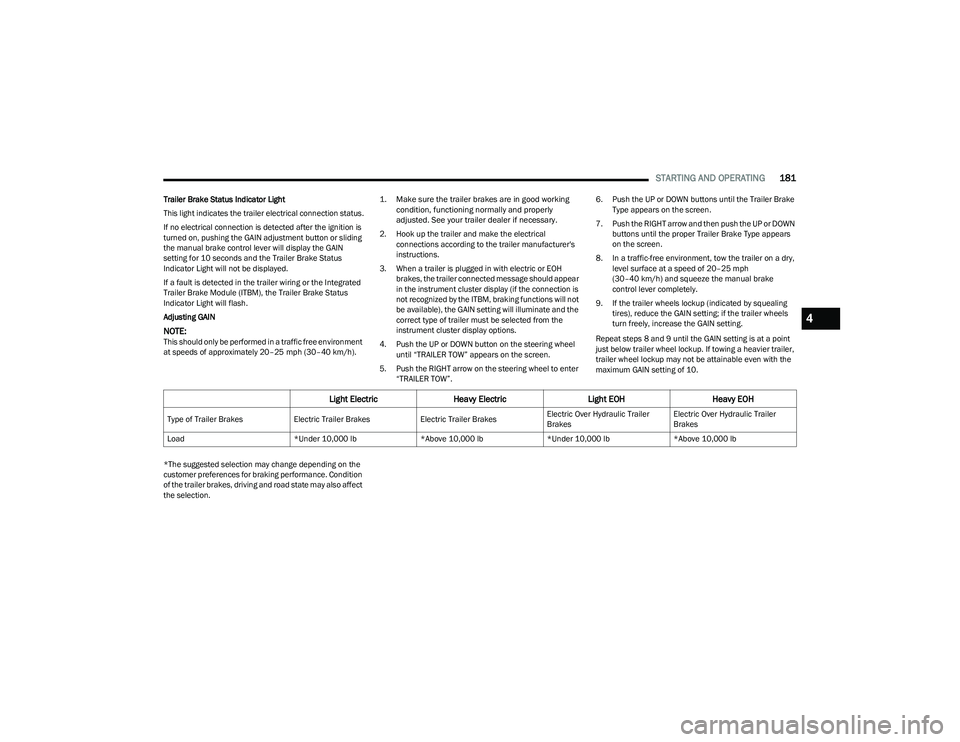
*The suggested selection may change depending on the
customer preferences for braking performance. Condition
of the trailer brakes, driving and road state may also affect
the selection.
Light Electric Heavy Electric Light EOHHeavy EOH
Type of Trailer Brakes Electric Trailer BrakesElectric Trailer BrakesElectric Over Hydraulic Trailer
BrakesElectric Over Hydraulic Trailer
Brakes
Load *Under 10,000 lb*Above 10,000 lb*Under 10,000 lb*Above 10,000 lb
4
23_DT_OM_EN_USC_t.book Page 181
Page 196 of 416
194MULTIMEDIA
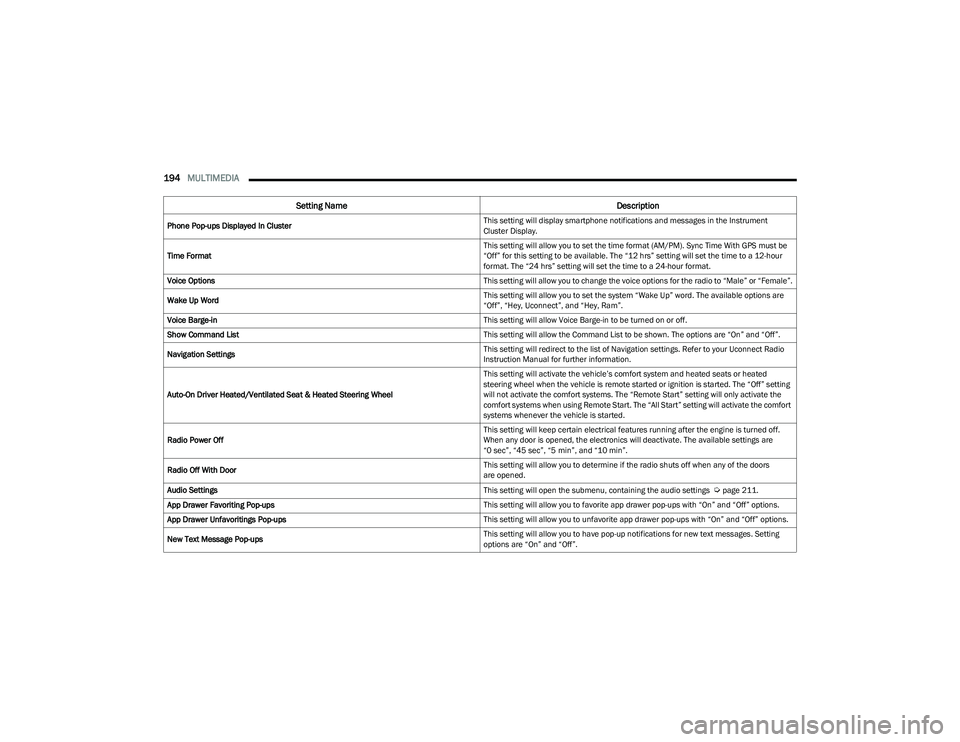
Phone Pop-ups Displayed In Cluster This setting will display smartphone notifications and messages in the Instrument
Cluster Display.
Time Format This setting will allow you to set the time format (AM/PM). Sync Time With GPS must be
“Off” for this setting to be available. The “12 hrs” setting will set the time to a 12-hour
format. The “24 hrs” setting will set the time to a 24-hour format.
Voice Options This setting will allow you to change the voice options for the radio to “Male” or “Female”.
Wake Up Word This setting will allow you to set the system “Wake Up” word. The available options are
“Off”, “Hey, Uconnect”, and “Hey, Ram”.
Voice Barge-in This setting will allow Voice Barge-in to be turned on or off.
Show Command List This setting will allow the Command List to be shown. The options are “On” and “Off”.
Navigation Settings This setting will redirect to the list of Navigation settings. Refer to your Uconnect Radio
Instruction Manual for further information.
Auto-On Driver Heated/Ventilated Seat & Heated Steering Wheel This setting will activate the vehicle’s comfort system and heated seats or heated
steering wheel when the vehicle is remote started or ignition is started. The “Off” setting
will not activate the comfort systems. The “Remote Start” setting will only activate the
comfort systems when using Remote Start. The “All Start” setting will activate the comfort
systems whenever the vehicle is started.
Radio Power Off This setting will keep certain electrical features running after the engine is turned off.
When any door is opened, the electronics will deactivate. The available settings are
“0 sec”, “45 sec”, “5 min”, and “10 min”.
Radio Off With Door This setting will allow you to determine if the radio shuts off when any of the doors
are opened.
Audio Settings This setting will open the submenu, containing the audio settings
Úpage 211.
App Drawer Favoriting Pop-ups This setting will allow you to favorite app drawer pop-ups with “On” and “Off” options.
App Drawer Unfavoritings Pop-ups This setting will allow you to unfavorite app drawer pop-ups with “On” and “Off” options.
New Text Message Pop-ups This setting will allow you to have pop-up notifications for new text messages. Setting
options are “On” and “Off”.
Setting Name
Description
23_DT_OM_EN_USC_t.book Page 194
Page 200 of 416
198MULTIMEDIA
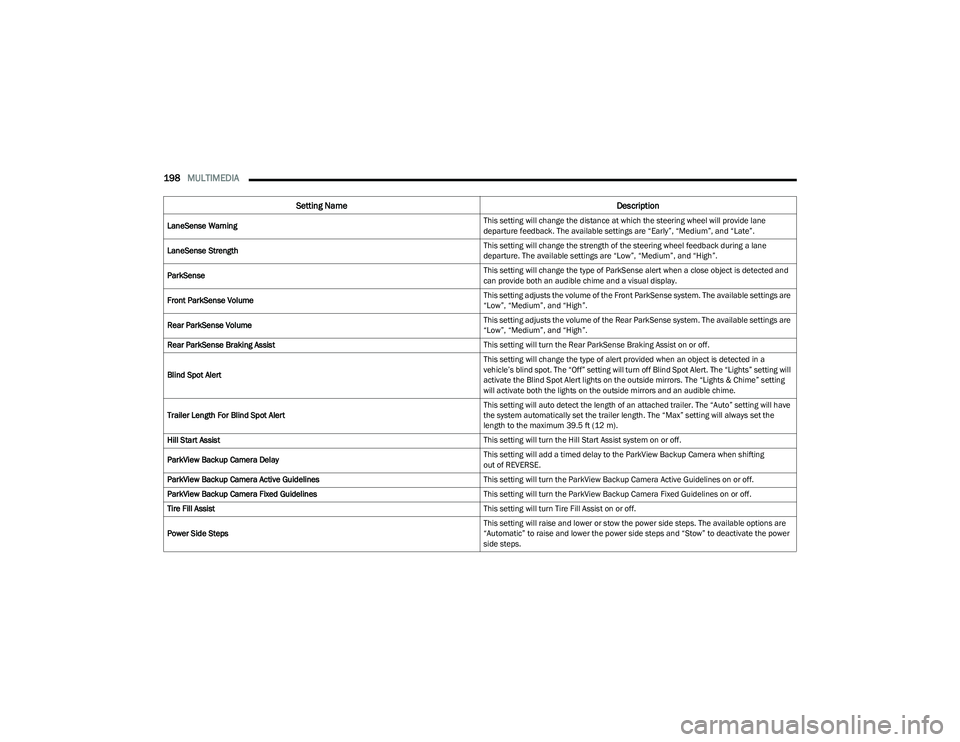
LaneSense Warning This setting will change the distance at which the steering wheel will provide lane
departure feedback. The available settings are “Early”, “Medium”, and “Late”.
LaneSense Strength This setting will change the strength of the steering wheel feedback during a lane
departure. The available settings are “Low”, “Medium”, and “High”.
ParkSense This setting will change the type of ParkSense alert when a close object is detected and
can provide both an audible chime and a visual display.
Front ParkSense Volume This setting adjusts the volume of the Front ParkSense system. The available settings are
“Low”, “Medium”, and “High”.
Rear ParkSense Volume This setting adjusts the volume of the Rear ParkSense system. The available settings are
“Low”, “Medium”, and “High”.
Rear ParkSense Braking Assist This setting will turn the Rear ParkSense Braking Assist on or off.
Blind Spot Alert This setting will change the type of alert provided when an object is detected in a
vehicle’s blind spot. The “Off” setting will turn off Blind Spot Alert. The “Lights” setting will
activate the Blind Spot Alert lights on the outside mirrors. The “Lights & Chime” setting
will activate both the lights on the outside mirrors and an audible chime.
Trailer Length For Blind Spot Alert This setting will auto detect the length of an attached trailer. The “Auto” setting will have
the system automatically set the trailer length. The “Max” setting will always set the
length to the maximum 39.5 ft (12 m).
Hill Start Assist This setting will turn the Hill Start Assist system on or off.
ParkView Backup Camera Delay This setting will add a timed delay to the ParkView Backup Camera when shifting
out of REVERSE.
ParkView Backup Camera Active Guidelines This setting will turn the ParkView Backup Camera Active Guidelines on or off.
ParkView Backup Camera Fixed Guidelines This setting will turn the ParkView Backup Camera Fixed Guidelines on or off.
Tire Fill Assist This setting will turn Tire Fill Assist on or off.
Power Side Steps This setting will raise and lower or stow the power side steps. The available options are
“Automatic” to raise and lower the power side steps and “Stow” to deactivate the power
side steps.
Setting Name
Description
23_DT_OM_EN_USC_t.book Page 198