clock RAM 1500 2023 User Guide
[x] Cancel search | Manufacturer: RAM, Model Year: 2023, Model line: 1500, Model: RAM 1500 2023Pages: 416, PDF Size: 20.59 MB
Page 220 of 416
218MULTIMEDIA
UCONNECT MODES
STEERING WHEEL AUDIO CONTROLS
The remote sound system controls are located on the rear
surface of the steering wheel at the three and nine o’clock
positions.
Remote Sound System Controls
The right-hand control is a rocker-type switch with a push
button in the center and controls the volume and mode of
the sound system. Pushing the top of the rocker switch will
increase the volume, and pushing the bottom of the rocker
switch will decrease the volume. Pushing the right-hand control’s center button will make
the radio switch between the various modes available
(AM/FM/SXM or Media, etc.).
The left-hand control is a rocker-type switch with a push
button in the center. The function of the left-hand control
is different depending on which mode you are in.
The following describes the left-hand control operation in
each mode:
Radio Operation
Pushing the top of the switch will seek up for the next
available station and pushing the bottom of the switch will
seek down for the next available station.
The button located in the center of the left-hand control
will tune to the next preset station that you have
programmed in the radio presets.
Media Mode
Pushing the top of the switch skips to the next track on the
selected media (AUX/USB/Bluetooth®). Pushing the
switch up twice will go forward two tracks. Pushing the
bottom switch goes to the beginning of the current track,
or the beginning of the previous track if it is within eight
seconds after the current track begins to play. Double
pressing the bottom button switch will skip to the previous
track if it is after eight seconds into the current track.
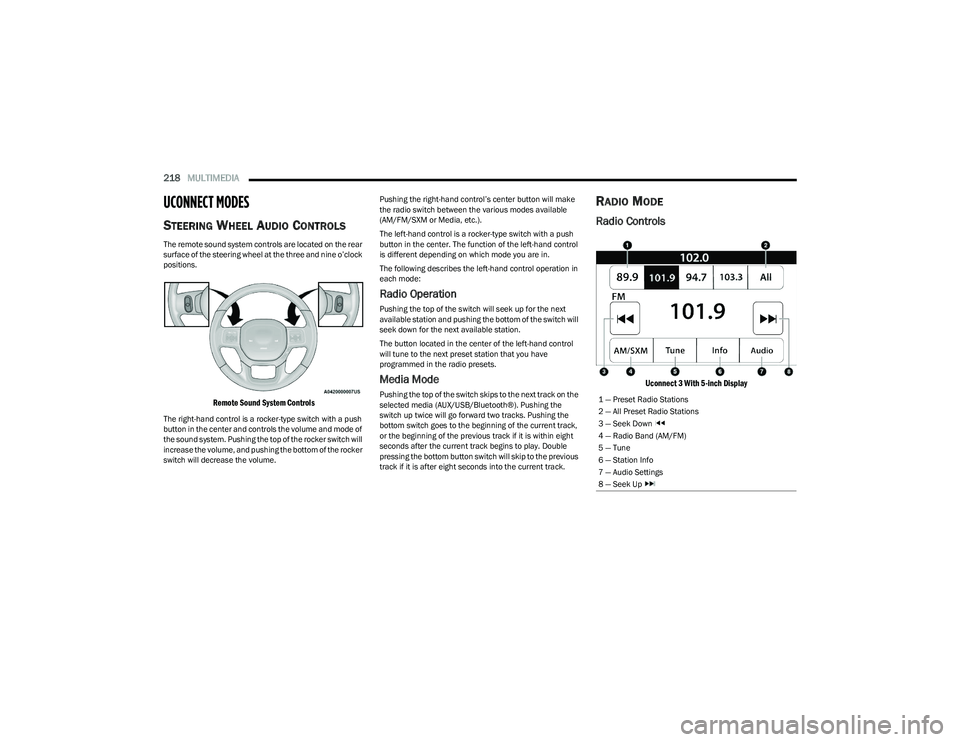
RADIO MODE
Radio Controls
Uconnect 3 With 5-inch Display
1 — Preset Radio Stations
2 — All Preset Radio Stations
3 — Seek Down
4 — Radio Band (AM/FM)
5 — Tune
6 — Station Info
7 — Audio Settings
8 — Seek Up
23_DT_OM_EN_USC_t.book Page 218
Page 221 of 416
MULTIMEDIA219
The radio is equipped with the following modes:
AM
FM
SiriusXM® Satellite Radio (If Equipped)
Press the Radio button on the touchscreen to enter the
Radio Mode. The different tuner modes, AM, FM, and SXM,
can then be selected by pressing the corresponding
button in Radio Mode.
Volume & On/Off Control
Push the VOLUME & On/Off control knob to turn on and off
the Uconnect system.
The electronic volume control turns continuously
(360 degrees) in either direction, without stopping.
Turning the VOLUME & On/Off control knob clockwise
increases the volume, and counterclockwise decreases it.
When the audio system is turned on, the sound will be set
at the same volume level as last played.
Mute Button
Push the MUTE button to mute or unmute the system.
Tune/Scroll Control
Turn the rotary TUNE/SCROLL control knob clockwise to
increase or counterclockwise to decrease the radio station
frequency. Push the ENTER/BROWSE button to choose a
selection.
Seek
The Seek Up and Down functions are activated by pressing
the double arrow buttons on the touchscreen to the right
and left of the radio station display or by pushing the left
steering wheel audio control button up or down. Seek Up
and Seek Down
Press and release the Seek Up or Seek Down
button to tune the radio to the next available station or
channel. During a Seek Up/Down function, if the radio
reaches the starting station after passing through the
entire band two times, the radio will stop at the station
where it began.
Fast Seek Up and Fast Seek Down
Press and hold, and then release the Seek Up or
Seek Down button to advance the radio through the
available stations or channels at a faster rate. The radio
stops at the next available station or channel when the
button on the touchscreen is released.
NOTE:
Pressing and holding either the Seek Up or
Seek Down button will scan the different
frequency bands at a slower rate.
Info — If Equipped
Press the Info button to display information related to the
currently playing song and radio station.
Direct Tune
Press the Tune button located at the bottom of the radio
screen to directly tune to a desired radio station or
channel. Press the available number button on the touchscreen to
begin selecting a desired station. Once a number has
been entered, any numbers that are no longer possible
(stations that cannot be reached) will become
deactivated/grayed out.
Undo
You can backspace an entry by pressing the
Back button on the touchscreen.
GO
Once the last digit of a station has been entered, press
“Ok”. The Direct Tune screen will close, and the system will
automatically tune to that station.
RADIO VOICE COMMANDS
Use your voice to quickly get to the AM, FM, or SiriusXM®
Satellite Radio stations you would like to hear.
(Subscription or included SiriusXM® Satellite Radio trial
required.)
Push the VR button on the steering wheel and wait for
the beep to say a command. See an example:
“Tune to ninety-five-point-five FM”
“Tune to Satellite Channel Hits 1”
Did You Know: At any time, if you are not sure of what to
say or want to learn a Voice Command, push the VR button
and say “ Help”. The system provides you with a list of
commands.
5
23_DT_OM_EN_USC_t.book Page 219
Page 320 of 416
318IN CASE OF EMERGENCY
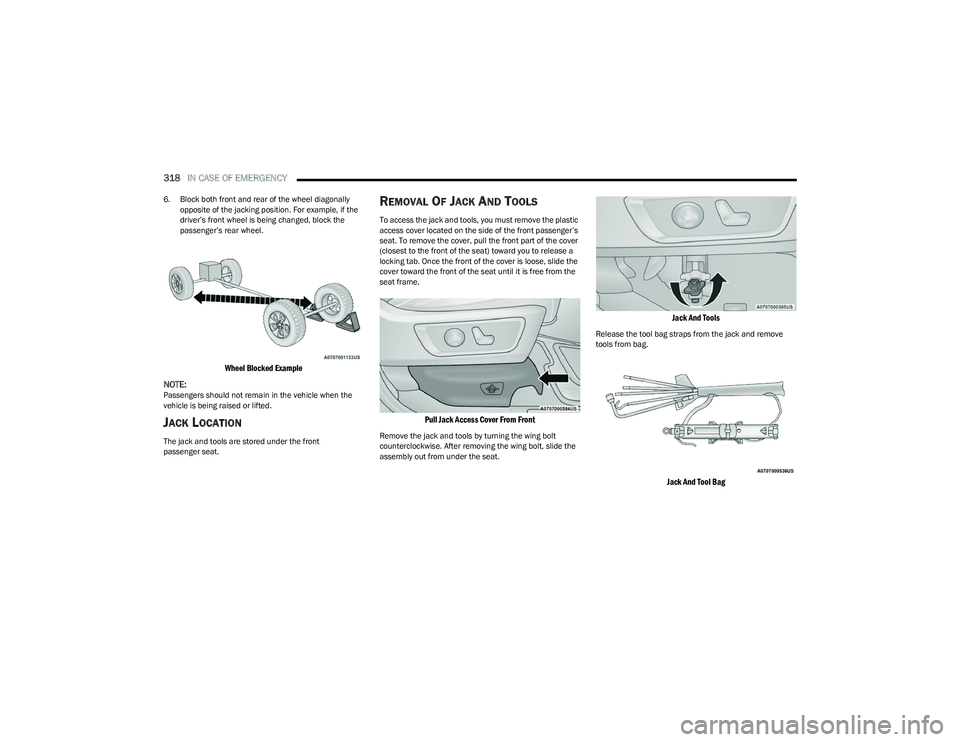
6. Block both front and rear of the wheel diagonally
opposite of the jacking position. For example, if the
driver’s front wheel is being changed, block the
passenger’s rear wheel.
Wheel Blocked Example
NOTE:
Passengers should not remain in the vehicle when the
vehicle is being raised or lifted.
JACK LOCATION
The jack and tools are stored under the front
passenger seat.
REMOVAL OF JACK AND TOOLS
To access the jack and tools, you must remove the plastic
access cover located on the side of the front passenger’s
seat. To remove the cover, pull the front part of the cover
(closest to the front of the seat) toward you to release a
locking tab. Once the front of the cover is loose, slide the
cover toward the front of the seat until it is free from the
seat frame.
Pull Jack Access Cover From Front
Remove the jack and tools by turning the wing bolt
counterclockwise. After removing the wing bolt, slide the
assembly out from under the seat.
Jack And Tools
Release the tool bag straps from the jack and remove
tools from bag.
Jack And Tool Bag
23_DT_OM_EN_USC_t.book Page 318
Page 322 of 416
320IN CASE OF EMERGENCY
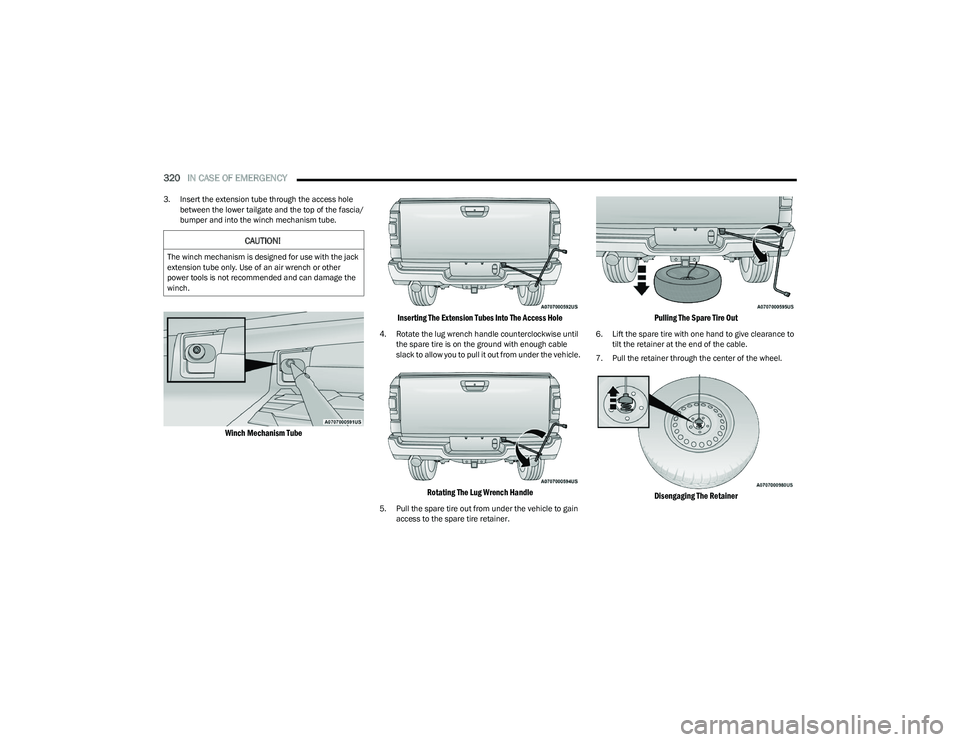
3. Insert the extension tube through the access hole
between the lower tailgate and the top of the fascia/
bumper and into the winch mechanism tube.
Winch Mechanism Tube Inserting The Extension Tubes Into The Access Hole
4. Rotate the lug wrench handle counterclockwise until
the spare tire is on the ground with enough cable
slack to allow you to pull it out from under the vehicle.
Rotating The Lug Wrench Handle
5. Pull the spare tire out from under the vehicle to gain access to the spare tire retainer.
Pulling The Spare Tire Out
6. Lift the spare tire with one hand to give clearance to tilt the retainer at the end of the cable.
7. Pull the retainer through the center of the wheel.
Disengaging The Retainer
CAUTION!
The winch mechanism is designed for use with the jack
extension tube only. Use of an air wrench or other
power tools is not recommended and can damage the
winch.
23_DT_OM_EN_USC_t.book Page 320
Page 323 of 416
IN CASE OF EMERGENCY321
JACKING INSTRUCTIONS
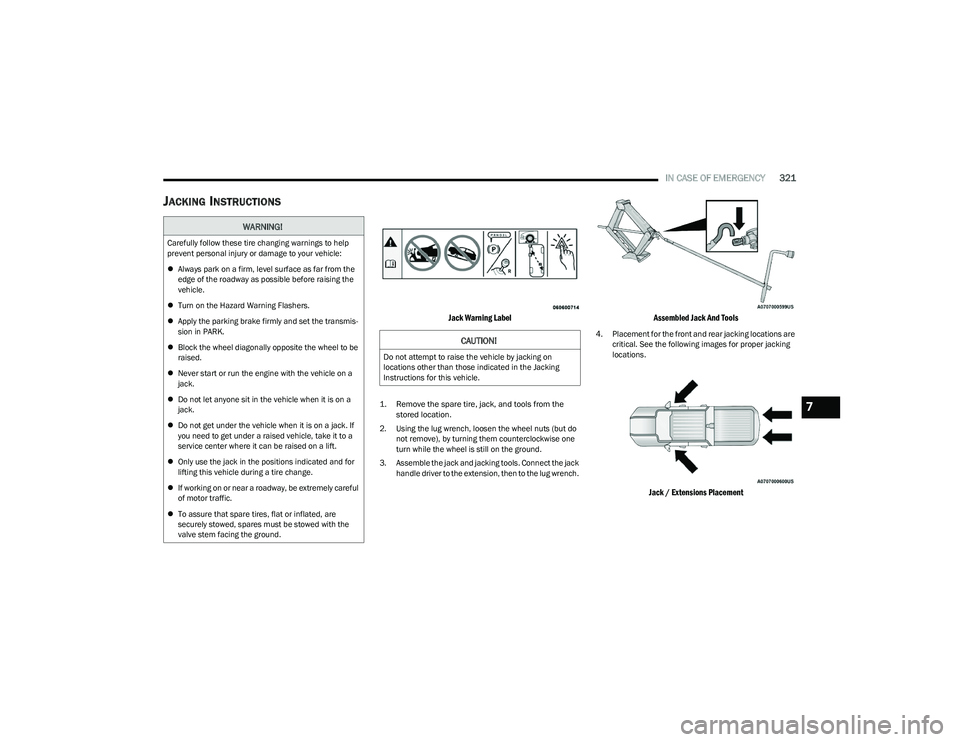
Jack Warning Label
1. Remove the spare tire, jack, and tools from the
stored location.
2. Using the lug wrench, loosen the wheel nuts (but do not remove), by turning them counterclockwise one
turn while the wheel is still on the ground.
3. Assemble the jack and jacking tools. Connect the jack handle driver to the extension, then to the lug wrench.
Assembled Jack And Tools
4. Placement for the front and rear jacking locations are critical. See the following images for proper jacking
locations.
Jack / Extensions Placement
WARNING!
Carefully follow these tire changing warnings to help
prevent personal injury or damage to your vehicle:
Always park on a firm, level surface as far from the
edge of the roadway as possible before raising the
vehicle.
Turn on the Hazard Warning Flashers.
Apply the parking brake firmly and set the transmis -
sion in PARK.
Block the wheel diagonally opposite the wheel to be
raised.
Never start or run the engine with the vehicle on a
jack.
Do not let anyone sit in the vehicle when it is on a
jack.
Do not get under the vehicle when it is on a jack. If
you need to get under a raised vehicle, take it to a
service center where it can be raised on a lift.
Only use the jack in the positions indicated and for
lifting this vehicle during a tire change.
If working on or near a roadway, be extremely careful
of motor traffic.
To assure that spare tires, flat or inflated, are
securely stowed, spares must be stowed with the
valve stem facing the ground.
CAUTION!
Do not attempt to raise the vehicle by jacking on
locations other than those indicated in the Jacking
Instructions for this vehicle.
7
23_DT_OM_EN_USC_t.book Page 321
Page 324 of 416
322IN CASE OF EMERGENCY
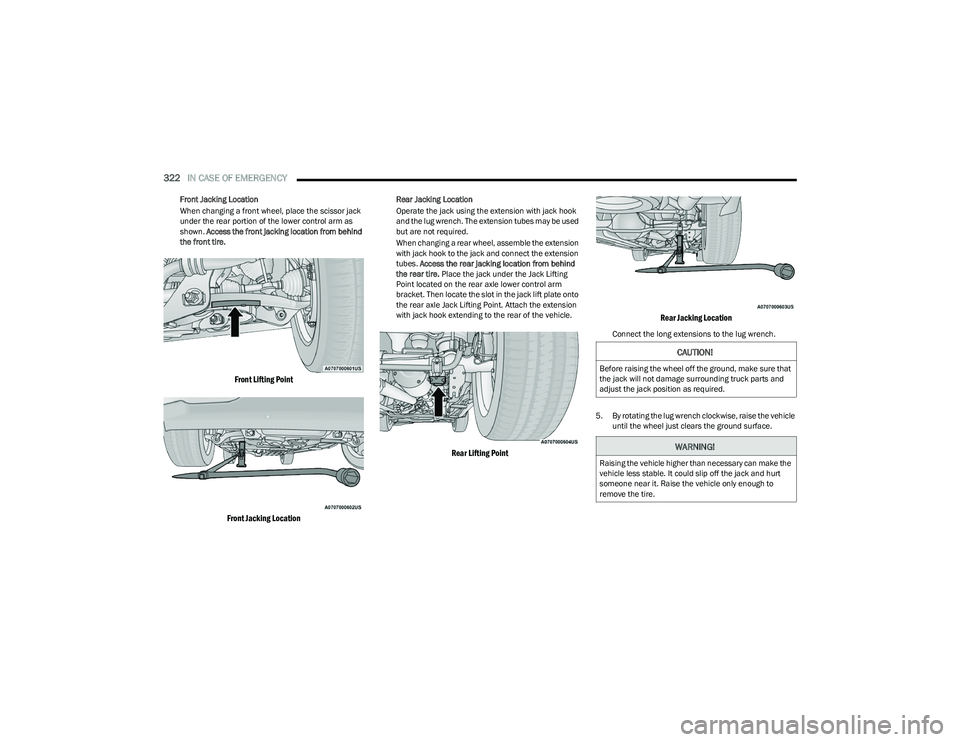
Front Jacking Location
When changing a front wheel, place the scissor jack
under the rear portion of the lower control arm as
shown. Access the front jacking location from behind
the front tire.
Front Lifting Point
Front Jacking Location
Rear Jacking Location
Operate the jack using the extension with jack hook
and the lug wrench. The extension tubes may be used
but are not required.
When changing a rear wheel, assemble the extension
with jack hook to the jack and connect the extension
tubes. Access the rear jacking location from behind
the rear tire. Place the jack under the Jack Lifting
Point located on the rear axle lower control arm
bracket. Then locate the slot in the jack lift plate onto
the rear axle Jack Lifting Point. Attach the extension
with jack hook extending to the rear of the vehicle.
Rear Lifting Point Rear Jacking Location
Connect the long extensions to the lug wrench.
5. By rotating the lug wrench clockwise, raise the vehicle until the wheel just clears the ground surface.
CAUTION!
Before raising the wheel off the ground, make sure that
the jack will not damage surrounding truck parts and
adjust the jack position as required.
WARNING!
Raising the vehicle higher than necessary can make the
vehicle less stable. It could slip off the jack and hurt
someone near it. Raise the vehicle only enough to
remove the tire.
23_DT_OM_EN_USC_t.book Page 322
Page 326 of 416
324IN CASE OF EMERGENCY
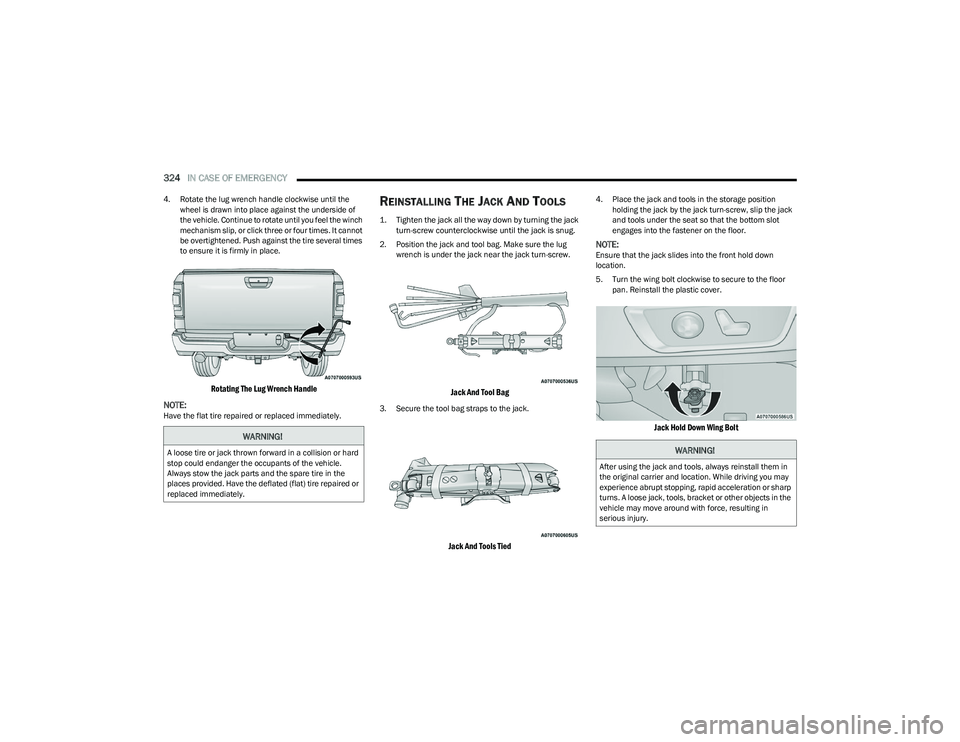
4. Rotate the lug wrench handle clockwise until the
wheel is drawn into place against the underside of
the vehicle. Continue to rotate until you feel the winch
mechanism slip, or click three or four times. It cannot
be overtightened. Push against the tire several times
to ensure it is firmly in place.
Rotating The Lug Wrench Handle
NOTE:
Have the flat tire repaired or replaced immediately.
REINSTALLING THE JACK AND TOOLS
1. Tighten the jack all the way down by turning the jack turn-screw counterclockwise until the jack is snug.
2. Position the jack and tool bag. Make sure the lug wrench is under the jack near the jack turn-screw.
Jack And Tool Bag
3. Secure the tool bag straps to the jack.
Jack And Tools Tied
4. Place the jack and tools in the storage position holding the jack by the jack turn-screw, slip the jack
and tools under the seat so that the bottom slot
engages into the fastener on the floor.
NOTE:Ensure that the jack slides into the front hold down
location.
5. Turn the wing bolt clockwise to secure to the floor pan. Reinstall the plastic cover.
Jack Hold Down Wing Bolt
WARNING!
A loose tire or jack thrown forward in a collision or hard
stop could endanger the occupants of the vehicle.
Always stow the jack parts and the spare tire in the
places provided. Have the deflated (flat) tire repaired or
replaced immediately.WARNING!
After using the jack and tools, always reinstall them in
the original carrier and location. While driving you may
experience abrupt stopping, rapid acceleration or sharp
turns. A loose jack, tools, bracket or other objects in the
vehicle may move around with force, resulting in
serious injury.
23_DT_OM_EN_USC_t.book Page 324
Page 368 of 416
366SERVICING AND MAINTENANCE
Replacing Exterior Bulbs
BASE QUAD: LOW BEAM HEADLAMP, HIGH
BEAM HEADLAMP, FRONT PARK AND TURN —
IF EQUIPPED
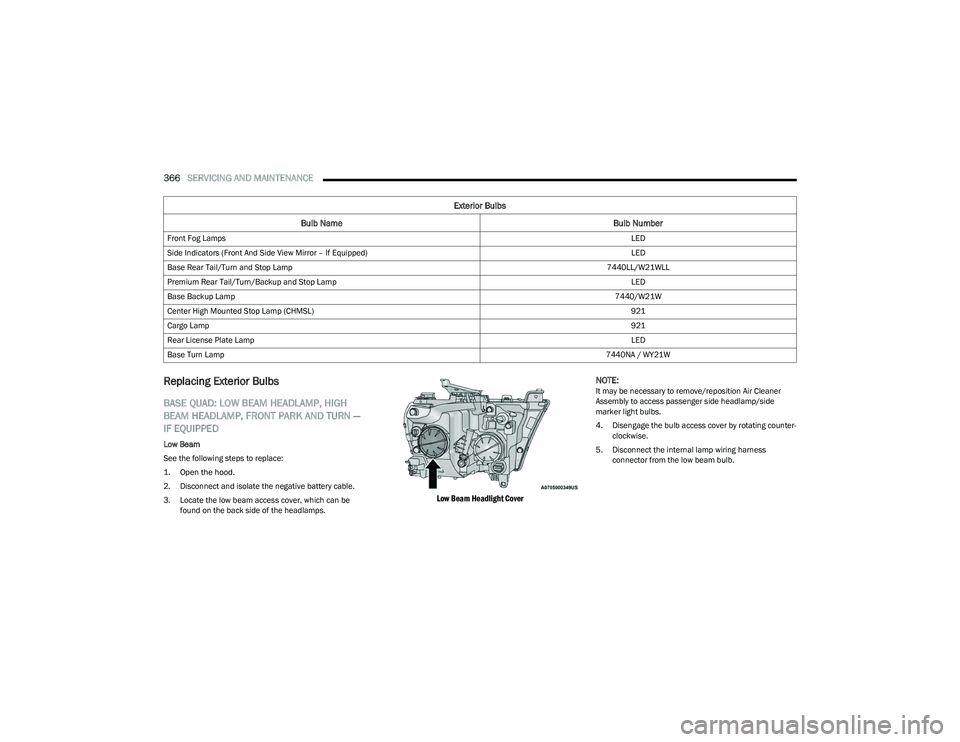
Low Beam
See the following steps to replace:
1. Open the hood.
2. Disconnect and isolate the negative battery cable.
3. Locate the low beam access cover, which can be
found on the back side of the headlamps.
Low Beam Headlight Cover
NOTE:
It may be necessary to remove/reposition Air Cleaner
Assembly to access passenger side headlamp/side
marker light bulbs.
4. Disengage the bulb access cover by rotating counter
-
clockwise.
5. Disconnect the internal lamp wiring harness connector from the low beam bulb.
Front Fog Lamps
LED
Side Indicators (Front And Side View Mirror – If Equipped) LED
Base Rear Tail/Turn and Stop Lamp 7440LL/W21WLL
Premium Rear Tail/Turn/Backup and Stop Lamp LED
Base Backup Lamp 7440/W21W
Center High Mounted Stop Lamp (CHMSL) 921
Cargo Lamp 921
Rear License Plate Lamp LED
Base Turn Lamp 7440NA / WY21W
Exterior Bulbs
Bulb Name Bulb Number
23_DT_OM_EN_USC_t.book Page 366
Page 369 of 416
SERVICING AND MAINTENANCE367
6. Rotate the bulb counterclockwise a quarter turn to
unlock the bulb from the lamp.
7. Pull the bulb straight out from the housing.
8. Reverse the procedure for installation of new bulb and covers.
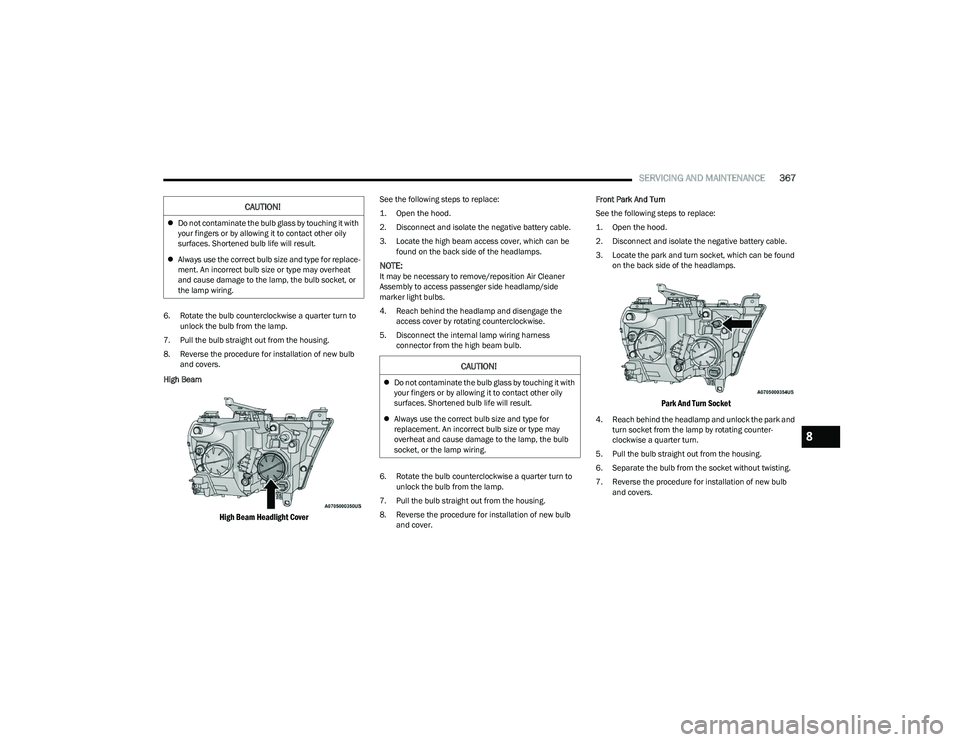
High Beam
High Beam Headlight Cover
See the following steps to replace:
1. Open the hood.
2. Disconnect and isolate the negative battery cable.
3. Locate the high beam access cover, which can be found on the back side of the headlamps.
NOTE:It may be necessary to remove/reposition Air Cleaner
Assembly to access passenger side headlamp/side
marker light bulbs.
4. Reach behind the headlamp and disengage the access cover by rotating counterclockwise.
5. Disconnect the internal lamp wiring harness connector from the high beam bulb.
6. Rotate the bulb counterclockwise a quarter turn to unlock the bulb from the lamp.
7. Pull the bulb straight out from the housing.
8. Reverse the procedure for installation of new bulb and cover. Front Park And Turn
See the following steps to replace:
1. Open the hood.
2. Disconnect and isolate the negative battery cable.
3. Locate the park and turn socket, which can be found
on the back side of the headlamps.
Park And Turn Socket
4. Reach behind the headlamp and unlock the park and turn socket from the lamp by rotating counter -
clockwise a quarter turn.
5. Pull the bulb straight out from the housing.
6. Separate the bulb from the socket without twisting.
7. Reverse the procedure for installation of new bulb and covers.
CAUTION!
Do not contaminate the bulb glass by touching it with
your fingers or by allowing it to contact other oily
surfaces. Shortened bulb life will result.
Always use the correct bulb size and type for replace -
ment. An incorrect bulb size or type may overheat
and cause damage to the lamp, the bulb socket, or
the lamp wiring.
CAUTION!
Do not contaminate the bulb glass by touching it with
your fingers or by allowing it to contact other oily
surfaces. Shortened bulb life will result.
Always use the correct bulb size and type for
replacement. An incorrect bulb size or type may
overheat and cause damage to the lamp, the bulb
socket, or the lamp wiring.
8
23_DT_OM_EN_USC_t.book Page 367
Page 370 of 416
368SERVICING AND MAINTENANCE
Side Marker Lamp
See the following steps to replace:
1. Open the hood.
2. Disconnect and isolate the negative battery cable.
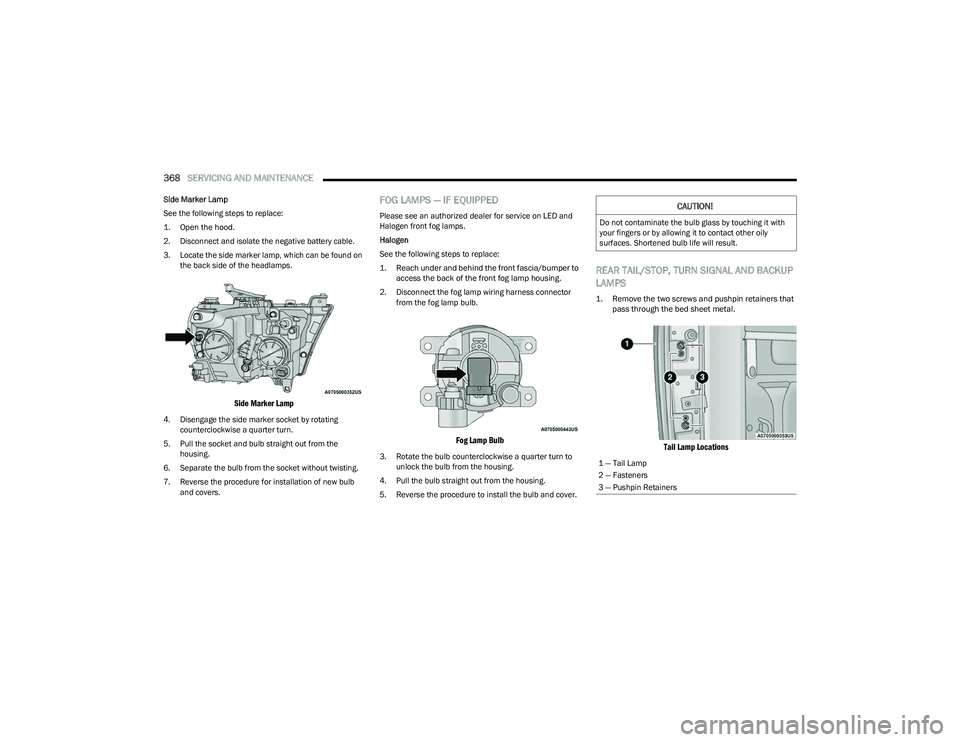
3. Locate the side marker lamp, which can be found on
the back side of the headlamps.
Side Marker Lamp
4. Disengage the side marker socket by rotating counterclockwise a quarter turn.
5. Pull the socket and bulb straight out from the housing.
6. Separate the bulb from the socket without twisting.
7. Reverse the procedure for installation of new bulb and covers.
FOG LAMPS — IF EQUIPPED
Please see an authorized dealer for service on LED and
Halogen front fog lamps.
Halogen
See the following steps to replace:
1. Reach under and behind the front fascia/bumper to access the back of the front fog lamp housing.
2. Disconnect the fog lamp wiring harness connector from the fog lamp bulb.
Fog Lamp Bulb
3. Rotate the bulb counterclockwise a quarter turn to unlock the bulb from the housing.
4. Pull the bulb straight out from the housing.
5. Reverse the procedure to install the bulb and cover.
REAR TAIL/STOP, TURN SIGNAL AND BACKUP
LAMPS
1. Remove the two screws and pushpin retainers that pass through the bed sheet metal.
Tail Lamp Locations
CAUTION!
Do not contaminate the bulb glass by touching it with
your fingers or by allowing it to contact other oily
surfaces. Shortened bulb life will result.
1 — Tail Lamp
2 — Fasteners
3 — Pushpin Retainers
23_DT_OM_EN_USC_t.book Page 368