key battery RAM 1500 2023 User Guide
[x] Cancel search | Manufacturer: RAM, Model Year: 2023, Model line: 1500, Model: RAM 1500 2023Pages: 416, PDF Size: 20.59 MB
Page 68 of 416

66GETTING TO KNOW YOUR VEHICLE
NOTE:Charge unsupported devices with the Charge Only USB
ports. If an unsupported device is plugged into a Media
USB port, a message will display on the touchscreen that
the device is not supported by the system.
Plugging in a phone or another USB device may cause the
connection to a previous device to be lost.
If equipped, your vehicle may also contain a USB port
located on the top tray of the vehicle’s center console.
If equipped, two Mini-USB ports (Type C), two Standard
USB ports (Type A), and one AUX port may be located to the
left of the center stack, just below the climate controls.
Center Console USB/AUX Media Hub
Some USB ports support media and charging. You can use
features, such as Apple CarPlay®, Android Auto™,
Pandora®, and others while charging your phone.
NOTE:Plugging in a phone or another USB device may cause the
connection to a previous device to be lost.
For further information, refer to the Uconnect Radio
Instruction Manual or visit UconnectPhone.com.
ELECTRICAL POWER OUTLETS
The auxiliary 12 Volt (13 Amp) power outlet can provide
power for in-cab accessories designed for use with the
standard “cigarette lighter” style plug. The 12 Volt power
outlets and 5 Volt (2.5 Amp) USB Port (Charge Only) have
a cap attached to the outlet indicating “12V DC”, together
with either a key symbol, battery symbol, or USB symbol.
An auxiliary power outlet can be found in the tray on top of
the center stack. This power outlet works when the ignition
is in the ON/RUN, ACC, or OFF position.
Power Outlet — Top Of Center Stack
Power Outlet Fuse Locations
1 — Standard USB Type A Ports
2 — Mini-USB Type C Ports
3 — AUX Port
CAUTION!
Do not exceed the maximum power of 160 Watts
(13 Amps) at 12 Volts. If the 160 Watts (13 Amps)
power rating is exceeded, the fuse protecting the
system will need to be replaced.
Power outlets are designed for accessory plugs only.
Do not insert any other object in the power outlets as
this will damage the outlet and blow the fuse.
Improper use of the power outlet can cause damage
not covered by your New Vehicle Limited Warranty.
1 — F54 Fuse 20 A Yellow Power Outlet Battery Fed
Position
2 — F54 Fuse 20 A Yellow Power Outlet Ignition Fed
Position
3 — F48 Fuse 10 A Red Port Power or Rear USB
(Charge Only)
23_DT_OM_EN_USC_t.book Page 66
Page 84 of 416
82GETTING TO KNOW YOUR VEHICLE
LOCKING AND UNLOCKING RAMBOX
Push and release the lock or unlock button on the key fob
to lock and unlock all doors, the tailgate and the RamBox
Úpage 16. To unlatch the storage bin manually, insert the
emergency key into the keyhole and turn clockwise.
Always return the key to the upright (vertical) position
before removing it from the keyhole.
RAMBOX CARGO STORAGE BINS
Cargo storage bins are located on both sides of the pickup
box. The cargo storage bins provide watertight, lockable,
illuminated storage for up to 150 lb (68 kg) of evenly
distributed cargo.
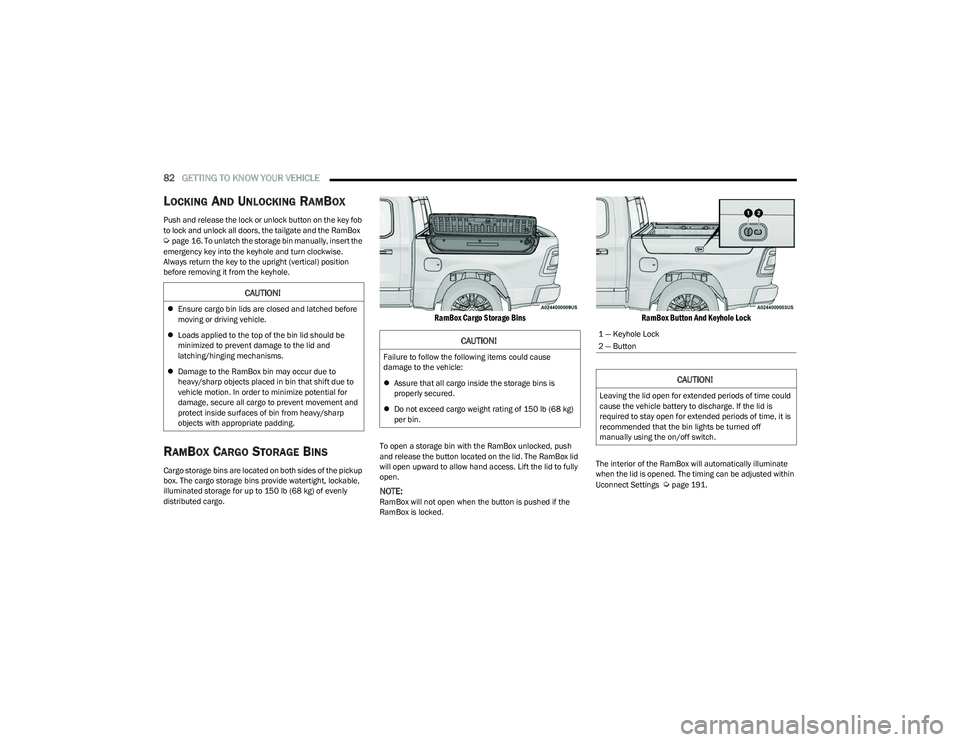
RamBox Cargo Storage Bins
To open a storage bin with the RamBox unlocked, push
and release the button located on the lid. The RamBox lid
will open upward to allow hand access. Lift the lid to fully
open.
NOTE:RamBox will not open when the button is pushed if the
RamBox is locked.
RamBox Button And Keyhole Lock
The interior of the RamBox will automatically illuminate
when the lid is opened. The timing can be adjusted within
Uconnect Settings
Úpage 191.
CAUTION!
Ensure cargo bin lids are closed and latched before
moving or driving vehicle.
Loads applied to the top of the bin lid should be
minimized to prevent damage to the lid and
latching/hinging mechanisms.
Damage to the RamBox bin may occur due to
heavy/sharp objects placed in bin that shift due to
vehicle motion. In order to minimize potential for
damage, secure all cargo to prevent movement and
protect inside surfaces of bin from heavy/sharp
objects with appropriate padding.
CAUTION!
Failure to follow the following items could cause
damage to the vehicle:
Assure that all cargo inside the storage bins is
properly secured.
Do not exceed cargo weight rating of 150 lb (68 kg)
per bin.
1 — Keyhole Lock
2 — Button
CAUTION!
Leaving the lid open for extended periods of time could
cause the vehicle battery to discharge. If the lid is
required to stay open for extended periods of time, it is
recommended that the bin lights be turned off
manually using the on/off switch.
23_DT_OM_EN_USC_t.book Page 82
Page 122 of 416
120STARTING AND OPERATING
If the vehicle is not in PARK and the driver exits the vehicle
with the engine running, the vehicle may AutoPark.
AutoPark will engage when all of these conditions are met:
Vehicle is equipped with a rotary shifter and an 8-speed
transmission
Vehicle is not in PARK
Vehicle speed is 1.2 mph (1.9 km/h) or less
Driver’s seat belt is unbuckled
Driver’s door is ajar
Brake pedal is not pressed
The message “ AutoPark Engaged Shift To P Then Shift To
Gear ” will display in the instrument cluster.
NOTE:In some cases the ParkSense graphic will be displayed in
the instrument cluster, causing the “ AutoPark Engaged
Shift To P Then Shift To Gear ” message to not be seen. In
these cases, the gear selector must be returned to “P” to
select desired gear.
If the driver shifts into PARK while moving, the vehicle may
AutoPark.
AutoPark will engage ONLY when vehicle speed is 1.2 mph
(1.9 km/h) or less.
The message “ Vehicle Speed Is Too High To Shift to P ” will
be displayed in the instrument cluster if vehicle speed is
above 1.2 mph (1.9 km/h). 4WD LOW — If Equipped
AutoPark will be disabled when operating the vehicle in
4WD LOW.
The message “
AutoPark Disabled ” will be displayed in the
instrument cluster.
Additional customer warnings will be given when all of
these conditions are met:
Vehicle is not in PARK
Driver’s door is ajar
Vehicle is in 4WD LOW
The message “ AutoPark Not Engaged ” will be displayed in
the instrument cluster. A warning chime will continue until
you shift the vehicle into PARK or the driver’s door is
closed.
ALWAYS DO A VISUAL CHECK
that your vehicle is in PARK
by looking for the "P" in the instrument cluster display and
near the gear selector. As an added precaution, always
apply the parking brake when exiting the vehicle.
EXTENDED PARK STARTING
NOTE:Extended Park condition occurs when the vehicle has not
been started or driven for at least 30 days.
1. Install a battery charger or jumper cables to the battery to ensure a full battery charge during the
crank cycle.
2. Place the ignition to the START position and release it when the engine starts. For Keyless Enter ‘n Go
ignition systems, press and hold the brake pedal
while pushing the ENGINE START/STOP button once.
3. If the engine fails to start within 10 seconds, wait 10 to 15 seconds to allow the starter to cool, then
repeat the Extended Park Starting procedure.
4. If the engine fails to start after eight attempts, allow the starter to cool for at least 10 minutes, then repeat
the Extended Park Starting procedure.
WARNING!
If vehicle speed is above 1.2 mph (1.9 km/h), the transmission will default to NEUTRAL until the vehicle
speed drops below 1.2 mph (1.9 km/h). A vehicle left in
the NEUTRAL position can roll. As an added precaution,
always apply the parking brake when exiting the vehicle.
CAUTION!
To prevent damage to the starter, do not crank
continuously for more than 10 seconds at a time.
Wait 10 to 15 seconds before trying again.
23_DT_OM_EN_USC_t.book Page 120
Page 123 of 416
STARTING AND OPERATING121
(Continued)
IF ENGINE FAILS TO START
If the engine fails to start after you have followed the
“Normal Starting” procedure and the vehicle has not
experienced an Extended Park condition as defined
above, it may be flooded. Push the accelerator pedal all
the way to the floor and hold it there while the engine is
cranking. This should clear any excess fuel in case the
engine is flooded.
The starter motor will engage automatically, run for 10
seconds, and then disengage. Once this occurs, release
the accelerator pedal and the brake pedal, wait 10 to 15
seconds, then repeat the “Normal Starting” procedure.
If the engine has been flooded, it may start to run, but not
have enough power to continue running when the ignition
button/key is released. If this occurs, continue cranking
with the accelerator pedal pushed all the way to the floor.
Release the accelerator pedal and the ignition button/key
once the engine is running smoothly.
If the engine shows no sign of starting after a 10 second
period of engine cranking with the accelerator pedal held
to the floor, wait 10 to 15 seconds, then repeat the
“Normal Starting” procedure.
AFTER STARTING
The idle speed is controlled automatically, and it will
decrease as the engine warms up.
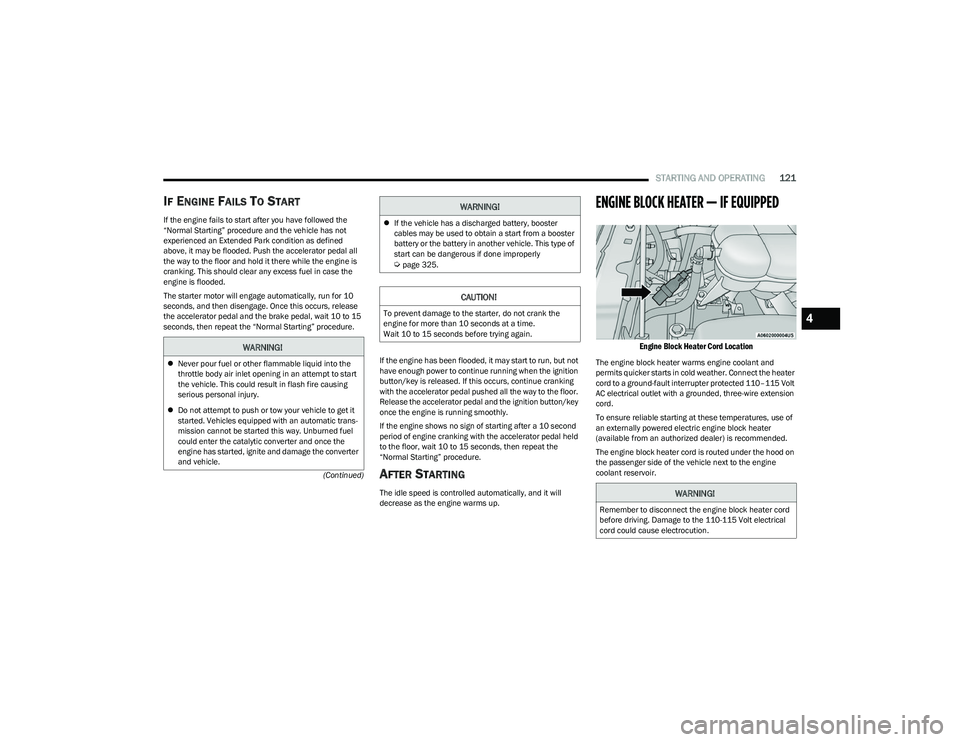
ENGINE BLOCK HEATER — IF EQUIPPED
Engine Block Heater Cord Location
The engine block heater warms engine coolant and
permits quicker starts in cold weather. Connect the heater
cord to a ground-fault interrupter protected 110–115 Volt
AC electrical outlet with a grounded, three-wire extension
cord.
To ensure reliable starting at these temperatures, use of
an externally powered electric engine block heater
(available from an authorized dealer) is recommended.
The engine block heater cord is routed under the hood on
the passenger side of the vehicle next to the engine
coolant reservoir.
WARNING!
Never pour fuel or other flammable liquid into the
throttle body air inlet opening in an attempt to start
the vehicle. This could result in flash fire causing
serious personal injury.
Do not attempt to push or tow your vehicle to get it
started. Vehicles equipped with an automatic trans -
mission cannot be started this way. Unburned fuel
could enter the catalytic converter and once the
engine has started, ignite and damage the converter
and vehicle.
If the vehicle has a discharged battery, booster
cables may be used to obtain a start from a booster
battery or the battery in another vehicle. This type of
start can be dangerous if done improperly
Úpage 325.
CAUTION!
To prevent damage to the starter, do not crank the
engine for more than 10 seconds at a time.
Wait 10 to 15 seconds before trying again.
WARNING!
WARNING!
Remember to disconnect the engine block heater cord
before driving. Damage to the 110-115 Volt electrical
cord could cause electrocution.
4
23_DT_OM_EN_USC_t.book Page 121
Page 141 of 416

STARTING AND OPERATING139
Wheel Alignment Mode
Before performing a wheel alignment, this mode must be
enabled which moves the vehicle to normal ride height
and disables the automatic leveling
Úpage 191.
Protection Strategy
In order to protect the air suspension system, the vehicle
will disable load leveling as required (suspension
overloaded, battery charge low, etc.). Load leveling will
automatically resume as soon as system operation
requirements are met. See an authorized dealer if system
does not resume.
NOTE:For towing with air suspension Úpage 173.
INSTRUMENT CLUSTER DISPLAY
M
ESSAGES
When the appropriate conditions exist, a message will
appear in the instrument cluster display Úpage 98.
An audible chime will be heard whenever a system error
has been detected.
See an authorized dealer for system service if normal
operation does not resume.
OPERATION
Air Suspension Switch
The indicator lamps 1 through 4 will illuminate to show the
current position of the vehicle. Flashing indicator lamps
will show a position which the system is working to
achieve. When raising or lowering, the flashing indicator
lamp is the position the system is working to achieve.
Pushing the height selector switch up once will move the
suspension one position higher from the current position,
assuming all conditions are met (i.e., key in ON/RUN
position, engine running, speed below threshold, etc.).
The height selector switch can be pushed up multiple
times, each push will raise the requested level by one
position up to a maximum position of OR or the highest
position allowed based on current conditions
(i.e., vehicle speed, etc.). Pushing the height selector switch down once will move
the suspension one position lower from the current level,
assuming all conditions are met (i.e., key in ON/RUN
position, engine running, doors closed, speed below
threshold, etc.). The height selector switch can be pushed
down multiple times, each push will lower the requested
level by one position down to a minimum of Entry/Exit
Mode or the lowest position allowed based on current
conditions (i.e., vehicle speed, etc.).
Automatic height changes will occur based on vehicle
speed and the current vehicle height. The indicator lamps
and instrument cluster display messages will operate the
same for automatic changes and user requested changes.
Off-Road 1 (OR1) – Indicator lamps 4, 3, 2, and 1 will
be illuminated.
Normal Ride Height (NRH) – Indicator lamps 4, 3, and
2 will be illuminated.
Aero Height– Indicator lamps 4 and 3 will be
illuminated.
Entry/Exit – Indicator lamp 4 will be illuminated.
Entry/Exit can be requested up to 33 mph (53 km/h).
If vehicle speed is reduced to, and kept below, 15 mph
(24 km/h) indicator lamp 3 will flash and indicator
lamp 4 will remain solid until Entry/Exit is achieved at
which point indicator lamp 3 will turn off.
Automatic Aero Mode – Indicator lamps 5 and 4 will be
illuminated.
Transport Mode – No indicator lamps will be illumi -
nated. Transport Mode is disabled by driving the
vehicle or disabling through the Uconnect settings.
4
23_DT_OM_EN_USC_t.book Page 139
Page 144 of 416

142STARTING AND OPERATING
To Activate The Autostop Mode, The Following Must Occur:
1. The system must be in STOP/START READY state. A
STOP/START READY message is displayed in the
instrument cluster within the Stop/Start section
Ú
page 98.
2. The vehicle must be decelerating and likely coming to a complete stop.
3. The transmission gear selector must be in DRIVE and the brake pedal pressed.
The engine will shut down, the tachometer will move to the
zero position and the Stop/Start telltale will illuminate
indicating you are in an Autostop. While in an Autostop,
the Climate Controls system may automatically adjust
airflow to maintain cabin comfort. Customer settings will
be maintained upon return to an engine running condition.
POSSIBLE REASONS THE ENGINE DOES
N
OT AUTOSTOP
Prior to engine shut down, the system will check many
safety and comfort conditions to see if they are fulfilled.
In following situations, the engine will not Autostop:
Driver’s seat belt is not buckled
Driver’s door is not closed
The vehicle is on a steep grade
Cabin heating or cooling is in process and an accept -
able cabin temperature has not been achieved
HVAC is set to full defrost mode at a high blower speed
Engine has not reached normal operating temperature
Engine or exhaust temperature is too high
The battery is charging
The transmission is not in DRIVE
Hood is open
Transfer case is in 4WD LOW
TOW/HAUL mode is selected
Accelerator pedal input
Excessive 12 Volt loads
Brake application is adequate to obtain and maintain
a stop
It may be possible to operate the vehicle several
consecutive times in extreme conditions and not meet all
criteria to enable an Autostop state.TO START THE ENGINE WHILE IN
A
UTOSTOP MODE
While in DRIVE, the engine will start when the brake pedal
is released or the accelerator pedal is pressed and the
transmission will automatically reengage upon engine
restart. Conditions That Will Cause The Engine To Start
Automatically While In Autostop Mode
The engine will start automatically when:
The transmission selector is moved from DRIVE to
REVERSE, NEUTRAL, or PARK
To maintain cabin temperature near the HVAC settings
HVAC is set to full defrost mode
12 Volt demand requires engine restart
Stop/Start OFF switch is pushed
Transfer case is in 4WD LOW
The emissions system override is present
A Stop/Start system error is present
Conditions That Force An Automatic Shift To Park While In
Autostop Mode
The engine will not start automatically and the
transmission will be placed in PARK if:
The driver door is open and brake pedal released
The driver door is open and the driver seat belt is
unbuckled
The engine hood has been opened
A Stop/Start system error is present
The engine may then be restarted by moving the
transmission shift selector out of PARK (e.g., to DRIVE) or,
in some cases, only by a key start. The instrument cluster
will display a “SHIFT OUT OF PARK” message, or a
“STOP/START KEY START REQUIRED” message, to
indicate which action is required
Úpage 98.
23_DT_OM_EN_USC_t.book Page 142
Page 185 of 416
STARTING AND OPERATING183
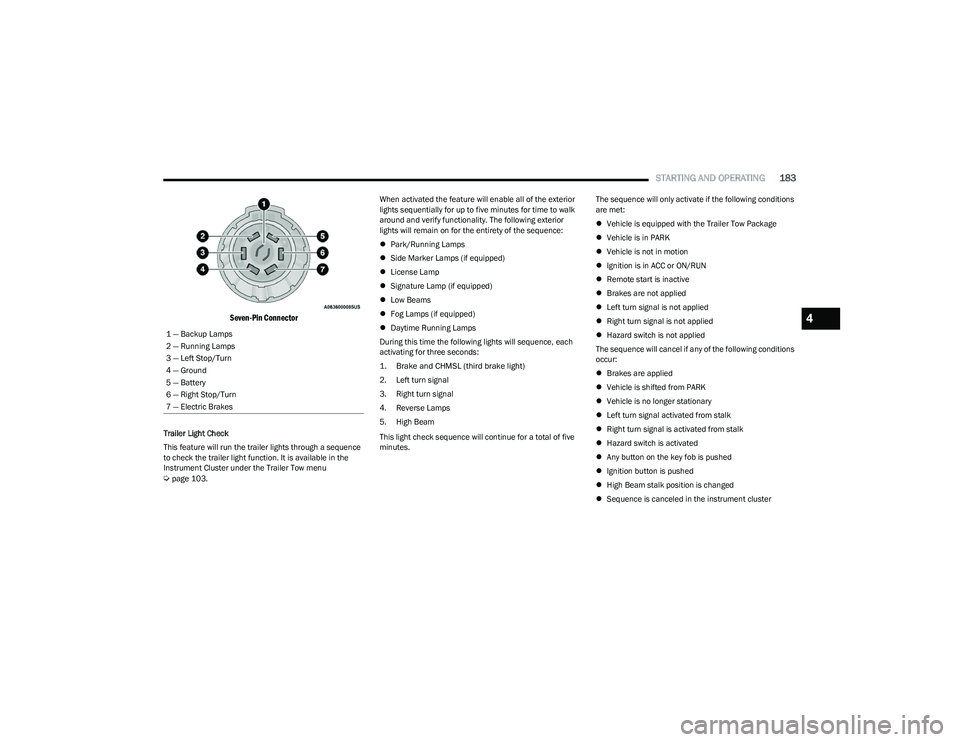
Seven-Pin Connector
Trailer Light Check
This feature will run the trailer lights through a sequence
to check the trailer light function. It is available in the
Instrument Cluster under the Trailer Tow menu
Úpage 103. When activated the feature will enable all of the exterior
lights sequentially for up to five minutes for time to walk
around and verify functionality. The following exterior
lights will remain on for the entirety of the sequence:
Park/Running Lamps
Side Marker Lamps (if equipped)
License Lamp
Signature Lamp (if equipped)
Low Beams
Fog Lamps (if equipped)
Daytime Running Lamps
During this time the following lights will sequence, each
activating for three seconds:
1. Brake and CHMSL (third brake light)
2. Left turn signal
3. Right turn signal
4. Reverse Lamps
5. High Beam
This light check sequence will continue for a total of five
minutes. The sequence will only activate if the following conditions
are met:
Vehicle is equipped with the Trailer Tow Package
Vehicle is in PARK
Vehicle is not in motion
Ignition is in ACC or ON/RUN
Remote start is inactive
Brakes are not applied
Left turn signal is not applied
Right turn signal is not applied
Hazard switch is not applied
The sequence will cancel if any of the following conditions
occur:
Brakes are applied
Vehicle is shifted from PARK
Vehicle is no longer stationary
Left turn signal activated from stalk
Right turn signal is activated from stalk
Hazard switch is activated
Any button on the key fob is pushed
Ignition button is pushed
High Beam stalk position is changed
Sequence is canceled in the instrument cluster
1 — Backup Lamps
2 — Running Lamps
3 — Left Stop/Turn
4 — Ground
5 — Battery
6 — Right Stop/Turn
7 — Electric Brakes
4
23_DT_OM_EN_USC_t.book Page 183
Page 242 of 416

240MULTIMEDIA
How It Works
1. Push the SOS Call button; the indicator light will turn green indicating a call has been placed.
NOTE:
In case the SOS Call button is accidentally pushed,
there is a 10-second delay before the SOS call is
placed. The system will verbally alert you that a
call is about to be made. To cancel the SOS Call
connection, push the SOS Call button on the
rearview mirror or overhead console or press
the Cancel button on the touchscreen within
10 seconds.
During an SOS Call, the Bluetooth®-paired phone
is disconnected so incoming or outgoing calls will
go through your mobile device versus the
hands-free system which is not available due to
the SOS Call.
2. Once a connection between the vehicle and a SiriusXM Guardian™ Customer Care agent is made,
the agent will stay on the line with you.
NOTE:Calls between the vehicle occupants and the SiriusXM
Guardian™ Customer Care center may be recorded or
monitored for quality assurance purposes. Through your
enrollment in and use of the SiriusXM Guardian™
connected services, you consent to being recorded. SOS Call System Limitations
Vehicles that have been purchased in the US and that
travel into Mexico and Canada may have limited services.
In particular, responses to SOS calls or other emergency
services may be unavailable or very limited. Vehicles
purchased outside the United States and Canada are
unable to receive SiriusXM Guardian™ connected
services.
If the SOS Call system detects a malfunction, any of the
following may occur at the time the malfunction is
detected:
The light will continuously be illuminated red.
The screen will display the following message “Vehicle
phone requires service. Please contact your dealer.”
An in-vehicle audio message will state “Vehicle phone
requires service. Please contact your dealer.”
Even if the SOS Call system is fully functional, factors
beyond FCA US LLC’s control may prevent or stop SOS Call
system operation. These include, but are not limited to,
the following factors:
The ignition key is in OFF position.
The vehicle’s electrical systems are not intact.
The vehicle battery loses power or becomes
disconnected during a vehicle crash.
The SOS Call system software and/or hardware is
damaged during a vehicle crash.
LTE (voice/data) or 4G (data) coverage and/or GPS
signals are unavailable or obstructed.
Network congestion.
Weather conditions.
Buildings, structures, geographic terrain, or tunnels.
If your vehicle loses battery power for any reason
(including during or after an accident), the SOS Call
system, among other vehicle systems, will not operate.
Requirements
This feature is available only on vehicles sold in the US
or Canada.
Vehicle must be properly equipped with the SiriusXM
Guardian™ connected services. Vehicle must be regis -
tered with SiriusXM Guardian™ and have an active
subscription that includes the applicable feature.
Vehicle must have an operable LTE (voice/data) or 4G
(data) network connection compatible with your device.
Vehicle must be powered in the ON/RUN or ACC
(Accessory) position with a properly functioning elec -
trical system.
23_DT_OM_EN_USC_t.book Page 240
Page 245 of 416

MULTIMEDIA243
Requirements
Vehicle must be properly equipped with SiriusXM
Guardian™.
Vehicle must have an operable LTE (voice/data) or 4G
(data) network connection. If using the Vehicle
Branded App to command your vehicle, your device
must be compatible and be connected to an operable
LTE (voice/data) or 4G (data) network connection.
Vehicle must be registered with SiriusXM Guardian™
and have an active subscription that includes the appli -
cable feature.
An ignition cycle is required for some remote
commands, such as Remote Vehicle Start and Remote
Door Lock/Unlock if following a Remote Horn & Lights
activation.
Your Remote Door Lock/Unlock request will not be
processed if the vehicle is in motion, the ignition key is
on or during an emergency call.
NOTE:All other remote services should be performed via your
Owner’s Site or through the Vehicle Branded App on your
compatible device.
Remote Vehicle Start
Description
The Remote Vehicle Start feature provides you with the
ability to start the engine on your vehicle without the keys
and from virtually any distance. Once started, the preset
climate controls in your vehicle can warm up or cool down
the interior. You can also send a command to turn off an engine that
has been started using Remote Vehicle Start. After
15 minutes, if you have not entered your vehicle with the
key, the engine will shut off automatically.
This remote function requires your vehicle to be equipped
with a factory-installed Remote Start system.
You can set up push notifications every time a command
is sent to activate or cancel Remote Start.
Working Vehicle Conditions
The vehicle must be off or in ACC mode.
The vehicle has been started with the key fob within the
last 14 days.
The vehicle must be in PARK or at a standstill.
The vehicle’s security system has been armed and not
triggered since the last vehicle start.
The doors, hood, and trunk/liftgate are closed.
The vehicle’s check engine light must be off.
The vehicle must have at least a quarter tank of fuel,
along with oil and battery power.
The vehicle’s hazard lights must be off.
If equipped, the vehicle must have an automatic trans -
mission.
The vehicle must be in an open area with cell tower
reception.
Your mobile device must have a cellular or Wi-Fi
connection.
If the Panic button has been pressed, the vehicle must
be started at least once after alarming the system.
NOTE:The SiriusXM Guardian™ Customer Care agents are not
authorized for Remote Vehicle Start services. Contact the
Uconnect Care Team for assistance.
Remote Horn & Lights
Description
It is easy to locate a vehicle in a dark, crowded or noisy
parking area by activating the horn and lights. It may also
help if you need to draw attention to your vehicle for any
reason.
If you want, you can set up push notifications every time a
command is sent to turn on the horn and lights.
Working Vehicle Conditions
The vehicle must in PARK or at a standstill.
The vehicle must be in an open area with cell tower
reception.
Your mobile device must have a cellular or Wi-Fi
connection.
NOTE:The Remote Horn & Lights feature is designed to be loud
and get noticed. Please keep in mind the surroundings
when using this feature. You are responsible for
compliance with local laws, rules and ordinances in the
location of your vehicle when using Remote Horn & Lights.
5
23_DT_OM_EN_USC_t.book Page 243
Page 299 of 416
SAFETY297
If A Deployment Occurs
The front air bags are designed to deflate immediately
after deployment.
NOTE:Front and/or side air bags will not deploy in all collisions.
This does not mean something is wrong with the air bag
system.
If you do have a collision which deploys the air bags, any
or all of the following may occur:
The air bag material may sometimes cause abrasions
and/or skin reddening to the occupants as the air bags
deploy and unfold. The abrasions are similar to friction
rope burns or those you might get sliding along a carpet
or gymnasium floor. They are not caused by contact
with chemicals. They are not permanent and normally
heal quickly. However, if you haven’t healed signifi -
cantly within a few days, or if you have any blistering,
see your doctor immediately.
As the air bags deflate, you may see some smoke-like
particles. The particles are a normal by-product of the
process that generates the non-toxic gas used for air
bag inflation. These airborne particles may irritate the
skin, eyes, nose, or throat. If you have skin or eye irrita -
tion, rinse the area with cool water. For nose or throat
irritation, move to fresh air. If the irritation continues,
see your doctor. If these particles settle on your
clothing, follow the garment manufacturer’s instruc -
tions for cleaning. Do not drive your vehicle after the air bags have deployed.
If you are involved in another collision, the air bags will not
be in place to protect you.
NOTE:
Air bag covers may not be obvious in the interior trim,
but they will open during air bag deployment.
After any collision, the vehicle should be taken to an
authorized dealer immediately.
Enhanced Accident Response System
In the event of an impact, if the communication network
remains intact, and the power remains intact, depending
on the nature of the event, the Occupant Restraint
Controller (ORC) will determine whether to have the
Enhanced Accident Response System perform the
following functions:
Cut off fuel to the engine (if equipped)
Cut off battery power to the electric motor (if equipped)
Flash hazard lights as long as the battery has power
Turn on the interior lights, which remain on as long as
the battery has power or for 15 minutes from the inter -
vention of the Enhanced Accident Response System
Unlock the power door locks
Your vehicle may also be designed to perform any of these
other functions in response to the Enhanced Accident
Response System:
Turn off the Fuel Filter Heater, Turn off the HVAC Blower
Motor, Close the HVAC Circulation Door
Cut off battery power to the:
Engine
Electric Motor (if equipped)
Electric power steering
Brake booster
Electric park brake
Automatic transmission gear selector
Horn
Front wiper
Headlight washer pump (if equipped)
NOTE:After an accident, remember to cycle the ignition to the
STOP (OFF/LOCK) position and remove the key from the
ignition switch to avoid draining the battery. Carefully
check the vehicle for fuel leaks in the engine compartment
and on the ground near the engine compartment and fuel
tank before resetting the system and starting the engine.
If there are no fuel leaks or damage to the vehicle elec -
trical devices (e.g. headlights) after an accident, reset the
system by following the procedure described below. If you
have any doubt, contact an authorized dealer.
WARNING!
Deployed air bags and seat belt pretensioners cannot
protect you in another collision. Have the air bags, seat
belt pretensioners, and the seat belt retractor
assemblies replaced by an authorized dealer
immediately. Also, have the Occupant Restraint
Controller System serviced as well.
6
23_DT_OM_EN_USC_t.book Page 297