mirror RAM 1500 2023 User Guide
[x] Cancel search | Manufacturer: RAM, Model Year: 2023, Model line: 1500, Model: RAM 1500 2023Pages: 416, PDF Size: 20.59 MB
Page 57 of 416
GETTING TO KNOW YOUR VEHICLE55
Auto Button
Set your desired temperature and press AUTO.
AUTO will achieve and maintain your desired
temperature by automatically adjusting the
blower speed and air distribution. Air
Conditioning (A/C) may be active during AUTO operation to
improve performance. AUTO mode is highly recommended
for efficiency.
You can turn AUTO on in one of two ways:
Press and release this button on the touchscreen.
Push the button on the faceplate.
Toggling this function will cause the system to switch
between manual mode and automatic mode
Úpage 59.
Front Defrost Button
Press and release the Front Defrost button on
the touchscreen, or push and release the
button on the faceplate, to change the current
airflow setting to Defrost mode. The Front
Defrost indicator illuminates when Front Defrost is on.
Air comes from the windshield and side window demist
outlets. When the defrost button is selected, the blower
level may increase. Use Defrost mode with maximum
temperature settings for best windshield and side window
defrosting and defogging. When toggling the front defrost
mode button, the climate system will return to the
previous setting.
Rear Defrost Button
Press and release the Rear Defrost button on
the touchscreen, or push and release the
button on the faceplate, to turn on the rear
window defroster and the heated outside
mirrors (if equipped). The Rear Defrost indicator
illuminates when the rear window defroster is on. The rear
window defroster automatically turns off after 10 minutes.
Driver And Passenger Temperature Up And
Down Buttons
These buttons provide the driver and passenger with
independent temperature control. Push the red button (or rotate knob if
equipped) on the faceplate, press the red
button on the touchscreen, or press and slide
the temperature bar towards the red arrow
button on the touchscreen for warmer temperature
settings.
Push the blue button (or rotate knob if
equipped) on the faceplate, press the blue
button on the touchscreen, or press and slide
the temperature bar towards the blue arrow
button on the touchscreen for cooler temperature
settings.
NOTE:
The numbers within the temperature display will only
appear if the system is equipped with an automatic
climate control system.
Up and down buttons are only available on vehicles
equipped with a 12-inch display.
SYNC Button
Press the SYNC button on the touchscreen to
toggle the SYNC feature on/off. The SYNC
indicator illuminates when SYNC is on. SYNC
synchronizes the passenger temperature
setting with the driver temperature setting. Changing the
passenger’s temperature setting while in SYNC will
automatically exit this feature.
NOTE:The SYNC button is only available on the touchscreen.
CAUTION!
Failure to follow these cautions can cause damage to
the heating elements:
Use care when washing the inside of the rear
window. Do not use abrasive window cleaners on the
interior surface of the window. Use a soft cloth and a
mild washing solution, wiping parallel to the heating
elements. Labels can be peeled off after soaking
with warm water.
Do not use scrapers, sharp instruments, or abrasive
window cleaners on the interior surface of the
window.
Keep all objects a safe distance from the window.
2
23_DT_OM_EN_USC_t.book Page 55
Page 60 of 416
58GETTING TO KNOW YOUR VEHICLE
Rear Defrost Button
Push and release the Rear Defrost Control
button to turn on the rear window defroster and
the heated outside mirrors (if equipped). The
Rear Defrost indicator illuminates when the
rear window defroster is on. The rear window defroster
automatically turns off after 10 minutes.
Temperature Control
Temperature Control regulates the temperature of the air
forced through the climate system. The temperature increases as you turn the
temperature control knob clockwise.
The temperature decreases as you turn the
temperature control knob counterclockwise.
Blower Control
Blower Control regulates the amount of air
forced through the climate control system.
There are seven blower speeds available. The
blower speed increases as you turn the blower
control knob clockwise from the lowest blower setting. The
blower speed decreases as you turn the blower control
knob counterclockwise.
Mode Control
Turn the mode control knob or press the mode
control button (if equipped) to adjust airflow
distribution. The airflow distribution mode can
be adjusted so air comes from the instrument
panel outlets, floor outlets, defrost outlets and demist
outlets.
Panel Mode
Air comes from the outlets in the instrument
panel. Each of these outlets can be individually
adjusted to direct the flow of air. The air vanes
of the center outlets and outboard outlets can
be moved up and down or side to side to regulate airflow
direction. There is a shut-off wheel located below the air vanes to
shut off or adjust the amount of airflow from these outlets.
Bi-Level Mode
Air comes from the instrument panel outlets
and floor outlets. A slight amount of air is
directed through the defrost and side window
demister outlets.
NOTE:Bi-Level mode is designed under comfort conditions to
provide cooler air out of the panel outlets and warmer air
from the floor outlets.
Floor Mode
Air comes from the floor outlets. A slight
amount of air is directed through the defrost
and side window demister outlets.
Mix Mode
Air is directed through the floor, defrost, and
side window demister outlets. This setting
works best in cold or snowy conditions that
require extra heat to the windshield. This
setting is good for maintaining comfort while reducing
moisture on the windshield.
CAUTION!
Failure to follow these cautions can cause damage to
the heating elements:
Use care when washing the inside of the rear
window. Do not use abrasive window cleaners on the
interior surface of the window. Use a soft cloth and a
mild washing solution, wiping parallel to the heating
elements. Labels can be peeled off after soaking
with warm water.
Do not use scrapers, sharp instruments, or abrasive
window cleaners on the interior surface of the
window.
Keep all objects a safe distance from the window.
23_DT_OM_EN_USC_t.book Page 58
Page 109 of 416

GETTING TO KNOW YOUR INSTRUMENT PANEL107
NOTE:
The charging system is independent from load reduc -
tion. The charging system performs a diagnostic on the
charging system continuously.
If the Battery Charge Warning Light is on it may indicate
a problem with the charging system
Úpage 108.
The electrical loads that may be switched off (if equipped),
and vehicle functions which can be affected by load
reduction:
Heated Seats / Vented Seats / Heated Wheel
Rear Defroster And Heated Mirrors
HVAC System
115 Volts AC Power Inverter System
Audio and Telematics System
Loss of the battery charge may indicate one or more of the
following conditions:
The charging system cannot deliver enough electrical
power to the vehicle system because the electrical
loads are larger than the capability of charging system.
The charging system is still functioning properly.
Turning on all possible vehicle electrical loads
(e.g. HVAC to max settings, exterior and interior lights,
overloaded power outlets +12 Volts, 115 Volts AC, USB
ports) during certain driving conditions (city driving,
towing, frequent stopping).
Installing options like additional lights, upfitter
electrical accessories, audio systems, alarms and
similar devices.
Unusual driving cycles (short trips separated by long
parking periods).
The vehicle was parked for an extended period of time
(weeks, months).
The battery was recently replaced and was not charged
completely.
The battery was discharged by an electrical load left on
when the vehicle was parked.
The battery was used for an extended period with the
engine not running to supply radio, lights, chargers,
+12 Volt portable appliances like vacuum cleaners,
game consoles and similar devices.
What to do when an electrical load reduction action
message is present (“Battery Saver On” or “Battery Saver
Mode”)
During a trip:
Reduce power to unnecessary loads if possible:
Turn off redundant lights (interior or exterior).
Check what may be plugged in to power outlets
+12 Volts, 115 Volts AC, USB ports.
Check HVAC settings (blower, temperature).
Check the audio settings (volume). After a trip:
Check if any aftermarket equipment was installed
(additional lights, upfitter electrical accessories, audio
systems, alarms) and review specifications if any
(load and Ignition Off Draw currents).
Evaluate the latest driving cycles (distance, driving
time and parking time).
The vehicle should have service performed if the
message is still present during consecutive trips and
the evaluation of the vehicle and driving pattern did not
help to identify the cause.
WARNING LIGHTS AND MESSAGES
The warning/indicator lights will illuminate in the
instrument panel together with a dedicated message
and/or acoustic signal when applicable. These indications
are indicative and precautionary and as such must not be
considered as exhaustive and/or alternative to the
information contained in the Owner’s Manual, which you
are advised to read carefully in all cases. Always refer to
the information in this chapter in the event of a failure
indication. All active telltales will display first if applicable.
The system check menu may appear different based upon
equipment options and current vehicle status. Some
telltales are optional and may not appear.
3
23_DT_OM_EN_USC_t.book Page 107
Page 120 of 416

118
(Continued)
STARTING AND OPERATING
STARTING THE ENGINE
Before starting your vehicle, adjust your seat, adjust both
inside and outside mirrors, and fasten your seat belt.
The starter should not be operated for more than
10-second intervals. Waiting at least 10 to 15 seconds
between such intervals will protect the starter from
overheating.
AUTOMATIC TRANSMISSION
Start the engine with the transmission in PARK position.
Apply the brake before shifting into any driving range.
NOTE:
This vehicle is equipped with a transmission shift inter -
locking system. The brake pedal must be pressed to
shift out of PARK.
If equipped with an 8-speed transmission, starting the
vehicle in NEUTRAL is not possible unless the Manual
Park Release has been activated
Úpage 328.
TIP START FEATURE
Do not press the accelerator. Cycle the ignition switch
briefly to the START position and release it. The starter
motor will continue to run and will automatically
disengage when the engine is running.
KEYLESS ENTER ‘N GO™ — IGNITION
This feature allows the driver to operate the ignition
switch with the push of a button, as long as the Remote
Start/Keyless Enter ‘n Go™ key fob is in the passenger
compartment.
NORMAL STARTING USING ENGINE
START/STOP B
UTTON
To Turn On The Engine Using The ENGINE START/STOP
Button
1. The transmission must be in PARK.
2. Press and hold the brake pedal while pushing the
ENGINE START/STOP button once.
3. The system starts the vehicle. If the vehicle fails to start, the starter will disengage automatically after
10 seconds.
4. If you wish to stop the cranking of the engine prior to the engine starting, push the button again.WARNING!
When leaving the vehicle, always make sure the
keyless ignition node is in the OFF position, remove
the key fob from the vehicle and lock the vehicle.
Never leave children alone in a vehicle, or with
access to an unlocked vehicle. Allowing children to
be in a vehicle unattended is dangerous for a
number of reasons. A child or others could be seri -
ously or fatally injured. Children should be warned
not to touch the parking brake, brake pedal or the
gear selector.
Do not leave the key fob in or near the vehicle, or in
a location accessible to children, and do not leave
the ignition of a vehicle equipped with Keyless Enter
‘n Go™ in the ACC or ON/RUN position. A child could
operate power windows, other controls, or move the
vehicle.
Do not leave children or animals inside parked vehi -
cles in hot weather. Interior heat buildup may cause
serious injury or death.
WARNING!
23_DT_OM_EN_USC_t.book Page 118
Page 152 of 416

150STARTING AND OPERATING
Display Warnings And Maintenance
“WIPE FRONT RADAR SENSOR IN FRONT OF
VEHICLE” WARNING
The “ACC/FCW Unavailable Wipe Front Radar Sensor”
warning will display and a chime will sound when
conditions temporarily limit system performance.
This most often occurs at times of poor visibility, such as
in snow or heavy rain. The ACC system may also become
temporarily blinded due to obstructions, such as mud, dirt
or ice. In these cases, the instrument cluster display will
display “ACC/FCW Unavailable Wipe Front Radar Sensor”
and the system will deactivate.
The “ACC/FCW Unavailable Wipe Front Radar Sensor”
message can sometimes be displayed while driving in
highly reflective areas (i.e. ice and snow, or tunnels with
reflective tiles). The ACC system will recover after the
vehicle has left these areas. Under rare conditions, when
the radar is not tracking any vehicles or objects in its path
this warning may temporarily occur.
NOTE:If the “ACC/FCW Unavailable Wipe Front Radar Sensor”
warning is active, Fixed Speed Cruise Control is still
available.
If weather conditions are not a factor, the driver should
examine the sensor. It may require cleaning or removal of
an obstruction. The sensor is located in the camera in the
center of the windshield, on the forward side of the
rearview mirror. To keep the ACC system operating properly, it is important
to note the following maintenance items:
Always keep the sensor clean. Carefully clear the wind-
shield.
Do not remove any screws from the sensor. Doing so
could cause an ACC system malfunction or failure and
require a sensor realignment.
Do not attach or install any accessories near the
sensor, including transparent material. Doing so could
cause an ACC system failure or malfunction.
When the condition that deactivated the system is no
longer present, the system will return to the “Adaptive
Cruise Control Off” state and will resume function by
simply reactivating it.
NOTE:
If the “ACC/FCW Unavailable Wipe Front Radar Sensor”
message occurs frequently (e.g. more than once on
every trip) without any snow, rain, mud, or other
obstruction, have the radar sensor realigned at an
authorized dealer.
Installing a snowplow, front-end protector, an after -
market grille or modifying the grille is not recom -
mended. Doing so may block the sensor and inhibit
ACC/FCW operation.
“CLEAN FRONT WINDSHIELD” WARNING
The “ACC/FCW Limited Functionality Clean Front
Windshield” warning will display and a chime will sound
when conditions temporarily limit system performance.
This most often occurs at times of poor visibility, such as
in snow or heavy rain and fog.
The ACC system may also become temporarily blinded due
to obstructions, such as mud, dirt, or ice on windshield,
driving directly into the sun and fog on the inside of glass.
In these cases, the instrument cluster display will show
“ACC/FCW Limited Functionality Clean Front Windshield”
and the system will have degraded performance.
This message can sometimes be displayed while driving in
adverse weather conditions. The ACC/FCW system will
recover after the vehicle has left these areas. Under rare
conditions, when the camera is not tracking any vehicles
or objects in its path this warning may temporarily occur.
If weather conditions are not a factor, the driver should
examine the windshield and the camera located on the
back side of the inside rearview mirror. They may require
cleaning or removal of an obstruction.
When the condition that created limited functionality is no
longer present, the system will return to full functionality.
NOTE:If the “ACC/FCW Limited Functionality Clean Front Wind -
shield” message occurs frequently (e.g. more than once
on every trip) without any snow, rain, mud, or other
obstruction, have the windshield and forward facing
camera inspected at an authorized dealer.
23_DT_OM_EN_USC_t.book Page 150
Page 165 of 416
STARTING AND OPERATING163
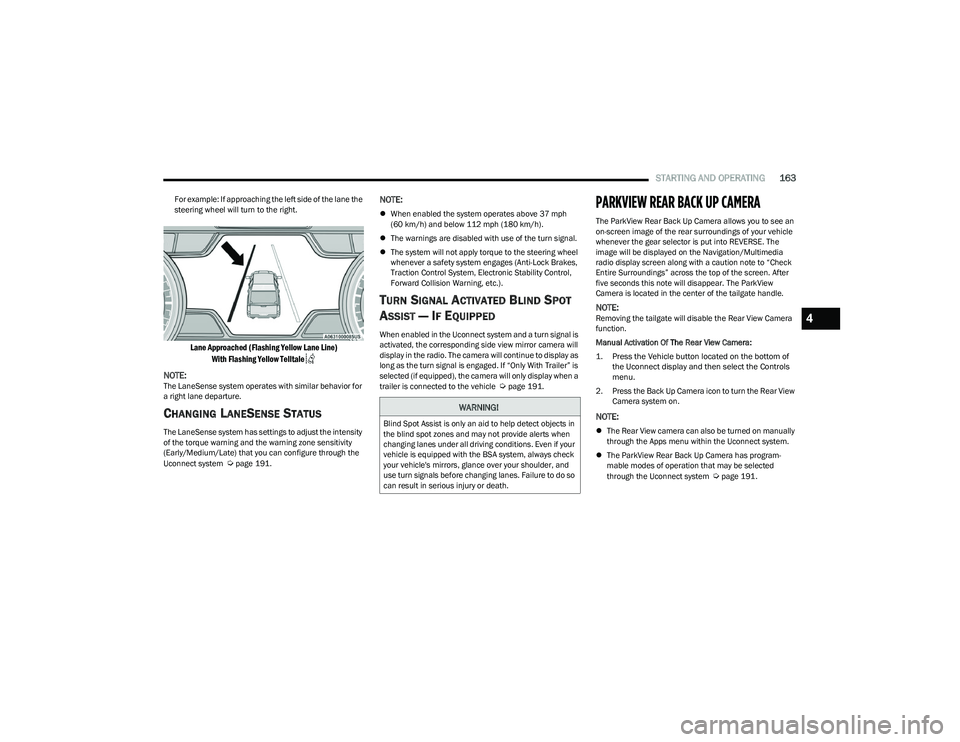
For example: If approaching the left side of the lane the
steering wheel will turn to the right.
Lane Approached (Flashing Yellow Lane Line)
With Flashing Yellow Telltale
NOTE:
The LaneSense system operates with similar behavior for
a right lane departure.
CHANGING LANESENSE STATUS
The LaneSense system has settings to adjust the intensity
of the torque warning and the warning zone sensitivity
(Early/Medium/Late) that you can configure through the
Uconnect system
Úpage 191.
NOTE:
When enabled the system operates above 37 mph
(60 km/h) and below 112 mph (180 km/h).
The warnings are disabled with use of the turn signal.
The system will not apply torque to the steering wheel
whenever a safety system engages (Anti-Lock Brakes,
Traction Control System, Electronic Stability Control,
Forward Collision Warning, etc.).
TURN SIGNAL ACTIVATED BLIND SPOT
A
SSIST — IF EQUIPPED
When enabled in the Uconnect system and a turn signal is
activated, the corresponding side view mirror camera will
display in the radio. The camera will continue to display as
long as the turn signal is engaged. If “Only With Trailer” is
selected (if equipped), the camera will only display when a
trailer is connected to the vehicle
Úpage 191.
PARKVIEW REAR BACK UP CAMERA
The ParkView Rear Back Up Camera allows you to see an
on-screen image of the rear surroundings of your vehicle
whenever the gear selector is put into REVERSE. The
image will be displayed on the Navigation/Multimedia
radio display screen along with a caution note to “Check
Entire Surroundings” across the top of the screen. After
five seconds this note will disappear. The ParkView
Camera is located in the center of the tailgate handle.
NOTE:Removing the tailgate will disable the Rear View Camera
function.
Manual Activation Of The Rear View Camera:
1. Press the Vehicle button located on the bottom of
the Uconnect display and then select the Controls
menu.
2. Press the Back Up Camera icon to turn the Rear View Camera system on.
NOTE:
The Rear View camera can also be turned on manually
through the Apps menu within the Uconnect system.
The ParkView Rear Back Up Camera has program -
mable modes of operation that may be selected
through the Uconnect system
Úpage 191.
WARNING!
Blind Spot Assist is only an aid to help detect objects in
the blind spot zones and may not provide alerts when
changing lanes under all driving conditions. Even if your
vehicle is equipped with the BSA system, always check
your vehicle's mirrors, glance over your shoulder, and
use turn signals before changing lanes. Failure to do so
can result in serious injury or death.
4
23_DT_OM_EN_USC_t.book Page 163
Page 167 of 416
STARTING AND OPERATING165
When Zoom View is selected while the vehicle is in
REVERSE, then shifted to DRIVE, the camera delay view
will display the standard Back Up Camera view. If the
vehicle is then returned to REVERSE gear from DRIVE, the
Zoom View selection will automatically resume.
NOTE:The Zoom View button and AUX button (if equipped) will
not be available when the vehicle is shifted into REVERSE
and the Trailer Reverse Steering Control (TRSC) feature
(if equipped) is activated.
Shifting to NEUTRAL from any gear will maintain the
selected view (Zoom or Standard) as long as the vehicle is
below 8 mph (13 km/h).
If the vehicle is in PARK, Zoom View is available until the
gear selector is placed in DRIVE or REVERSE and speeds
are at or above 8 mph (13 km/h).
NOTE:
If the vehicle is in DRIVE, NEUTRAL, or REVERSE, and
speed is greater than or equal to 8 mph (13 km/h),
Zoom View is unavailable and the icon will appear grey.
While in Zoom View, the guidelines will not be visible.
For information on Auxiliary Cameras (if equipped), see
Úpage 170.
SURROUND VIEW CAMERA SYSTEM —
IF EQUIPPED
The Surround View Camera system allows you to see an
on-screen image of the surroundings and the Top View of
your vehicle. This occurs whenever the gear selector is in
REVERSE or when enabled through the Uconnect system.
The Top View of the vehicle will also show if any doors are
open. The image will be displayed on the touchscreen
along with a caution note “Check Entire Surroundings”.
After five seconds, this note will disappear. The Surround
View Camera system is comprised of four cameras located
in the front grille, rear tailgate and side mirrors.
NOTE:
Removing the tailgate will disable the Rear View
Camera function.
The Surround View Camera system has programmable
settings that may be selected through the Uconnect
system
Úpage 191.
Press this button on the touchscreen to enter
the Surround View Camera menu in the
Uconnect system.
When the vehicle is shifted into REVERSE, the Rear View
and Top View is the default view of the system. If the camera delay is turned on, the camera image will
display for up to 10 seconds after shifting out of REVERSE.
The camera image will stop displaying, close, and display
the previous screen if the vehicle speed exceeds 8 mph
(13 km/h), the vehicle is shifted into PARK, or the ignition
is placed in the OFF position. The touchscreen X button on
the touchscreen disables the display of the camera image.
If the camera delay is turned off, the camera image will
close and display the previous screen after shifting out of
REVERSE.
If active guidelines are enabled, the lines are overlaid on
the image in the Rear View and Top View to illustrate the
width of the vehicle and its projected path based on
steering wheel position.
The guidelines have different colored zones to indicate the
distance an object in the view is from the rear of the
vehicle. Refer to the chart below:
Modes Of Operation
Standard Rear View can be manually activated by
selecting “Back Up Camera” through the Controls menu
within the Uconnect system.Zone
Distance To The Rear Of The
Vehicle
Red 0 - 1 ft
(0 - 30 cm)
Yellow 1 ft - 6.5 ft
(30 cm - 2 m)
Green 6.5 ft or greater
(2 m or greater)
4
23_DT_OM_EN_USC_t.book Page 165
Page 168 of 416
166STARTING AND OPERATING
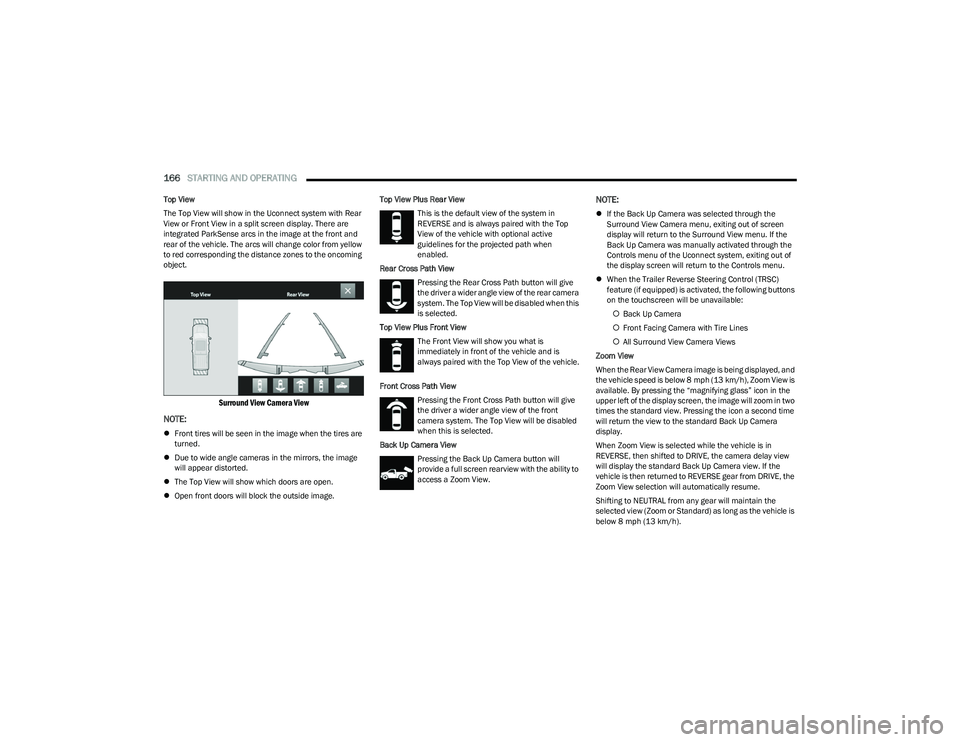
Top View
The Top View will show in the Uconnect system with Rear
View or Front View in a split screen display. There are
integrated ParkSense arcs in the image at the front and
rear of the vehicle. The arcs will change color from yellow
to red corresponding the distance zones to the oncoming
object.
Surround View Camera View
NOTE:
Front tires will be seen in the image when the tires are
turned.
Due to wide angle cameras in the mirrors, the image
will appear distorted.
The Top View will show which doors are open.
Open front doors will block the outside image. Top View Plus Rear View
This is the default view of the system in
REVERSE and is always paired with the Top
View of the vehicle with optional active
guidelines for the projected path when
enabled.
Rear Cross Path View Pressing the Rear Cross Path button will give
the driver a wider angle view of the rear camera
system. The Top View will be disabled when this
is selected.
Top View Plus Front View The Front View will show you what is
immediately in front of the vehicle and is
always paired with the Top View of the vehicle.
Front Cross Path View Pressing the Front Cross Path button will give
the driver a wider angle view of the front
camera system. The Top View will be disabled
when this is selected.
Back Up Camera View Pressing the Back Up Camera button will
provide a full screen rearview with the ability to
access a Zoom View.
NOTE:
If the Back Up Camera was selected through the
Surround View Camera menu, exiting out of screen
display will return to the Surround View menu. If the
Back Up Camera was manually activated through the
Controls menu of the Uconnect system, exiting out of
the display screen will return to the Controls menu.
When the Trailer Reverse Steering Control (TRSC)
feature (if equipped) is activated, the following buttons
on the touchscreen will be unavailable:
Back Up Camera
Front Facing Camera with Tire Lines
All Surround View Camera Views
Zoom View
When the Rear View Camera image is being displayed, and
the vehicle speed is below 8 mph (13 km/h), Zoom View is
available. By pressing the “magnifying glass” icon in the
upper left of the display screen, the image will zoom in two
times the standard view. Pressing the icon a second time
will return the view to the standard Back Up Camera
display.
When Zoom View is selected while the vehicle is in
REVERSE, then shifted to DRIVE, the camera delay view
will display the standard Back Up Camera view. If the
vehicle is then returned to REVERSE gear from DRIVE, the
Zoom View selection will automatically resume.
Shifting to NEUTRAL from any gear will maintain the
selected view (Zoom or Standard) as long as the vehicle is
below 8 mph (13 km/h).
23_DT_OM_EN_USC_t.book Page 166
Page 180 of 416
178STARTING AND OPERATING
Using TRSC
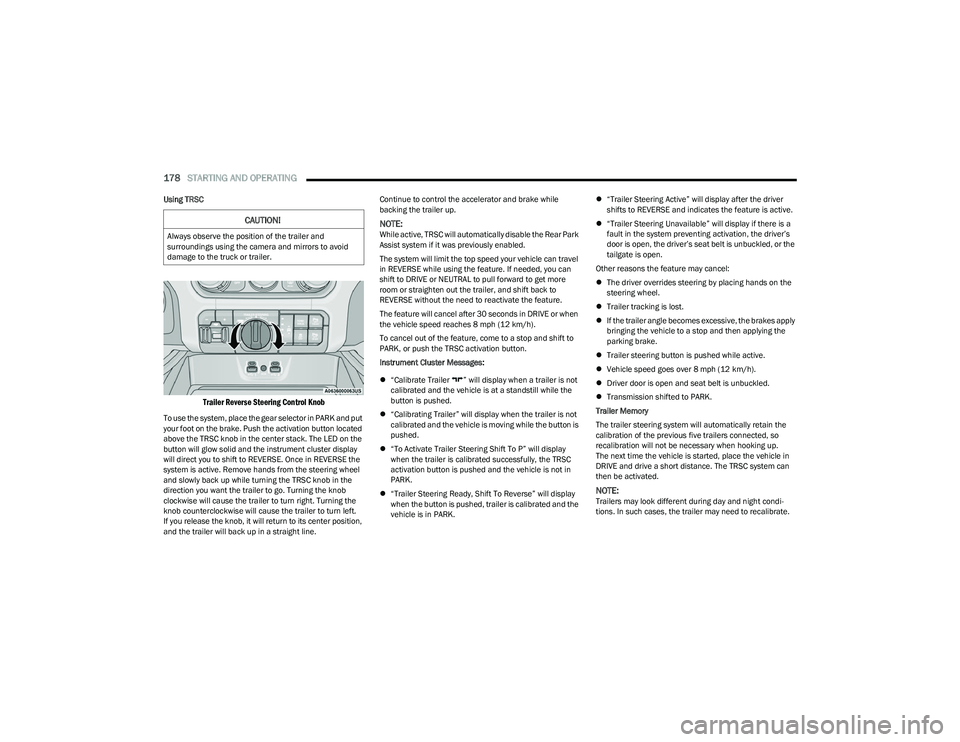
Trailer Reverse Steering Control Knob
To use the system, place the gear selector in PARK and put
your foot on the brake. Push the activation button located
above the TRSC knob in the center stack. The LED on the
button will glow solid and the instrument cluster display
will direct you to shift to REVERSE. Once in REVERSE the
system is active. Remove hands from the steering wheel
and slowly back up while turning the TRSC knob in the
direction you want the trailer to go. Turning the knob
clockwise will cause the trailer to turn right. Turning the
knob counterclockwise will cause the trailer to turn left.
If you release the knob, it will return to its center position,
and the trailer will back up in a straight line. Continue to control the accelerator and brake while
backing the trailer up.
NOTE:While active, TRSC will automatically disable the Rear Park
Assist system if it was previously enabled.
The system will limit the top speed your vehicle can travel
in REVERSE while using the feature. If needed, you can
shift to DRIVE or NEUTRAL to pull forward to get more
room or straighten out the trailer, and shift back to
REVERSE without the need to reactivate the feature.
The feature will cancel after 30 seconds in DRIVE or when
the vehicle speed reaches 8 mph (12 km/h).
To cancel out of the feature, come to a stop and shift to
PARK, or push the TRSC activation button.
Instrument Cluster Messages:
“Calibrate Trailer ” will display when a trailer is not
calibrated and the vehicle is at a standstill while the
button is pushed.
“Calibrating Trailer” will display when the trailer is not
calibrated and the vehicle is moving while the button is
pushed.
“To Activate Trailer Steering Shift To P” will display
when the trailer is calibrated successfully, the TRSC
activation button is pushed and the vehicle is not in
PARK.
“Trailer Steering Ready, Shift To Reverse” will display
when the button is pushed, trailer is calibrated and the
vehicle is in PARK.
“Trailer Steering Active” will display after the driver
shifts to REVERSE and indicates the feature is active.
“Trailer Steering Unavailable” will display if there is a
fault in the system preventing activation, the driver’s
door is open, the driver’s seat belt is unbuckled, or the
tailgate is open.
Other reasons the feature may cancel:
The driver overrides steering by placing hands on the
steering wheel.
Trailer tracking is lost.
If the trailer angle becomes excessive, the brakes apply
bringing the vehicle to a stop and then applying the
parking brake.
Trailer steering button is pushed while active.
Vehicle speed goes over 8 mph (12 km/h).
Driver door is open and seat belt is unbuckled.
Transmission shifted to PARK.
Trailer Memory
The trailer steering system will automatically retain the
calibration of the previous five trailers connected, so
recalibration will not be necessary when hooking up.
The next time the vehicle is started, place the vehicle in
DRIVE and drive a short distance. The TRSC system can
then be activated.
NOTE:Trailers may look different during day and night condi -
tions. In such cases, the trailer may need to recalibrate.
CAUTION!
Always observe the position of the trailer and
surroundings using the camera and mirrors to avoid
damage to the truck or trailer.
23_DT_OM_EN_USC_t.book Page 178
Page 200 of 416
198MULTIMEDIA
LaneSense Warning This setting will change the distance at which the steering wheel will provide lane
departure feedback. The available settings are “Early”, “Medium”, and “Late”.
LaneSense Strength This setting will change the strength of the steering wheel feedback during a lane
departure. The available settings are “Low”, “Medium”, and “High”.
ParkSense This setting will change the type of ParkSense alert when a close object is detected and
can provide both an audible chime and a visual display.
Front ParkSense Volume This setting adjusts the volume of the Front ParkSense system. The available settings are
“Low”, “Medium”, and “High”.
Rear ParkSense Volume This setting adjusts the volume of the Rear ParkSense system. The available settings are
“Low”, “Medium”, and “High”.
Rear ParkSense Braking Assist This setting will turn the Rear ParkSense Braking Assist on or off.
Blind Spot Alert This setting will change the type of alert provided when an object is detected in a
vehicle’s blind spot. The “Off” setting will turn off Blind Spot Alert. The “Lights” setting will
activate the Blind Spot Alert lights on the outside mirrors. The “Lights & Chime” setting
will activate both the lights on the outside mirrors and an audible chime.
Trailer Length For Blind Spot Alert This setting will auto detect the length of an attached trailer. The “Auto” setting will have
the system automatically set the trailer length. The “Max” setting will always set the
length to the maximum 39.5 ft (12 m).
Hill Start Assist This setting will turn the Hill Start Assist system on or off.
ParkView Backup Camera Delay This setting will add a timed delay to the ParkView Backup Camera when shifting
out of REVERSE.
ParkView Backup Camera Active Guidelines This setting will turn the ParkView Backup Camera Active Guidelines on or off.
ParkView Backup Camera Fixed Guidelines This setting will turn the ParkView Backup Camera Fixed Guidelines on or off.
Tire Fill Assist This setting will turn Tire Fill Assist on or off.
Power Side Steps This setting will raise and lower or stow the power side steps. The available options are
“Automatic” to raise and lower the power side steps and “Stow” to deactivate the power
side steps.
Setting Name
Description
23_DT_OM_EN_USC_t.book Page 198