parking brake RAM 1500 2023 Owners Manual
[x] Cancel search | Manufacturer: RAM, Model Year: 2023, Model line: 1500, Model: RAM 1500 2023Pages: 416, PDF Size: 20.59 MB
Page 6 of 416
4
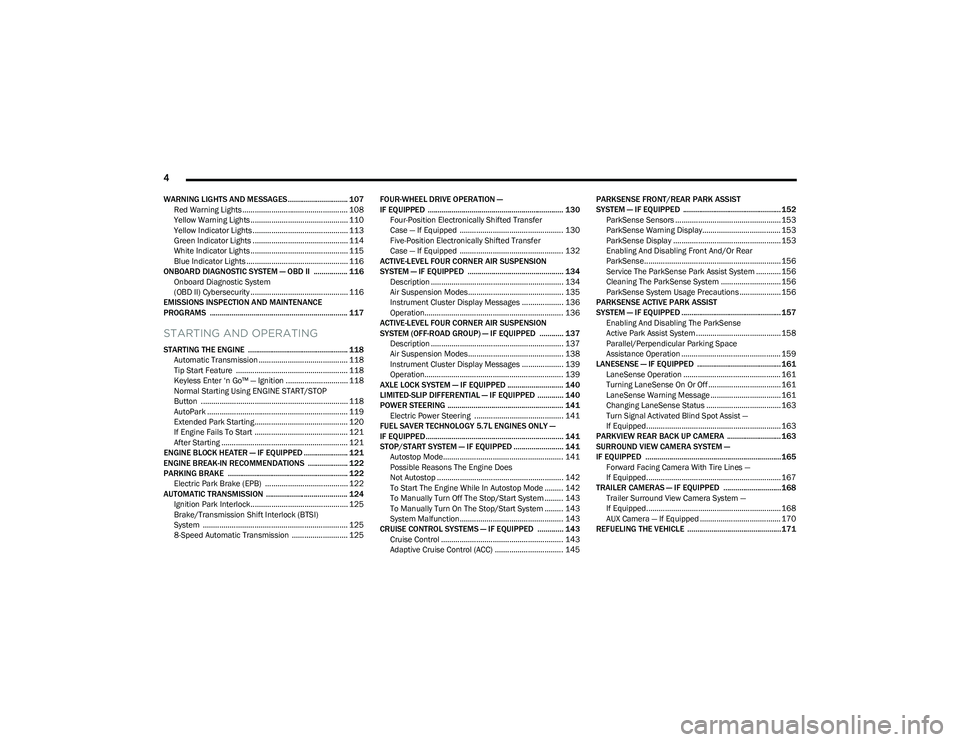
WARNING LIGHTS AND MESSAGES.............................. 107
Red Warning Lights ................................................... 108
Yellow Warning Lights ............................................... 110Yellow Indicator Lights .............................................. 113
Green Indicator Lights .............................................. 114
White Indicator Lights ............................................... 115Blue Indicator Lights ................................................. 116
ONBOARD DIAGNOSTIC SYSTEM — OBD II ................. 116 Onboard Diagnostic System
(OBD II) Cybersecurity ............................................... 116
EMISSIONS INSPECTION AND MAINTENANCE
PROGRAMS ..................................................................... 117
STARTING AND OPERATING
STARTING THE ENGINE .................................................. 118 Automatic Transmission ........................................... 118
Tip Start Feature ...................................................... 118Keyless Enter ‘n Go™ — Ignition .............................. 118
Normal Starting Using ENGINE START/STOP
Button ....................................................................... 118
AutoPark .................................................................... 119Extended Park Starting............................................. 120
If Engine Fails To Start ............................................. 121
After Starting ............................................................. 121
ENGINE BLOCK HEATER — IF EQUIPPED ...................... 121
ENGINE BREAK-IN RECOMMENDATIONS .................... 122
PARKING BRAKE ............................................................ 122 Electric Park Brake (EPB) ........................................ 122
AUTOMATIC TRANSMISSION ......................................... 124 Ignition Park Interlock............................................... 125Brake/Transmission Shift Interlock (BTSI)
System ...................................................................... 125
8-Speed Automatic Transmission ........................... 125 FOUR-WHEEL DRIVE OPERATION —
IF EQUIPPED .................................................................... 130
Four-Position Electronically Shifted Transfer
Case — If Equipped .................................................. 130Five-Position Electronically Shifted Transfer
Case — If Equipped .................................................. 132
ACTIVE-LEVEL FOUR CORNER AIR SUSPENSION
SYSTEM — IF EQUIPPED ................................................ 134 Description ................................................................ 134Air Suspension Modes.............................................. 135
Instrument Cluster Display Messages .................... 136
Operation................................................................... 136
ACTIVE-LEVEL FOUR CORNER AIR SUSPENSION
SYSTEM (OFF-ROAD GROUP) — IF EQUIPPED ............ 137 Description ................................................................ 137Air Suspension Modes.............................................. 138
Instrument Cluster Display Messages .................... 139
Operation................................................................... 139
AXLE LOCK SYSTEM — IF EQUIPPED ............................ 140
LIMITED-SLIP DIFFERENTIAL — IF EQUIPPED ............. 140
POWER STEERING .......................................................... 141 Electric Power Steering ........................................... 141
FUEL SAVER TECHNOLOGY 5.7L ENGINES ONLY —
IF EQUIPPED ..................................................................... 141
STOP/START SYSTEM — IF EQUIPPED ......................... 141 Autostop Mode.......................................................... 141
Possible Reasons The Engine Does
Not Autostop ............................................................. 142
To Start The Engine While In Autostop Mode ......... 142
To Manually Turn Off The Stop/Start System ......... 143
To Manually Turn On The Stop/Start System ......... 143
System Malfunction.................................................. 143
CRUISE CONTROL SYSTEMS — IF EQUIPPED ............. 143 Cruise Control ........................................................... 143
Adaptive Cruise Control (ACC) ................................. 145 PARKSENSE FRONT/REAR PARK ASSIST
SYSTEM — IF EQUIPPED ................................................. 152
ParkSense Sensors ................................................... 153
ParkSense Warning Display...................................... 153ParkSense Display .................................................... 153
Enabling And Disabling Front And/Or Rear
ParkSense.................................................................. 156
Service The ParkSense Park Assist System ............ 156
Cleaning The ParkSense System ............................. 156
ParkSense System Usage Precautions .................... 156
PARKSENSE ACTIVE PARK ASSIST
SYSTEM — IF EQUIPPED .................................................. 157 Enabling And Disabling The ParkSense
Active Park Assist System ......................................... 158
Parallel/Perpendicular Parking Space
Assistance Operation ................................................ 159
LANESENSE — IF EQUIPPED .......................................... 161 LaneSense Operation ............................................... 161Turning LaneSense On Or Off ................................... 161
LaneSense Warning Message .................................. 161
Changing LaneSense Status .................................... 163
Turn Signal Activated Blind Spot Assist —
If Equipped................................................................. 163
PARKVIEW REAR BACK UP CAMERA ........................... 163
SURROUND VIEW CAMERA SYSTEM —
IF EQUIPPED ....................................................................165 Forward Facing Camera With Tire Lines —
If Equipped................................................................. 167
TRAILER CAMERAS — IF EQUIPPED ............................. 168 Trailer Surround View Camera System —
If Equipped................................................................. 168
AUX Camera — If Equipped ....................................... 170
REFUELING THE VEHICLE ...............................................171
23_DT_OM_EN_USC_t.book Page 4
Page 22 of 416

20GETTING TO KNOW YOUR VEHICLE
IGNITION SWITCH
KEYLESS ENTER ‘N GO™ IGNITION
This feature allows the driver to operate the ignition switch
with the push of a button as long as the key fob is in the
passenger compartment.
The START/STOP ignition button has several operating
modes that are labeled and will illuminate when in
position. These modes are OFF, ACC, ON/RUN, and START.
Keyless Push Button Ignition
The push button ignition can be placed in the following
modes:
OFF
The engine is stopped
Some electrical devices (e.g. power locks, alarm, etc.)
are still available
ACC
Engine is not started
Some electrical devices are available
(e.g. power sunroof, power windows, etc.)
ON/RUN
Driving position
All electrical devices are available
(e.g. climate controls, heated seats, etc.)
START
The engine will start (when foot is on the brake)
NOTE:If the ignition switch does not change the mode by pushing
the button, the key fob may have a low or depleted battery.
In this situation, a backup method can be used to operate
the ignition switch. Put the nose side (side opposite of the
emergency key) of the key fob against the START/STOP
ignition button and push to operate the ignition switch.
Backup Starting Method
1 — OFF
2 — ACC (Accessory)
3 — ON/RUN
WARNING!
When exiting the vehicle, always remove the key fob
from the vehicle and lock your vehicle.
Never leave children alone in a vehicle, or with
access to an unlocked vehicle.
Allowing children to be in a vehicle unattended is
dangerous for a number of reasons. A child or others
could be seriously or fatally injured. Children should
be warned not to touch the parking brake, brake
pedal or the gear selector.
Do not leave the key fob in or near the vehicle, or in
a location accessible to children, and do not leave
the Keyless Enter ‘n Go™ Ignition in the ON/RUN
position. A child could operate power windows, other
controls, or move the vehicle.
Do not leave children or animals inside parked vehi -
cles in hot weather. Interior heat buildup may cause
serious injury or death.
23_DT_OM_EN_USC_t.book Page 20
Page 23 of 416

GETTING TO KNOW YOUR VEHICLE21
NOTE:
The key fob may not be detected by the vehicle Keyless
Enter ‘n Go™ system if it is located next to a mobile
phone, laptop or other electronic device; these devices
may block the key fob’s wireless signal and prevent the
Keyless Enter ‘n Go™ system from starting the vehicle.
For more information on normal engine starting, see
Úpage 118.
When opening the driver's door and the ignition is in
the ON/RUN position (engine not running), a chime will
sound to remind you to place the ignition in the OFF
position. In addition to the chime, the message “Igni-
tion or Accessory ON” will display in the cluster.
REMOTE START — IF EQUIPPED
This system uses the key fob to start the engine
conveniently from outside the vehicle while still
maintaining security. The system has a range
of approximately 328 ft (100 m).
Remote Start is used to defrost windows in cold weather
and to reach a comfortable climate in all ambient
conditions before the customer enters the vehicle.
NOTE:Obstructions between the vehicle and key fob may reduce
this range Úpage 402.
HOW TO USE REMOTE START
Push and release the Remote Start button on the key fob
twice within five seconds. The vehicle doors will lock, the
parking lights will flash, and the horn will chirp twice
(if programmed). Then, the engine will start, and the
vehicle will remain in the Remote Start mode for a
15 minute cycle.
Pushing the Remote Start button a third time shuts the
engine off. To drive the vehicle, push the unlock button, and place the
ignition in the ON/RUN position.
NOTE:
With Remote Start, the engine will only run for
15 minutes.
Remote Start can only be used twice.
If an engine fault is present or fuel level is low, the
vehicle will start and then shut down in 10 seconds.
The parking lights will turn on and remain on during
Remote Start mode.
For security, power window and power sunroof opera -
tion (if equipped) are disabled when the vehicle is in
the Remote Start mode.
The ignition must be placed in the ON/RUN position
before the Remote Start sequence can be repeated for
a third cycle.
All of the following conditions must be met before the
engine will remote start:
Gear selector in PARK
Doors closed
Hood closed
Hazard switch off
Brake switch inactive (brake pedal not pressed)
Battery at an acceptable charge level
CAUTION!
An unlocked vehicle is an invitation for thieves. Always
remove key fob from the vehicle and lock all doors
when leaving the vehicle unattended.
WARNING!
Do not start or run an engine in a closed garage or
confined area. Exhaust gas contains carbon
monoxide (CO) which is odorless and colorless.
Carbon monoxide is poisonous and can cause
serious injury or death when inhaled.
Keep key fobs away from children. Operation of the
Remote Start system, windows, door locks or other
controls could cause serious injury or death.2
23_DT_OM_EN_USC_t.book Page 21
Page 26 of 416
24GETTING TO KNOW YOUR VEHICLE
REARMING OF THE SYSTEM
If something triggers the alarm and no action is taken to
disarm it, the Vehicle Security system will turn the horn off
after a 29 second cycle (with five seconds between cycles
and up to eight cycles if the trigger remains active) and
then rearm itself.
SECURITY SYSTEM MANUAL OVERRIDE
The Vehicle Security system will not arm if you lock the
doors using the manual door lock.
DOORS
MANUAL DOOR LOCKS
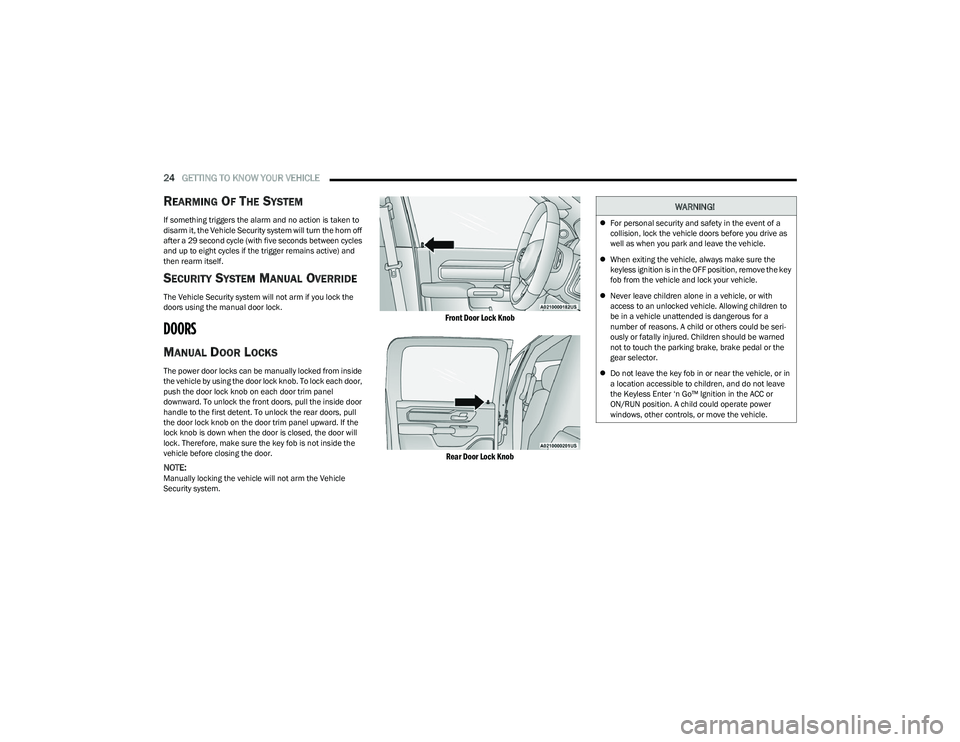
The power door locks can be manually locked from inside
the vehicle by using the door lock knob. To lock each door,
push the door lock knob on each door trim panel
downward. To unlock the front doors, pull the inside door
handle to the first detent. To unlock the rear doors, pull
the door lock knob on the door trim panel upward. If the
lock knob is down when the door is closed, the door will
lock. Therefore, make sure the key fob is not inside the
vehicle before closing the door.
NOTE:Manually locking the vehicle will not arm the Vehicle
Security system.
Front Door Lock Knob
Rear Door Lock Knob
WARNING!
For personal security and safety in the event of a
collision, lock the vehicle doors before you drive as
well as when you park and leave the vehicle.
When exiting the vehicle, always make sure the
keyless ignition is in the OFF position, remove the key
fob from the vehicle and lock your vehicle.
Never leave children alone in a vehicle, or with
access to an unlocked vehicle. Allowing children to
be in a vehicle unattended is dangerous for a
number of reasons. A child or others could be seri -
ously or fatally injured. Children should be warned
not to touch the parking brake, brake pedal or the
gear selector.
Do not leave the key fob in or near the vehicle, or in
a location accessible to children, and do not leave
the Keyless Enter ‘n Go™ Ignition in the ACC or
ON/RUN position. A child could operate power
windows, other controls, or move the vehicle.
23_DT_OM_EN_USC_t.book Page 24
Page 48 of 416
46GETTING TO KNOW YOUR VEHICLE
TROUBLESHOOTING TIPS
If you are having trouble programming HomeLink®, here
are some of the most common solutions:
Replace the battery in the garage door opener
hand-held transmitter.
Push the LEARN button on the garage door opener to
complete the training for a rolling code.
Did you unplug the device for programming and
remember to plug it back in?
If you have any problems, or require assistance, please
call toll-free 1-800-355-3515 or, on the Internet at
HomeLink.com for information or assistance.
EXTERIOR LIGHTS
HEADLIGHT SWITCH
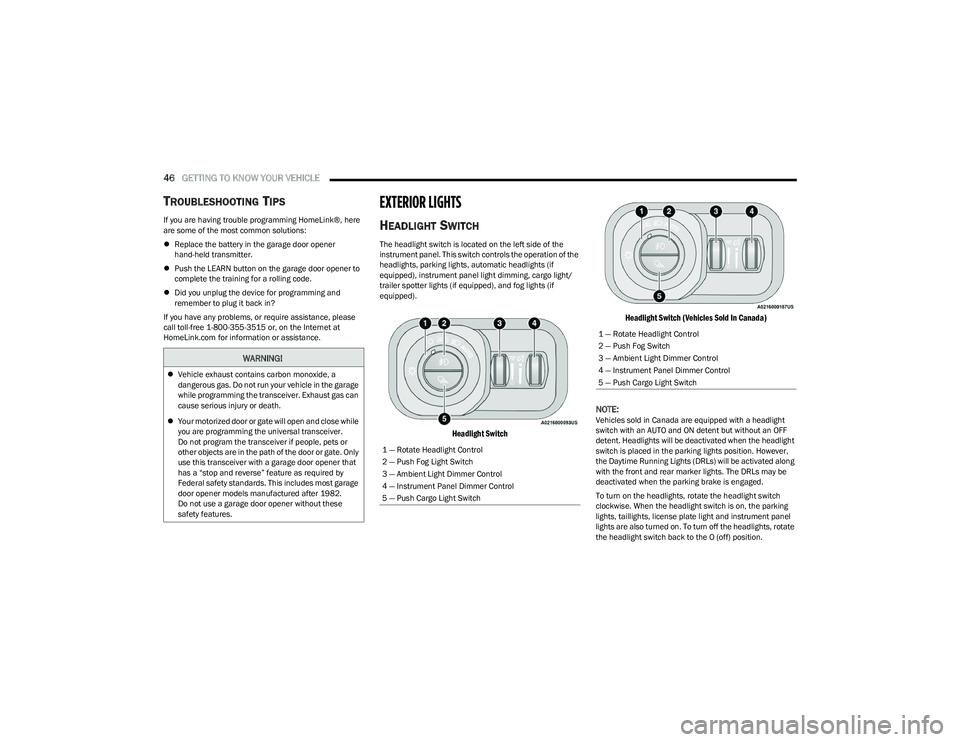
The headlight switch is located on the left side of the
instrument panel. This switch controls the operation of the
headlights, parking lights, automatic headlights (if
equipped), instrument panel light dimming, cargo light/
trailer spotter lights (if equipped), and fog lights (if
equipped).
Headlight Switch Headlight Switch (Vehicles Sold In Canada)
NOTE:
Vehicles sold in Canada are equipped with a headlight
switch with an AUTO and ON detent but without an OFF
detent. Headlights will be deactivated when the headlight
switch is placed in the parking lights position. However,
the Daytime Running Lights (DRLs) will be activated along
with the front and rear marker lights. The DRLs may be
deactivated when the parking brake is engaged.
To turn on the headlights, rotate the headlight switch
clockwise. When the headlight switch is on, the parking
lights, taillights, license plate light and instrument panel
lights are also turned on. To turn off the headlights, rotate
the headlight switch back to the O (off) position.
WARNING!
Vehicle exhaust contains carbon monoxide, a
dangerous gas. Do not run your vehicle in the garage
while programming the transceiver. Exhaust gas can
cause serious injury or death.
Your motorized door or gate will open and close while
you are programming the universal transceiver.
Do not program the transceiver if people, pets or
other objects are in the path of the door or gate. Only
use this transceiver with a garage door opener that
has a “stop and reverse” feature as required by
Federal safety standards. This includes most garage
door opener models manufactured after 1982.
Do not use a garage door opener without these
safety features.
1 — Rotate Headlight Control
2 — Push Fog Light Switch
3 — Ambient Light Dimmer Control
4 — Instrument Panel Dimmer Control
5 — Push Cargo Light Switch
1 — Rotate Headlight Control
2 — Push Fog Switch
3 — Ambient Light Dimmer Control
4 — Instrument Panel Dimmer Control
5 — Push Cargo Light Switch
23_DT_OM_EN_USC_t.book Page 46
Page 49 of 416
GETTING TO KNOW YOUR VEHICLE47
NOTE:For vehicles sold in Canada, rotate the headlight switch
clockwise from the parking lights and instrument panel
lights position to the first detent to turn on headlights,
parking lights, and instrument panel lights. Rotate the
headlight switch to the second detent for the AUTO
position.
NOTE:
Your vehicle is equipped with plastic headlight and fog
light (if equipped) lenses that are lighter and less
susceptible to stone breakage than glass lights. Plastic
is not as scratch resistant as glass and therefore
different lens cleaning procedures must be followed.
To minimize the possibility of scratching the lenses and
reducing light output, avoid wiping with a dry cloth.
To remove road dirt, wash with a mild soap solution
followed by rinsing.
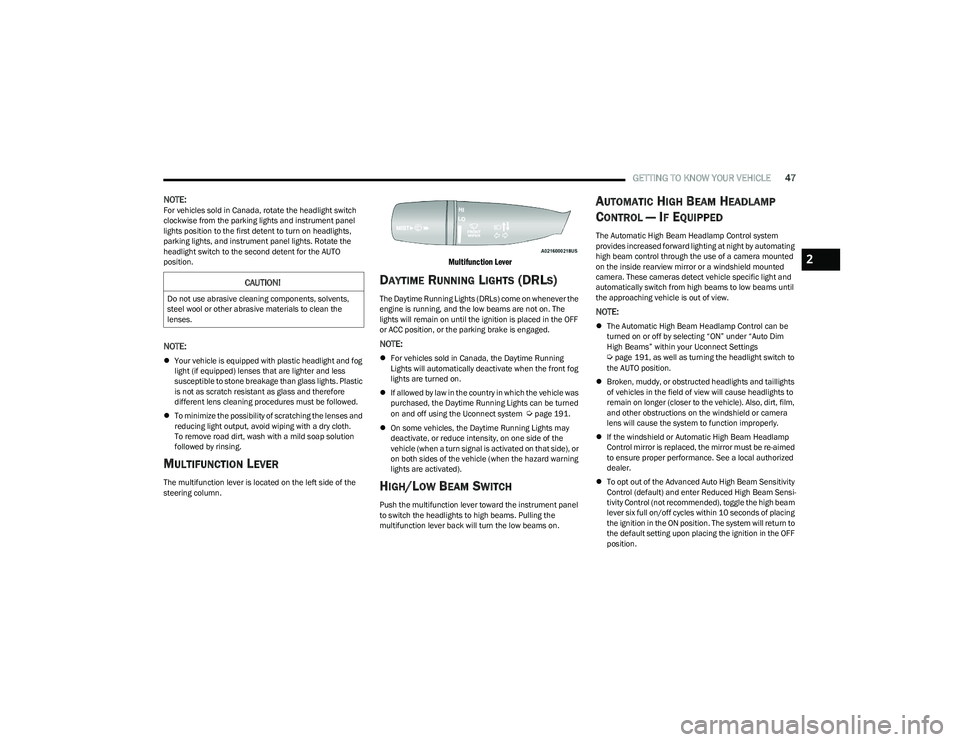
MULTIFUNCTION LEVER
The multifunction lever is located on the left side of the
steering column.
Multifunction Lever
DAYTIME RUNNING LIGHTS (DRLS)
The Daytime Running Lights (DRLs) come on whenever the
engine is running, and the low beams are not on. The
lights will remain on until the ignition is placed in the OFF
or ACC position, or the parking brake is engaged.
NOTE:
For vehicles sold in Canada, the Daytime Running
Lights will automatically deactivate when the front fog
lights are turned on.
If allowed by law in the country in which the vehicle was
purchased, the Daytime Running Lights can be turned
on and off using the Uconnect system
Úpage 191.
On some vehicles, the Daytime Running Lights may
deactivate, or reduce intensity, on one side of the
vehicle (when a turn signal is activated on that side), or
on both sides of the vehicle (when the hazard warning
lights are activated).
HIGH/LOW BEAM SWITCH
Push the multifunction lever toward the instrument panel
to switch the headlights to high beams. Pulling the
multifunction lever back will turn the low beams on.
AUTOMATIC HIGH BEAM HEADLAMP
C
ONTROL — IF EQUIPPED
The Automatic High Beam Headlamp Control system
provides increased forward lighting at night by automating
high beam control through the use of a camera mounted
on the inside rearview mirror or a windshield mounted
camera. These cameras detect vehicle specific light and
automatically switch from high beams to low beams until
the approaching vehicle is out of view.
NOTE:
The Automatic High Beam Headlamp Control can be
turned on or off by selecting “ON” under “Auto Dim
High Beams” within your Uconnect Settings
Úpage 191, as well as turning the headlight switch to
the AUTO position.
Broken, muddy, or obstructed headlights and taillights
of vehicles in the field of view will cause headlights to
remain on longer (closer to the vehicle). Also, dirt, film,
and other obstructions on the windshield or camera
lens will cause the system to function improperly.
If the windshield or Automatic High Beam Headlamp
Control mirror is replaced, the mirror must be re-aimed
to ensure proper performance. See a local authorized
dealer.
To opt out of the Advanced Auto High Beam Sensitivity
Control (default) and enter Reduced High Beam Sensi -
tivity Control (not recommended), toggle the high beam
lever six full on/off cycles within 10 seconds of placing
the ignition in the ON position. The system will return to
the default setting upon placing the ignition in the OFF
position.
CAUTION!
Do not use abrasive cleaning components, solvents,
steel wool or other abrasive materials to clean the
lenses.
2
23_DT_OM_EN_USC_t.book Page 47
Page 50 of 416
48GETTING TO KNOW YOUR VEHICLE
FLASH-TO-PASS
You can signal another vehicle with your headlights by
lightly pulling the multifunction lever toward you. This will
cause the high beam headlights to turn on, and remain on,
until the lever is released.
AUTOMATIC HEADLIGHTS — IF EQUIPPED
This system automatically turns the headlights on or off
according to ambient light levels. To turn the system on,
rotate the headlight switch to the AUTO position.
When the system is on, the Headlight Delay feature is
also on. This means the headlights will stay on for up to
90 seconds after you place the ignition into the OFF
position. To turn the automatic headlights off, turn the
headlight switch out of the AUTO position.
NOTE:The engine must be running before the headlights will turn
on in the Automatic Mode.
PARKING LIGHTS AND PANEL LIGHTS
To turn on the parking lights and instrument panel lights,
rotate the headlight switch clockwise. To turn off the
parking lights, rotate the headlight switch back to the O
(off) position.
NOTE:Vehicles sold in Canada are equipped with a headlight
switch with an AUTO and ON detent but without an OFF
detent. Headlights will be deactivated when the headlight
switch is placed in the parking lights position. However,
the Daytime Running Lights (DRLs) will be activated along
with the front and rear marker lights. The DRLs may be
deactivated when the parking brake is engaged.
AUTOMATIC HEADLIGHTS WITH WIPERS
If your vehicle is equipped with Automatic Headlights, it
also has this customer-programmable feature. When your
headlights are in the automatic mode and the engine is
running, they will automatically turn on when the wiper
system is on. This feature is programmable through the
Uconnect system
Úpage 191.
If your vehicle is equipped with the Rain Sensing Wiper
system
Úpage 53, and it is activated, the headlights will
automatically turn on after the wipers complete five wipe
cycles within approximately one minute. They will turn off
approximately four minutes after the wipers completely
stop.
NOTE:When your headlights come on during the daytime, the
instrument panel lights will automatically dim to the lower
nighttime intensity.
HEADLIGHT DELAY
To assist when exiting the vehicle, the headlight delay
feature will leave the headlights on for up to 90 seconds.
This delay is initiated when the ignition is placed in the OFF
position while the headlight switch is on, and then the
headlight switch is cycled off. Headlight delay can be
canceled by either turning the headlight switch on then
off, or by placing the ignition in the ON position.
NOTE:
This feature can be programmed through the Uconnect
system Úpage 191.
The headlight delay feature is automatically activated if
the headlight switch is left in the AUTO position when
the ignition is placed in the OFF position.
LIGHTS-ON REMINDER
If the headlights, parking lights, or cargo lights are left on
after the ignition is placed in the OFF position, the vehicle
will chime when the driver’s door is opened.
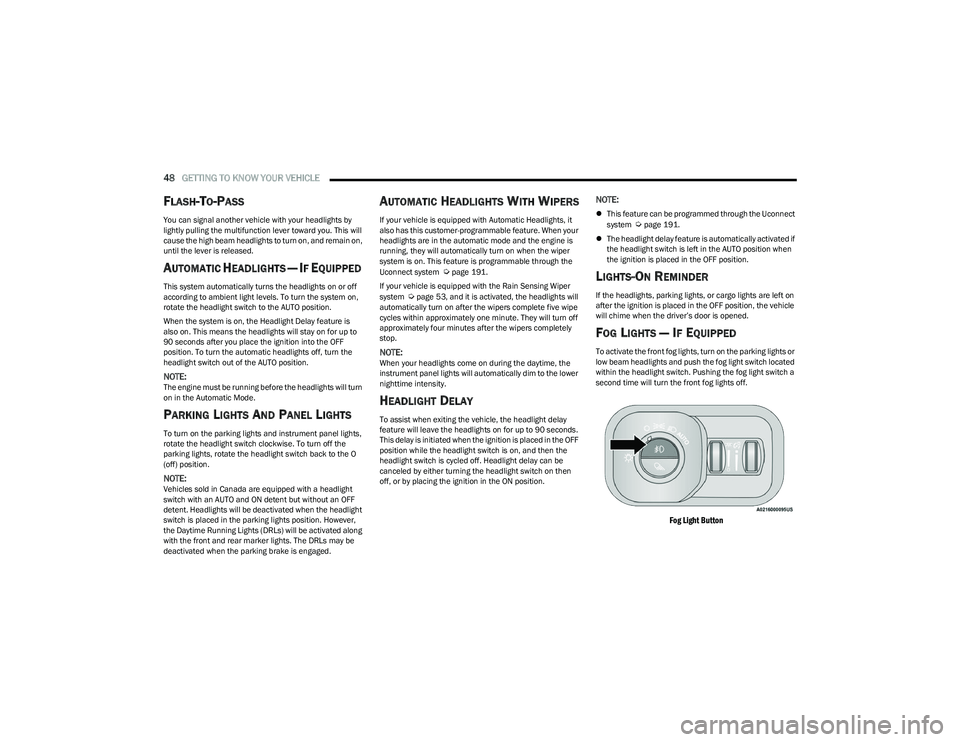
FOG LIGHTS — IF EQUIPPED
To activate the front fog lights, turn on the parking lights or
low beam headlights and push the fog light switch located
within the headlight switch. Pushing the fog light switch a
second time will turn the front fog lights off.
Fog Light Button
23_DT_OM_EN_USC_t.book Page 48
Page 110 of 416

108GETTING TO KNOW YOUR INSTRUMENT PANEL
RED WARNING LIGHTS
Air Bag Warning Light
This warning light will illuminate to indicate a
fault with the air bag, and will turn on for four to
eight seconds as a bulb check when the
ignition is placed in the ON/RUN or ACC/ON/
RUN position. This light will illuminate with a single chime
when a fault with the air bag has been detected, it will stay
on until the fault is cleared. If the light is either not on
during startup, stays on, or turns on while driving, have the
system inspected at an authorized dealer as soon as
possible.
Brake Warning Light
This warning light monitors various brake
functions, including brake fluid level and
parking brake application. If the brake light
turns on it may indicate that the parking brake
is applied, that the brake fluid level is low, or that there is
a problem with the Anti-Lock Brake System reservoir.
If the light remains on when the parking brake has been
disengaged, and the fluid level is at the full mark on the
master cylinder reservoir, it indicates a possible brake
hydraulic system malfunction or that a problem with the
Brake Booster has been detected by the Anti-Lock Brake
System (ABS) / Electronic Stability Control (ESC) system.
In this case, the light will remain on until the condition has
been corrected. If the problem is related to the brake
booster, the ABS pump will run when applying the brake,
and a brake pedal pulsation may be felt during each stop. The dual brake system provides a reserve braking capacity
in the event of a failure to a portion of the hydraulic
system. A leak in either half of the dual brake system is
indicated by the Brake Warning Light, which will turn on
when the brake fluid level in the master cylinder has
dropped below a specified level.
The light will remain on until the cause is corrected.
NOTE:The light may flash momentarily during sharp cornering
maneuvers, which change fluid level conditions. The
vehicle should have service performed, and the brake
fluid level checked.
If brake failure is indicated, immediate repair is necessary.
Vehicles equipped with the Anti-Lock Brake System (ABS)
are also equipped with Electronic Brake Force Distribution
(EBD). In the event of an EBD failure, the Brake Warning
Light will turn on along with the ABS Light. Immediate
repair to the ABS system is required.
Operation of the Brake Warning Light can be checked by
turning the ignition switch from the OFF position to the
ON/RUN position. The light should illuminate for
approximately two seconds.
The light should then turn off unless the parking brake is
applied or a brake fault is detected. If the light does not
illuminate, have the light inspected by an authorized
dealer.
The light also will turn on when the parking brake is
applied with the ignition switch in the ON/RUN position.
NOTE:This light shows only that the parking brake is applied.
It does not show the degree of brake application.
Battery Charge Warning Light
This warning light will illuminate when the
battery is not charging properly. If it stays on
while the engine is running, there may be a
malfunction with the charging system. Contact
an authorized dealer as soon as possible.
This indicates a possible problem with the electrical
system or a related component.
Door Open Warning Light
This indicator will illuminate when a door is
ajar/open and not fully closed.
NOTE:If the vehicle is moving there will also be a single chime.
WARNING!
Driving a vehicle with the red brake light on is
dangerous. Part of the brake system may have failed. It
will take longer to stop the vehicle. You could have a
collision. Have the vehicle checked immediately.
23_DT_OM_EN_USC_t.book Page 108
Page 120 of 416

118
(Continued)
STARTING AND OPERATING
STARTING THE ENGINE
Before starting your vehicle, adjust your seat, adjust both
inside and outside mirrors, and fasten your seat belt.
The starter should not be operated for more than
10-second intervals. Waiting at least 10 to 15 seconds
between such intervals will protect the starter from
overheating.
AUTOMATIC TRANSMISSION
Start the engine with the transmission in PARK position.
Apply the brake before shifting into any driving range.
NOTE:
This vehicle is equipped with a transmission shift inter -
locking system. The brake pedal must be pressed to
shift out of PARK.
If equipped with an 8-speed transmission, starting the
vehicle in NEUTRAL is not possible unless the Manual
Park Release has been activated
Úpage 328.
TIP START FEATURE
Do not press the accelerator. Cycle the ignition switch
briefly to the START position and release it. The starter
motor will continue to run and will automatically
disengage when the engine is running.
KEYLESS ENTER ‘N GO™ — IGNITION
This feature allows the driver to operate the ignition
switch with the push of a button, as long as the Remote
Start/Keyless Enter ‘n Go™ key fob is in the passenger
compartment.
NORMAL STARTING USING ENGINE
START/STOP B
UTTON
To Turn On The Engine Using The ENGINE START/STOP
Button
1. The transmission must be in PARK.
2. Press and hold the brake pedal while pushing the
ENGINE START/STOP button once.
3. The system starts the vehicle. If the vehicle fails to start, the starter will disengage automatically after
10 seconds.
4. If you wish to stop the cranking of the engine prior to the engine starting, push the button again.WARNING!
When leaving the vehicle, always make sure the
keyless ignition node is in the OFF position, remove
the key fob from the vehicle and lock the vehicle.
Never leave children alone in a vehicle, or with
access to an unlocked vehicle. Allowing children to
be in a vehicle unattended is dangerous for a
number of reasons. A child or others could be seri -
ously or fatally injured. Children should be warned
not to touch the parking brake, brake pedal or the
gear selector.
Do not leave the key fob in or near the vehicle, or in
a location accessible to children, and do not leave
the ignition of a vehicle equipped with Keyless Enter
‘n Go™ in the ACC or ON/RUN position. A child could
operate power windows, other controls, or move the
vehicle.
Do not leave children or animals inside parked vehi -
cles in hot weather. Interior heat buildup may cause
serious injury or death.
WARNING!
23_DT_OM_EN_USC_t.book Page 118
Page 121 of 416
STARTING AND OPERATING119
To Turn Off The Engine Using The ENGINE START/STOP
Button
1. Place the gear selector in PARK, then push and
release the ENGINE START/STOP button. The
ignition will return to the OFF position.
2. If the gear selector is not in PARK, the ENGINE START/STOP button must be held for two seconds or
three short pushes in a row with the vehicle speed
above 5 mph (8 km/h) before the engine will shut off.
The ignition will remain in the ACC position until the
gear selector is in PARK and the button is pushed
twice to the OFF position.
3. If the gear selector is not in PARK and the ENGINE START/STOP button is pushed once with the vehicle
speed above 5 mph (8 km/h), the instrument cluster will display a “ Vehicle Not In Park ” message and the
engine will remain running. Never leave a vehicle out
of the PARK position, or it could roll.
NOTE:If the gear selector is not in PARK, and the ENGINE
START/STOP button is pushed once with the vehicle speed
below 5 mph (8 km/h), the engine will shut off and the
ignition will remain in the ACC position. If vehicle speed
drops below 1.2 mph (1.9 km/h), the vehicle may
AutoPark
Úpage 119. ENGINE START/STOP Button Functions — With Driver’s
Foot Off The Brake Pedal (In PARK Or NEUTRAL Position)
The ENGINE START/STOP button operates similar to an
ignition switch. It has three positions: OFF, ACC, and
ON/RUN. To change the ignition positions without starting
the vehicle and use the accessories, follow these
directions:
1. Start with the ignition in the OFF position.
2. Push the ENGINE START/STOP button once to place
the ignition to the ACC position.
3. Push the ENGINE START/STOP button a second time to place the ignition to the ON/RUN position.
4. Push the ENGINE START/STOP button a third time to return the ignition to the OFF position.
AUTOPARK
AutoPark is a supplemental feature to assist with placing
the vehicle in PARK should the situations on the following
pages occur. It is a back-up system and should not be
relied upon as the primary method by which the driver
shifts the vehicle into PARK.
The conditions under which AutoPark will engage are
outlined on the following pages. If the vehicle is not in PARK and the driver turns off the
engine, the vehicle may AutoPark.
AutoPark will engage when all of these conditions are met:
Vehicle is equipped with a rotary shifter and an 8-speed
transmission
Vehicle is not in PARK
Vehicle speed is 1.2 mph (1.9 km/h) or less
Ignition is switched from ON/RUN to ACC
NOTE:For Keyless Enter ‘n Go™ equipped vehicles, the engine
will turn off and the ignition switch will change to ACC
position. After 30 minutes the ignition switches to OFF
automatically, unless the driver turns the ignition
switch OFF.
WARNING!
Driver inattention could lead to failure to place the
vehicle in PARK. ALWAYS DO A VISUAL CHECK that
your vehicle is in PARK by verifying that a solid (not
blinking) “P” is indicated in the instrument cluster
display and near the gear selector. If the “P” indicator
is blinking, your vehicle is not in PARK. As an added
precaution, always apply the parking brake when
exiting the vehicle.
AutoPark is a supplemental feature. It is not
designed to replace the need to shift your vehicle
into PARK. It is a back up system and should not be
relied upon as the primary method by which the
driver shifts the vehicle into PARK.
4
23_DT_OM_EN_USC_t.book Page 119