reset RAM 1500 2023 User Guide
[x] Cancel search | Manufacturer: RAM, Model Year: 2023, Model line: 1500, Model: RAM 1500 2023Pages: 416, PDF Size: 20.59 MB
Page 130 of 416

128STARTING AND OPERATING
Transmission Limp Home Mode
Transmission function is monitored electronically for
abnormal conditions. If a condition is detected that could
result in transmission damage, Transmission Limp Home
Mode is activated. In this mode, the transmission may
operate only in certain gears, or may not shift at all.
Vehicle performance may be severely degraded and the
engine may stall. In some situations, the transmission may
not re-engage if the engine is turned off and restarted.
The Malfunction Indicator Light (MIL) may be illuminated.
A message in the instrument cluster will inform the driver
of the more serious conditions, and indicate what actions
may be necessary.
In the event of a momentary problem, the transmission
can be reset to regain all forward gears by performing the
following steps:
NOTE:In cases where the instrument cluster message indicates
the transmission may not re-engage after engine
shutdown, perform this procedure only in a desired
location (preferably, at an authorized dealer).
1. Stop the vehicle.
2. Shift the transmission into PARK, if possible. If not,
shift the transmission to NEUTRAL.
3. Push and hold the ignition switch until the engine turns off.
4. Wait approximately 30 seconds.
5. Restart the engine.
6. Shift into the desired gear range. If the problem is no longer detected, the transmission will return to
normal operation.
NOTE:Even if the transmission can be reset, we recommend that
you visit an authorized dealer at your earliest possible
convenience. An authorized dealer has diagnostic
equipment to assess the condition of your transmission.
If the transmission cannot be reset, an authorized dealer
service is required.
Electronic Range Select (ERS) Operation —
If Equipped
The ERS shift control allows the driver to limit the highest
available gear when the transmission is in DRIVE and ERS
mode is not active. For example, if you set the
transmission gear limit to FOURTH gear, the transmission
will hold that gear and not shift above FOURTH gear, but
will shift through the lower gears normally.
NOTE:ERS will only upshift during a FIRST to SECOND gear shift
when in 4WD LOW. All other ranges will hold the gear.
You can switch between DRIVE and ERS mode at any
vehicle speed. When the transmission gear selector is in
DRIVE, the transmission will operate automatically,
shifting between all available gears. Tapping the “-” button
(on the steering wheel) will activate ERS mode, display the
current gear in the instrument cluster, and set that gear as
the top available gear. Once in ERS mode, tapping the “-”
or “+” button will change the top available gear.
Electronic Range Select (ERS)
To exit ERS mode, simply push and hold the “+” button
until the gear limit display disappears from the instrument
cluster.1 — Shift Up “+”
2 — Shift Down “–”
WARNING!
Do not downshift for additional engine braking on a
slippery surface. The drive wheels could lose their grip
and the vehicle could skid, causing a collision or
personal injury.
23_DT_OM_EN_USC_t.book Page 128
Page 145 of 416

STARTING AND OPERATING143
TO MANUALLY TURN OFF THE
S
TOP/START SYSTEM
Stop/Start OFF Switch
Push the Stop/Start OFF switch (located on the
switch bank). The light on the switch will illuminate.
The “STOP/START OFF” message will appear in the
instrument cluster display and the Autostop mode will be
disabled
Úpage 98.
NOTE:The Stop/Start system will reset itself back to the ON
position every time the ignition is turned OFF and back ON.
TO MANUALLY TURN ON THE
S
TOP/START SYSTEM
Push the Stop/Start OFF switch (located on the switch
bank). The light on the switch will turn off.
SYSTEM MALFUNCTION
If there is a malfunction in the Stop/Start system, the
system will not shut down the engine. A “SERVICE STOP/
START SYSTEM” message will appear in the instrument
cluster display
Úpage 107.
The system will need to be checked by an authorized
dealer.
CRUISE CONTROL SYSTEMS — IF EQUIPPED
Your vehicle may be equipped with the Cruise Control
system, or the Adaptive Cruise Control (ACC) system:
Cruise Control will keep your vehicle at a constant
preset speed.
Adaptive Cruise Control (ACC) will adjust the vehicle
speed up to the preset speed to maintain a distance
with the vehicle ahead.
NOTE:
In vehicles equipped with ACC, if ACC is not enabled,
Fixed Speed Cruise Control will not detect vehicles
directly ahead of you. Always be aware of the feature
selected.
Only one Cruise Control feature can operate at a time.
For example, if Fixed Speed Cruise Control is enabled,
Adaptive Cruise Control will be unavailable, and vice
versa.
CRUISE CONTROL
When engaged, the Cruise Control takes over accelerator
operations at speeds greater than 20 mph (32 km/h).
The Cruise Control buttons are located on the right side of
the steering wheel.
Cruise Control Buttons
1 — SET (+)/Accel
2 — CANC/Cancel
3 — SET (-)/Decel
4 — On/Off
5 — RES/Resume
4
23_DT_OM_EN_USC_t.book Page 143
Page 147 of 416

STARTING AND OPERATING145
(Continued)
To Deactivate
A tap on the brake pedal, pushing the CANC (cancel)
button, or normal brake pressure while slowing the vehicle
will deactivate the Cruise Control system without erasing
the set speed from memory.
The following conditions will also deactivate the Cruise
Control system without erasing the set speed from
memory:
Vehicle parking brake is applied
Stability event occurs
Gear selector is moved out of DRIVE
Engine overspeed occurs
Pushing the on/off button or placing the ignition in the OFF
position, erases the set speed from memory.
ADAPTIVE CRUISE CONTROL (ACC)
Adaptive Cruise Control (ACC) increases the driving
convenience provided by Cruise Control while traveling on
highways and major roadways. However, it is not a safety
system and not designed to prevent collisions. The Cruise
Control function performs differently
Úpage 143.
ACC will allow you to keep Cruise Control engaged in light
to moderate traffic conditions without the constant need
to reset your speed. ACC utilizes a radar sensor and a
forward facing camera designed to detect a vehicle
directly ahead of you to maintain a set speed.
NOTE:
If the ACC sensor detects a vehicle ahead, ACC will
apply limited braking or acceleration (not to exceed the
original set speed) automatically to maintain a preset
following distance, while matching the speed of the
vehicle ahead.
Any chassis/suspension or tire size modifications to
the vehicle will affect the performance of the Adaptive
Cruise Control and Forward Collision Warning system.
Fixed Speed Cruise Control (ACC not enabled) will not
detect vehicles directly ahead of you. Always be aware
of the feature selected
Úpage 402.
WARNING!
Adaptive Cruise Control (ACC) is a convenience
system. It is not a substitute for active driver involve -
ment. It is always the driver’s responsibility to be
attentive of road, traffic, and weather conditions,
vehicle speed, distance to the vehicle ahead and,
most importantly, brake operation to ensure safe
operation of the vehicle under all road conditions.
Your complete attention is always required while
driving to maintain safe control of your vehicle.
Failure to follow these warnings can result in a colli -
sion and death or serious personal injury.
The ACC system:
Does not react to pedestrians, oncoming vehi -
cles, and stationary objects (e.g., a stopped
vehicle in a traffic jam or a disabled vehicle).
Cannot take street, traffic, and weather condi -
tions into account, and may be limited upon
adverse sight distance conditions.
Does not always fully recognize complex driving
conditions, which can result in wrong or missing
distance warnings.
Will bring your vehicle to a complete stop while
following a vehicle ahead and hold your vehicle
for approximately three minutes in the stop posi -
tion. If the vehicle ahead does not start moving
within three minutes the parking brake will be
activated, and the ACC system will be canceled.
You should not utilize the ACC system:
When driving in fog, heavy rain, heavy snow, sleet,
heavy traffic, and complex driving situations (i.e., in
highway construction zones).
When entering a turn lane or highway off-ramp; when
driving on roads that are winding, icy, snow-covered,
slippery, or have steep uphill or downhill slopes.
When towing a trailer up or down steep slopes.
When circumstances do not allow safe driving at a
constant speed.
WARNING!
4
23_DT_OM_EN_USC_t.book Page 145
Page 187 of 416
STARTING AND OPERATING185
BEFORE PLOWING
Check the hydraulic system for leaks and proper fluid
level.
Check the mounting bolts and nuts for proper tight -
ness.
Check the runners and cutting edge for excessive wear.
The cutting edge should be ¼ to ½ inches
(6 cm to 1.2 cm) above ground in snow plowing
position.
Check that snowplow lighting is connected and
functioning properly.
SNOWPLOW PREP PACKAGE MODEL
A
VAILABILITY
For Information about snowplow applications visit
www.ramtrucks.com or refer to the current Body Builder’s
Guide.
1. The maximum number of occupants in the truck
should not exceed one.
2. The total GVWR, Front GAWR or the Rear GAWR should never be exceeded.
3. Cargo capacity will be reduced by the addition of options or passengers, etc.
The loaded vehicle weight, including the snowplow
system, all aftermarket accessories, driver, passengers,
options, and cargo, must not exceed either the Gross
Vehicle Weight (GVWR) or Gross Axle Weight (GAWR)
ratings. These weights are specified on the Safety Compliance Certification Label on the driver's side door
opening.
NOTE:Detach the snowplow when transporting passengers.
Vehicle front end wheel alignment was set to
specifications at the factory without consideration for the
weight of the plow. Front end toe-in should be checked
and reset if necessary at the beginning and end of the
snowplow season. This will help prevent uneven tire wear.
The blade should be lowered whenever the vehicle is
parked.
Maintain and operate your vehicle and snowplow
equipment following the recommendations provided by
the specific snowplow manufacturer.
OVER THE ROAD OPERATION WITH
S
NOWPLOW ATTACHED
The blade restricts air flow to the radiator and causes the
engine to operate at higher than normal temperatures.
Therefore, when transporting the plow, angle the blade
completely and position it as low as road or surface
conditions permit. Do not exceed 40 mph (64 km/h). The
operator should always maintain a safe stopping distance
and allow adequate passing clearance.
NOTE:Lane Departure Warning / Lane Keep Assist is not
available when a snow plow is attached.
OPERATING TIPS
Under ideal snow plowing conditions, 20 mph (32 km/h)
should be maximum operating speed. The operator should
be familiar with the area and surface to be cleaned.
Reduce speed and use extreme caution when plowing
unfamiliar areas or under poor visibility.
GENERAL MAINTENANCE
Snowplows should be maintained in accordance with the
plow manufacturer's instructions.
Keep all snowplow electrical connections and battery
terminals clean and free of corrosion.
When plowing snow, to avoid transmission and drivetrain
damage, the following precautions should be observed:
Operate with transfer case in 4WD LOW when plowing
small or congested areas where speeds are not likely to
exceed 15 mph (24 km/h). At higher speeds operate in
4WD HIGH.
Vehicles with automatic transmissions should use
4WD LOW when plowing deep or heavy snow for
extended periods of time to avoid transmission over -
heating.
Do not shift the transmission unless the engine has
returned to idle and wheels have stopped. Make a
practice of stepping on the brake pedal while shifting
the transmission.
4
23_DT_OM_EN_USC_t.book Page 185
Page 193 of 416
191
MULTIMEDIA
UCONNECT SYSTEMS
For detailed information about your Uconnect 3 With
5-inch Display Úpage 215.
For detailed information about your Uconnect 5/5 NAV
With 8.4-inch Display system or your Uconnect 5 NAV With
12-inch Display system, refer to your Uconnect Radio
Instruction Manual.
NOTE:Uconnect screen images are for illustration purposes only
and may not reflect exact software for your vehicle.
CYBERSECURITY
Depending on applicability, your vehicle may be able to
send or receive information from a wired or wireless
network. This information allows systems and features in
your vehicle to function properly.
Your vehicle may be equipped with certain security
features to reduce the risk of unauthorized and unlawful
access to vehicle systems and wireless communications.
Vehicle software technology continues to evolve over time
and FCA US LLC, working with its suppliers, evaluates and
takes appropriate steps as needed. As always, if you
experience unusual behavior, contact an authorized
dealer immediately
Úpage 398, or refer to your
Uconnect Radio Instruction Manual for additional contact
information. The risk of unauthorized and unlawful access to your
vehicle systems may still exist, even if the most recent
version of vehicle software (such as Uconnect software) is
installed.
NOTE:To help further improve user experience, features,
stability, etc., and minimize the potential risk of a security
breach, vehicle owners should routinely check
www.driveuconnect.com (US Residents) or www.driveuco
-
nnect.ca (Canadian Residents) to learn about available
Uconnect software updates.
UCONNECT SETTINGS
The Uconnect system uses a combination of buttons on
the touchscreen and buttons on the faceplate located on
the center of the instrument panel. These buttons allow
you to access and change the Customer Programmable
Features. Many features can vary by vehicle.
Buttons on the faceplate are located below and/or beside
the Uconnect system in the center of the instrument
panel. In addition, there is a SCROLL/ENTER control knob
located on the right side. Turn the control knob to scroll
through menus and change settings. Push the center of
the control knob one or more times to select or change a
setting.
Your Uconnect system may also have SCREEN OFF and
MUTE buttons on the faceplate.
Push the SCREEN OFF button on the faceplate to turn off
the Uconnect screen. Push the button again or tap the
screen to turn the screen on.
Press the Back Arrow button to exit out of a Menu or
certain option on the Uconnect system.
For the Uconnect 5 systems, push and hold the
Power button on the radio’s faceplate for a minimum of
15 seconds to reset the radio.
WARNING!
ONLY insert trusted devices/components into your
vehicle. Media of unknown origin could possibly
contain malicious software, and if installed in your
vehicle, it may increase the possibility for vehicle
systems to be breached.
As always, if you experience unusual vehicle
behavior, take your vehicle to an authorized dealer
immediately.
5
23_DT_OM_EN_USC_t.book Page 191
Page 197 of 416
MULTIMEDIA195
Missed Calls Message This setting will allow you to have pop-up notifications for missed calls. Setting options
are “On” and “Off”.
Navigation Pop-ups This setting will allow you to have pop-up notifications for Navigation. Setting options are
“On” and “Off”.
Reset App Drawer to Default Order This setting will reset the app drawer to its factory default layout.
Restore Settings to Default This setting will return all the previously changed settings to their factory defaults.
Trip B This setting will turn the Trip B feature in the cluster on or off.
Audio Info On Cluster This setting will turn the audio info on the cluster on or off.
Digital Speed On All Cluster Screens This setting will show the digital speedometer on all cluster screens.
Consumption Bar On Cluster Screen This setting will show the digital fuel consumption bar on all cluster screens.
Custom Areas On Cluster This setting will allow you to customize the information displayed on the cluster.
Head Up Display This setting will turn the Head Up Display (HUD) on or off.
HUD Brightness This setting will adjust the brightness of the Head Up Display.
HUD Height This setting will adjust the Head Up Display height.
HUD Content This setting will adjust the amount of content displayed on the Head Up Display.
The available options are “Simple”, “Standard”, and “Advanced”.
Audio Repetition This setting will turn the system audio repetition on or off.
More Profile Options This setting will give access to more profile options.
Setting NameDescription
5
23_DT_OM_EN_USC_t.book Page 195
Page 209 of 416
MULTIMEDIA207
Doors & Locks
When the Doors & Locks button is pressed on the touchscreen, the system displays the options related to locking and unlocking the vehicle’s doors.
NOTE:Depending on the vehicle’s options, feature settings may vary.
Setting Name Description
Auto Door Locks This setting will allow you to change if the doors lock automatically when the vehicle
reaches 15 mph (24 km/h).
Auto Unlock On Exit This setting will unlock the doors when any of the doors are opened from the inside.
Flash Lights With Lock This setting will allow you to turn the flashing of the lights when the Lock button is pushed
on the key fob on or off.
Sound Horn With Lock This setting will sound the horn when the Lock button is pushed on the key fob. The “Off”
setting will not sound the horn when the Lock button is pushed. The “1st Press” setting
will sound the horn when the Lock button is pushed once. The “2nd Press” setting will
sound the horn when the Lock button is pushed twice.
Sound Horn With Remote Start This setting will sound the horn when the remote start is activated from the key fob.
Remote Door Unlock, Door Lock/1st Press Of Key Fob Unlocks This setting will change how many pushes of the Unlock button on the key fob are needed
to unlock all the doors. The “Driver Door” setting will only unlock the driver door on the
first push on the Unlock button. The “All Doors” setting will unlock all doors with only one
push of the Unlock button.
Passive Entry This setting will allow you to turn the Passive Entry feature (Keyless Enter ‘n Go™)
on or off.
Personal Settings Linked To Key Fob This setting will recall preset radio stations and driver seat position that have been linked
to the key fob.
5
23_DT_OM_EN_USC_t.book Page 207
Page 215 of 416
MULTIMEDIA213
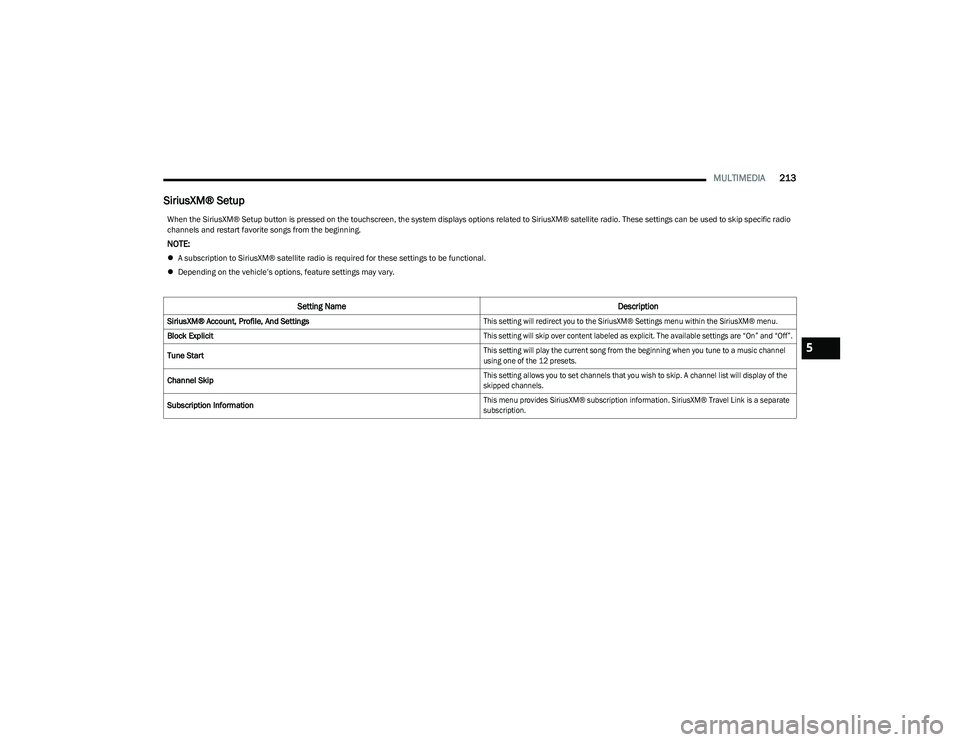
SiriusXM® Setup
When the SiriusXM® Setup button is pressed on the touchscreen, the system displays options related to SiriusXM® satellite radio. These settings can be used to skip specific radio
channels and restart favorite songs from the beginning.
NOTE:
A subscription to SiriusXM® satellite radio is required for these settings to be functional.
Depending on the vehicle’s options, feature settings may vary.
Setting Name Description
SiriusXM® Account, Profile, And Settings
This setting will redirect you to the SiriusXM® Settings menu within the SiriusXM® menu.
Block Explicit
This setting will skip over content labeled as explicit. The available settings are “On” and “Off”.
Tune Start
This setting will play the current song from the beginning when you tune to a music channel
using one of the 12 presets.
Channel Skip
This setting allows you to set channels that you wish to skip. A channel list will display of the
skipped channels.
Subscription Information
This menu provides SiriusXM® subscription information. SiriusXM® Travel Link is a separate
subscription.
5
23_DT_OM_EN_USC_t.book Page 213
Page 216 of 416
214MULTIMEDIA
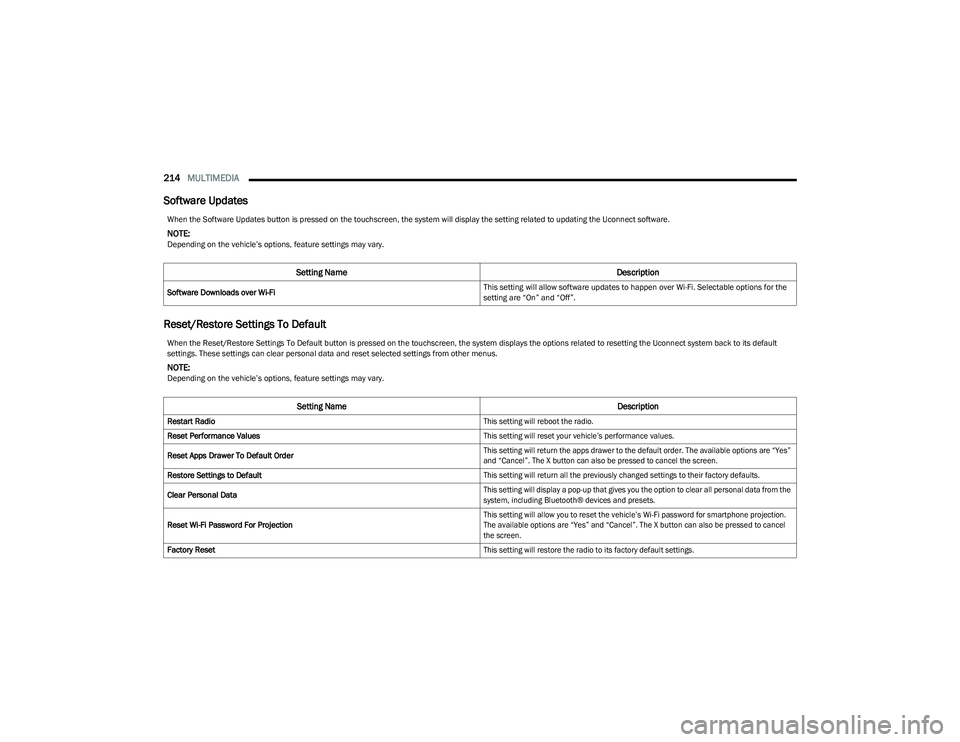
Software Updates
Reset/Restore Settings To Default
When the Software Updates button is pressed on the touchscreen, the system will display the setting related to updating the Uconnect software.
NOTE:Depending on the vehicle’s options, feature settings may vary.
Setting Name Description
Software Downloads over Wi-Fi This setting will allow software updates to happen over Wi-Fi. Selectable options for the
setting are “On” and “Off”.
When the Reset/Restore Settings To Default button is pressed on the touchscreen, the system displays the options related to resetting the Uconnect system back to its default
settings. These settings can clear personal data and reset selected settings from other menus.
NOTE:Depending on the vehicle’s options, feature settings may vary.
Setting Name
Description
Restart Radio
This setting will reboot the radio.
Reset Performance Values
This setting will reset your vehicle’s performance values.
Reset Apps Drawer To Default Order
This setting will return the apps drawer to the default order. The available options are “Yes”
and “Cancel”. The X button can also be pressed to cancel the screen.
Restore Settings to Default
This setting will return all the previously changed settings to their factory defaults.
Clear Personal Data
This setting will display a pop-up that gives you the option to clear all personal data from the
system, including Bluetooth® devices and presets.
Reset Wi-Fi Password For Projection
This setting will allow you to reset the vehicle’s Wi-Fi password for smartphone projection.
The available options are “Yes” and “Cancel”. The X button can also be pressed to cancel
the screen.
Factory Reset
This setting will restore the radio to its factory default settings.
23_DT_OM_EN_USC_t.book Page 214
Page 218 of 416
216MULTIMEDIA
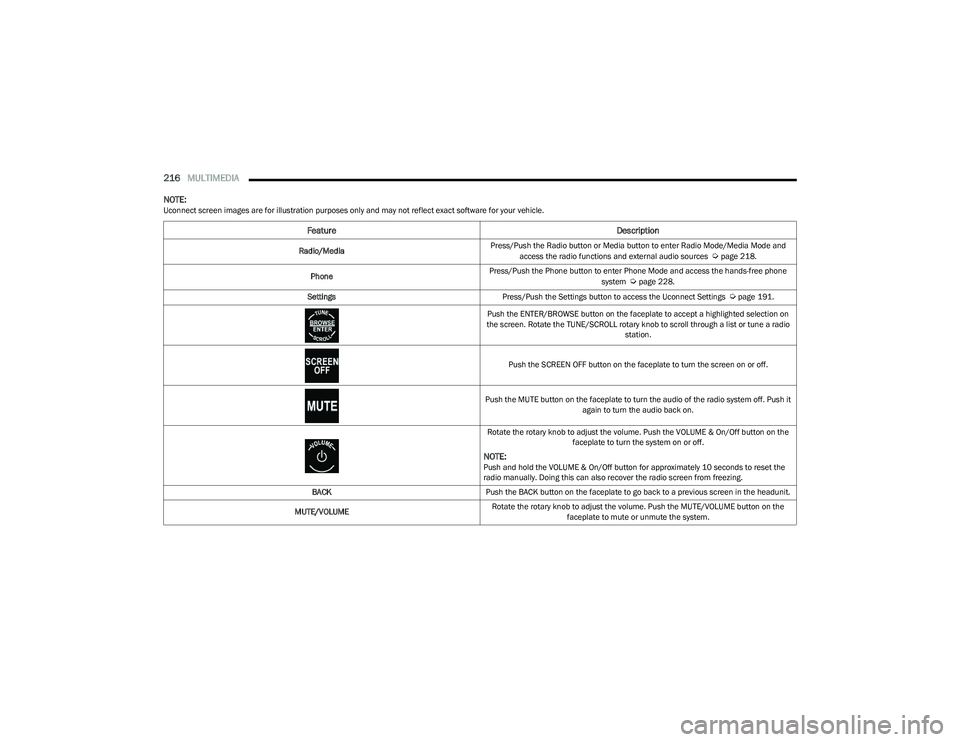
NOTE:Uconnect screen images are for illustration purposes only and may not reflect exact software for your vehicle.
Feature Description
Radio/MediaPress/Push the Radio button or Media button to enter Radio Mode/Media Mode and
access the radio functions and external audio sources Úpage 218.
Phone Press/Push the Phone button to enter Phone Mode and access the hands-free phone
system
Úpage 228.
Settings Press/Push the Settings button to access the Uconnect Settings
Úpage 191.
Push the ENTER/BROWSE button on the faceplate to accept a highlighted selection on
the screen. Rotate the TUNE/SCROLL rotary knob to scroll through a list or tune a radio station.
Push the SCREEN OFF button on the faceplate to turn the screen on or off.
Push the MUTE button on the faceplate to turn the audio of the radio system off. Push it again to turn the audio back on.
Rotate the rotary knob to adjust the volume. Push the VOLUME & On/Off button on the faceplate to turn the system on or off.
NOTE:Push and hold the VOLUME & On/Off button for approximately 10 seconds to reset the
radio manually. Doing this can also recover the radio screen from freezing.
BACK Push the BACK button on the faceplate to go back to a previous screen in the headunit.
MUTE/VOLUME Rotate the rotary knob to adjust the volume. Push the MUTE/VOLUME button on the
faceplate to mute or unmute the system.
23_DT_OM_EN_USC_t.book Page 216