weight RAM 1500 2023 User Guide
[x] Cancel search | Manufacturer: RAM, Model Year: 2023, Model line: 1500, Model: RAM 1500 2023Pages: 416, PDF Size: 20.59 MB
Page 176 of 416
174STARTING AND OPERATING
Weight-Distributing Hitch
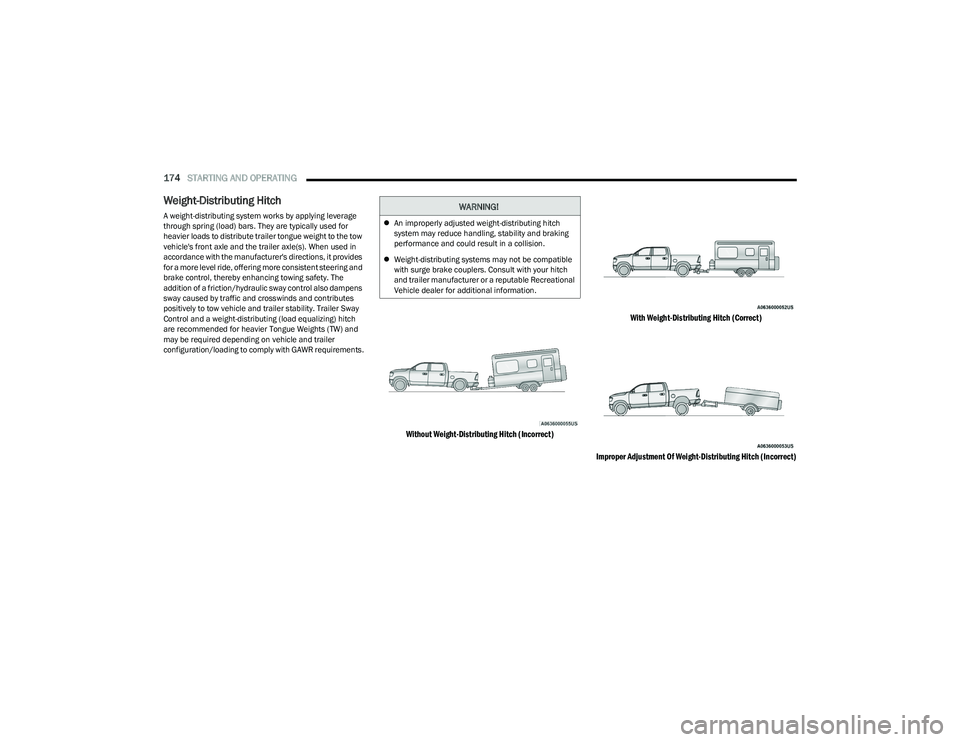
A weight-distributing system works by applying leverage
through spring (load) bars. They are typically used for
heavier loads to distribute trailer tongue weight to the tow
vehicle's front axle and the trailer axle(s). When used in
accordance with the manufacturer's directions, it provides
for a more level ride, offering more consistent steering and
brake control, thereby enhancing towing safety. The
addition of a friction/hydraulic sway control also dampens
sway caused by traffic and crosswinds and contributes
positively to tow vehicle and trailer stability. Trailer Sway
Control and a weight-distributing (load equalizing) hitch
are recommended for heavier Tongue Weights (TW) and
may be required depending on vehicle and trailer
configuration/loading to comply with GAWR requirements.
Without Weight-Distributing Hitch (Incorrect) With Weight-Distributing Hitch (Correct)
Improper Adjustment Of Weight-Distributing Hitch (Incorrect)
WARNING!
An improperly adjusted weight-distributing hitch
system may reduce handling, stability and braking
performance and could result in a collision.
Weight-distributing systems may not be compatible
with surge brake couplers. Consult with your hitch
and trailer manufacturer or a reputable Recreational
Vehicle dealer for additional information.
23_DT_OM_EN_USC_t.book Page 174
Page 177 of 416
STARTING AND OPERATING175
RECOMMENDED DISTRIBUTION HITCH
ADJUSTMENT
Towing With Air Suspension — If Equipped
1. Verify that the vehicle is at the normal ride height.
NOTE:The vehicle must remain in the engine run position with all
doors closed while attaching a trailer for proper leveling of
the air suspension system.
2. Position the truck to be ready to connect to the trailer
(do not connect the trailer).
3. Enable tire jack mode through the instrument cluster or touchscreen radio settings. Tire jack mode will be
canceled and the procedure must be restarted if the
vehicle is driven at speeds above 5 mph (8 km/h).
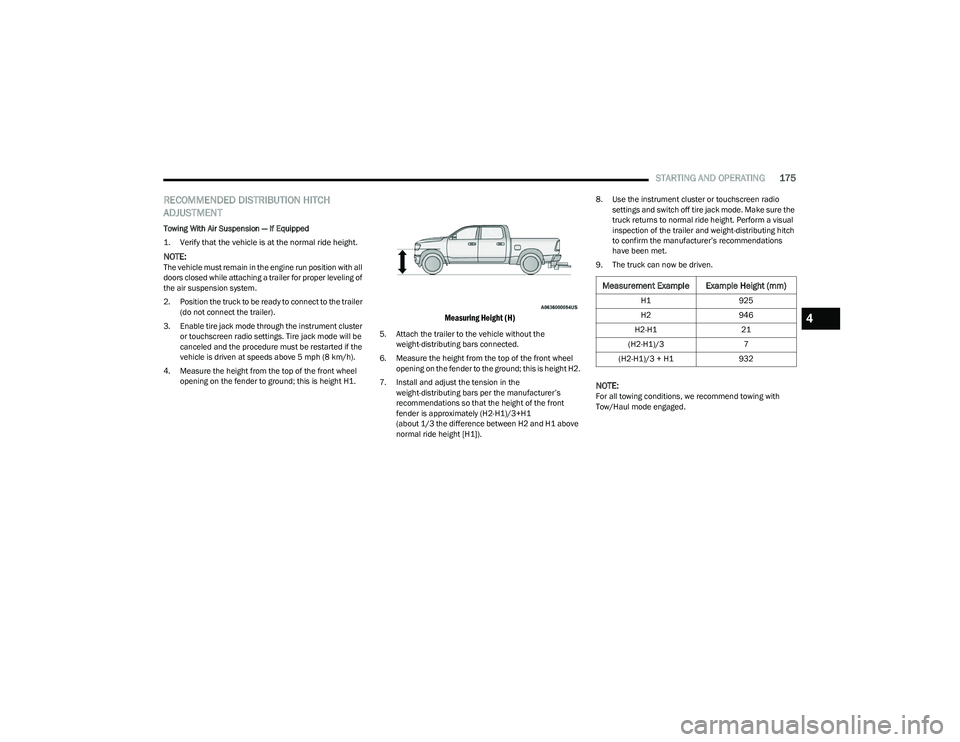
4. Measure the height from the top of the front wheel opening on the fender to ground; this is height H1.
Measuring Height (H)
5. Attach the trailer to the vehicle without the weight-distributing bars connected.
6. Measure the height from the top of the front wheel opening on the fender to the ground; this is height H2.
7. Install and adjust the tension in the weight-distributing bars per the manufacturer’s
recommendations so that the height of the front
fender is approximately (H2-H1)/3+H1
(about 1/3 the difference between H2 and H1 above
normal ride height [H1]). 8. Use the instrument cluster or touchscreen radio
settings and switch off tire jack mode. Make sure the
truck returns to normal ride height. Perform a visual
inspection of the trailer and weight-distributing hitch
to confirm the manufacturer’s recommendations
have been met.
9. The truck can now be driven.
NOTE:For all towing conditions, we recommend towing with
Tow/Haul mode engaged.
Measurement Example Example Height (mm)
H1 925
H2 946
H2-H1 21
(H2-H1)/3 7
(H2-H1)/3 + H1 932
4
23_DT_OM_EN_USC_t.book Page 175
Page 178 of 416
176STARTING AND OPERATING
TRAILER HITCH TYPE AND MAXIMUM TRAILER WEIGHT
The following chart provides the maximum trailer weight a given factory equipped trailer hitch type can tow and should be used to assist you in selecting the correct trailer hitch for your
intended towing condition.
All trailer hitches should be professionally installed on
your vehicle.
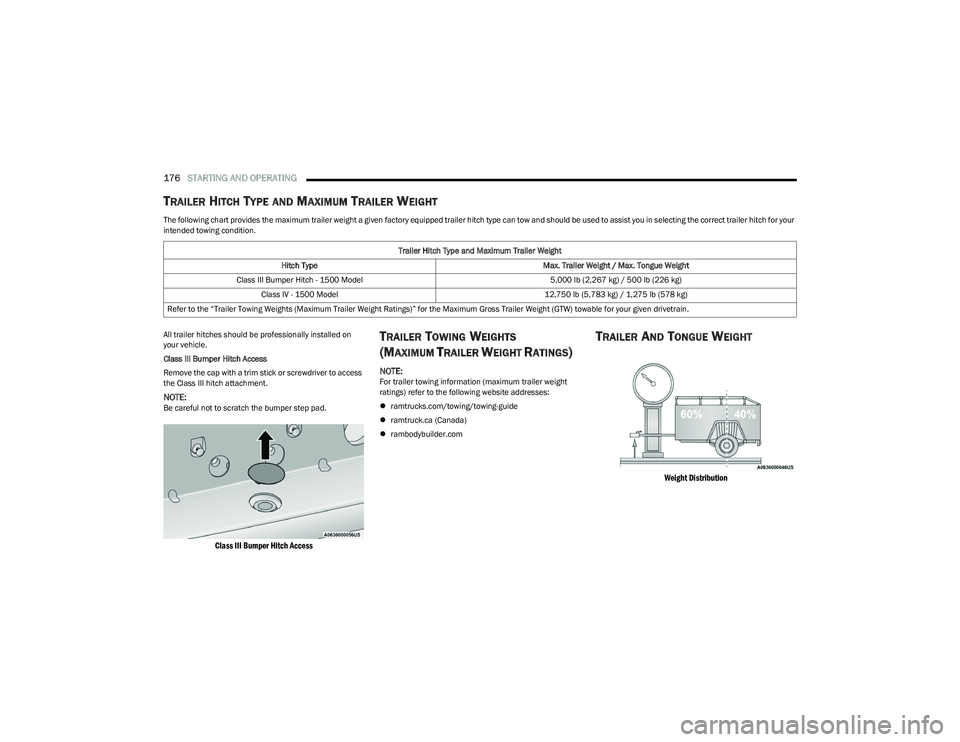
Class III Bumper Hitch Access
Remove the cap with a trim stick or screwdriver to access
the Class III hitch attachment.
NOTE:Be careful not to scratch the bumper step pad.
Class III Bumper Hitch Access
TRAILER TOWING WEIGHTS
(M
AXIMUM TRAILER WEIGHT RATINGS)
NOTE:For trailer towing information (maximum trailer weight
ratings) refer to the following website addresses:
ramtrucks.com/towing/towing-guide
ramtruck.ca (Canada)
rambodybuilder.com
TRAILER AND TONGUE WEIGHT
Weight Distribution
Trailer Hitch Type and Maximum Trailer Weight
Hitch Type Max. Trailer Weight / Max. Tongue Weight
Class III Bumper Hitch - 1500 Model 5,000 lb (2,267 kg) / 500 lb (226 kg)
Class IV - 1500 Model 12,750 lb (5,783 kg) / 1,275 lb (578 kg)
Refer to the “Trailer Towing Weights (Maximum Trailer Weight Ratings)” for the Maximum Gross Trailer Weight (GTW) towable for your given drivetrain.
23_DT_OM_EN_USC_t.book Page 176
Page 179 of 416
STARTING AND OPERATING177
Consider the following items when computing the weight
on the rear axle of the vehicle:
The tongue weight of the trailer.
The weight of any other type of cargo or equipment put
in or on your vehicle.
The weight of the driver and all passengers.
NOTE:Remember that everything put into or on the trailer adds
to the load on your vehicle. Also, additional
factory-installed options or dealer-installed options must
be considered as part of the total load on your vehicle.
Refer to the Tire And Loading Information Placard for the
maximum combined weight of occupants and cargo for
your vehicle.
TRAILER REVERSE STEERING
C
ONTROL — IF EQUIPPED
Feature Overview
Trailer Reverse Steering Control (TRSC) is a feature that
will assist the driver when backing up a trailer. By turning
the knob located on the center stack, you can more
accurately control the direction the trailer will go. The driver controls the accelerator and the brake while
steering with the use of the Trailer Reverse Steering
Control knob. The trailer is steered according to the
direction the knob is turned.
This feature will also allow the driver to back up a vehicle
and trailer in a straight line when the knob is rested in its
center position.
Minimal setup is required to use this feature.
Set Up:
To use the system, hitch your trailer to the truck and
ensure all electrical wiring is connected
Úpage 182.
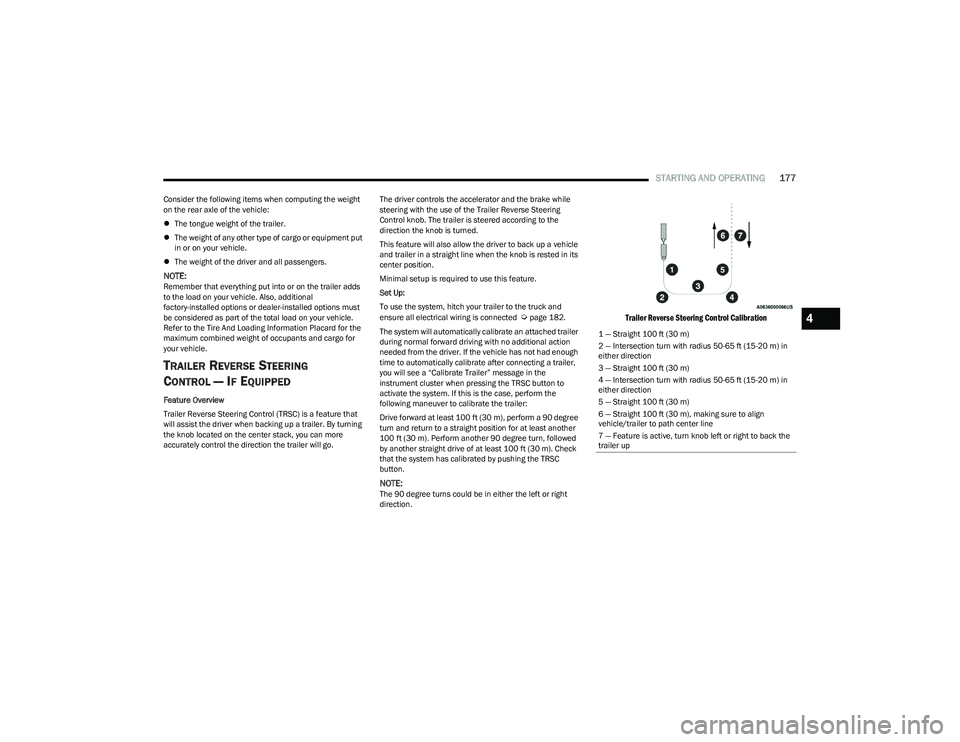
The system will automatically calibrate an attached trailer
during normal forward driving with no additional action
needed from the driver. If the vehicle has not had enough
time to automatically calibrate after connecting a trailer,
you will see a “Calibrate Trailer” message in the
instrument cluster when pressing the TRSC button to
activate the system. If this is the case, perform the
following maneuver to calibrate the trailer:
Drive forward at least 100 ft (30 m), perform a 90 degree
turn and return to a straight position for at least another
100 ft (30 m). Perform another 90 degree turn, followed
by another straight drive of at least 100 ft (30 m). Check
that the system has calibrated by pushing the TRSC
button.
NOTE:The 90 degree turns could be in either the left or right
direction.
Trailer Reverse Steering Control Calibration
1 — Straight 100 ft (30 m) 2 — Intersection turn with radius 50-65 ft (15-20 m) in
either direction
3 — Straight 100 ft (30 m)4 — Intersection turn with radius 50-65 ft (15-20 m) in
either direction
5 — Straight 100 ft (30 m)6 — Straight 100 ft (30 m), making sure to align vehicle/trailer to path center line
7 — Feature is active, turn knob left or right to back the
trailer up
4
23_DT_OM_EN_USC_t.book Page 177
Page 181 of 416

STARTING AND OPERATING179
(Continued)
Some trailers (such as boat trailers) will need to
recalibrate while loaded and unloaded.
NOTE:
The system may not detect a trailer in low light condi -
tions. In sunny conditions, the performance may be
degraded as shadows pass over the trailer.
The driver is always responsible for safe operation of
truck and trailer.
The driver is always in control of the truck as well as the
trailer and is responsible for controlling the throttle and
brakes.
The system may not function when the camera lens is
blocked, blurred (covered with water, snow, ice, dirt,
etc) and will not work unless the tailgate is upright and
fully latched.
TOWING REQUIREMENTS
To promote proper break-in of your new vehicle drivetrain
components, the following guidelines are recommended. Perform the maintenance listed in the Scheduled
Servicing section for the proper maintenance intervals
Úpage 333. When towing a trailer, never exceed the
GAWR or GCWR ratings.
Towing Requirements — Tires
Do not attempt to tow a trailer while using a compact
spare tire.
Do not drive more than 50 mph (80 km/h) when towing
while using a full size spare tire.
Proper tire inflation pressures are essential to the safe
and satisfactory operation of your vehicle.
Check the trailer tires for proper tire inflation pressures
before trailer usage.
Check for signs of tire wear or visible tire damage
before towing a trailer.
Replacing tires with a higher load carrying capacity will
not increase the vehicle's GVWR and GAWR limits.
For further information
Úpage 370.
CAUTION!
Do not tow a trailer at all during the first 500 miles
(805 km) the new vehicle is driven. The engine, axle
or other parts could be damaged.
Then, during the first 500 miles (805 km) that a
trailer is towed, do not drive over 50 mph (80 km/h)
and do not make starts at full throttle. This helps the
engine and other parts of the vehicle wear in at the
heavier loads.
WARNING!
Make certain that the load is secured in the trailer
and will not shift during travel. When trailering cargo
that is not fully secured, dynamic load shifts can
occur that may be difficult for the driver to control.
You could lose control of your vehicle and have a
collision.
When hauling cargo or towing a trailer, do not over -
load your vehicle or trailer. Overloading can cause a
loss of control, poor performance or damage to
brakes, axle, engine, transmission, steering, suspen -
sion, chassis structure or tires.
Safety chains must always be used between your
vehicle and trailer. Always connect the chains to the
hook retainers of the vehicle hitch. Cross the chains
under the trailer tongue and allow enough slack for
turning corners.
Vehicles with trailers should not be parked on a
grade. When parking, apply the parking brake on the
tow vehicle. Put the tow vehicle transmission in
PARK. For four-wheel drive vehicles, make sure the
transfer case is not in NEUTRAL. Always, block or
"chock" the trailer wheels.
GCWR must not be exceeded.
Total weight must be distributed between the tow
vehicle and the trailer such that the following four
ratings are not exceeded :
GVWR
GTW
GAWR
Tongue weight rating for the trailer hitch utilized
WARNING!
4
23_DT_OM_EN_USC_t.book Page 179
Page 186 of 416

184STARTING AND OPERATING
TOWING TIPS
Before towing, practice turning, stopping, and backing up
the trailer in an area located away from heavy traffic.
Automatic Transmission
The DRIVE range can be selected when towing. The
transmission controls include a drive strategy to avoid
frequent shifting when towing. However, if frequent
shifting does occur while in DRIVE, select TOW/HAUL
mode or select a lower gear range (using the Electronic
Range Select (ERS) shift control).
NOTE:Using TOW/HAUL mode or selecting a lower gear range
(using the ERS shift control) while operating the vehicle
under heavy loading conditions will improve performance
and extend transmission life by reducing excessive
shifting and heat build up. This action will also provide
better engine braking.
Tow/Haul Mode
To reduce potential for automatic transmission
overheating, activate TOW/HAUL mode when driving in
hilly areas, or select a lower gear range (using the (ERS)
shift control) on more severe grades.
Cruise Control — If Equipped
Do not use on hilly terrain or with heavy loads.
When using the Cruise Control, if you experience speed
drops greater than 10 mph (16 km/h), disengage until
you can get back to cruising speed.
Use Cruise Control in flat terrain and with light loads to
maximize fuel efficiency.
Air Suspension System
To aid in attaching/detaching the trailer from the vehicle,
the air suspension system can be used Úpage 134.
Selecting Tow/Haul or connecting a trailer with an
Integrated Trailer Brake Module (ITBM) will disable
Automatic Aero mode to avoid height changes while
towing and shifting loads or tongue weights.
NOTE:The vehicle must remain in the engine running position
while attaching a trailer for proper leveling of the air
suspension system.
SNOWPLOW
Snowplow Prep Packages are available as a factory
installed option. These packages include components
necessary to equip your vehicle with a snowplow.
NOTE:Before installation of a snowplow it is highly recom -
mended that the owner/installer obtain and follow the
recommendations contained within the current Body
Builder’s Guide. See an authorized dealer, installer or
snowplow manufacturer for this information. There are
unique electrical systems that must be connected to
properly ensure operator safety and prevent overloading
vehicle systems.
WARNING!
Attaching a snowplow to this vehicle could adversely
affect performance of the airbag system in a collision.
Do not expect that the airbag will perform as described
earlier in this manual.
CAUTION!
The “Lamp Out” indicator could illuminate if exterior
lamps are not properly installed.
23_DT_OM_EN_USC_t.book Page 184
Page 187 of 416
STARTING AND OPERATING185
BEFORE PLOWING
Check the hydraulic system for leaks and proper fluid
level.
Check the mounting bolts and nuts for proper tight -
ness.
Check the runners and cutting edge for excessive wear.
The cutting edge should be ¼ to ½ inches
(6 cm to 1.2 cm) above ground in snow plowing
position.
Check that snowplow lighting is connected and
functioning properly.
SNOWPLOW PREP PACKAGE MODEL
A
VAILABILITY
For Information about snowplow applications visit
www.ramtrucks.com or refer to the current Body Builder’s
Guide.
1. The maximum number of occupants in the truck
should not exceed one.
2. The total GVWR, Front GAWR or the Rear GAWR should never be exceeded.
3. Cargo capacity will be reduced by the addition of options or passengers, etc.
The loaded vehicle weight, including the snowplow
system, all aftermarket accessories, driver, passengers,
options, and cargo, must not exceed either the Gross
Vehicle Weight (GVWR) or Gross Axle Weight (GAWR)
ratings. These weights are specified on the Safety Compliance Certification Label on the driver's side door
opening.
NOTE:Detach the snowplow when transporting passengers.
Vehicle front end wheel alignment was set to
specifications at the factory without consideration for the
weight of the plow. Front end toe-in should be checked
and reset if necessary at the beginning and end of the
snowplow season. This will help prevent uneven tire wear.
The blade should be lowered whenever the vehicle is
parked.
Maintain and operate your vehicle and snowplow
equipment following the recommendations provided by
the specific snowplow manufacturer.
OVER THE ROAD OPERATION WITH
S
NOWPLOW ATTACHED
The blade restricts air flow to the radiator and causes the
engine to operate at higher than normal temperatures.
Therefore, when transporting the plow, angle the blade
completely and position it as low as road or surface
conditions permit. Do not exceed 40 mph (64 km/h). The
operator should always maintain a safe stopping distance
and allow adequate passing clearance.
NOTE:Lane Departure Warning / Lane Keep Assist is not
available when a snow plow is attached.
OPERATING TIPS
Under ideal snow plowing conditions, 20 mph (32 km/h)
should be maximum operating speed. The operator should
be familiar with the area and surface to be cleaned.
Reduce speed and use extreme caution when plowing
unfamiliar areas or under poor visibility.
GENERAL MAINTENANCE
Snowplows should be maintained in accordance with the
plow manufacturer's instructions.
Keep all snowplow electrical connections and battery
terminals clean and free of corrosion.
When plowing snow, to avoid transmission and drivetrain
damage, the following precautions should be observed:
Operate with transfer case in 4WD LOW when plowing
small or congested areas where speeds are not likely to
exceed 15 mph (24 km/h). At higher speeds operate in
4WD HIGH.
Vehicles with automatic transmissions should use
4WD LOW when plowing deep or heavy snow for
extended periods of time to avoid transmission over -
heating.
Do not shift the transmission unless the engine has
returned to idle and wheels have stopped. Make a
practice of stepping on the brake pedal while shifting
the transmission.
4
23_DT_OM_EN_USC_t.book Page 185
Page 270 of 416

268SAFETY
Driver Override
The driver may override SSC activation with throttle or
brake application at any time.
Deactivating SSC
SSC will be deactivated but remain available if any of the
following conditions occur:
The driver overrides SSC set speed with throttle or
brake application.
The vehicle speed exceeds 20 mph (32 km/h) but
remains below 40 mph (64 km/h).
The vehicle is shifted into PARK.
Disabling SSC
SSC will deactivate and be disabled if any of the following
conditions occur:
The driver pushes the SSC switch.
The driveline is shifted out of the 4WD Low.
The parking brake is applied.
The driver door opens.
The vehicle is driven greater than 20 mph (32 km/h)
for greater than 70 seconds.
The vehicle is driven greater than 40 mph (64 km/h).
SSC will exist immediately. Feedback To The Driver
The instrument cluster has an SSC icon and the SSC
switch has a lamp which offers feedback to the driver
about the state SSC is in.
The cluster icon and switch lamp will illuminate and
remain on solid when SSC is enabled or activated.
These are the normal operating conditions for SSC.
The cluster icon and switch lamp will flash for several
seconds then extinguish when the driver pushes the
SSC switch but enabled conditions are not met.
The cluster icon and switch lamp will flash for several
seconds then extinguish when SSC disables due to
excess speed.
The cluster icon and switch lamp will flash then extin -
guish when SSC deactivates due to overheated brakes.
Traction Control System (TCS)
The TCS monitors the amount of wheel spin of each of the
driven wheels. If wheel spin is detected, the TCS may apply
brake pressure to the spinning wheel(s) and/or reduce
engine power to provide enhanced acceleration and
stability. A feature of the TCS, Brake Limited Differential (BLD)
functions similarly to a limited slip differential and controls
the wheel spin across a driven axle. If one wheel on a
driven axle is spinning faster than the other, the system
will apply the brake of the spinning wheel. This will allow
more engine torque to be applied to the wheel that is not
spinning. BLD may remain enabled even if TCS and
Electronic Stability Control (ESC) are in reduced modes.
Trailer Sway Control (TSC)
TSC uses sensors in the vehicle to recognize an
excessively swaying trailer and will take the appropriate
actions to attempt to stop the sway.
NOTE:TSC cannot stop all trailers from swaying. Always use
caution when towing a trailer and follow the trailer tongue
weight recommendations
Úpage 173.
When TSC is functioning, the ESC Activation/Malfunction
Indicator Light will flash, the engine power may be reduced
and you may feel the brakes being applied to individual
wheels to attempt to stop the trailer from swaying. TSC is
disabled when the ESC system is in the “Partial Off” or
“Full Off” modes.
WARNING!
SSC is only intended to assist the driver in controlling
vehicle speed when driving in off road conditions. The
driver must remain attentive to the driving conditions
and is responsible for maintaining a safe vehicle speed.
WARNING!
If TSC activates while driving, slow the vehicle down,
stop at the nearest safe location, and adjust the trailer
load to eliminate trailer sway.
23_DT_OM_EN_USC_t.book Page 268
Page 292 of 416

290SAFETY
Driver And Passenger Front Air Bag
Features
The Advanced Front Air Bag system has multistage driver
and front passenger air bags. This system provides output
appropriate to the severity and type of collision as
determined by the Occupant Restraint Controller (ORC),
which may receive information from the front impact
sensors (if equipped) or other system components.
The first stage inflator is triggered immediately during an
impact that requires air bag deployment. A low energy
output is used in less severe collisions. A higher energy
output is used for more severe collisions. This vehicle may be equipped with a driver and/or front
passenger seat belt buckle switch that detects whether
the driver or front passenger seat belt is buckled. The seat
belt buckle switch may adjust the inflation rate of the
Advanced Front Air Bags.
This vehicle may be equipped with driver and/or front
passenger seat track position sensors that may adjust the
inflation rate of the Advanced Front Air Bags based upon
seat position.
This vehicle is equipped with a right front passenger
Occupant Classification System (“OCS”) that is designed
to provide Passenger Advanced Front Air Bag output
appropriate to the occupant’s seated weight input, as
determined by the OCS.
Front Air Bag Operation
Front Air Bags are designed to provide additional
protection by supplementing the seat belts. Front air bags
are not expected to reduce the risk of injury in rear, side,
or rollover collisions. The front air bags will not deploy in all
frontal collisions, including some that may produce
substantial vehicle damage — for example, some pole
collisions, truck underrides, and angle offset collisions.
On the other hand, depending on the type and location of
impact, front air bags may deploy in crashes with little
vehicle front-end damage but that produce a severe initial
deceleration.
Because air bag sensors measure vehicle deceleration
over time, vehicle speed and damage by themselves are
not good indicators of whether or not an air bag should
have deployed.
Seat belts are necessary for your protection in all
collisions, and also are needed to help keep you in
position, away from an inflating air bag.
When the Occupant Restraint Controller (ORC) detects a
collision requiring the front air bags, it signals the inflator
units. A large quantity of non-toxic gas is generated to
inflate the front air bags.
The steering wheel hub trim cover and the upper
passenger side of the instrument panel separate and fold
out of the way as the air bags inflate to their full size. The
front air bags fully inflate in less time than it takes to blink
your eyes. The front air bags then quickly deflate while
helping to restrain the driver and front passenger.WARNING!
Being too close to the steering wheel or instrument
panel during front air bag deployment could cause
serious injury, including death. Air bags need room to
inflate. Sit back, comfortably extending your arms to
reach the steering wheel or instrument panel.
Never place a rear-facing child restraint in front of an
air bag. A deploying passenger front air bag can
cause death or serious injury to a child 12 years or
younger, including a child in a rear-facing child
restraint.
Never install a rear-facing child restraint in the front
seat of a vehicle. Only use a rear-facing child
restraint in the rear seat. If the vehicle does not have
a rear seat, do not transport a rear-facing child
restraint in that vehicle.
WARNING!
No objects should be placed over or near the air bag
on the instrument panel or steering wheel because
any such objects could cause harm if the vehicle is in
a collision severe enough to cause the air bag to
inflate.
Do not put anything on or around the air bag covers
or attempt to open them manually. You may damage
the air bags and you could be injured because the air
bags may no longer be functional. The protective
covers for the air bag cushions are designed to open
only when the air bags are inflating.
Relying on the air bags alone could lead to more
severe injuries in a collision. The air bags work with
your seat belt to restrain you properly. In some colli -
sions, air bags won’t deploy at all. Always wear your
seat belts even though you have air bags.
23_DT_OM_EN_USC_t.book Page 290
Page 293 of 416

SAFETY291
Occupant Classification System (OCS) —
Front Passenger Seat
The Occupant Classification System (OCS) is part of a
Federally regulated safety system for this vehicle. It is
designed to provide Passenger Advanced Front Air Bag
output appropriate to the occupant’s seated weight, as
determined by the OCS.
The Occupant Classification System (OCS) consists of the
following:
Occupant Restraint Controller (ORC)
Occupant Classification Module (OCM) and Sensor
located in the front passenger seat
Air Bag Warning Light Occupant Classification Module (OCM) And Sensor
The Occupant Classification Module (OCM) is located
underneath the front passenger seat. The Sensor is
located beneath the passenger seat cushion foam.
Any weight on the seat will be sensed by the Sensor.
The OCM uses input from the Sensor to determine the
front passenger’s most probable classification. The OCM
communicates this information to the ORC. The ORC may
reduce the inflation rate of the Passenger Advanced Front
Air Bag deployment based on occupant classification. In
order for the OCS to operate as designed, it is important
for the front passenger to be seated properly and properly
wearing the seat belt.
The OCS will NOT prevent deployment of the Passenger
Advanced Front Air Bag. The OCS may reduce the inflation
rate of the Passenger Advanced Front Air Bag if the OCS
estimates that:
The front passenger seat is unoccupied or has very
light objects on it; or
The front passenger seat is occupied by a small
passenger, including a child; or
The front passenger seat is occupied by a rear-facing
child restraint; or
The front passenger is not properly seated or his or her
weight is taken off of the seat for a period of time.
* It is possible for a child to be classified as an adult, allowing a full-power Passenger Advanced Front Air Bag deployment. Never allow children to ride in the front passenger seat and
never install a child restraint system, including a rear-facing child restraint, in the front passenger seat.
Front Passenger Seat Occupant Status Front Passenger Air Bag Output
Rear-facing child restraint Reduced-power deployment
Child, including a child in a forward-facing child restraint or booster seat* Reduced-power deployment OR full-power deployment
Properly seated adult Full-power deployment OR reduced-power deployment
Unoccupied seat Reduced-power deployment6
23_DT_OM_EN_USC_t.book Page 291