lights RAM 1500 2023 Owner's Manual
[x] Cancel search | Manufacturer: RAM, Model Year: 2023, Model line: 1500, Model: RAM 1500 2023Pages: 416, PDF Size: 20.59 MB
Page 69 of 416

GETTING TO KNOW YOUR VEHICLE67
(Continued)
When the vehicle is turned off, be sure to unplug any
equipment as to not drain the battery of the vehicle. All
accessories connected to the outlet(s) should be removed
or turned off when the vehicle is not in use to protect the
battery against discharge.
POWER INVERTER — IF EQUIPPED
A 115 Volt (400 Watts maximum) inverter may be located
inside the center console towards the right hand side. This
inverter can power cellular phones, electronics and other
low power devices requiring power up to 400 Watts.
Certain video game consoles exceed this power limit, as
will most power tools.
Center Console Power Inverter Outlet
There is also a second 115 Volt (400 Watts maximum)
power inverter located on the rear of the center console.
This inverter can power cellular phones, electronics and
other low power devices requiring power up to 400 Watts. Certain video game consoles exceed this power limit, as
will most power tools.
All power inverters are designed with built-in overload
protection. If the power rating of 400 Watts is exceeded,
the power inverter shuts down. Once the electrical device
has been removed from the outlet the inverter should
reset.
Rear Center Console Power Inverter Outlet
NOTE:
400 Watts is the maximum for the inverter, not each
outlet. If three outlets are in use, 400 Watts is shared
amongst the devices plugged in.
If equipped with a front bench seat, there may be a
115 Volt (400 Watts maximum) inverter located to the
right of the center stack, just below the climate controls.
This inverter can power cellular phones, electronics and
other low power devices requiring power up to 400 Watts.
WARNING!
To avoid serious injury or death:
Only devices designed for use in this type of outlet
should be inserted into any 12 Volt outlet.
Do not touch with wet hands.
Close the lid when not in use and while driving the
vehicle.
If this outlet is mishandled, it may cause an electric
shock and failure.
CAUTION!
Many accessories that can be plugged in draw power
from the vehicle's battery, even when not in use
(i.e., cellular phones, etc.). Eventually, if plugged in
long enough, the vehicle's battery will discharge suffi -
ciently to degrade battery life and/or prevent the
engine from starting.
Accessories that draw higher power (i.e., coolers,
vacuum cleaners, lights, etc.), will discharge the
battery even more quickly. Only use these intermit -
tently and with greater caution.
After the use of high power draw accessories, or long
periods of the vehicle not being started (with acces -
sories still plugged in), the vehicle must be driven a
sufficient length of time to allow the generator to
recharge the vehicle's battery.
CAUTION!
2
23_DT_OM_EN_USC_t.book Page 67
Page 72 of 416
70GETTING TO KNOW YOUR VEHICLE
Frequent exposure of items to the UV-C light can cause
early fading of the item’s colored surfaces.
For optimum effectiveness, the UV-C lights must be
free of fingerprints, moisture, and dust. Clean with a
lint-free cloth.
WINDOWS
POWER WINDOWS
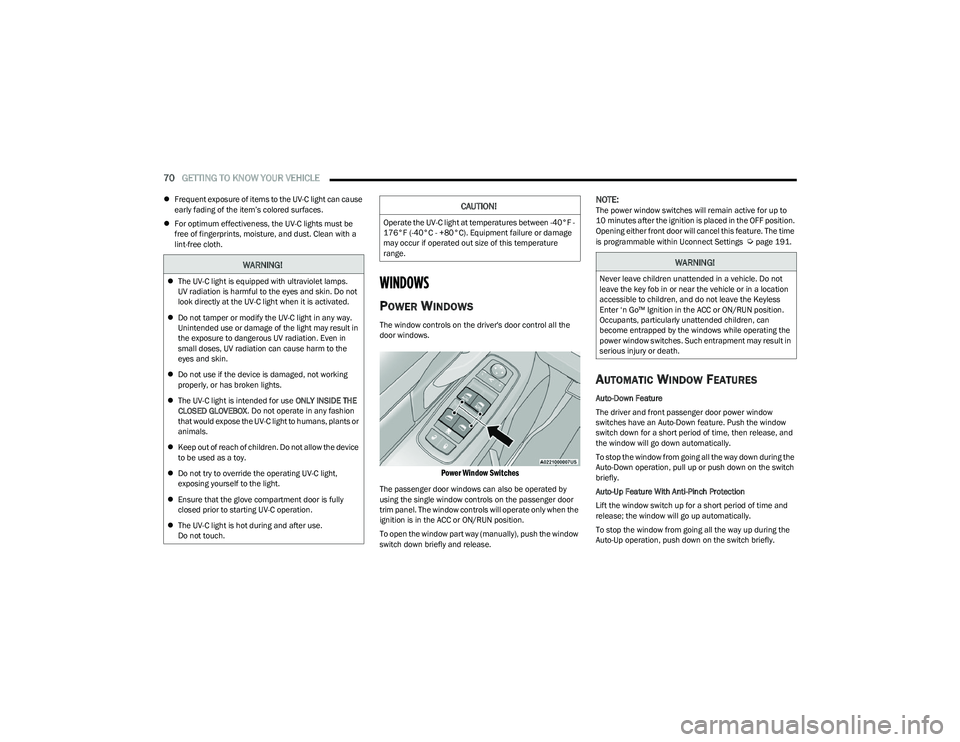
The window controls on the driver's door control all the
door windows.
Power Window Switches
The passenger door windows can also be operated by
using the single window controls on the passenger door
trim panel. The window controls will operate only when the
ignition is in the ACC or ON/RUN position.
To open the window part way (manually), push the window
switch down briefly and release.
NOTE:The power window switches will remain active for up to
10 minutes after the ignition is placed in the OFF position.
Opening either front door will cancel this feature. The time
is programmable within Uconnect Settings
Úpage 191.
AUTOMATIC WINDOW FEATURES
Auto-Down Feature
The driver and front passenger door power window
switches have an Auto-Down feature. Push the window
switch down for a short period of time, then release, and
the window will go down automatically.
To stop the window from going all the way down during the
Auto-Down operation, pull up or push down on the switch
briefly.
Auto-Up Feature With Anti-Pinch Protection
Lift the window switch up for a short period of time and
release; the window will go up automatically.
To stop the window from going all the way up during the
Auto-Up operation, push down on the switch briefly.
WARNING!
The UV-C light is equipped with ultraviolet lamps.
UV radiation is harmful to the eyes and skin. Do not
look directly at the UV-C light when it is activated.
Do not tamper or modify the UV-C light in any way.
Unintended use or damage of the light may result in
the exposure to dangerous UV radiation. Even in
small doses, UV radiation can cause harm to the
eyes and skin.
Do not use if the device is damaged, not working
properly, or has broken lights.
The UV-C light is intended for use ONLY INSIDE THE
CLOSED GLOVEBOX . Do not operate in any fashion
that would expose the UV-C light to humans, plants or
animals.
Keep out of reach of children. Do not allow the device
to be used as a toy.
Do not try to override the operating UV-C light,
exposing yourself to the light.
Ensure that the glove compartment door is fully
closed prior to starting UV-C operation.
The UV-C light is hot during and after use.
Do not touch.
CAUTION!
Operate the UV-C light at temperatures between -40°F -
176°F (-40°C - +80°C). Equipment failure or damage
may occur if operated out size of this temperature
range.
WARNING!
Never leave children unattended in a vehicle. Do not
leave the key fob in or near the vehicle or in a location
accessible to children, and do not leave the Keyless
Enter ‘n Go™ Ignition in the ACC or ON/RUN position.
Occupants, particularly unattended children, can
become entrapped by the windows while operating the
power window switches. Such entrapment may result in
serious injury or death.
23_DT_OM_EN_USC_t.book Page 70
Page 74 of 416
72GETTING TO KNOW YOUR VEHICLE
(Continued)
WIND BUFFETING
Wind buffeting can be described as the perception of
pressure on the ears or a helicopter-type sound in the
ears. Your vehicle may exhibit wind buffeting with the
windows down, or the sunroof (if equipped) in certain open
or partially open positions. This is a normal occurrence
and can be minimized. If the buffeting occurs with the rear
windows open, open the front and rear windows together
to minimize the buffeting. If the buffeting occurs with the
sunroof open, adjust the sunroof opening to minimize the
buffeting or open any window.
POWER SUNROOF — IF EQUIPPED
DUAL PANE POWER SUNROOF
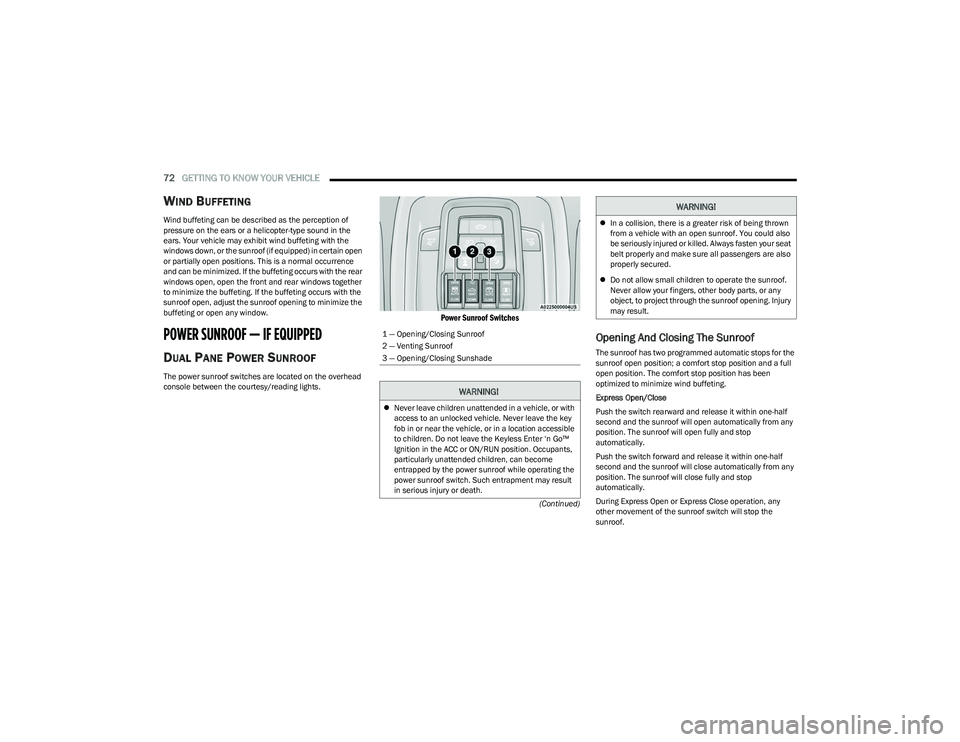
The power sunroof switches are located on the overhead
console between the courtesy/reading lights.
Power Sunroof Switches
Opening And Closing The Sunroof
The sunroof has two programmed automatic stops for the
sunroof open position; a comfort stop position and a full
open position. The comfort stop position has been
optimized to minimize wind buffeting.
Express Open/Close
Push the switch rearward and release it within one-half
second and the sunroof will open automatically from any
position. The sunroof will open fully and stop
automatically.
Push the switch forward and release it within one-half
second and the sunroof will close automatically from any
position. The sunroof will close fully and stop
automatically.
During Express Open or Express Close operation, any
other movement of the sunroof switch will stop the
sunroof.
1 — Opening/Closing Sunroof
2 — Venting Sunroof
3 — Opening/Closing Sunshade
WARNING!
Never leave children unattended in a vehicle, or with
access to an unlocked vehicle. Never leave the key
fob in or near the vehicle, or in a location accessible
to children. Do not leave the Keyless Enter ‘n Go™
Ignition in the ACC or ON/RUN position. Occupants,
particularly unattended children, can become
entrapped by the power sunroof while operating the
power sunroof switch. Such entrapment may result
in serious injury or death.
In a collision, there is a greater risk of being thrown
from a vehicle with an open sunroof. You could also
be seriously injured or killed. Always fasten your seat
belt properly and make sure all passengers are also
properly secured.
Do not allow small children to operate the sunroof.
Never allow your fingers, other body parts, or any
object, to project through the sunroof opening. Injury
may result.
WARNING!
23_DT_OM_EN_USC_t.book Page 72
Page 84 of 416
82GETTING TO KNOW YOUR VEHICLE
LOCKING AND UNLOCKING RAMBOX
Push and release the lock or unlock button on the key fob
to lock and unlock all doors, the tailgate and the RamBox
Úpage 16. To unlatch the storage bin manually, insert the
emergency key into the keyhole and turn clockwise.
Always return the key to the upright (vertical) position
before removing it from the keyhole.
RAMBOX CARGO STORAGE BINS
Cargo storage bins are located on both sides of the pickup
box. The cargo storage bins provide watertight, lockable,
illuminated storage for up to 150 lb (68 kg) of evenly
distributed cargo.
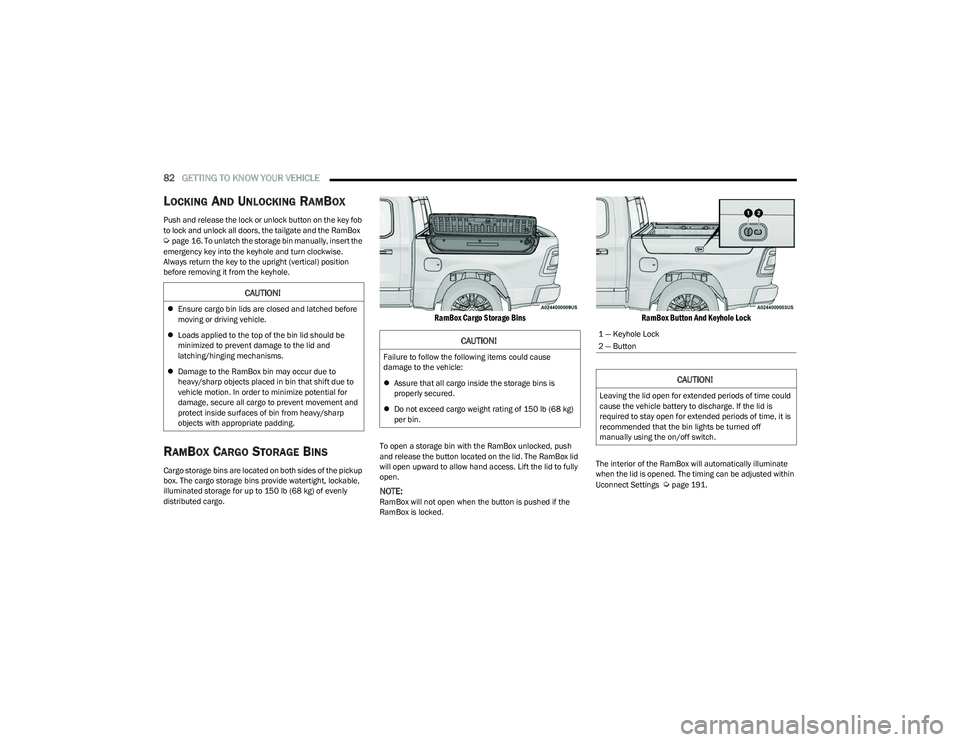
RamBox Cargo Storage Bins
To open a storage bin with the RamBox unlocked, push
and release the button located on the lid. The RamBox lid
will open upward to allow hand access. Lift the lid to fully
open.
NOTE:RamBox will not open when the button is pushed if the
RamBox is locked.
RamBox Button And Keyhole Lock
The interior of the RamBox will automatically illuminate
when the lid is opened. The timing can be adjusted within
Uconnect Settings
Úpage 191.
CAUTION!
Ensure cargo bin lids are closed and latched before
moving or driving vehicle.
Loads applied to the top of the bin lid should be
minimized to prevent damage to the lid and
latching/hinging mechanisms.
Damage to the RamBox bin may occur due to
heavy/sharp objects placed in bin that shift due to
vehicle motion. In order to minimize potential for
damage, secure all cargo to prevent movement and
protect inside surfaces of bin from heavy/sharp
objects with appropriate padding.
CAUTION!
Failure to follow the following items could cause
damage to the vehicle:
Assure that all cargo inside the storage bins is
properly secured.
Do not exceed cargo weight rating of 150 lb (68 kg)
per bin.
1 — Keyhole Lock
2 — Button
CAUTION!
Leaving the lid open for extended periods of time could
cause the vehicle battery to discharge. If the lid is
required to stay open for extended periods of time, it is
recommended that the bin lights be turned off
manually using the on/off switch.
23_DT_OM_EN_USC_t.book Page 82
Page 109 of 416

GETTING TO KNOW YOUR INSTRUMENT PANEL107
NOTE:
The charging system is independent from load reduc -
tion. The charging system performs a diagnostic on the
charging system continuously.
If the Battery Charge Warning Light is on it may indicate
a problem with the charging system
Úpage 108.
The electrical loads that may be switched off (if equipped),
and vehicle functions which can be affected by load
reduction:
Heated Seats / Vented Seats / Heated Wheel
Rear Defroster And Heated Mirrors
HVAC System
115 Volts AC Power Inverter System
Audio and Telematics System
Loss of the battery charge may indicate one or more of the
following conditions:
The charging system cannot deliver enough electrical
power to the vehicle system because the electrical
loads are larger than the capability of charging system.
The charging system is still functioning properly.
Turning on all possible vehicle electrical loads
(e.g. HVAC to max settings, exterior and interior lights,
overloaded power outlets +12 Volts, 115 Volts AC, USB
ports) during certain driving conditions (city driving,
towing, frequent stopping).
Installing options like additional lights, upfitter
electrical accessories, audio systems, alarms and
similar devices.
Unusual driving cycles (short trips separated by long
parking periods).
The vehicle was parked for an extended period of time
(weeks, months).
The battery was recently replaced and was not charged
completely.
The battery was discharged by an electrical load left on
when the vehicle was parked.
The battery was used for an extended period with the
engine not running to supply radio, lights, chargers,
+12 Volt portable appliances like vacuum cleaners,
game consoles and similar devices.
What to do when an electrical load reduction action
message is present (“Battery Saver On” or “Battery Saver
Mode”)
During a trip:
Reduce power to unnecessary loads if possible:
Turn off redundant lights (interior or exterior).
Check what may be plugged in to power outlets
+12 Volts, 115 Volts AC, USB ports.
Check HVAC settings (blower, temperature).
Check the audio settings (volume). After a trip:
Check if any aftermarket equipment was installed
(additional lights, upfitter electrical accessories, audio
systems, alarms) and review specifications if any
(load and Ignition Off Draw currents).
Evaluate the latest driving cycles (distance, driving
time and parking time).
The vehicle should have service performed if the
message is still present during consecutive trips and
the evaluation of the vehicle and driving pattern did not
help to identify the cause.
WARNING LIGHTS AND MESSAGES
The warning/indicator lights will illuminate in the
instrument panel together with a dedicated message
and/or acoustic signal when applicable. These indications
are indicative and precautionary and as such must not be
considered as exhaustive and/or alternative to the
information contained in the Owner’s Manual, which you
are advised to read carefully in all cases. Always refer to
the information in this chapter in the event of a failure
indication. All active telltales will display first if applicable.
The system check menu may appear different based upon
equipment options and current vehicle status. Some
telltales are optional and may not appear.
3
23_DT_OM_EN_USC_t.book Page 107
Page 110 of 416

108GETTING TO KNOW YOUR INSTRUMENT PANEL
RED WARNING LIGHTS
Air Bag Warning Light
This warning light will illuminate to indicate a
fault with the air bag, and will turn on for four to
eight seconds as a bulb check when the
ignition is placed in the ON/RUN or ACC/ON/
RUN position. This light will illuminate with a single chime
when a fault with the air bag has been detected, it will stay
on until the fault is cleared. If the light is either not on
during startup, stays on, or turns on while driving, have the
system inspected at an authorized dealer as soon as
possible.
Brake Warning Light
This warning light monitors various brake
functions, including brake fluid level and
parking brake application. If the brake light
turns on it may indicate that the parking brake
is applied, that the brake fluid level is low, or that there is
a problem with the Anti-Lock Brake System reservoir.
If the light remains on when the parking brake has been
disengaged, and the fluid level is at the full mark on the
master cylinder reservoir, it indicates a possible brake
hydraulic system malfunction or that a problem with the
Brake Booster has been detected by the Anti-Lock Brake
System (ABS) / Electronic Stability Control (ESC) system.
In this case, the light will remain on until the condition has
been corrected. If the problem is related to the brake
booster, the ABS pump will run when applying the brake,
and a brake pedal pulsation may be felt during each stop. The dual brake system provides a reserve braking capacity
in the event of a failure to a portion of the hydraulic
system. A leak in either half of the dual brake system is
indicated by the Brake Warning Light, which will turn on
when the brake fluid level in the master cylinder has
dropped below a specified level.
The light will remain on until the cause is corrected.
NOTE:The light may flash momentarily during sharp cornering
maneuvers, which change fluid level conditions. The
vehicle should have service performed, and the brake
fluid level checked.
If brake failure is indicated, immediate repair is necessary.
Vehicles equipped with the Anti-Lock Brake System (ABS)
are also equipped with Electronic Brake Force Distribution
(EBD). In the event of an EBD failure, the Brake Warning
Light will turn on along with the ABS Light. Immediate
repair to the ABS system is required.
Operation of the Brake Warning Light can be checked by
turning the ignition switch from the OFF position to the
ON/RUN position. The light should illuminate for
approximately two seconds.
The light should then turn off unless the parking brake is
applied or a brake fault is detected. If the light does not
illuminate, have the light inspected by an authorized
dealer.
The light also will turn on when the parking brake is
applied with the ignition switch in the ON/RUN position.
NOTE:This light shows only that the parking brake is applied.
It does not show the degree of brake application.
Battery Charge Warning Light
This warning light will illuminate when the
battery is not charging properly. If it stays on
while the engine is running, there may be a
malfunction with the charging system. Contact
an authorized dealer as soon as possible.
This indicates a possible problem with the electrical
system or a related component.
Door Open Warning Light
This indicator will illuminate when a door is
ajar/open and not fully closed.
NOTE:If the vehicle is moving there will also be a single chime.
WARNING!
Driving a vehicle with the red brake light on is
dangerous. Part of the brake system may have failed. It
will take longer to stop the vehicle. You could have a
collision. Have the vehicle checked immediately.
23_DT_OM_EN_USC_t.book Page 108
Page 112 of 416
110GETTING TO KNOW YOUR INSTRUMENT PANEL
Oil Temperature Warning Light
This warning light will illuminate to indicate the
engine oil temperature is high. If the light turns
on while driving, stop the vehicle and shut off
the engine as soon as possible. Wait for oil
temperature to return to normal levels.
Seat Belt Reminder Warning Light
This warning light indicates when the driver or
passenger seat belt is unbuckled. When the
ignition is first placed in the ON/RUN or ACC/
ON/RUN position and if the driver’s seat belt is
unbuckled, a chime will sound and the light will turn on.
When driving, if the driver or front passenger seat belt
remains unbuckled, the Seat Belt Reminder Light will flash
or remain on continuously and a chime will sound
Úpage 282.
Tailgate Open Warning Light
This warning light will illuminate when the
tailgate is open.
NOTE:If the vehicle is moving, there will also be a single chime.
Trailer Brake Disconnected Warning Light
This warning light will illuminate when the
Trailer Brake has been disconnected.
Transmission Temperature Warning
Light — If Equipped
This warning light will illuminate to warn of a
high transmission fluid temperature. This may
occur with strenuous usage such as trailer
towing. If this light turns on, stop the vehicle
and run the engine at idle or slightly faster, with the
transmission in PARK or NEUTRAL, until the light turns off.
Once the light turns off, you may continue to drive
normally.
Vehicle Security Warning Light —
If Equipped
This light will flash at a fast rate for
approximately 15 seconds when the vehicle
security system is arming, and then will flash
slowly until the vehicle is disarmed.
YELLOW WARNING LIGHTS
Adaptive Cruise Control (ACC) Fault
Warning Light — If Equipped
This warning light will illuminate to indicate a
fault in the ACC system. Contact an authorized
dealer for service
Úpage 145.
Air Suspension Fault Warning Light —
If Equipped
This light will illuminate when a fault is
detected with the air suspension system.
Anti-Lock Brake System (ABS)
Warning Light
This warning light monitors the ABS. The light
will turn on when the ignition is placed in the
ON/RUN or ACC/ON/RUN position and may
stay on for as long as four seconds.
If the ABS light remains on or turns on while driving, then
the Anti-Lock portion of the brake system is not
functioning and service is required as soon as possible.
However, the conventional brake system will continue to
operate normally, assuming the Brake Warning Light is not
also on.
If the ABS light does not turn on when the ignition is placed
in the ON/RUN or ACC/ON/RUN position, have the brake
system inspected by an authorized dealer.
WARNING!
If you continue operating the vehicle when the
Transmission Temperature Warning Light is illuminated
you could cause the fluid to boil over, come in contact
with hot engine or exhaust components and cause a
fire.
CAUTION!
Continuous driving with the Transmission Temperature
Warning Light illuminated will eventually cause severe
transmission damage or transmission failure.
23_DT_OM_EN_USC_t.book Page 110
Page 115 of 416
GETTING TO KNOW YOUR INSTRUMENT PANEL113
Your vehicle has also been equipped with a TPMS
malfunction indicator to indicate when the system is not
operating properly. The TPMS malfunction indicator is
combined with the low tire pressure telltale. When the
system detects a malfunction, the telltale will flash for
approximately one minute and then remain continuously
illuminated. This sequence will continue upon subsequent
vehicle start-ups as long as the malfunction exists. When
the malfunction indicator is illuminated, the system may
not be able to detect or signal low tire pressure as
intended. TPMS malfunctions may occur for a variety of
reasons, including the installation of replacement or
alternate tires or wheels on the vehicle that prevent the
TPMS from functioning properly. Always check the TPMS
malfunction telltale after replacing one or more tires or
wheels on your vehicle to ensure that the replacement or
alternate tires and wheels allow the TPMS to continue to
function properly.YELLOW INDICATOR LIGHTS
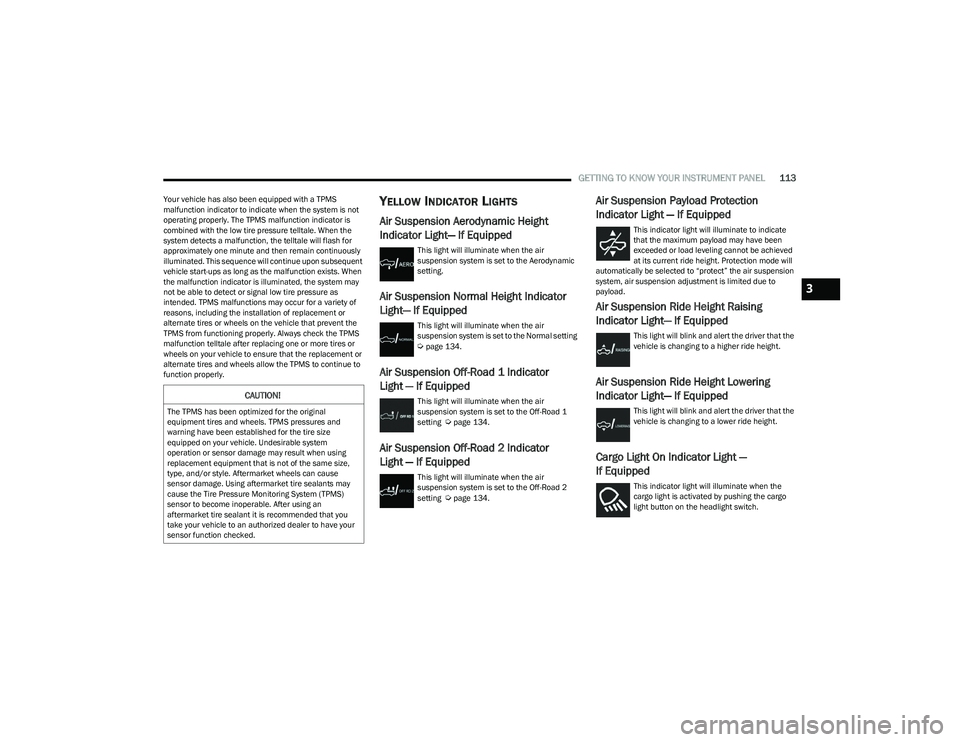
Air Suspension Aerodynamic Height
Indicator Light— If Equipped
This light will illuminate when the air
suspension system is set to the Aerodynamic
setting.
Air Suspension Normal Height Indicator
Light— If Equipped
This light will illuminate when the air
suspension system is set to the Normal setting
Úpage 134.
Air Suspension Off-Road 1 Indicator
Light — If Equipped
This light will illuminate when the air
suspension system is set to the Off-Road 1
setting
Úpage 134.
Air Suspension Off-Road 2 Indicator
Light — If Equipped
This light will illuminate when the air
suspension system is set to the Off-Road 2
setting
Úpage 134.
Air Suspension Payload Protection
Indicator Light — If Equipped
This indicator light will illuminate to indicate
that the maximum payload may have been
exceeded or load leveling cannot be achieved
at its current ride height. Protection mode will
automatically be selected to “protect” the air suspension
system, air suspension adjustment is limited due to
payload.
Air Suspension Ride Height Raising
Indicator Light— If Equipped
This light will blink and alert the driver that the
vehicle is changing to a higher ride height.
Air Suspension Ride Height Lowering
Indicator Light— If Equipped
This light will blink and alert the driver that the
vehicle is changing to a lower ride height.
Cargo Light On Indicator Light —
If Equipped
This indicator light will illuminate when the
cargo light is activated by pushing the cargo
light button on the headlight switch.
CAUTION!
The TPMS has been optimized for the original
equipment tires and wheels. TPMS pressures and
warning have been established for the tire size
equipped on your vehicle. Undesirable system
operation or sensor damage may result when using
replacement equipment that is not of the same size,
type, and/or style. Aftermarket wheels can cause
sensor damage. Using aftermarket tire sealants may
cause the Tire Pressure Monitoring System (TPMS)
sensor to become inoperable. After using an
aftermarket tire sealant it is recommended that you
take your vehicle to an authorized dealer to have your
sensor function checked.
3
23_DT_OM_EN_USC_t.book Page 113
Page 116 of 416
114GETTING TO KNOW YOUR INSTRUMENT PANEL
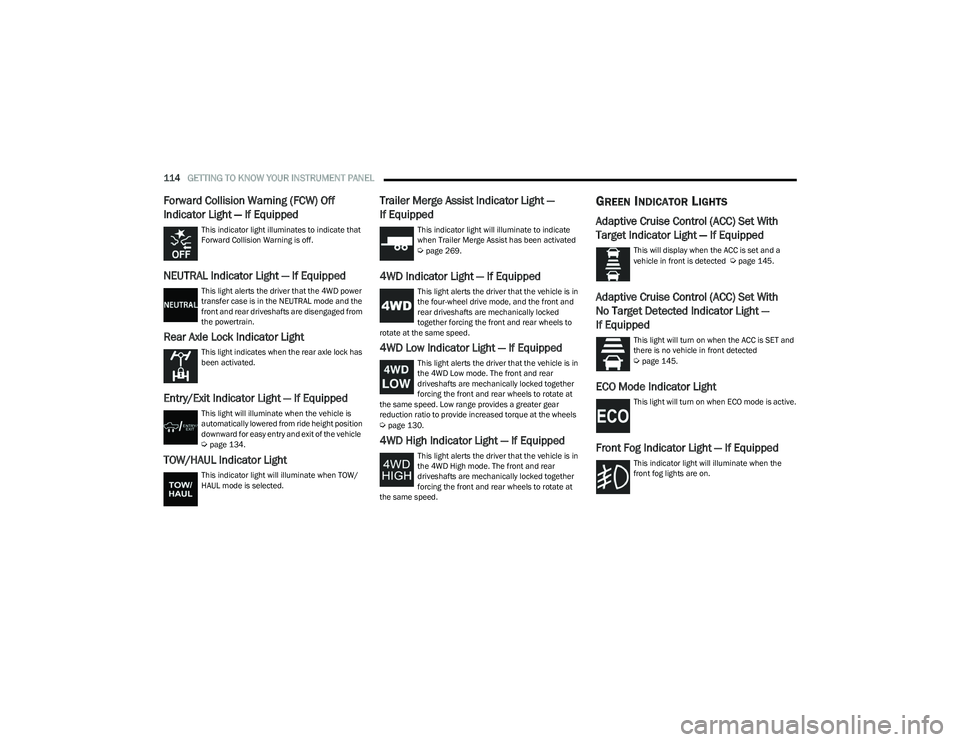
Forward Collision Warning (FCW) Off
Indicator Light — If Equipped
This indicator light illuminates to indicate that
Forward Collision Warning is off.
NEUTRAL Indicator Light — If Equipped
This light alerts the driver that the 4WD power
transfer case is in the NEUTRAL mode and the
front and rear driveshafts are disengaged from
the powertrain.
Rear Axle Lock Indicator Light
This light indicates when the rear axle lock has
been activated.
Entry/Exit Indicator Light — If Equipped
This light will illuminate when the vehicle is
automatically lowered from ride height position
downward for easy entry and exit of the vehicle
Úpage 134.
TOW/HAUL Indicator Light
This indicator light will illuminate when TOW/
HAUL mode is selected.
Trailer Merge Assist Indicator Light —
If Equipped
This indicator light will illuminate to indicate
when Trailer Merge Assist has been activated
Úpage 269.
4WD Indicator Light — If Equipped
This light alerts the driver that the vehicle is in
the four-wheel drive mode, and the front and
rear driveshafts are mechanically locked
together forcing the front and rear wheels to
rotate at the same speed.
4WD Low Indicator Light — If Equipped
This light alerts the driver that the vehicle is in
the 4WD Low mode. The front and rear
driveshafts are mechanically locked together
forcing the front and rear wheels to rotate at
the same speed. Low range provides a greater gear
reduction ratio to provide increased torque at the wheels
Úpage 130.
4WD High Indicator Light — If Equipped
This light alerts the driver that the vehicle is in
the 4WD High mode. The front and rear
driveshafts are mechanically locked together
forcing the front and rear wheels to rotate at
the same speed.
GREEN INDICATOR LIGHTS
Adaptive Cruise Control (ACC) Set With
Target Indicator Light — If Equipped
This will display when the ACC is set and a
vehicle in front is detected Úpage 145.
Adaptive Cruise Control (ACC) Set With
No Target Detected Indicator Light —
If Equipped
This light will turn on when the ACC is SET and
there is no vehicle in front detected
Úpage 145.
ECO Mode Indicator Light
This light will turn on when ECO mode is active.
Front Fog Indicator Light — If Equipped
This indicator light will illuminate when the
front fog lights are on.
23_DT_OM_EN_USC_t.book Page 114
Page 117 of 416
GETTING TO KNOW YOUR INSTRUMENT PANEL115
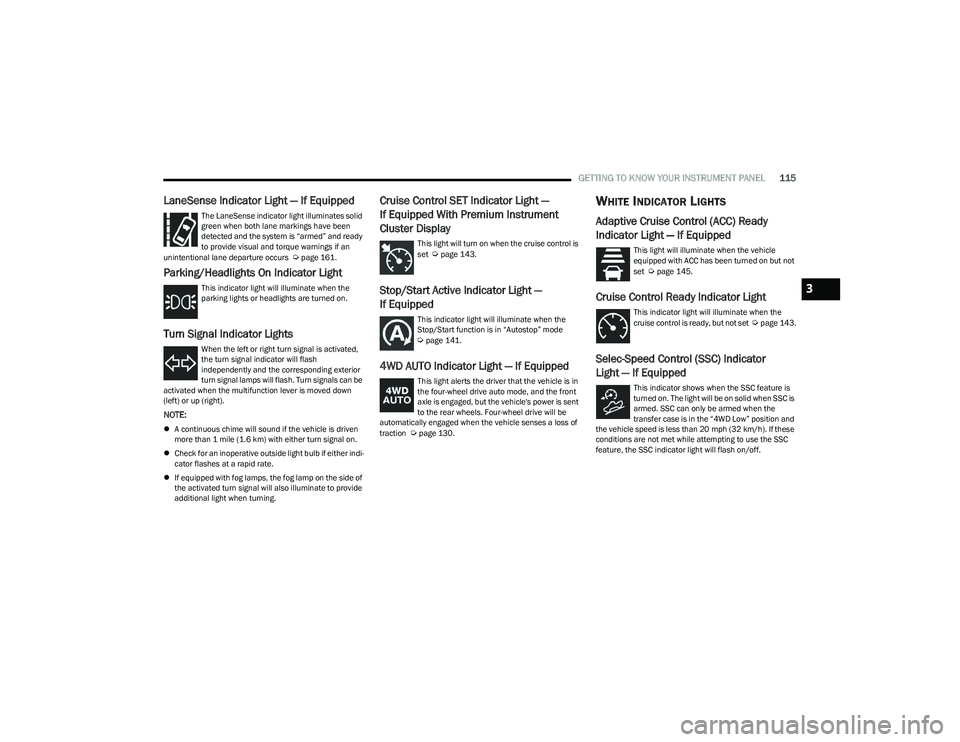
LaneSense Indicator Light — If Equipped
The LaneSense indicator light illuminates solid
green when both lane markings have been
detected and the system is “armed” and ready
to provide visual and torque warnings if an
unintentional lane departure occurs
Úpage 161.
Parking/Headlights On Indicator Light
This indicator light will illuminate when the
parking lights or headlights are turned on.
Turn Signal Indicator Lights
When the left or right turn signal is activated,
the turn signal indicator will flash
independently and the corresponding exterior
turn signal lamps will flash. Turn signals can be
activated when the multifunction lever is moved down
(left) or up (right).
NOTE:
A continuous chime will sound if the vehicle is driven
more than 1 mile (1.6 km) with either turn signal on.
Check for an inoperative outside light bulb if either indi -
cator flashes at a rapid rate.
If equipped with fog lamps, the fog lamp on the side of
the activated turn signal will also illuminate to provide
additional light when turning.
Cruise Control SET Indicator Light —
If Equipped With Premium Instrument
Cluster Display
This light will turn on when the cruise control is
set Úpage 143.
Stop/Start Active Indicator Light —
If Equipped
This indicator light will illuminate when the
Stop/Start function is in “Autostop” mode
Úpage 141.
4WD AUTO Indicator Light — If Equipped
This light alerts the driver that the vehicle is in
the four-wheel drive auto mode, and the front
axle is engaged, but the vehicle's power is sent
to the rear wheels. Four-wheel drive will be
automatically engaged when the vehicle senses a loss of
traction
Úpage 130.
WHITE INDICATOR LIGHTS
Adaptive Cruise Control (ACC) Ready
Indicator Light — If Equipped
This light will illuminate when the vehicle
equipped with ACC has been turned on but not
set
Úpage 145.
Cruise Control Ready Indicator Light
This indicator light will illuminate when the
cruise control is ready, but not set Úpage 143.
Selec-Speed Control (SSC) Indicator
Light — If Equipped
This indicator shows when the SSC feature is
turned on. The light will be on solid when SSC is
armed. SSC can only be armed when the
transfer case is in the “4WD Low” position and
the vehicle speed is less than 20 mph (32 km/h). If these conditions are not met while attempting to use the SSC
feature, the SSC indicator light will flash on/off.
3
23_DT_OM_EN_USC_t.book Page 115