warning RAM 1500 2023 Owner's Guide
[x] Cancel search | Manufacturer: RAM, Model Year: 2023, Model line: 1500, Model: RAM 1500 2023Pages: 416, PDF Size: 20.59 MB
Page 63 of 416
GETTING TO KNOW YOUR VEHICLE61
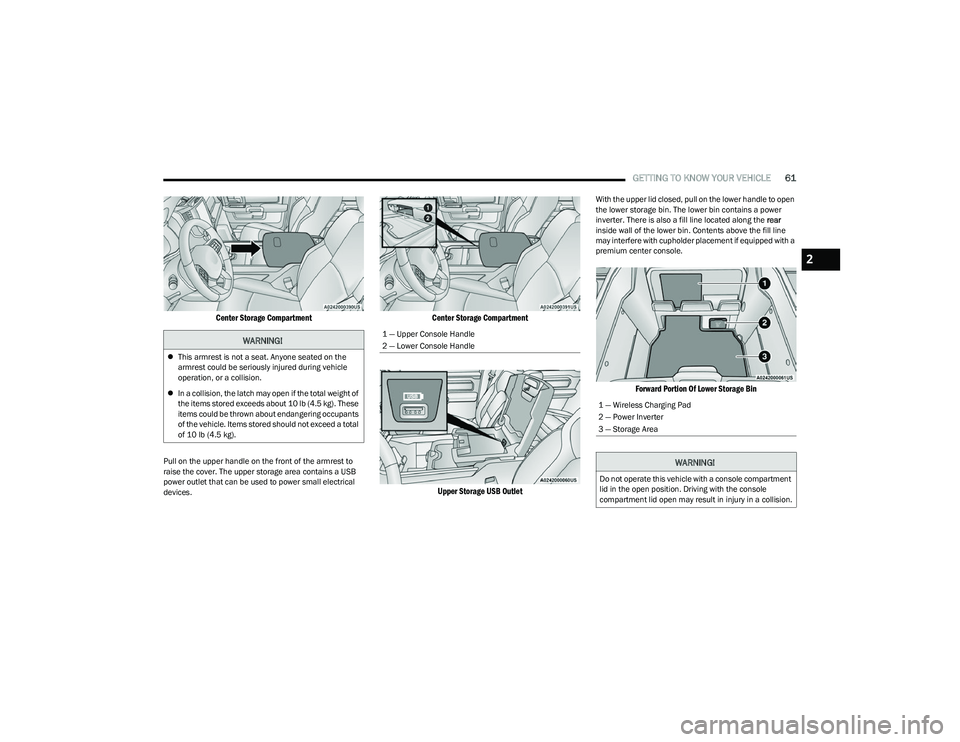
Center Storage Compartment
Pull on the upper handle on the front of the armrest to
raise the cover. The upper storage area contains a USB
power outlet that can be used to power small electrical
devices.
Center Storage Compartment
Upper Storage USB Outlet
With the upper lid closed, pull on the lower handle to open
the lower storage bin. The lower bin contains a power
inverter. There is also a fill line located along the rear
inside wall of the lower bin. Contents above the fill line
may interfere with cupholder placement if equipped with a
premium center console.
Forward Portion Of Lower Storage Bin
WARNING!
This armrest is not a seat. Anyone seated on the
armrest could be seriously injured during vehicle
operation, or a collision.
In a collision, the latch may open if the total weight of
the items stored exceeds about 10 lb (4.5 kg). These
items could be thrown about endangering occupants
of the vehicle. Items stored should not exceed a total
of 10 lb (4.5 kg).
1 — Upper Console Handle
2 — Lower Console Handle
1 — Wireless Charging Pad
2 — Power Inverter
3 — Storage Area
WARNING!
Do not operate this vehicle with a console compartment
lid in the open position. Driving with the console
compartment lid open may result in injury in a collision.
2
23_DT_OM_EN_USC_t.book Page 61
Page 69 of 416

GETTING TO KNOW YOUR VEHICLE67
(Continued)
When the vehicle is turned off, be sure to unplug any
equipment as to not drain the battery of the vehicle. All
accessories connected to the outlet(s) should be removed
or turned off when the vehicle is not in use to protect the
battery against discharge.
POWER INVERTER — IF EQUIPPED
A 115 Volt (400 Watts maximum) inverter may be located
inside the center console towards the right hand side. This
inverter can power cellular phones, electronics and other
low power devices requiring power up to 400 Watts.
Certain video game consoles exceed this power limit, as
will most power tools.
Center Console Power Inverter Outlet
There is also a second 115 Volt (400 Watts maximum)
power inverter located on the rear of the center console.
This inverter can power cellular phones, electronics and
other low power devices requiring power up to 400 Watts. Certain video game consoles exceed this power limit, as
will most power tools.
All power inverters are designed with built-in overload
protection. If the power rating of 400 Watts is exceeded,
the power inverter shuts down. Once the electrical device
has been removed from the outlet the inverter should
reset.
Rear Center Console Power Inverter Outlet
NOTE:
400 Watts is the maximum for the inverter, not each
outlet. If three outlets are in use, 400 Watts is shared
amongst the devices plugged in.
If equipped with a front bench seat, there may be a
115 Volt (400 Watts maximum) inverter located to the
right of the center stack, just below the climate controls.
This inverter can power cellular phones, electronics and
other low power devices requiring power up to 400 Watts.
WARNING!
To avoid serious injury or death:
Only devices designed for use in this type of outlet
should be inserted into any 12 Volt outlet.
Do not touch with wet hands.
Close the lid when not in use and while driving the
vehicle.
If this outlet is mishandled, it may cause an electric
shock and failure.
CAUTION!
Many accessories that can be plugged in draw power
from the vehicle's battery, even when not in use
(i.e., cellular phones, etc.). Eventually, if plugged in
long enough, the vehicle's battery will discharge suffi -
ciently to degrade battery life and/or prevent the
engine from starting.
Accessories that draw higher power (i.e., coolers,
vacuum cleaners, lights, etc.), will discharge the
battery even more quickly. Only use these intermit -
tently and with greater caution.
After the use of high power draw accessories, or long
periods of the vehicle not being started (with acces -
sories still plugged in), the vehicle must be driven a
sufficient length of time to allow the generator to
recharge the vehicle's battery.
CAUTION!
2
23_DT_OM_EN_USC_t.book Page 67
Page 70 of 416
68GETTING TO KNOW YOUR VEHICLE
Certain video game consoles exceed this power limit, as
will most power tools.
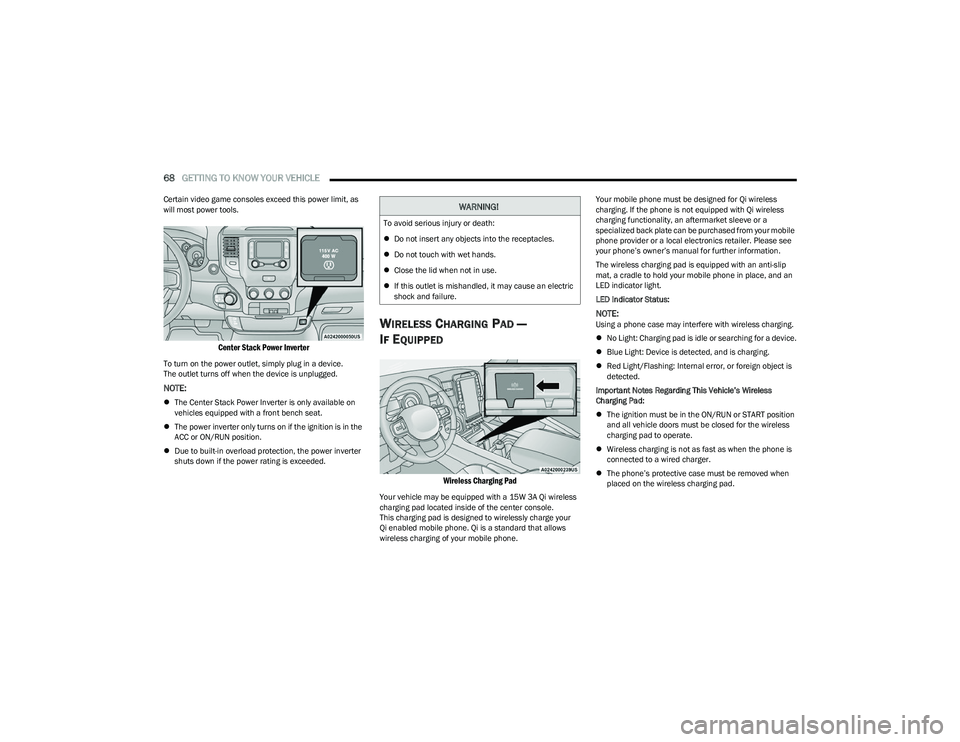
Center Stack Power Inverter
To turn on the power outlet, simply plug in a device.
The outlet turns off when the device is unplugged.
NOTE:
The Center Stack Power Inverter is only available on
vehicles equipped with a front bench seat.
The power inverter only turns on if the ignition is in the
ACC or ON/RUN position.
Due to built-in overload protection, the power inverter
shuts down if the power rating is exceeded.
WIRELESS CHARGING PAD —
I
F EQUIPPED
Wireless Charging Pad
Your vehicle may be equipped with a 15W 3A Qi wireless
charging pad located inside of the center console.
This charging pad is designed to wirelessly charge your
Qi enabled mobile phone. Qi is a standard that allows
wireless charging of your mobile phone. Your mobile phone must be designed for Qi wireless
charging. If the phone is not equipped with Qi wireless
charging functionality, an aftermarket sleeve or a
specialized back plate can be purchased from your mobile
phone provider or a local electronics retailer. Please see
your phone’s owner’s manual for further information.
The wireless charging pad is equipped with an anti-slip
mat, a cradle to hold your mobile phone in place, and an
LED indicator light.
LED Indicator Status:
NOTE:Using a phone case may interfere with wireless charging.
No Light: Charging pad is idle or searching for a device.
Blue Light: Device is detected, and is charging.
Red Light/Flashing: Internal error, or foreign object is
detected.
Important Notes Regarding This Vehicle’s Wireless
Charging Pad:
The ignition must be in the ON/RUN or START position
and all vehicle doors must be closed for the wireless
charging pad to operate.
Wireless charging is not as fast as when the phone is
connected to a wired charger.
The phone’s protective case must be removed when
placed on the wireless charging pad.
WARNING!
To avoid serious injury or death:
Do not insert any objects into the receptacles.
Do not touch with wet hands.
Close the lid when not in use.
If this outlet is mishandled, it may cause an electric
shock and failure.
23_DT_OM_EN_USC_t.book Page 68
Page 72 of 416
70GETTING TO KNOW YOUR VEHICLE
Frequent exposure of items to the UV-C light can cause
early fading of the item’s colored surfaces.
For optimum effectiveness, the UV-C lights must be
free of fingerprints, moisture, and dust. Clean with a
lint-free cloth.
WINDOWS
POWER WINDOWS
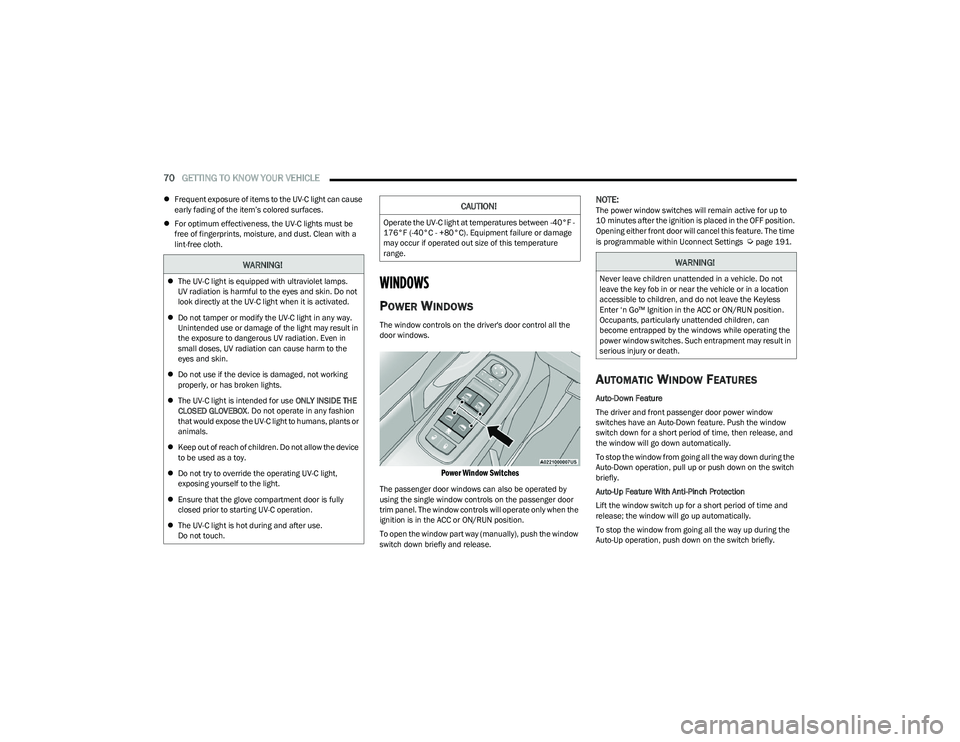
The window controls on the driver's door control all the
door windows.
Power Window Switches
The passenger door windows can also be operated by
using the single window controls on the passenger door
trim panel. The window controls will operate only when the
ignition is in the ACC or ON/RUN position.
To open the window part way (manually), push the window
switch down briefly and release.
NOTE:The power window switches will remain active for up to
10 minutes after the ignition is placed in the OFF position.
Opening either front door will cancel this feature. The time
is programmable within Uconnect Settings
Úpage 191.
AUTOMATIC WINDOW FEATURES
Auto-Down Feature
The driver and front passenger door power window
switches have an Auto-Down feature. Push the window
switch down for a short period of time, then release, and
the window will go down automatically.
To stop the window from going all the way down during the
Auto-Down operation, pull up or push down on the switch
briefly.
Auto-Up Feature With Anti-Pinch Protection
Lift the window switch up for a short period of time and
release; the window will go up automatically.
To stop the window from going all the way up during the
Auto-Up operation, push down on the switch briefly.
WARNING!
The UV-C light is equipped with ultraviolet lamps.
UV radiation is harmful to the eyes and skin. Do not
look directly at the UV-C light when it is activated.
Do not tamper or modify the UV-C light in any way.
Unintended use or damage of the light may result in
the exposure to dangerous UV radiation. Even in
small doses, UV radiation can cause harm to the
eyes and skin.
Do not use if the device is damaged, not working
properly, or has broken lights.
The UV-C light is intended for use ONLY INSIDE THE
CLOSED GLOVEBOX . Do not operate in any fashion
that would expose the UV-C light to humans, plants or
animals.
Keep out of reach of children. Do not allow the device
to be used as a toy.
Do not try to override the operating UV-C light,
exposing yourself to the light.
Ensure that the glove compartment door is fully
closed prior to starting UV-C operation.
The UV-C light is hot during and after use.
Do not touch.
CAUTION!
Operate the UV-C light at temperatures between -40°F -
176°F (-40°C - +80°C). Equipment failure or damage
may occur if operated out size of this temperature
range.
WARNING!
Never leave children unattended in a vehicle. Do not
leave the key fob in or near the vehicle or in a location
accessible to children, and do not leave the Keyless
Enter ‘n Go™ Ignition in the ACC or ON/RUN position.
Occupants, particularly unattended children, can
become entrapped by the windows while operating the
power window switches. Such entrapment may result in
serious injury or death.
23_DT_OM_EN_USC_t.book Page 70
Page 73 of 416

GETTING TO KNOW YOUR VEHICLE71
To close the window part way, lift the window switch briefly
and release it when you want the window to stop.
If the window runs into any obstacle during auto-closure, it
will reverse direction and then go back down. Remove the
obstacle and use the window switch again to close the
window.
NOTE:Any impact due to rough road conditions may trigger the
auto-reverse function unexpectedly during auto-closure.
If this happens, pull the switch lightly and hold to close the
window manually.
RESET AUTO-UP
Should the Auto-Up feature stop working, the window
probably needs to be reset. To reset Auto-Up:
1. Pull the window switch up to close the window
completely and continue to hold the switch up for an
additional two seconds after the window is closed.
2. Push the window switch down firmly to open the window completely and continue to hold the switch
down for an additional two seconds after the window
is fully open.
WINDOW LOCKOUT SWITCH
The window lockout switch on the driver's door trim panel
allows you to disable the window controls on the rear
passenger doors. To disable the window controls, push
and release the window lockout button (the indicator light
on the button will turn on). To enable the window controls,
push and release the window lockout button again
(the indicator light on the button will turn off).
Window Lockout Switch
POWER SLIDING REAR WINDOW —
I
F EQUIPPED
The switch for the power sliding rear window is located on
the overhead console. Push the switch rearward to open
the glass. Pull the switch forward to close the glass.
Rear Window Switch
MANUAL SLIDING REAR WINDOW —
I
F EQUIPPED
A locking device in the center of the window helps to
prevent entry from the rear of the vehicle. Squeeze the
lock to release the window.
Manual Rear Window Lock
WARNING!
There is no anti-pinch protection when the window is
almost closed. To avoid personal injury be sure to clear
your arms, hands, fingers and all objects from the
window path before closing.
2
23_DT_OM_EN_USC_t.book Page 71
Page 74 of 416
72GETTING TO KNOW YOUR VEHICLE
(Continued)
WIND BUFFETING
Wind buffeting can be described as the perception of
pressure on the ears or a helicopter-type sound in the
ears. Your vehicle may exhibit wind buffeting with the
windows down, or the sunroof (if equipped) in certain open
or partially open positions. This is a normal occurrence
and can be minimized. If the buffeting occurs with the rear
windows open, open the front and rear windows together
to minimize the buffeting. If the buffeting occurs with the
sunroof open, adjust the sunroof opening to minimize the
buffeting or open any window.
POWER SUNROOF — IF EQUIPPED
DUAL PANE POWER SUNROOF
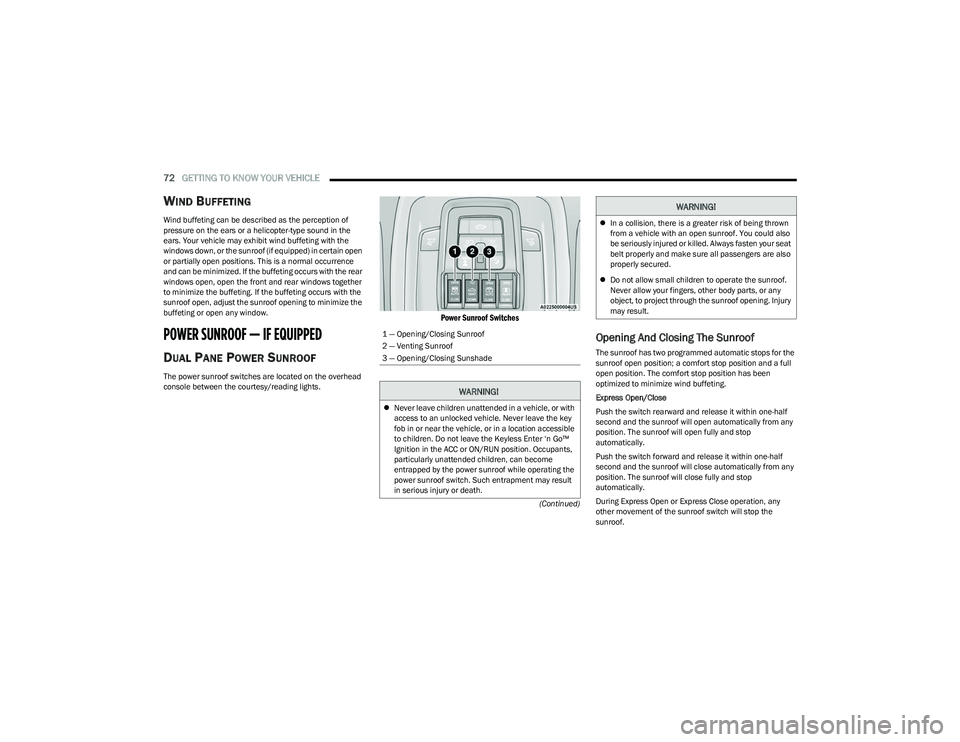
The power sunroof switches are located on the overhead
console between the courtesy/reading lights.
Power Sunroof Switches
Opening And Closing The Sunroof
The sunroof has two programmed automatic stops for the
sunroof open position; a comfort stop position and a full
open position. The comfort stop position has been
optimized to minimize wind buffeting.
Express Open/Close
Push the switch rearward and release it within one-half
second and the sunroof will open automatically from any
position. The sunroof will open fully and stop
automatically.
Push the switch forward and release it within one-half
second and the sunroof will close automatically from any
position. The sunroof will close fully and stop
automatically.
During Express Open or Express Close operation, any
other movement of the sunroof switch will stop the
sunroof.
1 — Opening/Closing Sunroof
2 — Venting Sunroof
3 — Opening/Closing Sunshade
WARNING!
Never leave children unattended in a vehicle, or with
access to an unlocked vehicle. Never leave the key
fob in or near the vehicle, or in a location accessible
to children. Do not leave the Keyless Enter ‘n Go™
Ignition in the ACC or ON/RUN position. Occupants,
particularly unattended children, can become
entrapped by the power sunroof while operating the
power sunroof switch. Such entrapment may result
in serious injury or death.
In a collision, there is a greater risk of being thrown
from a vehicle with an open sunroof. You could also
be seriously injured or killed. Always fasten your seat
belt properly and make sure all passengers are also
properly secured.
Do not allow small children to operate the sunroof.
Never allow your fingers, other body parts, or any
object, to project through the sunroof opening. Injury
may result.
WARNING!
23_DT_OM_EN_USC_t.book Page 72
Page 76 of 416
74GETTING TO KNOW YOUR VEHICLE
HOOD
TO OPEN THE HOOD
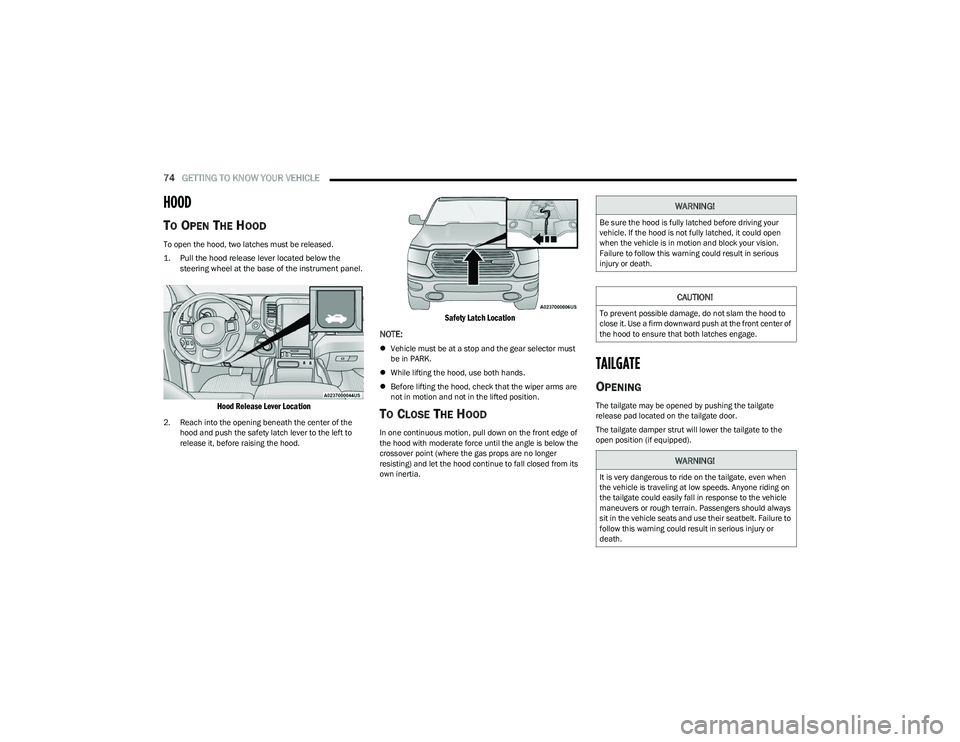
To open the hood, two latches must be released.
1. Pull the hood release lever located below the
steering wheel at the base of the instrument panel.
Hood Release Lever Location
2. Reach into the opening beneath the center of the hood and push the safety latch lever to the left to
release it, before raising the hood.
Safety Latch Location
NOTE:
Vehicle must be at a stop and the gear selector must
be in PARK.
While lifting the hood, use both hands.
Before lifting the hood, check that the wiper arms are
not in motion and not in the lifted position.
TO CLOSE THE HOOD
In one continuous motion, pull down on the front edge of
the hood with moderate force until the angle is below the
crossover point (where the gas props are no longer
resisting) and let the hood continue to fall closed from its
own inertia.
TAILGATE
OPENING
The tailgate may be opened by pushing the tailgate
release pad located on the tailgate door.
The tailgate damper strut will lower the tailgate to the
open position (if equipped).
WARNING!
Be sure the hood is fully latched before driving your
vehicle. If the hood is not fully latched, it could open
when the vehicle is in motion and block your vision.
Failure to follow this warning could result in serious
injury or death.
CAUTION!
To prevent possible damage, do not slam the hood to
close it. Use a firm downward push at the front center of
the hood to ensure that both latches engage.
WARNING!
It is very dangerous to ride on the tailgate, even when
the vehicle is traveling at low speeds. Anyone riding on
the tailgate could easily fall in response to the vehicle
maneuvers or rough terrain. Passengers should always
sit in the vehicle seats and use their seatbelt. Failure to
follow this warning could result in serious injury or
death.
23_DT_OM_EN_USC_t.book Page 74
Page 77 of 416
GETTING TO KNOW YOUR VEHICLE75
Electronic Tailgate Release — If Equipped
The key fob may be equipped with an electronic
release feature for the tailgate, allowing
hands-free tailgate opening. To activate, push
and release the Tailgate Release button on the
key fob twice within five seconds. The tailgate door will
unlatch, and slowly lower into the open position.
If equipped, a button on the center overhead console
inside the vehicle can be used to release the tailgate.
An indicator light may also signal when the tailgate is
open.
For the tailgate to lower, the vehicle must be stationary
and in PARK or NEUTRAL.
NOTE:The optional Tri-Fold Tonneau Cover Úpage 86 may
prevent electronic tailgate release. The Tonneau Cover
must be removed or folded up before releasing the
tailgate.
CLOSING
To close the tailgate, push it upward until both sides are
securely latched.
LOCKING TAILGATE
The tailgate can be locked using the key fob lock button.
MULTIFUNCTION TAILGATE —
I
F EQUIPPED
The 60/40 multifunction tailgate has two swing doors to
allow for closer access to the pickup box with the doors
open.
Opening
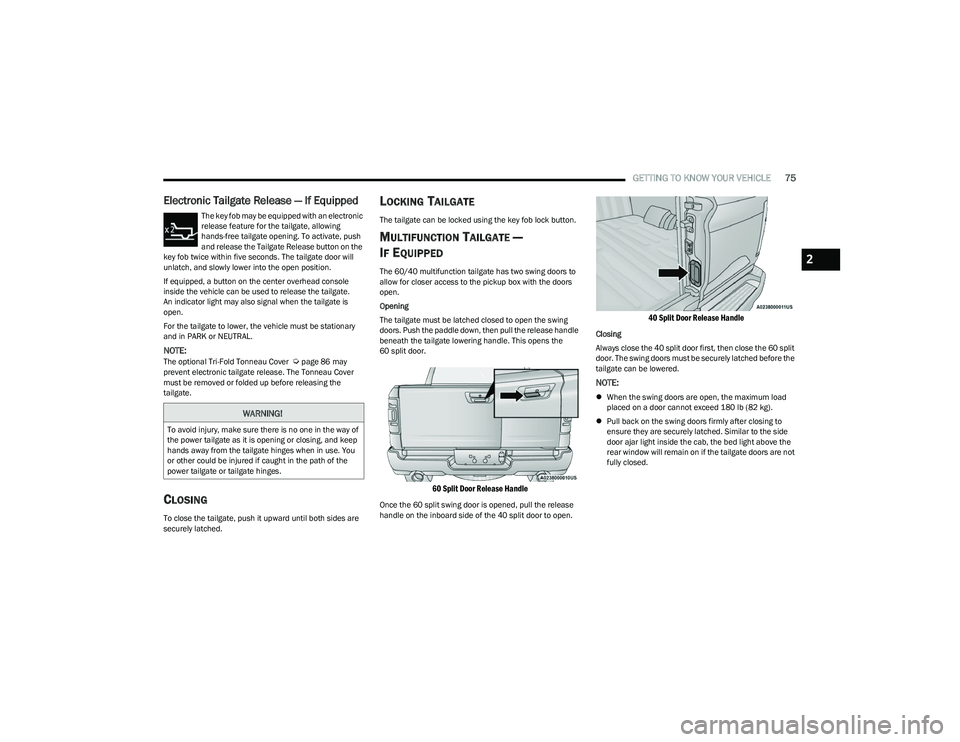
The tailgate must be latched closed to open the swing
doors. Push the paddle down, then pull the release handle
beneath the tailgate lowering handle. This opens the
60 split door.
60 Split Door Release Handle
Once the 60 split swing door is opened, pull the release
handle on the inboard side of the 40 split door to open.
40 Split Door Release Handle
Closing
Always close the 40 split door first, then close the 60 split
door. The swing doors must be securely latched before the
tailgate can be lowered.
NOTE:
When the swing doors are open, the maximum load
placed on a door cannot exceed 180 lb (82 kg).
Pull back on the swing doors firmly after closing to
ensure they are securely latched. Similar to the side
door ajar light inside the cab, the bed light above the
rear window will remain on if the tailgate doors are not
fully closed.
WARNING!
To avoid injury, make sure there is no one in the way of
the power tailgate as it is opening or closing, and keep
hands away from the tailgate hinges when in use. You
or other could be injured if caught in the path of the
power tailgate or tailgate hinges.
2
23_DT_OM_EN_USC_t.book Page 75
Page 78 of 416
76GETTING TO KNOW YOUR VEHICLE
TAILGATE REMOVAL
NOTE:Removing the tailgate will disable the rearview camera
function.
To remove the tailgate, refer to the following instructions:
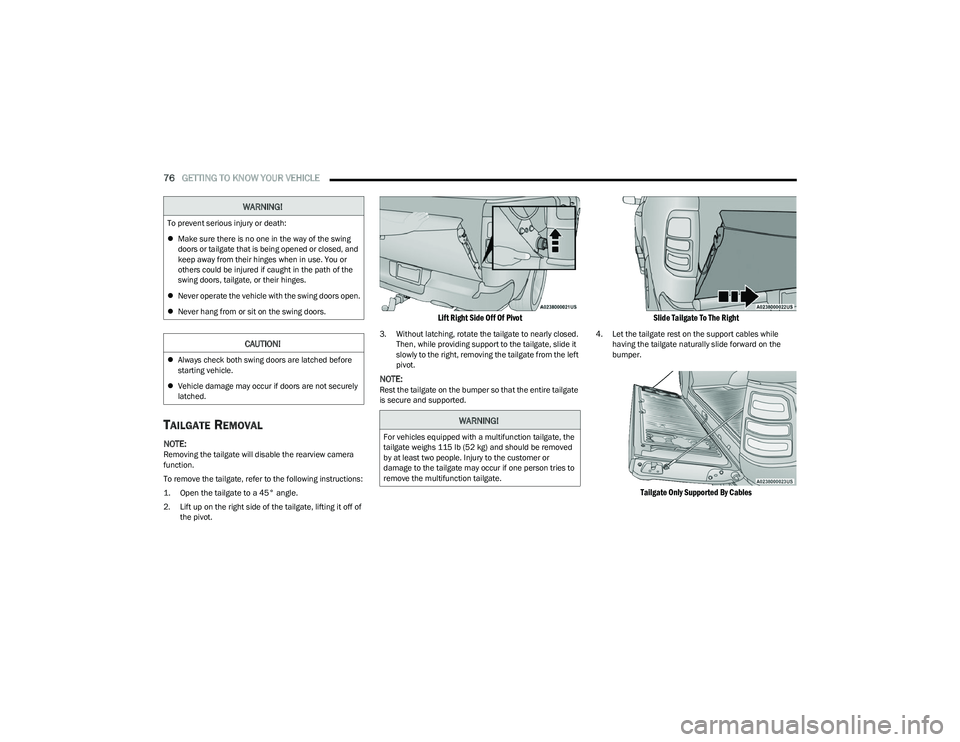
1. Open the tailgate to a 45° angle.
2. Lift up on the right side of the tailgate, lifting it off of
the pivot.
Lift Right Side Off Of Pivot
3. Without latching, rotate the tailgate to nearly closed. Then, while providing support to the tailgate, slide it
slowly to the right, removing the tailgate from the left
pivot.
NOTE:Rest the tailgate on the bumper so that the entire tailgate
is secure and supported.
Slide Tailgate To The Right
4. Let the tailgate rest on the support cables while having the tailgate naturally slide forward on the
bumper.
Tailgate Only Supported By Cables
WARNING!
To prevent serious injury or death:
Make sure there is no one in the way of the swing
doors or tailgate that is being opened or closed, and
keep away from their hinges when in use. You or
others could be injured if caught in the path of the
swing doors, tailgate, or their hinges.
Never operate the vehicle with the swing doors open.
Never hang from or sit on the swing doors.
CAUTION!
Always check both swing doors are latched before
starting vehicle.
Vehicle damage may occur if doors are not securely
latched.
WARNING!
For vehicles equipped with a multifunction tailgate, the
tailgate weighs 115 lb (52 kg) and should be removed
by at least two people. Injury to the customer or
damage to the tailgate may occur if one person tries to
remove the multifunction tailgate.
23_DT_OM_EN_USC_t.book Page 76
Page 80 of 416
78GETTING TO KNOW YOUR VEHICLE
9. Tape the tailgate harness and bracket against the
forward-facing surface of the tailgate. This will
prevent damaging the connector and bracket when
storing or reinstalling the tailgate.
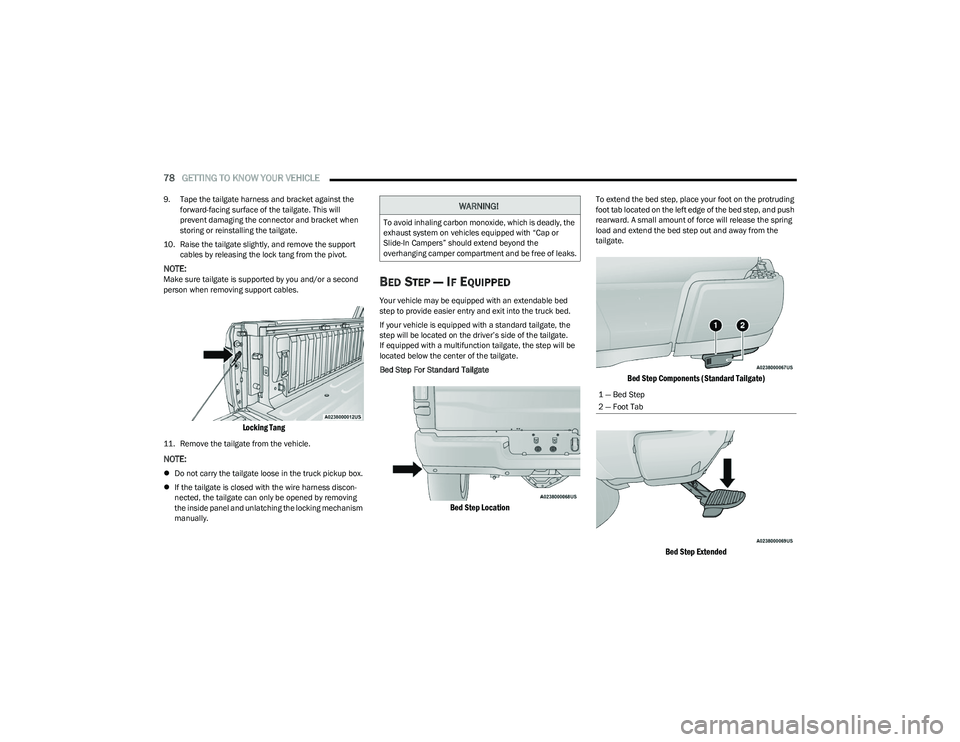
10. Raise the tailgate slightly, and remove the support cables by releasing the lock tang from the pivot.
NOTE:Make sure tailgate is supported by you and/or a second
person when removing support cables.
Locking Tang
11. Remove the tailgate from the vehicle.
NOTE:
Do not carry the tailgate loose in the truck pickup box.
If the tailgate is closed with the wire harness discon -
nected, the tailgate can only be opened by removing
the inside panel and unlatching the locking mechanism
manually.
BED STEP — IF EQUIPPED
Your vehicle may be equipped with an extendable bed
step to provide easier entry and exit into the truck bed.
If your vehicle is equipped with a standard tailgate, the
step will be located on the driver’s side of the tailgate.
If equipped with a multifunction tailgate, the step will be
located below the center of the tailgate.
Bed Step For Standard Tailgate
Bed Step Location
To extend the bed step, place your foot on the protruding
foot tab located on the left edge of the bed step, and push
rearward. A small amount of force will release the spring
load and extend the bed step out and away from the
tailgate.
Bed Step Components (Standard Tailgate)
Bed Step Extended
WARNING!
To avoid inhaling carbon monoxide, which is deadly, the
exhaust system on vehicles equipped with “Cap or
Slide-In Campers” should extend beyond the
overhanging camper compartment and be free of leaks.
1 — Bed Step
2 — Foot Tab
23_DT_OM_EN_USC_t.book Page 78