lock RAM 1500 2023 Workshop Manual
[x] Cancel search | Manufacturer: RAM, Model Year: 2023, Model line: 1500, Model: RAM 1500 2023Pages: 416, PDF Size: 20.59 MB
Page 90 of 416
88GETTING TO KNOW YOUR VEHICLE
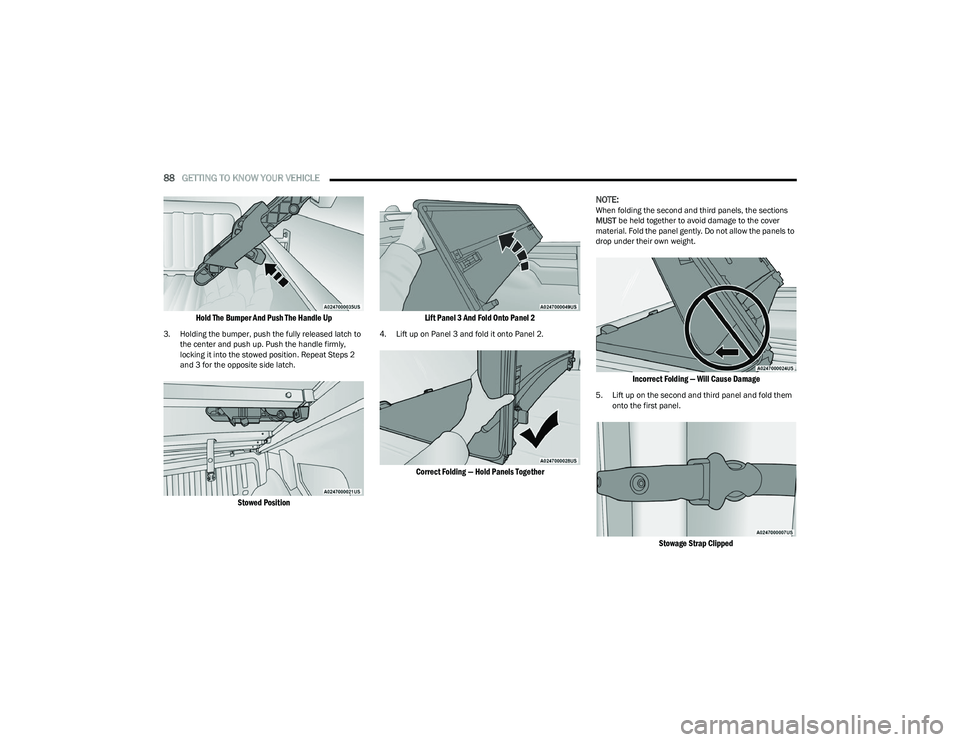
Hold The Bumper And Push The Handle Up
3. Holding the bumper, push the fully released latch to
the center and push up. Push the handle firmly,
locking it into the stowed position. Repeat Steps 2
and 3 for the opposite side latch.
Stowed Position Lift Panel 3 And Fold Onto Panel 2
4. Lift up on Panel 3 and fold it onto Panel 2.
Correct Folding — Hold Panels Together
NOTE:
When folding the second and third panels, the sections
MUST
be held together to avoid damage to the cover
material. Fold the panel gently. Do not allow the panels to
drop under their own weight.
Incorrect Folding — Will Cause Damage
5. Lift up on the second and third panel and fold them onto the first panel.
Stowage Strap Clipped
23_DT_OM_EN_USC_t.book Page 88
Page 91 of 416
GETTING TO KNOW YOUR VEHICLE89
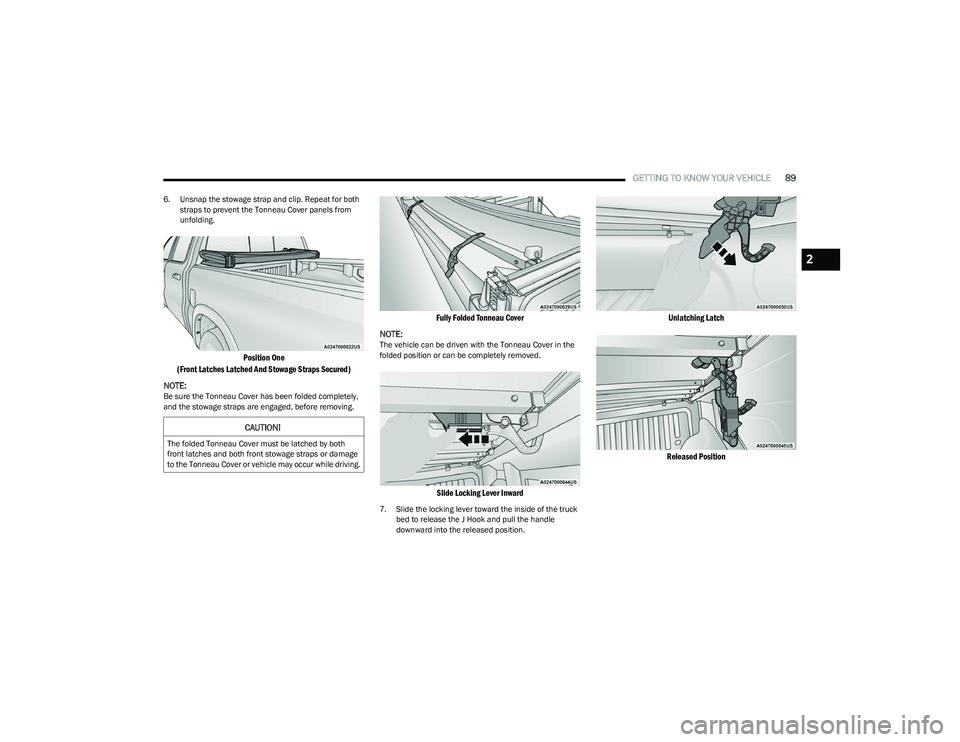
6. Unsnap the stowage strap and clip. Repeat for both
straps to prevent the Tonneau Cover panels from
unfolding.
Position One
(Front Latches Latched And Stowage Straps Secured)
NOTE:
Be sure the Tonneau Cover has been folded completely,
and the stowage straps are engaged, before removing.
Fully Folded Tonneau Cover
NOTE:
The vehicle can be driven with the Tonneau Cover in the
folded position or can be completely removed.
Slide Locking Lever Inward
7. Slide the locking lever toward the inside of the truck bed to release the J Hook and pull the handle
downward into the released position.
Unlatching Latch
Released Position
CAUTION!
The folded Tonneau Cover must be latched by both
front latches and both front stowage straps or damage
to the Tonneau Cover or vehicle may occur while driving.
2
23_DT_OM_EN_USC_t.book Page 89
Page 92 of 416
90GETTING TO KNOW YOUR VEHICLE
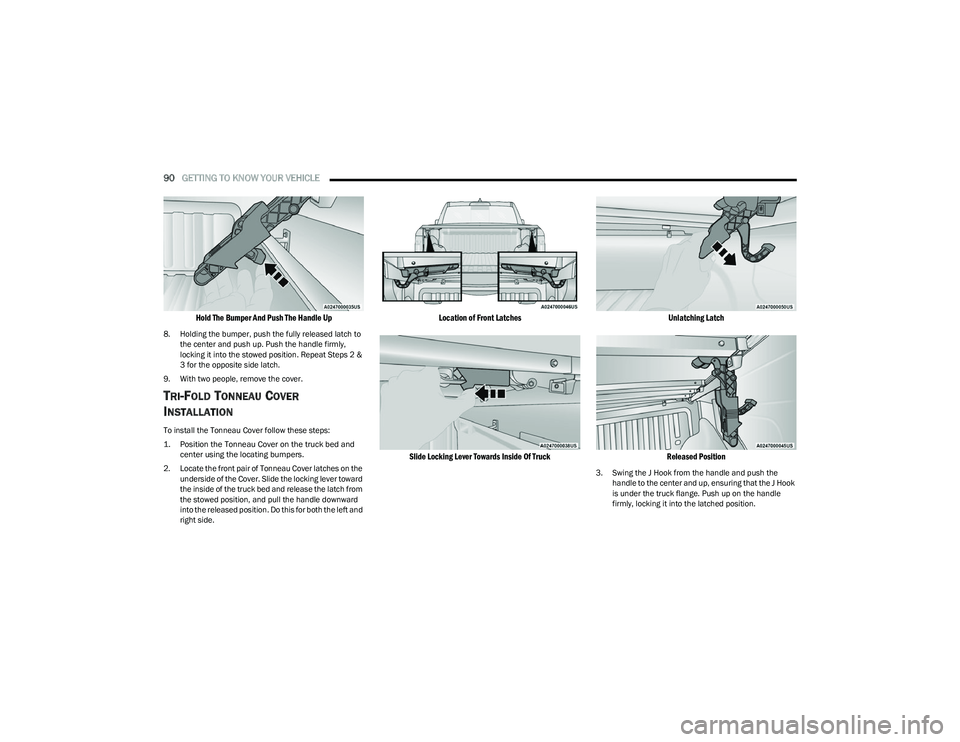
Hold The Bumper And Push The Handle Up
8. Holding the bumper, push the fully released latch to
the center and push up. Push the handle firmly,
locking it into the stowed position. Repeat Steps 2 &
3 for the opposite side latch.
9. With two people, remove the cover.
TRI-FOLD TONNEAU COVER
I
NSTALLATION
To install the Tonneau Cover follow these steps:
1. Position the Tonneau Cover on the truck bed and
center using the locating bumpers.
2. Locate the front pair of Tonneau Cover latches on the underside of the Cover. Slide the locking lever toward
the inside of the truck bed and release the latch from
the stowed position, and pull the handle downward
into the released position. Do this for both the left and
right side.
Location of Front Latches
Slide Locking Lever Towards Inside Of Truck Unlatching Latch
Released Position
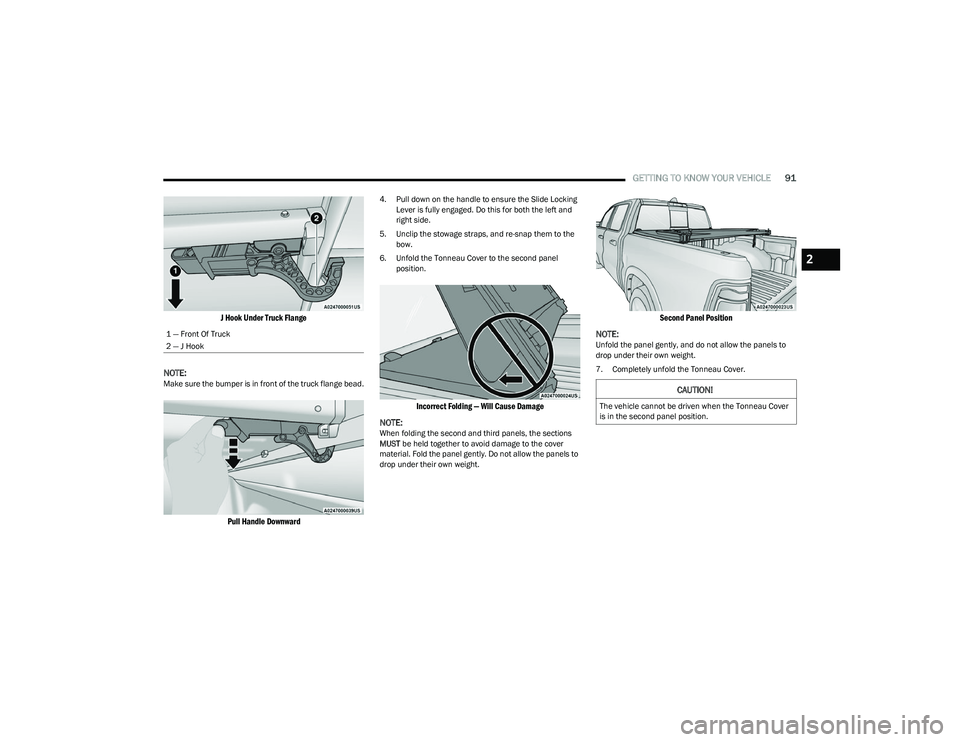
3. Swing the J Hook from the handle and push the handle to the center and up, ensuring that the J Hook
is under the truck flange. Push up on the handle
firmly, locking it into the latched position.
23_DT_OM_EN_USC_t.book Page 90
Page 93 of 416
GETTING TO KNOW YOUR VEHICLE91
J Hook Under Truck Flange
NOTE:
Make sure the bumper is in front of the truck flange bead.
Pull Handle Downward
4. Pull down on the handle to ensure the Slide Locking Lever is fully engaged. Do this for both the left and
right side.
5. Unclip the stowage straps, and re-snap them to the bow.
6. Unfold the Tonneau Cover to the second panel position.
Incorrect Folding — Will Cause Damage
NOTE:
When folding the second and third panels, the sections
MUST be held together to avoid damage to the cover
material. Fold the panel gently. Do not allow the panels to
drop under their own weight.
Second Panel Position
NOTE:
Unfold the panel gently, and do not allow the panels to
drop under their own weight.
7. Completely unfold the Tonneau Cover.
1 — Front Of Truck
2 — J Hook
CAUTION!
The vehicle cannot be driven when the Tonneau Cover
is in the second panel position.
2
23_DT_OM_EN_USC_t.book Page 91
Page 94 of 416
92GETTING TO KNOW YOUR VEHICLE
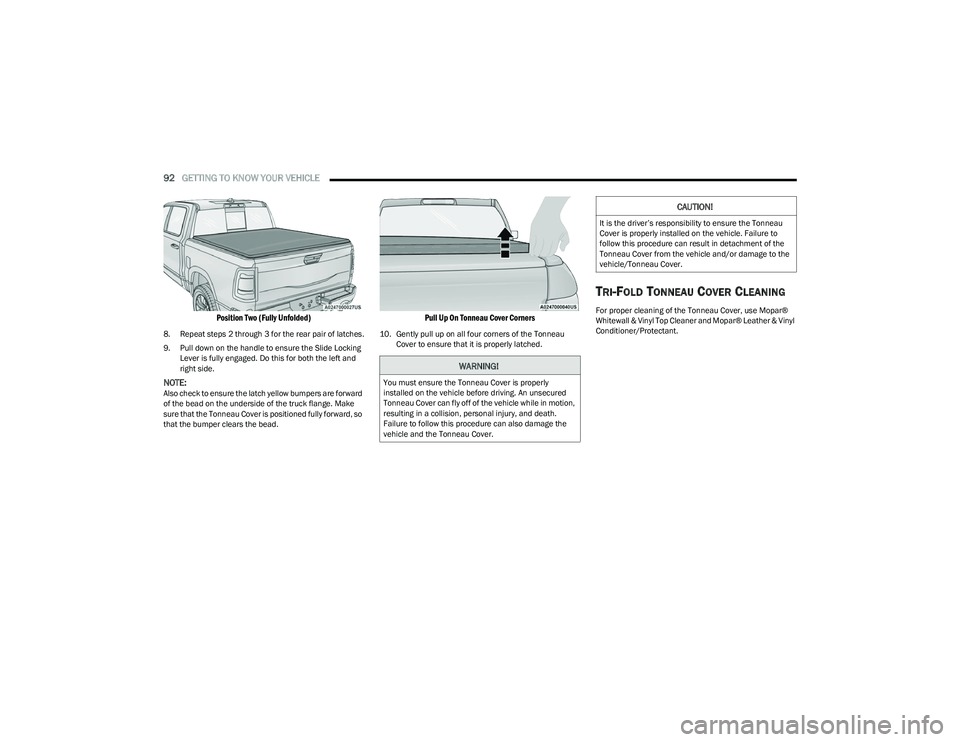
Position Two (Fully Unfolded)
8. Repeat steps 2 through 3 for the rear pair of latches.
9. Pull down on the handle to ensure the Slide Locking
Lever is fully engaged. Do this for both the left and
right side.
NOTE:Also check to ensure the latch yellow bumpers are forward
of the bead on the underside of the truck flange. Make
sure that the Tonneau Cover is positioned fully forward, so
that the bumper clears the bead.
Pull Up On Tonneau Cover Corners
10. Gently pull up on all four corners of the Tonneau Cover to ensure that it is properly latched.
TRI-FOLD TONNEAU COVER CLEANING
For proper cleaning of the Tonneau Cover, use Mopar®
Whitewall & Vinyl Top Cleaner and Mopar® Leather & Vinyl
Conditioner/Protectant.
WARNING!
You must ensure the Tonneau Cover is properly
installed on the vehicle before driving. An unsecured
Tonneau Cover can fly off of the vehicle while in motion,
resulting in a collision, personal injury, and death.
Failure to follow this procedure can also damage the
vehicle and the Tonneau Cover.
CAUTION!
It is the driver’s responsibility to ensure the Tonneau
Cover is properly installed on the vehicle. Failure to
follow this procedure can result in detachment of the
Tonneau Cover from the vehicle and/or damage to the
vehicle/Tonneau Cover.
23_DT_OM_EN_USC_t.book Page 92
Page 104 of 416
102GETTING TO KNOW YOUR INSTRUMENT PANEL
LaneSense — If Equipped
The instrument cluster display displays the current
LaneSense system settings. The information displayed
depends on LaneSense system status and the conditions
that need to be met
Úpage 116.
Vehicle Info
Push and release the up or down arrow button until
the Vehicle Info menu icon is displayed in the instrument
cluster display. Push and release the left or right
arrow button to scroll through the information submenus
and push and release the OK button to select or reset the
resettable submenus.
BASE AND MIDLINE CLUSTER
Tire Pressure Monitor System
Air Suspension — If Equipped
Coolant Temperature — If Equipped
Trans Temperature
Oil Temperature
Oil Pressure — If Equipped
Oil Life
Battery Voltage — If Equipped
Gauge Summary — If Equipped
Coolant Temp
Trans Temp
Oil Temp
Oil Pressure
Engine Hours — If Equipped
PREMIUM CLUSTER
Fuel Economy
Average
Current
Range to Empty
Gauge Summary
Coolant Temperature — If Equipped
Battery Voltage — If Equipped
Trans Temperature
Oil Summary
Oil Temperature
Oil Life
Oil Pressure — If Equipped
Tire Pressure Monitor System
Stop/Start — If Equipped
Air Suspension Status — If Equipped
Engine Hours — If Equipped
Off Road – If Equipped
Push and release the up or down arrow button
until the Off Road menu icon is displayed in the instrument
cluster display. Push and release the left or right
arrow button to scroll through the information submenus.
Vehicle Dynamics
Front Wheel Angle: displays the graphical and
numerical value of calculated average front wheel
angle from the steering wheel orientation.
Transfer Case Lock Status: displays “Lock”
graphic only during 4WD High, 4WD Auto, 4WD
Low status.
Axle Lock And Sway Bar Status (If Equipped):
displays front and rear or rear only axle locker
graphic, and sway bar connection graphic with text
message (connected or disconnected).
Pitch And Roll
Displays the pitch and roll of the vehicle in the
graphic with the angle number on the screen.
NOTE:When vehicle speed becomes too high to display the pitch
and roll, “- -” will display in place of the numbers, and the
graphic will be grayed out. A message indicating the
necessary speed for the feature to become available will
also display.
Fuel Economy
Push and release the up or down arrow button until
the Fuel Economy menu item is highlighted in the
instrument cluster display. Push and hold the OK button to
reset Average Fuel Economy.
Current Fuel Economy
Average Fuel Economy
Range To Empty
23_DT_OM_EN_USC_t.book Page 102
Page 110 of 416

108GETTING TO KNOW YOUR INSTRUMENT PANEL
RED WARNING LIGHTS
Air Bag Warning Light
This warning light will illuminate to indicate a
fault with the air bag, and will turn on for four to
eight seconds as a bulb check when the
ignition is placed in the ON/RUN or ACC/ON/
RUN position. This light will illuminate with a single chime
when a fault with the air bag has been detected, it will stay
on until the fault is cleared. If the light is either not on
during startup, stays on, or turns on while driving, have the
system inspected at an authorized dealer as soon as
possible.
Brake Warning Light
This warning light monitors various brake
functions, including brake fluid level and
parking brake application. If the brake light
turns on it may indicate that the parking brake
is applied, that the brake fluid level is low, or that there is
a problem with the Anti-Lock Brake System reservoir.
If the light remains on when the parking brake has been
disengaged, and the fluid level is at the full mark on the
master cylinder reservoir, it indicates a possible brake
hydraulic system malfunction or that a problem with the
Brake Booster has been detected by the Anti-Lock Brake
System (ABS) / Electronic Stability Control (ESC) system.
In this case, the light will remain on until the condition has
been corrected. If the problem is related to the brake
booster, the ABS pump will run when applying the brake,
and a brake pedal pulsation may be felt during each stop. The dual brake system provides a reserve braking capacity
in the event of a failure to a portion of the hydraulic
system. A leak in either half of the dual brake system is
indicated by the Brake Warning Light, which will turn on
when the brake fluid level in the master cylinder has
dropped below a specified level.
The light will remain on until the cause is corrected.
NOTE:The light may flash momentarily during sharp cornering
maneuvers, which change fluid level conditions. The
vehicle should have service performed, and the brake
fluid level checked.
If brake failure is indicated, immediate repair is necessary.
Vehicles equipped with the Anti-Lock Brake System (ABS)
are also equipped with Electronic Brake Force Distribution
(EBD). In the event of an EBD failure, the Brake Warning
Light will turn on along with the ABS Light. Immediate
repair to the ABS system is required.
Operation of the Brake Warning Light can be checked by
turning the ignition switch from the OFF position to the
ON/RUN position. The light should illuminate for
approximately two seconds.
The light should then turn off unless the parking brake is
applied or a brake fault is detected. If the light does not
illuminate, have the light inspected by an authorized
dealer.
The light also will turn on when the parking brake is
applied with the ignition switch in the ON/RUN position.
NOTE:This light shows only that the parking brake is applied.
It does not show the degree of brake application.
Battery Charge Warning Light
This warning light will illuminate when the
battery is not charging properly. If it stays on
while the engine is running, there may be a
malfunction with the charging system. Contact
an authorized dealer as soon as possible.
This indicates a possible problem with the electrical
system or a related component.
Door Open Warning Light
This indicator will illuminate when a door is
ajar/open and not fully closed.
NOTE:If the vehicle is moving there will also be a single chime.
WARNING!
Driving a vehicle with the red brake light on is
dangerous. Part of the brake system may have failed. It
will take longer to stop the vehicle. You could have a
collision. Have the vehicle checked immediately.
23_DT_OM_EN_USC_t.book Page 108
Page 112 of 416
110GETTING TO KNOW YOUR INSTRUMENT PANEL
Oil Temperature Warning Light
This warning light will illuminate to indicate the
engine oil temperature is high. If the light turns
on while driving, stop the vehicle and shut off
the engine as soon as possible. Wait for oil
temperature to return to normal levels.
Seat Belt Reminder Warning Light
This warning light indicates when the driver or
passenger seat belt is unbuckled. When the
ignition is first placed in the ON/RUN or ACC/
ON/RUN position and if the driver’s seat belt is
unbuckled, a chime will sound and the light will turn on.
When driving, if the driver or front passenger seat belt
remains unbuckled, the Seat Belt Reminder Light will flash
or remain on continuously and a chime will sound
Úpage 282.
Tailgate Open Warning Light
This warning light will illuminate when the
tailgate is open.
NOTE:If the vehicle is moving, there will also be a single chime.
Trailer Brake Disconnected Warning Light
This warning light will illuminate when the
Trailer Brake has been disconnected.
Transmission Temperature Warning
Light — If Equipped
This warning light will illuminate to warn of a
high transmission fluid temperature. This may
occur with strenuous usage such as trailer
towing. If this light turns on, stop the vehicle
and run the engine at idle or slightly faster, with the
transmission in PARK or NEUTRAL, until the light turns off.
Once the light turns off, you may continue to drive
normally.
Vehicle Security Warning Light —
If Equipped
This light will flash at a fast rate for
approximately 15 seconds when the vehicle
security system is arming, and then will flash
slowly until the vehicle is disarmed.
YELLOW WARNING LIGHTS
Adaptive Cruise Control (ACC) Fault
Warning Light — If Equipped
This warning light will illuminate to indicate a
fault in the ACC system. Contact an authorized
dealer for service
Úpage 145.
Air Suspension Fault Warning Light —
If Equipped
This light will illuminate when a fault is
detected with the air suspension system.
Anti-Lock Brake System (ABS)
Warning Light
This warning light monitors the ABS. The light
will turn on when the ignition is placed in the
ON/RUN or ACC/ON/RUN position and may
stay on for as long as four seconds.
If the ABS light remains on or turns on while driving, then
the Anti-Lock portion of the brake system is not
functioning and service is required as soon as possible.
However, the conventional brake system will continue to
operate normally, assuming the Brake Warning Light is not
also on.
If the ABS light does not turn on when the ignition is placed
in the ON/RUN or ACC/ON/RUN position, have the brake
system inspected by an authorized dealer.
WARNING!
If you continue operating the vehicle when the
Transmission Temperature Warning Light is illuminated
you could cause the fluid to boil over, come in contact
with hot engine or exhaust components and cause a
fire.
CAUTION!
Continuous driving with the Transmission Temperature
Warning Light illuminated will eventually cause severe
transmission damage or transmission failure.
23_DT_OM_EN_USC_t.book Page 110
Page 114 of 416
112GETTING TO KNOW YOUR INSTRUMENT PANEL
Rear Axle Locker Fault Warning Light —
If Equipped
This warning light will illuminate to indicate
when a rear axle locker fault has been
detected.
Service Forward Collision Warning (FCW)
Light — If Equipped
This warning light will illuminate to indicate a
fault in the FCW System. Contact an authorized
dealer for service
Úpage 274.
Service Stop/Start System Warning Light —
If Equipped
This warning light will illuminate when the
Stop/Start system is not functioning properly
and service is required. Contact an authorized
dealer for service.
Service 4WD Warning Light — If Equipped
This warning light will illuminate to signal a fault
with the 4WD system. If the light stays on or
comes on during driving, it means that the 4WD
system is not functioning properly and that
service is required. We recommend you drive to the
nearest service center and have the vehicle serviced
immediately.
Cruise Control Fault Warning Light
This warning light will illuminate to indicate the
Cruise Control System is not functioning
properly and service is required. Contact an
authorized dealer.
Tire Pressure Monitoring System (TPMS)
Warning Light
The warning light switches on and a message is
displayed to indicate that the tire pressure is
lower than the recommended value and/or
that slow pressure loss is occurring. In these
cases, optimal tire duration and fuel consumption may not
be guaranteed.
Should one or more tires be in the condition previously
mentioned, the display will show the indications
corresponding to each tire. Each tire, including the spare (if provided), should be
checked monthly when cold and inflated to the inflation
pressure recommended by the vehicle manufacturer on
the vehicle placard or tire inflation pressure label. If your
vehicle has tires of a different size than the size indicated
on the vehicle placard or tire inflation pressure label, you
should determine the proper tire inflation pressure for
those tires.
As an added safety feature, your vehicle has been
equipped with a TPMS that illuminates a low tire pressure
telltale when one or more of your tires is significantly
underinflated. Accordingly, when the low tire pressure
telltale illuminates, you should stop and check your tires
as soon as possible, and inflate them to the proper
pressure. Driving on a significantly underinflated tire
causes the tire to overheat and can lead to tire failure.
Underinflation also reduces fuel efficiency and tire tread
life, and may affect the vehicle’s handling and stopping
ability.
Please note that the TPMS is not a substitute for proper
tire maintenance, and it is the driver’s responsibility to
maintain correct tire pressure, even if underinflation has
not reached the level to trigger illumination of the TPMS
low tire pressure telltale.
CAUTION!
Prolonged driving with the Malfunction Indicator Light
(MIL) on could cause damage to the vehicle control
system. It also could affect fuel economy and
driveability. If the MIL is flashing, severe catalytic
converter damage and power loss will soon occur.
Immediate service is required.
CAUTION!
Do not continue driving with one or more flat tires as
handling may be compromised. Stop the vehicle,
avoiding sharp braking and steering. If a tire puncture
occurs, repair immediately using the dedicated tire
repair kit and contact an authorized dealer as soon as
possible.
23_DT_OM_EN_USC_t.book Page 112
Page 116 of 416
114GETTING TO KNOW YOUR INSTRUMENT PANEL
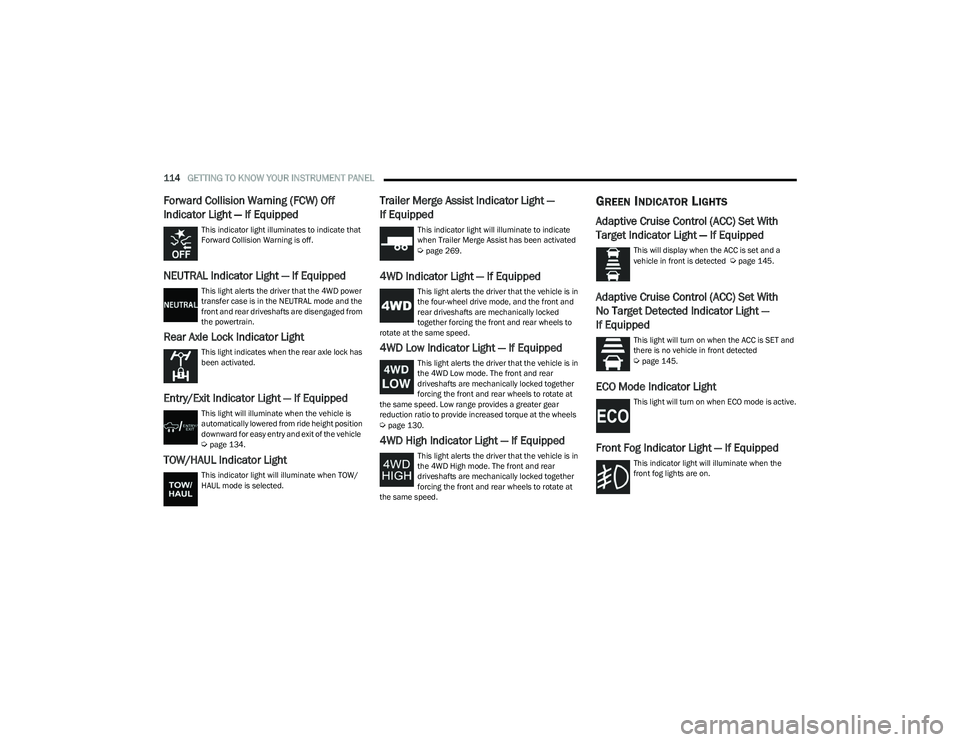
Forward Collision Warning (FCW) Off
Indicator Light — If Equipped
This indicator light illuminates to indicate that
Forward Collision Warning is off.
NEUTRAL Indicator Light — If Equipped
This light alerts the driver that the 4WD power
transfer case is in the NEUTRAL mode and the
front and rear driveshafts are disengaged from
the powertrain.
Rear Axle Lock Indicator Light
This light indicates when the rear axle lock has
been activated.
Entry/Exit Indicator Light — If Equipped
This light will illuminate when the vehicle is
automatically lowered from ride height position
downward for easy entry and exit of the vehicle
Úpage 134.
TOW/HAUL Indicator Light
This indicator light will illuminate when TOW/
HAUL mode is selected.
Trailer Merge Assist Indicator Light —
If Equipped
This indicator light will illuminate to indicate
when Trailer Merge Assist has been activated
Úpage 269.
4WD Indicator Light — If Equipped
This light alerts the driver that the vehicle is in
the four-wheel drive mode, and the front and
rear driveshafts are mechanically locked
together forcing the front and rear wheels to
rotate at the same speed.
4WD Low Indicator Light — If Equipped
This light alerts the driver that the vehicle is in
the 4WD Low mode. The front and rear
driveshafts are mechanically locked together
forcing the front and rear wheels to rotate at
the same speed. Low range provides a greater gear
reduction ratio to provide increased torque at the wheels
Úpage 130.
4WD High Indicator Light — If Equipped
This light alerts the driver that the vehicle is in
the 4WD High mode. The front and rear
driveshafts are mechanically locked together
forcing the front and rear wheels to rotate at
the same speed.
GREEN INDICATOR LIGHTS
Adaptive Cruise Control (ACC) Set With
Target Indicator Light — If Equipped
This will display when the ACC is set and a
vehicle in front is detected Úpage 145.
Adaptive Cruise Control (ACC) Set With
No Target Detected Indicator Light —
If Equipped
This light will turn on when the ACC is SET and
there is no vehicle in front detected
Úpage 145.
ECO Mode Indicator Light
This light will turn on when ECO mode is active.
Front Fog Indicator Light — If Equipped
This indicator light will illuminate when the
front fog lights are on.
23_DT_OM_EN_USC_t.book Page 114