trailer RAM 1500 2023 Repair Manual
[x] Cancel search | Manufacturer: RAM, Model Year: 2023, Model line: 1500, Model: RAM 1500 2023Pages: 416, PDF Size: 20.59 MB
Page 274 of 416

272SAFETY
When RCP is on and the vehicle is in REVERSE (R), the
driver is alerted using both the visual and audible alarms,
including reducing the radio volume.
NOTE:In a parking lot situation, oncoming vehicles can be
blocked by vehicles parked on either side. If the sensors
are blocked by other structures or vehicles, the system will
not be able to alert the driver.
Blind Spot Modes
Blind Spot has three selectable modes of operation that
are available in the Uconnect system.
Blind Spot Alert Lights Only
When operating in Blind Spot Alert mode, the BSM system
will provide a visual alert in the appropriate side view
mirror based on a detected object. However, when the
system is operating in Rear Cross Path (RCP) mode, the
system will respond with both visual and audible alerts
when a detected object is present. Whenever an audible
alert is requested, the radio is muted. Blind Spot Alert Lights/Chime
When operating in Blind Spot Alert Lights/Chime mode,
the BSM system will provide a visual alert in the
appropriate side view mirror based on a detected object.
If the turn signal is then activated, and it corresponds to
an alert present on that side of the vehicle, an audible
chime will also be sounded. Whenever a turn signal and
detected object are present on the same side at the same
time, both the visual and audible alerts will be issued. In
addition to the audible alert the radio (if on) will also be
muted.
NOTE:Whenever an audible alert is requested by the BSM
system, the radio is also muted.
When the system is in RCP, the system shall respond with
both visual and audible alerts when a detected object is
present. Whenever an audible alert is requested, the radio
is also muted. Turn/hazard signal status is ignored; the
RCP state always requests the chime.
Blind Spot Alert Off
When the BSM system is turned off there will be no visual
or audible alerts from either the BSM, RCP, or Trailer
Merge Assist systems.
NOTE:The BSM system will store the current operating mode
when the vehicle is shut off. Each time the vehicle is
started the previously stored mode will be recalled and
used.
Trailer Merge Assist — If Equipped
Trailer Merge Assist is a function of the Blind Spot
Monitoring (BSM) system that extends the blind spot zone
to work while pulling a trailer.
NOTE:When Trailer Merge Assist is activated, Rear Cross Path is
disabled.
Trailer Merge Assist consists of three sub functions:
Automatic Trailer Detection
Trailer Length Detection
Trailer Merge Warning
Blind Spot Zones With Trailer Merge Assist
WARNING!
Rear Cross Path Detection (RCP) is not a backup aid
system. It is intended to be used to help a driver detect
an oncoming vehicle in a parking lot situation. Drivers
must be careful when backing up, even when using
RCP. Always check carefully behind your vehicle, look
behind you, and be sure to check for pedestrians,
animals, other vehicles, obstructions, and blind spots
before backing up. Failure to do so can result in serious
injury or death.
1 — Vehicle
2 — Trailer
23_DT_OM_EN_USC_t.book Page 272
Page 275 of 416

SAFETY273
Automatic Trailer Detection
There are two modes of operation for the detection of the
trailer length:
Automatic Mode — When “Auto Mode” is selected, the
system will use the blind spot sensors to automatically
determine the presence and length of a trailer. The
presence of a trailer will be detected using the blind
spot radar within 90 seconds of forward movement of
the vehicle. The vehicle must be moving above 6 mph
(10 km/h) to activate the feature. Once the trailer has
been detected, the system will default to the maximum
blind spot zone until the length has been verified. You
will see “Auto” in the instrument panel cluster .
Maximum Mode — When “Max Mode” is selected, the
system will default to the maximum blind spot zone
regardless of what size trailer is attached .
NOTE:Selected setting is stored when the ignition is placed in the
OFF position. To change this setting, it must be selected
through the Uconnect Settings
Úpage 191.
Trailer Length Detection
Once the trailer presence has been established, the trailer
length will be established (by making a 90 degree turn)
and then the trailer length category (example 10-20 ft
(3 m to 6 m)) will be displayed. This can take up to
30 seconds after completing the turn.
NOTE:During the same ignition cycle, if the vehicle is at a
standstill for a minimum of 90 seconds, a new “trailer
detection request” is enabled by the system once the
vehicle resumes motion.
The maximum trailer length supported by the Trailer
Merge Assist feature is 39.5 ft (12 m). Trailer length is
considered the forward most portion of the trailer hitch to
the rearward most portion of the body, fascia/bumper, or
ramp of the trailer.
The maximum width supported by the Trailer Merge Assist
feature is 8.5 ft (2.59 m). Trailer width is measured at the
widest portion of the trailer and may include wheels, tires,
finders, or rails.
NOTE:Fifth wheel or gooseneck trailers are not supported by
Trailer Merge Assist.
NOTE:The ability to detect a trailer may be degraded in crowded
or busy environments. Busy parking lots, narrow areas
surrounded with trees, or any other crowded area may
prevent the radar sensors from being able to adequately
detect the trailer. The system will try to detect a trailer at
every ignition cycle or 90 seconds of standstill.
Trailer Length Detection
Trailer length will be identified and placed into one of the
following categories:
Trailer length up to 10 ft (3 m) — Blind spot zone will be
adjusted to 10 ft (3 m) .
Trailer length between 10 ft to 20 ft
(3 m to 6 m) — Blind spot zone will be adjusted to
20 ft (6 m) .
Trailer length between 20 ft to 30 ft
(6 m to 9 m) — Blind spot zone will be adjusted to
30 ft (9 m) .
Trailer length between 30 ft and 39.5 ft
(9 m to 12 m) — Blind spot zone will be adjusted to
Max distance .
1 — Trailer Length
2 — Trailer Hitch
3 — Trailer Width
6
23_DT_OM_EN_USC_t.book Page 273
Page 276 of 416

274SAFETY
NOTE:Trailer length is determined within +/- 3 ft (1 m) of actual
length. Trailers that are the same size as the category
limit, 10/20/30 ft (3/6/9 m), could be subject to being
placed in the category above or below the correct one.
Trailer Merge Warning
Trailer Merge Warning is the extension of the blind spot
function to cover the length of the trailer, plus a safety
margin, to warn the driver when there is a vehicle in the
adjacent lane. The driver is alerted by the illumination of
the BSM Warning Light located in the outside mirror on the
side the other vehicle is detected on. In addition, an
audible (chime) alert will be heard and radio volume will
be reduced
Úpage 272.
NOTE:
The Trailer Merge Alert system DOES NOT alert the
driver about rapidly approaching vehicles that are
outside the detection zones.
The Blind Spot Monitoring (BSM) system may experi -
ence drop outs (blinking on and off) of the side mirror
warning indicator lights when a motorcycle or any small
object remains at the side of the vehicle for extended
periods of time (more than a couple of seconds).
Crowded areas such as parking lots, neighborhoods,
etc. may lead to an increased amount of false alerts.
This is normal operation.
FORWARD COLLISION WARNING (FCW)
W
ITH MITIGATION — IF EQUIPPED
FCW with Mitigation provides the driver with audible
warnings, visual warnings (within the instrument cluster
display), and may apply a brake jerk to warn the driver
when it detects a potential frontal collision. The warnings
and limited braking are intended to provide the driver with
enough time to react, avoid or mitigate the potential
collision.
NOTE:FCW monitors the information from the forward looking
sensors as well as the Electronic Brake Controller (EBC), to
calculate the probability of a forward collision. When the
system determines that a forward collision is probable, the
driver will be provided with audible and visual warnings as
well as a possible brake jerk warning. If the driver does not take action based upon these
progressive warnings, then the system will provide a
limited level of active braking to help slow the vehicle and
mitigate the potential forward collision. If the driver reacts
to the warnings by braking and the system determines
that the driver intends to avoid the collision by braking but
has not applied sufficient brake force, the system will
compensate and provide additional brake force as
required.
If a FCW with Mitigation event begins at a speed below
32 mph (52 km/h), the system may provide the maximum
braking possible to mitigate the potential forward
collision. If the Forward Collision Warning with Mitigation
event stops the vehicle completely, the system will hold
the vehicle at standstill for two seconds and then release
the brakes.
FCW Message
WARNING!
The Blind Spot Monitoring system is only an aid to help
detect objects in the blind spot zones. The BSM system
is not designed to detect pedestrians, bicyclists, or
animals. Even if your vehicle is equipped with the BSM
system, always check your vehicle’s mirrors, glance
over your shoulder, and use your turn signal before
changing lanes. Failure to do so can result in serious
injury or death.
23_DT_OM_EN_USC_t.book Page 274
Page 282 of 416

280SAFETY
The system will be activated when a positive increase in
tire pressure is detected by the TPMS while inflating the
tire. The ignition must be in the RUN mode, with the
transmission in PARK.
NOTE:It is not required to have the engine running to enter Tire
Fill Alert mode.
The hazard lamps will come on to confirm the vehicle is in
Tire Fill Alert mode.
When Tire Fill Alert mode is entered, the tire pressure
display screen will be displayed in the instrument cluster.
If the hazard lamps do not come on while inflating the tire,
the TPMS sensor may be out of range preventing the TPMS
sensor signal from being received. In this case, the vehicle
may need to be moved either forward or backward slightly
to exit the null spot.
Operation:
The horn will sound once to let the user know when to
stop filling the tire, when it reaches recommended
pressure.
The horn will sound three times if the tire is overfilled
and will continue to sound every five seconds if the
user continues to inflate the tire.
The horn will sound once again when enough air is let
out to reach proper inflation level.
The horn will also sound three times if the tire is then
underinflated and will continue to sound every five
seconds if the user continues to deflate the tire.
Trailer Tire Pressure Monitoring System
(TTPMS) — If Equipped
The Trailer Tire Pressure Monitoring System (TTPMS) is a
feature that displays the trailer tire pressure values and
warns the driver of a low tire pressure event based on the
driver’s set target tire pressure value, through TTPMS
settings found in the radio.
The TTPMS monitors the pressure of each tire and warns
the driver through the instrument cluster, when either a
low tire pressure condition falls below 25% of the driver’s
set pressure or if a system malfunction occurs. The
instrument cluster will display the actual tire pressure or
dashes for each of the trailer tires in the correct trailer
position, based on trailer configuration. The TTPMS can
support up to 12 trailer tires per configured trailer on up to
four configurable trailers
Úpage 191.
Trailer Tire Pressure Monitoring System
Trailer Tire Pressure Sensor Pairing
In order use this feature, the provided tire pressure
sensors must be installed in the desired trailer tires and
the sensors must be paired to the truck. If the target trailer
requires more than the provided four sensors, additional
sensors can be purchased at an authorized Ram
dealership.
With the sensors installed and the trailer near or
connected to your Ram truck, initiate the pairing process
by entering the settings menu in the radio and selecting
trailer. Select the desired trailer profile to pair to, open the
“Tire Pressure” menu, and hit “Setup All Tires”
Úpage 191.
NOTE:The vehicle may not be driven until the pairing process is
complete.
Trailer Tire Pressure Settings
23_DT_OM_EN_USC_t.book Page 280
Page 283 of 416

SAFETY281
Trailer Tire Pressure Pairing
Follow the on screen prompts to select the number of
axles (1-3), the number of trailer tires (2, 4, 6, 8, or 12),
and the set trailer tire pressure. The range is selectable
anywhere between 25-125 psi (172-862 kPa).
Once psi (kPa) is programmed, the pairing screen
appears. Tire sensors must be paired in order shown.
Starting with Tire 1, deflate tire by 5 psi (34 kPa) and wait
for a horn chirp. It may take up to three minutes for the
chirp to occur, indicating that the sensor has paired.
Repeat process on each tire, in order, until complete.
Do not exit the pairing screen until process is complete.
If pairing was unsuccessful, a double horn chirp will
sound, and a prompt on the touchscreen will allow you to
retry the procedure; “Retry” will only appear when setup
fails. Each tire must be successfully paired during a single
pairing process to receive the success screen.
NOTE:If the pairing process times out after three minutes of no
communication with a sensor, a double horn chip will
occur indicating the pairing has failed and a message will
display on the radio indicating the process was unsuc -
cessful. Under certain circumstances, the double horn
chirp may continue to happen every three minutes indi -
cating the failed pairing. If this happens, the horn chirping
may be canceled by cycling the ignition button OFF and
then back to RUN position.
Tire Pressure Monitoring System Low Pressure Warnings
When a tire pressure low in one or more of the active road
tires is detected, the instrument cluster will display a
message stating “Trailer Tire Pressure Low”.
The instrument cluster will then display the TTPMS graphic
showing the pressure values of each tire with the low tire
pressure values in a different color.
Should this occur, you should stop as soon as possible
and inflate the tires with a low pressure condition (those in
a different color in the instrument cluster graphic) to the
customer programmed target tire pressure value as
shown at the top of the TTPMS instrument cluster graphic.
Once the tire(s) are inflated, the system will automatically
update the graphic display in the instrument cluster,
returning to its original color. The vehicle may need to be
driven for up to 10 minutes above 15 mph (24 km/h) in
order for the TTPMS to receive the updated information. Service TTPMS Warning
If a system fault is detected, the instrument cluster will
display a “Trailer Tire Pressure System Service Required”
message for a minimum of five seconds.
Once the system fault is corrected the "Trailer Tire
Pressure System Service Required" message will no
longer be displayed. The vehicle may need to be driven for
up to 10 minutes above 15 mph (24 km/h) in order for the
TTPMS to receive the trailer tire pressure information.
Trailer Tire Pressure System Not Configured
A “Trailer Tire Pressure System Not Configured” message
will be displayed in the instrument cluster on the TTPMS
instrument cluster graphic when a trailer number is
selected that has not had trailer tire pressure sensors
paired. To correct this condition, see
Úpage 191.
Trailer Sensors Detected Do Not Match Active Trailer
The “Trailer Sensors Detected Do Not Match Active
Trailer” message will be displayed in the instrument
cluster when the trailer sensors being received by the
TTPMS module do not match the trailer sensors paired to
the current trailer number selected. This message will be
displayed when the sensors being received completely
match the sensors paired to another trailer number
configured in the TTPMS module.
To correct this condition, the correct trailer number must
be selected in the radio
Úpage 191.
6
23_DT_OM_EN_USC_t.book Page 281
Page 332 of 416
330IN CASE OF EMERGENCY
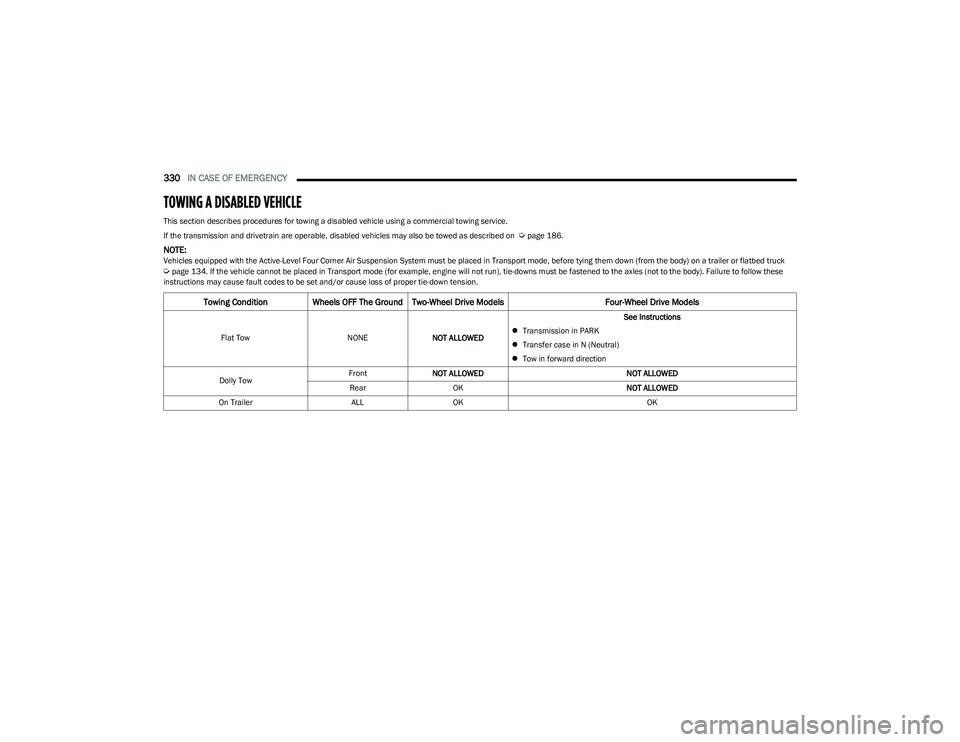
TOWING A DISABLED VEHICLE
This section describes procedures for towing a disabled vehicle using a commercial towing service.
If the transmission and drivetrain are operable, disabled vehicles may also be towed as described on
Úpage 186.
NOTE:Vehicles equipped with the Active-Level Four Corner Air Suspension System must be placed in Transport mode, before tying them down (from the body) on a trailer or flatbed truck Úpage 134. If the vehicle cannot be placed in Transport mode (for example, engine will not run), tie-downs must be fastened to the axles (not to the body). Failure to follow these
instructions may cause fault codes to be set and/or cause loss of proper tie-down tension.
Towing Condition Wheels OFF The Ground Two-Wheel Drive Models Four-Wheel Drive Models
Flat TowNONENOT ALLOWED See Instructions
Transmission in PARK
Transfer case in N (Neutral)
Tow in forward direction
Dolly Tow Front
NOT ALLOWED NOT ALLOWED
Rear OK NOT ALLOWED
On Trailer ALLOK OK
23_DT_OM_EN_USC_t.book Page 330
Page 335 of 416
333
SERVICING AND MAINTENANCE
SCHEDULED SERVICING
Your vehicle is equipped with an automatic oil change
indicator system. The oil change indicator system will
remind you that it is time to take your vehicle in for
scheduled maintenance.
Based on engine operation conditions, the oil change
indicator message will illuminate. This means that service
is required for your vehicle. Operating conditions such as
frequent short-trips, trailer tow, and extremely hot or cold
ambient temperatures will influence when the “Oil Change
Required” message is displayed. Have your vehicle
serviced as soon as possible, within the next 500 miles
(805 km).An authorized dealer will reset the oil change indicator
message after completing the scheduled oil change. If a
scheduled oil change is performed by someone other than
an authorized dealer, the message can be reset by
referring to the steps described under Instrument Cluster
Display
Úpage 98.
NOTE:Under no circumstances should oil change intervals
exceed 10,000 miles (16,000 km), 12 months or
350 hours of engine run time, whichever comes first.
The 350 hours of engine run or idle time is generally only
a concern for fleet customers.
Once A Month Or Before A Long Trip:
Check engine oil level.
Check windshield washer fluid level.
Check tire pressure and look for unusual wear or
damage. Rotate tires at the first sign of irregular
wear, even if it occurs before the oil indicator system
turns on.
Check the fluid levels of the coolant reservoir, brake
master cylinder, and fill as needed.
Check function of all interior and exterior lights.
8
23_DT_OM_EN_USC_t.book Page 333
Page 337 of 416

SERVICING AND MAINTENANCE335
Mileage Or Time Passed (Whichever Comes
First)
20,000
30,000
40,000
50,000
60,000
70,000
80,000
90,000
100,000
110,000
120,000
130,000
140,000
150,000
Or Years: 2 3 4 5 6 7 8 9 10 11 12 13 14 15
Or Kilometers:
32,000
48,000
64,000
80,000
96,000
112,000
128,000
144,000
160,000
176,000
192,000
208,000
224,000
240,000
Additional Inspections
Inspect the CV/Universal joints. X X X X X X X X X X X X X X
Inspect front suspension, tie rod ends, and
replace if necessary. X
X X XX XX
Inspect the front and rear axle surfaces. If gear
oil leakage is suspected, check the fluid level.
If using your vehicle for police, taxi, fleet,
off-road or frequent trailer towing, change
axle fluid. X
X XXX
Inspect the brake linings, replace as necessary. X XX XX XX
Inspect transfer case fluid. X
Additional Maintenance
Replace cabin air filter. To be replaced every 12,000 miles (19,000 km).
For severe dusty driving conditions, inspect and
replace the Evaporative System Fresh Air Filter
as necessary; replacement may be more
frequent depending on conditions. X X X X X X X X X X X X X X
Replace engine air cleaner filter. XX XXX
If equipped with Stop/Start, replace accessory
drive belt with OEM grade Mopar® belt. X
8
23_DT_OM_EN_USC_t.book Page 335
Page 338 of 416

336SERVICING AND MAINTENANCE
Replace spark plugs. 1X
Flush and replace the engine coolant at
10 years or 150,000 miles (240,000 km)
whichever comes first. X
X
Inspect the transfer case fluid, change for any
of the following: police, taxi, fleet, or frequent
trailer towing. X
X
Change the transfer case fluid. X
Inspect and replace PCV valve if necessary. X
1. The spark plug change interval is mileage-based only; yearly intervals do not apply.
Mileage Or Time Passed (Whichever Comes
First)
20,000
30,000
40,000
50,000
60,000
70,000
80,000
90,000
100,000
110,000
120,000
130,000
140,000
150,000
Or Years: 2 3 4 5 6 7 8 9 10 11 12 13 14 15
Or Kilometers:
32,000
48,000
64,000
80,000
96,000
112,000
128,000
144,000
160,000
176,000
192,000
208,000
224,000
240,000
WARNING!
You can be badly injured working on or around a motor vehicle. Do only service work for which you have the knowledge and the right equipment. If you have any doubt about your
ability to perform a service job, take your vehicle to a competent mechanic.
Failure to properly inspect and maintain your vehicle could result in a component malfunction and affect vehicle handling and performance. This could cause an accident.
23_DT_OM_EN_USC_t.book Page 336
Page 359 of 416

SERVICING AND MAINTENANCE357
CavityCartridge Fuse Micro Fuse Description
* If Equipped
F01 –25 Amp ClearFuel Pump Motor / Assy Fuel Tank
F02 ––Spare *
F03 –5 Amp TanMGU *
F04 ––Spare *
F05 ––Spare *
F06 –10 Amp RedOUTPUT TO UPFITTER PDC *
F07 ––Spare *
F08 20 Amp Blue –Trailer Tow Backup
F09 –20 Amp Yellow Trailer Stop / Turn Lamp Left
F10 –20 Amp Yellow Trailer Stop / Turn Lamp Right
F11 –15 Amp BlueID/CLEARANCE LIGHTS *
F12 20 Amp Blue –Trailer Tow Park Lamp
F13 ––Spare *
F14 –10 Amp RedAC Clutch
F15 –5 Amp TanIntelligent Battery Sensor (IBS)
F16 ––Spare *
F17 –20 Amp Yellow Air Suspension
F18 –15 Amp BlueAGS / Rear Axle Cooling Valve / Active Air Dam
F19 ––Spare *
8
23_DT_OM_EN_USC_t.book Page 357