4WD RAM 1500 2023 Owners Manual
[x] Cancel search | Manufacturer: RAM, Model Year: 2023, Model line: 1500, Model: RAM 1500 2023Pages: 416, PDF Size: 20.59 MB
Page 15 of 416
13
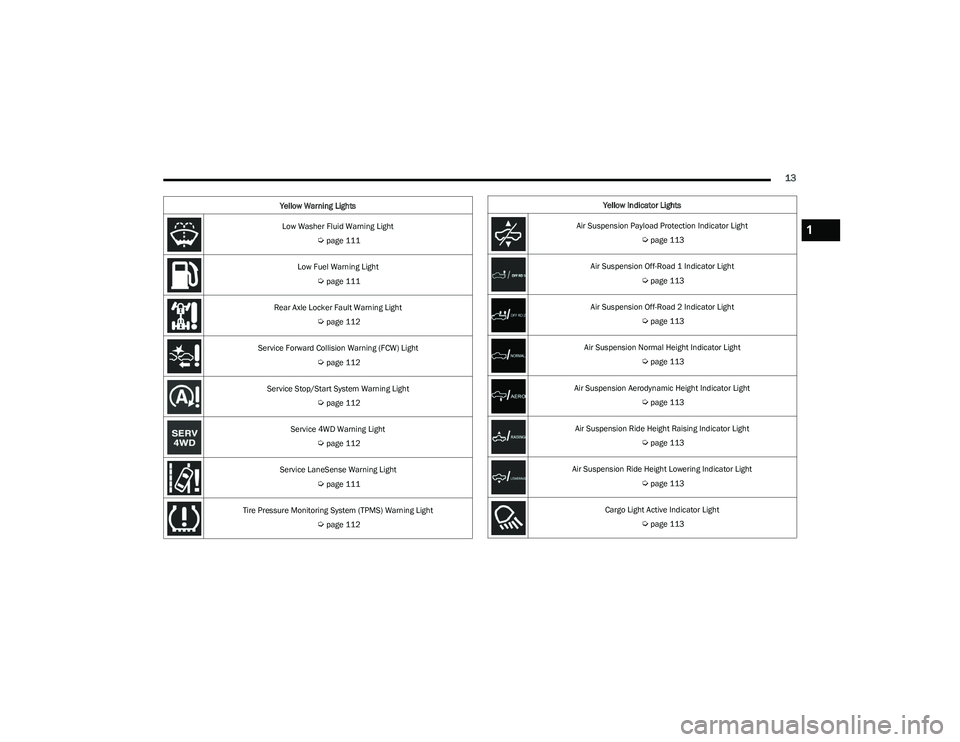
Low Washer Fluid Warning Light
Úpage 111
Low Fuel Warning Light
Úpage 111
Rear Axle Locker Fault Warning Light
Úpage 112
Service Forward Collision Warning (FCW) Light
Úpage 112
Service Stop/Start System Warning Light
Úpage 112
Service 4WD Warning Light
Úpage 112
Service LaneSense Warning Light
Úpage 111
Tire Pressure Monitoring System (TPMS) Warning Light
Úpage 112
Yellow Warning Lights
Yellow Indicator Lights
Air Suspension Payload Protection Indicator Light
Úpage 113
Air Suspension Off-Road 1 Indicator Light
Úpage 113
Air Suspension Off-Road 2 Indicator Light
Úpage 113
Air Suspension Normal Height Indicator Light
Úpage 113
Air Suspension Aerodynamic Height Indicator Light
Úpage 113
Air Suspension Ride Height Raising Indicator Light
Úpage 113
Air Suspension Ride Height Lowering Indicator Light
Úpage 113
Cargo Light Active Indicator Light
Úpage 113
1
23_DT_OM_EN_USC_t.book Page 13
Page 16 of 416
14
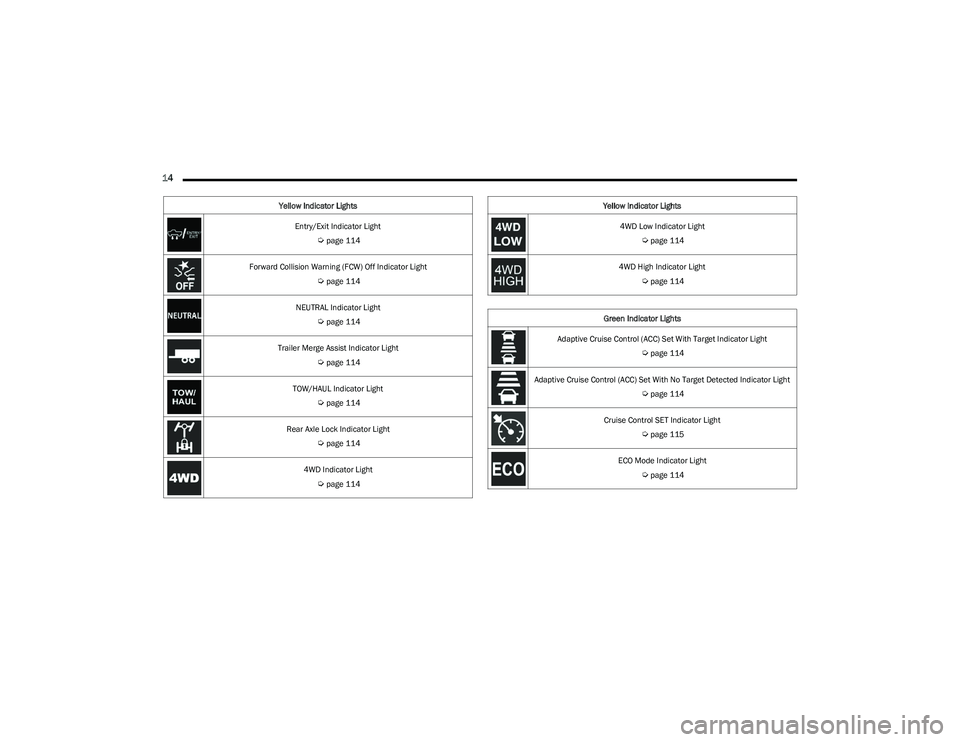
Entry/Exit Indicator Light
Úpage 114
Forward Collision Warning (FCW) Off Indicator Light
Úpage 114
NEUTRAL Indicator Light
Úpage 114
Trailer Merge Assist Indicator Light
Úpage 114
TOW/HAUL Indicator Light
Úpage 114
Rear Axle Lock Indicator Light
Úpage 114
4WD Indicator Light
Úpage 114
Yellow Indicator Lights
4WD Low Indicator Light
Úpage 114
4WD High Indicator Light
Úpage 114
Green Indicator Lights
Adaptive Cruise Control (ACC) Set With Target Indicator Light
Úpage 114
Adaptive Cruise Control (ACC) Set With No Target Detected Indicator Light
Úpage 114
Cruise Control SET Indicator Light
Úpage 115
ECO Mode Indicator Light
Úpage 114
Yellow Indicator Lights
23_DT_OM_EN_USC_t.book Page 14
Page 17 of 416
15
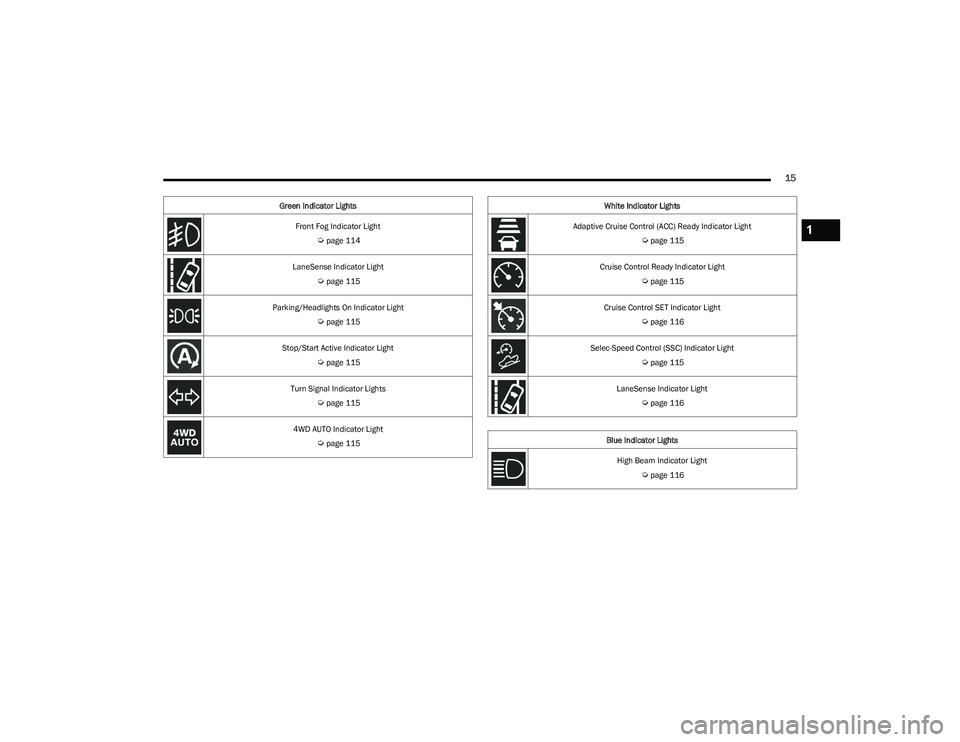
Front Fog Indicator Light
Úpage 114
LaneSense Indicator Light
Úpage 115
Parking/Headlights On Indicator Light
Úpage 115
Stop/Start Active Indicator Light
Úpage 115
Turn Signal Indicator Lights
Úpage 115
4WD AUTO Indicator Light
Úpage 115
Green Indicator Lights
White Indicator Lights
Adaptive Cruise Control (ACC) Ready Indicator Light
Úpage 115
Cruise Control Ready Indicator Light
Úpage 115
Cruise Control SET Indicator Light
Úpage 116
Selec-Speed Control (SSC) Indicator Light
Úpage 115
LaneSense Indicator Light
Úpage 116
Blue Indicator Lights High Beam Indicator Light
Úpage 116
1
23_DT_OM_EN_USC_t.book Page 15
Page 104 of 416
102GETTING TO KNOW YOUR INSTRUMENT PANEL
LaneSense — If Equipped
The instrument cluster display displays the current
LaneSense system settings. The information displayed
depends on LaneSense system status and the conditions
that need to be met
Úpage 116.
Vehicle Info
Push and release the up or down arrow button until
the Vehicle Info menu icon is displayed in the instrument
cluster display. Push and release the left or right
arrow button to scroll through the information submenus
and push and release the OK button to select or reset the
resettable submenus.
BASE AND MIDLINE CLUSTER
Tire Pressure Monitor System
Air Suspension — If Equipped
Coolant Temperature — If Equipped
Trans Temperature
Oil Temperature
Oil Pressure — If Equipped
Oil Life
Battery Voltage — If Equipped
Gauge Summary — If Equipped
Coolant Temp
Trans Temp
Oil Temp
Oil Pressure
Engine Hours — If Equipped
PREMIUM CLUSTER
Fuel Economy
Average
Current
Range to Empty
Gauge Summary
Coolant Temperature — If Equipped
Battery Voltage — If Equipped
Trans Temperature
Oil Summary
Oil Temperature
Oil Life
Oil Pressure — If Equipped
Tire Pressure Monitor System
Stop/Start — If Equipped
Air Suspension Status — If Equipped
Engine Hours — If Equipped
Off Road – If Equipped
Push and release the up or down arrow button
until the Off Road menu icon is displayed in the instrument
cluster display. Push and release the left or right
arrow button to scroll through the information submenus.
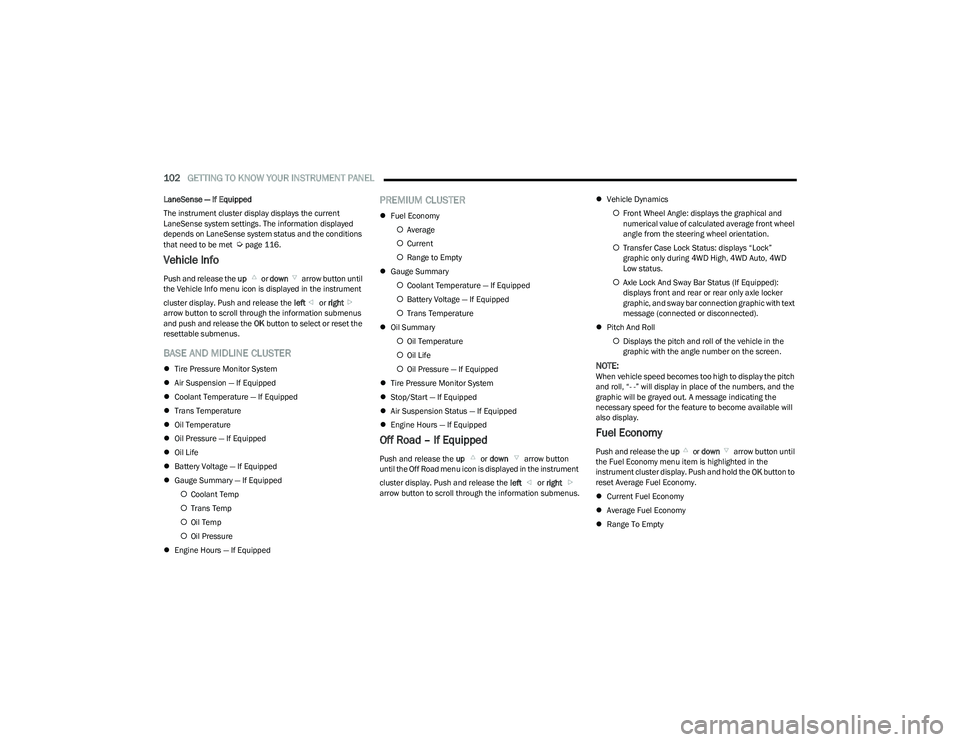
Vehicle Dynamics
Front Wheel Angle: displays the graphical and
numerical value of calculated average front wheel
angle from the steering wheel orientation.
Transfer Case Lock Status: displays “Lock”
graphic only during 4WD High, 4WD Auto, 4WD
Low status.
Axle Lock And Sway Bar Status (If Equipped):
displays front and rear or rear only axle locker
graphic, and sway bar connection graphic with text
message (connected or disconnected).
Pitch And Roll
Displays the pitch and roll of the vehicle in the
graphic with the angle number on the screen.
NOTE:When vehicle speed becomes too high to display the pitch
and roll, “- -” will display in place of the numbers, and the
graphic will be grayed out. A message indicating the
necessary speed for the feature to become available will
also display.
Fuel Economy
Push and release the up or down arrow button until
the Fuel Economy menu item is highlighted in the
instrument cluster display. Push and hold the OK button to
reset Average Fuel Economy.
Current Fuel Economy
Average Fuel Economy
Range To Empty
23_DT_OM_EN_USC_t.book Page 102
Page 114 of 416
112GETTING TO KNOW YOUR INSTRUMENT PANEL
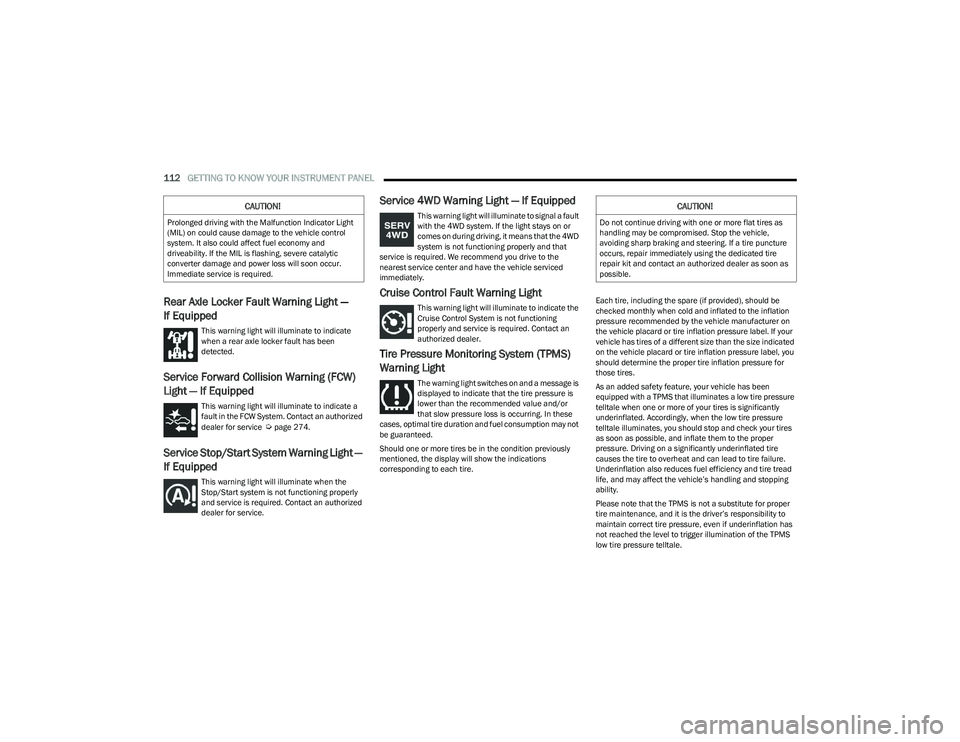
Rear Axle Locker Fault Warning Light —
If Equipped
This warning light will illuminate to indicate
when a rear axle locker fault has been
detected.
Service Forward Collision Warning (FCW)
Light — If Equipped
This warning light will illuminate to indicate a
fault in the FCW System. Contact an authorized
dealer for service
Úpage 274.
Service Stop/Start System Warning Light —
If Equipped
This warning light will illuminate when the
Stop/Start system is not functioning properly
and service is required. Contact an authorized
dealer for service.
Service 4WD Warning Light — If Equipped
This warning light will illuminate to signal a fault
with the 4WD system. If the light stays on or
comes on during driving, it means that the 4WD
system is not functioning properly and that
service is required. We recommend you drive to the
nearest service center and have the vehicle serviced
immediately.
Cruise Control Fault Warning Light
This warning light will illuminate to indicate the
Cruise Control System is not functioning
properly and service is required. Contact an
authorized dealer.
Tire Pressure Monitoring System (TPMS)
Warning Light
The warning light switches on and a message is
displayed to indicate that the tire pressure is
lower than the recommended value and/or
that slow pressure loss is occurring. In these
cases, optimal tire duration and fuel consumption may not
be guaranteed.
Should one or more tires be in the condition previously
mentioned, the display will show the indications
corresponding to each tire. Each tire, including the spare (if provided), should be
checked monthly when cold and inflated to the inflation
pressure recommended by the vehicle manufacturer on
the vehicle placard or tire inflation pressure label. If your
vehicle has tires of a different size than the size indicated
on the vehicle placard or tire inflation pressure label, you
should determine the proper tire inflation pressure for
those tires.
As an added safety feature, your vehicle has been
equipped with a TPMS that illuminates a low tire pressure
telltale when one or more of your tires is significantly
underinflated. Accordingly, when the low tire pressure
telltale illuminates, you should stop and check your tires
as soon as possible, and inflate them to the proper
pressure. Driving on a significantly underinflated tire
causes the tire to overheat and can lead to tire failure.
Underinflation also reduces fuel efficiency and tire tread
life, and may affect the vehicle’s handling and stopping
ability.
Please note that the TPMS is not a substitute for proper
tire maintenance, and it is the driver’s responsibility to
maintain correct tire pressure, even if underinflation has
not reached the level to trigger illumination of the TPMS
low tire pressure telltale.
CAUTION!
Prolonged driving with the Malfunction Indicator Light
(MIL) on could cause damage to the vehicle control
system. It also could affect fuel economy and
driveability. If the MIL is flashing, severe catalytic
converter damage and power loss will soon occur.
Immediate service is required.
CAUTION!
Do not continue driving with one or more flat tires as
handling may be compromised. Stop the vehicle,
avoiding sharp braking and steering. If a tire puncture
occurs, repair immediately using the dedicated tire
repair kit and contact an authorized dealer as soon as
possible.
23_DT_OM_EN_USC_t.book Page 112
Page 116 of 416
114GETTING TO KNOW YOUR INSTRUMENT PANEL
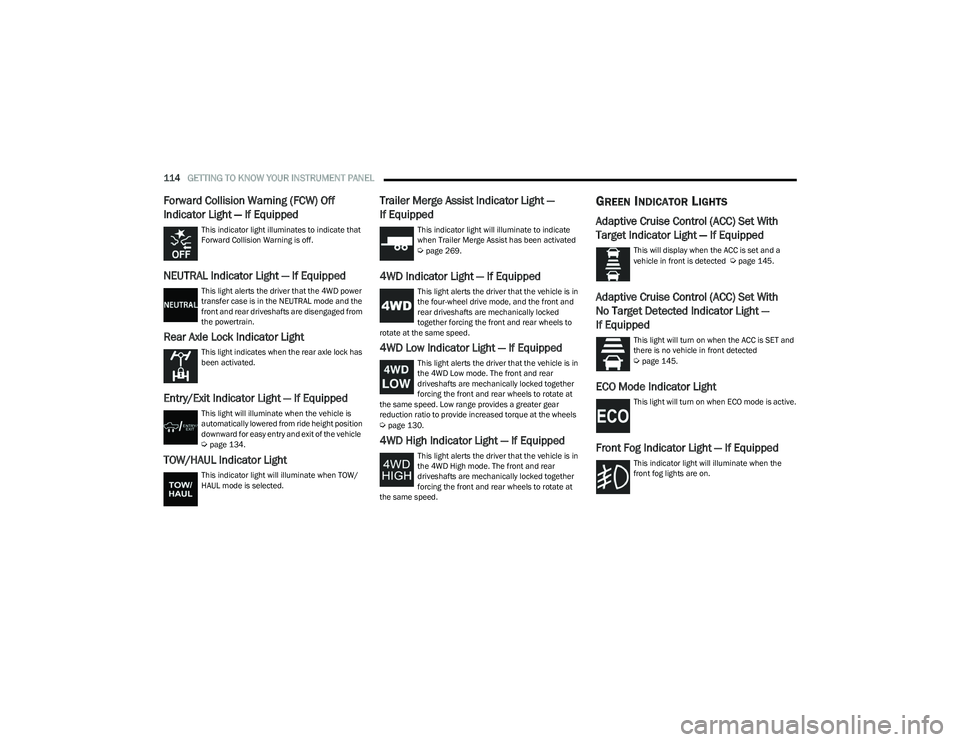
Forward Collision Warning (FCW) Off
Indicator Light — If Equipped
This indicator light illuminates to indicate that
Forward Collision Warning is off.
NEUTRAL Indicator Light — If Equipped
This light alerts the driver that the 4WD power
transfer case is in the NEUTRAL mode and the
front and rear driveshafts are disengaged from
the powertrain.
Rear Axle Lock Indicator Light
This light indicates when the rear axle lock has
been activated.
Entry/Exit Indicator Light — If Equipped
This light will illuminate when the vehicle is
automatically lowered from ride height position
downward for easy entry and exit of the vehicle
Úpage 134.
TOW/HAUL Indicator Light
This indicator light will illuminate when TOW/
HAUL mode is selected.
Trailer Merge Assist Indicator Light —
If Equipped
This indicator light will illuminate to indicate
when Trailer Merge Assist has been activated
Úpage 269.
4WD Indicator Light — If Equipped
This light alerts the driver that the vehicle is in
the four-wheel drive mode, and the front and
rear driveshafts are mechanically locked
together forcing the front and rear wheels to
rotate at the same speed.
4WD Low Indicator Light — If Equipped
This light alerts the driver that the vehicle is in
the 4WD Low mode. The front and rear
driveshafts are mechanically locked together
forcing the front and rear wheels to rotate at
the same speed. Low range provides a greater gear
reduction ratio to provide increased torque at the wheels
Úpage 130.
4WD High Indicator Light — If Equipped
This light alerts the driver that the vehicle is in
the 4WD High mode. The front and rear
driveshafts are mechanically locked together
forcing the front and rear wheels to rotate at
the same speed.
GREEN INDICATOR LIGHTS
Adaptive Cruise Control (ACC) Set With
Target Indicator Light — If Equipped
This will display when the ACC is set and a
vehicle in front is detected Úpage 145.
Adaptive Cruise Control (ACC) Set With
No Target Detected Indicator Light —
If Equipped
This light will turn on when the ACC is SET and
there is no vehicle in front detected
Úpage 145.
ECO Mode Indicator Light
This light will turn on when ECO mode is active.
Front Fog Indicator Light — If Equipped
This indicator light will illuminate when the
front fog lights are on.
23_DT_OM_EN_USC_t.book Page 114
Page 117 of 416
GETTING TO KNOW YOUR INSTRUMENT PANEL115
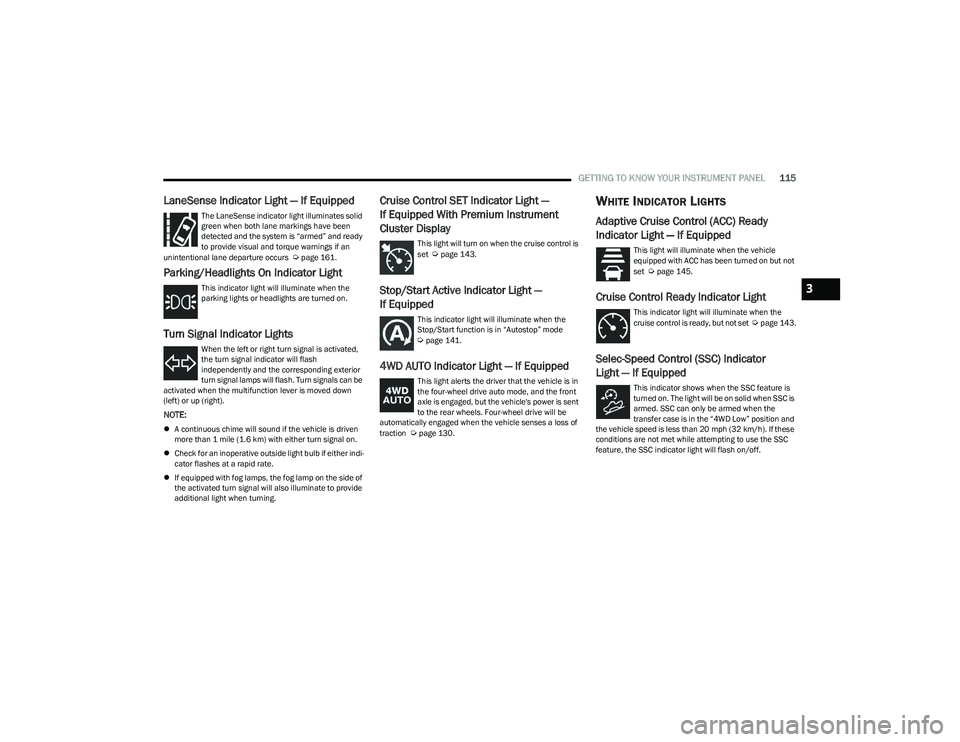
LaneSense Indicator Light — If Equipped
The LaneSense indicator light illuminates solid
green when both lane markings have been
detected and the system is “armed” and ready
to provide visual and torque warnings if an
unintentional lane departure occurs
Úpage 161.
Parking/Headlights On Indicator Light
This indicator light will illuminate when the
parking lights or headlights are turned on.
Turn Signal Indicator Lights
When the left or right turn signal is activated,
the turn signal indicator will flash
independently and the corresponding exterior
turn signal lamps will flash. Turn signals can be
activated when the multifunction lever is moved down
(left) or up (right).
NOTE:
A continuous chime will sound if the vehicle is driven
more than 1 mile (1.6 km) with either turn signal on.
Check for an inoperative outside light bulb if either indi -
cator flashes at a rapid rate.
If equipped with fog lamps, the fog lamp on the side of
the activated turn signal will also illuminate to provide
additional light when turning.
Cruise Control SET Indicator Light —
If Equipped With Premium Instrument
Cluster Display
This light will turn on when the cruise control is
set Úpage 143.
Stop/Start Active Indicator Light —
If Equipped
This indicator light will illuminate when the
Stop/Start function is in “Autostop” mode
Úpage 141.
4WD AUTO Indicator Light — If Equipped
This light alerts the driver that the vehicle is in
the four-wheel drive auto mode, and the front
axle is engaged, but the vehicle's power is sent
to the rear wheels. Four-wheel drive will be
automatically engaged when the vehicle senses a loss of
traction
Úpage 130.
WHITE INDICATOR LIGHTS
Adaptive Cruise Control (ACC) Ready
Indicator Light — If Equipped
This light will illuminate when the vehicle
equipped with ACC has been turned on but not
set
Úpage 145.
Cruise Control Ready Indicator Light
This indicator light will illuminate when the
cruise control is ready, but not set Úpage 143.
Selec-Speed Control (SSC) Indicator
Light — If Equipped
This indicator shows when the SSC feature is
turned on. The light will be on solid when SSC is
armed. SSC can only be armed when the
transfer case is in the “4WD Low” position and
the vehicle speed is less than 20 mph (32 km/h). If these conditions are not met while attempting to use the SSC
feature, the SSC indicator light will flash on/off.
3
23_DT_OM_EN_USC_t.book Page 115
Page 122 of 416
120STARTING AND OPERATING
If the vehicle is not in PARK and the driver exits the vehicle
with the engine running, the vehicle may AutoPark.
AutoPark will engage when all of these conditions are met:
Vehicle is equipped with a rotary shifter and an 8-speed
transmission
Vehicle is not in PARK
Vehicle speed is 1.2 mph (1.9 km/h) or less
Driver’s seat belt is unbuckled
Driver’s door is ajar
Brake pedal is not pressed
The message “ AutoPark Engaged Shift To P Then Shift To
Gear ” will display in the instrument cluster.
NOTE:In some cases the ParkSense graphic will be displayed in
the instrument cluster, causing the “ AutoPark Engaged
Shift To P Then Shift To Gear ” message to not be seen. In
these cases, the gear selector must be returned to “P” to
select desired gear.
If the driver shifts into PARK while moving, the vehicle may
AutoPark.
AutoPark will engage ONLY when vehicle speed is 1.2 mph
(1.9 km/h) or less.
The message “ Vehicle Speed Is Too High To Shift to P ” will
be displayed in the instrument cluster if vehicle speed is
above 1.2 mph (1.9 km/h). 4WD LOW — If Equipped
AutoPark will be disabled when operating the vehicle in
4WD LOW.
The message “
AutoPark Disabled ” will be displayed in the
instrument cluster.
Additional customer warnings will be given when all of
these conditions are met:
Vehicle is not in PARK
Driver’s door is ajar
Vehicle is in 4WD LOW
The message “ AutoPark Not Engaged ” will be displayed in
the instrument cluster. A warning chime will continue until
you shift the vehicle into PARK or the driver’s door is
closed.
ALWAYS DO A VISUAL CHECK
that your vehicle is in PARK
by looking for the "P" in the instrument cluster display and
near the gear selector. As an added precaution, always
apply the parking brake when exiting the vehicle.
EXTENDED PARK STARTING
NOTE:Extended Park condition occurs when the vehicle has not
been started or driven for at least 30 days.
1. Install a battery charger or jumper cables to the battery to ensure a full battery charge during the
crank cycle.
2. Place the ignition to the START position and release it when the engine starts. For Keyless Enter ‘n Go
ignition systems, press and hold the brake pedal
while pushing the ENGINE START/STOP button once.
3. If the engine fails to start within 10 seconds, wait 10 to 15 seconds to allow the starter to cool, then
repeat the Extended Park Starting procedure.
4. If the engine fails to start after eight attempts, allow the starter to cool for at least 10 minutes, then repeat
the Extended Park Starting procedure.
WARNING!
If vehicle speed is above 1.2 mph (1.9 km/h), the transmission will default to NEUTRAL until the vehicle
speed drops below 1.2 mph (1.9 km/h). A vehicle left in
the NEUTRAL position can roll. As an added precaution,
always apply the parking brake when exiting the vehicle.
CAUTION!
To prevent damage to the starter, do not crank
continuously for more than 10 seconds at a time.
Wait 10 to 15 seconds before trying again.
23_DT_OM_EN_USC_t.book Page 120
Page 130 of 416

128STARTING AND OPERATING
Transmission Limp Home Mode
Transmission function is monitored electronically for
abnormal conditions. If a condition is detected that could
result in transmission damage, Transmission Limp Home
Mode is activated. In this mode, the transmission may
operate only in certain gears, or may not shift at all.
Vehicle performance may be severely degraded and the
engine may stall. In some situations, the transmission may
not re-engage if the engine is turned off and restarted.
The Malfunction Indicator Light (MIL) may be illuminated.
A message in the instrument cluster will inform the driver
of the more serious conditions, and indicate what actions
may be necessary.
In the event of a momentary problem, the transmission
can be reset to regain all forward gears by performing the
following steps:
NOTE:In cases where the instrument cluster message indicates
the transmission may not re-engage after engine
shutdown, perform this procedure only in a desired
location (preferably, at an authorized dealer).
1. Stop the vehicle.
2. Shift the transmission into PARK, if possible. If not,
shift the transmission to NEUTRAL.
3. Push and hold the ignition switch until the engine turns off.
4. Wait approximately 30 seconds.
5. Restart the engine.
6. Shift into the desired gear range. If the problem is no longer detected, the transmission will return to
normal operation.
NOTE:Even if the transmission can be reset, we recommend that
you visit an authorized dealer at your earliest possible
convenience. An authorized dealer has diagnostic
equipment to assess the condition of your transmission.
If the transmission cannot be reset, an authorized dealer
service is required.
Electronic Range Select (ERS) Operation —
If Equipped
The ERS shift control allows the driver to limit the highest
available gear when the transmission is in DRIVE and ERS
mode is not active. For example, if you set the
transmission gear limit to FOURTH gear, the transmission
will hold that gear and not shift above FOURTH gear, but
will shift through the lower gears normally.
NOTE:ERS will only upshift during a FIRST to SECOND gear shift
when in 4WD LOW. All other ranges will hold the gear.
You can switch between DRIVE and ERS mode at any
vehicle speed. When the transmission gear selector is in
DRIVE, the transmission will operate automatically,
shifting between all available gears. Tapping the “-” button
(on the steering wheel) will activate ERS mode, display the
current gear in the instrument cluster, and set that gear as
the top available gear. Once in ERS mode, tapping the “-”
or “+” button will change the top available gear.
Electronic Range Select (ERS)
To exit ERS mode, simply push and hold the “+” button
until the gear limit display disappears from the instrument
cluster.1 — Shift Up “+”
2 — Shift Down “–”
WARNING!
Do not downshift for additional engine braking on a
slippery surface. The drive wheels could lose their grip
and the vehicle could skid, causing a collision or
personal injury.
23_DT_OM_EN_USC_t.book Page 128
Page 131 of 416

STARTING AND OPERATING129
AutoStick — If Equipped
AutoStick is a driver-interactive transmission feature
providing manual shift control, giving you more control of
the vehicle. AutoStick allows you to maximize engine
braking, eliminate undesirable upshifts and downshifts,
and improve overall vehicle performance. This feature can
also provide you with more control during passing, city
driving, cold slippery conditions, mountain driving, trailer
towing, and many other situations.
Paddle Shifters
Operation
In AutoStick mode, you can use the gear selector (in the
SPORT position), or the paddle shifters, to manually shift
the transmission. To activate AutoStick mode, move the
gear selector into the SPORT (S) position (beside the
DRIVE position), or tap one of the paddle shifters on the
steering wheel. Tapping the “-” shift paddle to enter
AutoStick mode will downshift the transmission to the next
lower gear, while tapping “+” to enter AutoStick mode will
retain the current gear. The current transmission gear will
be displayed in the instrument cluster.
AutoStick mode has the following operational benefits:
The transmission will automatically downshift as the
vehicle slows (to prevent engine lugging) and will
display the current gear.
The transmission will automatically downshift to FIRST
gear when coming to a stop. After a stop, the driver
should manually upshift “+” the transmission as the
vehicle is accelerated.
You can start out, from a stop, in FIRST or SECOND gear
(or THIRD gear, in 4WD LOW). Tapping “+” (at a stop)
will allow starting in SECOND gear. Starting out in
SECOND or THIRD gear can be helpful in snowy or icy
conditions.
If a requested downshift would cause the engine to
overspeed, that shift will not occur.
The system will ignore attempts to upshift at too low of
a vehicle speed.
Holding the “-” paddle pressed, or holding the gear
selector in the “-” position, will downshift the transmis -
sion to the lowest gear possible at the current speed.
Transmission shifting will be more noticeable when
AutoStick is enabled.
The system may revert to automatic shift mode if a
fault or overheat condition is detected.
NOTE:When Selec-Speed or Hill Descent Control is enabled,
AutoStick is not active.
To disengage AutoStick, return the gear selector to the
DRIVE position, or press and hold the “+” paddle shifter
(and the gear selector is already in DRIVE) until "D" is once
again indicated in the instrument cluster. You can shift in
or out of AutoStick at any time without taking your foot off
the accelerator pedal.
1 — “-” Paddle
2 — “+” Paddle
WARNING!
Do not downshift for additional engine braking on a
slippery surface. The drive wheels could lose their grip
and the vehicle could skid, causing a collision or
personal injury.
4
23_DT_OM_EN_USC_t.book Page 129