Driver Information Display (DID) — 7” Display
The Driver Information Display (DID) display is located
in the center portion of the cluster and consists of eight
sections:1. Main Screen — The inner ring of the display will
illuminate in grey under normal conditions, yellow for
non critical warnings, red for critical warnings and
white for on demand information.
2. Audio Information and Submenu Information — Whenever there are submenus available, the position
within the submenus is shown here.
3. Selectable Information (Compass, Temp, Range to Empty, Trip A, Trip B, Average MPG, Trailer Trip
(distance only), Trailer Brake Gain).
4. Air Suspension Status – If Equipped
5. Transmission Gear Position Indicator (PRND)
6. Status Menu Icons
7. Telltales/Indicators
8. 4WD Status
242 UNDERSTANDING YOUR INSTRUMENT PANEL
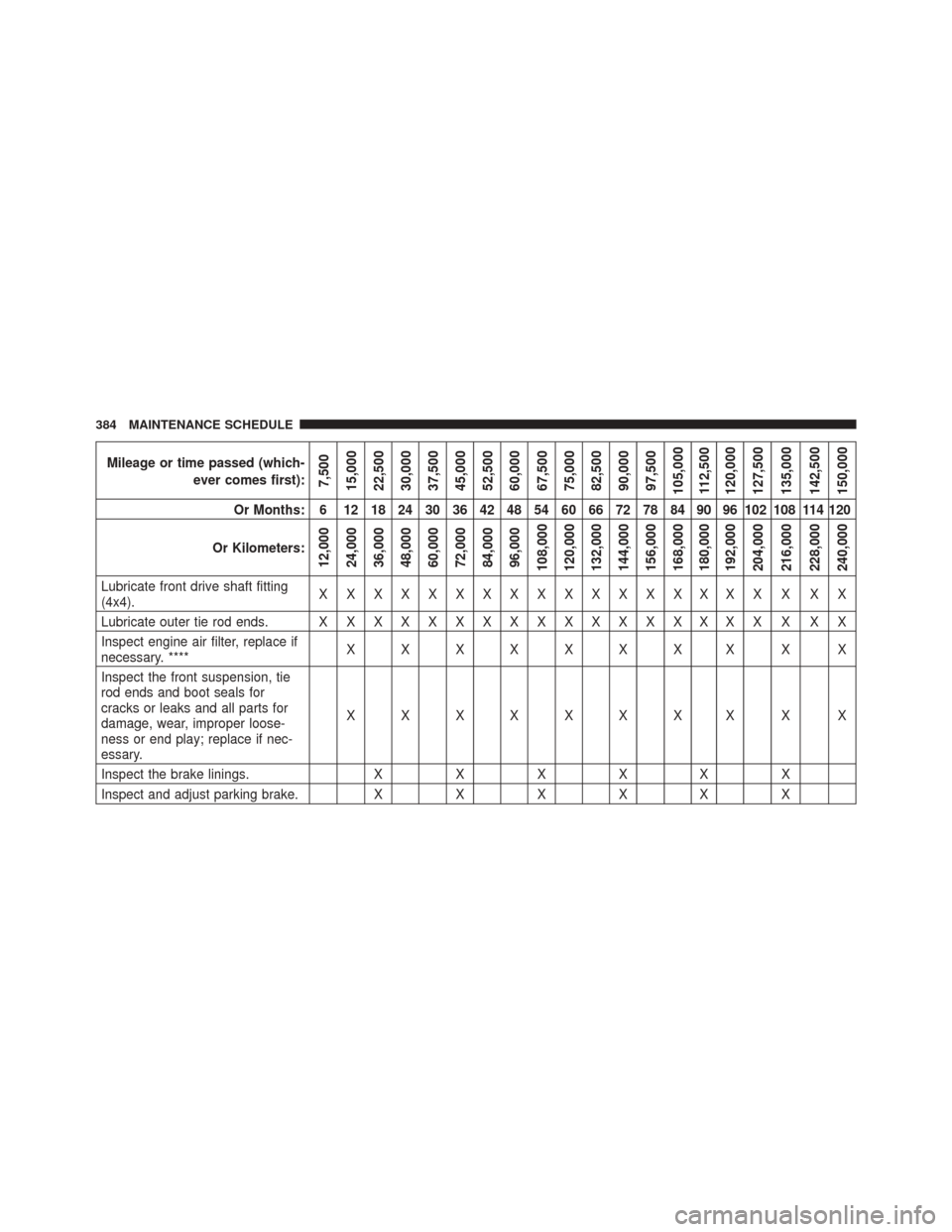
Mileage or time passed (which-ever comes first):
7,500
15,000
22,500
30,000
37,500
45,000
52,500
60,000
67,500
75,000
82,500
90,000
97,500
105,000 112,500
120,000
127,500
135,000
142,500
150,000
Or Months: 6 12 18 24 30 36 42 48 54 60 66 72 78 84 90 96 102 108 114 120
Or Kilometers:
12,000
24,000
36,000
48,000
60,000
72,000
84,000
96,000
108,000
120,000
132,000
144,000
156,000
168,000
180,000
192,000
204,000
216,000
228,000
240,000
Lubricate front drive shaft fitting
(4x4). XXXXXXXXXXXXXXXXX X XX
Lubricate outer tie rod ends. X X X X X X X X X X X X X X X X X X X X
Inspect engine air filter, replace if
necessary. **** XXXXXXXX X X
Inspect the front suspension, tie
rod ends and boot seals for
cracks or leaks and all parts for
damage, wear, improper loose-
ness or end play; replace if nec-
essary. XXXXXXXX X X
Inspect the brake linings. XXXXX X
Inspect and adjust parking brake. XXXXX X
384 MAINTENANCE SCHEDULE