height Ram 2500 2017 User Guide
[x] Cancel search | Manufacturer: RAM, Model Year: 2017, Model line: 2500, Model: Ram 2500 2017Pages: 734, PDF Size: 7.3 MB
Page 279 of 734
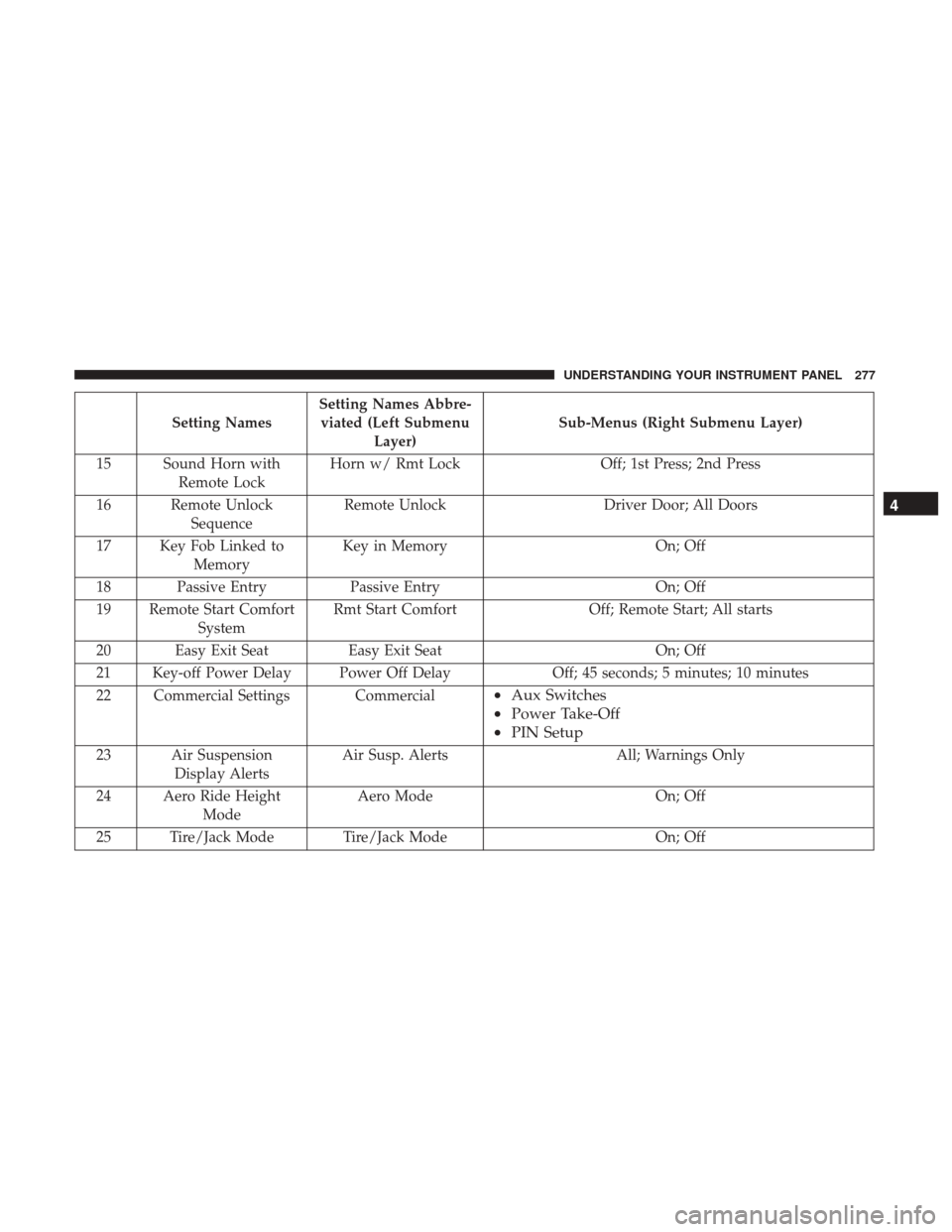
Setting NamesSetting Names Abbre-
viated (Left Submenu Layer) Sub-Menus (Right Submenu Layer)
15 Sound Horn with Remote Lock Horn w/ Rmt Lock
Off; 1st Press; 2nd Press
16 Remote Unlock Sequence Remote Unlock
Driver Door; All Doors
17 Key Fob Linked to Memory Key in Memory
On; Off
18 Passive Entry Passive Entry On; Off
19 Remote Start Comfort System Rmt Start Comfort
Off; Remote Start; All starts
20 Easy Exit Seat Easy Exit Seat On; Off
21 Key-off Power Delay Power Off Delay Off; 45 seconds; 5 minutes; 10 minutes
22 Commercial Settings Commercial
• Aux Switches
• Power Take-Off
• PIN Setup
23 Air Suspension
Display Alerts Air Susp. Alerts All; Warnings Only
24 Aero Ride Height Mode Aero Mode
On; Off
25 Tire/Jack Mode Tire/Jack Mode On; Off
4
UNDERSTANDING YOUR INSTRUMENT PANEL 277
Page 284 of 734
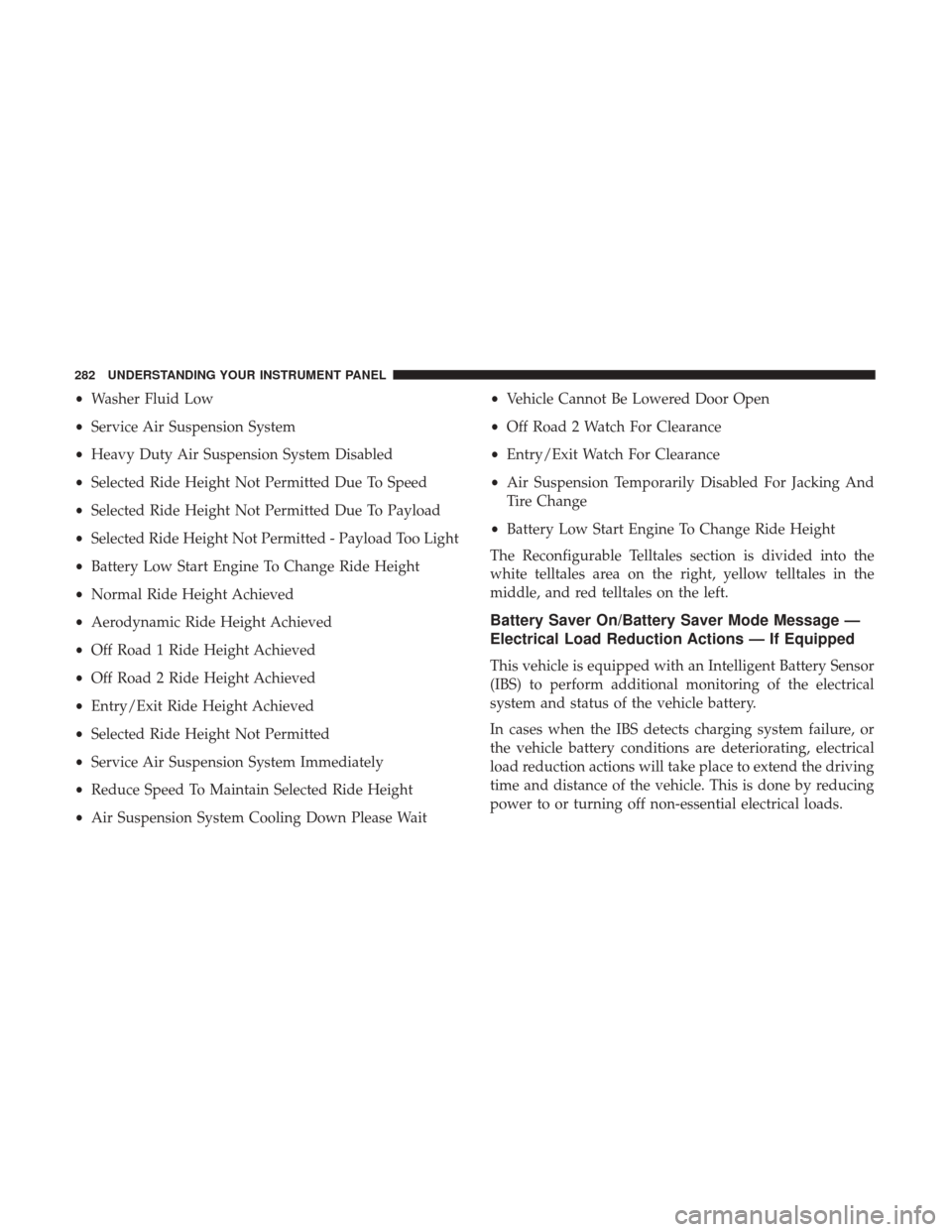
•Washer Fluid Low
• Service Air Suspension System
• Heavy Duty Air Suspension System Disabled
• Selected Ride Height Not Permitted Due To Speed
• Selected Ride Height Not Permitted Due To Payload
• Selected Ride Height Not Permitted - Payload Too Light
• Battery Low Start Engine To Change Ride Height
• Normal Ride Height Achieved
• Aerodynamic Ride Height Achieved
• Off Road 1 Ride Height Achieved
• Off Road 2 Ride Height Achieved
• Entry/Exit Ride Height Achieved
• Selected Ride Height Not Permitted
• Service Air Suspension System Immediately
• Reduce Speed To Maintain Selected Ride Height
• Air Suspension System Cooling Down Please Wait •
Vehicle Cannot Be Lowered Door Open
• Off Road 2 Watch For Clearance
• Entry/Exit Watch For Clearance
• Air Suspension Temporarily Disabled For Jacking And
Tire Change
• Battery Low Start Engine To Change Ride Height
The Reconfigurable Telltales section is divided into the
white telltales area on the right, yellow telltales in the
middle, and red telltales on the left.
Battery Saver On/Battery Saver Mode Message —
Electrical Load Reduction Actions — If Equipped
This vehicle is equipped with an Intelligent Battery Sensor
(IBS) to perform additional monitoring of the electrical
system and status of the vehicle battery.
In cases when the IBS detects charging system failure, or
the vehicle battery conditions are deteriorating, electrical
load reduction actions will take place to extend the driving
time and distance of the vehicle. This is done by reducing
power to or turning off non-essential electrical loads.
282 UNDERSTANDING YOUR INSTRUMENT PANEL
Page 301 of 734

Suspension — If Equipped
After pressing the “Suspension” button on the touchscreen,
the following settings will be available:
Setting NameSelectable Options
Sound Horn With Lower OnOff
Flash Lights With Lower OnOff
Auto Entry/Exit Suspension OnOff
NOTE: When the “Auto Entry/Exit Suspension” feature is selected, the vehicle automatically lowers from ride height
position when vehicle shifted to park for easy entry/exit.
Display Suspension Messages AllWarning Only
Automatic Aero Mode (1500 Model Only) On
Off
NOTE: When the “Automatic Aero Mode” feature is selected, the Ride Height will automatically be adjusted depend-
ing on the vehicle speed.
4
UNDERSTANDING YOUR INSTRUMENT PANEL 299
Page 321 of 734
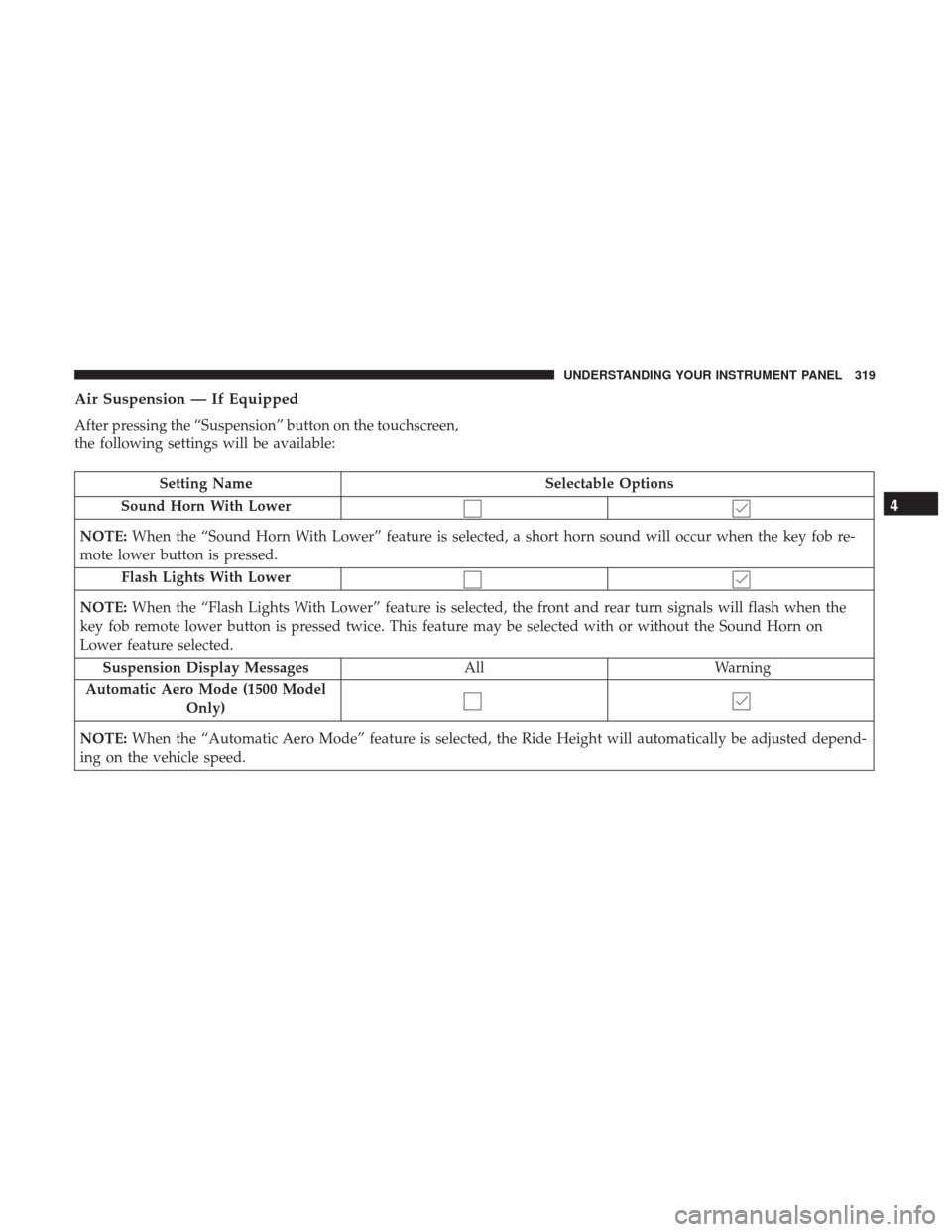
Air Suspension — If Equipped
After pressing the “Suspension” button on the touchscreen,
the following settings will be available:
Setting NameSelectable Options
Sound Horn With Lower
NOTE: When the “Sound Horn With Lower” feature is selected, a short horn sound will occur when the key fob re-
mote lower button is pressed.
Flash Lights With Lower
NOTE: When the “Flash Lights With Lower” feature is selected, the front and rear turn signals will flash when the
key fob remote lower button is pressed twice. This feature may be selected with or without the Sound Horn on
Lower feature selected.
Suspension Display Messages AllWarning
Automatic Aero Mode (1500 Model Only)
NOTE: When the “Automatic Aero Mode” feature is selected, the Ride Height will automatically be adjusted depend-
ing on the vehicle speed.
4
UNDERSTANDING YOUR INSTRUMENT PANEL 319
Page 440 of 734

AIR SUSPENSION SYSTEM (1500 MODELS) —
IF EQUIPPED
Description
The air suspension system provides full time load leveling
capability along with the benefit of being able to adjust
vehicle height by the push of a button.
1 — Up Button
2 — Down Button
3 — Entry/Exit Mode Indicator (Customer selectable)
4 — Normal Ride Height Indicator (Customer selectable)
5 — Off-Road 1 Indicator (Customer selectable)
6 — Off-Road 2 Indicator (Customer selectable)
NOTE:The vehicle will automatically enter Aero Mode
when the vehicle speed remains between 62 mph (100 km/h)
and 66 mph (106 km/h) for greater than 20 seconds or if the
vehicle speed exceeds 66 mph (106 km/h).
• Normal Ride Height (NRH) – This is the standard
position of the suspension and is meant for normal
driving.
• Off-Road 1 (OR1) (Raises the vehicle approximately 1
in [26 mm]) – This position should be the primary
position for all off-road driving until Off Road 2 (OR2) is
needed. A smoother and more comfortable ride will
result. To enter OR1, push the “Up” button once from
the NRH position while the vehicle speed is below
35 mph (56 km/h). When in the OR1 position, if the
vehicle speed remains between 40 mph (64 km/h) and
50 mph (80 km/h) for greater than 20 seconds or if the
vehicle speed exceeds 50 mph (80 km/h), the vehicle
will be automatically lowered to NRH. Off-Road 1 may
not be available due to vehicle payload, an instrument
cluster message will be displayed when this occurs.
Refer to “Instrument Cluster Display” in “Understand-
ing Your Instrument Panel” for further information.
Air Suspension Switch
438 STARTING AND OPERATING
Page 441 of 734
![Ram 2500 2017 User Guide •Off-Road 2 (OR2) (Raises the vehicle approximately
2 in [51 mm]) –
This position is intended for off-roading
use only where maximum ground clearance is required.
To enter OR2, push the “Up” b](/img/34/12560/w960_12560-440.png "Ram 2500 2017 User Guide •Off-Road 2 (OR2) (Raises the vehicle approximately
2 in [51 mm]) –
This position is intended for off-roading
use only where maximum ground clearance is required.
To enter OR2, push the “Up” b")
•Off-Road 2 (OR2) (Raises the vehicle approximately
2 in [51 mm]) –
This position is intended for off-roading
use only where maximum ground clearance is required.
To enter OR2, push the “Up” button twice from the NRH
position or once from the OR1 position while vehicle
speed is below 20 mph (32 km/h). While in OR2, if the
vehicle speed exceeds 25 mph (40 km/h) the vehicle
height will be automatically lowered to OR1. Off-Road 2
may not be available due to vehicle payload, an instru-
ment cluster message will be displayed when this occurs.
Refer to “Instrument Cluster Display” in “Understanding
Your Instrument Panel” for further information.
CAUTION!
If the vehicle is in OFFROAD1 or OFFROAD2 setting,
be aware of your surroundings, you may not have the
clearance required for certain areas and vehicle dam-
age may occur.
• Aero Mode (Lowers the vehicle approximately .6 in
[15 mm]) –
This position provides improved aerodynam-
ics by lowering the vehicle. The vehicle will automatically
enter Aero Mode when the vehicle speed remains between
62 mph (100 km/h) and 66 mph (106 km/h) for greater
than 20 seconds or if the vehicle speed exceeds 66 mph (106 km/h). The vehicle will return to NRH from Aero
Mode if the vehicle speed remains between 30 mph
(48 km/h) and 35 mph (56 km/h) for greater than 20 sec-
onds or if the vehicle speed falls below 30 mph (48 km/h).
NOTE:
Automatic Aero Mode may be disabled through
vehicle settings in the instrument cluster display when
equipped with Uconnect 3.0, or your Uconnect Radio when
equipped with Uconnect 5.0, 8.4A, or 8.4AN. Refer to
“Instrument Cluster Display” in “Understanding Your
Instrument Panel” or “Uconnect Settings” in “Understand-
ing Your Instrument Panel” for further information.
• Entry/Exit Mode (Lowers the vehicle approximately
2 in [51 mm]) – This position lowers the vehicle for
easier passenger entry and exit as well as lowering the
rear of the vehicle for easier loading and unloading of
cargo. To enter Entry/Exit Mode, push the “Down”
button once from the NRH while the vehicle speed is
below 33 mph (53 km/h). Once the vehicle speed goes
below 15 mph (24 km/h) the vehicle height will begin to
lower. If the vehicle speed remains between 15 mph
(24 km/h) and 25 mph (40 km/h) for greater than
60 seconds, or the vehicle speed exceeds 25 mph
(40 km/h) the Entry/Exit change will be cancelled. To
return to Normal Height Mode, push the “Up” button
5
STARTING AND OPERATING 439
Page 443 of 734
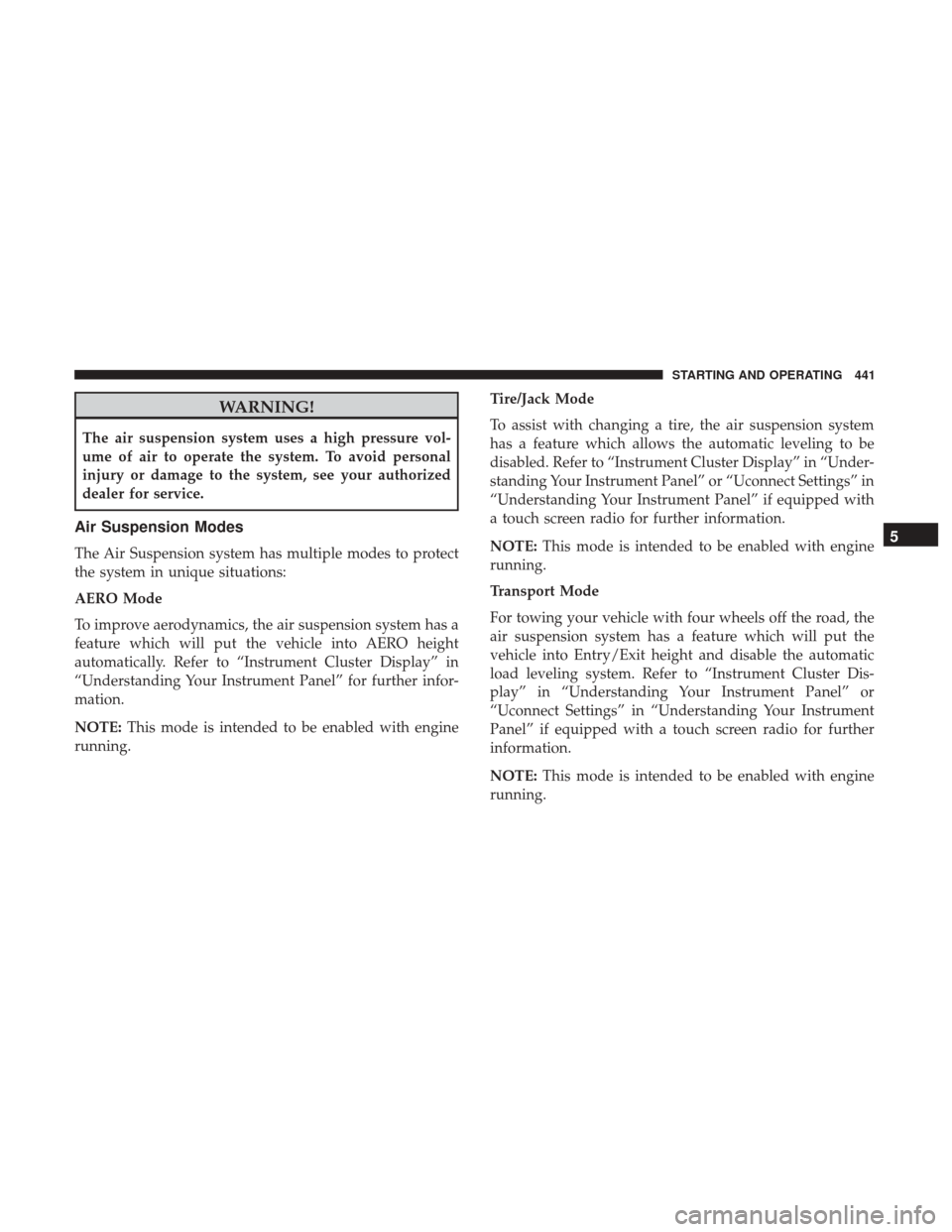
WARNING!
The air suspension system uses a high pressure vol-
ume of air to operate the system. To avoid personal
injury or damage to the system, see your authorized
dealer for service.
Air Suspension Modes
The Air Suspension system has multiple modes to protect
the system in unique situations:
AERO Mode
To improve aerodynamics, the air suspension system has a
feature which will put the vehicle into AERO height
automatically. Refer to “Instrument Cluster Display” in
“Understanding Your Instrument Panel” for further infor-
mation.
NOTE:This mode is intended to be enabled with engine
running. Tire/Jack Mode
To assist with changing a tire, the air suspension system
has a feature which allows the automatic leveling to be
disabled. Refer to “Instrument Cluster Display” in “Under-
standing Your Instrument Panel” or “Uconnect Settings” in
“Understanding Your Instrument Panel” if equipped with
a touch screen radio for further information.
NOTE:
This mode is intended to be enabled with engine
running.
Transport Mode
For towing your vehicle with four wheels off the road, the
air suspension system has a feature which will put the
vehicle into Entry/Exit height and disable the automatic
load leveling system. Refer to “Instrument Cluster Dis-
play” in “Understanding Your Instrument Panel” or
“Uconnect Settings” in “Understanding Your Instrument
Panel” if equipped with a touch screen radio for further
information.
NOTE: This mode is intended to be enabled with engine
running.
5
STARTING AND OPERATING 441
Page 445 of 734

Operation
1 — Up Button
2 — Down Button
3 — Entry/Exit Mode Indicator (Customer selectable)
4 — Normal Ride Height Indicator (Customer selectable)
5 — Off-Road 1 Indicator (Customer selectable)
6 — Off-Road 2 Indicator (Customer selectable)
The indicator lamps 3 through 6 will illuminate to show the
current position of the vehicle. Flashing indicator lamps
will show a position which the system is working to
achieve. When raising, if multiple indicator lamps are
flashing, the highest flashing indicator lamp is the position
the system is working to achieve. When lowering, if
multiple indicators are flashing, the lowest solid indicator
lamp is the position the system is working to achieve.
Pushing the “Up” button once will move the suspension
one position higher from the current position, assuming all
conditions are met (i.e. key in ON/RUN position, engine
running, speed below threshold, etc). The “Up” button can
be pushed multiple times, each push will raise the re-
quested level by one position up to a maximum position of
OR2 or the highest position allowed based on current
conditions (i.e. vehicle speed, etc).
Pushing the “DOWN” button once will move the suspen-
sion one position lower from the current level, assuming all
conditions are met (i.e. key in ON/RUN position, engine
running, doors closed, speed below threshold, etc). The
“DOWN” button can be pushed multiple times, each push
will lower the requested level by one position down to a
minimum of Entry/Exit Mode or the lowest position
allowed based on current conditions (i.e. vehicle speed,
etc.)
Air Suspension Switch
5
STARTING AND OPERATING 443
Page 446 of 734
Automatic height changes will occur based on vehicle
speed and the current vehicle height. The indicator lamps
and instrument cluster display messages will operate the
same for automatic changes and user requested changes.
•Off-Road 2 (OR2) – Indicator lamps 3, 4, 5 and 6 will be
illuminated when the vehicle is in OR2.
• Off-Road 1 (OR1) – Indicator lamps 3, 4 and 5 will be
illuminated when the vehicle is in OR1.
• Normal Ride Height (NRH)/Aero Mode – Indicator
lamps 3 and 4 will be illuminated when the vehicle is in
this position.
• Entry/Exit Mode – Indicator lamp 3 will be illuminated
when the vehicle is in Entry Exit Mode. Entry/Exit
mode can be requested up to 33 mph (53 km/h). If
vehicle speed is reduced to, and kept below, 15 mph
(24 km/h) indicator lamp 4 will flash and indicator lamp
3 will remain solid until Entry/Exit Mode is achieved at
which point indicator lamp 4 will turn off.
•
Transport Mode – No indicator lamps will be illuminated.
Transport Mode is disabled by driving the vehicle.
• Tire/Jack Mode – Indicator lamps 3 and 6 will be
illuminated. Tire/Jack Mode is disabled by driving the
vehicle.
• Wheel Alignment Mode – Indicator lamps 3 and 4 will
be illuminated. Wheel Alignment Mode is disabled by
driving the vehicle.
AIR SUSPENSION SYSTEM (REBEL MODELS
ONLY) — IF EQUIPPED
Description
The air suspension system provides full time load leveling
capability along with the benefit of being able to adjust
vehicle height by the push of a button.
444 STARTING AND OPERATING
Page 447 of 734
NOTE:The vehicle will automatically enter Aero Mode
when the vehicle speed remains between 62 mph (100 km/h)
and 66 mph (106 km/h) for greater than 20 seconds or if the
vehicle speed exceeds 66 mph (106 km/h).
• Normal Ride Height (NRH) – This is the standard
position of the suspension and is meant for normal
driving.
• Off-Road (OR) (Raises the vehicle approximately 1 in
[26 mm]) – This position is intended for off-roading use
only where maximum ground clearance is required. To
enter OR, push the “Up” button once from the NRH
position while vehicle speed is below 20 mph (32 km/h).
While in OR, if the vehicle speed exceeds 25 mph
(40 km/h) the vehicle height will be automatically
lowered to NRH. Off-Road may not be available due to
vehicle payload, an instrument cluster display message
will be shown when this occurs. Refer to “Instrument
Cluster Display” in “Understanding Your Instrument
Panel” for further information.
CAUTION!
If the vehicle is in Off-Road setting, be aware of your
surroundings, you may not have the clearance required
for certain areas and vehicle damage may occur.
Air Suspension Switch
1 — Up Button
2 — Down Button
3 — Entry/Exit Mode Indicator Lamp (Customer selectable)
4 — Aero Mode Indicator Lamp (Customer selectable)
5 — Normal Ride Height Indicator Lamp (Customer selectable)
6 — Off-Road Indicator Lamp (Customer selectable)
5
STARTING AND OPERATING 445