light Ram 2500 2019 Owner's Manual
[x] Cancel search | Manufacturer: RAM, Model Year: 2019, Model line: 2500, Model: Ram 2500 2019Pages: 696, PDF Size: 13.89 MB
Page 300 of 696

298 STARTING AND OPERATING
PARKING BRAKE
Before leaving the vehicle, make sure that the parking brake
is fully applied. Also, be certain to leave the transmission in
PARK.
The foot operated parking brake is located below the lower
left corner of the instrument panel. To apply the park brake,
firmly push the park brake pedal fully. To release the
parking brake, pull the parking brake release handle.Parking Brake Release When the parking brake is applied with the ignition switch
ON, the “Brake Warning Light” in the instrument cluster
will illuminate.
NOTE:
• When the parking brake is applied and the transmission is
placed in gear, the “Brake Warning Light” will flash. If
vehicle speed is detected, a chime will sound to alert the
driver. Fully release the parking brake before attempting
to move the vehicle.
• This light only shows that the parking brake is applied. It does not show the degree of brake application.
When parking on a hill, it is important to turn the front
wheels toward the curb on a downhill grade and away from
the curb on an uphill grade. Apply the parking brake before
placing the gear selector in PARK, otherwise the load on the
transmission locking mechanism may make it difficult to
move the gear selector out of PARK. The parking brake
should always be applied whenever the driver is not in the
vehicle.
Page 301 of 696

STARTING AND OPERATING 299
(Continued)
AUTOMATIC TRANSMISSION
WARNING!
• Never use the PARK position as a substitute for the parking brake. Always apply the parking brake fully
when parked to guard against vehicle movement and
possible injury or damage.
• Never leave children alone in a vehicle, or with access to an unlocked vehicle. Leaving unattended children in
a vehicle is dangerous for a number of reasons. A child
or others could be seriously or fatally injured.
• Do not leave the key fob in or near the vehicle, or in a location accessible to children, and do not leave a
vehicle equipped with Keyless Enter-N-Go in the ACC
or ON/RUN mode. A child could operate power
windows, other controls, or move the vehicle.
• Be sure the parking brake is fully disengaged before driving; failure to do so can lead to brake failure and a
collision.
• Always fully apply the parking brake when leaving your vehicle or it may roll and cause damage or injury.
Also, be certain to leave the transmission in PARK.
Failure to do so may cause the vehicle to roll and cause
damage or injury.CAUTION!
If the Brake System Warning Light remains on with the
parking brake released, a brake system malfunction is
indicated. Have the brake system serviced by an
authorized dealer immediately.
WARNING!
• Never use the PARK position as a substitute for the parking brake. Always apply the parking brake fully
when exiting the vehicle to guard against vehicle move -
ment and possible injury or damage.
• Your vehicle could move and injure you and others if it is not in PARK. Check by trying to move the transmis -
sion gear selector out of PARK with the brake pedal
released. Make sure the transmission is in PARK before
exiting the vehicle.
5
Page 308 of 696

306 STARTING AND OPERATING
Transmission Limp Home Mode
Transmission function is monitored electronically for
abnormal conditions. If a condition is detected that could
result in transmission damage, Transmission Limp Home
Mode is activated. In this mode, the transmission may
operate only in certain gears, or may not shift at all. Vehicle
performance may be severely degraded and the engine may
stall. In some situations, the transmission may not re-engage
if the engine is turned off and restarted. The Malfunction
Indicator Light (MIL) may be illuminated. A message in the
instrument cluster will inform the driver of the more serious
conditions, and indicate what actions may be necessary.
In the event of a momentary problem, the transmission can
be reset to regain all forward gears by performing the
following steps:
NOTE:
In cases where the instrument cluster message indicates the
transmission may not re-engage after engine shutdown,
perform this procedure only in a desired location (prefer-
ably, at an authorized dealer). 1. Stop the vehicle.
2. Shift the transmission into PARK, if possible. If not, shift
the transmission to NEUTRAL.
3. Push and hold the ignition switch until the engine turns OFF.
4. Wait approximately 30 seconds.
5. Restart the engine.
6. Shift into the desired gear range. If the problem is no longer detected, the transmission will return to normal
operation.
NOTE:
Even if the transmission can be reset, we recommend that
you visit an authorized dealer at your earliest possible
convenience. An authorized dealer has diagnostic equip -
ment to assess the condition of your transmission.
If the transmission cannot be reset, authorized dealer service
is required.
Page 310 of 696

308 STARTING AND OPERATING
When to Use TOW/HAUL Mode
When driving in hilly areas, towing a trailer, carrying a
heavy load, etc., and frequent transmission shifting occurs,
push the TOW/HAUL switch to activate TOW/HAUL
mode. This will improve performance and reduce the poten-
tial for transmission overheating or failure due to excessive
shifting.
TOW/HAUL Switch The “TOW/HAUL Indicator Light” will illuminate in the
instrument cluster to indicate that TOW/HAUL mode has
been activated. Pushing the switch a second time restores
normal operation. Normal operation is always the default at
engine start-up. If TOW/HAUL mode is desired, the switch
must be pushed each time the engine is started.
ACTIVE NOISE CANCELLATION
Your vehicle is equipped with an Active Noise Cancellation
System. This system is designed to address exhaust and
engine noise. The system relies on four microphones
embedded in the headliner, which monitor exhaust and
engine noise, and assists an onboard frequency generator,
which creates counteracting sound waves in the audio
system’s speakers. This helps keep the vehicle quiet at idle
and during drive.
WARNING!
Do not use the “TOW/HAUL” feature when driving in
icy or slippery conditions. The increased engine braking
can cause the rear wheels to slide, and the vehicle to
swing around with the possible loss of vehicle control,
which may cause an accident possibly resulting in
personal injury or death.
Page 313 of 696

STARTING AND OPERATING 311
The 4WD HIGH and 4WD LOW positions are designed for
loose, slippery road surfaces only. Driving in the 4WD HIGH
and 4WD LOW positions on dry hard surfaced roads may
cause increased tire wear and damage to the driveline
components.
NOTE:
The transfer case NEUTRAL button is located in the center of
the 4WD Control Switch and is pushed by using a ballpoint
pen or similar object. The transfer case NEUTRAL position is
to be used for recreational towing only. Refer to “Recre-
ational Towing” in “Starting And Operating” for further
information.
Transfer Case Position Indicator Lights
The Transfer Case Position Indicator Lights (4WD and
4LOW) are located in the instrument cluster and indicate the
current and desired transfer case selection. When you select
a different transfer case position, the indicator lights will do
the following:
If All Of The Following Shift Conditions Are Met:
1. The current position indicator light will turn OFF.
2. The selected position indicator light will flash until the transfer case completes the shift. 3. When the shift is complete, the indicator light for the
selected position will stop flashing and remain ON.
If One Or More Of The Following Shift Conditions Are
Not Met:
1. The indicator light for the current position will remain ON.
2. The newly selected position indicator light will continue to flash.
3. The transfer case will not shift.
NOTE:
Before retrying a selection, make certain that all the neces -
sary requirements for selecting a new transfer case position
have been met. To retry the selection, push the current posi -
tion, wait five seconds, and retry selection. To find the shift
requirements, refer to the "Shifting Procedure" for your
transfer case, located in this section.
The “SVC 4WD Warning Light” monitors the electronic shift
four-wheel drive system. If this light remains on after engine
start up or illuminates during driving, it means that the
four-wheel drive system is not functioning properly and that
service is required.
5
Page 314 of 696

312 STARTING AND OPERATING
NOTE:
Do not attempt to make a shift while only the front or rear
wheels are spinning. This could cause damage to driveline
components.
When operating your vehicle in 4WD LOW, the engine
speed is approximately three times that of the 2WD or 4WD
HIGH positions at a given road speed. Take care not to over-
speed the engine and do not exceed 25 mph (40 km/h).
Proper operation of four-wheel drive vehicles depends on
tires of equal size, type and circumference on each wheel.
Any difference in tire size can cause damage to the drive -
train.
Because four-wheel drive provides improved traction, there
is a tendency to exceed safe turning and stopping speeds. Do
not go faster than road conditions permit. Shifting Procedure
NOTE:
• If any of the requirements to select a new transfer case
position have not been met, the transfer case will not shift.
The position indicator light for the previous position will
remain ON and the newly selected position indicator light
will continue to flash until all the requirements for the
selected position have been met.
• If all the requirements to select a new transfer case position have been met, the current position indicator light will
turn OFF, the selected position indicator light will flash
until the transfer case completes the shift. When the shift is
complete, the position indicator light for the selected posi -
tion will stop flashing and remain ON.
2WD To 4WD HIGH
Push the desired position on the 4WD control switch to shift
the transfercase. Shifts between 2WD and 4WD HIGH can be
done with the vehicle stopped or in motion. With the vehicle
in motion, the transfer case will engage/disengage faster if
you momentarily release the accelerator pedal after turning
the control switch. If the vehicle is stopped, the ignition
switch must be in the ON position with the engine either
running or off. This shift cannot be completed if the ignition
switch is in the ACC position.
WARNING!
Always engage the parking brake when powering down the
vehicle if the “SVC 4WD Warning Light” is illuminated.
Not engaging the parking brake may allow the vehicle to
roll which may cause personal injury or death.
Page 315 of 696

STARTING AND OPERATING 313
NOTE:
The four-wheel drive system will not allow shifts between
2WD/4WD HIGH if the front and/or rear wheels are spin-
ning (no traction). In this situation, the selected position indi -
cator light will flash and the original position indicator light
will remain ON. At this time, reduce speed and stop spin -
ning the wheels to complete the shift.
2WD Or 4WD HIGH To 4WD LOW
NOTE:
When shifting into or out of 4WD LOW some gear noise may
be heard. This noise is normal and is not detrimental to the
vehicle or occupants.
Shifting can be performed with the vehicle rolling 2 to 3 mph
(3 to 5 km/h) or completely stopped. You can use either of
the following procedures:
Preferred Procedure
1. With the engine running, slow the vehicle to 2 to 3 mph (3 to 5 km/h).
2. Shift the transmission into NEUTRAL.
3. While still rolling, push the desired position on the transfer case control switch. 4. After the desired position indicator light is ON (not
flashing), shift the transmission back into gear.
Alternate Procedure
1. Bring the vehicle to a complete stop.
2. With the ignition switch in the ON position and the engine running, shift the transmission into NEUTRAL.
3. Push the desired position on the transfer case control switch.
4. After the desired position indicator light is ON (not flashing), shift the transmission back into gear.
NOTE:
• If Steps 1 or 2 of either the Preferred or Alternate Proce -
dure are not satisfied prior to attempting the shift, then the
desired position indicator light will flash continuously
while the original position indicator light is ON, until all
requirements have been met.
• The ignition switch must be in the ON position for a shift to take place and for the position indicator lights to be
operable. If the ignition switch is not in the ON position,
the shift will not take place and no position indicator lights
will be on or flashing.
5
Page 317 of 696

STARTING AND OPERATING 315
The “Transfer Case Position Indicator Light” in the instru-
ment cluster will alert the driver that the vehicle is in
four-wheel drive and that the front and rear driveshafts are
locked together. This light will illuminate when the transfer
case is shifted into either the 4H or 4L position. There is no
light for the 2H or NEUTRAL positions on some models.
When operating your vehicle in 4L, the engine speed is
approximately three times that of the 2H or 4H positions at a
given road speed. Take care not to overspeed the engine and
do not exceed 25 mph (40 km/h).
Proper operation of four-wheel drive vehicles depends on
tires of equal size, type and circumference on each wheel.
Any difference will adversely affect shifting and can cause
damage to the drivetrain.
NOTE:
Do not attempt to make a shift while only the front or rear
wheels are spinning, as this can cause damage to driveline
components.
Because four-wheel drive provides improved traction, there
is a tendency to exceed safe turning and stopping speeds. Do
not go faster than road conditions permit.NOTE:
Delayed shifts out of four-wheel drive may be experienced
due to uneven tire wear, low or uneven tire pressures, exces
-
sive vehicle loading, or cold temperatures.
Two-Wheel Drive High Range (2H)
Rear-Wheel Drive High Range — This range is for normal
street and highway driving on dry hard surfaced roads.
Four-Wheel Drive High Range (4H)
Four-Wheel Drive High Range — This range locks the front
and rear driveshafts together forcing the front and rear
wheels to rotate at the same speed. Additional traction for
loose, slippery road surfaces only.
WARNING!
You or others could be injured or killed if you leave the
vehicle unattended with the transfer case in the
NEUTRAL position without first fully engaging the
parking brake. The transfer case NEUTRAL position
disengages both the front and rear drive shafts from the
powertrain and will allow the vehicle to roll, even if the
transmission is in PARK. The parking brake should
always be applied when the driver is not in the vehicle.
5
Page 319 of 696
STARTING AND OPERATING 317
shift completion to occur. The preferred method is with the
vehicle rolling 2 to 3 mph (3 to 5 km/h). Avoid attempting
to engage or disengage 4L with the vehicle moving faster
than 2 to 3 mph (3 to 5 km/h).
• Do not attempt to shift into or out of 4L while the transmis -
sion is in gear.
Transfer Case Position Indicator Light
The “Transfer Case Position Indicator Light” in the instru-
ment cluster is used to alert the driver that the front axle is
fully engaged and all four wheels are driving.
AIR SUSPENSION SYSTEM (2500/3500 MODELS) — IF
EQUIPPED
Description
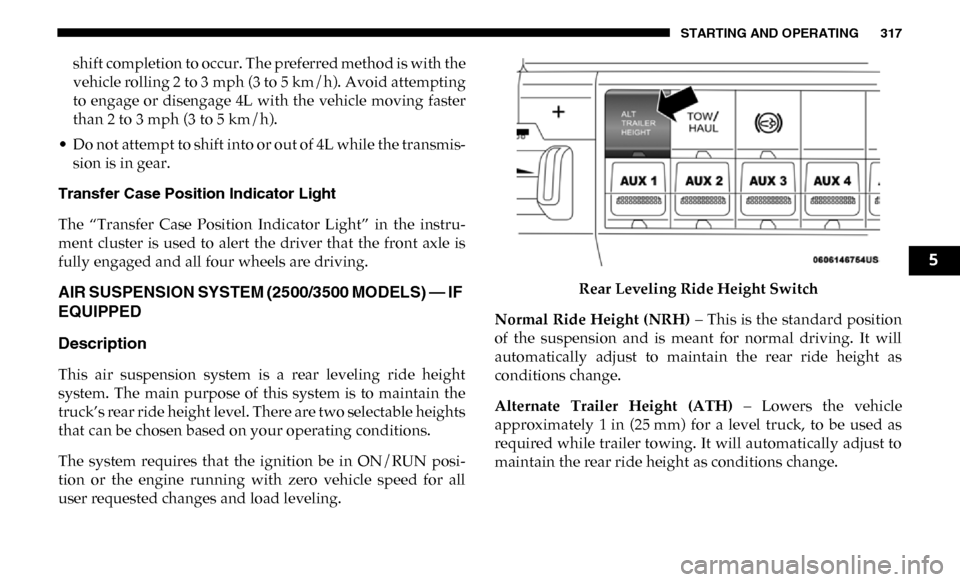
This air suspension system is a rear leveling ride height
system. The main purpose of this system is to maintain the
truck’s rear ride height level. There are two selectable heights
that can be chosen based on your operating conditions.
The system requires that the ignition be in ON/RUN posi -
tion or the engine running with zero vehicle speed for all
user requested changes and load leveling. Rear Leveling Ride Height Switch
Normal Ride Height (NRH) – This is the standard position
of the suspension and is meant for normal driving. It will
automatically adjust to maintain the rear ride height as
conditions change.
Alternate Trailer Height (ATH) – Lowers the vehicle
approximately 1 in (25 mm) for a level truck, to be used as
required while trailer towing. It will automatically adjust to
maintain the rear ride height as conditions change.
5
Page 323 of 696

STARTING AND OPERATING 321
(Continued)
during low-speed, extreme off-road situations where one
wheel is likely to not be in contact with the ground. It is not
recommended to drive the vehicle with the differentials
locked on pavement due to the reduced ability to turn and
speed limitations.Axle Lock Selector The locking axles are controlled by the axle locker switch.
The switch has three positions:
• AXLE UNLOCK – the front and rear axles are unlocked
• REAR LOCK – the rear axle is locked
• FRONT/REAR LOCK – the front and rear axles are locked
Under normal driving conditions, the switch should be left
in the AXLE UNLOCK position.
NOTE:
Even when the axles are in the AXLE UNLOCK position, the
limited slip differential in the rear axle still provides torque
biasing capability for moderate low traction environments.
During the command to lock the axle, the indicator light will
flash until the axle is locked. After the lock command has
been successfully executed, the light will remain on solid.
CAUTION!
• Do not lock the front or rear axle on hard surfaced roads. The ability to steer the vehicle is reduced and
damage to the drivetrain may occur when the axles are
locked on hard surfaced roads.
• Do not try to lock the rear axle if the vehicle is stuck andthe tires are spinning. You can damage drivetrain
components. Lock the rear axle before attempting situ -
ations or navigating terrain, which could possibly
cause the vehicle to become stuck. CAUTION!
(Continued)
5