light Ram 2500 2019 Owner's Manual
[x] Cancel search | Manufacturer: RAM, Model Year: 2019, Model line: 2500, Model: Ram 2500 2019Pages: 696, PDF Size: 13.89 MB
Page 359 of 696

STARTING AND OPERATING 357
On steep hills, a greater speed loss or gain may occur so it
may be preferable to drive without Speed Control.
To Resume Speed
To resume a previously set speed, push the RES (+) button
and release. Resume can be used at any speed above 20 mph
(32 km/h).
To Deactivate
A soft tap on the brake pedal, pushing the CANCEL button,
or normal brake pressure while slowing the vehicle will
deactivate the Speed Control without erasing the set speed
from memory.
Pushing the On/Off button, or returning the ignition to OFF,
erases the set speed from memory.
ADAPTIVE CRUISE CONTROL (ACC) — IF EQUIPPED
Adaptive Cruise Control (ACC) increases the driving conve-
nience provided by cruise control while traveling on high -
ways and major roadways. However, it is not a safety system
and not designed to prevent collisions. Speed Control func-
tion performs differently. Please refer to the proper section
within this chapter.
ACC will allow you to keep cruise control engaged in light
to moderate traffic conditions without the constant need to
reset your cruise control. ACC utilizes a radar sensor and a
forward facing camera designed to detect a vehicle directly
ahead of you.
NOTE:
• If the sensor does not detect a vehicle ahead of you, ACC will maintain a fixed set speed.
• If the ACC sensor detects a vehicle ahead, ACC will apply limited braking or accelerate (not to exceed the original set
speed) automatically to maintain a preset following
distance, while matching the speed of the vehicle ahead.
WARNING!
Speed Control can be dangerous where the system
cannot maintain a constant speed. Your vehicle could go
too fast for the conditions, and you could lose control
and have an accident. Do not use Speed Control in heavy
traffic or on roads that are winding, icy, snow-covered or
slippery.
5
Page 366 of 696
364 STARTING AND OPERATING
NOTE:
• When you override and push the RES (+) button or SET (-)buttons, the new set speed will be the current speed of the
vehicle.
• When you use the SET (-) button to decelerate, if the engine’s braking power does not slow the vehicle suffi -
ciently to reach the set speed, the brake system will auto -
matically slow the vehicle.
• The ACC system decelerates the vehicle to a full stop when following a target vehicle. If an ACC host vehicle follows a
target vehicle to a standstill, after two seconds the driver
will either have to push the RES (+) button, or apply the
accelerator pedal to reengage the ACC to the existing set
speed.
• The ACC system maintains set speed when driving up hill and down hill. However, a slight speed change on
moderate hills is normal. In addition, downshifting may
occur while climbing uphill or descending downhill. This
is normal operation and necessary to maintain set speed.
When driving up hill and down hill, the ACC system will
cancel if the braking temperature exceeds normal range
(overheated).Setting The Following Distance In ACC
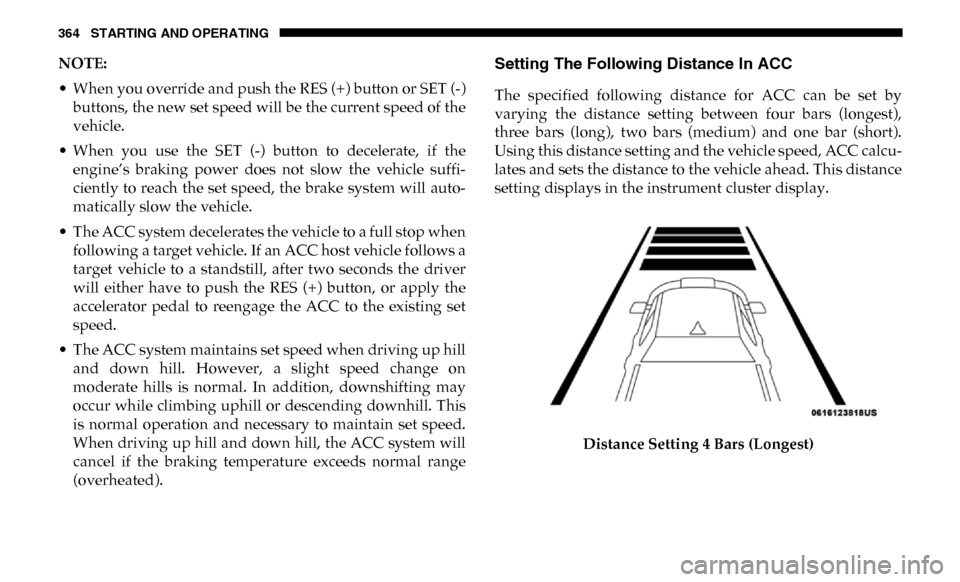
The specified following distance for ACC can be set by
varying the distance setting between four bars (longest),
three bars (long), two bars (medium) and one bar (short).
Using this distance setting and the vehicle speed, ACC calcu-
lates and sets the distance to the vehicle ahead. This distance
setting displays in the instrument cluster display.
Distance Setting 4 Bars (Longest)
Page 368 of 696

366 STARTING AND OPERATING
Distance Setting 1 Bar (Short)
The system automatically defaults to the longest distance
setting. To decrease the distance setting, push the Distance
Button and release. Each time the button is pushed, the
distance setting decreases by one bar. Once the shortest
setting is reached, if the button is pushed again it will reset
to the default setting (longest).
If there is no vehicle ahead, the vehicle will maintain the set
speed. If a slower moving vehicle is detected in the same
lane, the instrument cluster displays the “Sensed Vehicle
Indicator” icon, and the system adjusts vehicle speed auto -
matically to maintain the distance setting, regardless of the
set speed. The vehicle will then maintain the set distance until:
• The vehicle ahead accelerates to a speed above the set
speed.
• The vehicle ahead moves out of your lane or view of the sensor.
• The distance setting is changed.
• The system disengages. (Refer to the information on ACC Activation).
The maximum braking applied by ACC is limited; however,
the driver can always apply the brakes manually, if neces -
sary.
NOTE:
The brake lights will illuminate whenever the ACC system
applies the brakes.
A Proximity Warning will alert the driver if ACC predicts
that its maximum braking level is not sufficient to maintain
the set distance. If this occurs, a visual alert “BRAKE” will
flash in the instrument cluster display and a chime will
sound while ACC continues to apply its maximum braking
capacity.
Page 378 of 696
376 STARTING AND OPERATING
Normal (Fixed Speed) Cruise Control Mode
In addition to Adaptive Cruise Control mode, a Normal
(Fixed Speed) Cruise Control mode is available for cruising
at fixed speeds. The Normal (Fixed Speed) Cruise Control
mode is designed to maintain a set cruising speed without
requiring the driver to operate the accelerator. Speed Control
can only be operated if the vehicle speed is above 20 mph
(32 km/h).
To change between the different control modes, push the
Adaptive Cruise Control (ACC) on/off button which turns
the ACC on and the Normal (Fixed Speed) Cruise Control
off. Pushing of the Normal (Fixed Speed) Cruise Control on/
off button will result in turning on (changing to) the Normal
(Fixed Speed) Cruise Control mode.To Set A Desired Speed
Turn the Normal (Fixed Speed) Cruise Control on.
When the vehicle has reached the desired speed,
push the RES (+) or SET (-) button and release.
Release the accelerator and the vehicle will operate at the
selected speed. Once a speed has been set a message
“CRUISE CONTROL SET TO MPH (km/h)” will appear
indicating what speed was set. This light will turn on when
the system is turned on via the on/off control. It turns green
when the cruise control is set.
To Vary The Speed Setting
To Increase Speed
When the Normal (Fixed Speed) Cruise Control is set, you
can increase speed by pushing the RES (+) button.
The driver's preferred units can be selected through the
instrument panel settings. Refer to ”Instrument Cluster
Display” in “Getting To Know Your Instrument Panel” for
more information. The speed increment shown is dependant
on the speed of U.S. (mph) or Metric (km/h) units:
WARNING!
In the Normal (Fixed Speed) Cruise Control mode, the
system will not react to vehicles ahead. In addition, the
proximity warning does not activate and no alarm will
sound even if you are too close to the vehicle ahead since
neither the presence of the vehicle ahead nor the
vehicle-to-vehicle distance is detected. Be sure to
maintain a safe distance between your vehicle and the
vehicle ahead. Always be aware which mode is selected.
Page 411 of 696

STARTING AND OPERATING 409
NOTE:
• When the fuel nozzle “clicks” or shuts off, the fuel tank isfull.
• Tighten the gas cap until you hear a “clicking” sound. This is an indication that the gas cap is tightened properly. The
MIL in the instrument cluster may turn on if the gas cap is
not secured properly. Make sure that the gas cap is tight -
ened each time the vehicle is refueled.WARNING!
• Never have any smoking materials lit in or near the vehicle when the gas cap is removed or the tank is
being filled.
• Never add fuel to the vehicle when the engine is running.
• A fire may result if gasoline is pumped into a portable container that is inside of a vehicle. You could be
burned. Always place gas containers on the ground
while filling.
CAUTION!
• Damage to the fuel system or emissions control system could result from using an improper fuel tank filler
tube cap.
• A poorly fitting fuel filler cap could let impurities into the fuel system.
• A poorly fitting fuel filler cap may cause the “Malfunc -
tion Indicator Light (MIL)” to turn on.
• To avoid fuel spillage and overfilling, do not “top off” the fuel tank after filling. When the fuel nozzle “clicks”
or shuts off, the fuel tank is full.
WARNING!
• Always place container on the ground before filling.
• Keep the pump nozzle in contact with the container when you are filling it.
• Use only approved containers for flammable liquid.
• Do not leave container unattended while filling.
• A static electric charge could cause a spark and fire hazard.
5
Page 417 of 696
STARTING AND OPERATING 415
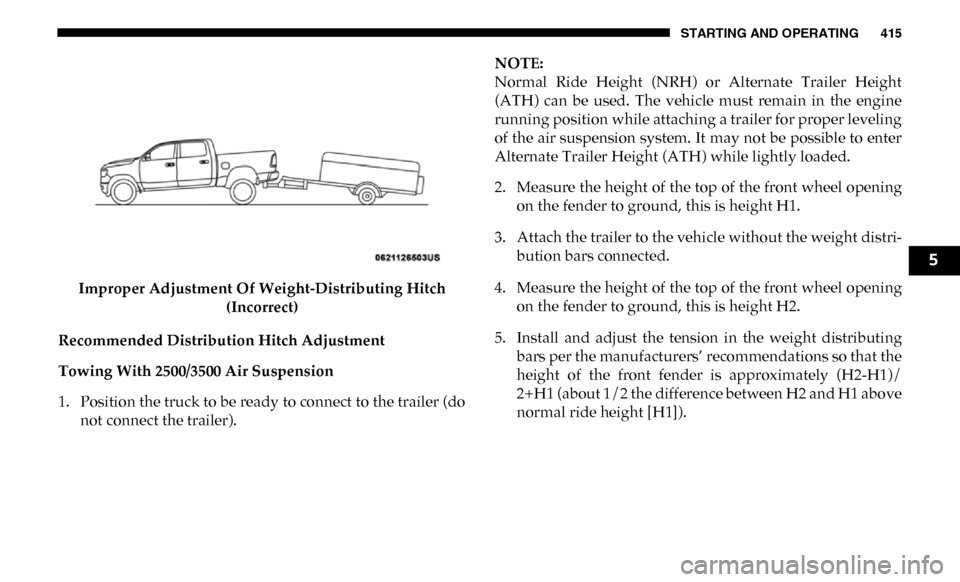
Improper Adjustment Of Weight-Distributing Hitch (Incorrect)
Recommended Distribution Hitch Adjustment
Towing With 2500/3500 Air Suspension
1. Position the truck to be ready to connect to the trailer (do not connect the trailer). NOTE:
Normal Ride Height (NRH) or Alternate Trailer Height
(ATH) can be used. The vehicle must remain in the engine
running position while attaching a trailer for proper leveling
of the air suspension system. It may not be possible to enter
Alternate Trailer Height (ATH) while lightly loaded.
2. Measure the height of the top of the front wheel opening
on the fender to ground, this is height H1.
3. Attach the trailer to the vehicle without the weight distri -
bution bars connected.
4. Measure the height of the top of the front wheel opening on the fender to ground, this is height H2.
5. Install and adjust the tension in the weight distributing bars per the manufacturers’ recommendations so that the
height of the front fender is approximately (H2-H1)/
2+H1 (about 1/2 the difference between H2 and H1 above
normal ride height [H1]).
5
Page 424 of 696

422 STARTING AND OPERATING
The trailer and the vehicle’s stop lamps will come on when
braking normally with the vehicle brake pedal. Only the
trailer stop lamps will come on when the manual brake
control lever is applied.
Trailer Brake Status Indicator Light
This light indicates the trailer electrical connection status.
If no electrical connection is detected after the ignition is
turned on, pushing the GAIN adjustment button or sliding
the manual brake control lever will display the GAIN setting
for 10 seconds and the “Trailer Brake Status Indicator Light”
will not be displayed.
If a fault is detected in the trailer wiring or the Integrated
Trailer Brake Module (ITBM), the “Trailer Brake Status Indi-
cator Light” will flash.
GAIN Adjustment Buttons (+/-)
Pushing these buttons will adjust the brake control power
output to the trailer brakes in 0.5 increments. The GAIN
setting can be increased to a maximum of 10 or decreased to
a minimum of 0 (no trailer braking). GAIN
The GAIN setting is used to set the trailer brake control for
the specific towing condition and should be changed as
towing conditions change. Changes to towing conditions
include trailer load, vehicle load, road conditions and
weather.
Adjusting GAIN
NOTE:
This should only be performed in a traffic free environment
at speeds of approximately 20–25 mph (30–40 km/h).
1. Make sure the trailer brakes are in good working condi
-
tion, functioning normally and properly adjusted. See
your trailer dealer if necessary.
2. Hook up the trailer and make the electrical connections according to the trailer manufacturer's instructions.
3. When a trailer with electric/EOH brakes is plugged in, the trailer connected message should appear in the
instrument cluster display (if the connection is not recog -
nized by the ITBM, braking functions will not be avail -
able), the GAIN setting will illuminate and the correct
type of trailer must be selected from the instrument
cluster display options.
Page 425 of 696

STARTING AND OPERATING 423
4. Push the UP or DOWN button on the steering wheel until“TRAILER TOW” appears on the screen.
5. Push the RIGHT arrow on the steering wheel to enter “TRAILER TOW”.
6. Push the UP or DOWN buttons until the Trailer Brake Type appears on the screen.
7. Push the RIGHT arrow and then push the UP or DOWN buttons until the proper Trailer Brake Type appears on
the screen. 8. In a traffic-free environment, tow the trailer on a dry,
level surface at a speed of 20–25 mph (30–40 km/h) and
squeeze the manual brake control lever completely.
9. If the trailer wheels lockup (indicated by squealing tires), reduce the GAIN setting; if the trailer wheels turn freely,
increase the GAIN setting.
Repeat steps 8 and 9 until the GAIN setting is at a point just
below trailer wheel lockup. If towing a heavier trailer, trailer
wheel lockup may not be attainable even with the maximum
GAIN setting of 10.
* The suggested selection depends and may change
depending on the customer preferences for braking perfor -
mance. Condition of the trailer brakes, driving and road state
may also affect the selection. Light Electric Heavy Electric
Light EOHHeavy EOH
Type of Trailer Brakes Electric Trailer Brakes Electric Trailer Brakes Electric over Hydraulic
Trailer BrakesElectric over Hydraulic
Trailer Brakes
Load *Under 10,000 lbs *Above 10,000 lbs *Under 10,000 lbs *Above 10,000 lbs
5
Page 426 of 696

424 STARTING AND OPERATING
Display Messages
The trailer brake control interacts with the instrument cluster
display. Display messages, along with a single chime, will be
displayed when a malfunction is determined in the trailer
connection, trailer brake control, or on the trailer. Refer to
“Instrument Cluster Display” in “Getting To Know Your
Instrument Panel” for further information.NOTE:
• An aftermarket controller may be available for use with
trailers with air or electric-over-hydraulic trailer brake
systems. To determine the type of brakes on your trailer
and the availability of controllers, check with your trailer
manufacturer or dealer.
• Removal of the ITBM will cause errors and it may cause damage to the electrical system and electronic modules of
the vehicle. See your authorized dealer if an aftermarket
module is to be installed.
Towing Requirements — Trailer Lights And Wiring
Whenever you pull a trailer, regardless of the trailer size,
stoplights and turn signals on the trailer are required for
motoring safety.
The Trailer Tow Package may include a four- and seven-pin
wiring harness. Use a factory approved trailer harness and
connector.
NOTE:
Do not cut or splice wiring into the vehicle’s wiring harness.
The electrical connections are all complete to the vehicle but
you must mate the harness to a trailer connector. Refer to the
following illustrations.
WARNING!
Connecting a trailer that is not compatible with the
ITBM system may result in reduced or complete loss of
trailer braking. There may be a increase in stopping
distance or trailer instability which could result in
personal injury.
CAUTION!
Connecting a trailer that is not compatible with the
ITBM system may result in reduced or complete loss of
trailer braking. There may be a increase in stopping
distance or trailer instability which could result in
damage to your vehicle, trailer, or other property.
Page 428 of 696

426 STARTING AND OPERATING
Towing Tips
Before setting out on a trip, practice turning, stopping, and
backing up the trailer in an area located away from heavy
traffic.
Automatic Transmission
The DRIVE range can be selected when towing. The trans-
mission controls include a drive strategy to avoid frequent
shifting when towing. However, if frequent shifting does
occur while in DRIVE, select TOW/HAUL mode or select a
lower gear range (using the Electronic Range Select (ERS)
shift control).
NOTE:
Using TOW/HAUL mode or selecting a lower gear range
(using the ERS shift control) while operating the vehicle
under heavy loading conditions will improve performance
and extend transmission life by reducing excessive shifting
and heat build up. This action will also provide better engine
braking.
Tow/Haul Mode
To reduce potential for automatic transmission overheating,
activate TOW/HAUL mode when driving in hilly areas, or select a lower gear range (using the Electronic Range Select
(ERS) shift control) on more severe grades.
Speed Control — If Equipped
• Do not use on hilly terrain or with heavy loads.
• When using the speed control, if you experience speed
drops greater than 10 mph (16 km/h), disengage until you
can get back to cruising speed.
• Use speed control in flat terrain and with light loads to maximize fuel efficiency.
Cooling System
To reduce potential for engine and transmission over -
heating, take the following actions:
City Driving
• In city traffic — while stopped, place the transmission in NEUTRAL, but do not increase engine idle speed.
Highway Driving
• Reduce speed.
• Temporarily turn off air conditioning.