lock Ram 2500 2019 Owner's Manual
[x] Cancel search | Manufacturer: RAM, Model Year: 2019, Model line: 2500, Model: Ram 2500 2019Pages: 696, PDF Size: 13.89 MB
Page 305 of 696

STARTING AND OPERATING 303
(Continued)
PARK (P)
This range supplements the parking brake by locking the
transmission. The engine can be started in this range. Never
attempt to use PARK while the vehicle is in motion. Apply
the parking brake when exiting the vehicle in this range.
When parking on a level surface, you may shift the transmis-
sion into PARK first, and then apply the parking brake.
When parking on a hill, apply the parking brake before
shifting the transmission to PARK. As an added precaution,
turn the front wheels toward the curb on a downhill grade
and away from the curb on an uphill grade.
NOTE:
On four-wheel drive vehicles be sure that the transfer case is
in a drive position.
When exiting the vehicle, always:
• Apply the parking brake.
• Shift the transmission into PARK.
• Turn the engine OFF.
• Remove the key fob.WARNING!
• Never use the PARK position as a substitute for the parking brake. Always apply the parking brake fully
when exiting the vehicle to guard against vehicle move -
ment and possible injury or damage.
• Your vehicle could move and injure you and others if it is not in PARK. Check by trying to move the transmis -
sion gear selector out of PARK with the brake pedal
released. Make sure the transmission is in PARK before
exiting the vehicle.
• The transmission may not engage PARK if the vehicle is moving. Always bring the vehicle to a complete stop
before shifting to PARK, and verify that the transmis -
sion gear position indicator solidly indicates PARK (P)
without blinking. Ensure that the vehicle is completely
stopped, and the PARK position is properly indicated,
before exiting the vehicle.
• It is dangerous to shift out of PARK or NEUTRAL if the engine speed is higher than idle speed. If your foot is
not firmly pressing the brake pedal, the vehicle could
accelerate quickly forward or in reverse. You could lose
control of the vehicle and hit someone or something.
Only shift into gear when the engine is idling normally
and your foot is firmly pressing the brake pedal.
5
Page 306 of 696

304 STARTING AND OPERATING
The following indicators should be used to ensure that you
have properly engaged the transmission into the PARK posi-
tion:
• Look at the transmission gear position display and verify that it indicates the PARK position (P), and is not blinking.
• With brake pedal released, verify that the gear selector will not move out of PARK.
REVERSE (R)
This range is for moving the vehicle backward. Shift into
REVERSE only after the vehicle has come to a complete stop.
• Unintended movement of a vehicle could injure those
in or near the vehicle. As with all vehicles, you should
never exit a vehicle while the engine is running. Before
exiting a vehicle, always come to a complete stop, then
apply the parking brake, shift the transmission into
PARK, and turn the ignition OFF. When the ignition is
in the OFF mode, the transmission is locked in PARK,
securing the vehicle against unwanted movement.
• When exiting the vehicle, always make sure the igni -
tion is in the OFF mode, remove the key fob from the
vehicle, and lock the vehicle.
• Never leave children alone in a vehicle, or with access to an unlocked vehicle. Allowing children to be in a
vehicle unattended is dangerous for a number of
reasons. A child or others could be seriously or fatally
injured. Children should be warned not to touch the
parking brake, brake pedal or the transmission gear
selector.
• Do not leave the key fob in or near the vehicle (or in a location accessible to children), and do not leave the
ignition in the ACC or ON/RUN mode. A child could
operate power windows, other controls, or move the
vehicle.
WARNING! (Continued)CAUTION!
• DO NOT race the engine when shifting from PARK or NEUTRAL into another gear range, as this can damage
the drivetrain.
• Before moving the transmission gear selector out of PARK, you must start the engine, and also press the
brake pedal. Otherwise, damage to the gear selector
could result.
Page 316 of 696

314 STARTING AND OPERATING
Manually Shifted Transfer Case — If Equipped
The transfer case provides four mode positions:
• Two-Wheel Drive High Range (2H)
• Four-Wheel Drive Lock High Range (4H)
• Neutral (N)
• Four-Wheel Drive Low Range (4L)
For additional information on the appropriate use of each
transfer case mode position, see the information below:
2H
Two-Wheel Drive High Range — This range is for normal
street and highway driving on dry, hard surfaced roads.
4H
Four-Wheel Drive Lock High Range — This range locks the
front and rear driveshafts together forcing the front and rear
wheels to rotate at the same speed. Additional traction for
loose, slippery road surfaces only.
NEUTRAL (N)
Neutral — This range disengages both the front and rear
driveshafts from the powertrain. To be used for flat towingbehind another vehicle. Refer to “Recreational Towing” in
“Starting And Operating” for further information.
4L
Four-Wheel Drive Low Range — This range locks the front
and rear driveshafts together forcing the front and rear
wheels to rotate at the same speed. Additional traction and
maximum pulling power for loose, slippery road surfaces
only. Do not exceed 25 mph (40 km/h).
This transfer case is intended to be driven in the 2H position
for normal street and highway conditions such as dry, hard
surfaced roads.
When additional traction is required, the 4H and 4L posi -
tions can be used to lock the front and rear driveshafts
together and force the front and rear wheels to rotate at the
same speed. This is accomplished by simply moving the gear
selector to the desired positions once the appropriate speed
and gear requirements are met, refer to “Shifting Procedure
– Manually Shifted Transfer Case” in this section for further
information.
The 4H and 4L positions are intended for loose, slippery road
surfaces only. Driving in the 4H and 4L positions on dry,
hard surfaced roads may cause increased tire wear and
damage to the driveline components.
Page 317 of 696

STARTING AND OPERATING 315
The “Transfer Case Position Indicator Light” in the instru-
ment cluster will alert the driver that the vehicle is in
four-wheel drive and that the front and rear driveshafts are
locked together. This light will illuminate when the transfer
case is shifted into either the 4H or 4L position. There is no
light for the 2H or NEUTRAL positions on some models.
When operating your vehicle in 4L, the engine speed is
approximately three times that of the 2H or 4H positions at a
given road speed. Take care not to overspeed the engine and
do not exceed 25 mph (40 km/h).
Proper operation of four-wheel drive vehicles depends on
tires of equal size, type and circumference on each wheel.
Any difference will adversely affect shifting and can cause
damage to the drivetrain.
NOTE:
Do not attempt to make a shift while only the front or rear
wheels are spinning, as this can cause damage to driveline
components.
Because four-wheel drive provides improved traction, there
is a tendency to exceed safe turning and stopping speeds. Do
not go faster than road conditions permit.NOTE:
Delayed shifts out of four-wheel drive may be experienced
due to uneven tire wear, low or uneven tire pressures, exces
-
sive vehicle loading, or cold temperatures.
Two-Wheel Drive High Range (2H)
Rear-Wheel Drive High Range — This range is for normal
street and highway driving on dry hard surfaced roads.
Four-Wheel Drive High Range (4H)
Four-Wheel Drive High Range — This range locks the front
and rear driveshafts together forcing the front and rear
wheels to rotate at the same speed. Additional traction for
loose, slippery road surfaces only.
WARNING!
You or others could be injured or killed if you leave the
vehicle unattended with the transfer case in the
NEUTRAL position without first fully engaging the
parking brake. The transfer case NEUTRAL position
disengages both the front and rear drive shafts from the
powertrain and will allow the vehicle to roll, even if the
transmission is in PARK. The parking brake should
always be applied when the driver is not in the vehicle.
5
Page 318 of 696

316 STARTING AND OPERATING
Neutral (N)
Neutral — This range disengages the front and rear drivesh-
afts from the powertrain. To be used for flat towing behind
another vehicle. Refer to “Recreational Towing” in “Starting
And Operating” for further information.
Four-Wheel Drive Low Range (4L)
Four-Wheel Drive Low Range — This range locks the front
and rear driveshafts together forcing the front and rear
wheels to rotate at the same speed. Additional traction and
maximum pulling power for loose, slippery road surfaces
only. Do not exceed 25 mph (40 km/h).
Shifting Procedure — Manually Shifted Transfer Case
2H To 4H
Shifting between 2H and 4H can be made with the vehicle
stopped or in motion. If the vehicle is in motion, shifts can be
made up to 55 mph (88 km/h). With the vehicle in motion,
the transfer case will engage/disengage faster if you
momentarily release the accelerator pedal after completing the shift. Apply a constant force when shifting the transfer
case lever.
2H Or 4H To 4L
NOTE:
When shifting into or out of 4L some gear noise may be
heard. This noise is normal and is not detrimental to the
vehicle or occupants.
With the vehicle rolling at 2 to 3 mph (3 to 5 km/h), shift the
transmission into NEUTRAL. While the vehicle is coasting at
2 to 3 mph (3 to 5 km/h), shift the transfer case lever firmly
to the desired position. Do not pause in transfer case
NEUTRAL.
NOTE:
• Pausing in transfer case NEUTRAL in vehicles equipped
with an automatic transmission may require shutting the
engine OFF to avoid gear clash while completing the shift.
If difficulty occurs, shift the transmission into NEUTRAL,
hold your foot on the brake, and turn the engine OFF.
Complete the range shift to the desired mode.
• Shifting into or out of 4L is possible with the vehicle completely stopped, however difficulty may occur due to
the mating clutch teeth not being properly aligned. Several
attempts may be required for clutch teeth alignment and
CAUTION!
Do not use 4L (Low) range when operating the vehicle on
dry pavement. Driveline hardware damage can result.
Page 322 of 696

320 STARTING AND OPERATING
Instrument Cluster Display Messages
When the appropriate conditions exist, a message will
appear in the instrument cluster display. Refer to “Instru-
ment Cluster Display” in “Getting To Know Your Instru-
ment Panel” for further information.
An audible chime will be heard whenever a system error has
been detected.
See your authorized dealer for system service if normal oper-
ation does not resume.
Operation
Pushing the Alternate Trailer Height (ATH) button once
while at Normal Ride Height (NRH), will lower the vehicle
to Alternate Trailer Height (ATH) and will illuminate the
LED.
NOTE:
The LED will continuously blink until vehicle Alternate
Trailer Height (ATH) has been achieved and the LED will
turn on.
Pushing the Alternate Trailer Height (ATH) again will raise
the vehicle to Normal Ride Height (NRH). NOTE:
The LED will continuously blink until Normal Ride Height
(NRH) has been achieved and the LED will turn off.
• Transport Mode – No indicator lamps will be illuminated.
Transport Mode is disabled by driving the vehicle, or dese -
lecting the mode via the interface.
• Tire/Jack Mode – No indicator lamps will be illuminated. Tire/Jack Mode is disabled by driving the vehicle, or by
deselecting the mode via the interface.
• Wheel Alignment Mode – No indicator lamps will be illu -
minated. Wheel Alignment Mode is disabled by driving
the vehicle, or by deselecting the mode via the interface.
• Bed Lowering Mode – No indicator lamps will be illumi -
nated. Bed Lowering Mode is disabled by driving the
vehicle, or deselecting the mode via the interface.
AXLE LOCKER SYSTEM — POWER WAGON
MODELS ONLY (IF EQUIPPED)
This vehicle is equipped with electronically locking front
and rear differentials. These differentials, when engaged,
mechanically lock together the axle shafts forcing the wheels
to spin at an equal rate. This allows the vehicle to maintain
its momentum and prevents it from becoming stuck. The
locking front and rear differentials should only be engaged
Page 323 of 696

STARTING AND OPERATING 321
(Continued)
during low-speed, extreme off-road situations where one
wheel is likely to not be in contact with the ground. It is not
recommended to drive the vehicle with the differentials
locked on pavement due to the reduced ability to turn and
speed limitations.Axle Lock Selector The locking axles are controlled by the axle locker switch.
The switch has three positions:
• AXLE UNLOCK – the front and rear axles are unlocked
• REAR LOCK – the rear axle is locked
• FRONT/REAR LOCK – the front and rear axles are locked
Under normal driving conditions, the switch should be left
in the AXLE UNLOCK position.
NOTE:
Even when the axles are in the AXLE UNLOCK position, the
limited slip differential in the rear axle still provides torque
biasing capability for moderate low traction environments.
During the command to lock the axle, the indicator light will
flash until the axle is locked. After the lock command has
been successfully executed, the light will remain on solid.
CAUTION!
• Do not lock the front or rear axle on hard surfaced roads. The ability to steer the vehicle is reduced and
damage to the drivetrain may occur when the axles are
locked on hard surfaced roads.
• Do not try to lock the rear axle if the vehicle is stuck andthe tires are spinning. You can damage drivetrain
components. Lock the rear axle before attempting situ -
ations or navigating terrain, which could possibly
cause the vehicle to become stuck. CAUTION!
(Continued)
5
Page 324 of 696

322 STARTING AND OPERATING
To lock the rear axle, place the vehicle in 4LO. Refer to “Four
Wheel Drive Operation” in “Starting And Operating” for
further information. Push the REAR LOCK button while
traveling less than 3 mph (5 km/h). The RR indicator light
will remain on when the rear axle is locked.
NOTE:
Left to right wheel speed difference may be necessary to
allow the axle to fully lock. If the indicator light is flashing
after placing the switch in the REAR LOCK or FRONT/
REAR LOCK position, drive the vehicle in a turn or on loose
gravel to expedite the locking action.
To lock the front axle; push the FRONT/REAR LOCK button
while traveling less than 3 mph (5 km/h). The indicator light
will be solid when the front axle is locked.
NOTE:
The rear axle must be locked before the front axle will lock. To unlock the front axle; push the REAR LOCK button. The
FRONT/REAR LOCK indicator light will go out when the
axle is unlocked.
NOTE:
The axle lockers could be torque locked due to side to side
loads on the axle. Driving slowly while turning the steering
wheel from a left hand turn to a right hand turn or driving in
REVERSE for a short distance may be required to release the
torque lock and unlock the axles.
To unlock the rear axle; push the AXLE UNLOCK button.
The REAR LOCK indicator light will go out when the rear
axle is unlocked.
STABILIZER/SWAY BAR SYSTEM — POWER WAGON
ONLY
Your vehicle is equipped with an electronic disconnecting
stabilizer/sway bar. This system allows greater front
suspension travel in off-road situations.
Due to the use of taller springs, this vehicle has an increased
ride height of approximately 1.9 in (48.3 mm) in the front
and 1.5 in (38.1 mm) in the rear. A major advantage to
increasing ride height is the positive effect it has on
approach/departure and break over angles.
WARNING!
Do not use the locked axle position for normal driving. A
locked front axle is intended for off-road driving only.
Locking the front axle during on-road driving will
reduce the steering ability. This could cause a collision
and you may be seriously injured.
Page 325 of 696
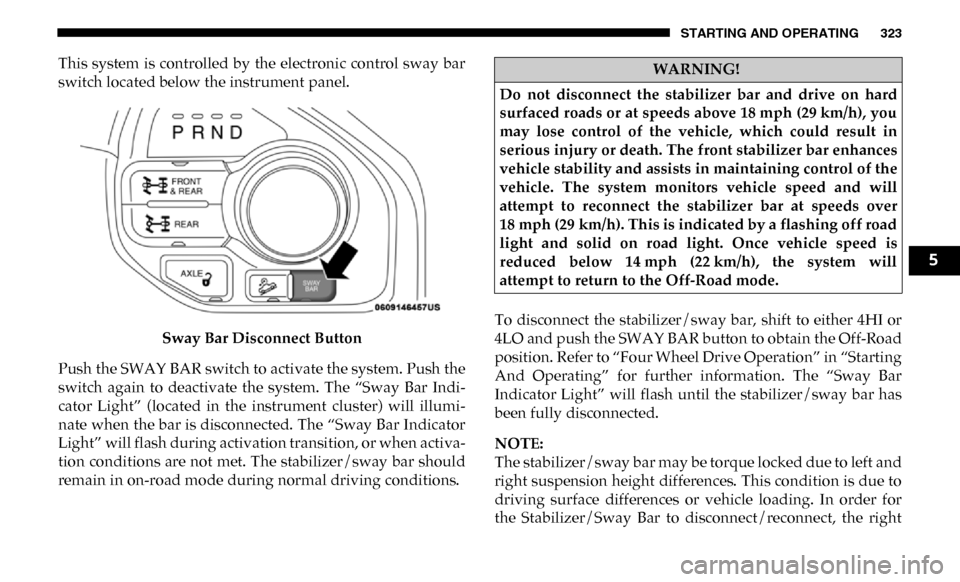
STARTING AND OPERATING 323
This system is controlled by the electronic control sway bar
switch located below the instrument panel.Sway Bar Disconnect Button
Push the SWAY BAR switch to activate the system. Push the
switch again to deactivate the system. The “Sway Bar Indi -
cator Light” (located in the instrument cluster) will illumi -
nate when the bar is disconnected. The “Sway Bar Indicator
Light” will flash during activation transition, or when activa -
tion conditions are not met. The stabilizer/sway bar should
remain in on-road mode during normal driving conditions. To disconnect the stabilizer/sway bar, shift to either 4HI or
4LO and push the SWAY BAR button to obtain the Off-Road
position. Refer to “Four Wheel Drive Operation” in “Starting
And Operating” for further information. The “Sway Bar
Indicator Light” will flash until the stabilizer/sway bar has
been fully disconnected.
NOTE:
The stabilizer/sway bar may be torque locked due to left and
right suspension height differences. This condition is due to
driving surface differences or vehicle loading. In order for
the Stabilizer/Sway Bar to disconnect/reconnect, the rightWARNING!
Do not disconnect the stabilizer bar and drive on hard
surfaced roads or at speeds above 18 mph (29 km/h), you
may lose control of the vehicle, which could result in
serious injury or death. The front stabilizer bar enhances
vehicle stability and assists in maintaining control of the
vehicle. The system monitors vehicle speed and will
attempt to reconnect the stabilizer bar at speeds over
18 mph (29 km/h). This is indicated by a flashing off road
light and solid on road light. Once vehicle speed is
reduced below 14 mph (22 km/h), the system will
attempt to return to the Off-Road mode.
5
Page 332 of 696

330 STARTING AND OPERATING
provide enough traction to complete the climb. If you do
not make it to the top, place the vehicle in REVERSE and
back straight down the grade using engine resistance
along with the vehicle brakes.
• Driving Down Hill – Before driving down a steep hill you
need to determine if it is too steep for a safe descent. What
is the surface traction? Is the grade too steep to maintain a
slow controlled descent? Are there obstacles? Is it a
straight descent? Is there plenty of distance at the base of
the hill to regain control if the vehicle descends too fast? If
you feel confident in your ability to proceed then make
sure you are in 4LO (Low Range) with the transmission in
first gear (manually select first gear on automatic transmis -
sions) and proceed with caution. Allow engine braking to
control the descent and apply your brakes if necessary, but
do not allow the tires to lock. •
Driving Across An Incline – If at all possible avoid
driving across an incline. If it is necessary, know your
vehicle's abilities. Driving across an incline places more
weight on the down hill wheels, which increases the possi -
bilities of a down hill slide or rollover. Make sure the
surface has good traction with firm and stable soils. If
possible transverse the incline at an angle heading slightly
up or down.
• If You Stall Or Begin To Lose Headway – If you stall or
begin to lose headway while climbing a steep hill, allow
your vehicle to come to a stop and immediately apply the
brake. Restart the engine and shift into REVERSE. Back
slowly down the hill allowing the compression braking of
the engine and transmission to help regulate your speed. If
WARNING!
Never attempt to climb a hill at an angle or turn around
on a steep grade. Driving across an incline increases the
risk of a roll over, which may result in severe injury or
death.
WARNING!
Do not descend a steep grade in NEUTRAL. Use vehicle
brakes in conjunction with engine braking. Descending
a grade too fast could cause you to lose control and be
seriously injured or killed.
WARNING!
Driving across an incline increases the risk of a rollover,
which may result in severe injury.