lock Ram 2500 2019 Owner's Manual
[x] Cancel search | Manufacturer: RAM, Model Year: 2019, Model line: 2500, Model: Ram 2500 2019Pages: 696, PDF Size: 13.89 MB
Page 484 of 696

482 IN CASE OF EMERGENCY
Dual Rear Wheel Jack Placement
6. Finish tightening the lug nuts. Push down on the lug wrench while at the end of the handle for increased
leverage. Tighten the lug nuts in a star pattern until each
nut has been tightened twice. For the correct lug nut
torque refer to “Torque Specifications” in “Technical
Specifications”. If in doubt about the correct tightness,
have them checked with a torque wrench by an autho -
rized dealer or service station. 7. Install the wheel center cap and remove the wheel blocks.
Do not install chrome or aluminum wheel center caps on
the spare wheel. This may result in cap damage.
8. Lower the jack to its fully closed position. Stow the replaced tire, jack, and tools as previously described.
NOTE:
The bottle jack will not lower by turning the dial (thumb -
wheel) by hand, it may be necessary to use the jack driver in
order to lower the jack
9. Adjust the tire pressure when possible.
NOTE:
Do not oil wheel studs. For chrome wheels, do not substitute
with chrome plated lug nuts.
WARNING!
A loose tire or jack thrown forward in a collision or hard
stop, could endanger the occupants of the vehicle.
Always stow the jack parts and the spare tire in the
places provided.
Page 487 of 696

IN CASE OF EMERGENCY 485
4. Rotate the lug wrench handle clockwise until the wheel isdrawn into place against the underside of the vehicle.
Continue to rotate until you feel the winch mechanism
slip, or click three or four times. It cannot be overtight -
ened. Push against the tire several times to ensure it is
firmly in place.
Rotating The Lug Wrench Handle
NOTE:
The winch mechanism is designed for use with the jack
extension tube only. Use of an air wrench or other power
tools is not recommended and can damage the winch.Reinstalling The Jack And Tools
1. Tighten the jack all the way down by turning the jack turn-screw counterclockwise until the jack is snug.
2. Position the jack and tools into bracket assembly. Make sure the lug wrench is under the jack near the jack
turn-screw. Snap tools into bracket assembly clips. Install
the jack into bracket assembly and turn the
jack-turn-screw clockwise until jack is snug into bracket
assembly.
Jack And Tools Bracket Assembly
6
Page 488 of 696

486 IN CASE OF EMERGENCY
3. Place the jack and tool bracket assembly in the storageposition holding the jack by the jack turn-screw, slip the
jack and tools under the seat so that the bottom slot
engages into the fastener on the floor.
Jack Hold Down Fastener
NOTE:
Ensure that the jack and tool bracket assembly slides into the
front hold down location. 4. Turn the wing bolt clockwise to secure to the floor pan.
Reinstall the plastic cover.
Wing Bolt/Jack And Tools
Page 495 of 696

IN CASE OF EMERGENCY 493
4. Using the screwdriver or similar tool, push the ManualPark Release lever locking tab (just below the middle of
the lever) to the right.
5. While holding the locking tab in the disengaged position, pull the tether strap to rotate the lever rearward, until it
locks in place pointing towards the driver's seat. Release
the locking tab and verify that the Manual Park Release
lever is locked in the released position.
6. The vehicle is now out of PARK and can be towed. Release the parking brake only when the vehicle is
securely connected to a tow vehicle.
To Reset The Manual Park Release:
1. Push the locking tab to the right, to unlock the lever.
2. Rotate the Manual Park Release lever forward to its orig -
inal position, until the locking tab snaps into place to
secure the lever.
3. Pull gently on the tether strap to confirm that the lever is locked in its stowed position.
4. Re-install the access cover.IF YOUR ENGINE OVERHEATS
In any of the following situations, you can reduce the poten -
tial for overheating by taking the appropriate action.
• On the highways — slow down.
• In city traffic — while stopped, place the transmission in NEUTRAL, but do not increase the engine idle speed while
preventing vehicle motion with the brakes.
NOTE:
There are steps that you can take to slow down an impending
overheat condition:
• If your air conditioner (A/C) is on, turn it off. The A/C system adds heat to the engine cooling system and turning
the A/C off can help remove this heat.
• You can also turn the temperature control to maximum heat, the mode control to floor and the blower control to
high. This allows the heater core to act as a supplement to
the radiator and aids in removing heat from the engine
cooling system.
6
Page 519 of 696

SERVICING AND MAINTENANCE 517
• Belt broken (note: identify and correct problem before newbelt is installed)
• Noise (objectionable squeal, squeak, or rumble is heard or felt while drive belt is in operation)
Some conditions can be caused by a faulty component such
as a belt pulley. Belt pulleys should be carefully inspected for
damage and proper alignment.
Belt replacement on some models requires the use of special
tools, we recommend having your vehicle serviced at an
authorized dealer.
Body Lubrication
Locks and all body pivot points, including such items as seat
tracks, door hinge pivot points and rollers, liftgate, tailgate,
decklid, sliding doors and hood hinges, should be lubricated
periodically with a lithium based grease, such as Mopar
Spray White Lube to assure quiet, easy operation and to
protect against rust and wear. Prior to the application of any
lubricant, the parts concerned should be wiped clean to
remove dust and grit; after lubricating excess oil and grease
should be removed. Particular attention should also be given
to hood latching components to ensure proper function. When performing other underhood services, the hood latch,
release mechanism and safety catch should be cleaned and
lubricated.
The external lock cylinders should be lubricated twice a year,
preferably in the Fall and Spring. Apply a small amount of a
high quality lubricant, such as Mopar Lock Cylinder Lubri
-
cant directly into the lock cylinder.
Windshield Wiper Blades
Clean the rubber edges of the wiper blades and the wind -
shield periodically with a sponge or soft cloth and a mild
nonabrasive cleaner. This will remove accumulations of salt
or road film.
Operation of the wipers on dry glass for long periods may
cause deterioration of the wiper blades. Always use washer
fluid when using the wipers to remove salt or dirt from a dry
windshield.
Avoid using the wiper blades to remove frost or ice from the
windshield. Keep the blade rubber out of contact with petro -
leum products such as engine oil, gasoline, etc.
7
Page 520 of 696

518 SERVICING AND MAINTENANCE
NOTE:
Life expectancy of wiper blades varies depending on
geographical area and frequency of use. Poor performance of
blades may be present with chattering, marks, water lines or
wet spots. If any of these conditions are present, clean the
wiper blades or replace as necessary.
The wiper blades and wiper arms should be inspected peri-
odically, not just when wiper performance problems are
experienced. This inspection should include the following
points:
• Wear or uneven edges
• Foreign material
• Hardening or cracking
• Deformation or fatigue
If a wiper blade or wiper arm is damaged, replace the
affected wiper arm or blade with a new unit. Do not attempt
to repair a wiper arm or blade that is damaged. Wiper Blade Removal/Installation
1. Lift the wiper arm to raise the wiper blade off of the glass,
until the wiper arm is in the full up position.
Windshield Wiper ArmCAUTION!
Do not allow the wiper arm to spring back against the
glass without the wiper blade in place or the glass may
be damaged.
1 — Wiper
2 — Locking Tab
3 — Wiper Arm
Page 521 of 696

SERVICING AND MAINTENANCE 519
2. To disengage the wiper blade from the wiper arm, flip upthe locking tab.
Wiper Locking Assembly
3. Tilt the lower end of the wiper blade away from the arm and use one finger push the release tab toward the wiper
arm. Wiper Disengaging
4. Slide the wiper blade down towards the base of the wiper arm.
5. With the wiper blade disengaged, remove the wiper blade from the wiper arm by holding the wiper arm with
one hand and separating the wiper blade from the wiper
arm with the other hand (move the wiper blade down
toward the base of the wiper arm and away from the J
hook in the end of the wiper arm).
1 — Wiper
2 — Locking Tab
1 — Locking Tab
2 — Wiper
3 — Release Tab
7
Page 522 of 696
520 SERVICING AND MAINTENANCE
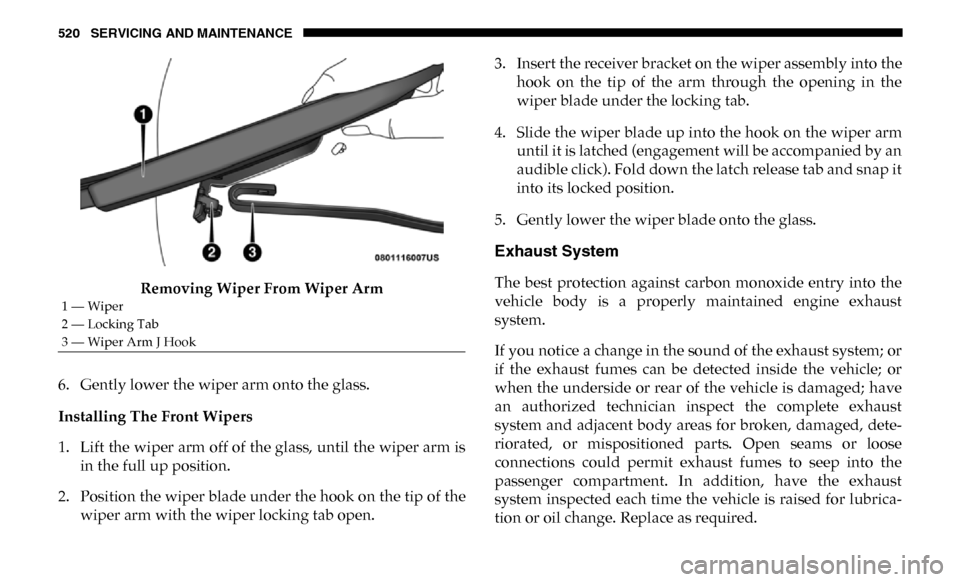
Removing Wiper From Wiper Arm
6. Gently lower the wiper arm onto the glass.
Installing The Front Wipers
1. Lift the wiper arm off of the glass, until the wiper arm is in the full up position.
2. Position the wiper blade under the hook on the tip of the wiper arm with the wiper locking tab open. 3. Insert the receiver bracket on the wiper assembly into the
hook on the tip of the arm through the opening in the
wiper blade under the locking tab.
4. Slide the wiper blade up into the hook on the wiper arm until it is latched (engagement will be accompanied by an
audible click). Fold down the latch release tab and snap it
into its locked position.
5. Gently lower the wiper blade onto the glass.
Exhaust System
The best protection against carbon monoxide entry into the
vehicle body is a properly maintained engine exhaust
system.
If you notice a change in the sound of the exhaust system; or
if the exhaust fumes can be detected inside the vehicle; or
when the underside or rear of the vehicle is damaged; have
an authorized technician inspect the complete exhaust
system and adjacent body areas for broken, damaged, dete -
riorated, or mispositioned parts. Open seams or loose
connections could permit exhaust fumes to seep into the
passenger compartment. In addition, have the exhaust
system inspected each time the vehicle is raised for lubrica -
tion or oil change. Replace as required.
1 — Wiper
2 — Locking Tab
3 — Wiper Arm J Hook
Page 580 of 696
578 MULTIMEDIA
UCONNECT SETTINGS
The Uconnect system uses a combination of buttons on the
touchscreen and buttons on the faceplate located on the
center of the instrument panel that allows you to access and
change the customer programmable features. Many features
can vary by vehicle.
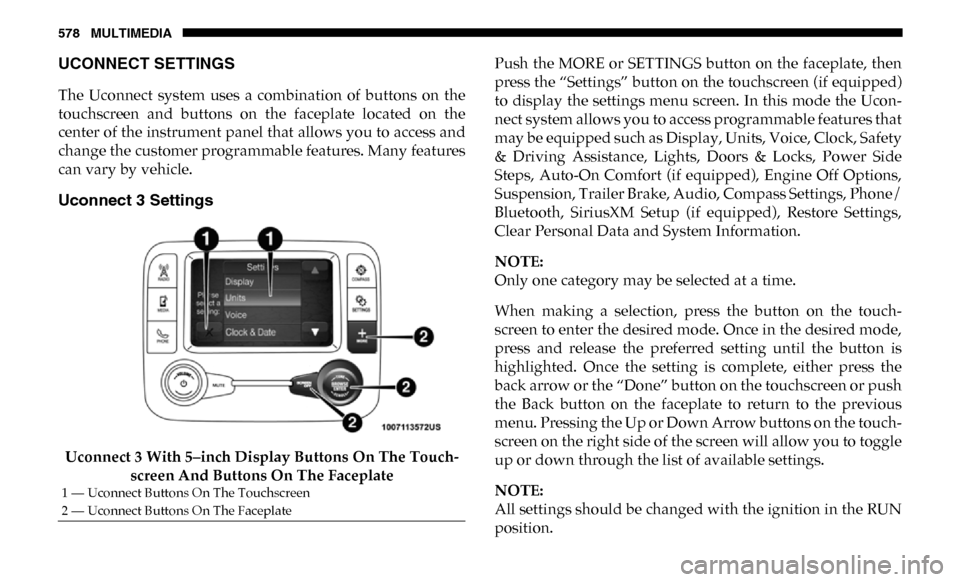
Uconnect 3 Settings
Uconnect 3 With 5–inch Display Buttons On The Touch-
screen And Buttons On The Faceplate Push the MORE or SETTINGS button on the faceplate, then
press the “Settings” button on the touchscreen (if equipped)
to display the settings menu screen. In this mode the Ucon
-
nect system allows you to access programmable features that
may be equipped such as Display, Units, Voice, Clock, Safety
& Driving Assistance, Lights, Doors & Locks, Power Side
Steps, Auto-On Comfort (if equipped), Engine Off Options,
Suspension, Trailer Brake, Audio, Compass Settings, Phone/
Bluetooth, SiriusXM Setup (if equipped), Restore Settings,
Clear Personal Data and System Information.
NOTE:
Only one category may be selected at a time.
When making a selection, press the button on the touch -
screen to enter the desired mode. Once in the desired mode,
press and release the preferred setting until the button is
highlighted. Once the setting is complete, either press the
back arrow or the “Done” button on the touchscreen or push
the Back button on the faceplate to return to the previous
menu. Pressing the Up or Down Arrow buttons on the touch -
screen on the right side of the screen will allow you to toggle
up or down through the list of available settings.
NOTE:
All settings should be changed with the ignition in the RUN
position.
1 — Uconnect Buttons On The Touchscreen
2 — Uconnect Buttons On The Faceplate
Page 582 of 696

580 MULTIMEDIA
Voice
After pressing the “Voice” button on the touchscreen, the following settings will be available:
Clock
After pressing the “Clock” button on the touchscreen, the following settings will be available:Power — If Equipped
HP (US)HP (UK) Kw
Temperature °C °F
Torque — If Equipped lb-ft Nm
Setting Name
Selectable Options
Setting NameSelectable Options
Voice Response Length Brief Detailed
Show Command List AlwaysWith Help Never
Setting Name Selectable Options
Set Time 12 hour24 hour
NOTE:
Within the “Set Time” feature, press the corresponding arrow above and below the current time to adjust, then select “AM”
or “PM.”