console Ram 2500 2019 User Guide
[x] Cancel search | Manufacturer: RAM, Model Year: 2019, Model line: 2500, Model: Ram 2500 2019Pages: 696, PDF Size: 13.89 MB
Page 124 of 696

122 GETTING TO KNOW YOUR VEHICLE
Below Rear Seat Storage (Crew Cab)
The Crew Cab models provide additional storage under the
rear seats. Lift the seats to access the storage compartment.
To open the storage compartments, unsnap the securing
snap located at either side of the load floor and lift upward
on the fold flat lid.Crew Cab Storage
NOTE:
For more information on storage and the fold flat floor, refer
to “Fold Flat Load Floor” in this section.Cupholders
Front Seat Cupholders
For vehicles equipped with a center console, two cupholders
are located in front of the console storage bin.
Front Cupholders
NOTE:
If the vehicle is equipped with a premium center console
with double (tandem) doors, push the front bin door to
access the cupholders.
Page 127 of 696
GETTING TO KNOW YOUR VEHICLE 125
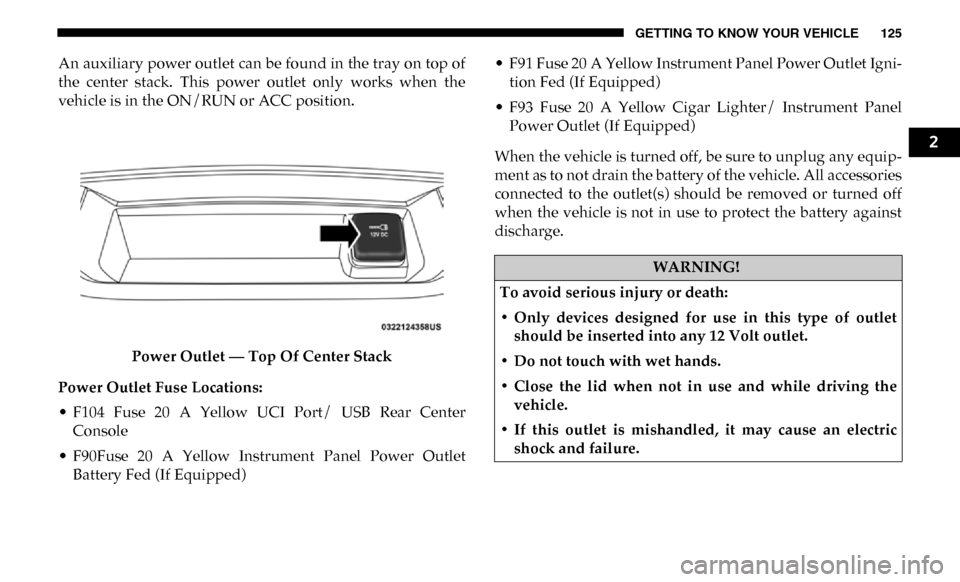
An auxiliary power outlet can be found in the tray on top of
the center stack. This power outlet only works when the
vehicle is in the ON/RUN or ACC position.Power Outlet — Top Of Center Stack
Power Outlet Fuse Locations:
• F104 Fuse 20 A Yellow UCI Port/ USB Rear Center Console
• F90Fuse 20 A Yellow Instrument Panel Power Outlet Battery Fed (If Equipped) • F91 Fuse 20 A Yellow Instrument Panel Power Outlet Igni
-
tion Fed (If Equipped)
• F93 Fuse 20 A Yellow Cigar Lighter/ Instrument Panel Power Outlet (If Equipped)
When the vehicle is turned off, be sure to unplug any equip -
ment as to not drain the battery of the vehicle. All accessories
connected to the outlet(s) should be removed or turned off
when the vehicle is not in use to protect the battery against
discharge.
WARNING!
To avoid serious injury or death:
• Only devices designed for use in this type of outlet should be inserted into any 12 Volt outlet.
• Do not touch with wet hands.
• Close the lid when not in use and while driving the vehicle.
• If this outlet is mishandled, it may cause an electric shock and failure.
2
Page 128 of 696
126 GETTING TO KNOW YOUR VEHICLE
Power Inverter — If Equipped
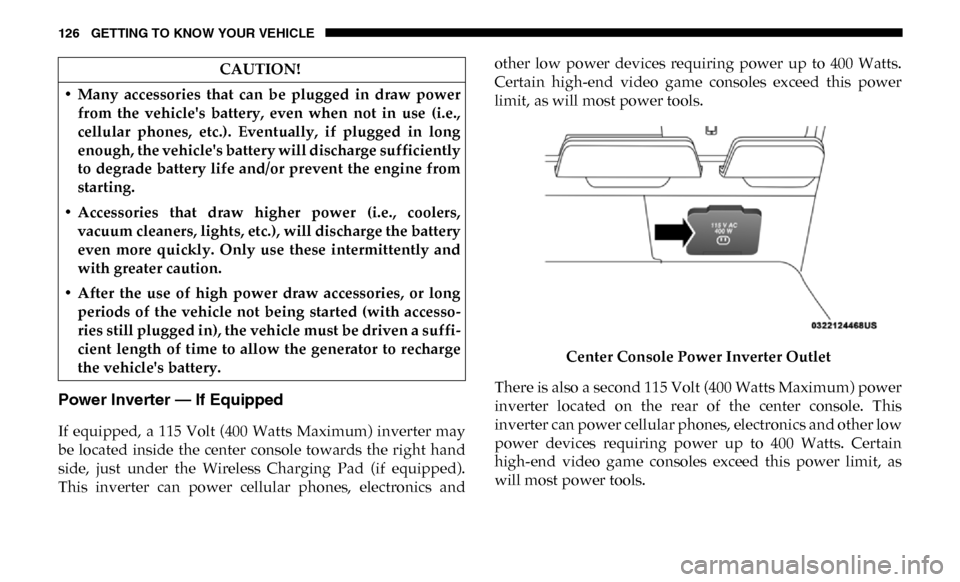
If equipped, a 115 Volt (400 Watts Maximum) inverter may
be located inside the center console towards the right hand
side, just under the Wireless Charging Pad (if equipped).
This inverter can power cellular phones, electronics andother low power devices requiring power up to 400 Watts.
Certain high-end video game consoles exceed this power
limit, as will most power tools.
Center Console Power Inverter Outlet
There is also a second 115 Volt (400 Watts Maximum) power
inverter located on the rear of the center console. This
inverter can power cellular phones, electronics and other low
power devices requiring power up to 400 Watts. Certain
high-end video game consoles exceed this power limit, as
will most power tools.
CAUTION!
• Many accessories that can be plugged in draw power from the vehicle's battery, even when not in use (i.e.,
cellular phones, etc.). Eventually, if plugged in long
enough, the vehicle's battery will discharge sufficiently
to degrade battery life and/or prevent the engine from
starting.
• Accessories that draw higher power (i.e., coolers, vacuum cleaners, lights, etc.), will discharge the battery
even more quickly. Only use these intermittently and
with greater caution.
• After the use of high power draw accessories, or long periods of the vehicle not being started (with accesso -
ries still plugged in), the vehicle must be driven a suffi -
cient length of time to allow the generator to recharge
the vehicle's battery.
Page 129 of 696

GETTING TO KNOW YOUR VEHICLE 127
All power inverters are designed with built-in overload
protection. If the power rating of 400 Watts is exceeded, the
power inverter shuts down. Once the electrical device has
been removed from the outlet the inverter should reset.Rear Center Console Power Inverter Outlet
NOTE:
400 Watts is the maximum for the inverter, not each outlet. If
three outlets are in use, 400 Watts is shared amongst the
devices plugged in. If equipped, a 115 Volt (400 Watts Maximum) inverter may
be located inside the ram box of your vehicle. The inverter
can be turned on by the Instrument Panel Power Inverter
switch located to the left of the steering wheel. This inverter
can power cellular phones, electronics and other low power
devices requiring power up to 400 Watts. Certain high-end
video game consoles exceed this power limit, as will most
power tools.
Ram Box Power Inverter
2
Page 130 of 696

128 GETTING TO KNOW YOUR VEHICLE
Instrument Panel Power Inverter Switch
If equipped, there may be a 115 Volt (400 Watts Maximum)
inverter located to the right of the center stack, just below the
climate controls. This inverter can power cellular phones,
electronics and other low power devices requiring power up
to 400 Watts. Certain high-end video game consoles exceed
this power limit, as will most power tools. Center Stack Power Inverter
To turn on the power outlet, simply plug in the device. The
outlet turns off when the device is unplugged.
NOTE:
• The Power Inverter only turns on if the ignition is in the ACC or ON/RUN position.
• Due to built-in overload protection, the power inverter shuts down if the power rating is exceeded.
Page 131 of 696

GETTING TO KNOW YOUR VEHICLE 129
Wireless Charging Pad — If Equipped
Wireless Charging PadYour vehicle may be equipped with a 15W 3A Qi wireless
charging pad located inside of the center console just below
the CD player (if equipped). This charging pad is designed to
wirelessly charge your Qi enabled mobile phone. Qi is a stan
-
dard that uses magnetic induction to transfer power to your
mobile device.
Your mobile phone must be designed for Qi wireless
charging. If the phone is not equipped with Qi wireless
charging functionality, an aftermarket sleeve or a specialized
back plate can be purchased from your mobile phone
provider or an local electronics retailer. Please see your
phone’s owner’s manual for further information.
The wireless charging pad is equipped with an anti-slip mat,
an adjustable cradle to hold your mobile phone in place and
an LED indicator light.
WARNING!
To avoid serious injury or death:
• Do not insert any objects into the receptacles.
• Do not touch with wet hands.
• Close the lid when not in use.
• If this outlet is mishandled, it may cause an electric shock and failure.
CAUTION!
The key fob should not be placed on the charging pad or
within 15 cm (150 mm) of it. Doing so can cause excessive
heat buildup and damage to the fob. Placing the fob in
close proximity of the charging pad blocks the fob from
being detected by the vehicle and prevents the vehicle
from starting.
2
Page 132 of 696

130 GETTING TO KNOW YOUR VEHICLE
Overhead Sunglass Storage
At the front of the overhead console, a compartment is
provided for the storage of one pair of sunglasses.
From the closed position, push the door latch to open the
compartment.Overhead Sunglass Door
The door will slowly rotate to the full open position.
PICKUP BOX
The pickup box has many features designed for utility and
convenience.
Pick Up Box Features
1 — Upper Load Floor Indents
2 — Bulk Head Dividers
3 — Cleats
Page 180 of 696

178 GETTING TO KNOW YOUR INSTRUMENT PANEL
NOTE:
• The charging system is independent from load reduction.The charging system performs a diagnostic on the
charging system continuously.
• If the Battery Charge Warning Light is on it may indicate a problem with the charging system. Refer to “Battery
Charge Warning Light” in “Getting To Know Your Instru -
ment Panel” for further information.
The electrical loads that may be switched off (if equipped), and
vehicle functions which can be affected by load reduction:
• Heated Seats/Vented Seats/Heated Wheel
• Rear Defroster And Heated Mirrors
• HVAC System
• 115V AC Power Inverter System
• Audio and Telematics System
Loss of the battery charge may indicate one or more of the
following conditions:
• The charging system cannot deliver enough electrical power to the vehicle system because the electrical loads are
larger than the capability of charging system. The charging
system is still functioning properly. • Turning on all possible vehicle electrical loads (e.g. HVAC
to max settings, exterior and interior lights, overloaded
power outlets +12V, 115V AC, USB ports) during certain
driving conditions (city driving, towing, frequent stop -
ping).
• Installing options like additional lights, upfitter electrical accessories, audio systems, alarms and similar devices.
• Unusual driving cycles (short trips separated by long parking periods).
• The vehicle was parked for an extended period of time (weeks, months).
• The battery was recently replaced and was not charged completely.
• The battery was discharged by an electrical load left on when the vehicle was parked.
• The battery was used for an extended period with the engine not running to supply radio, lights, chargers, +12V
portable appliances like vacuum cleaners, game consoles
and similar devices.
Page 443 of 696

IN CASE OF EMERGENCY 441
ASSIST AND SOS SYSTEM — IF EQUIPPED
Assist And SOS Buttons
If equipped, the overhead console contains an ASSIST and a
SOS button. NOTE:
• Your vehicle may be transmitting data as authorized by
the subscriber.
• The SOS and ASSIST buttons will only function if you are connected to an operable LTE (voice/data) or 4G (data)
network. Other Uconnect services will only be operable if
your SiriusXM Guardian™ service is active and you are
connected to an operable LTE (voice/data) or 4G (data)
network.
1 — ASSIST Button
2 — SOS Button
WARNING!
ALWAYS obey traffic laws and pay attention to the road.
ALWAYS drive safely with your hands on the steering
wheel. You have full responsibility and assume all risks
related to the use of the features and applications in this
vehicle. Only use the features and applications when it is
safe to do so. Failure to do so may result in an accident
involving serious injury or death.
6
Page 444 of 696

442 IN CASE OF EMERGENCY
ASSIST Call
The ASSIST Button is used to automatically connect you to
any one of the following support centers:
• Roadside Assistance – If you get a flat tire, or need a tow,just push the ASSIST button and you’ll be connected to
someone who can help. Roadside Assistance will know
what vehicle you’re driving and its location. Additional
fees may apply for roadside assistance.
• SiriusXM Guardian™ Customer Care – In-vehicle support for SiriusXM Guardian™.
• Vehicle Customer Care – Total support for all other vehicle issues.
SOS Call
1. Push the SOS Call button on the overhead console.
NOTE:
In case the SOS Call button is pushed in error, there will be a
ten second delay before the SOS Call system initiates a call to
a SOS operator. To cancel the SOS Call connection, push the
SOS call button on the overhead console or press the cancel -
lation button on the Device Screen. Termination of the SOS
Call will turn off the green LED light on the overhead
console. 2. The LED light located between the ASSIST and SOS
buttons on the overhead console will turn green once a
connection to a SOS operator has been made.
3. Once a connection between the vehicle and a SOS oper -
ator is made, the SOS Call system may transmit the
following important vehicle information to a SOS oper -
ator:
•Indication that the occupant placed a SOS Call.
•The vehicle brand.
•The last known GPS coordinates of the vehicle.
4. You should be able to speak with the SOS operator through the vehicle audio system to determine if addi -
tional help is needed.
WARNING!
ALWAYS obey traffic laws and pay attention to the road.
ALWAYS drive safely with your hands on the steering
wheel. You have full responsibility and assume all risks
related to the use of the features and applications in this
vehicle. Only use the features and applications when it is
safe to do so. Failure to do so may result in an accident
involving serious injury or death.