console Ram 2500 2019 Owner's Guide
[x] Cancel search | Manufacturer: RAM, Model Year: 2019, Model line: 2500, Model: Ram 2500 2019Pages: 696, PDF Size: 13.89 MB
Page 446 of 696

444 IN CASE OF EMERGENCY
(Continued)
SOS Call System Limitations
Vehicles sold in Mexico DO NOT have SOS Call system
capabilities.
SOS or other emergency line operators in Mexico may not
answer or respond to SOS system calls.
If the SOS Call system detects a malfunction, any of the
following may occur at the time the malfunction is detected,
and at the beginning of each ignition cycle:
• The overhead console light located between the ASSIST and SOS buttons will continuously be illuminated red.
• The Device Screen will display the following message: “Vehicle device requires service. Please contact your
dealer.”
• An In-Vehicle Audio message will state “Vehicle device requires service. Please contact your dealer.” Even if the SOS Call system is fully functional, factors
beyond FCA US LLC’s control may prevent or stop the SOS
Call system operation. These include, but are not limited to,
the following factors:
• Delayed accessories mode is active.
• The ignition is in the OFF position.
• The vehicle’s electrical systems are not intact.
• The SOS Call system software and/or hardware are
damaged during a crash.
• The vehicle battery loses power or becomes disconnected during a vehicle crash.
• LTE (voice/data) or 4G (data) network and/or Global Positioning Satellite signals are unavailable or obstructed.
WARNING!
• Ignoring the overhead console light could mean you will not have SOS Call services. If the overhead console
light is illuminated, have your authorized dealer
service the SOS Call system immediately.
• The Occupant Restraint Control module turns on theair bag Warning Light on the instrument panel if a
malfunction in any part of the system is detected. If the
Air Bag Warning Light is illuminated, have your autho -
rized dealer service the Occupant Restraint Control
system immediately.
WARNING! (Continued)
Page 448 of 696

446 IN CASE OF EMERGENCY
BULB REPLACEMENT
Replacement Bulbs
All of the inside bulbs are brass or glass-wedge base. Aluminum base bulbs are not approved.
Interior BulbsBulb Number
Overhead Console Lamps TS 212–9
Dome Lamp 7679
For lighted switches, see your authorized dealer for replacement instructions.
Exterior Bulbs (Sheet 1 of 2) Bulb Number
Low Beam (Halogen Reflector Headlamp) H11LL
High Beam (Halogen Reflector Headlamp) 9005LL
Low & High Beam (LED Reflector Headlamp) LED (Serviced At An Authorized Dealer)
Low & High Beam (LED Projector Headlamp) LED (Serviced At An Authorized Dealer)
Turn Signal / Front Position (Halogen Reflector Headlamp) 7444NA
Turn Signal / Front Position (LED Headlamps) LED (Serviced at authorized dealer)
Front Side Marker (Halogen Reflector Headlamp) W5W
Front Side Marker (LED Headlamps) LED (Serviced At An Authorized Dealer)
Page 467 of 696

IN CASE OF EMERGENCY 465
F76–10 Amp Red Electronic Stability Control (HD Only)
Brake System Module / Stop Lamp Switch /
Electric Park Brake / Clutch Pedal Switch (DS
1500 Only)
F77 –10 Amp Red Drivetrain Control Module / Front Axle
Disconnect Module / TCM (HD Only)
Drivetrain Control Module / ELSD / Front Axle
Disconnect Module / Transmission Control
Relay / RDM / Power Take Off Unit – If
Equipped (DS 1500 Only)
F78 –10 Amp Red Engine Control Module / Powertrain Control
Module / Electric Power Steering (DS 1500
Only)
F78 –15 Amp Blue Engine Control Module / Powertrain Control
Module / AEB RACM MOD / Feed To AUX
PDC Relay Coils (HD Only)
F79 –15 Amp Blue ID / Clearance Lights
F80 –10 Amp Red Universal Garage Door Opener / Compass /
Anti-Intrusion Module (DS 1500 Only)
ASSY Overhead Console / SW Assist / SW 911
– If Equipped (HD Only)
F81 –20 Amp Yellow Trailer Tow Right Turn / Stop Lights - If
Equipped
Cavity
Cartridge Fuse Micro Fuse Description
6
Page 470 of 696

468 IN CASE OF EMERGENCY
(Continued)
F99–10 Amp Red HVAC / DASM (DS 1500 Only)
HVAC / In-Car Temperature Sensor / CSG
MOD / Humidity Sensor (HD Only)
F100 –10 Amp Red Upfitters – If Equipped (HD Only)
F101 –15 Amp Blue SSV Only
F101 –20 Amp Yellow Rear Heated Seat Right (HD Only)
F102 –20 Amp Yellow Rear Heated Seat Left / Run RLY #3 Coil (HD
Only)
F103 –10 Amp Red HeadLamp AFLS (HD Only)
F104 –20 Amp Yellow Power Outlets (Instrument Panel / Center
Console) / Trunk – If Equipped (DS 1500 Only)
UCI Port / USB Rear (HD Only)
Cavity
Cartridge Fuse Micro Fuse Description
CAUTION!
• When installing the power distribution center cover, it is important to ensure the cover is properly positioned
and fully latched. Failure to do so may allow water to
get into the power distribution center and possibly
result in an electrical system failure.
• When replacing a blown fuse, it is important to useonly a fuse having the correct amperage rating. The use
of a fuse with a rating other than indicated may result
in a dangerous electrical system overload. If a properly
rated fuse continues to blow, it indicates a problem in
the circuit that must be corrected. CAUTION!
(Continued)
Page 646 of 696

644 MULTIMEDIA
A third and fourth USB Ports are located behind the center
console, above the Power Inverter. One is a charge only port,
and can only charge USB devices. The other USB Port allows
you to play music from iPod/MP3 players or USB devices
through your vehicle’s sound system.Rear Center Console Mini-USB (Type C) USB Ports Rear Center Console Standard (Type A) USB Ports
1 — Mini-USB Type C Port #1
2 — Mini-USB Type C Port #2
1 — Standard USB Type A Port #1
2 — Standard USB Type A Port #2
Page 648 of 696

646 MULTIMEDIA
Phone Or USB Plugged In Message Screen
Plugging in a phone or another USB device may cause the
connection to a previous device to be lost. If equipped, your vehicle may also contain a USB Port
located on the top tray of the vehicles center console.
Center Console USB Port
Page 649 of 696
MULTIMEDIA 647
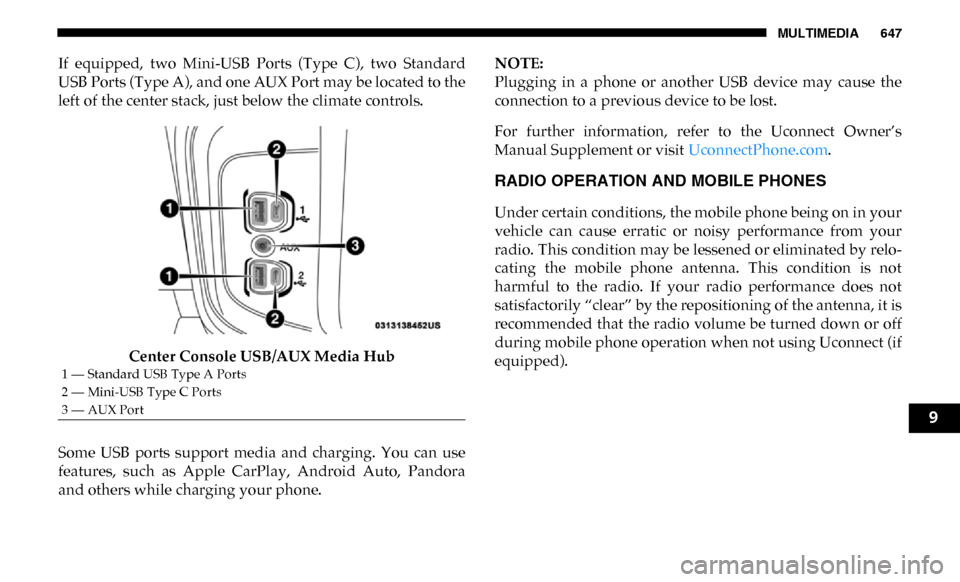
If equipped, two Mini-USB Ports (Type C), two Standard
USB Ports (Type A), and one AUX Port may be located to the
left of the center stack, just below the climate controls.Center Console USB/AUX Media Hub
Some USB ports support media and charging. You can use
features, such as Apple CarPlay, Android Auto, Pandora
and others while charging your phone. NOTE:
Plugging in a phone or another USB device may cause the
connection to a previous device to be lost.
For further information, refer to the Uconnect Owner’s
Manual Supplement or visit
UconnectPhone.com.
RADIO OPERATION AND MOBILE PHONES
Under certain conditions, the mobile phone being on in your
vehicle can cause erratic or noisy performance from your
radio. This condition may be lessened or eliminated by relo -
cating the mobile phone antenna. This condition is not
harmful to the radio. If your radio performance does not
satisfactorily “clear” by the repositioning of the antenna, it is
recommended that the radio volume be turned down or off
during mobile phone operation when not using Uconnect (if
equipped).
1 — Standard USB Type A Ports
2 — Mini-USB Type C Ports
3 — AUX Port
9