Instrument Ram 2500 2019 Owner's Guide
[x] Cancel search | Manufacturer: RAM, Model Year: 2019, Model line: 2500, Model: Ram 2500 2019Pages: 696, PDF Size: 13.89 MB
Page 74 of 696

72 GETTING TO KNOW YOUR VEHICLE
Cargo Light With Bed Lights — If Equipped
The cargo light and bed lights (if equipped) and trailer
spotter lamps (if equipped) are turned on by pushing the
cargo lights button located on the lower half of the headlight
switch.Cargo/Bed Lights Button On Headlight Switch
If the vehicle’s speed is 0 mph (0 km/h), these lights can also
be turned on using the switch located just inside the pickup
box, on the lower part of the bed light lens. A telltale will illu-
minate in the instrument cluster display when these lights
are on. Pushing the switch a second time will turn the lights
off. Bed Light Switch In Truck Bed
The cargo light and bed lights (if equipped) will turn on for
approximately 30 seconds when a key fob unlock button is
pushed, as part of the Illuminated Entry feature.
NOTE:
For vehicles shipped to or sold in the states of California or
Mississippi, the Cargo, Bed, and Mirror Spotter lights will
not work while the vehicle is in motion. In every other state,
the Cargo and Mirror Spotter lights will turn off when the
vehicle is in motion, but the Bed Light will remain on. In all
states, including California and Mississippi, if a bed camera
is deactivated, the Bed Lights will turn back on.
Page 77 of 696

GETTING TO KNOW YOUR VEHICLE 75
NOTE:
The Rear Courtesy/Reading Lights will remain on until the
switch is pushed a second time, so be sure they have been
turned off before exiting the vehicle. If the interior lights are
left on after the ignition is turned off, they will automatically
turn off after 10 minutes.
Dimmer Control
The dimmer controls are part of the headlight switch and are
located on the left side of the instrument panel.Dimmer Controls With the parking lights or headlights on, rotating the right
dimmer control upward will increase the brightness of the
instrument panel lights. Rotating the left dimmer control will
adjust the interior and ambient light levels.
NOTE:
• The dimming of the touchscreen is programmable through
the Uconnect system. Refer to “Uconnect Settings” in
“Multimedia” for further details.
• The ambient lights are only active when the headlights or parking lights are on.
1 — Ambient Light Control
2 — Instrument Panel Dimmer Control
2
Page 81 of 696
GETTING TO KNOW YOUR VEHICLE 79
•Transmission In NEUTRAL Position — When the igni-
tion is ON, and the transmission is in the NEUTRAL posi -
tion, the Rain Sensing system will not operate until the
wiper switch is moved, vehicle speed is greater than
5 mph (8 km/h), or the gear selector is moved out of the
NEUTRAL position.
• Remote Start Mode Inhibit — On vehicles equipped with
Remote Starting system, Rain Sensing wipers are not oper -
ational when the vehicle is in the remote start mode. Once
the operator is in the vehicle and has placed the ignition
switch in the RUN position, Rain Sensing wiper operation
can resume, if it has been selected, and no other inhibit
conditions (mentioned previously) exist.
CLIMATE CONTROLS
The Climate Control System allows you to regulate the
temperature, air flow, and direction of air circulating
throughout the vehicle. The controls are located on the
touchscreen (if equipped), on the sides of the touchscreen, or
on the instrument panel below the radio.
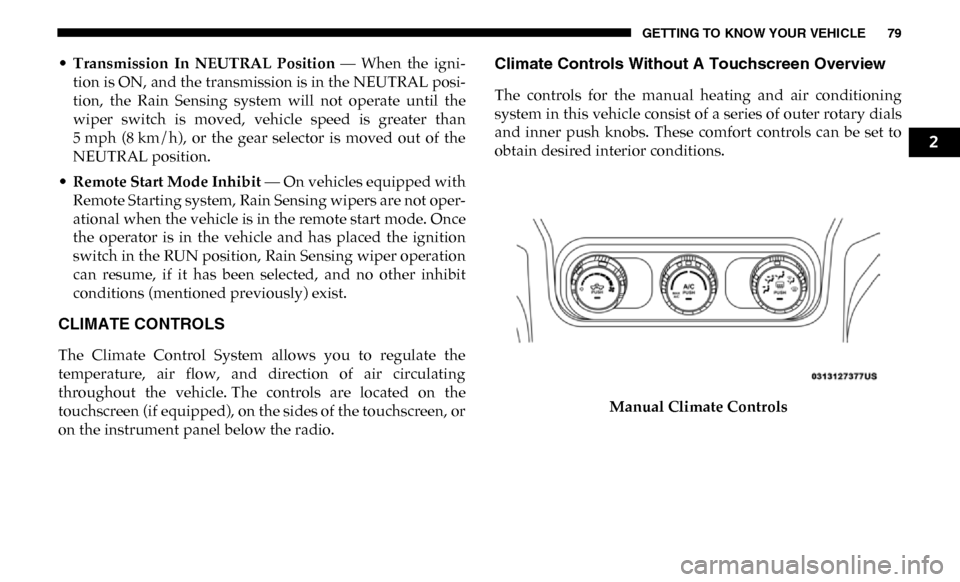
Climate Controls Without A Touchscreen Overview
The controls for the manual heating and air conditioning
system in this vehicle consist of a series of outer rotary dials
and inner push knobs. These comfort controls can be set to
obtain desired interior conditions.
Manual Climate Controls
2
Page 83 of 696
GETTING TO KNOW YOUR VEHICLE 81
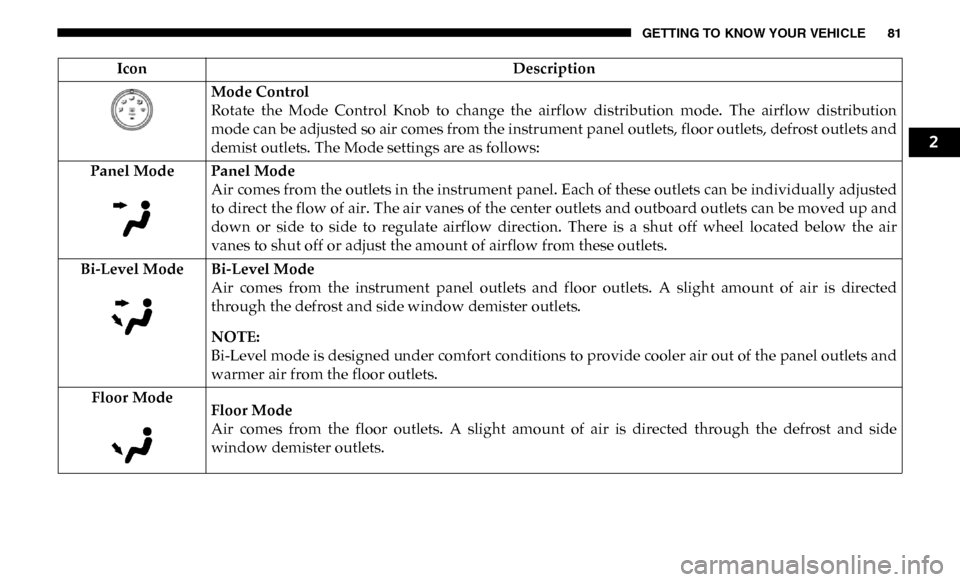
Mode Control
Rotate the Mode Control Knob to change the airflow distribution mode. The airflow distribution
mode can be adjusted so air comes from the instrument panel outlets, floor outlets, defrost outlets and
demist outlets. The Mode settings are as follows:
Panel Mode Panel Mode Air comes from the outlets in the instrument panel. Each of these outlets can be individually adjusted
to direct the flow of air. The air vanes of the center outlets and outboard outlets can be moved up and
down or side to side to regulate airflow direction. There is a shut off wheel located below the air
vanes to shut off or adjust the amount of airflow from these outlets.
Bi-Level Mode Bi-Level Mode Air comes from the instrument panel outlets and floor outlets. A slight amount of air is directed
through the defrost and side window demister outlets.
NOTE:
Bi-Level mode is designed under comfort conditions to provide cooler air out of the panel outlets and
warmer air from the floor outlets.
Floor Mode Floor Mode
Air comes from the floor outlets. A slight amount of air is directed through the defrost and side
window demister outlets.
Icon
Description
2
Page 90 of 696

88 GETTING TO KNOW YOUR VEHICLE
Blower Control Knob
Blower Control Buttons Blower Control
Blower Control is used to regulate the amount of air forced through the climate system. There are
seven blower speeds available. Adjusting the blower will cause automatic mode to switch to manual
operation. The speeds can be selected using either the blower control knob on the faceplate or the
buttons on the touchscreen.
•
Faceplate: The blower speed increases as you turn the blower control knob clockwise from the
lowest blower setting. The blower speed decreases as you turn the blower control knob counter -
clockwise.
• Touchscreen: Use the small blower icon to reduce the blower setting and the large blower icon to
increase the blower setting. Blower can also be selected by pressing the blower bar area between the
icons.
NOTE:
On Uconnect 4C NAV With 12–inch display radios, pressing the blower control button below one
turns the Climate Control system OFF.
Mode Control Knob
Mode Controls Button Modes Control
Control Knob:
Push the Mode Control Knob to change the airflow distribution mode. The airflow
distribution mode can be adjusted so air comes from the instrument panel outlets, floor outlets,
defrost outlets and demist outlets.
Touchscreen: Select Mode by pressing one of the Mode buttons on the touchscreen to change the
airflow distribution mode. The airflow distribution mode can be adjusted so air comes from the
instrument panel outlets, floor outlets, defrost outlets and demist outlets.
Icon
Description
Page 91 of 696

GETTING TO KNOW YOUR VEHICLE 89
Panel Mode Panel ModeAir comes from the outlets in the instrument panel. Each of these outlets can be individually adjusted
to direct the flow of air. The air vanes of the center outlets and outboard outlets can be moved up and
down or side to side to regulate airflow direction. There is a shut off wheel located below the air
vanes to shut off or adjust the amount of airflow from these outlets.
Bi-Level Mode Bi-Level Mode Air comes from the instrument panel outlets and floor outlets. A slight amount of air is directed
through the defrost and side window demister outlets.
NOTE:
Bi-Level mode is designed under comfort conditions to provide cooler air out of the panel outlets and
warmer air from the floor outlets.
Floor Mode Floor Mode Air comes from the floor outlets. A slight amount of air is directed through the defrost and side
window demister outlets.
Mix Mode Mix Mode
Air is directed through the floor, defrost, and side window demister outlets. This setting works best in
cold or snowy conditions that require extra heat to the windshield. This setting is good for
maintaining comfort while reducing moisture on the windshield.
Climate Control OFF Button
This button turns the Climate Control System off.
Icon
Description
2
Page 94 of 696

92 GETTING TO KNOW YOUR VEHICLE
Summer Operation
The engine cooling system must be protected with a
high-quality antifreeze coolant to provide proper corrosion
protection and to protect against engine overheating. OAT
coolant (conforming to MS.90032) is recommended.
Winter Operation
To ensure the best possible heater and defroster perfor-
mance, make sure the engine cooling system is functioning
properly and the proper amount, type, and concentration of
coolant is used. Use of the Air Recirculation mode during
Winter months is not recommended, because it may cause
window fogging.
Vacation/Storage
Before you store your vehicle, or keep it out of service (i.e.,
vacation) for two weeks or more, run the air conditioning
system at idle for about five minutes, in fresh air with the
blower setting on high. This will ensure adequate system
lubrication to minimize the possibility of compressor
damage when the system is started again. Window Fogging
Vehicle windows tend to fog on the inside in mild, rainy,
and/or humid weather. To clear the windows, select Defrost
or Mix mode and increase the front blower speed. Do not use
the Recirculation mode without A/C for long periods, as
fogging may occur.
CAUTION!
Failure to follow these cautions can cause damage to the
heating elements:
• Use care when washing the inside of the rear window. Do not use abrasive window cleaners on the interior
surface of the window. Use a soft cloth and a mild
washing solution, wiping parallel to the heating
elements. Labels can be peeled off after soaking with
warm water.
• Do not use scrapers, sharp instruments, or abrasive window cleaners on the interior surface of the window.
• Keep all objects a safe distance from the window.
Page 103 of 696

GETTING TO KNOW YOUR VEHICLE 101
HOOD
To Open The Hood
To open the hood, two latches must be released.
1. Pull the hood release lever located below the steeringwheel at the base of the instrument panel.
Hood Release 2. Reach into the opening beneath the center of the hood
and push the safety latch lever to the left to release it,
before raising the hood.
Safety Latch Location2
Page 113 of 696

GETTING TO KNOW YOUR VEHICLE 111
INTERNAL EQUIPMENT
Storage
Glove Compartment
The glove compartment is located on the passenger side of
the instrument panel and features both an upper and lower
storage area.
NOTE:
Not all vehicles are equipped with a door over the upper
storage area.Glove Compartment
If equipped with a covered upper glove compartment, push
the release button to open.
To open the lower glove compartment, pull the release
handle.
1 — Upper Glove Compartment Release Button (If Equipped)
2 — Upper Glove Compartment
3 — Lower Glove Compartment
2
Page 118 of 696
116 GETTING TO KNOW YOUR VEHICLE
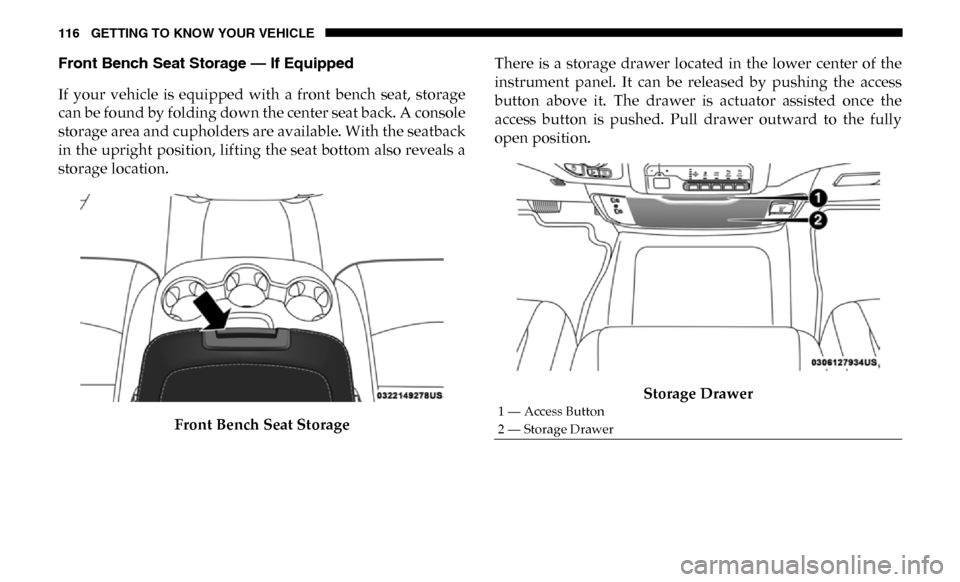
Front Bench Seat Storage — If Equipped
If your vehicle is equipped with a front bench seat, storage
can be found by folding down the center seat back. A console
storage area and cupholders are available. With the seatback
in the upright position, lifting the seat bottom also reveals a
storage location.Front Bench Seat Storage There is a storage drawer located in the lower center of the
instrument panel. It can be released by pushing the access
button above it. The drawer is actuator assisted once the
access button is pushed. Pull drawer outward to the fully
open position.
Storage Drawer
1 — Access Button
2 — Storage Drawer