ignition Ram 2500 2019 Owner's Guide
[x] Cancel search | Manufacturer: RAM, Model Year: 2019, Model line: 2500, Model: Ram 2500 2019Pages: 696, PDF Size: 13.89 MB
Page 72 of 696

70 GETTING TO KNOW YOUR VEHICLE
Parking Lights And Panel Lights
To turn on the parking lights and instrument panel lights,
from the O (off) position, rotate the headlight switch clock-
wise to the first detent. To turn off the parking lights, rotate
the headlight switch back to the O (off) position.
Headlights On With Wipers (Available With Automatic
Headlights Only)
When this feature is active, the headlights will turn on
approximately 10 seconds after the wipers are turned on if
the headlight switch is placed in the AUTO position. In addi -
tion, the headlights will turn off when the wipers are turned
off, if they were turned on by this feature.
NOTE:
This feature can be programmed through the Uconnect
system. Refer to “Uconnect Settings” in “Multimedia” for
further information.
Headlight Delay
To aid in your exit, your vehicle is equipped with a headlight
delay that will leave the headlights on for approximately up
to 90 seconds. This delay is initiated when the ignition is
turned off while the headlight switch is on, and then the
headlight switch is cycled off. Headlight delay can be
canceled by either turning the headlight switch on then off,
or by turning the ignition to the ON/RUN position.
NOTE:
This feature can be programmed through the Uconnect
system. Refer to “Uconnect Settings” in “Multimedia” for
further information.
Lights-On Reminder
If the headlights, parking lights, or cargo lights are left on
after the ignition is turned OFF, a chime will sound when the
driver’s door is opened.
Page 75 of 696

GETTING TO KNOW YOUR VEHICLE 73
Battery Saver
To protect the life of your vehicle’s battery, load shedding is
provided for both the interior and exterior lights.
If the ignition is OFF, the interior lights will automatically
turn off when:
• Any door is left ajar for 10 minutes.
• The Dome Defeat button is pushed.
• The Cargo, Bed, and Spotter lights are manually activatedby either the headlight switch or the truck bed switch.
NOTE:
Battery saver mode is canceled if the ignition is ON.
If the headlights remain on while the ignition is cycled OFF,
the exterior lights will automatically turn off after eight
minutes. If the headlights are turned on and left on for eight
minutes while the ignition is OFF, the exterior lights will
automatically turn off.
INTERIOR LIGHTS
Courtesy Lights
The Courtesy, Dome, Cargo, and Bed Lights are turned on
when any door is opened or the Dome On button is pushed
on the overhead console. Also, if your vehicle is equipped
with Remote Keyless Entry, and the unlock button is pushed
on the key fob, the Courtesy, Dome, Cargo, and Bed Lights
will turn on.2
Page 77 of 696

GETTING TO KNOW YOUR VEHICLE 75
NOTE:
The Rear Courtesy/Reading Lights will remain on until the
switch is pushed a second time, so be sure they have been
turned off before exiting the vehicle. If the interior lights are
left on after the ignition is turned off, they will automatically
turn off after 10 minutes.
Dimmer Control
The dimmer controls are part of the headlight switch and are
located on the left side of the instrument panel.Dimmer Controls With the parking lights or headlights on, rotating the right
dimmer control upward will increase the brightness of the
instrument panel lights. Rotating the left dimmer control will
adjust the interior and ambient light levels.
NOTE:
• The dimming of the touchscreen is programmable through
the Uconnect system. Refer to “Uconnect Settings” in
“Multimedia” for further details.
• The ambient lights are only active when the headlights or parking lights are on.
1 — Ambient Light Control
2 — Instrument Panel Dimmer Control
2
Page 78 of 696
76 GETTING TO KNOW YOUR VEHICLE
Illuminated Entry
The courtesy lights will turn on when you use the key fob to
unlock the doors or open any door.
This feature also turns on the puddle lamps located beneath
the outside mirrors (if equipped).
The lights will fade to off after approximately 30 seconds, or
they will immediately fade to off once the ignition switch is
turned to ON/RUN from the OFF position.
The front courtesy overhead console and door courtesy
lights will not turn off if the Dome On button on the over-
head console is pushed.
The illuminated entry system will not operate if the Dome
Defeat button on the overhead console is pushed.
NOTE:
If your vehicle is equipped with Illuminated Approach lights
under the outside mirrors, they can also be turned off by
pushing the Dome Defeat button.
WINDSHIELD WIPERS AND WASHERS
Windshield Wipers
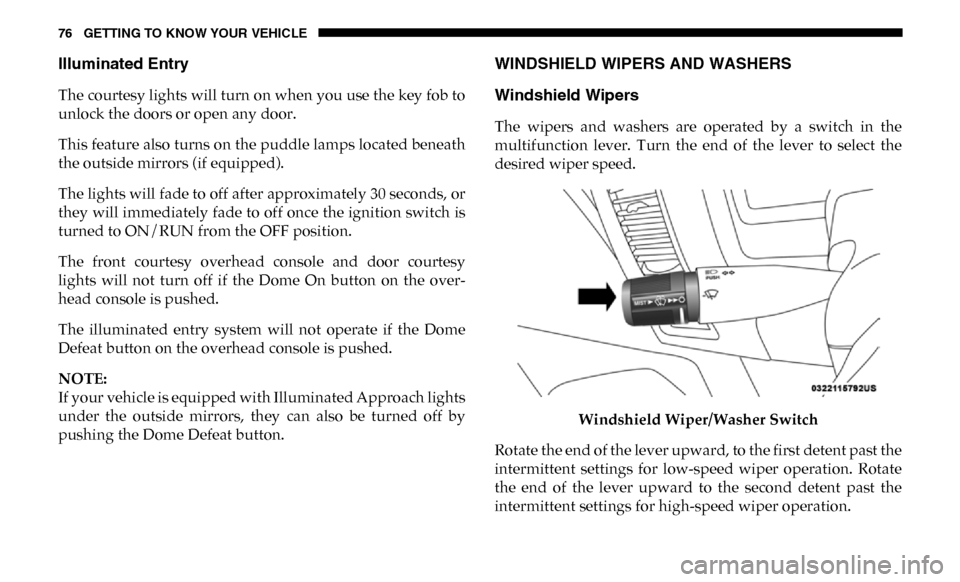
The wipers and washers are operated by a switch in the
multifunction lever. Turn the end of the lever to select the
desired wiper speed.
Windshield Wiper/Washer Switch
Rotate the end of the lever upward, to the first detent past the
intermittent settings for low-speed wiper operation. Rotate
the end of the lever upward to the second detent past the
intermittent settings for high-speed wiper operation.
Page 80 of 696

78 GETTING TO KNOW YOUR VEHICLE
Mist Feature
When a single wipe to clear off road mist or spray from a
passing vehicle is needed, push the washer knob, located on
the end of the multifunction lever, inward to the first detent
and release. The wipers will cycle one time and automati-
cally shut off.
NOTE:
The mist feature does not activate the washer pump; there -
fore, no washer fluid will be sprayed on the windshield. The
wash function must be used in order to spray the windshield
with washer fluid.
Rain Sensing Wipers — If Equipped
This feature senses moisture on the windshield and automat -
ically activates the wipers for the driver. The feature is espe -
cially useful for road splash or overspray from the
windshield washers of the vehicle ahead. Rotate the end of
the multifunction lever to one of five settings to activate this
feature.
NOTE:
This feature can be programmed through the Uconnect
system. Refer to “Uconnect Settings” in “Multimedia” for
further information. The sensitivity of the system can be adjusted with the multi
-
function lever. Wiper delay position 1 is the least sensitive,
and wiper delay position 5 is the most sensitive. Position 3
should be used for normal rain conditions. Positions 1 and 2
can be used if the driver desires less wiper sensitivity. Posi -
tions 4 and 5 can be used if the driver desires more sensi -
tivity. Place the wiper switch in the O (off) position when not
using the system.
NOTE:
• The Rain Sensing feature will not operate when the wiper switch is in the low or high-speed position.
• The Rain Sensing feature may not function properly when ice, or dried salt water is present on the windshield.
• Use of Rain-X or products containing wax or silicone may reduce Rain Sensing performance.
The Rain Sensing system has protection features for the
wiper blades and arms, and will not operate under the
following conditions:
• Low Ambient Temperature — When the ignition is first
turned ON, the Rain Sensing system will not operate until
the wiper switch is moved, vehicle speed is greater than
0 mph (0 km/h), or the outside temperature is greater than
32°F (0°C).
Page 81 of 696
GETTING TO KNOW YOUR VEHICLE 79
•Transmission In NEUTRAL Position — When the igni-
tion is ON, and the transmission is in the NEUTRAL posi -
tion, the Rain Sensing system will not operate until the
wiper switch is moved, vehicle speed is greater than
5 mph (8 km/h), or the gear selector is moved out of the
NEUTRAL position.
• Remote Start Mode Inhibit — On vehicles equipped with
Remote Starting system, Rain Sensing wipers are not oper -
ational when the vehicle is in the remote start mode. Once
the operator is in the vehicle and has placed the ignition
switch in the RUN position, Rain Sensing wiper operation
can resume, if it has been selected, and no other inhibit
conditions (mentioned previously) exist.
CLIMATE CONTROLS
The Climate Control System allows you to regulate the
temperature, air flow, and direction of air circulating
throughout the vehicle. The controls are located on the
touchscreen (if equipped), on the sides of the touchscreen, or
on the instrument panel below the radio.
Climate Controls Without A Touchscreen Overview
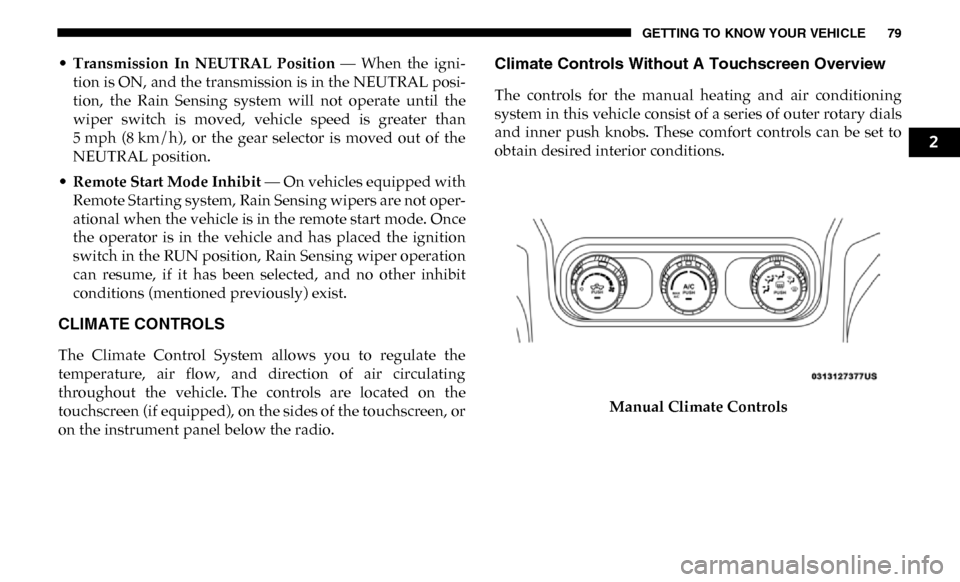
The controls for the manual heating and air conditioning
system in this vehicle consist of a series of outer rotary dials
and inner push knobs. These comfort controls can be set to
obtain desired interior conditions.
Manual Climate Controls
2
Page 96 of 696

94 GETTING TO KNOW YOUR VEHICLE
WINDOWS
Power Windows
Power Window ControlsPower Window Switches
The power window controls located on the driver's door trim
panel have up-down switches that give you fingertip control
of all power windows. There is a single opening and closing
switch on the front passenger door for passenger window
control and on the rear doors for rear window control. The windows will operate when the ignition switch is turned to
the ON/RUN or ACC position, and for up to 10 minutes
after the ignition is turned OFF or until a front door is
opened.
NOTE:
The Key Off Power Delay feature will allow the power
windows to operate for up to 10 minutes after the ignition is
turned OFF. This feature is cancelled when either front door
is opened.
WARNING!
Never leave children unattended in a vehicle. Do not
leave the key fob in or near the vehicle or in a location
accessible to children, and do not leave the ignition of a
vehicle equipped with Keyless Enter-N-Go in the ACC
or ON/RUN mode. Occupants, particularly unattended
children, can become entrapped by the windows while
operating the power window switches. Such entrapment
may result in serious injury or death.
Page 100 of 696

98 GETTING TO KNOW YOUR VEHICLE
Opening Sunroof
Express
Push the switch rearward and release it within one-half
second. The sunroof and sunshade will open automatically
and stop when the full open position is reached. This is called
“Express Open.” During Express Open operation, any other
actuation of the sunroof switch will stop the sunroof.
Manual Mode
To open the sunroof, push and hold the switch rearward. The
sunroof will move rearward and automatically stop at full
open position. Any release of the switch will stop the move-
ment. The sunroof and sunshade will remain in a partially
opened condition until the sunroof switch is pushed again.WARNING!
• Never leave children unattended in a vehicle, or with access to an unlocked vehicle. Never leave the key fob
in or near the vehicle, or in a location accessible to chil -
dren. Do not leave the ignition of a vehicle equipped
with Keyless Enter-N-Go in the ACC or ON/RUN
mode. Occupants, particularly unattended children,
can become entrapped by the power sunroof while
operating the power sunroof switch. Such entrapment
may result in serious injury or death.
• In a collision, there is a greater risk of being thrown from a vehicle with an open sunroof. You could also be
seriously injured or killed. Always fasten your seat belt
properly and make sure all passengers are also properly
secured.
• Do not allow small children to operate the sunroof. Never allow your fingers, other body parts, or any
object, to project through the sunroof opening. Injury
may result.
Page 102 of 696

100 GETTING TO KNOW YOUR VEHICLE
Venting Sunroof — Express
Push and release the Vent button within one half second and
the sunroof will open to the vent position. This is called
“Express Vent”, and it will occur regardless of sunroof posi-
tion. During Express Vent operation, any other actuation of
the switch will stop the sunroof.
Sunroof Maintenance
Use only a non-abrasive cleaner and a soft cloth to clean the
glass panel.
Ignition Off Operation
The power sunroof switch will remain active for up to
approximately 10 minutes after the ignition switch is turned
to the OFF/LOCK position. Opening either front door will
cancel this feature.
NOTE:
Ignition Off time is programmable through the Uconnect
System. Refer to “Uconnect Settings” in “Multimedia” for
further information. Relearn Procedure
For vehicles equipped with a sunroof, there is a relearn
procedure that allows you to calibrate the sunroof when the
“Express Operation” feature stops working. To reset the
sunroof, follow these steps:
1. Set the ignition to the ACC or the ON/RUN position.
2. Ensure that the sunroof is in the fully closed position.
3. Push and hold the close switch. The sunroof will hit the
hard stop and move to the vent position after ten seconds.
4. Release the close switch.
5. Push and hold the close switch again within five seconds to begin the teaching process. The sunroof will complete
one full cycle and return to the fully closed position.
NOTE:
If the close switch is released anytime during the teach cycle,
the procedure will need to be repeated starting from the first
step.
6. Once the sunroof has stopped in the fully closed position, release the close switch. The sunroof is now reset and
ready to use.
Page 107 of 696

GETTING TO KNOW YOUR VEHICLE 105
NOTE:
Only use this transceiver with a garage door opener that has
a “stop and reverse” feature as required by federal safety
standards. This includes most garage door opener models
manufactured after 1982. Do not use a garage door opener
without these safety features. Call toll-free 1-800-355-3515 or,on the Internet at HomeLink.com for safety information or
assistance.
Before You Begin Programming HomeLink
Be sure that your vehicle is parked outside of the garage
before you begin programming.
For more efficient programming and accurate transmission
of the radio-frequency signal it is recommended that a new
battery be placed in the hand-held transmitter of the device
that is being programmed to the HomeLink system.
To erase the channels, place the ignition in the ON/RUN
position, and push and hold the two outside HomeLink
buttons (I and III) for up to 20 seconds or until the orange
indicator flashes.
NOTE:
• Erasing all channels should only be performed when programming HomeLink for the first time. Do not erase
channels when programming additional buttons.
• If you have any problems, or require assistance, please call toll-free 1-800-355-3515 or, on the Internet at Home-
Link.com for information or assistance.
WARNING!
• Your motorized door or gate will open and close while you are programming the universal transceiver. Do not
program the transceiver if people, pets or other objects
are in the path of the door or gate. Only use this trans -
ceiver with a garage door opener that has a “stop and
reverse” feature as required by Federal safety stan -
dards. This includes most garage door opener models
manufactured after 1982. Do not use a garage door
opener without these safety features.
• Vehicle exhaust contains carbon monoxide, a dangerous gas. Do not run your vehicle in the garage
while programming the transceiver. Exhaust gas can
cause serious injury or death.
2