ignition Ram 2500 2019 Repair Manual
[x] Cancel search | Manufacturer: RAM, Model Year: 2019, Model line: 2500, Model: Ram 2500 2019Pages: 696, PDF Size: 13.89 MB
Page 229 of 696

SAFETY 227
Trailer Sensors Detected Do Not Match Active Trailer
The “Trailer Sensors Detected Do Not Match Active Trailer”
message will be displayed in the Instrument Cluster when
the trailer sensors being received by the TTPM module do
match the trailer sensors paired to the current trailer number
selected. This message will be displayed when the sensors
being received completely match the sensors paired to
another trailer number configured in the TTPM module.
To correct this condition, the correct trailer number must be
selected in the radio. Refer to the “Uconnect Settings” in
“Multimedia” for further information.
Tire Fill Alert
This feature notifies the user when the placard tire pressure
is attained while inflating or deflating the tire.
The customer may choose to disable or enable the Tire Fill
Alert feature through use of the customer settings in the
radio.
NOTE:
• Only one tire can be filled at a time when using the Tire FillAlert system. • The Tire Fill Alert feature cannot be entered if an existing
TPM system fault is set to “active” or if the system is in
deactivation mode (if equipped).
The system will be activated when the TPM receiver module
detects a change in tire pressure. The ignition must be in the
RUN mode, with the transmission in PARK (P).
NOTE:
It is not required to have the engine running to enter Tire Fill
Alert mode.
The hazard lamps will come on to confirm the vehicle is in
Tire Fill Alert mode.
When Tire Fill Alert Mode is entered, the tire pressure
display screen will be displayed in the instrument cluster.
Operation:
• The horn will chirp to let the user know when to stop filling the tire, when it reaches recommended pressure.
• The horn will chirp three times if the tire is over filled and will continue to chirp every five seconds if the user
continues to inflate the tire.
4
Page 230 of 696

228 SAFETY
• The horn will chirp once again when enough air is let outto reach proper inflation level.
• The horn will also chirp three times if the tire is then under-inflated and will continue to chirp every five
seconds if the user continues to deflate the tire.
Selectable Tire Fill Alert (STFA)
The Selectable Tire Fill Alert (STFA) system is an optional
feature that is included as part of the normal Tire Fill Alert
system. The system is designed to allow the customer to
select a pressure to inflate or deflate the vehicle's front and
rear axle tires to and to provide feedback to the customer
while inflating or deflating the vehicle's tires.
In the Selectable Tire Fill Alert customer settings menu in the
radio, the customer will be able to select a pressure setting
for both the front and rear axle tire pressures by scrolling
through a pressure range from XX to 15 psi in 1 psi incre -
ments for each axle setting. XX = the vehicle’s cold placard
pressure values for the front and rear axles as shown on the
vehicle placard pressure label.
The customer may also store the pressure values chosen for
each axle in the radio as a preset pressure. The customer will
be allowed to store up to two sets of preset values in the radio
for the front and rear axle pressure values. Once the customer selects the tire pressures for the front and
rear axles that they want to inflate or deflate to, they can
begin inflating or deflating one tire at a time.
NOTE:
The STFA system will only support inflating or deflating one
tire at a time.
The system will be activated when the TPM receiver module
detects a change in tire pressure. The ignition must be in the
RUN mode, with the transmission in PARK (P).
The hazard lamps will come on to confirm the vehicle is in
Tire Fill Alert mode.
When Tire Fill Alert Mode is entered, the tire pressure
display screen will be displayed in the instrument cluster.
Operation:
• The horn will chirp once when the selected pressure is
reached to let the user know when to stop inflating or
deflating the tire.
• The horn will chirp three times if the tire is over inflated or over deflated and will continue to chirp every five seconds
if the user continues to inflate or deflate the tire.
• The horn will chirp once again when enough air is added or removed to reach proper selected pressure level.
Page 231 of 696

SAFETY 229
Tire Pressure Information System (TPIS) 3500 Series
Trucks
Your vehicle may be equipped with a Tire Pressure Informa-
tion System (TPIS).
The Tire Pressure Information System (TPIS) uses wireless
technology with wheel rim mounted electronic sensors to
transmit tire pressure levels. Sensors mounted to each wheel
as part of the valve stem transmit tire pressure readings to
the receiver module.
NOTE:
It is particularly important for you to check the tire pressure
in all of the tires on your vehicle monthly and to maintain the
proper pressure.
The TPIS consists of the following components:
• Receiver module
• Four TPM sensors (Single Rear Wheel (SRW) applications)
• Six TPM sensors (Dual Rear Wheel (DRW) applications)
• Pressure display in the instrument cluster
The TPIS system will display all four (Single Rear Wheel
(SRW) applications) or six (Dual Rear Wheel (DRW) applica -
tions) tire pressure values in the instrument cluster display. If a system fault is detected, the instrument cluster will
display a "SERVICE TPM SYSTEM" message for a minimum
of five seconds and then display dashes (- -) in place of the
pressure value to indicate which sensor is not being received.
If the ignition switch is cycled, this sequence will repeat,
providing the system fault still exists. If the system fault no
longer exists, the "SERVICE TPM SYSTEM" message will no
longer be displayed, and a pressure value will display in
place of the dashes. A system fault can occur due to any of
the following:
• Signal interference due to electronic devices or driving
next to facilities emitting the same radio frequencies as the
TPM sensors.
• Installing aftermarket window tinting that contains mate -
rials that may block radio wave signals.
• Accumulation of snow or ice around the wheels or wheel housings.
• Using tire chains on the vehicle.
• Using wheels/tires not equipped with TPM sensors.
4
Page 234 of 696
232 SAFETY
Enhanced Seat Belt Use Reminder System (BeltAlert)
Driver And Passenger BeltAlert — If Equipped BeltAlert is a feature intended to remind the driver and
outboard front seat passenger (if equipped with outboard
front passenger seat BeltAlert) to buckle their seat belts. The
Belt Alert feature is active whenever the ignition switch is in
the START or ON/RUN position.
Initial Indication
If the driver is unbuckled when the ignition switch is first in
the START or ON/RUN position, a chime will signal for a
few seconds. If the driver or outboard front seat passenger (if
equipped with outboard front passenger seat BeltAlert) is
unbuckled when the ignition switch is first in the START or
ON/RUN position the Seat Belt Reminder Light will turn on
and remain on until both outboard front seat belts are
buckled. The outboard front passenger seat BeltAlert is not
active when an outboard front passenger seat is unoccupied. BeltAlert Warning Sequence
The BeltAlert warning sequence is activated when the
vehicle is moving above a specified vehicle speed range and
the driver or outboard front seat passenger is unbuckled (if
equipped with outboard front passenger seat BeltAlert) (the
outboard front passenger seat BeltAlert is not active when
the outboard front passenger seat is unoccupied). The
BeltAlert warning sequence starts by blinking the Seat Belt
Reminder Light and sounding an intermittent chime. Once
the BeltAlert warning sequence has completed, the Seat Belt
Reminder Light will remain on until the seat belts are
buckled. The BeltAlert warning sequence may repeat based
on vehicle speed until the driver and occupied outboard
front seat passenger seat belts are buckled. The driver should
instruct all occupants to buckle their seat belts.
Page 247 of 696

SAFETY 245
Supplemental Restraint Systems (SRS)
Some of the safety features described in this section may be
standard equipment on some models, or may be optional
equipment on others. If you are not sure, ask an authorized
dealer.
The air bag system must be ready to protect you in a colli-
sion. The Occupant Restraint Controller (ORC) monitors the
internal circuits and interconnecting wiring associated with
the electrical Air Bag System Components. Your vehicle may
be equipped with the following Air Bag System Compo -
nents:
Air Bag System Components
• Occupant Restraint Controller (ORC)
• Air Bag Warning Light
• Steering Wheel and Column
• Instrument Panel
• Knee Impact Bolsters
• Driver and Front Passenger Air Bags
• Seat Belt Buckle Switch
• Supplemental Side Air Bags • Front and Side Impact Sensors — If Equipped
• Seat Belt Pretensioners
• Seat Track Position Sensors
Air Bag Warning Light
The ORC monitors the readiness of the elec -
tronic parts of the air bag system whenever
the ignition switch is in the START or ON/
RUN position. If the ignition switch is in the
OFF position or in the ACC position, the air
bag system is not on and the air bags will not
inflate.
The ORC contains a backup power supply system that may
deploy the air bag system even if the battery loses power or
it becomes disconnected prior to deployment.
The ORC turns on the Air Bag Warning Light in the instru-
ment panel for approximately four to eight seconds for a
self-check when the ignition switch is first in the ON/RUN
position. After the self-check, the Air Bag Warning Light will
turn off. If the ORC detects a malfunction in any part of the
system, it turns on the Air Bag Warning Light, either
momentarily or continuously. A single chime will sound to
alert you if the light comes on again after initial startup.
4
Page 248 of 696

246 SAFETY
The ORC also includes diagnostics that will illuminate the
instrument panel Air Bag Warning Light if a malfunction is
detected that could affect the air bag system. The diagnostics
also record the nature of the malfunction. While the air bag
system is designed to be maintenance free, if any of the
following occurs, have an authorized dealer service the air
bag system immediately.
• The Air Bag Warning Light does not come on during thefour to eight seconds when the ignition switch is first in the
ON/RUN position.
• The Air Bag Warning Light remains on after the four to eight-second interval.
• The Air Bag Warning Light comes on intermittently or remains on while driving. NOTE:
If the speedometer, tachometer, or any engine related gauges
are not working, the Occupant Restraint Controller (ORC)
may also be disabled. In this condition the air bags may not
be ready to inflate for your protection. Have an authorized
dealer service the air bag system immediately.
WARNING!
Ignoring the Air Bag Warning Light in your instrument
panel could mean you won’t have the air bag system to
protect you in a collision. If the light does not come on as
a bulb check when the ignition is first turned on, stays
on after you start the vehicle, or if it comes on as you
drive, have an authorized dealer service the air bag
system immediately.
Page 258 of 696

256 SAFETY
(Continued)
• Cut off battery power to the:•Engine
•Electric Motor (if equipped)
•Electric power steering
•Brake booster
•Electric park brake
•Automatic transmission gear selector
•Horn
•Front wiper
•Headlamp washer pump
NOTE:
After an accident, remember to cycle the ignition to the STOP
(OFF/LOCK) position and remove the key from the ignition
switch to avoid draining the battery. Carefully check the
vehicle for fuel leaks in the engine compartment and on the
ground near the engine compartment and fuel tank before
resetting the system and starting the engine. If there are no
fuel leaks or damage to the vehicle electrical devices (e.g.
headlights) after an accident, reset the system by following
the procedure described below. If you have any doubt,
contact an authorized dealer. Enhanced Accident Response System Reset Procedure
In order to reset the Enhanced Accident Response System
functions after an event, the ignition switch must be changed
from ignition START or ON/RUN to ignition OFF. Carefully
check the vehicle for fuel leaks in the engine compartment
and on the ground near the engine compartment and fuel
tank before resetting the system and starting the engine.
Maintaining Your Air Bag System
WARNING!
• Modifications to any part of the air bag system could cause it to fail when you need it. You could be injured
if the air bag system is not there to protect you. Do not
modify the components or wiring, including adding
any kind of badges or stickers to the steering wheel hub
trim cover or the upper passenger side of the instru -
ment panel. Do not modify the front bumper, vehicle
body structure, or add aftermarket side steps or
running boards.
• It is dangerous to try to repair any part of the air bag system yourself. Be sure to tell anyone who works on
your vehicle that it has an air bag system.
Page 289 of 696

SAFETY 287
Whenever a change is noticed in the sound of the exhaust
system, when exhaust fumes can be detected inside the
vehicle, or when the underside or rear of the vehicle is
damaged, have a competent mechanic inspect the complete
exhaust system and adjacent body areas for broken,
damaged, deteriorated, or mispositioned parts. Open seams
or loose connections could permit exhaust fumes to seep into
the passenger compartment. In addition, inspect the exhaust
system each time the vehicle is raised for lubrication or oil
change. Replace as required.
Safety Checks You Should Make Inside The Vehicle
Seat Belts
Inspect the seat belt system periodically, checking for cuts,
frays, and loose parts. Damaged parts must be replaced
immediately. Do not disassemble or modify the system.
Front seat belt assemblies must be replaced after a collision.
Rear seat belt assemblies must be replaced after a collision if
they have been damaged (i.e., bent retractor, torn webbing,
etc.). If there is any question regarding seat belt or retractor
condition, replace the seat belt.Air Bag Warning Light
The Air Bag warning light will turn on for four to eight
seconds as a bulb check when the ignition switch is first
turned to ON/RUN. If the light is either not on during
starting, stays on, or turns on while driving, have the system
inspected at an authorized dealer as soon as possible. After
the bulb check, this light will illuminate with a single chime
when a fault with the Air Bag System has been detected. It
will stay on until the fault is removed. If the light comes on
intermittently or remains on while driving, have an autho
-
rized dealer service the vehicle immediately.
Refer to “Occupant Restraint Systems” in “Safety” for
further information.
Defroster
Check operation by selecting the defrost mode and place the
blower control on high speed. You should be able to feel the
air directed against the windshield. See an authorized dealer
for service if your defroster is inoperable.
4
Page 292 of 696

290
(Continued)
STARTING AND OPERATING
STARTING THE ENGINE
Before starting your vehicle, adjust your seat, adjust both
inside and outside mirrors, and fasten your seat belt.
The starter should not be operated for more than 10-second
intervals. Waiting a few seconds between such intervals will
protect the starter from overheating.
WARNING!
• When leaving the vehicle, always make sure the keyless ignition node is in the "OFF" mode, remove the
key fob from the vehicle and lock the vehicle.
• Never leave children alone in a vehicle, or with access to an unlocked vehicle. Allowing children to be in a
vehicle unattended is dangerous for a number of
reasons. A child or others could be seriously or fatally
injured. Children should be warned not to touch the
parking brake, brake pedal or the gear selector.
• Do not leave the key fob in or near the vehicle, or in alocation accessible to children, and do not leave the
ignition of a vehicle equipped with Keyless
Enter-N-Go in the ACC or ON/RUN mode. A child
could operate power windows, other controls, or move
the vehicle.
• Do not leave children or animals inside parked vehicles in hot weather. Interior heat build-up may cause
serious injury or death.
WARNING! (Continued)
Page 293 of 696
STARTING AND OPERATING 291
Automatic Transmission
Start the engine with the transmission in PARK position.
Apply the brake before shifting into any driving range.
NOTE:
• This vehicle is equipped with a transmission shift inter-
locking system. The brake pedal must be pressed to shift
out of PARK.
• If equipped with an 8-speed transmission, starting the vehicle in NEUTRAL is not possible unless the Manual
Park Release has been activated. For the Manual Park
Release operation refer to Manual Park Release in “In Case
Of Emergency”.
Tip Start Feature
Do not press the accelerator. Cycle the ignition switch briefly
to the START position and release it. The starter motor will
continue to run and will automatically disengage when the
engine is running.
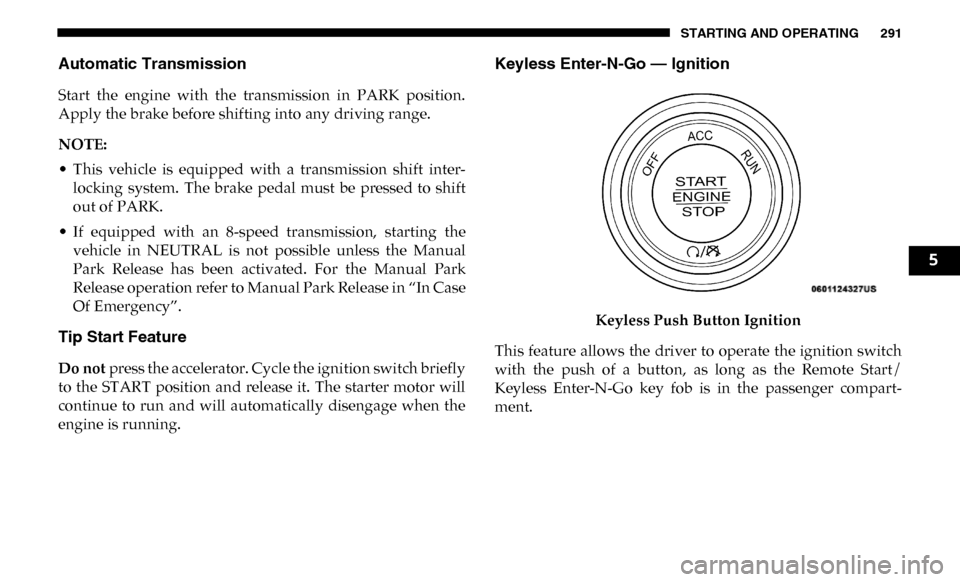
Keyless Enter-N-Go — Ignition
Keyless Push Button Ignition
This feature allows the driver to operate the ignition switch
with the push of a button, as long as the Remote Start/
Keyless Enter-N-Go key fob is in the passenger compart -
ment.
5