ignition Ram 2500 2019 Manual Online
[x] Cancel search | Manufacturer: RAM, Model Year: 2019, Model line: 2500, Model: Ram 2500 2019Pages: 696, PDF Size: 13.89 MB
Page 314 of 696

312 STARTING AND OPERATING
NOTE:
Do not attempt to make a shift while only the front or rear
wheels are spinning. This could cause damage to driveline
components.
When operating your vehicle in 4WD LOW, the engine
speed is approximately three times that of the 2WD or 4WD
HIGH positions at a given road speed. Take care not to over-
speed the engine and do not exceed 25 mph (40 km/h).
Proper operation of four-wheel drive vehicles depends on
tires of equal size, type and circumference on each wheel.
Any difference in tire size can cause damage to the drive -
train.
Because four-wheel drive provides improved traction, there
is a tendency to exceed safe turning and stopping speeds. Do
not go faster than road conditions permit. Shifting Procedure
NOTE:
• If any of the requirements to select a new transfer case
position have not been met, the transfer case will not shift.
The position indicator light for the previous position will
remain ON and the newly selected position indicator light
will continue to flash until all the requirements for the
selected position have been met.
• If all the requirements to select a new transfer case position have been met, the current position indicator light will
turn OFF, the selected position indicator light will flash
until the transfer case completes the shift. When the shift is
complete, the position indicator light for the selected posi -
tion will stop flashing and remain ON.
2WD To 4WD HIGH
Push the desired position on the 4WD control switch to shift
the transfercase. Shifts between 2WD and 4WD HIGH can be
done with the vehicle stopped or in motion. With the vehicle
in motion, the transfer case will engage/disengage faster if
you momentarily release the accelerator pedal after turning
the control switch. If the vehicle is stopped, the ignition
switch must be in the ON position with the engine either
running or off. This shift cannot be completed if the ignition
switch is in the ACC position.
WARNING!
Always engage the parking brake when powering down the
vehicle if the “SVC 4WD Warning Light” is illuminated.
Not engaging the parking brake may allow the vehicle to
roll which may cause personal injury or death.
Page 315 of 696

STARTING AND OPERATING 313
NOTE:
The four-wheel drive system will not allow shifts between
2WD/4WD HIGH if the front and/or rear wheels are spin-
ning (no traction). In this situation, the selected position indi -
cator light will flash and the original position indicator light
will remain ON. At this time, reduce speed and stop spin -
ning the wheels to complete the shift.
2WD Or 4WD HIGH To 4WD LOW
NOTE:
When shifting into or out of 4WD LOW some gear noise may
be heard. This noise is normal and is not detrimental to the
vehicle or occupants.
Shifting can be performed with the vehicle rolling 2 to 3 mph
(3 to 5 km/h) or completely stopped. You can use either of
the following procedures:
Preferred Procedure
1. With the engine running, slow the vehicle to 2 to 3 mph (3 to 5 km/h).
2. Shift the transmission into NEUTRAL.
3. While still rolling, push the desired position on the transfer case control switch. 4. After the desired position indicator light is ON (not
flashing), shift the transmission back into gear.
Alternate Procedure
1. Bring the vehicle to a complete stop.
2. With the ignition switch in the ON position and the engine running, shift the transmission into NEUTRAL.
3. Push the desired position on the transfer case control switch.
4. After the desired position indicator light is ON (not flashing), shift the transmission back into gear.
NOTE:
• If Steps 1 or 2 of either the Preferred or Alternate Proce -
dure are not satisfied prior to attempting the shift, then the
desired position indicator light will flash continuously
while the original position indicator light is ON, until all
requirements have been met.
• The ignition switch must be in the ON position for a shift to take place and for the position indicator lights to be
operable. If the ignition switch is not in the ON position,
the shift will not take place and no position indicator lights
will be on or flashing.
5
Page 319 of 696
STARTING AND OPERATING 317
shift completion to occur. The preferred method is with the
vehicle rolling 2 to 3 mph (3 to 5 km/h). Avoid attempting
to engage or disengage 4L with the vehicle moving faster
than 2 to 3 mph (3 to 5 km/h).
• Do not attempt to shift into or out of 4L while the transmis -
sion is in gear.
Transfer Case Position Indicator Light
The “Transfer Case Position Indicator Light” in the instru-
ment cluster is used to alert the driver that the front axle is
fully engaged and all four wheels are driving.
AIR SUSPENSION SYSTEM (2500/3500 MODELS) — IF
EQUIPPED
Description
This air suspension system is a rear leveling ride height
system. The main purpose of this system is to maintain the
truck’s rear ride height level. There are two selectable heights
that can be chosen based on your operating conditions.
The system requires that the ignition be in ON/RUN posi -
tion or the engine running with zero vehicle speed for all
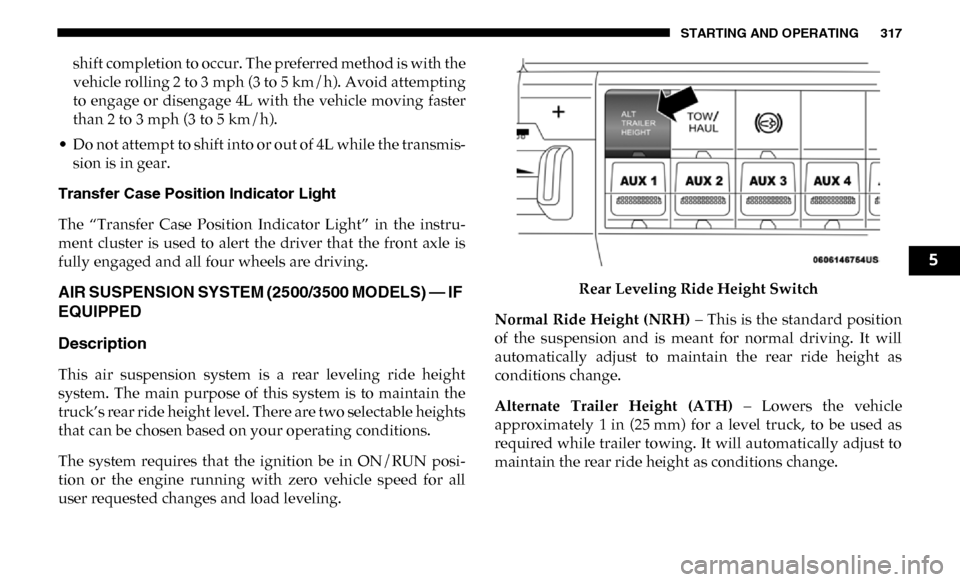
user requested changes and load leveling. Rear Leveling Ride Height Switch
Normal Ride Height (NRH) – This is the standard position
of the suspension and is meant for normal driving. It will
automatically adjust to maintain the rear ride height as
conditions change.
Alternate Trailer Height (ATH) – Lowers the vehicle
approximately 1 in (25 mm) for a level truck, to be used as
required while trailer towing. It will automatically adjust to
maintain the rear ride height as conditions change.
5
Page 320 of 696

318 STARTING AND OPERATING
Trailer Decoupling/Unloading - The air suspension system
will load level (lower/exhaust only) once after 12 minutes
after the vehicle is turned off. This allows for easy removal of
a trailer and/or load from the back of the truck by main -
taining the ride height. After 12 minutes you will need to
turn the ignition to the run position for the air suspension to
re-level due to addition/removal of load in the vehicle. If the
air suspension system is disabled using the settings menu
(Tire Jack Mode, Transport Mode, Alignment Mode, or Bed
Lowering Mode) the system will remain disabled when the
vehicle is turned off. Reactivating the air suspension can be
accomplished via the settings menu or driving the vehicle
above 5 mph (8 km/h) for Tire Jack Mode or Alignment
Mode and 16 mph (26 km/h) for Transport Mode and Bed
Lowering Mode.
NOTE:
• Most 3500 models will not lower to Alternate Trailer Height (ATH) when unloaded.
• Refer to “Trailer Towing” in “Starting And Operating” for further information. Ignition OFF Behavior
For a predetermined amount of time after the ignition is off the
air suspension may adjust to maintain a proper appearance.
Air Suspension Modes
The air suspension system has multiple modes to protect the
system in unique situations:
Tire/Jack Mode
To assist with changing a tire, the air suspension system has a
feature which allows the automatic leveling to be disabled. This
mode is intended to be enabled with engine running. Refer to
“Instrument Cluster Display” in “Getting To Know Your Instru
-
ment Panel” or “Uconnect Settings” in “Multimedia” if equipped
with a touch screen radio for further information.
NOTE:
This mode is intended to be enabled with engine running.
WARNING!
The air suspension system uses a high pressure volume
of air to operate the system. To avoid personal injury or
damage to the system, see your authorized dealer for
service.
Page 359 of 696

STARTING AND OPERATING 357
On steep hills, a greater speed loss or gain may occur so it
may be preferable to drive without Speed Control.
To Resume Speed
To resume a previously set speed, push the RES (+) button
and release. Resume can be used at any speed above 20 mph
(32 km/h).
To Deactivate
A soft tap on the brake pedal, pushing the CANCEL button,
or normal brake pressure while slowing the vehicle will
deactivate the Speed Control without erasing the set speed
from memory.
Pushing the On/Off button, or returning the ignition to OFF,
erases the set speed from memory.
ADAPTIVE CRUISE CONTROL (ACC) — IF EQUIPPED
Adaptive Cruise Control (ACC) increases the driving conve-
nience provided by cruise control while traveling on high -
ways and major roadways. However, it is not a safety system
and not designed to prevent collisions. Speed Control func-
tion performs differently. Please refer to the proper section
within this chapter.
ACC will allow you to keep cruise control engaged in light
to moderate traffic conditions without the constant need to
reset your cruise control. ACC utilizes a radar sensor and a
forward facing camera designed to detect a vehicle directly
ahead of you.
NOTE:
• If the sensor does not detect a vehicle ahead of you, ACC will maintain a fixed set speed.
• If the ACC sensor detects a vehicle ahead, ACC will apply limited braking or accelerate (not to exceed the original set
speed) automatically to maintain a preset following
distance, while matching the speed of the vehicle ahead.
WARNING!
Speed Control can be dangerous where the system
cannot maintain a constant speed. Your vehicle could go
too fast for the conditions, and you could lose control
and have an accident. Do not use Speed Control in heavy
traffic or on roads that are winding, icy, snow-covered or
slippery.
5
Page 364 of 696

362 STARTING AND OPERATING
To Cancel
The following conditions cancel the system:
• The brake pedal is applied.
• The CANC (cancel) button is pushed.
• An Anti-Lock Brake System (ABS) event occurs.
• The gear selector is removed from the DRIVE position.
• The Electronic Stability Control/Traction Control System(ESC/TCS) activates.
• The vehicle parking brake is applied.
• Driver seatbelt is unbuckled at low speeds.
• Driver door is opened at low speeds.
• A Trailer Sway Control (TSC) event occurs.
• The driver switches ESC to full-off mode.
• The braking temperature exceeds normal range (overheated).
To Turn Off
The system will turn off and clear the set speed in memory if:
• The Adaptive Cruise Control (ACC) on/off button is pushed. • The Normal (Fixed Speed) Cruise Control on/off button is
pushed.
• The ignition is turned OFF.
• You switch to Four-Wheel Drive Low.
To Resume
If there is a set speed in memory push the RES (+) button and
then remove your foot from the accelerator pedal. The instru-
ment cluster display will display the last set speed.
NOTE:
• If your vehicle stays at standstill for longer than two seconds, the driver will have to push the RES (+) button to
reengage the ACC to the existing set speed.
• ACC cannot be resumed if there is a stationary vehicle in-front of your vehicle in close proximity.
WARNING!
The Resume function should only be used if traffic and road
conditions permit. Resuming a set speed that is too high or
too low for prevailing traffic and road conditions could
cause the vehicle to accelerate or decelerate too sharply for
safe operation. Failure to follow these warnings can result in
a collision and death or serious personal injury.
Page 373 of 696

STARTING AND OPERATING 371
The “ACC/FCW Limited Functionality Clean Front Wind-
shield” message can sometimes be displayed while driving
in adverse weather conditions. The ACC/FCW system will
recover after the vehicle has left these areas. Under rare
conditions, when the camera is not tracking any vehicles or
objects in its path this warning may temporarily occur.
If weather conditions are not a factor, the driver should
examine the windshield and the camera located on the back
side of the inside rear view mirror. They may require
cleaning or removal of an obstruction.
When the condition that created limited functionality is no
longer present, the system will return to full functionality.
NOTE:
If the “ACC/FCW Limited Functionality Clean Front Wind -
shield” message occurs frequently (e.g. more than once on
every trip) without any snow, rain, mud, or other obstruc -
tion, have the windshield and forward facing camera
inspected at your authorized dealer. Service ACC/FCW Warning
If the system turns off, and the instrument cluster displays
“ACC/FCW Unavailable Service Required” or “Cruise/
FCW Unavailable Service Required”, there may be an
internal system fault or a temporary malfunction that limits
ACC functionality. Although the vehicle is still drivable
under normal conditions, ACC will be temporarily unavail
-
able. If this occurs, try activating ACC again later, following
an ignition cycle. If the problem persists, see your authorized
dealer.
Precautions While Driving With ACC
In certain driving situations, ACC may have detection issues.
In these cases, ACC may brake late or unexpectedly. The
driver needs to stay alert and may need to intervene.
NOTE:
• Aftermarket add-ons such as snow plows, lift kits, and brush/grille bars can hinder module performance. Ensure
the radar/camera has no obstructions in the field of view.
• Height modifications can limit module performance and functionality.
5
Page 380 of 696

378 STARTING AND OPERATING
Metric Speed (km/h)
• Pushing the SET (-) button once will result in a 1 km/h decrease in set speed. Each subsequent tap of the button
results in a decrease of 1 km/h.
• If the button is continually pushed, the set speed will continue to decrease in 10 km/h decrements until the
button is released. The decrease in set speed is reflected in
the instrument cluster display.
To Cancel
The following conditions will cancel the Normal (Fixed
Speed) Cruise Control without clearing the memory:
• The brake pedal is applied.
• The CANC button is pushed.
• The Electronic Stability Control/Traction Control System (ESC/TCS) activates.
• The vehicle parking brake is applied.
• The braking temperature exceeds normal range (over -
heated).
• The gear selector is removed from the DRIVE position.
• The driver switches ESC to full-off mode. To Resume Speed
To resume a previously set speed, push the RES (+) button
and release. Resume can be used at any speed above 20 mph
(32 km/h).
To Turn Off
The system will turn off and erase the set speed in memory if:
• The Normal (Fixed Speed) Cruise Control on/off button is
pushed.
• The ignition is turned OFF.
• You engage Four-Wheel Drive Low.
• The Adaptive Cruise Control (ACC) on/off button is pushed.
Page 381 of 696

STARTING AND OPERATING 379
PARKSENSE REAR PARK ASSIST — IF EQUIPPED
The ParkSense Rear Park Assist system provides visual and
audible indications of the distance between the rear fascia
and a detected obstacle when backing up, e.g. during a
parking maneuver. Refer to “ParkSense System Usage
Precautions” in this section for limitations of this system and
recommendations.
ParkSense will retain the last system state (enabled or
disabled) from the last ignition cycle when the ignition is
changed to the ON/RUN position.
ParkSense can be active only when the gear selector is in
REVERSE. If ParkSense is enabled at this gear selector posi-
tion, the system will remain active until the vehicle speed is
increased to approximately 7 mph (11 km/h) or above.
When in REVERSE and above the system's operating speed,
a warning will appear within the instrument cluster display
indicating the vehicle speed is too fast. The system will
become active again if the vehicle speed is decreased to
speeds less than approximately 6 mph (9 km/h).
ParkSense Sensors
The four ParkSense sensors, located in the rear fascia/
bumper, monitor the area behind the vehicle that is within
the sensors’ field of view.
The sensors can detect obstacles from approximately
18 inches (45 cm) up to 79 inches (200 cm) from the rear
fascia/bumper in the horizontal direction, depending on the
location, type and orientation of the obstacle.
NOTE:
If equipped as a dually, the ParkSense system has six rear
sensors to assist in detection around the dually flares.
5
Page 387 of 696

STARTING AND OPERATING 385
Enabling And Disabling ParkSense
ParkSense can be enabled and disabled with the ParkSense
switch.When the gear selector is moved to REVERSE and
the system is disabled, the instrument cluster
display will show the vehicle graphic with “Off”
over the arcs for as long as the vehicle is in REVERSE.
NOTE:
The ParkSense system will automatically disable when the
system detects that a trailer with trailer brakes has been
connected to the Integrated Trailer Brake Module. The
instrument cluster display will show an “Off” message over
the arcs if the ParkSense system is off, or a “Trailer” message
if the system is on, for as long as the vehicle is in REVERSE.
The ParkSense switch LED will be on when ParkSense is
disabled or defective. The ParkSense switch LED will be off
when the system is enabled.
If the ParkSense switch is pushed, and the system is disabled
or requires service, the ParkSense switch LED will blink
momentarily, and then the LED will be on.
Service The ParkSense Rear Park Assist System
During vehicle start up, when the Rear ParkSense System
has detected a faulted condition, the instrument cluster
display will show the "Rear ParkSense Unavailable Service
Required" or the "Rear ParkSense Unavailable Wipe Sensors"
message.
When the gear selector is moved into REVERSE, a vehicle
graphic will show in the instrument cluster display, along
with the display overlay “Rear ParkSense Unavailable Wipe
Sensors.” If the system needs service, the display overlay will
read “Rear ParkSense Unavailable Service Required” Under
this condition, ParkSense will not operate.
If "Rear ParkSense Unavailable Wipe Sensors" appears in the
instrument cluster display make sure the outer surface and
the underside of the rear fascia/bumper is clean and clear of
snow, ice, mud, dirt or other obstruction, and then cycle the
ignition. If the message continues to appear, see an autho -
rized dealer.
If "Rear ParkSense Unavailable Service Required" appears in
the instrument cluster display, see an authorized dealer.
5