Page 90 Ram 2500 2020 Owner's Manual
[x] Cancel search | Manufacturer: RAM, Model Year: 2020, Model line: 2500, Model: Ram 2500 2020Pages: 553, PDF Size: 21.99 MB
Page 453 of 553

TECHNICAL SPECIFICATIONS451
FLUID CAPACITIES — GAS ENGINE
FLUID CAPACITIES — DIESEL ENGINE
USMetric
Fuel (Approximate)
2500/3500 Shortbed Models 31 Gallons117 Liters
2500/3500 Longbed Models 32 Gallons121 Liters
2500/3500 Crew Cab Longbed Models — If Equipped 50 Gallons189 Liters
Engine Oil With Filter
6.4L Engine (We recommend you use SAE 0W-40 engine oil meeting the requirements of
FCA Material Standard MS-12633 for use in all operating temperatures.) 7 Quarts
6.6 Liters
Cooling System
6.4L Engine – (We recommend you use Mopar® Antifreeze/Coolant 10 Year/
150,000 Mile Formula that meets the requirements of FCA Material Standard
MS.90032.) 16.6 Quarts
15.7 Liters
USMetric
Fuel (Approximate)
2500/3500 Standard Cab Longbed Models 28 Gallons106 Liters
2500/3500 Crew/Mega Cab Shortbed Models 31 Gallons117 Liters
2500/3500 Crew Cab Longbed Models 32 Gallons121 Liters
2500/3500 Crew Cab Longbed Models — If Equipped 50 Gallons189 Liters
8
20_DJD2_OM_EN_USC_t.book Page 451
Page 454 of 553

452TECHNICAL SPECIFICATIONS
FLUIDS AND LUBRICANTS — GAS ENGINE
Engine
Diesel Exhaust Fluid Tank 5.7 Gallons21 Liters
Engine Oil With Filter
6.7L Turbo Diesel Engine 12 Quarts11.4 Liters
Cooling System
6.7L Turbo Diesel Engine with 68RFE (Mopar Engine Coolant/Antifreeze 10 Year/
150,000 Mile Formula) 22.0 Quarts
20.8 Liters
USMetric
Component Fluid, Lubricant, or Genuine Part
Engine Coolant We recommend you use Mopar Antifreeze/Coolant 10 Year/
150,000 Mile Formula OAT (Organic Additive Technology).
Engine Oil – 6.4L For best performance and maximum protection under all types of
operating conditions, the manufacturer only recommends full synthetic
engine oils that meet the American Petroleum Institute (API) categories of
SN. The manufacturer recommends the use of Pennzoil Ultra 0W-40 or
equivalent Mopar engine oil meeting the requirements of FCA Material
Standard MS-12633 for use in all operating temperatures.
Engine Oil Filter We recommend you use Mopar brand Engine Oil Filters.
Spark Plugs We recommend you use Mopar Spark Plugs.
Fuel Selection – 6.4L Engines 89 Octane Recommended - 87 Octane Acceptable (R+M)/2, 0-15% Ethanol
(Do not use E-85).
20_DJD2_OM_EN_USC_t.book Page 452
Page 455 of 553

TECHNICAL SPECIFICATIONS453
(Continued)
(Continued)
CAUTION!
Mixing of engine coolant (antifreeze) other
than specified Organic Additive Technology
(OAT) engine coolant (antifreeze), may
result in engine damage and may decrease
corrosion protection. Organic Additive Tech -
nology (OAT) engine coolant is different and
should not be mixed with Hybrid Organic
Additive Technology (HOAT) engine coolant
(antifreeze) or any “globally compatible”
coolant (antifreeze). If a non-OAT engine
coolant (antifreeze) is introduced into the
cooling system in an emergency, the
cooling system will need to be drained,
flushed, and refilled with fresh OAT coolant
(conforming to MS.90032), by an autho -
rized dealer as soon as possible.Do not use water alone or alcohol-based
engine coolant (antifreeze) products. Do
not use additional rust inhibitors or antirust
products, as they may not be compatible
with the radiator engine coolant and may
plug the radiator.
CAUTION! (Continued)
This vehicle has not been designed for use
with propylene glycol-based engine coolant
(antifreeze). Use of propylene glycol-based
engine coolant (antifreeze) is not recom -
mended.
CAUTION! (Continued)
8
20_DJD2_OM_EN_USC_t.book Page 453
Page 456 of 553
454TECHNICAL SPECIFICATIONS
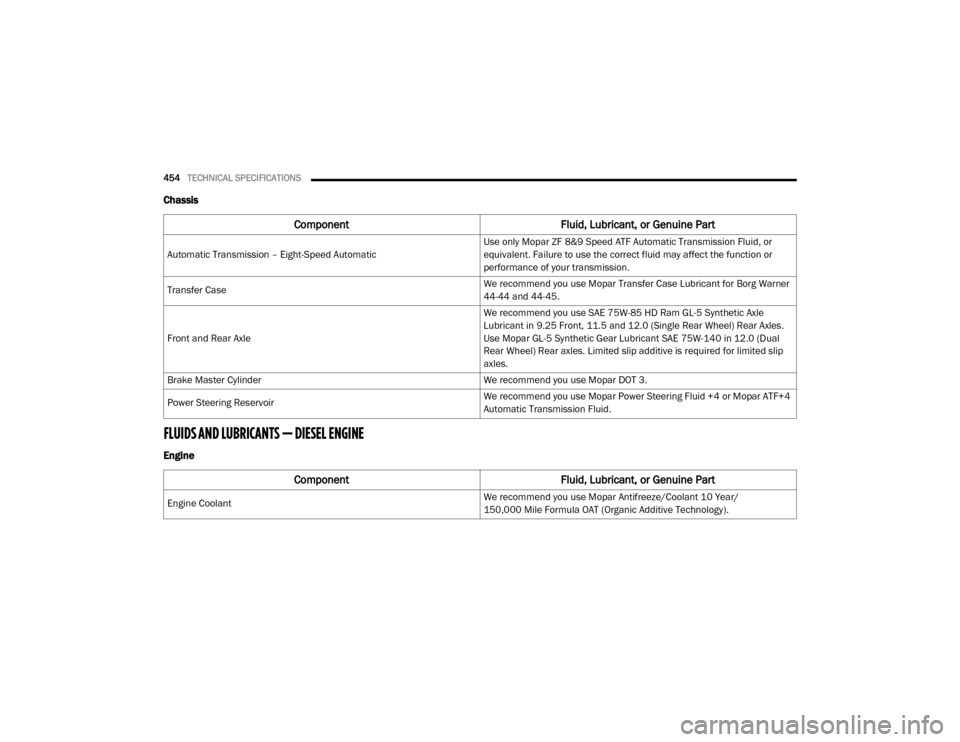
Chassis
FLUIDS AND LUBRICANTS — DIESEL ENGINE
Engine
Component Fluid, Lubricant, or Genuine Part
Automatic Transmission – Eight-Speed Automatic Use only Mopar ZF 8&9 Speed ATF Automatic Transmission Fluid, or
equivalent. Failure to use the correct fluid may affect the function or
performance of your transmission.
Transfer Case We recommend you use Mopar Transfer Case Lubricant for Borg Warner
44-44 and 44-45.
Front and Rear Axle We recommend you use SAE 75W-85 HD Ram GL-5 Synthetic Axle
Lubricant in 9.25 Front, 11.5 and 12.0 (Single Rear Wheel) Rear Axles.
Use Mopar GL-5 Synthetic Gear Lubricant SAE 75W-140 in 12.0 (Dual
Rear Wheel) Rear axles. Limited slip additive is required for limited slip
axles.
Brake Master Cylinder We recommend you use Mopar DOT 3.
Power Steering Reservoir We recommend you use Mopar Power Steering Fluid +4 or Mopar ATF+4
Automatic Transmission Fluid.
Component
Fluid, Lubricant, or Genuine Part
Engine Coolant We recommend you use Mopar Antifreeze/Coolant 10 Year/
150,000 Mile Formula OAT (Organic Additive Technology).
20_DJD2_OM_EN_USC_t.book Page 454
Page 457 of 553

TECHNICAL SPECIFICATIONS455
Engine Oil In ambient temperatures above 0°F (-18°C), we recommend you use
10W-30 engine oil such as Mopar, Shell Rotella and Shell Rimula that
meets FCA Material Standard MS-10902 and the API CK-4 engine oil
category is required. Products meeting Cummins CES 20081 may also be
used. The identification of these engine oils is typically located on the
back of the oil container.
In ambient temperatures below 0°F (-18°C), we recommend you use
5W-40
synthetic engine oil such as Mopar, Shell Rotella and Shell Rimula
that meets FCA Material Standard MS-10902 and the API CK-4 engine oil
category is required.
Engine Oil Filter We recommend you use Mopar Engine Oil Filters.
Fuel Filters We recommend you use Mopar Fuel Filter. Must meet 3 micron rating
(engine mounted filter). Must meet 5 micron rating (chassis mounted
filter).
Using a fuel filter that does not meet the manufacturers filtration
and water separating requirements can severely impact fuel system life
and reliability.
Crankcase Ventilation Filter We recommend you use Mopar CCV Filter.
ComponentFluid, Lubricant, or Genuine Part
8
20_DJD2_OM_EN_USC_t.book Page 455
Page 458 of 553

456TECHNICAL SPECIFICATIONS
Fuel Selection Use good quality diesel fuel from a reputable supplier in your vehicle.
Federal law requires that you must fuel this vehicle with Ultra Low Sulfur
Highway Diesel fuel (15 ppm Sulfur maximum) and prohibits the use of
Low Sulfur Highway Diesel fuel (500 ppm Sulfur maximum) to avoid
damage to the emissions control system.
For most year-round service, No. 2 diesel fuel meeting ASTM
specification D-975 Grade S15 will provide good performance.
If climatized or diesel Number 1 ULSD fuel is not available, and you are
operating below (20°F/-6°C), in sustained arctic conditions, Mopar
Premium Diesel Fuel Treatment (or equivalent) is recommended to avoid
gelling.
This vehicle is fully compatible with biodiesel blends up to 5% biodiesel
meeting ASTM specification D-975.
Pickup models, and Chassis Cab
models configured with optional B20 capability, are additionally
compatible with 20% biodiesel meeting ASTM specification D-7467.
Diesel Exhaust Fluid Mopar Diesel Exhaust Fluid (API Certified) (DEF) or equivalent that has
been API Certified to the ISO 22241 standard. Use of fluids not API
Certified to ISO 22241 may result in system damage. You can receive
assistance in locating DEF in the United States by calling 866-RAM-INFO
(866-726-4636). In Canada call 1–800–465–2001 (English) or
1–800–387–9983 (French).
Component
Fluid, Lubricant, or Genuine Part
20_DJD2_OM_EN_USC_t.book Page 456
Page 459 of 553

TECHNICAL SPECIFICATIONS457
Chassis
Component Fluid, Lubricant, or Genuine Part
Automatic Transmission – 6.7L Diesel with 68RFE Only use ATF+4 Automatic Transmission Fluid. Failure to use ATF+4 fluid
may affect the function or performance of your transmission. We
recommend Mopar ATF+4 fluid.
Automatic Transmission – 6.7L Diesel with AS69RC Only use Mopar ASRC Automatic Transmission Fluid or equivalent.Failure
to use the proper fluid may affect the function orperformance of your
transmission
Transfer Case We recommend you use Mopar BW44–44 Transfer Case Fluid.
Front and Rear Axle Fluid (2500/3500) We recommend you use SAE 75W-85 HD Ram GL-5 Synthetic Axle
Lubricant in 9.25 Front, 11.5 and 12.0 (Single Rear Wheel) Rear Axles.
Use Mopar GL-5 Synthetic Gear Lubricant SAE 75W-140 in 12.0 (Dual
Rear Wheel) Rear axles. Limited slip additive is required for limited slip
axles.
Brake Master Cylinder We recommend you use Mopar DOT 3.
8
20_DJD2_OM_EN_USC_t.book Page 457
Page 460 of 553

458
MULTIMEDIA
UCONNECT SYSTEMS
For detailed information about your Uconnect
4/4C/4C NAV with 8.4-inch or 12-inch display,
refer to your Uconnect Owner’s Manual Supple-
ment.
NOTE:
Uconnect screen images are for illustration
purposes only and may not reflect exact soft -
ware for your vehicle.
CYBERSECURITY
Your vehicle may be a connected vehicle and
may be equipped with both wired and wireless
networks. These networks allow your vehicle to
send and receive information. This information
allows systems and features in your vehicle to
function properly. Your vehicle may be equipped with certain secu
-
rity features to reduce the risk of unauthorized
and unlawful access to vehicle systems and
wireless communications. Vehicle software
technology continues to evolve over time and
FCA US LLC, working with its suppliers, evalu -
ates and takes appropriate steps as needed.
Similar to a computer or other devices, your
vehicle may require software updates to
improve the usability and performance of your
systems or to reduce the potential risk of unau -
thorized and unlawful access to your vehicle
systems.
The risk of unauthorized and unlawful access to
your vehicle systems may still exist, even if the
most recent version of vehicle software (such as
Uconnect software) is installed.
WARNING!
It is not possible to know or to predict all of
the possible outcomes if your vehicle’s
systems are breached. It may be possible
that vehicle systems, including safety
related systems, could be impaired or a
loss of vehicle control could occur that may
result in an accident involving serious injury
or death.
ONLY insert media (e.g., USB, SD card, or
CD) into your vehicle if it came from a
trusted source. Media of unknown origin
could possibly contain malicious software,
and if installed in your vehicle, it may
increase the possibility for vehicle systems
to be breached.
As always, if you experience unusual
vehicle behavior, take your vehicle to your
nearest authorized dealer immediately.
20_DJD2_OM_EN_USC_t.book Page 458
Page 461 of 553
MULTIMEDIA459
NOTE:
FCA US LLC or your dealer may contact you
directly regarding software updates.
To help further improve vehicle security and
minimize the potential risk of a security
breach, vehicle owners should:
Routinely check www.driveuconnect.com
(US Residents) or www.driveuconnect.ca
(Canadian Residents) to learn about
available Uconnect software updates.
Only connect and use trusted media devices (e.g. personal mobile phones,
USBs, CDs).
Privacy of any wireless and wired communica -
tions cannot be assured. Third parties may
unlawfully intercept information and private
communications without your consent. For
further information, refer to “Data Collection &
Privacy” in your Uconnect Owner’s Manual
Supplement or “Onboard Diagnostic System
(OBD II) Cybersecurity” in “Getting To Know Your
Instrument Panel”.
UCONNECT SETTINGS
The Uconnect system uses a combination of
buttons on the touchscreen and buttons on the
faceplate located on the center of the instru -
ment panel. These buttons allow you to access
and change the customer programmable
features. Many features can vary by vehicle.
Buttons on the faceplate are located below
and/or beside the Uconnect system in the
center of the instrument panel. In addition,
there is a Scroll/Enter control knob located on
the right side. Turn the control knob to scroll
through menus and change settings. Push the
center of the control knob one or more times to
select or change a setting.
Your Uconnect system may also have Screen
Off and Mute buttons on the faceplate.
Push the Screen Off button on the faceplate to
turn off the Uconnect screen. Push the button
again or tap the screen to turn the screen on.
Push the Back Arrow button to exit out of a
Menu or certain option on the Uconnect system.
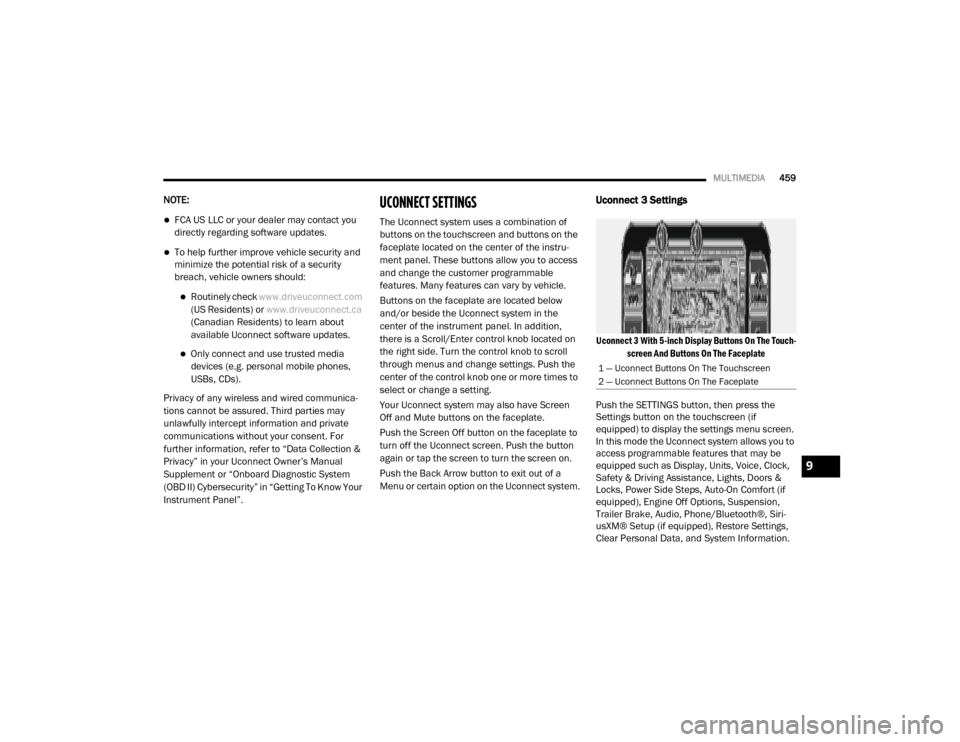
Uconnect 3 Settings
Uconnect 3 With 5-inch Display Buttons On The Touch -
screen And Buttons On The Faceplate
Push the SETTINGS button, then press the
Settings button on the touchscreen (if
equipped) to display the settings menu screen.
In this mode the Uconnect system allows you to
access programmable features that may be
equipped such as Display, Units, Voice, Clock,
Safety & Driving Assistance, Lights, Doors &
Locks, Power Side Steps, Auto-On Comfort (if
equipped), Engine Off Options, Suspension,
Trailer Brake, Audio, Phone/Bluetooth®, Siri -
usXM® Setup (if equipped), Restore Settings,
Clear Personal Data, and System Information.
1 — Uconnect Buttons On The Touchscreen
2 — Uconnect Buttons On The Faceplate
9
20_DJD2_OM_EN_USC_t.book Page 459
Page 462 of 553
460MULTIMEDIA
NOTE:
Only one category may be selected at a time.
When making a selection, press the button on
the touchscreen to enter the desired menu.
Once in the desired menu, press and release
the preferred setting until the button is high -lighted. Once the setting is complete, either
press the Back Arrow or the Done button on the
touchscreen or push the Back button on the
faceplate to return to the previous menu.
Pressing the Up or Down Arrow buttons on the
touchscreen on the right side of the screen will
allow you to toggle up or down through the list
of available settings.
NOTE:
All settings should be changed with the ignition
in the ON/RUN position.
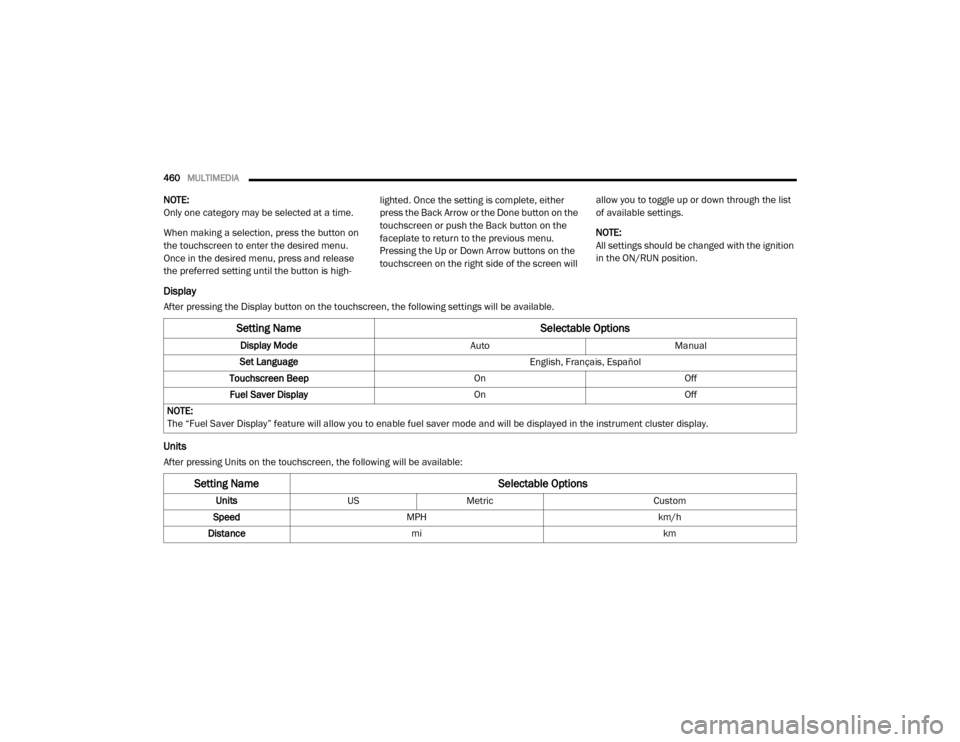
Display
After pressing the Display button on the touchscreen, the following settings will be available.
Units
After pressing Units on the touchscreen, the following will be available:
Setting Name
Selectable Options
Display ModeAutoManual
Set Language English, Français, Español
Touchscreen Beep OnOff
Fuel Saver Display OnOff
NOTE:
The “Fuel Saver Display” feature will allow you to enable fuel saver mode and will be displayed in the instrument cluster display.
Setting Name Selectable Options
UnitsUSMetric Custom
Speed MPH km/h
Distance mi km
20_DJD2_OM_EN_USC_t.book Page 460