change wheel Ram 3500 2019 User Guide
[x] Cancel search | Manufacturer: RAM, Model Year: 2019, Model line: 3500, Model: Ram 3500 2019Pages: 696, PDF Size: 13.89 MB
Page 291 of 696

SAFETY 289
Periodic Safety Checks You Should Make Outside
The Vehicle
Tires
Examine tires for excessive tread wear and uneven wear
patterns. Check for stones, nails, glass, or other objects
lodged in the tread or sidewall. Inspect the tread for cuts and
cracks. Inspect sidewalls for cuts, cracks, and bulges. Check
the wheel bolts for tightness. Check the tires (including
spare) for proper cold inflation pressure.
Lights
Have someone observe the operation of brake lights and
exterior lights while you work the controls. Check turn
signal and high beam indicator lights on the instrument
panel.
Door Latches
Check for proper closing, latching, and locking.
Fluid Leaks
Check area under the vehicle after overnight parking for
fuel, coolant, oil, or other fluid leaks. Also, if gasoline fumes
are detected or if fuel, or brake fluid leaks are suspected. The
cause should be located and corrected immediately.
• ALWAYS make sure objects cannot fall or slide into the
driver’s side floor area when the vehicle is moving.
Objects can become trapped under accelerator, brake,
or clutch pedals and could cause a loss of vehicle
control.
• NEVER place any objects under the floor mat (e.g., towels, keys, etc.). These objects could change the posi -
tion of the floor mat and may cause interference with
the accelerator, brake, or clutch pedals.
• If the vehicle carpet has been removed and re-installed, always properly attach carpet to the floor and check the
floor mat fasteners are secure to the vehicle carpet.
Fully depress each pedal to check for interference with
the accelerator, brake, or clutch pedals then re-install
the floor mats.
• It is recommended to only use mild soap and water to clean your floor mats. After cleaning, always check
your floor mat has been properly installed and is
secured to your vehicle using the floor mat fasteners by
lightly pulling mat.
WARNING! (Continued)
4
Page 309 of 696

STARTING AND OPERATING 307
Electronic Range Select (ERS) Operation — Eight-Speed
Transmission
The Electronic Range Select (ERS) shift control allows the
driver to limit the highest available gear when the transmis-
sion is in DRIVE. For example, if you set the transmission
gear limit to 4 (fourth gear), the transmission will not shift
above fourth gear (except to prevent engine overspeed), but
will shift through the lower gears normally.
You can switch between DRIVE and ERS mode at any
vehicle speed. When the transmission gear selector is in
DRIVE, the transmission will operate automatically, shifting
between all available gears. Tapping the GEAR- switch (on
the steering wheel) will activate ERS mode, display the
current gear in the instrument cluster, and set that gear as the
top available gear. Once in ERS mode, tapping the GEAR- or
GEAR+ switch will change the top available gear. To exit ERS mode, simply push and hold the GEAR+ switch
until the gear limit display disappears from the instrument
cluster.
1 — GEAR + Switch
2 — GEAR – Switch
WARNING!
Do not downshift for additional engine braking on a
slippery surface. The drive wheels could lose their grip
and the vehicle could skid, causing a collision or
personal injury.
5
Page 319 of 696
STARTING AND OPERATING 317
shift completion to occur. The preferred method is with the
vehicle rolling 2 to 3 mph (3 to 5 km/h). Avoid attempting
to engage or disengage 4L with the vehicle moving faster
than 2 to 3 mph (3 to 5 km/h).
• Do not attempt to shift into or out of 4L while the transmis -
sion is in gear.
Transfer Case Position Indicator Light
The “Transfer Case Position Indicator Light” in the instru-
ment cluster is used to alert the driver that the front axle is
fully engaged and all four wheels are driving.
AIR SUSPENSION SYSTEM (2500/3500 MODELS) — IF
EQUIPPED
Description
This air suspension system is a rear leveling ride height
system. The main purpose of this system is to maintain the
truck’s rear ride height level. There are two selectable heights
that can be chosen based on your operating conditions.
The system requires that the ignition be in ON/RUN posi -
tion or the engine running with zero vehicle speed for all
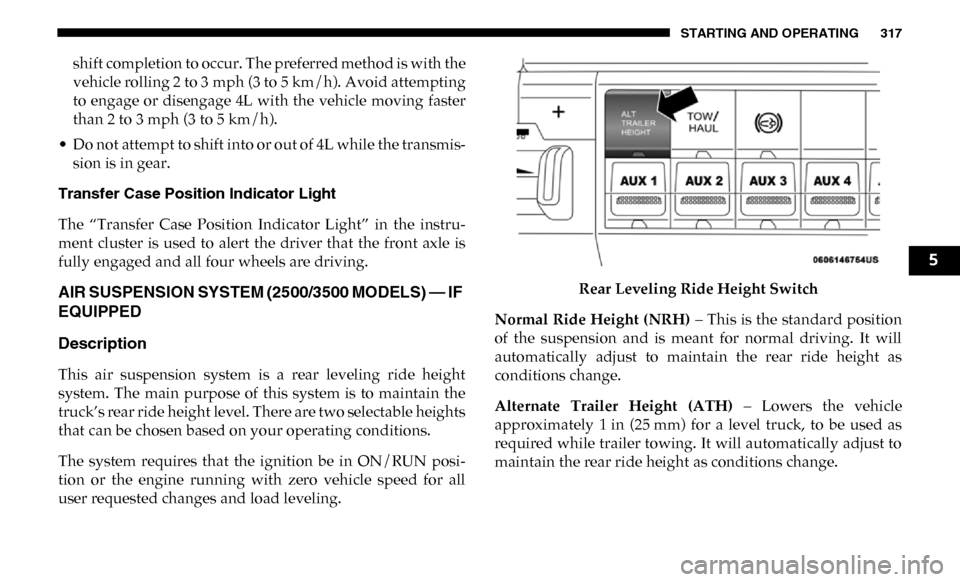
user requested changes and load leveling. Rear Leveling Ride Height Switch
Normal Ride Height (NRH) – This is the standard position
of the suspension and is meant for normal driving. It will
automatically adjust to maintain the rear ride height as
conditions change.
Alternate Trailer Height (ATH) – Lowers the vehicle
approximately 1 in (25 mm) for a level truck, to be used as
required while trailer towing. It will automatically adjust to
maintain the rear ride height as conditions change.
5
Page 327 of 696

STARTING AND OPERATING 325
Water Fording Characteristics
Water fording characteristic is the vehicle's ability to cross a
body of still water, where the powertrain and drivetrain are
safe from water ingestion. This vehicle has high water
fording characteristics with the ability to cross a pool of
water, without stopping, 24 inches (60 cm) deep at a
maximum speed of 10 mph (16 km/h) and a pool of water
30 inches (76 cm) deep at a maximum speed of 5 mph (8 km/
h), both with an entrance ramp angle of 1.3 degrees.
Simultaneous Brake And Throttle Operation
Many off-road driving conditions require the simultaneous
use of the brake and throttle (two footed driving). When
climbing rocks, logs, or other stepped objects, using light
brake pressure with light throttle will keep the vehicle from
jerking or lurching. This technique is also used when you
need to stop and restart a vehicle on a steep incline.The Basics Of Off-Road Driving
You will encounter many types of terrain driving off-road.
You should be familiar with the terrain and area before
proceeding. There are many types of surface conditions:
hard packed dirt, gravel, rocks, grass, sand, mud, snow and
ice. Every surface has a different effect on your vehicle's
steering, handling and traction. Controlling your vehicle is
one of the keys to successful off-road driving, so always keep
a firm grip on the steering wheel and maintain a good
driving posture. Avoid sudden accelerations, turns or
braking. In most cases there are no road signs, posted speed
limits or signal lights. Therefore you will need to use your
own good judgment on what is safe and what isn't. When on
a trail you should always be looking ahead for surface obsta
-
cles and changes in terrain. The key is to plan your future
driving route while remembering what you are currently
driving over.
CAUTION!
The door sill height is 25 inches (63.5 cm). Water may
intrude into the interior of the vehicle at greater depths.
WARNING!
Always wear your seat belt and firmly tie down cargo.
Unsecured cargo can become projectiles in an off-road
situation.
5
Page 331 of 696

STARTING AND OPERATING 329
Getting High Centered
If you get hung up or high centered on an object, get out of
the vehicle and try to determine what the vehicle is hung up
on, where it is contacting the underbody and what is the best
direction to recover the vehicle. Depending on what you are
in contact with, jack the vehicle up and place a few rocks
under the tires so the weight is off of the high point when
you let the vehicle down. You can also try rocking the vehicle
or winching the vehicle off the object.
Hill Climbing
Hill climbing requires good judgment and a good under-
standing of your abilities and your vehicle's limitations. Hills
can cause serious problems. Some are just too steep to climb
and should not be attempted. You should always feel confi -
dent with the vehicle and your abilities. You should always
climb hills straight up and down. Never attempt to climb a
hill on an angle. •
Before Climbing A Steep Hill – As you approach a hill
consider its grade or steepness. Determine if it is too steep.
Look to see what the traction is on the hill side trail. Is the
trail straight up and down? What is on top and the other
side? Are there ruts, rocks, branches or other obstacles on
the path? Can you safely recover the vehicle if something
goes wrong? If everything looks good and you feel confi -
dent, then change transmission into a lower gear, shift the
transfer case into 4LO (Low) and proceed with caution.
You should use first gear and 4LO (Low Range) for very
steep hills.
• Driving Up Hill – Once you have determined your ability
to proceed and have shifted into the appropriate gear, line
your vehicle up for the straightest possible run. Accelerate
with an easy constant throttle and apply more power as
you start up the hill. Do not race forward into a steep
grade, the abrupt change of grade could cause you to lose
control. If the front end begins to bounce, ease off the
throttle slightly to bring all four tires back on the ground.
As you approach the crest of the hill ease off the throttle
and slowly proceed over the top. If the wheels start to slip
as you approach the crest of a hill, ease off the accelerator
and maintain headway by turning the steering wheel no
more than a ¼ turn quickly back and forth. This will
provide a fresh "bite" into the surface and will usually
CAUTION!
Winching or rocking the vehicle off hard objects
increases the risk of underbody damage.
5
Page 400 of 696
398 STARTING AND OPERATING
If Equipped — Cargo Camera Icons:
• — Backup Camera Touchscreen Button
• — Cargo Camera Touchscreen Button
• — AUX Camera Touchscreen Button
If equipped with a Cargo Camera, a touchscreen button to
indicate the current active Camera image being displayed is
made available whenever the Rear View Camera image is
displayed.
If equipped with a Cargo Camera, a touchscreen button to
switch the display to Cargo Camera image is made available
whenever the Rear View Camera image is displayed.
A touchscreen button "X" to disable display of the camera
image is made available when the vehicle is not in REVERSE
gear.
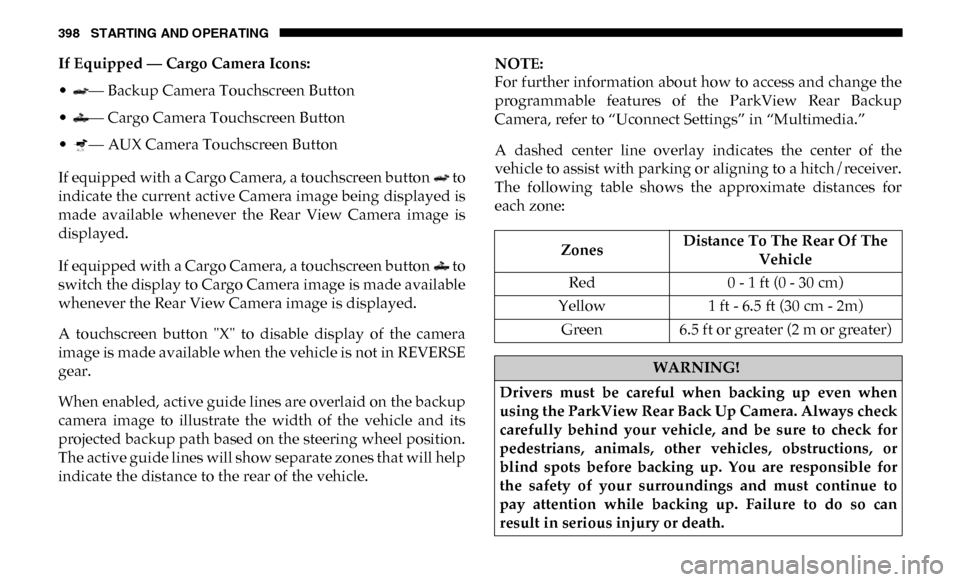
When enabled, active guide lines are overlaid on the backup
camera image to illustrate the width of the vehicle and its
projected backup path based on the steering wheel position.
The active guide lines will show separate zones that will help
indicate the distance to the rear of the vehicle.NOTE:
For further information about how to access and change the
programmable features of the ParkView Rear Backup
Camera, refer to “Uconnect Settings” in “Multimedia.”
A dashed center line overlay indicates the center of the
vehicle to assist with parking or aligning to a hitch/receiver.
The following table shows the approximate distances for
each zone:
Zones
Distance To The Rear Of The
Vehicle
Red 0 - 1 ft (0 - 30 cm)
Yellow 1 ft - 6.5 ft (30 cm - 2m)
Green 6.5 ft or greater (2 m or greater)
WARNING!
Drivers must be careful when backing up even when
using the ParkView Rear Back Up Camera. Always check
carefully behind your vehicle, and be sure to check for
pedestrians, animals, other vehicles, obstructions, or
blind spots before backing up. You are responsible for
the safety of your surroundings and must continue to
pay attention while backing up. Failure to do so can
result in serious injury or death.
Page 425 of 696

STARTING AND OPERATING 423
4. Push the UP or DOWN button on the steering wheel until“TRAILER TOW” appears on the screen.
5. Push the RIGHT arrow on the steering wheel to enter “TRAILER TOW”.
6. Push the UP or DOWN buttons until the Trailer Brake Type appears on the screen.
7. Push the RIGHT arrow and then push the UP or DOWN buttons until the proper Trailer Brake Type appears on
the screen. 8. In a traffic-free environment, tow the trailer on a dry,
level surface at a speed of 20–25 mph (30–40 km/h) and
squeeze the manual brake control lever completely.
9. If the trailer wheels lockup (indicated by squealing tires), reduce the GAIN setting; if the trailer wheels turn freely,
increase the GAIN setting.
Repeat steps 8 and 9 until the GAIN setting is at a point just
below trailer wheel lockup. If towing a heavier trailer, trailer
wheel lockup may not be attainable even with the maximum
GAIN setting of 10.
* The suggested selection depends and may change
depending on the customer preferences for braking perfor -
mance. Condition of the trailer brakes, driving and road state
may also affect the selection. Light Electric Heavy Electric
Light EOHHeavy EOH
Type of Trailer Brakes Electric Trailer Brakes Electric Trailer Brakes Electric over Hydraulic
Trailer BrakesElectric over Hydraulic
Trailer Brakes
Load *Under 10,000 lbs *Above 10,000 lbs *Under 10,000 lbs *Above 10,000 lbs
5
Page 447 of 696

IN CASE OF EMERGENCY 445
• Equipment malfunction at the SOS operator facility.
• Operator error by the SOS operator.
• LTE (voice/data) or 4G (data) network congestion.
• Weather.
• Buildings, structures, geographic terrain, or tunnels.
NOTE:
• Your vehicle may be transmitting data as authorized bythe subscriber. • Never place anything on or near the vehicle’s LTE (voice/
data) or 4G (data) and GPS antennas. You could prevent
LTE (voice/data) or 4G (data) and GPS signal reception,
which can prevent your vehicle from placing an emer -
gency call. An operable LTE (voice/data) or 4G (data)
network connection and a GPS signal is required for the
SOS Call system to function properly.
General Information
This device complies with Part 15 of the FCC Rules. Opera -
tion is subject to the following two conditions: (1) This device
may not cause harmful interference, and (2) this device must
accept any interference received, including interference that
may cause undesired operation.
NOTE:
Changes or modifications not expressly approved by the
party responsible for compliance could void the user's
authority to operate the equipment.
WARNING!
ALWAYS obey traffic laws and pay attention to the road.
ALWAYS drive safely with your hands on the steering
wheel. You have full responsibility and assume all risks
related to the use of the features and applications in this
vehicle. Only use the features and applications when it is
safe to do so. Failure to do so may result in an accident
involving serious injury or death.
6
Page 471 of 696

IN CASE OF EMERGENCY 469
JACKING AND TIRE CHANGING NOTE:
If your vehicle is equipped with an air suspension system,
there is a feature which allows the automatic leveling to be
disabled to assist with changing a tire.
This feature can be activated through the Uconnect system.
Refer to “Uconnect Settings” in “Multimedia” for further
information.
WARNING!
• Do not attempt to change a tire on the side of the vehicle close to moving traffic. Pull far enough off the road to
avoid the danger of being hit when operating the jack
or changing the wheel.
• Being under a jacked-up vehicle is dangerous. The vehicle could slip off the jack and fall on you. You
could be crushed. Never put any part of your body
under a vehicle that is on a jack. If you need to get
under a raised vehicle, take it to a service center where
it can be raised on a lift.
• Never start or run the engine while the vehicle is on a jack.
• The jack is designed to be used as a tool for changing tires only. The jack should not be used to lift the
vehicle for service purposes. The vehicle should be
jacked on a firm level surface only. Avoid ice or slip -
pery areas.
6
Page 478 of 696

476 IN CASE OF EMERGENCY
Preparations For Jacking
1. Park the vehicle on a firm, level surface. Avoid ice or slip-
pery areas.
2. Place the gear selector into PARK. On four-wheel drive vehicles, shift the transfer case to the 4L position.
3. Turn on the Hazard Warning flasher.
4. Apply the parking brake.
5. Turn the ignition OFF. 6. Block both the front and rear of the wheel diagonally
opposite the jacking position. For example, if the right
front wheel is being changed, block the left rear wheel.
Wheel Blocked
NOTE:
Passengers should not remain in the vehicle when the
vehicle is being jacked.
WARNING!
Do not attempt to change a tire on the side of the vehicle
close to moving traffic. Pull far enough off the road to
avoid being hit when operating the jack or changing the
wheel.