phone Ram 3500 2019 User Guide
[x] Cancel search | Manufacturer: RAM, Model Year: 2019, Model line: 3500, Model: Ram 3500 2019Pages: 696, PDF Size: 13.89 MB
Page 130 of 696

128 GETTING TO KNOW YOUR VEHICLE
Instrument Panel Power Inverter Switch
If equipped, there may be a 115 Volt (400 Watts Maximum)
inverter located to the right of the center stack, just below the
climate controls. This inverter can power cellular phones,
electronics and other low power devices requiring power up
to 400 Watts. Certain high-end video game consoles exceed
this power limit, as will most power tools. Center Stack Power Inverter
To turn on the power outlet, simply plug in the device. The
outlet turns off when the device is unplugged.
NOTE:
• The Power Inverter only turns on if the ignition is in the ACC or ON/RUN position.
• Due to built-in overload protection, the power inverter shuts down if the power rating is exceeded.
Page 131 of 696

GETTING TO KNOW YOUR VEHICLE 129
Wireless Charging Pad — If Equipped
Wireless Charging PadYour vehicle may be equipped with a 15W 3A Qi wireless
charging pad located inside of the center console just below
the CD player (if equipped). This charging pad is designed to
wirelessly charge your Qi enabled mobile phone. Qi is a stan
-
dard that uses magnetic induction to transfer power to your
mobile device.
Your mobile phone must be designed for Qi wireless
charging. If the phone is not equipped with Qi wireless
charging functionality, an aftermarket sleeve or a specialized
back plate can be purchased from your mobile phone
provider or an local electronics retailer. Please see your
phone’s owner’s manual for further information.
The wireless charging pad is equipped with an anti-slip mat,
an adjustable cradle to hold your mobile phone in place and
an LED indicator light.
WARNING!
To avoid serious injury or death:
• Do not insert any objects into the receptacles.
• Do not touch with wet hands.
• Close the lid when not in use.
• If this outlet is mishandled, it may cause an electric shock and failure.
CAUTION!
The key fob should not be placed on the charging pad or
within 15 cm (150 mm) of it. Doing so can cause excessive
heat buildup and damage to the fob. Placing the fob in
close proximity of the charging pad blocks the fob from
being detected by the vehicle and prevents the vehicle
from starting.
2
Page 173 of 696

GETTING TO KNOW YOUR INSTRUMENT PANEL 171
Trip A/Trip B
Push and release the up or down arrow button until the Trip
menu item is highlighted in the instrument cluster display.
Push and release the right arrow button to enter the
submenus of Trip A and Trip B. The Trip A or Trip B infor -
mation will display the following:
• Distance
• Average Fuel Economy
• Elapsed Time
Push and hold right arrow button to reset all information.
Trailer Tow
Push and release the up or down arrow button until the
Trailer Tow menu item is highlighted in the instrument
cluster display. Push and release the right arrow button and
the next screen will display the following trailer trip infor -
mation:
• Trip (trailer specific) Distance: Push and hold the right
arrow button to reset the distance. • Trailer Brake
•Output
•Type
•Gain
• Trailer Tire Pressure — If Equipped
Audio
Push and release the up or down arrow button until the
Audio Menu icon/title is highlighted in the instrument
cluster display. This menu will display the audio source
information, including the Song name, Artist name, and
audio source with an accompanying graphic.
Phone Call Status
When a call is incoming, a Phone Call Status pop-up will
display on the screen. The pop-up will remain until the
phone is answered or ignored.
NOTE:
The call status will temporarily replace the previous media
source information displayed on the screen. When the
pop-up is no longer displayed, the display will return to the
last used screen.
3
Page 310 of 696

308 STARTING AND OPERATING
When to Use TOW/HAUL Mode
When driving in hilly areas, towing a trailer, carrying a
heavy load, etc., and frequent transmission shifting occurs,
push the TOW/HAUL switch to activate TOW/HAUL
mode. This will improve performance and reduce the poten-
tial for transmission overheating or failure due to excessive
shifting.
TOW/HAUL Switch The “TOW/HAUL Indicator Light” will illuminate in the
instrument cluster to indicate that TOW/HAUL mode has
been activated. Pushing the switch a second time restores
normal operation. Normal operation is always the default at
engine start-up. If TOW/HAUL mode is desired, the switch
must be pushed each time the engine is started.
ACTIVE NOISE CANCELLATION
Your vehicle is equipped with an Active Noise Cancellation
System. This system is designed to address exhaust and
engine noise. The system relies on four microphones
embedded in the headliner, which monitor exhaust and
engine noise, and assists an onboard frequency generator,
which creates counteracting sound waves in the audio
system’s speakers. This helps keep the vehicle quiet at idle
and during drive.
WARNING!
Do not use the “TOW/HAUL” feature when driving in
icy or slippery conditions. The increased engine braking
can cause the rear wheels to slide, and the vehicle to
swing around with the possible loss of vehicle control,
which may cause an accident possibly resulting in
personal injury or death.
Page 579 of 696

MULTIMEDIA 577
The risk of unauthorized and unlawful access to your vehicle
systems may still exist, even if the most recent version of
vehicle software (such as Uconnect software) is installed.NOTE:
• FCA US LLC or your dealer may contact you directly
regarding software updates.
• To help further improve vehicle security and minimize the potential risk of a security breach, vehicle owners should:
•Routinely check www.driveuconnect.com (U.S. Resi-
dents) or www.driveuconnect.ca (Canadian Residents)
to learn about available Uconnect software updates.
•Only connect and use trusted media devices (e.g. personal mobile phones, USBs, CDs).
Privacy of any wireless and wired communications cannot
be assured. Third parties may unlawfully intercept informa -
tion and private communications without your consent. For
further information, refer to “Data Collection & Privacy” in
your Uconnect Owner’s Manual Supplement or “Onboard
Diagnostic System (OBD II) Cybersecurity” in “Getting To
Know Your Instrument Panel”.
WARNING!
• It is not possible to know or to predict all of the possible outcomes if your vehicle’s systems are
breached. It may be possible that vehicle systems,
including safety related systems, could be impaired or
a loss of vehicle control could occur that may result in
an accident involving serious injury or death.
• ONLY insert media (e.g., USB, SD card, or CD) into your vehicle if it came from a trusted source. Media of
unknown origin could possibly contain malicious soft -
ware, and if installed in your vehicle, it may increase
the possibility for vehicle systems to be breached.
• As always, if you experience unusual vehicle behavior, take your vehicle to your nearest authorized dealer
immediately.
9
Page 580 of 696
578 MULTIMEDIA
UCONNECT SETTINGS
The Uconnect system uses a combination of buttons on the
touchscreen and buttons on the faceplate located on the
center of the instrument panel that allows you to access and
change the customer programmable features. Many features
can vary by vehicle.
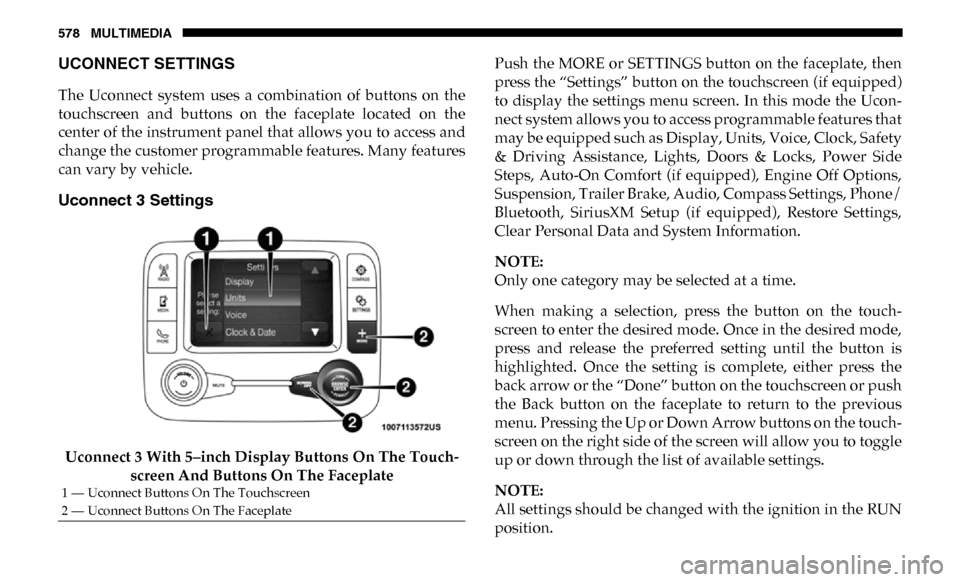
Uconnect 3 Settings
Uconnect 3 With 5–inch Display Buttons On The Touch-
screen And Buttons On The Faceplate Push the MORE or SETTINGS button on the faceplate, then
press the “Settings” button on the touchscreen (if equipped)
to display the settings menu screen. In this mode the Ucon
-
nect system allows you to access programmable features that
may be equipped such as Display, Units, Voice, Clock, Safety
& Driving Assistance, Lights, Doors & Locks, Power Side
Steps, Auto-On Comfort (if equipped), Engine Off Options,
Suspension, Trailer Brake, Audio, Compass Settings, Phone/
Bluetooth, SiriusXM Setup (if equipped), Restore Settings,
Clear Personal Data and System Information.
NOTE:
Only one category may be selected at a time.
When making a selection, press the button on the touch -
screen to enter the desired mode. Once in the desired mode,
press and release the preferred setting until the button is
highlighted. Once the setting is complete, either press the
back arrow or the “Done” button on the touchscreen or push
the Back button on the faceplate to return to the previous
menu. Pressing the Up or Down Arrow buttons on the touch -
screen on the right side of the screen will allow you to toggle
up or down through the list of available settings.
NOTE:
All settings should be changed with the ignition in the RUN
position.
1 — Uconnect Buttons On The Touchscreen
2 — Uconnect Buttons On The Faceplate
Page 594 of 696

592 MULTIMEDIA
Compass Settings — If Equipped
After pressing the “Compass Settings” button on the touchscreen, the following settings will be available:Setting Name Selectable Options
Variance 1 2 3 4 5 6 7 8 9 10 11 12 13 14 15
NOTE:
• Compass Variance is the difference between Magnetic North and Geographic North. To compensate for the differences the variance should be set for the zone where the vehicle is driven, per the zone map. Once properly set, the compass will auto -
matically compensate for the differences, and provide the most accurate compass heading.
• Keep magnetic materials away from the top of the instrument panel, such as iPod's, Mobile Phones, Laptops and Radar Detectors. This is where the compass module is located, and it can cause interference with the compass sensor, and it may
give false readings.
Perform Compass Calibration On
Off
NOTE:
Press the “Calibration” button on the touchscreen to change this setting. This compass is self-calibrating, which eliminates
the need to manually reset the compass. When the vehicle is new, the compass may appear erratic until it is calibrated. You
may also calibrate the compass by pressing the “ON” button on the touchscreen and completing one or more 360-degree
turns (in an area free from large metal or metallic objects). The compass will now function normally.
Page 596 of 696

594 MULTIMEDIA
Phone/Bluetooth
After pressing the “Phone/Bluetooth” button on the touchscreen, the following settings will be available:
SiriusXM Setup — If Equipped
After pressing the “SiriusXM Setup” button on the touchscreen, the following settings will be available:Setting Name
Selectable Options
Paired Phones List of Paired Phones
NOTE:
The “Paired Phones” feature shows which phones are paired to the Phone/Bluetooth system. For further information, refer
to the Uconnect Owner’s Manual Supplement.
Setting Name Selectable Options
Tune Start OnOff
Channel Skip List of Channels
NOTE:
SiriusXM can be programmed to exclude undesirable channels while scanning. To make your selection, press the “Channel
Skip” button on the touchscreen, select the channels you would like to skip. Subscription Info Sirius ID
Page 599 of 696
MULTIMEDIA 597
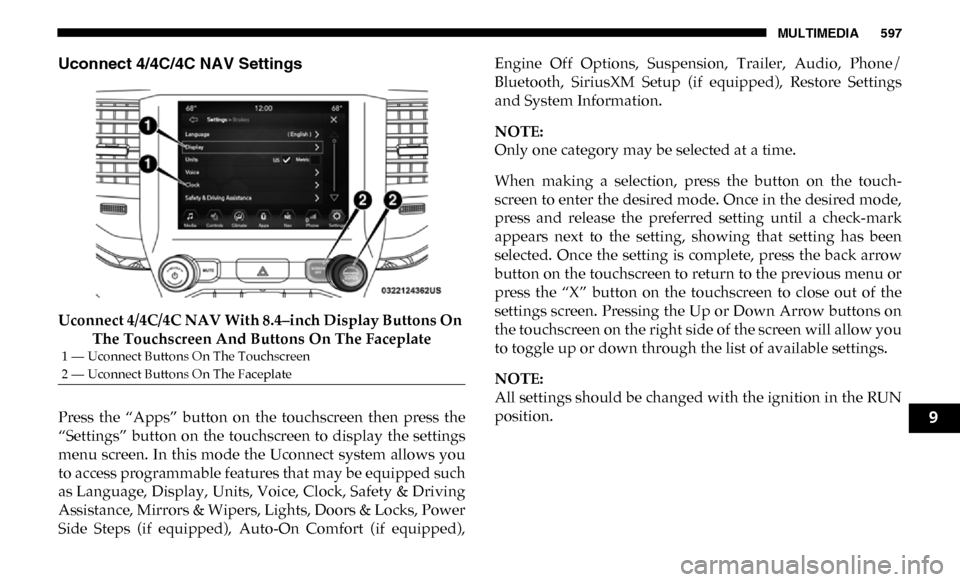
Uconnect 4/4C/4C NAV Settings
Uconnect 4/4C/4C NAV With 8.4–inch Display Buttons On The Touchscreen And Buttons On The Faceplate
Press the “Apps” button on the touchscreen then press the
“Settings” button on the touchscreen to display the settings
menu screen. In this mode the Uconnect system allows you
to access programmable features that may be equipped such
as Language, Display, Units, Voice, Clock, Safety & Driving
Assistance, Mirrors & Wipers, Lights, Doors & Locks, Power
Side Steps (if equipped), Auto-On Comfort (if equipped), Engine Off Options, Suspension, Trailer, Audio, Phone/
Bluetooth, SiriusXM Setup (if equipped), Restore Settings
and System Information.
NOTE:
Only one category may be selected at a time.
When making a selection, press the button on the touch
-
screen to enter the desired mode. Once in the desired mode,
press and release the preferred setting until a check-mark
appears next to the setting, showing that setting has been
selected. Once the setting is complete, press the back arrow
button on the touchscreen to return to the previous menu or
press the “X” button on the touchscreen to close out of the
settings screen. Pressing the Up or Down Arrow buttons on
the touchscreen on the right side of the screen will allow you
to toggle up or down through the list of available settings.
NOTE:
All settings should be changed with the ignition in the RUN
position.
1 — Uconnect Buttons On The Touchscreen
2 — Uconnect Buttons On The Faceplate
9
Page 601 of 696

MULTIMEDIA 599
Display Brightness With Headlights
OFF–
+
NOTE:
To make changes to the "Display Brightness with Headlights OFF" setting, the headlights must be off and the interior dimmer
switch must not be in the "party" or "parade" positions.
Touchscreen Beep OnOff
Controls Screen Time-Out — If
Equipped On
Off
Fuel Saver Display in Cluster — If
Equipped On
Off
NOTE:
When selected, the system displays fuel saver mode in the instrument cluster.
Navigation Next Turn Pop-ups
Displayed In Cluster — If Equipped On
Off
Phone Pop-ups Displayed in Cluster
— If Equipped On
Off
Setting Name
Selectable Options
9