lights Ram 3500 2019 Owner's Guide
[x] Cancel search | Manufacturer: RAM, Model Year: 2019, Model line: 3500, Model: Ram 3500 2019Pages: 696, PDF Size: 13.89 MB
Page 128 of 696

126 GETTING TO KNOW YOUR VEHICLE
Power Inverter — If Equipped
If equipped, a 115 Volt (400 Watts Maximum) inverter may
be located inside the center console towards the right hand
side, just under the Wireless Charging Pad (if equipped).
This inverter can power cellular phones, electronics andother low power devices requiring power up to 400 Watts.
Certain high-end video game consoles exceed this power
limit, as will most power tools.
Center Console Power Inverter Outlet
There is also a second 115 Volt (400 Watts Maximum) power
inverter located on the rear of the center console. This
inverter can power cellular phones, electronics and other low
power devices requiring power up to 400 Watts. Certain
high-end video game consoles exceed this power limit, as
will most power tools.
CAUTION!
• Many accessories that can be plugged in draw power from the vehicle's battery, even when not in use (i.e.,
cellular phones, etc.). Eventually, if plugged in long
enough, the vehicle's battery will discharge sufficiently
to degrade battery life and/or prevent the engine from
starting.
• Accessories that draw higher power (i.e., coolers, vacuum cleaners, lights, etc.), will discharge the battery
even more quickly. Only use these intermittently and
with greater caution.
• After the use of high power draw accessories, or long periods of the vehicle not being started (with accesso -
ries still plugged in), the vehicle must be driven a suffi -
cient length of time to allow the generator to recharge
the vehicle's battery.
Page 137 of 696

GETTING TO KNOW YOUR VEHICLE 135
To open a storage bin with the RamBox unlocked, push and
release the button located on the lid. The RamBox lid will
open upward to allow hand access. Lift the lid to fully open.
NOTE:
RamBox will not open when the pushbutton is pushed if the
RamBox is locked.RamBox Pushbutton And Lock The interior of the RamBox will automatically illuminate
when the lid is opened. In addition to the automatic illumi
-
nation switch, there is a manual on/off switch located at the
rear of each storage bin. Pushing the switch once will turn off
the bin lights, pushing the switch again will turn the lights
back on.CAUTION!
Leaving the lid open for extended periods of time could
cause the vehicle battery to discharge. If the lid is
required to stay open for extended periods of time, it is
recommended that the bin lights be turned off manually
using the on/off switch.
2
Page 180 of 696

178 GETTING TO KNOW YOUR INSTRUMENT PANEL
NOTE:
• The charging system is independent from load reduction.The charging system performs a diagnostic on the
charging system continuously.
• If the Battery Charge Warning Light is on it may indicate a problem with the charging system. Refer to “Battery
Charge Warning Light” in “Getting To Know Your Instru -
ment Panel” for further information.
The electrical loads that may be switched off (if equipped), and
vehicle functions which can be affected by load reduction:
• Heated Seats/Vented Seats/Heated Wheel
• Rear Defroster And Heated Mirrors
• HVAC System
• 115V AC Power Inverter System
• Audio and Telematics System
Loss of the battery charge may indicate one or more of the
following conditions:
• The charging system cannot deliver enough electrical power to the vehicle system because the electrical loads are
larger than the capability of charging system. The charging
system is still functioning properly. • Turning on all possible vehicle electrical loads (e.g. HVAC
to max settings, exterior and interior lights, overloaded
power outlets +12V, 115V AC, USB ports) during certain
driving conditions (city driving, towing, frequent stop -
ping).
• Installing options like additional lights, upfitter electrical accessories, audio systems, alarms and similar devices.
• Unusual driving cycles (short trips separated by long parking periods).
• The vehicle was parked for an extended period of time (weeks, months).
• The battery was recently replaced and was not charged completely.
• The battery was discharged by an electrical load left on when the vehicle was parked.
• The battery was used for an extended period with the engine not running to supply radio, lights, chargers, +12V
portable appliances like vacuum cleaners, game consoles
and similar devices.
Page 181 of 696
GETTING TO KNOW YOUR INSTRUMENT PANEL 179
What to do when an electrical load reduction action
message is present (“Battery Saver On” or “Battery Saver
Mode”)
During a trip:
• Reduce power to unnecessary loads if possible:•Turn off redundant lights (interior or exterior).
•Check what may be plugged in to power outlets +12V,115V AC, USB ports.
•Check HVAC settings (blower, temperature).
•Check the audio settings (volume).
After a trip:
• Check if any aftermarket equipment was installed (addi -
tional lights, upfitter electrical accessories, audio systems,
alarms) and review specifications if any (load and Ignition
Off Draw currents).
• Evaluate the latest driving cycles (distance, driving time and parking time).
• The vehicle should have service performed if the message is still present during consecutive trips and the evaluation
of the vehicle and driving pattern did not help to identify
the cause.WARNING LIGHTS AND MESSAGES
The warning/indicator lights will illuminate in the instru-
ment panel together with a dedicated message and/or
acoustic signal when applicable. These indications are indic -
ative and precautionary and as such must not be considered
as exhaustive. Always refer to the information in this chapter
in the event of a failure indication. All active telltales will
display first if applicable. The system check menu may
appear different based upon equipment options and current
vehicle status. Some telltales are optional and may not
appear.
Red Warning Lights
— Seat Belt Reminder Warning Light
This warning light indicates when the driver or passenger
seat belt is unbuckled. When the ignition is first placed in the
ON/RUN or ACC/ON/RUN position and if the driver’s
seat belt is unbuckled, a chime will sound and the light will
turn on. When driving, if the driver or front passenger seat
belt remains unbuckled, the Seat Belt Reminder Light will
flash or remain on continuously and a chime will sound.
Refer to “Occupant Restraint Systems” in “Safety” for
further information.
3
Page 186 of 696

184 GETTING TO KNOW YOUR INSTRUMENT PANEL
Yellow Warning Lights
— Adaptive Cruise Control (ACC) Fault Warning Light
— If Equipped
This warning light will illuminate to indicate a fault in the
ACC system. Contact a local authorized dealer for service.
For further information, refer to “Adaptive Cruise Control
(ACC)” in “Starting And Operating.”
— Air Suspension Fault Warning Light — If Equipped
This light will illuminate when a fault is detected with the air
suspension system.
— Engine Check/Malfunction Indicator Warning Light
(MIL)
The Engine Check/Malfunction Indicator Light (MIL) is a
part of an Onboard Diagnostic System called OBD II that
monitors engine and automatic transmission control
systems. This warning light will illuminate when the ignition
is in the ON/RUN position before engine start. If the bulb
does not come on when turning the ignition switch from OFF
to ON/RUN, have the condition checked promptly. Certain conditions, such as a loose or missing gas cap, poor
quality fuel, etc., may illuminate the light after engine start.
The vehicle should be serviced if the light stays on through
several typical driving styles. In most situations, the vehicle
will drive normally and will not require towing.
When the engine is running, the MIL may flash to alert
serious conditions that could lead to immediate loss of
power or severe catalytic converter damage. The vehicle
should be serviced by an authorized dealer as soon as
possible if this occurs.
WARNING!
A malfunctioning catalytic converter, as referenced
above, can reach higher temperatures than in normal
operating conditions. This can cause a fire if you drive
slowly or park over flammable substances such as dry
plants, wood, cardboard, etc. This could result in death
or serious injury to the driver, occupants or others.
Page 190 of 696
188 GETTING TO KNOW YOUR INSTRUMENT PANEL
If the ABS light does not turn on when the ignition is placed
in the ON/RUN or ACC/ON/RUN position, have the brake
system inspected by an authorized dealer. — Rear Axle Locker Fault Indicator Light — If
Equipped
This warning light will illuminate to indicate when a rear
axle locker fault has been detected.
— Service Forward Collision Warning (FCW) Light —
If Equipped
This warning light will illuminate to indicate a fault in the
Forward Collision Warning System. Contact an authorized
dealer for service.
Refer to "Forward Collision Warning (FCW)" in "Safety" for
further information.
— Service 4WD Warning Light — If Equipped
This warning light will illuminate to signal a fault with the 4WD
system. If the light stays on or comes on during driving, it means
that the 4WD system is not functioning properly and that
service is required. We recommend you drive to the nearest
service center and have the vehicle serviced immediately.
— Speed Control Fault Warning Light
This warning light will illuminate to indicate the Speed
Control System is not functioning properly and service is
required. Contact an authorized dealer.
— Sway Bar Fault Warning Light
This light will illuminate when there is a fault in the sway bar
disconnect system.
Yellow Indicator Lights
— Forward Collision Warning Off Indicator Light — If
Equipped
This indicator light illuminates to indicate that Forward
Collision Warning is off.
— Air Suspension Payload Protection Indicator Light —
If Equipped
This indicator light will illuminate to indicate that the
maximum payload may have been exceeded or load leveling
cannot be achieved at its current ride height. Protection
Mode will automatically be selected in order to “protect” the
air suspension system, air suspension adjustment is limited
due to payload.
Page 192 of 696

190 GETTING TO KNOW YOUR INSTRUMENT PANEL
— 4WD Lock Indicator Light
This light alerts the driver that the vehicle is in the
four-wheel drive LOCK mode. The front and rear drivesh -
afts are mechanically locked together, forcing the front and
rear wheels to rotate at the same speed.
Refer to “Four-Wheel Drive Operation” in “Starting And
Operating” for further information on four-wheel drive
operation and proper use.
— 4WD Low Indicator Light — If Equipped
This light alerts the driver that the vehicle is in the
four-wheel drive LOW mode. The front and rear driveshafts
are mechanically locked together forcing the front and rear
wheels to rotate at the same speed. Low range provides a
greater gear reduction ratio to provide increased torque at
the wheels.
Refer to “Four-Wheel Drive Operation — If Equipped” in
“Starting And Operating” for further information on
four-wheel drive operation and proper use.
— 4WD High Indicator Light — If Equipped
This light alerts the driver that the vehicle is in the
four-wheel drive HIGH mode. The front and rear driveshafts are mechanically locked together forcing the front and rear
wheels to rotate at the same speed.
— NEUTRAL Indicator Light — If Equipped
This light alerts the driver that the 4WD power transfer case
is in the NEUTRAL mode and the front and rear driveshafts
are disengaged from the powertrain.
Green Indicator Lights
— Adaptive Cruise Control (ACC) Set With Target
Light — If Equipped
This will display when the ACC is set and a target vehicle is
detected.
Refer to “Adaptive Cruise Control (ACC) — If Equipped” in
“Starting And Operating” for further information.
— Adaptive Cruise Control (ACC) Set With No Target
Detected Indicator Light — If Equipped
This light will turn on when the Adaptive Cruise Control is
SET and there is no target vehicle detected.
Refer to "Adaptive Cruise Control (ACC) — If Equipped" in
"Starting And Operating" for further information.
Page 193 of 696

GETTING TO KNOW YOUR INSTRUMENT PANEL 191
— ECO Mode Indicator Light
This light will turn on when ECO Mode is active.
— Park/Headlight On Indicator Light
This indicator light will illuminate when the park lights or
headlights are turned on.
— Front Fog Indicator Light — If Equipped
This indicator light will illuminate when the front fog lights
are on.
— Turn Signal Indicator Lights
When the left or right turn signal is activated, the turn signal
indicator will flash independently and the corresponding
exterior turn signal lamps will flash. Turn signals can be acti -
vated when the multifunction lever is moved down (left) or
up (right). NOTE:
• A continuous chime will sound if the vehicle is driven
more than 1 mile (1.6 km) with either turn signal on.
• Check for an inoperative outside light bulb if either indi -
cator flashes at a rapid rate.
• If equipped with fog lamps, the fog lamp on the side of the activated turn signal will also illuminate to provide addi -
tional light when turning.
— Cruise Control Set Indicator Light — If Equipped
This indicator light will illuminate when the cruise control is
set to the desired speed. Refer to “Speed Control” in
“Starting And Operating” for further information.
White Indicator Lights
— Adaptive Cruise Control (ACC) Ready Light — If
Equipped
This light will illuminate when the vehicle equipped with
Adaptive Cruise Control (ACC) has been turned on but not
set.
Refer to “Adaptive Cruise Control (ACC) — If Equipped” in
“Starting And Operating” for further information.
3
Page 194 of 696
192 GETTING TO KNOW YOUR INSTRUMENT PANEL
— Cruise Control Ready Indicator
This indicator light will illuminate when the cruise control is
ready, but not set. Refer to “Speed Control” in “Starting And
Operating” for further information.
— Hill Descent Control (HDC) Indicator Light — If
Equipped
This indicator shows when the Hill Descent Control (HDC)
feature is turned on. The lamp will be on solid when HDC is
armed. HDC can only be armed when the transfer case is in
the “4WD LOW” position and the vehicle speed is less then
20 mph (32 km/h). If these conditions are not met while
attempting to use the HDC feature, the HDC indicator light
will flash on/off.
Blue Indicator Lights
— High Beam Indicator Light
This indicator light will illuminate to indicate that the high
beam headlights are on. With the low beams activated, push
the multifunction lever forward (toward the front of the
vehicle) to turn on the high beams. Pull the multifunction
lever rearward (toward the rear of the vehicle) to turn off the
high beams. If the high beams are off, pull the lever toward
you for a temporary high beam on, "flash to pass" scenario.
ONBOARD DIAGNOSTIC SYSTEM — OBD II
Your vehicle is equipped with a sophisticated Onboard
Diagnostic system called OBD II. This system monitors the
performance of the emissions, engine, and transmission
control systems. When these systems are operating properly,
your vehicle will provide excellent performance and fuel
economy, as well as engine emissions well within current
government regulations.
If any of these systems require service, the OBD II system
will turn on the Malfunction Indicator Light (MIL). It will
also store diagnostic codes and other information to assist
your service technician in making repairs. Although your
vehicle will usually be drivable and not need towing, see an
authorized dealer for service as soon as possible.
CAUTION!
• Prolonged driving with the MIL on could cause further damage to the emission control system. It could also
affect fuel economy and driveability. The vehicle must
be serviced before any emissions tests can be
performed.
• If the MIL is flashing while the vehicle is running, severe catalytic converter damage and power loss will
soon occur. Immediate service is required.
Page 210 of 696
208 SAFETY
Feedback To The Driver
The instrument cluster has an HDC icon and the HDC switch
has an LED icon, which offers feedback to the driver about
the state HDC is in.
• The cluster icon and switch lamp will illuminate andremain on solid when HDC is enabled or activated. This is
the normal operating condition for HDC.
• The cluster icon and switch lamp will flash for several seconds then extinguish when the driver pushes the HDC
switch but enable conditions are not met.
• The cluster icon and switch lamp will flash for several seconds then extinguish when HDC disables due to excess
speed.
• The cluster icon and switch lamp will flash when HDC deactivates due to overheated brakes. The flashing will
stop and HDC will activate again once the brakes have
cooled sufficiently.AUXILIARY DRIVING SYSTEMS
Blind Spot Monitoring (BSM) — If Equipped
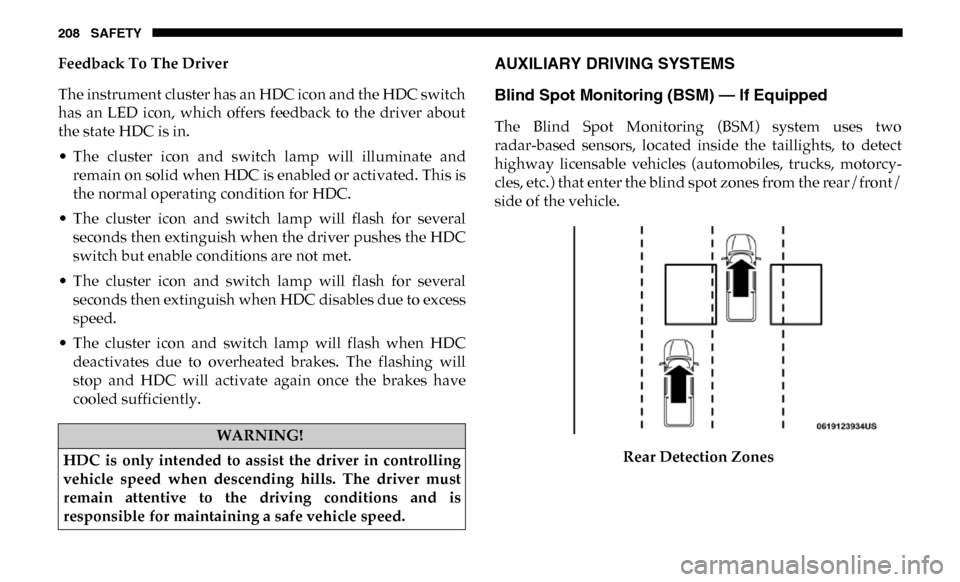
The Blind Spot Monitoring (BSM) system uses two
radar-based sensors, located inside the taillights, to detect
highway licensable vehicles (automobiles, trucks, motorcy -
cles, etc.) that enter the blind spot zones from the rear/front/
side of the vehicle.
Rear Detection Zones
WARNING!
HDC is only intended to assist the driver in controlling
vehicle speed when descending hills. The driver must
remain attentive to the driving conditions and is
responsible for maintaining a safe vehicle speed.