mirror Ram 3500 2019 Owner's Guide
[x] Cancel search | Manufacturer: RAM, Model Year: 2019, Model line: 3500, Model: Ram 3500 2019Pages: 696, PDF Size: 13.89 MB
Page 409 of 696

STARTING AND OPERATING 407
Forward Facing Camera With Tire Lines — If Equipped
The Forward Facing Camera displays a front view image of
the road ahead, along with tire lines to guide the driver when
driving on narrow roads.
Activation
The Forward Facing Camera can be activated by pressing the
Forward Camera soft button on the touchscreen.
Once activated, the camera image will remain on as long as
the vehicle speed is below 8 mph (13 km/h).
Deactivation
The Forward Facing Camera is deactivated in the following
conditions:
• The vehicle speed exceeds 8 mph (13 km/h) for 10seconds.
• The “X” button on the display is pressed.
• Vehicle is shifted into PARK.
• Ignition is cycled to OFF.
NOTE:
The Forward Facing Camera cannot be deactivated when the
vehicle is in 4LO. Trailer Reverse Guidance — If Equipped
The Trailer Reverse Guidance feature assists the driver in
backing up a trailer by providing adjustable camera views of
the trailer and surrounding area. The cameras are mounted
on the side mirrors and the images will be displayed
side-by-side on the touchscreen. Left and right camera
images are swapped and mirrored on the touchscreen to
show the equivalent area behind the vehicle as though the
driver is using the side mirrors.
Activation
The Trailer Reverse Guidance feature can be activated by
pressing the Trailer Reverse Guidance button on the touch
-
screen.
Deactivation
Once activated, the image will continue to be displayed in
any gear until the vehicle speed exceeds 8 mph (13 km/h).
5
Page 449 of 696

IN CASE OF EMERGENCY 447
Replacing Exterior Bulbs
Base Quad: Low Beam Headlamp, High Beam Headlamp,
Front Park And Turn — If Equipped
Low Beam
1. Open the hood.2. Disconnect and isolate the negative battery cable.
3. Reach into the front wheel house ahead of the front
wheel, remove the fastener, and lift the cover over the
access hole in the front of the wheel house splash shield.
Access to the rear of the lamp can be gained through this
access hole.
Front Fog Lamps (Halogen Reflector Headlamp)
H11LL
Front Fog Lamps (LED Headlamps) LED (Serviced At An Authorized Dealer)
Side Indicators (Front And Side View Mirror) LED (Serviced at authorized dealer)
Base Rear Tail/Turn and Stop Lamp 3157K
Premium Rear Tail/Turn and Stop Lamp LED (Serviced At An Authorized Dealer)
Premium Backup Lamp 7440/W21W
Center High Mounted Stop Lamp (CHMSL) 921
Cab Roof Marker Lamps 194NA
Rear Lamp Bar ID Marker Lamp 194
Side Marker Lamps (Dual Rear Wheels) 194
Backup Lamp 921
Rear License Plate Lamp 194
Exterior Bulbs (Continued) (Sheet 2 of 2)
Bulb Number
6
Page 465 of 696

IN CASE OF EMERGENCY 463
F57–20 Amp Yellow TCM/PCM / Solenoid Trans Pressure SW (RFE
Trans Only) – If Equipped (HD Only)
Transmission (DS 1500 Only)
F58 –10 Amp Red Bed Lighting (LED) – If Equipped (HD Only)
F60 –15 Amp Blue Underhood Lamp / TCM – If Equipped (DS
1500 Only)
F61 –10 Amp Red UREA Sensor / PM Sensor – If Equipped (DS
1500 LD Diesel & Cummins Diesel)
F62 –10 Amp Red Air Conditioning Clutch
F63 –20 Amp Yellow Ignition Coils (Gas), Ignition Coils Capacitors
(Gas) / Short Runner Valve Actuator / Urea
Heater Control Unit (DS 1500 LD Diesel) / RLY
Coil Feed-SCR (DS 1500 LD Diesel)
F64 –25 Amp Clear Fuel Injectors / Powertrain Control Module /
SRV – If Equipped
F65 –10 Amp Red MOD Inverter (Wake Up) / Power Port / USB
IP / WCPM – If Equipped (HD Only)
Spare (DS 1500 Only)
F66 –10 Amp Red Sunroof / Light and Rain Sensor Module /
Inside Rearview Mirror / Passenger Window
SW / USB Port Rear / Feed for R/A RLY #2
Coil – If Equipped
Cavity
Cartridge Fuse Micro Fuse Description
6
Page 565 of 696

SERVICING AND MAINTENANCE 563
Leather Parts
Mopar Total Clean is specifically recommended for leather
upholstery.
Your leather upholstery can be best preserved by regular
cleaning with a damp soft cloth. Small particles of dirt can act
as an abrasive and damage the leather upholstery and
should be removed promptly with a damp cloth. Stubborn
soils can be removed easily with a soft cloth and Mopar Total
Clean. Care should be taken to avoid soaking your leather
upholstery with any liquid. Please do not use polishes, oils,
cleaning fluids, solvents, detergents, or ammonia-based
cleaners to clean your leather upholstery. Application of a
leather conditioner is not required to maintain the original
condition.
NOTE:
If equipped with light colored leather, it tends to show any
foreign material, dirt, and fabric dye transfer more so than
darker colors. The leather is designed for easy cleaning, and
FCA recommends Mopar total care leather cleaner applied
on a cloth to clean the leather seats as needed.
Glass Surfaces
All glass surfaces should be cleaned on a regular basis with
Mopar Glass Cleaner, or any commercial household-type
glass cleaner. Never use an abrasive type cleaner. Use
caution when cleaning the inside rear window equipped
with electric defrosters or windows equipped with radio
antennas. Do not use scrapers or other sharp instruments
that may scratch the elements.
When cleaning the rear view mirror, spray cleaner on the
towel or cloth that you are using. Do not spray cleaner
directly on the mirror.CAUTION!
Do not use Alcohol and Alcohol-based and/or Ketone
based cleaning products to clean leather upholstery, as
damage to the upholstery may result.
7
Page 583 of 696

MULTIMEDIA 581
Safety/Assistance
After pressing the “Safety/Assistance” button on the touchscreen, the following settings will be available:Setting Name Selectable Options
Forward Collision Warning
— If Equipped Off
Warning Only Warning & Braking
Forward Collision Warning
Sensitivity — If Equipped Near
Med Far
Front ParkSense Chime
Volume Low
MedHigh
Rear ParkSense Chime
Volume — If Equipped Low
MedHigh
Tilt Side Mirrors In Reverse
— If Equipped On
Off
NOTE:
When the “Tilt Side Mirrors In Reverse” feature is selected, the exterior side-view mirrors tilt downward when the ignition
is in the RUN position and the transmission gear selector is in the REVERSE position. The mirrors move back to their
previous position when the transmission is shifted out of REVERSE.
Surround View Camera — If
Equipped On
Off
NOTE:
The “Surround View Camera” feature displays a complete 360 degree view of the vehicle's exterior environment while
backing up.
9
Page 599 of 696
MULTIMEDIA 597
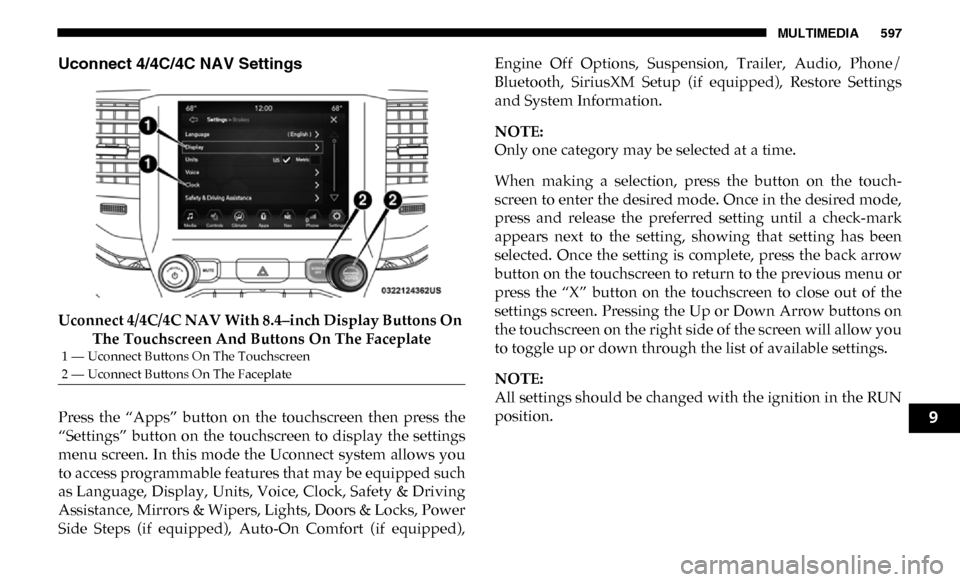
Uconnect 4/4C/4C NAV Settings
Uconnect 4/4C/4C NAV With 8.4–inch Display Buttons On The Touchscreen And Buttons On The Faceplate
Press the “Apps” button on the touchscreen then press the
“Settings” button on the touchscreen to display the settings
menu screen. In this mode the Uconnect system allows you
to access programmable features that may be equipped such
as Language, Display, Units, Voice, Clock, Safety & Driving
Assistance, Mirrors & Wipers, Lights, Doors & Locks, Power
Side Steps (if equipped), Auto-On Comfort (if equipped), Engine Off Options, Suspension, Trailer, Audio, Phone/
Bluetooth, SiriusXM Setup (if equipped), Restore Settings
and System Information.
NOTE:
Only one category may be selected at a time.
When making a selection, press the button on the touch
-
screen to enter the desired mode. Once in the desired mode,
press and release the preferred setting until a check-mark
appears next to the setting, showing that setting has been
selected. Once the setting is complete, press the back arrow
button on the touchscreen to return to the previous menu or
press the “X” button on the touchscreen to close out of the
settings screen. Pressing the Up or Down Arrow buttons on
the touchscreen on the right side of the screen will allow you
to toggle up or down through the list of available settings.
NOTE:
All settings should be changed with the ignition in the RUN
position.
1 — Uconnect Buttons On The Touchscreen
2 — Uconnect Buttons On The Faceplate
9
Page 610 of 696

608 MULTIMEDIA
Mirrors & Wipers
After pressing the “Mirrors & Wipers” button on the touchscreen, the following settings will be available:Setting Name Selectable Options
Tilt Side Mirrors In Reverse — If
Equipped On
Off
NOTE:
When the “Tilt Side Mirrors In Reverse” feature is selected, the outside side-view mirrors will tilt downward when the igni -
tion is in the RUN position and the transmission gear selector is in the REVERSE position. The mirrors will move back to
their previous position when the transmission is shifted out of REVERSE.
Rain Sensing Auto Wipers — If
Equipped On
Off
NOTE:
Automatically adjusts the wiper speed based on the amount of precipitation.
Headlights with Wipers OnOff
Page 623 of 696
MULTIMEDIA 621
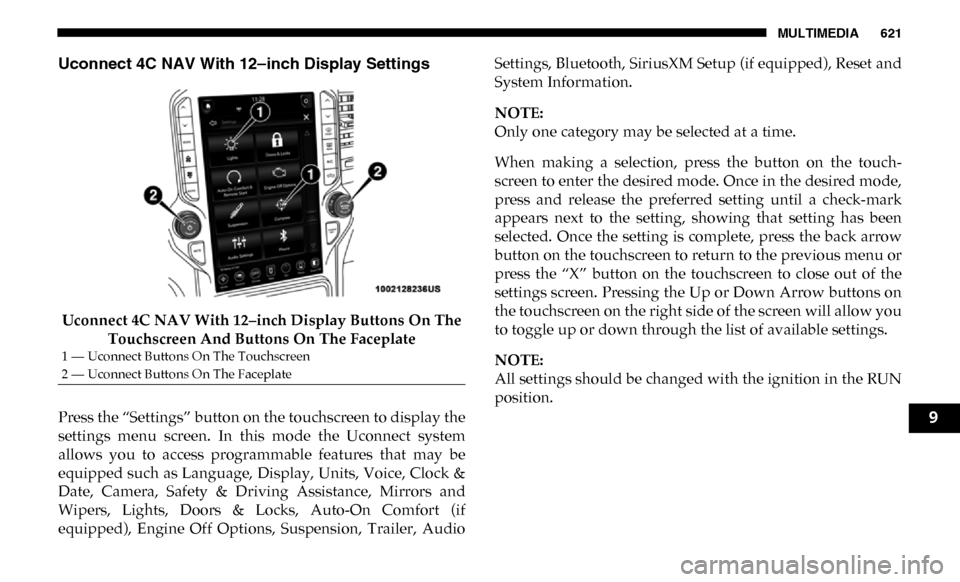
Uconnect 4C NAV With 12–inch Display Settings
Uconnect 4C NAV With 12–inch Display Buttons On The Touchscreen And Buttons On The Faceplate
Press the “Settings” button on the touchscreen to display the
settings menu screen. In this mode the Uconnect system
allows you to access programmable features that may be
equipped such as Language, Display, Units, Voice, Clock &
Date, Camera, Safety & Driving Assistance, Mirrors and
Wipers, Lights, Doors & Locks, Auto-On Comfort (if
equipped), Engine Off Options, Suspension, Trailer, Audio Settings, Bluetooth, SiriusXM Setup (if equipped), Reset and
System Information.
NOTE:
Only one category may be selected at a time.
When making a selection, press the button on the touch
-
screen to enter the desired mode. Once in the desired mode,
press and release the preferred setting until a check-mark
appears next to the setting, showing that setting has been
selected. Once the setting is complete, press the back arrow
button on the touchscreen to return to the previous menu or
press the “X” button on the touchscreen to close out of the
settings screen. Pressing the Up or Down Arrow buttons on
the touchscreen on the right side of the screen will allow you
to toggle up or down through the list of available settings.
NOTE:
All settings should be changed with the ignition in the RUN
position.
1 — Uconnect Buttons On The Touchscreen
2 — Uconnect Buttons On The Faceplate
9
Page 631 of 696

MULTIMEDIA 629
Mirrors & Wipers
After pressing the “Mirror and Wipers” button on the touchscreen, the following settings will be available:Setting Name Selectable Options
Tilt Side Mirrors In Reverse — If
Equipped On
Off
NOTE:
When the “Tilt Side Mirrors In Reverse” feature is selected, the outside side-view mirrors will tilt downward when the igni -
tion is in the RUN position and the transmission gear selector is in the REVERSE position. The mirrors will move back to
their previous position when the transmission is shifted out of REVERSE.
Rain Sensing Auto Wipers OnOff
NOTE:
Automatically adjusts the wiper speed based on the amount of precipitation.
Headlights with Wipers OnOff
9
Page 641 of 696

MULTIMEDIA 639
SiriusXM Setup — If Equipped
After pressing the “SiriusXM Setup” button on the touchscreen, the following settings will be available:Smartphone Device
Mirroring On
Off
Enable CarPlay Projections OnOff
Automatically Display Pop-Ups in Cluster On
Off
Set as Default Device
On Off
Projection Manager Smartphone Device Mirroring On Smartphone Device Mirroring
Off
Setting Name
Selectable Options
Setting NameSelectable Options
Sirius All Access Choose a Subscription Package
Add Listener Add up to five profiles
NOTE:
The “Add Listener” feature allows you to add up to five different profiles for customizing personal music or satellite radio
choices. Listener Items Listening History List Of Options
Tune Start OnOff
9