coolant temperature Ram 3500 2019 Owner's Manual
[x] Cancel search | Manufacturer: RAM, Model Year: 2019, Model line: 3500, Model: Ram 3500 2019Pages: 696, PDF Size: 13.89 MB
Page 164 of 696

162 GETTING TO KNOW YOUR INSTRUMENT PANEL
7. Temperature Gauge•The gauge pointer shows engine coolant temperature.The pointer positioned within the normal range indi -
cates that the engine cooling system is operating satis -
factorily.
•The gauge pointer will likely indicate a higher tempera -
ture when driving in hot weather, up mountain grades,
or when towing a trailer. It should not be allowed to
exceed the upper limits of the normal operating range.WARNING!
A hot engine cooling system is dangerous. You or others
could be badly burned by steam or boiling coolant. You
may want to call an authorized dealer for service if your
vehicle overheats. If you decide to look under the hood
yourself, see “Servicing And Maintenance.” Follow the
warnings under the Cooling System Pressure Cap
paragraph.
CAUTION!
Driving with a hot engine cooling system could damage
your vehicle. If the temperature gauge reads “H,” pull
over and stop the vehicle. Idle the vehicle with the air
conditioner turned off until the pointer drops back into
the normal range. If the pointer remains on the “H,” turn
the engine off immediately and call an authorized dealer
for service.
Page 166 of 696
164 GETTING TO KNOW YOUR INSTRUMENT PANEL
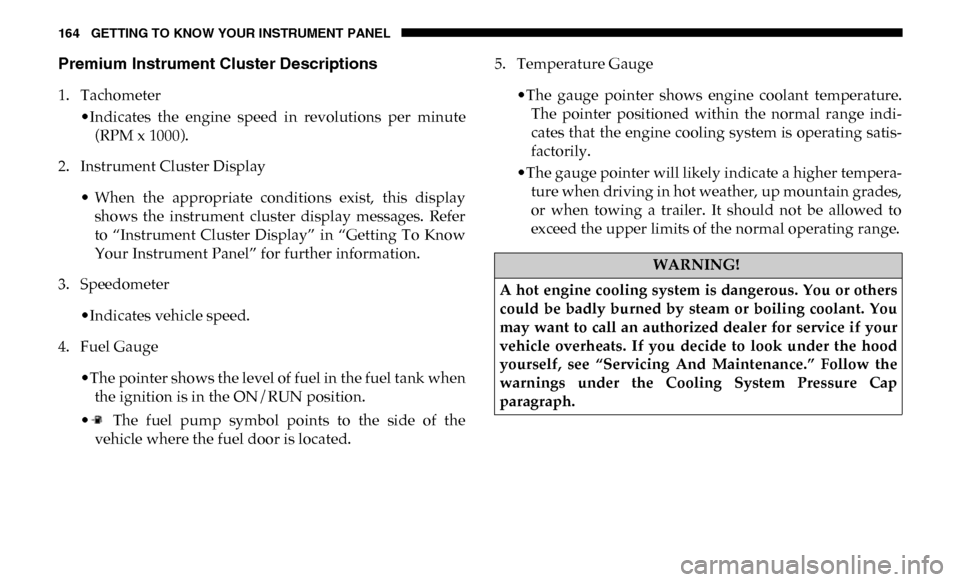
Premium Instrument Cluster Descriptions
1. Tachometer•Indicates the engine speed in revolutions per minute(RPM x 1000).
2. Instrument Cluster Display
• When the appropriate conditions exist, this displayshows the instrument cluster display messages. Refer
to “Instrument Cluster Display” in “Getting To Know
Your Instrument Panel” for further information.
3. Speedometer
•Indicates vehicle speed.
4. Fuel Gauge
•The pointer shows the level of fuel in the fuel tank whenthe ignition is in the ON/RUN position.
• The fuel pump symbol points to the side of the vehicle where the fuel door is located. 5. Temperature Gauge
•The gauge pointer shows engine coolant temperature.The pointer positioned within the normal range indi -
cates that the engine cooling system is operating satis -
factorily.
•The gauge pointer will likely indicate a higher tempera -
ture when driving in hot weather, up mountain grades,
or when towing a trailer. It should not be allowed to
exceed the upper limits of the normal operating range.
WARNING!
A hot engine cooling system is dangerous. You or others
could be badly burned by steam or boiling coolant. You
may want to call an authorized dealer for service if your
vehicle overheats. If you decide to look under the hood
yourself, see “Servicing And Maintenance.” Follow the
warnings under the Cooling System Pressure Cap
paragraph.
Page 171 of 696

GETTING TO KNOW YOUR INSTRUMENT PANEL 169
Display Menu Items
Push and release the up or down arrow button until the
desired selectable menu icon is highlighted in the instrument
cluster display.
Speedometer
Push and release the up or down arrow button until the
speedometer menu item is highlighted in the instrument
cluster display. Push and release the right arrow button to
cycle the display between mph and km/h.
Vehicle Info
Push and release the up or down arrow button until the
Vehicle Info menu item is highlighted in the instrument
cluster display. Push and release the right arrow button to
enter the submenus items of Vehicle Info. Follow the direc -
tional prompts to access or reset any of the following Vehicle
Info submenu items:
• Tire Pressure
• Coolant Temperature — If Equipped
• Transmission Temperature — If Equipped
• Oil Temperature — If Equipped
• Oil Pressure • Exhaust Brake — If Equipped
• Turbo Boost — If Equipped
• Oil Life
• Fuel Filter Life — If Equipped
• Battery Voltage
• Gauge Summary — If Equipped
• Engine Hours
Driver Assist — If Equipped
The Driver Assist menu displays the status of the ACC
system.
Push and release the
up or down arrow button until the
Driver Assist menu is displayed in the instrument cluster
display.
Adaptive Cruise Control (ACC) Feature
The instrument cluster display displays the current ACC
system settings. The information displayed depends on ACC
system status.
3
Page 175 of 696

GETTING TO KNOW YOUR INSTRUMENT PANEL 173
Upper Left
• None
• Compass (Default Setting) — If Equipped
• Outside Temp — If Equipped
• Time
• Range To Empty
• Average MPG
• Current MPG
• Trip A Distance
• Trip B Distance
• Trailer Trip — If Equipped
• Trailer Brake — If Equipped
• Oil Pressure — If Equipped
• Coolant Temperature — If Equipped
• Oil Temperature — If Equipped
• Battery Voltage — If Equipped
• Transmission Temperature — If Equipped
• Oil Life — If Equipped• Exhaust Brake — If Equipped
• Turbo Boost — If Equipped
• Fuel Filter Life — If Equipped
Upper Center
• None
• Compass
• Outside Temp
• Time
• Range To Empty
• Average MPG
• Current MPG
• Trip A Distance
• Trip B Distance
• Trailer Trip
• Audio
• Speedometer (Default Setting)
• Menu Title
3
Page 176 of 696

174 GETTING TO KNOW YOUR INSTRUMENT PANEL
Upper Right
• None
• Compass — If Equipped
• Outside Temp (Default Setting) — If Equipped
• Time
• Range To Empty
• Average MPG
• Current MPG
• Trip A Distance
• Trip B Distance
• Trailer Trip — If Equipped
• Trailer Brake — If Equipped
• Oil Pressure — If Equipped
• Coolant Temperature — If Equipped
• Oil Temperature — If Equipped
• Battery Voltage — If Equipped• Transmission Temperature — If Equipped
• Oil Life — If Equipped
• Exhaust Brake — If Equipped
• Turbo Boost — If Equipped
• Fuel Filter Life — If Equipped
Left Side — If Equipped
• None
• Range
• Average MPG
• Menu Icon (Default Setting)
• Coolant Temperature
• Oil Temperature
• Transmission Temperature
• Oil Life
• Fuel Filter Life — If Equipped
Page 177 of 696

GETTING TO KNOW YOUR INSTRUMENT PANEL 175
Right Side — If Equipped
• None
• Range (Default Setting)
• Average MPG
• Menu Icon
• Coolant Temperature
• Oil Temperature
• Transmission Temperature
• Oil Life
• Fuel Filter Life — If Equipped
Lower Left — If Equipped
• None
• Compass
• Outside Temp
• Time
• Range To Empty• Average MPG
• Current MPG
• Trip A Distance
• Trip B Distance
• Trailer Trip
• Trailer Brake
• Oil Pressure
• Coolant Temperature
• Oil Temperature
• Battery Voltage (Default Setting)
• Transmission Temperature
• Oil Life
• Exhaust Brake — If Equipped
• Turbo Boost — If Equipped
• Fuel Filter Life — If Equipped
3
Page 178 of 696

176 GETTING TO KNOW YOUR INSTRUMENT PANEL
Lower Right — If Equipped
• None
• Compass
• Outside Temp
• Time
• Range To Empty
• Average MPG
• Current MPG
• Trip A Distance
• Trip B Distance
• Trailer Trip
• Trailer Brake
• Oil Pressure (Default Setting)• Coolant Temperature
• Oil Temperature
• Battery Voltage
• Transmission Temperature
• Oil Life
• Exhaust Brake — If Equipped
• Turbo Boost — If Equipped
• Fuel Filter Life — If Equipped
Restore Defaults
• Cancel (Default Setting)
• Ok
Page 183 of 696
GETTING TO KNOW YOUR INSTRUMENT PANEL 181
Vehicles equipped with the Anti-Lock Brake System (ABS)
are also equipped with Electronic Brake Force Distribution
(EBD). In the event of an EBD failure, the Brake Warning
Light will turn on along with the ABS Light. Immediate
repair to the ABS system is required.
Operation of the Brake Warning Light can be checked by
turning the ignition switch from the OFF position to the ON/
RUN position. The light should illuminate for approximately
two seconds. The light should then turn off unless the
parking brake is applied or a brake fault is detected. If the
light does not illuminate, have the light inspected by an
authorized dealer.
The light also will turn on when the parking brake is applied
with the ignition switch in the ON/RUN position.
NOTE:
This light shows only that the parking brake is applied. It
does not show the degree of brake application. — Hood Open Warning Light
This warning light will illuminate when the hood is ajar/
open and not fully closed.
NOTE:
If the vehicle is moving, there will also be a single chime. — Vehicle Security Warning Light — If Equipped
This light will flash at a fast rate for approximately 15 seconds
when the vehicle security alarm is arming, and then will flash
slowly until the vehicle is disarmed.
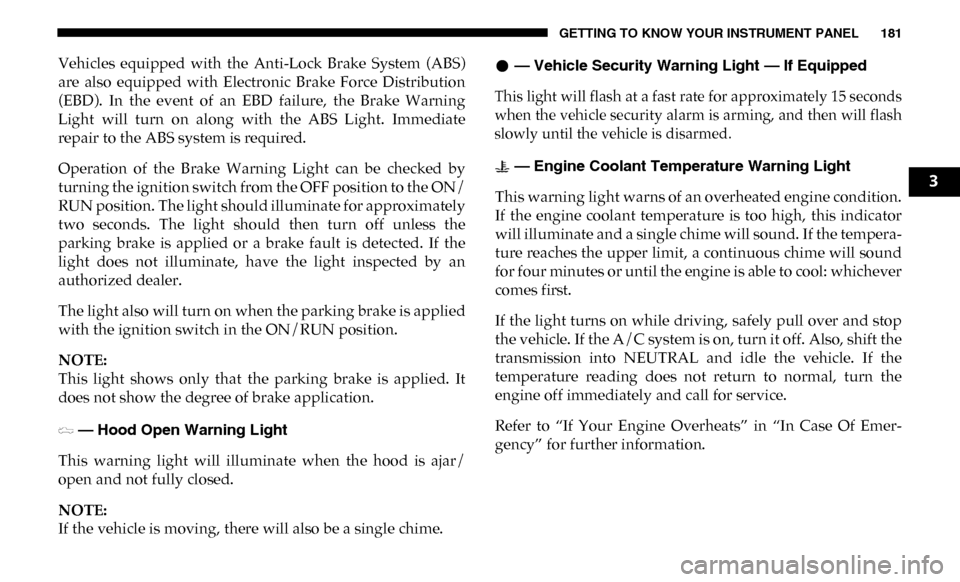
— Engine Coolant Temperature Warning Light
This warning light warns of an overheated engine condition.
If the engine coolant temperature is too high, this indicator
will illuminate and a single chime will sound. If the tempera -
ture reaches the upper limit, a continuous chime will sound
for four minutes or until the engine is able to cool: whichever
comes first.
If the light turns on while driving, safely pull over and stop
the vehicle. If the A/C system is on, turn it off. Also, shift the
transmission into NEUTRAL and idle the vehicle. If the
temperature reading does not return to normal, turn the
engine off immediately and call for service.
Refer to “If Your Engine Overheats” in “In Case Of Emer -
gency” for further information.
3
Page 466 of 696

464 IN CASE OF EMERGENCY
F67–10 Amp Red CD / DVD / UCI Port – If Equipped (HD Only)
Bluetooth Hands-Free Module / CD – If
Equipped (DS 1500 Only)
F68 –10 Amp Red AEB RACAM HTR – If Equipped (HD Only)
F69 –15 Amp Blue SCR Module – If Equipped (HD Only)
F70 –30 Amp Green Fuel Pump Motor / K09 RLY Coil Feed
(Cummins Diesel) – If Equipped
F71 –25 Amp Clear Amplifier / Active Noise Cancelation – If
Equipped (HD Only)
F72 –10 Amp Red PCM / DC/DC Converter Voltage– If Equipped
(DS 1500 Only)
F73 –20 Amp Yellow Fuel Transfer Pump (Rear Tank) – If Equipped
(HD Only)
F74 –20 Amp Yellow Brake Vacuum Pump Gas/Diesel – If Equipped
(DS 1500 Only)
F74 –10 Amp Red Backup Alarm – If Equipped (HD Only)
F75 –10 Amp Red ATMM / Coil-SCR Module RLY– If Equipped
(HD Only)
Coolant Temperature Valve – If Equipped (DS
1500 Only)
Cavity
Cartridge Fuse Micro Fuse Description
Page 496 of 696

494 IN CASE OF EMERGENCY
FREEING A STUCK VEHICLE
If your vehicle becomes stuck in mud, sand, or snow, it can
often be moved using a rocking motion. Turn the steering
wheel right and left to clear the area around the front wheels.
Then shift back and forth between DRIVE and REVERSE,
while gently pressing the accelerator. Use the least amount ofaccelerator pedal pressure that will maintain the rocking
motion, without spinning the wheels or racing the engine.
NOTE:
• For trucks equipped with an 8–speed transmission, shifts
between DRIVE and REVERSE can only be achieved at
wheel speeds of 5 mph (8 km/h) or less. Whenever the
transmission remains in NEUTRAL for more than two
seconds, you must press the brake pedal to engage DRIVE
or REVERSE.
• Push the "ESC Off" switch, to place the Electronic Stability Control (ESC) system in "Partial Off" mode, before rocking
the vehicle. Refer to “Electronic Brake Control” in “Safety”
for further information. Once the vehicle has been freed,
push the "ESC Off" switch again to restore "ESC On" mode.
WARNING!
You or others can be badly burned by hot engine coolant
(antifreeze) or steam from your radiator. If you see or
hear steam coming from under the hood, do not open the
hood until the radiator has had time to cool. Never try to
open a cooling system pressure cap when the radiator or
coolant bottle is hot.
CAUTION!
Driving with a hot cooling system could damage your
vehicle. If the temperature gauge reads HOT (H), pull
over and stop the vehicle. Idle the vehicle with the air
conditioner turned off until the pointer drops back into
the normal range. If the pointer remains on HOT (H),
and you hear continuous chimes, turn the engine off
immediately and call for service.
WARNING!
Fast spinning tires can be dangerous. Forces generated by
excessive wheel speeds may cause damage, or even failure,
of the axle and tires. A tire could explode and injure
someone. Do not spin your vehicle's wheels faster than
30 mph (48 km/h) or for longer than 30 seconds continuously
without stopping when you are stuck and do not let anyone
near a spinning wheel, no matter what the speed.