interior lights Ram 3500 2020 User Guide
[x] Cancel search | Manufacturer: RAM, Model Year: 2020, Model line: 3500, Model: Ram 3500 2020Pages: 568
Page 387 of 568
385
SERVICING AND MAINTENANCE
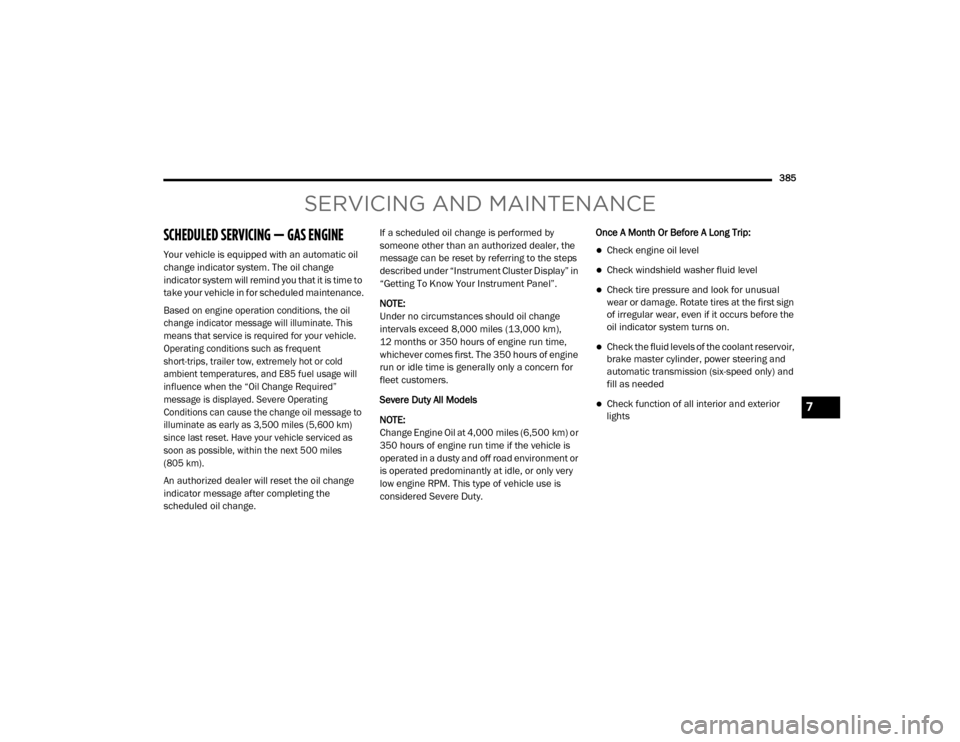
SCHEDULED SERVICING — GAS ENGINE
Your vehicle is equipped with an automatic oil
change indicator system. The oil change
indicator system will remind you that it is time to
take your vehicle in for scheduled maintenance.
Based on engine operation conditions, the oil
change indicator message will illuminate. This
means that service is required for your vehicle.
Operating conditions such as frequent
short-trips, trailer tow, extremely hot or cold
ambient temperatures, and E85 fuel usage will
influence when the “Oil Change Required”
message is displayed. Severe Operating
Conditions can cause the change oil message to
illuminate as early as 3,500 miles (5,600 km)
since last reset. Have your vehicle serviced as
soon as possible, within the next 500 miles
(805 km).
An authorized dealer will reset the oil change
indicator message after completing the
scheduled oil change.If a scheduled oil change is performed by
someone other than an authorized dealer, the
message can be reset by referring to the steps
described under “Instrument Cluster Display” in
“Getting To Know Your Instrument Panel”.
NOTE:
Under no circumstances should oil change
intervals exceed 8,000 miles (13,000 km),
12 months or 350 hours of engine run time,
whichever comes first. The 350 hours of engine
run or idle time is generally only a concern for
fleet customers.
Severe Duty All Models
NOTE:
Change Engine Oil at 4,000 miles (6,500 km) or
350 hours of engine run time if the vehicle is
operated in a dusty and off road environment or
is operated predominantly at idle, or only very
low engine RPM. This type of vehicle use is
considered Severe Duty.
Once A Month Or Before A Long Trip:Check engine oil level
Check windshield washer fluid level
Check tire pressure and look for unusual
wear or damage. Rotate tires at the first sign
of irregular wear, even if it occurs before the
oil indicator system turns on.
Check the fluid levels of the coolant reservoir,
brake master cylinder, power steering and
automatic transmission (six-speed only) and
fill as needed
Check function of all interior and exterior
lights7
20_DJD2_OM_EN_USC_t.book Page 385
Page 487 of 568
MULTIMEDIA485
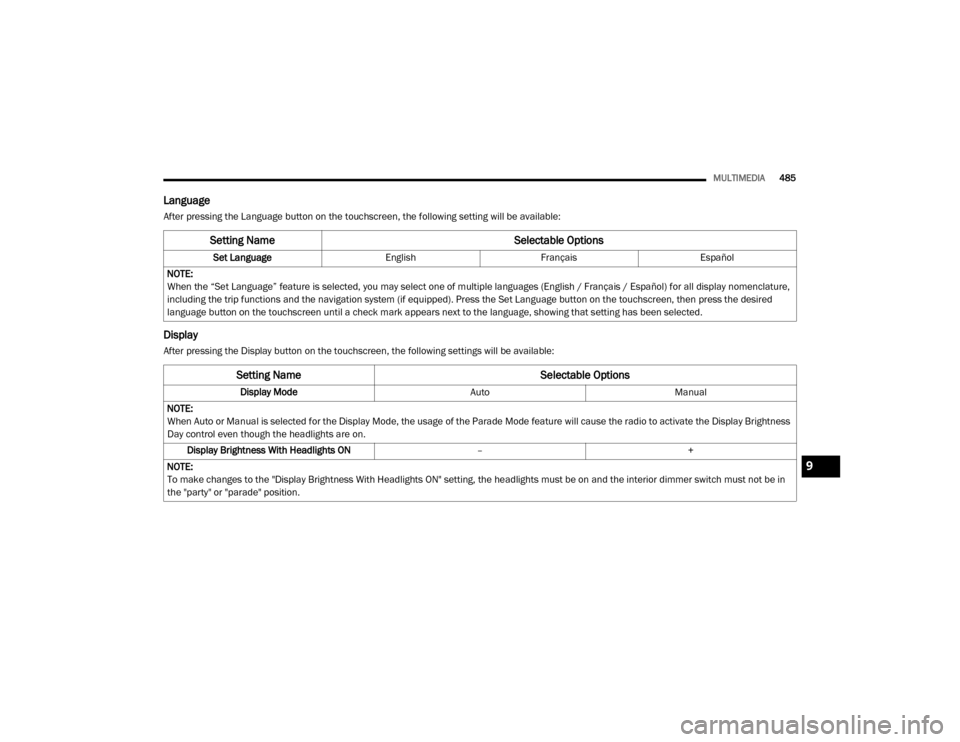
Language
After pressing the Language button on the touchscreen, the following setting will be available:
Display
After pressing the Display button on the touchscreen, the following settings will be available:
Setting Name Selectable Options
Set LanguageEnglishFrançais Español
NOTE:
When the “Set Language” feature is selected, you may select one of multiple languages (English / Français / Español) for all display nomenclature,
including the trip functions and the navigation system (if equipped). Press the Set Language button on the touchscreen, then press the desired
language button on the touchscreen until a check mark appears next to the language, showing that setting has been selected.
Setting Name Selectable Options
Display ModeAutoManual
NOTE:
When Auto or Manual is selected for the Display Mode, the usage of the Parade Mode feature will cause the radio to activate the Display Brightness
Day control even though the headlights are on. Display Brightness With Headlights ON –+
NOTE:
To make changes to the "Display Brightness With Headlights ON" setting, the headlights must be on and the interior dimmer switch must not be in
the "party" or "parade" position.
9
20_DJD2_OM_EN_USC_t.book Page 485
Page 488 of 568
486MULTIMEDIA
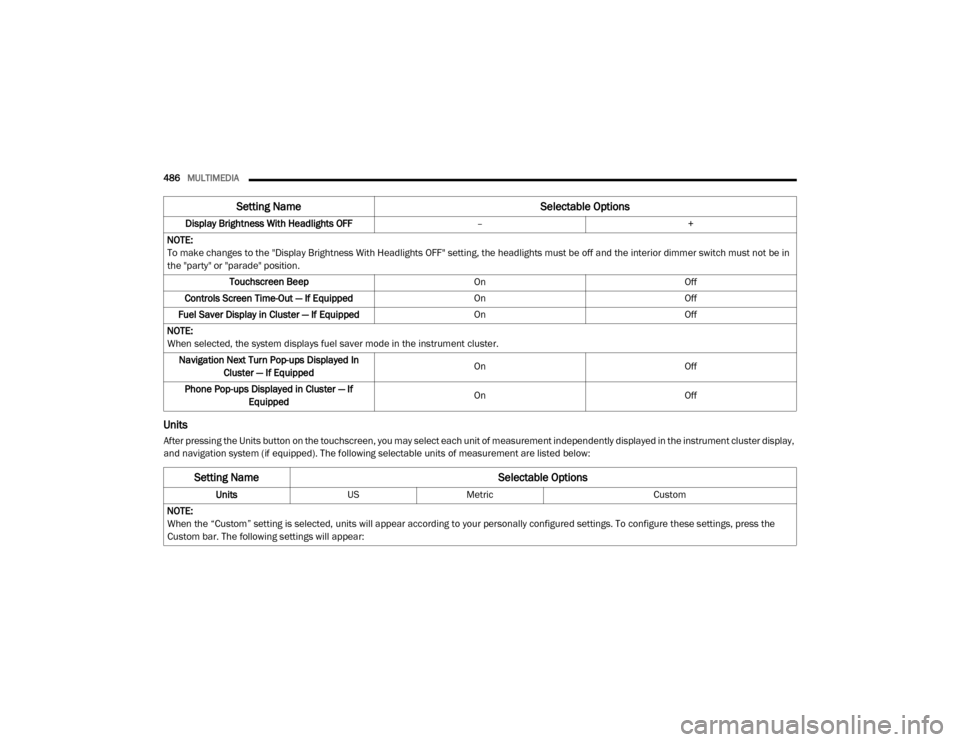
Units
After pressing the Units button on the touchscreen, you may select each unit of measurement independently displayed in the instrument cluster display,
and navigation system (if equipped). The following selectable units of measurement are listed below:Display Brightness With Headlights OFF
–+
NOTE:
To make changes to the "Display Brightness With Headlights OFF" setting, the headlights must be off and the interior dimmer switch must not be in
the "party" or "parade" position. Touchscreen Beep OnOff
Controls Screen Time-Out — If Equipped OnOff
Fuel Saver Display in Cluster — If Equipped OnOff
NOTE:
When selected, the system displays fuel saver mode in the instrument cluster. Navigation Next Turn Pop-ups Displayed In Cluster — If Equipped On
Off
Phone Pop-ups Displayed in Cluster — If Equipped On
Off
Setting Name Selectable Options
Setting NameSelectable Options
UnitsUSMetric Custom
NOTE:
When the “Custom” setting is selected, units will appear according to your personally configured settings. To configure these settings, press the
Custom bar. The following settings will appear:
20_DJD2_OM_EN_USC_t.book Page 486
Page 497 of 568

MULTIMEDIA495
Auto Unlock On Exit On Off
NOTE:
When the “Auto Unlock On Exit” feature is selected, all doors unlock when the vehicle is stopped and the transmission is in the PARK or NEUTRAL
position, and the driver's door is opened. Flash Lights With Lock On Off
NOTE:
When the “Flash Lights With Lock” feature is selected, the front and rear turn signals flash when the doors are locked or unlocked with the key fob.
This feature may be selected with or without the “Sound Horn With Lock” feature selected. Sound Horn With Lock Off1st Press 2nd Press
Sound Horn With Remote Start On Off
1st Press Of Key Fob Unlocks Driver Door All Doors
NOTE:
When “1st Press Of Key Fob Unlocks: Driver Door” is programmed, only the driver's door unlocks on the first press of the key fob Unlock button.
You must push the key fob unlock button twice to unlock the passengers’ doors.
When “All Doors” is programmed, all of the doors unlock on the first push of the key fob unlock button.
If the vehicle is programmed “1st Press Of Key Fob Unlocks: All Doors”, all doors will unlock no matter which Passive Entry equipped door handle
is grasped. If “1st Press Of Key Fob Unlocks: Driver Door” is programmed, only the driver’s door will unlock when the driver’s door is grasped.
With Passive Entry, if “1st Press Of Key Fob Unlocks: Driver Door” is programmed pushing the handle more than once only results in the driver’s
door opening. If “Driver Door” is programmed, once the driver’s door is opened, the interior door lock/unlock switch can be used to unlock all doors
(or use key fob).
Setting Name Selectable Options
9
20_DJD2_OM_EN_USC_t.book Page 495
Page 508 of 568
506MULTIMEDIA
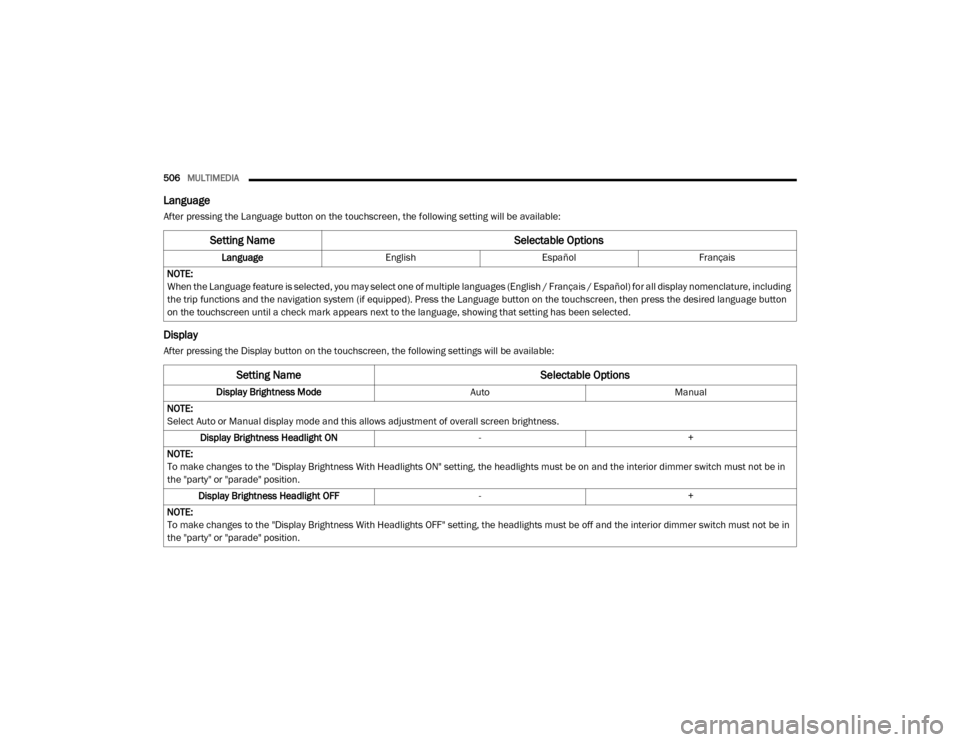
Language
After pressing the Language button on the touchscreen, the following setting will be available:
Display
After pressing the Display button on the touchscreen, the following settings will be available:
Setting Name Selectable Options
LanguageEnglishEspañol Français
NOTE:
When the Language feature is selected, you may select one of multiple languages (English / Français / Español) for all display nomenclature, including
the trip functions and the navigation system (if equipped). Press the Language button on the touchscreen, then press the desired language button
on the touchscreen until a check mark appears next to the language, showing that setting has been selected.
Setting Name Selectable Options
Display Brightness ModeAutoManual
NOTE:
Select Auto or Manual display mode and this allows adjustment of overall screen brightness. Display Brightness Headlight ON -+
NOTE:
To make changes to the "Display Brightness With Headlights ON" setting, the headlights must be on and the interior dimmer switch must not be in
the "party" or "parade" position. Display Brightness Headlight OFF -+
NOTE:
To make changes to the "Display Brightness With Headlights OFF" setting, the headlights must be off and the interior dimmer switch must not be in
the "party" or "parade" position.
20_DJD2_OM_EN_USC_t.book Page 506
Page 557 of 568

555
Four-Way Hazard Flasher
............................... 346Freeing A Stuck Vehicle................................. 380Front Axle (Differential).................................. 424Fuel..................................................... 454, 456Adding............................................. 319, 320Additives................................................... 454Capacity.................................................... 460Clean Air.................................................... 454Diesel.............................................. 456, 464Ethanol...................................................... 454Filler Cap (Gas Cap)................................... 320Filter.......................................................... 409Gasoline.................................................... 454Light.......................................................... 135Materials Added........................................ 454Methanol................................................... 454Octane Rating................................. 454, 461Requirements........................ 454, 456, 459Specifications............................................ 457Tank Capacity............................................ 459Fueling........................................................... 320Fuses............................................................. 358
G
Garage Door Opener (HomeLink).................... 76Gas Cap (Fuel Filler Cap)............................... 320Gasoline, Clean Air........................................ 454Gasoline, Reformulated................................. 454Gauges Voltage...................................................... 223
Gear Ranges................................................. 240Gear Selector Override................................. 377Glass Cleaning.............................................. 451Gross Axle Weight Rating.............................. 326Gross Vehicle Weight Rating......................... 325GuideBody Builders.............................................. 12GVWR............................................................ 324
H
HazardDriving Through Flowing, Rising, Or Shallow Standing Water
....................... 343Hazard Warning Flashers.............................. 346Head Restraints............................................... 38Head Rests...................................................... 38Headlights.................................................... 353Automatic High Beam.................................. 49Cleaning................................................... 447High Beam................................................... 49Lights On Reminder..................................... 51Passing........................................................ 50Switch.......................................................... 48Heated Mirrors................................................. 46Heater, Engine Block.................................... 229Hill Descent Control...................................... 149Hill Descent Control Indicator....................... 149Hill Start Assist.............................................. 151HitchesTrailer Towing........................................... 329
Hoisting......................................................... 429HomeLink (Garage Door Opener).....................76Hood Prop........................................................74Hood Release...................................................74Hub Caps...................................................... 374
I
Idle-Up Feature............................................. 226Ignition.............................................................17Switch..........................................................17Illuminated Entry..............................................54In Vehicle HelpVehicle User Guide......................................13Inside Rearview Mirror.................... 42, 43, 346Instrument Cluster............................... 110, 112Descriptions.............................................. 141Display...................................................... 113Engine Oil Reset....................................... 115Instrument Panel Lens Cleaning................... 451Integrated Trailer Brake Control.................... 332Interior Appearance Care.............................. 450Interior Lights...................................................53Intermittent Wipers (Delay Wipers)..................55Intervention Regeneration Strategy..... 125, 413Introduction.....................................................11Inverter Outlet (115V)......................................88iPod/USB/MP3 Control................................. 53811
20_DJD2_OM_EN_USC_t.book Page 555
Page 558 of 568

556 J
Jack Location
................................................. 365Jump Starting................................................ 375
K
Key Fob Panic Alarm
................................................. 15Programming Additional Key Fobs....... 16, 24Key Fob Battery Service (Remote
Keyless Entry).................................................. 15
Key Fob Programming (Remote Keyless Entry).. 16
Keyless Enter-N-Go........................28, 214, 218Lock The Vehicle’s Doors....... 476, 494, 514Passive Entry............................................... 28Passive Entry Programming............. 494, 514Keys................................................................. 14Replacement............................................... 24
L
Lane Change And Turn Signals........................ 51Lane Change Assist......................................... 52LaneSense.................................................... 306Latches.......................................................... 212Hood........................................................... 74Lead Free Gasoline........................................ 454Leaks, Fluid................................................... 212Life Of Tires................................................... 439Light Bulbs........................................... 212, 351
Lights............................................................ 212Air Bag.................................... 130, 182, 210Automatic High Beam.................................. 49Brake Assist Warning............................... 148Brake Warning.......................................... 131Bulb Replacement.................................... 351Cab Top Clearance................................... 357Cargo........................................................... 52Center Mounted Stop............................... 356Courtesy/Reading....................................... 53Cruise....................................................... 141Daytime Running......................................... 49
Electronic Stability Program(ESP) Indicator... 132
Exterior...............................................48, 212Fog........................................................... 355Four Wheel Drive Indicator....................... 255Hazard Warning Flasher........................... 346Headlights............................................ 48, 50High Beam................................................... 49Hill Descent Control Indicator................... 149Illuminated Entry......................................... 54Interior......................................................... 53Lights On Reminder..................................... 51Low Fuel................................................... 135Malfunction Indicator (Check Engine)....... 133Park.......................................................... 140Passing........................................................ 50Seat Belt Reminder.................................. 130Security Alarm.......................................... 132Service..................................................... 351
Side Marker.............................................. 357Traction Control........................................ 148Transfer Case........................................... 255Turn Signals............51, 141, 212, 353, 355Warning Instrument Cluster Descriptions................................ 132, 141Limited-Slip Differential....................... 270, 424Load Shed Battery Saver Mode..................... 129Load Shed Battery Saver On......................... 129Load Shed Electrical Load Reduction........... 129Load Shed Intelligent Battery Sensor............ 129Loading Vehicle............................................. 324Tires.......................................................... 433LocksAutomatic Door............................................30Child Protection...........................................30Power Door..................................................27Low Tire Pressure System............................. 163Lubrication, Body.......................................... 414Lug Nuts/Bolts.............................................. 452
M
Maintenance....................................................73Maintenance Free Battery............................ 400Maintenance Plan......................................... 391Maintenance Schedule............... 385, 389, 391Malfunction Indicator Light
(Check Engine)..................................... 133, 143
20_DJD2_OM_EN_USC_t.book Page 556