battery Ram 3500 Chassis Cab 2019 User Guide
[x] Cancel search | Manufacturer: RAM, Model Year: 2019, Model line: 3500 Chassis Cab, Model: Ram 3500 Chassis Cab 2019Pages: 607, PDF Size: 10.72 MB
Page 25 of 607

GETTING TO KNOW YOUR VEHICLE 23
Programming Additional Key Fobs
Programming the key fob may be performed by an autho-
rized dealer.
NOTE:
Once a key fob is programmed to a vehicle, it cannot be
repurposed and reprogrammed to another vehicle.
General Information
The following regulatory statement applies to all radio
frequency (RF) devices equipped in this vehicle:
This device complies with Part 15 of the FCC Rules and with
Industry Canada license-exempt RSS standard(s). Operation
is subject to the following two conditions:
1. This device may not cause harmful interference, and
2. This device must accept any interference received, including interference that may cause undesired opera -
tion.
NOTE:
Changes or modifications not expressly approved by the
party responsible for compliance could void the user’s
authority to operate the equipment.IGNITION SWITCH
Keyless Push Button Ignition
This feature allows the driver to operate the ignition switch
with the push of a button as long as the Remote Keyless
Entry key fob is in the passenger compartment.
The Keyless Push Button Ignition has four operating posi -
tions; three of which are labeled and will illuminate when in
position. The three positions are OFF, ACC, and ON/RUN.
The fourth position is START, during start RUN will illumi -
nate.
NOTE:
In case the ignition switch does not change with the push of
a button, the key fob may have a low or dead battery. In this
situation, a back up method can be used to operate the igni -
tion switch. Put the nose side (side opposite of the emer -
gency key) of the key fob against the ENGINE START/STOP
button, with your foot applied on the brake pedal, and push
to operate the ignition switch.
2
Page 27 of 607
GETTING TO KNOW YOUR VEHICLE 25
The engine only runs in the ON/RUN ignition position or
from a remote start request.
In case the ignition switch does not change with the push of
a button, the key fob may have a low or dead battery. In this
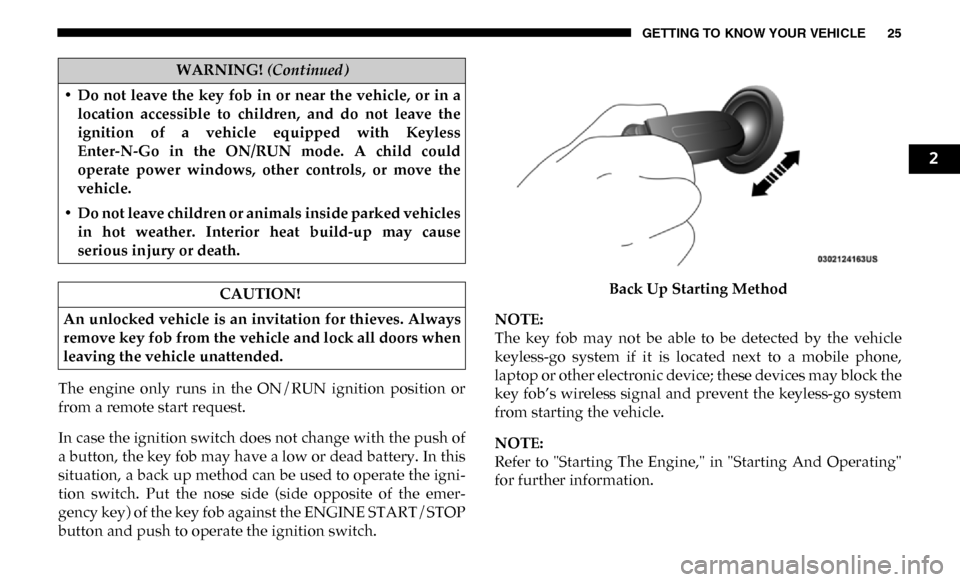
situation, a back up method can be used to operate the igni-
tion switch. Put the nose side (side opposite of the emer -
gency key) of the key fob against the ENGINE START/STOP
button and push to operate the ignition switch. Back Up Starting Method
NOTE:
The key fob may not be able to be detected by the vehicle
keyless-go system if it is located next to a mobile phone,
laptop or other electronic device; these devices may block the
key fob’s wireless signal and prevent the keyless-go system
from starting the vehicle.
NOTE:
Refer to "Starting The Engine," in "Starting And Operating"
for further information.
• Do not leave the key fob in or near the vehicle, or in a
location accessible to children, and do not leave the
ignition of a vehicle equipped with Keyless
Enter-N-Go in the ON/RUN mode. A child could
operate power windows, other controls, or move the
vehicle.
• Do not leave children or animals inside parked vehicles in hot weather. Interior heat build-up may cause
serious injury or death.
CAUTION!
An unlocked vehicle is an invitation for thieves. Always
remove key fob from the vehicle and lock all doors when
leaving the vehicle unattended.
WARNING! (Continued)
2
Page 28 of 607

26 GETTING TO KNOW YOUR VEHICLE
REMOTE START — IF EQUIPPED
How To Use Remote Start
All of the following conditions must be met before the engine
will remote start:
• Gear selector in PARK
• Doors closed
• Hood closed
• HAZARD switch off
• BRAKE switch inactive (brake pedal not pushed)
• Battery at an acceptable charge level
• PANIC button not pushed
• Fuel meets minimum requirement
• System not disabled from previous remote start event
• Vehicle security alarm not active
Remote Start Abort Message
The following messages will display in the instrument
cluster display if the vehicle fails to remote start or exits
remote start prematurely:
• Remote Start Cancelled — Door Open
• Remote Start Cancelled — Hood Open
• Remote Start Cancelled — Fuel Low
• Remote Start Cancelled — System Fault
• Remote Start Disabled — Start Vehicle to Reset
The instrument cluster display message stays active until the
ignition is turned to the ON/RUN position.
WARNING!
• Do not start or run an engine in a closed garage or confined area. Exhaust gas contains Carbon Monoxide
(CO) which is odorless and colorless. Carbon
Monoxide is poisonous and can cause serious injury or
death when inhaled.
• Keep key fobs away from children. Operation of the Remote Start System, windows, door locks or other
controls could cause serious injury or death.
Page 33 of 607

GETTING TO KNOW YOUR VEHICLE 31
3. If any doors are open, close them.
The vehicle security alarm will set when you use the power
door locks, or use the key fob to lock the doors. After all the
doors are locked and closed, the vehicle security light, in the
instrument panel cluster, will flash rapidly for about 16
seconds to indicate that the alarm is being set. After the
alarm is set, the vehicle security light will flash at a slower
rate to indicate that the system is armed.
To Disarm The System
The vehicle security alarm can be disarmed using any of the
following methods:
1. Push the unlock button on the key fob.
2. Grasp the Passive Entry Unlock Door Handle with a validkey fob within 5 ft (1.5 m) of the passive entry door
handle. If equipped, refer to "Keyless Enter-N-Go —
Passive Entry" in "Getting To Know Your Vehicle" for
further information.
3. Place the ignition out of the “OFF” position. The vehicle security alarm is designed to protect your
vehicle. However, you can create conditions where the
system will give you a false alarm. If one of the previously
described arming sequences has occurred, the vehicle secu-
rity alarm will arm regardless of whether you are in the
vehicle or not. If you remain in the vehicle and open a door,
the alarm will sound. If this occurs, disarm the vehicle secu-
rity alarm.
If the vehicle security alarm is armed and the battery
becomes disconnected, the vehicle security alarm will
remain armed when the battery is reconnected; the exterior
lights will flash, and the horn will sound. If this occurs,
disarm the vehicle security alarm.
Rearming Of The System
If something triggers the alarm, and no action is taken to
disarm it, the vehicle security alarm will turn the horn off
after 29 seconds, 5 seconds between cycles, up to 8 cycles if
the trigger remains active and then the vehicle security alarm
will rearm itself.
2
Page 38 of 607
36 GETTING TO KNOW YOUR VEHICLE
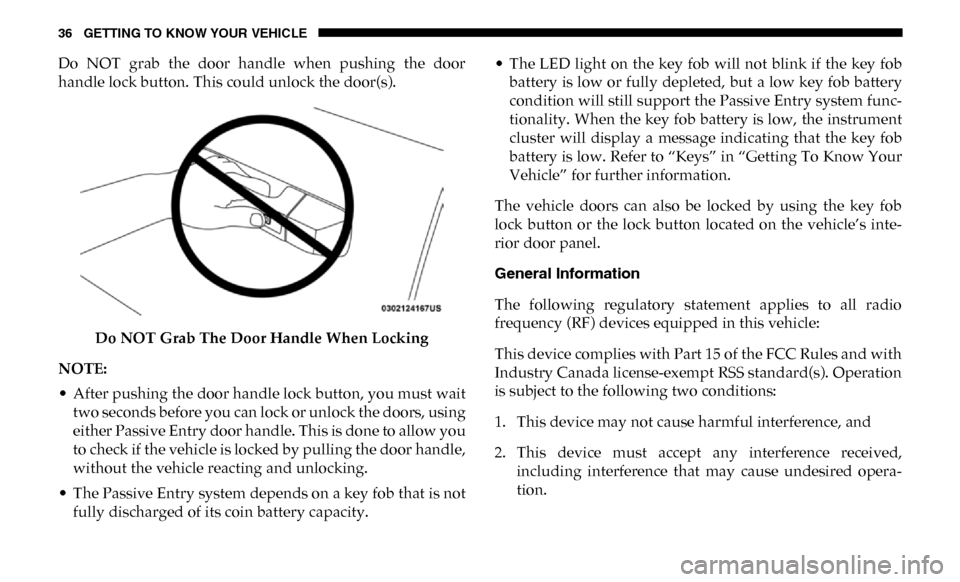
Do NOT grab the door handle when pushing the door
handle lock button. This could unlock the door(s).Do NOT Grab The Door Handle When Locking
NOTE:
• After pushing the door handle lock button, you must wait two seconds before you can lock or unlock the doors, using
either Passive Entry door handle. This is done to allow you
to check if the vehicle is locked by pulling the door handle,
without the vehicle reacting and unlocking.
• The Passive Entry system depends on a key fob that is not fully discharged of its coin battery capacity. • The LED light on the key fob will not blink if the key fob
battery is low or fully depleted, but a low key fob battery
condition will still support the Passive Entry system func -
tionality. When the key fob battery is low, the instrument
cluster will display a message indicating that the key fob
battery is low. Refer to “Keys” in “Getting To Know Your
Vehicle” for further information.
The vehicle doors can also be locked by using the key fob
lock button or the lock button located on the vehicle’s inte -
rior door panel.
General Information
The following regulatory statement applies to all radio
frequency (RF) devices equipped in this vehicle:
This device complies with Part 15 of the FCC Rules and with
Industry Canada license-exempt RSS standard(s). Operation
is subject to the following two conditions:
1. This device may not cause harmful interference, and
2. This device must accept any interference received, including interference that may cause undesired opera -
tion.
Page 73 of 607

GETTING TO KNOW YOUR VEHICLE 71
Cargo Lights — If Equipped
The cargo lights (if equipped) and trailer spotter lamps (if
equipped) are turned on by pushing the cargo lights button
located on the lower half of the headlight switch.Cargo Lights Button On Headlight Switch
The cargo lights will turn on for approximately 60 seconds
when a key fob unlock button is pushed, as part of the Illu-
minated Entry feature.
Battery Saver
To protect the life of your vehicle’s battery, load shedding is
provided for both the interior and exterior lights.
If the ignition is OFF, the interior lights will automatically
turn off when:
• Any door is left ajar for 10 minutes.
• The Dome Defeat button is pushed.
• The Cargo and Spotter lights are manually activated by the headlight switch.
NOTE:
Battery saver mode is canceled if the ignition is ON.
If the headlights remain on while the ignition is cycled OFF,
the exterior lights will automatically turn off after eight
minutes. If the headlights are turned on and left on for eight
minutes while the ignition is OFF, the exterior lights will
automatically turn off.
2
Page 99 of 607
GETTING TO KNOW YOUR VEHICLE 97
GARAGE DOOR OPENER — IF EQUIPPED
HomeLink replaces up to three hand-held transmitters that
operate devices such as garage door openers, motorized
gates, lighting or home security systems. The HomeLink unit
is powered by your vehicles 12 Volt battery.
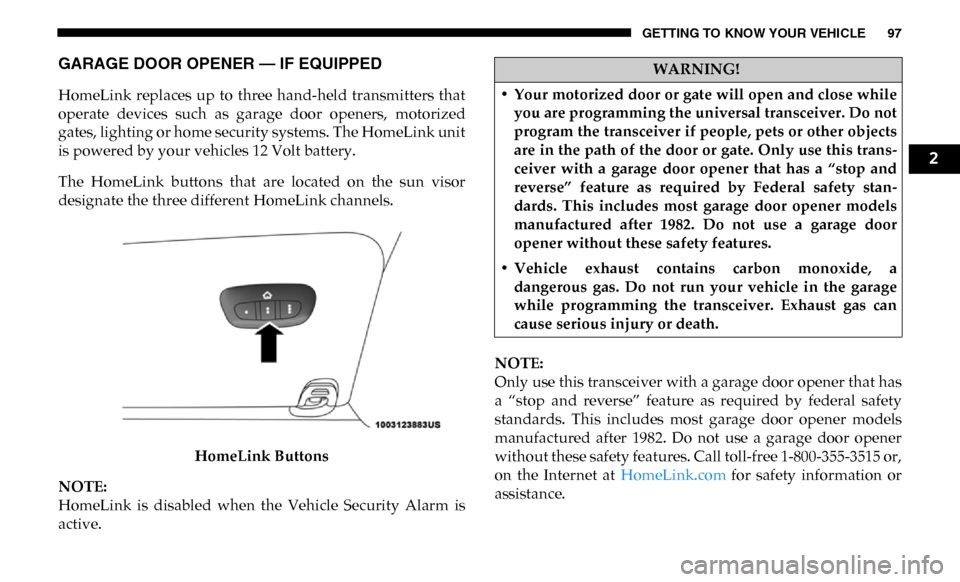
The HomeLink buttons that are located on the sun visor
designate the three different HomeLink channels.HomeLink Buttons
NOTE:
HomeLink is disabled when the Vehicle Security Alarm is
active. NOTE:
Only use this transceiver with a garage door opener that has
a “stop and reverse” feature as required by federal safety
standards. This includes most garage door opener models
manufactured after 1982. Do not use a garage door opener
without these safety features. Call toll-free 1-800-355-3515 or,
on the Internet at HomeLink.com for safety information or
assistance.
WARNING!
• Your motorized door or gate will open and close while you are programming the universal transceiver. Do not
program the transceiver if people, pets or other objects
are in the path of the door or gate. Only use this trans -
ceiver with a garage door opener that has a “stop and
reverse” feature as required by Federal safety stan -
dards. This includes most garage door opener models
manufactured after 1982. Do not use a garage door
opener without these safety features.
• Vehicle exhaust contains carbon monoxide, a dangerous gas. Do not run your vehicle in the garage
while programming the transceiver. Exhaust gas can
cause serious injury or death.
2
Page 100 of 607

98 GETTING TO KNOW YOUR VEHICLE
Before You Begin Programming HomeLink
Be sure that your vehicle is parked outside of the garage
before you begin programming.
For more efficient programming and accurate transmission
of the radio-frequency signal it is recommended that a new
battery be placed in the hand-held transmitter of the device
that is being programmed to the HomeLink system.
To erase the channels, place the ignition in the ON/RUN
position, and push and hold the two outside HomeLink
buttons (I and III) for up to 20 seconds or until the orange
indicator flashes.
NOTE:
• Erasing all channels should only be performed whenprogramming HomeLink for the first time. Do not erase
channels when programming additional buttons.
• If you have any problems, or require assistance, please call toll-free 1-800-355-3515 or, on the Internet at HomeLink.com
for information or assistance.
Programming A Rolling Code
For programming garage door openers that were manufac
-
tured after 1995. These garage door openers can be identified
by the “LEARN” or “TRAIN” button located where the
hanging antenna is attached to the garage door opener.
NOTE:
It is NOT the button that is normally used to open and close
the door. The name and color of the button may vary by
manufacturer.
Page 105 of 607

GETTING TO KNOW YOUR VEHICLE 103
Security
It is advised to erase all channels before you sell or turn in
your vehicle.
To do this, push and hold the two outside buttons for 20
seconds until the orange indicator flashes. Note that all chan-
nels will be erased. Individual channels cannot be erased.
The HomeLink Universal Transceiver is disabled when the
Vehicle Security Alarm is active.
Troubleshooting Tips
If you are having trouble programming HomeLink, here are
some of the most common solutions:
• Replace the battery in the Garage Door Opener hand-held transmitter.
• Push the LEARN button on the Garage Door Opener to complete the training for a Rolling Code.
• Did you unplug the device for programming and remember to plug it back in?
If you have any problems, or require assistance, please call
toll-free 1-800-355-3515 or, on the Internet at HomeLink.com
for information or assistance.
General Information
The following regulatory statement applies to all Radio
Frequency (RF) devices equipped in this vehicle:
This device complies with Part 15 of the FCC Rules and with
Innovation, Science and Economic Development Canada
license-exempt RSS standard(s). Operation is subject to the
following two conditions:
1. This device may not cause harmful interference, and
2. This device must accept any interference received, including interference that may cause undesired opera -
tion.
NOTE:
Changes or modifications not expressly approved by the
party responsible for compliance could void the user’s
authority to operate the equipment.
2
Page 119 of 607

GETTING TO KNOW YOUR VEHICLE 117
Some vehicles may be equipped with a rear cupholder that
consists of two cup wells for rear passenger convenience.Rear Cup Wells
Electrical Power Outlets
The auxiliary 12 Volt (13 Amp) power outlet can provide
power for in-cab accessories designed for use with the stan -
dard “cigar lighter” plug. The 12 Volt power outlets and 5 Volt
(2.5 Amp) USB Port (Charge Only) have a cap attached to the
outlet indicating “12V DC,” together with either a key symbol,
battery symbol, or USB symbol.
A key symbol indicates that the key must be in the ON/RUN
or ACC positions for the outlet to provide power. The battery
symbol indicates that the outlet is connected to the battery,
and can provide power at all times.
CAUTION!
• Do not exceed the maximum power of 160 Watts (13 Amps) at 12 Volts. If the 160 Watts (13 Amps) power rating is
exceeded, the fuse protecting the system will need to be
replaced.
• Power outlets are designed for accessory plugs only. Do not insert any other object in the power outlets as this
will damage the outlet and blow the fuse. Improper use
of the power outlet can cause damage not covered by
your New Vehicle Limited Warranty.2