lights Ram 3500 Chassis Cab 2019 User Guide
[x] Cancel search | Manufacturer: RAM, Model Year: 2019, Model line: 3500 Chassis Cab, Model: Ram 3500 Chassis Cab 2019Pages: 607, PDF Size: 10.72 MB
Page 69 of 607

GETTING TO KNOW YOUR VEHICLE 67
Daytime Running Lights (DRL) — If Equipped
The headlights on your vehicle will illuminate when the
engine is started and the transmission is in any gear except
PARK. This provides a constant "lights on" condition until
the ignition is turned OFF. The lights illuminate at less than
half of normal intensity. If the parking brake is applied, the
Daytime Running Lights (DRL) will turn off. Also, if a turn
signal is activated, the DRL lamp on the same side of the
vehicle may turn off for the duration of the turn signal acti-
vation. Once the turn signal is no longer active, the DRL
lamp will illuminate.
NOTE:
If allowed by law in the country in which the vehicle was
purchased, the Daytime Running Lights can be turned on
and off using the Uconnect System, refer to “Uconnect
Settings” in “Multimedia” for further information.
High/Low Beam Switch
Push the multifunction lever toward the instrument panel to
switch the headlights to high beam. Pulling the multifunc -
tion lever back toward the steering wheel will turn the low
beams back on, or shut the high beams off.
Automatic High Beam Headlamp Control — If
Equipped
The Automatic High Beam Headlamp Control system
provides increased forward lighting at night by automating
high beam control through the use of a digital camera
mounted on the inside rearview mirror. This camera detects
vehicle specific light and automatically switches from high
beams to low beams until the approaching vehicle is out of
view.
NOTE:
• The Automatic High Beam Headlamp Control can be turned on or off by selecting “ON” under “Auto Dim High
Beams” within your Uconnect settings, as well as turning
the headlight switch to the AUTO position. Refer to
“Uconnect Settings” in “Multimedia” for further informa -
tion.
• Broken, muddy, or obstructed headlights and taillights of vehicles in the field of view will cause headlights to remain
on longer (closer to the vehicle). Also, dirt, film, and other
obstructions on the windshield or camera lens will cause
the system to function improperly.
2
Page 70 of 607

68 GETTING TO KNOW YOUR VEHICLE
If the windshield or Automatic High Beam Headlamp
Control mirror is replaced, the mirror must be re-aimed to
ensure proper performance. See a local authorized dealer.
To Activate
1. The Automatic High Beams are enabled through theUconnect system. Refer to “Uconnect Settings” in “Multi -
media” for further information.
2. Turn the headlight switch to the AUTO headlight posi -
tion.
3. Push the multifunction lever away from you (toward front of vehicle) to engage the high beam mode.
NOTE:
The Automatic High Beams will not activate until the vehicle
is at or above 12 mph (20 km/h).
To Deactivate
1. Pull the multifunction lever toward you (or rearward in vehicle) to manually deactivate the system (normal oper -
ation of low beams).
2. Push back on the multifunction lever to reactivate the system. The Automatic High Beams can also be deactivated through
the Uconnect system. Refer to “Uconnect Settings” in “Multi
-
media” for further information.
Flash-To-Pass
You can signal another vehicle with your headlights by
lightly pulling the multifunction lever toward you. This will
cause the high beam headlights to turn on, and remain on,
until the lever is released.
Automatic Headlights — If Equipped
This system automatically turns your headlights on or off
based on ambient light levels. To turn the system on, turn the
headlight switch to the extreme clockwise position aligning
the indicator with the AUTO on the headlight switch. When
the system is on, the Headlight Time Delay feature is also on.
This means your headlights will stay on for up to 90 seconds
after you turn the ignition switch OFF. To turn the Auto -
matic System off, turn the headlight switch counterclockwise
to the O (off) position.
NOTE:
The engine must be running before the headlights will come
on in the Automatic mode.
Page 71 of 607

GETTING TO KNOW YOUR VEHICLE 69
Parking Lights And Panel Lights
To turn on the parking lights and instrument panel lights,
from the O (off) position, rotate the headlight switch clock-
wise to the first detent. To turn off the parking lights, rotate
the headlight switch back to the O (off) position.
Headlights On With Wipers (Available With Automatic
Headlights Only)
When this feature is active, the headlights will turn on
approximately 10 seconds after the wipers are turned on if
the headlight switch is placed in the AUTO position. In addi -
tion, the headlights will turn off when the wipers are turned
off, if they were turned on by this feature.
NOTE:
This feature can be programmed through the Uconnect
system. Refer to “Uconnect Settings” in “Multimedia” for
further information.
Headlight Delay
To aid in your exit, your vehicle is equipped with a headlight
delay that will leave the headlights on for approximately up
to 90 seconds. This delay is initiated when the ignition is
turned off while the headlight switch is on, and then the
headlight switch is cycled off. Headlight delay can be
canceled by either turning the headlight switch on then off,
or by turning the ignition to the ON/RUN position.
NOTE:
This feature can be programmed through the Uconnect
system. Refer to “Uconnect Settings” in “Multimedia” for
further information.
Lights-On Reminder
If the headlights, parking lights, or cargo lights are left on
after the ignition is turned OFF, a chime will sound when the
driver’s door is opened.
2
Page 72 of 607

70 GETTING TO KNOW YOUR VEHICLE
Front Fog Lights — If Equipped
To activate the front fog lights, turn on the parking lights or
low beam headlights and push in the center of the headlight
switch control knob. Pushing the headlight switch control
knob a second time will turn the front fog lights off.Front Fog Light Switch
Turn Signals
Move the multifunction lever up or down and the arrows on
each side of the instrument cluster display will flash to show
proper operation of the front and rear turn signal lights.
NOTE:
If either light remains on and does not flash, or there is a very
fast flash rate, check for a defective outside light bulb. If an
indicator fails to light when the lever is moved, it would
suggest that the indicator bulb is defective.
Lane Change Assist — If Equipped
Tap the multifunction lever up or down once, without
moving beyond the detent, and the turn signal (right or left)
will flash three times then automatically turn off.
Page 73 of 607

GETTING TO KNOW YOUR VEHICLE 71
Cargo Lights — If Equipped
The cargo lights (if equipped) and trailer spotter lamps (if
equipped) are turned on by pushing the cargo lights button
located on the lower half of the headlight switch.Cargo Lights Button On Headlight Switch
The cargo lights will turn on for approximately 60 seconds
when a key fob unlock button is pushed, as part of the Illu-
minated Entry feature.
Battery Saver
To protect the life of your vehicle’s battery, load shedding is
provided for both the interior and exterior lights.
If the ignition is OFF, the interior lights will automatically
turn off when:
• Any door is left ajar for 10 minutes.
• The Dome Defeat button is pushed.
• The Cargo and Spotter lights are manually activated by the headlight switch.
NOTE:
Battery saver mode is canceled if the ignition is ON.
If the headlights remain on while the ignition is cycled OFF,
the exterior lights will automatically turn off after eight
minutes. If the headlights are turned on and left on for eight
minutes while the ignition is OFF, the exterior lights will
automatically turn off.
2
Page 74 of 607

72 GETTING TO KNOW YOUR VEHICLE
INTERIOR LIGHTS
Courtesy Lights
The Courtesy, Dome, and Cargo Lights are turned on when
any door is opened or the Dome On button is pushed on the
overhead console. Also, if your vehicle is equipped with
Remote Keyless Entry, and the unlock button is pushed on
the key fob, the Courtesy, Dome, and Cargo Lights will turn
on.
Courtesy/Reading Lights
The overhead console lights can also be operated individu-
ally as reading lights by pushing the corresponding buttons.Front Courtesy/Reading Lights
NOTE:
On vehicles equipped with an LED overhead console, if both
the Dome On and Dome Defeat buttons are pushed, the Illu-
minated Entry with door ajar feature will be disabled, but the
Dome Lights inside the vehicle will turn on.
1 — Dome Defeat Button
2 — Driver’s Reading Light On/Off Button
3 — Passenger’s Reading Light On/Off Button
4 — Dome On Button
Page 75 of 607
GETTING TO KNOW YOUR VEHICLE 73
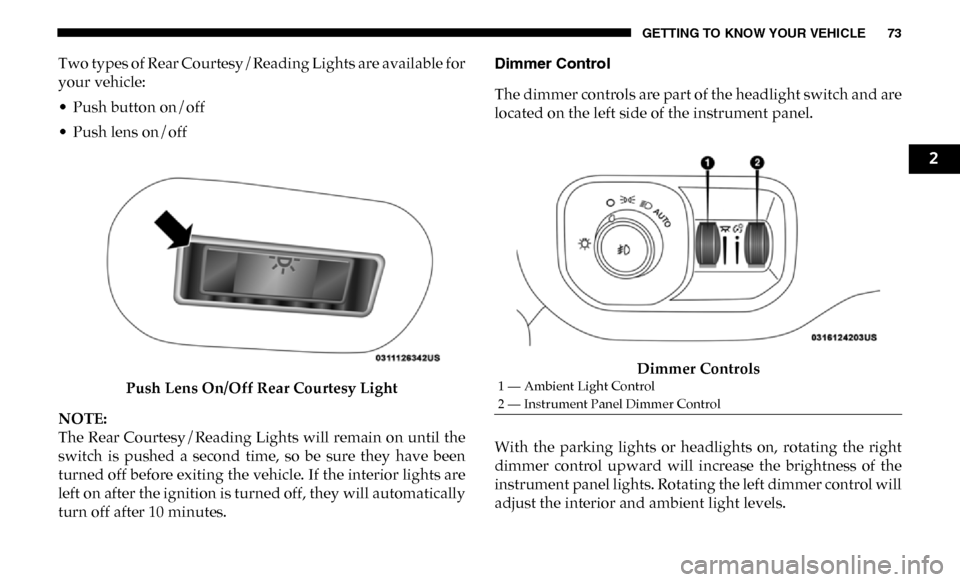
Two types of Rear Courtesy/Reading Lights are available for
your vehicle:
• Push button on/off
• Push lens on/offPush Lens On/Off Rear Courtesy Light
NOTE:
The Rear Courtesy/Reading Lights will remain on until the
switch is pushed a second time, so be sure they have been
turned off before exiting the vehicle. If the interior lights are
left on after the ignition is turned off, they will automatically
turn off after 10 minutes. Dimmer Control
The dimmer controls are part of the headlight switch and are
located on the left side of the instrument panel.
Dimmer Controls
With the parking lights or headlights on, rotating the right
dimmer control upward will increase the brightness of the
instrument panel lights. Rotating the left dimmer control will
adjust the interior and ambient light levels.
1 — Ambient Light Control
2 — Instrument Panel Dimmer Control
2
Page 76 of 607

74 GETTING TO KNOW YOUR VEHICLE
NOTE:
• The dimming of the touchscreen is programmable throughthe Uconnect system. Refer to “Uconnect Settings” in
“Multimedia” for further details.
• The ambient lights are only active when the headlights or parking lights are on.
Illuminated Entry
The courtesy lights will turn on when you use the key fob to
unlock the doors or open any door.
This feature also turns on the puddle lamps located beneath
the outside mirrors (if equipped).
The lights will fade to off after approximately 30 seconds, or
they will immediately fade to off once the ignition switch is
turned to ON/RUN from the OFF position.
The front courtesy overhead console and door courtesy
lights will not turn off if the Dome On button on the over -
head console is pushed.
The illuminated entry system will not operate if the Dome
Defeat button on the overhead console is pushed. NOTE:
If your vehicle is equipped with Illuminated Approach lights
under the outside mirrors, they can also be turned off by
pushing the Dome Defeat button.
WINDSHIELD WIPERS AND WASHERS
Windshield Wipers
The wipers and washers are operated by a switch in the
multifunction lever. Turn the end of the lever to select the
desired wiper speed.
Windshield Wiper/Washer Switch
Page 121 of 607
GETTING TO KNOW YOUR VEHICLE 119
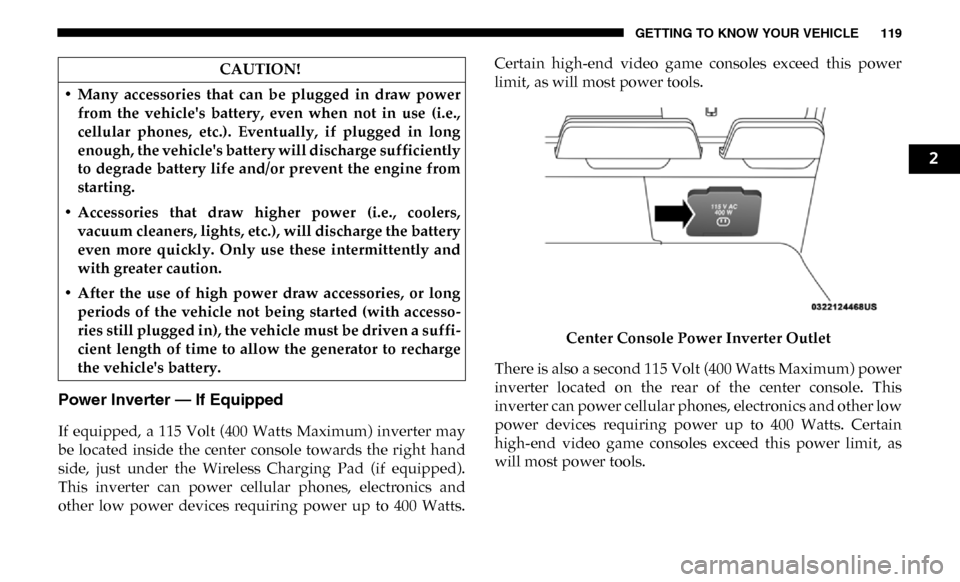
Power Inverter — If Equipped
If equipped, a 115 Volt (400 Watts Maximum) inverter may
be located inside the center console towards the right hand
side, just under the Wireless Charging Pad (if equipped).
This inverter can power cellular phones, electronics and
other low power devices requiring power up to 400 Watts.Certain high-end video game consoles exceed this power
limit, as will most power tools.
Center Console Power Inverter Outlet
There is also a second 115 Volt (400 Watts Maximum) power
inverter located on the rear of the center console. This
inverter can power cellular phones, electronics and other low
power devices requiring power up to 400 Watts. Certain
high-end video game consoles exceed this power limit, as
will most power tools.
CAUTION!
• Many accessories that can be plugged in draw power from the vehicle's battery, even when not in use (i.e.,
cellular phones, etc.). Eventually, if plugged in long
enough, the vehicle's battery will discharge sufficiently
to degrade battery life and/or prevent the engine from
starting.
• Accessories that draw higher power (i.e., coolers, vacuum cleaners, lights, etc.), will discharge the battery
even more quickly. Only use these intermittently and
with greater caution.
• After the use of high power draw accessories, or long periods of the vehicle not being started (with accesso -
ries still plugged in), the vehicle must be driven a suffi -
cient length of time to allow the generator to recharge
the vehicle's battery.
2
Page 141 of 607

GETTING TO KNOW YOUR INSTRUMENT PANEL 139
Settings — If Equipped
Personal Settings allows the driver to set and recall features
when the transmission is in PARK.
Push and release the up and down button until Settings
displays in the instrument cluster display.
Follow the prompts to display and set any of the following
Vehicle Settings. NOTE:
Your vehicle may be equipped with the following settings.
• If equipped with a base radio (Non-Touchscreen) Vehicle
Settings will be included in the instrument cluster display.
• If equipped with a Touchscreen radio, the Vehicle Settings will be included in the radio head unit.
Setting Names Setting Names
Abbreviated (Left Submenu Layer) Sub-Menus (Right Submenu Layer)
Language Select Language English, Spanish, French, Italian, German, Dutch, Arabic
Units Units U.S.; Metric
ParkSense ParkSense • Front Volume — Low; Medium; High
• Rear Volume — Low; Medium; High
Tilt Mirror in Reverse Tilt Mirror in R On; Off
Rain Sensing Wipers Auto Wipers On; Off
Hill Start Assist Hill Start Assist On; Off
Headlights Off Delay Lights Off Delay 0 seconds; 30 seconds; 60 seconds; 90 seconds
Illuminated Approach Lights w/ Unlock 0 seconds; 30 seconds; 60 seconds; 90 seconds
Headlights On with
Wipers Lights w/ Wipers
On; Off
3