brake Ram 3500 Chassis Cab 2019 Owner's Manual
[x] Cancel search | Manufacturer: RAM, Model Year: 2019, Model line: 3500 Chassis Cab, Model: Ram 3500 Chassis Cab 2019Pages: 607, PDF Size: 10.72 MB
Page 7 of 607

5
WARNING LIGHTS AND MESSAGES ........................ 146
Red Warning Lights .................................................... 146
Yellow Warning Lights............................................... 150
Yellow Indicator Lights .............................................. 155
Green Indicator Lights ................................................ 156
White Indicator Lights ................................................ 157
Blue Indicator Lights ................................................... 158
ONBOARD DIAGNOSTIC SYSTEM — OBD II ........ 158
Onboard Diagnostic System (OBD II)
Cybersecurity ............................................................... 159
EMISSIONS INSPECTION AND MAINTENANCE
PROGRAMS ..................................................................... 159
SAFETY
SAFETY FEATURES ......................................................... 161
Anti-Lock Brake System (ABS) ................................. 161
Electronic Brake Control System .............................. 162
AUXILIARY DRIVING SYSTEMS .................................. 174
Forward Collision Warning (FCW) With Mitigation —
If Equipped ................................................................... 174
Tire Pressure Monitoring System (TPMS) ............ 177
OCCUPANT RESTRAINT SYSTEMS ...........................187
Occupant Restraint Systems Features ......................187
Important Safety Precautions.....................................188
Seat Belt Systems .........................................................189
Supplemental Restraint Systems (SRS).....................202
Child Restraints ..........................................................214
Transporting Pets ......................................................240
SAFETY TIPS ...................................................................240
Transporting Passengers ............................................240
Exhaust Gas ..............................................................240
Safety Checks You Should Make Inside The
Vehicle ..........................................................................241
Periodic Safety Checks You Should Make Outside The
Vehicle ...........................................................................243
STARTING AND OPERATING
STARTING THE ENGINE ..............................................244
Automatic Transmission.............................................245
Tip Start Feature ..........................................................245
Keyless Enter-N-Go — Ignition ................................. 245
Normal Starting Using ENGINE START/STOP
Button .........................................................................246
Cold Weather Operation (Below –22°F Or −30°C) ... 250
After Starting ................................................................250
ENGINE BLOCK HEATER — IF EQUIPPED............... 251
Page 8 of 607

6
ENGINE BREAK-IN RECOMMENDATIONS ............ 251
PARKING BRAKE ........................................................... 252
AUTOMATIC TRANSMISSION .................................... 254
Ignition Park Interlock ................................................ 255
Brake/Transmission Shift Interlock System ........... 256
Six–Speed Automatic Transmission —
If Equipped .................................................................. 256
Eight-Speed Automatic Transmission .................... 265
FOUR-WHEEL DRIVE OPERATION —
IF EQUIPPED .................................................................... 272
Four-Position Electronically Shifted Transfer Case —
If Equipped .................................................................. 272
Manually Shifted Transfer Case — If Equipped ..... 277
LIMITED-SLIP DIFFERENTIAL .................................... 281
POWER TAKE OFF OPERATION — IF EQUIPPED
(CHASSIS CAB ONLY) ................................................... 281
Stationary Mode .......................................................... 282
Mobile Mode ................................................................ 283
POWER STEERING .......................................................... 283
Hydraulic Power Steering .......................................... 283
SPEED CONTROL ........................................................... 285
To Activate.................................................................... 285
To Set A Desired Speed...............................................286
To Vary The Speed Setting .........................................286
To Accelerate For Passing .......................................... 287
To Resume Speed.........................................................288
To Deactivate ................................................................288
ADAPTIVE CRUISE CONTROL (ACC) —
IF EQUIPPED ..................................................................288
Adaptive Cruise Control (ACC) Operation .............290
Activating Adaptive Cruise Control (ACC) ............290
To Activate/Deactivate...............................................291
To Set A Desired ACC Speed.....................................292
To Cancel.......................................................................292
To Turn Off ...................................................................293
To Resume .................................................................... 293
To Vary The Speed Setting .........................................293
Setting The Following Distance In ACC ..................295
Overtake Aid ................................................................298
ACC Operation At Stop ..............................................298
Adaptive Cruise Control (ACC) Menu.....................299
Display Warnings And Maintenance .......................300
Precautions While Driving With ACC .....................302
General Information ....................................................306
Normal (Fixed Speed) Cruise Control Mode...........307
Page 11 of 607

9
DEALER SERVICE ........................................................... 417
Engine Oil — Gas Engine .......................................... 418
Engine Oil Filter ......................................................... 419
Engine Air Cleaner Filter ......................................... 420
Air Conditioner Maintenance ................................. 421
Accessory Drive Belt Inspection ................................ 426
Body Lubrication ....................................................... 428
Windshield Wiper Blades ......................................... 428
Exhaust System ........................................................... 431
Cooling System ........................................................... 433
Brake System ............................................................... 438
Automatic Transmission ............................................ 439
Rear Axle And 4x4 Front Driving Axle Fluid
Level .......................................................................... 442
Transfer Case ............................................................... 444
HOISTING ......................................................................... 444
TIRES .................................................................................. 444
Tire Safety Information ............................................ 444
Tires — General Information ................................... 454
Tire Types ..................................................................... 460
Spare Tires — If Equipped ..................................... 461
Wheel And Wheel Trim Care ................................. 464
Tire Chains (Traction Devices) ................................. 465
Tire Rotation Recommendations ............................... 466
DEPARTMENT OF TRANSPORTATION UNIFORM
TIRE QUALITY GRADES ...............................................468
Treadwear .....................................................................469
Traction Grades............................................................ 469
Temperature Grades ................................................... 469
STORING THE VEHICLE .............................................470
BODYWORK ......................................................................470
Protection From Atmospheric Agents ....................470
Body And Underbody Maintenance .........................471
Preserving The Bodywork .......................................... 471
INTERIORS .......................................................................472
Seats And Fabric Parts ................................................472
Plastic And Coated Parts ............................................473
Leather Parts.................................................................474
Glass Surfaces ..............................................................474
TECHNICAL SPECIFICATIONS
IDENTIFICATION DATA ...............................................475
Vehicle Identification Number ................................. 475
BRAKE SYSTEM ...............................................................476
Hydraulic Brake Assist ...............................................476
WHEEL AND TIRE TORQUE SPECIFICATIONS .....476
Torque Specifications ................................................477
Page 25 of 607

GETTING TO KNOW YOUR VEHICLE 23
Programming Additional Key Fobs
Programming the key fob may be performed by an autho-
rized dealer.
NOTE:
Once a key fob is programmed to a vehicle, it cannot be
repurposed and reprogrammed to another vehicle.
General Information
The following regulatory statement applies to all radio
frequency (RF) devices equipped in this vehicle:
This device complies with Part 15 of the FCC Rules and with
Industry Canada license-exempt RSS standard(s). Operation
is subject to the following two conditions:
1. This device may not cause harmful interference, and
2. This device must accept any interference received, including interference that may cause undesired opera -
tion.
NOTE:
Changes or modifications not expressly approved by the
party responsible for compliance could void the user’s
authority to operate the equipment.IGNITION SWITCH
Keyless Push Button Ignition
This feature allows the driver to operate the ignition switch
with the push of a button as long as the Remote Keyless
Entry key fob is in the passenger compartment.
The Keyless Push Button Ignition has four operating posi -
tions; three of which are labeled and will illuminate when in
position. The three positions are OFF, ACC, and ON/RUN.
The fourth position is START, during start RUN will illumi -
nate.
NOTE:
In case the ignition switch does not change with the push of
a button, the key fob may have a low or dead battery. In this
situation, a back up method can be used to operate the igni -
tion switch. Put the nose side (side opposite of the emer -
gency key) of the key fob against the ENGINE START/STOP
button, with your foot applied on the brake pedal, and push
to operate the ignition switch.
2
Page 26 of 607

24 GETTING TO KNOW YOUR VEHICLE
(Continued)
Keyless Push Button Ignition
The push button ignition can be placed in the following
modes:
OFF
• The engine is stopped.
• Some electrical devices (e.g. Central locking, alarm, etc.) are still available. ACC
• Engine is not started.
• Some electrical devices are available.
RUN
• Driving position.
• All the electrical devices are available.
START
• The engine will start.
1 — OFF
2 — ACC (Accessory)
3 — ON/RUN
WARNING!
• When exiting the vehicle, always remove the key fob from the vehicle and lock your vehicle.
• Never leave children alone in a vehicle, or with access to an unlocked vehicle.
• Allowing children to be in a vehicle unattended is dangerous for a number of reasons. A child or others
could be seriously or fatally injured. Children should
be warned not to touch the parking brake, brake pedal
or the gear selector.
Page 28 of 607

26 GETTING TO KNOW YOUR VEHICLE
REMOTE START — IF EQUIPPED
How To Use Remote Start
All of the following conditions must be met before the engine
will remote start:
• Gear selector in PARK
• Doors closed
• Hood closed
• HAZARD switch off
• BRAKE switch inactive (brake pedal not pushed)
• Battery at an acceptable charge level
• PANIC button not pushed
• Fuel meets minimum requirement
• System not disabled from previous remote start event
• Vehicle security alarm not active
Remote Start Abort Message
The following messages will display in the instrument
cluster display if the vehicle fails to remote start or exits
remote start prematurely:
• Remote Start Cancelled — Door Open
• Remote Start Cancelled — Hood Open
• Remote Start Cancelled — Fuel Low
• Remote Start Cancelled — System Fault
• Remote Start Disabled — Start Vehicle to Reset
The instrument cluster display message stays active until the
ignition is turned to the ON/RUN position.
WARNING!
• Do not start or run an engine in a closed garage or confined area. Exhaust gas contains Carbon Monoxide
(CO) which is odorless and colorless. Carbon
Monoxide is poisonous and can cause serious injury or
death when inhaled.
• Keep key fobs away from children. Operation of the Remote Start System, windows, door locks or other
controls could cause serious injury or death.
Page 34 of 607
32 GETTING TO KNOW YOUR VEHICLE
(Continued)
Security System Manual Override
The vehicle security alarm will not arm/disarm if you lock/
unlock the doors using the manual door lock plunger.
DOORS
Manual Door Locks
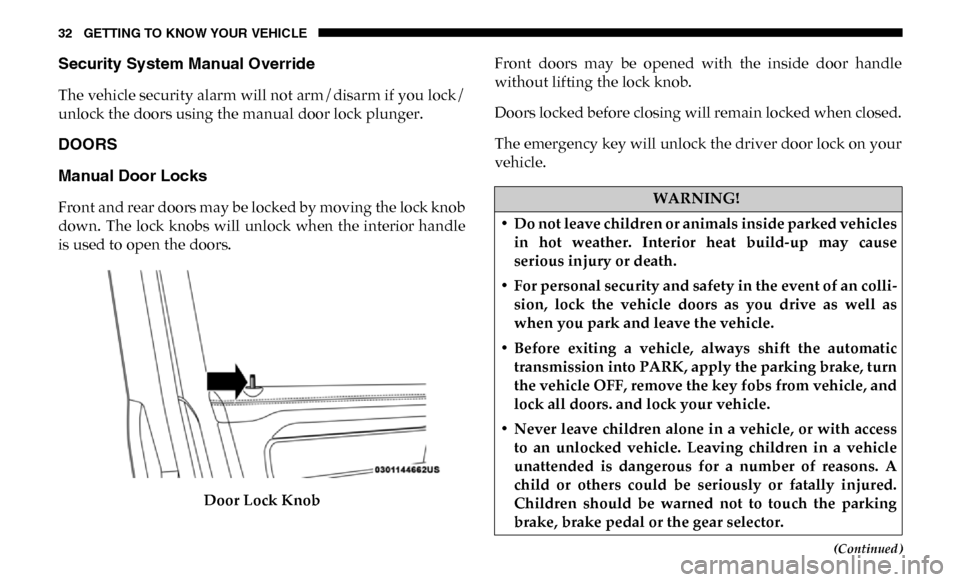
Front and rear doors may be locked by moving the lock knob
down. The lock knobs will unlock when the interior handle
is used to open the doors.Door Lock Knob Front doors may be opened with the inside door handle
without lifting the lock knob.
Doors locked before closing will remain locked when closed.
The emergency key will unlock the driver door lock on your
vehicle.WARNING!
• Do not leave children or animals inside parked vehicles in hot weather. Interior heat build-up may cause
serious injury or death.
• For personal security and safety in the event of an colli -
sion, lock the vehicle doors as you drive as well as
when you park and leave the vehicle.
• Before exiting a vehicle, always shift the automatic transmission into PARK, apply the parking brake, turn
the vehicle OFF, remove the key fobs from vehicle, and
lock all doors. and lock your vehicle.
• Never leave children alone in a vehicle, or with access to an unlocked vehicle. Leaving children in a vehicle
unattended is dangerous for a number of reasons. A
child or others could be seriously or fatally injured.
Children should be warned not to touch the parking
brake, brake pedal or the gear selector.
Page 35 of 607
GETTING TO KNOW YOUR VEHICLE 33
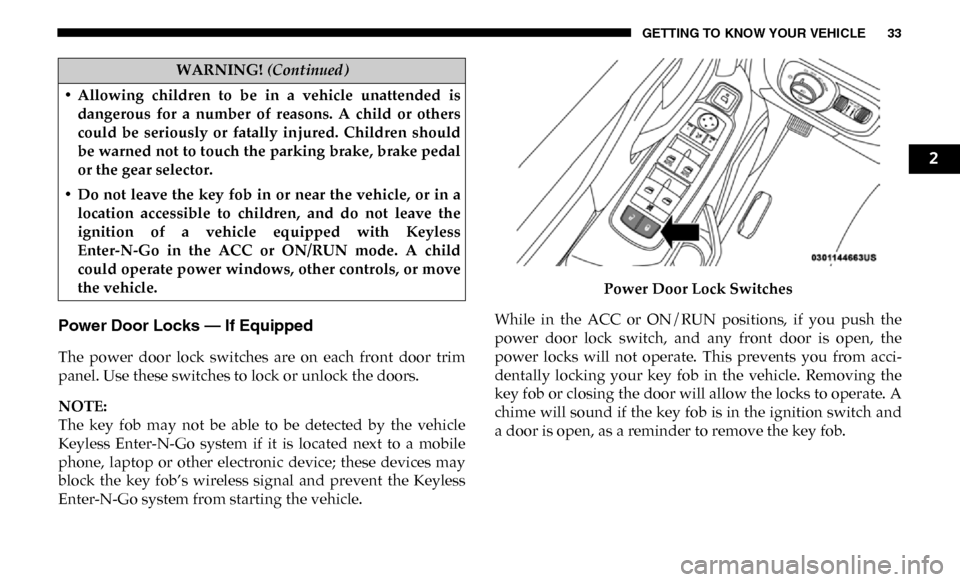
Power Door Locks — If Equipped
The power door lock switches are on each front door trim
panel. Use these switches to lock or unlock the doors.
NOTE:
The key fob may not be able to be detected by the vehicle
Keyless Enter-N-Go system if it is located next to a mobile
phone, laptop or other electronic device; these devices may
block the key fob’s wireless signal and prevent the Keyless
Enter-N-Go system from starting the vehicle.Power Door Lock Switches
While in the ACC or ON/RUN positions, if you push the
power door lock switch, and any front door is open, the
power locks will not operate. This prevents you from acci -
dentally locking your key fob in the vehicle. Removing the
key fob or closing the door will allow the locks to operate. A
chime will sound if the key fob is in the ignition switch and
a door is open, as a reminder to remove the key fob.
• Allowing children to be in a vehicle unattended is
dangerous for a number of reasons. A child or others
could be seriously or fatally injured. Children should
be warned not to touch the parking brake, brake pedal
or the gear selector.
• Do not leave the key fob in or near the vehicle, or in a location accessible to children, and do not leave the
ignition of a vehicle equipped with Keyless
Enter-N-Go in the ACC or ON/RUN mode. A child
could operate power windows, other controls, or move
the vehicle.
WARNING! (Continued)
2
Page 57 of 607

GETTING TO KNOW YOUR VEHICLE 55
DRIVER ADJUSTABLE PEDALS — IF EQUIPPED
The adjustable pedals system is designed to allow a greater
range of driver comfort for steering wheel tilt and seat posi-
tion. This feature allows the brake and accelerator pedals to
move toward or away from the driver to provide improved
position with the steering wheel.
The adjustable pedal switch is located to the left side of the
steering column.
Adjustable Pedals Switch
• The pedals can be adjusted with the ignition OFF.
• The pedals cannot be adjusted when the vehicle is in
REVERSE or when the Speed Control System is on. The
following messages will appear on vehicles equipped with
an instrument cluster display if the pedals are attempted to
be adjusted when the system is locked out: “Adjustable
Pedal Disabled — Cruise Control Engaged” or “Adjust -
able Pedal Disabled — Vehicle In Reverse”.
2
Page 69 of 607

GETTING TO KNOW YOUR VEHICLE 67
Daytime Running Lights (DRL) — If Equipped
The headlights on your vehicle will illuminate when the
engine is started and the transmission is in any gear except
PARK. This provides a constant "lights on" condition until
the ignition is turned OFF. The lights illuminate at less than
half of normal intensity. If the parking brake is applied, the
Daytime Running Lights (DRL) will turn off. Also, if a turn
signal is activated, the DRL lamp on the same side of the
vehicle may turn off for the duration of the turn signal acti-
vation. Once the turn signal is no longer active, the DRL
lamp will illuminate.
NOTE:
If allowed by law in the country in which the vehicle was
purchased, the Daytime Running Lights can be turned on
and off using the Uconnect System, refer to “Uconnect
Settings” in “Multimedia” for further information.
High/Low Beam Switch
Push the multifunction lever toward the instrument panel to
switch the headlights to high beam. Pulling the multifunc -
tion lever back toward the steering wheel will turn the low
beams back on, or shut the high beams off.
Automatic High Beam Headlamp Control — If
Equipped
The Automatic High Beam Headlamp Control system
provides increased forward lighting at night by automating
high beam control through the use of a digital camera
mounted on the inside rearview mirror. This camera detects
vehicle specific light and automatically switches from high
beams to low beams until the approaching vehicle is out of
view.
NOTE:
• The Automatic High Beam Headlamp Control can be turned on or off by selecting “ON” under “Auto Dim High
Beams” within your Uconnect settings, as well as turning
the headlight switch to the AUTO position. Refer to
“Uconnect Settings” in “Multimedia” for further informa -
tion.
• Broken, muddy, or obstructed headlights and taillights of vehicles in the field of view will cause headlights to remain
on longer (closer to the vehicle). Also, dirt, film, and other
obstructions on the windshield or camera lens will cause
the system to function improperly.
2