radio Ram 4500 Chassis Cab 2019 Owner's Guide
[x] Cancel search | Manufacturer: RAM, Model Year: 2019, Model line: 4500 Chassis Cab, Model: Ram 4500 Chassis Cab 2019Pages: 607, PDF Size: 10.72 MB
Page 179 of 607

SAFETY 177
General Information
The following regulatory statement applies to all Radio
Frequency (RF) devices equipped in this vehicle:
This device complies with Part 15 of the FCC Rules and with
Industry Canada license-exempt RSS standard(s). Operation
is subject to the following two conditions:
1. This device may not cause harmful interference.
2. This device must accept any interference received,including interference that may cause undesired opera -
tion.
NOTE:
Changes or modifications not expressly approved by the
party responsible for compliance could void the user’s
authority to operate the equipment.
Tire Pressure Monitoring System (TPMS)
The Tire Pressure Monitor System (TPMS) will warn the
driver of a low tire pressure based on the vehicle recom -
mended cold placard pressure.
NOTE:
The TPMS Warning Light will illuminate in the instrument
cluster and a chime will sound when tire pressure is low in one or more of the four active road tires. In addition, the
instrument cluster will display a graphic showing the pres
-
sure values of each tire with the low tire pressure values in a
different color, or the Uconnect radio will display a TPMS
message, when this occurs you must increase the tire pres -
sure to the recommended cold placard pressure in order for
the TPMS Warning Light to turn off.
The tire pressure will vary with temperature by about 1 psi
(7 kPa) for every 12°F (6.5°C). This means that when the
outside temperature decreases, the tire pressure will
decrease. Tire pressure should always be set based on cold
inflation tire pressure. This is defined as the tire pressure
after the vehicle has not been driven for at least three hours,
or driven less than 1 mile (1.6 km) after a three hour period.
The cold tire inflation pressure must not exceed the
maximum inflation pressure molded into the tire sidewall.
Refer to “Tires” in “Servicing And Maintenance” for infor -
mation on how to properly inflate the vehicle’s tires. The tire
pressure will also increase as the vehicle is driven - this is
normal and there should be no adjustment for this increased
pressure.
The TPMS will warn the driver of a low tire pressure if the
tire pressure falls below the low-pressure warning limit for
any reason, including low temperature effects and natural
pressure loss through the tire.
4
Page 183 of 607

SAFETY 181
NOTE:
When filling warm tires, the tire pressure may need to be
increased up to an additional 4 psi (28 kPa) above the recom-
mended cold placard pressure in order to turn the Tire Pres -
sure Monitoring Telltale Light off.
Service TPMS Warning
If a system fault is detected, the “Tire Pressure Monitoring
Telltale Light” will flash on and off for 75 seconds and then
remain on solid. The system fault will also sound a chime. In
addition, the instrument cluster will display a "SERVICE
TPM SYSTEM" message for a minimum of five seconds and
then display dashes (- -) in place of the pressure value to indi -
cate which sensor is not being received.
If the ignition switch is cycled, this sequence will repeat,
providing the system fault still exists. If the system fault no
longer exists, the “Tire Pressure Monitoring Telltale Light”
will no longer flash, and the "SERVICE TPM SYSTEM"
message will no longer display, and a pressure value will
display in place of the dashes. A system fault can occur due
to any of the following:
• Signal interference due to electronic devices or driving next to facilities emitting the same radio frequencies as the
TPM sensors. • Installing aftermarket window tinting that contains mate
-
rials that may block radio wave signals.
• Accumulation of snow or ice around the wheels or wheel housings.
• Using tire chains on the vehicle.
• Using wheels/tires not equipped with TPM sensors.
A system fault may occur due to an incorrect TPM sensor
location condition. When a system fault occurs due to an
incorrect TPM sensor location, the “Tire Pressure Monitoring
Telltale Light” will flash on and off for 75 seconds and then
remain on solid. The system fault will also sound a chime. In
addition, the instrument cluster will display a “Tire Pressure
Temporarily Unavailable” message in place of the tire pres -
sure display screen. If the ignition switch is cycled, this
sequence will repeat, providing the system fault still exists. If
the system fault no longer exists, the “Tire Pressure Moni -
toring Telltale Light” will no longer flash and the tire pres -
sure display screen will be displayed showing the tire
pressure values the correct locations.
4
Page 186 of 607

184 SAFETY
Trailer Tire Pressure System Not Configured
A “Trailer Tire Pressure System Not Configured” message
will be displayed in the Instrument Cluster when a trailer
number is selected that does not have configuration values
entered for the (Number of Tires, Number of Axles, SET
Target Tire Pressure, trailer TPM sensor ID's).
To correct this condition the (Number of Tires, Number of
Axles, and SET Target Tire Pressure) values must be entered
in the radio for the trailer number selected. The trailer
sensors must also be paired to the trailer. Refer to the “Ucon-
nect Settings” in “Multimedia” for further information.
Trailer Sensors Detected Do Not Match Active Trailer
The “Trailer Sensors Detected Do Not Match Active Trailer”
message will be displayed in the Instrument Cluster when
the trailer sensors being received by the TTPM module do
match the trailer sensors paired to the current trailer number
selected. This message will be displayed when the sensors
being received completely match the sensors paired to
another trailer number configured in the TTPM module.
To correct this condition, the correct trailer number must be
selected in the radio. Refer to the “Uconnect Settings” in
“Multimedia” for further information. Tire Fill Alert
This feature notifies the user when the placard tire pressure
is attained while inflating or deflating the tire.
The customer may choose to disable or enable the Tire Fill
Alert feature through use of the customer settings in the
radio.
NOTE:
• Only one tire can be filled at a time when using the Tire Fill
Alert system.
• The Tire Fill Alert feature cannot be entered if an existing TPM system fault is set to “active” or if the system is in
deactivation mode (if equipped).
The system will be activated when the TPM receiver module
detects a change in tire pressure. The ignition must be in the
RUN mode, with the transmission in PARK (P).
NOTE:
It is not required to have the engine running to enter Tire Fill
Alert mode.
The hazard lamps will come on to confirm the vehicle is in
Tire Fill Alert mode.
Page 187 of 607

SAFETY 185
When Tire Fill Alert Mode is entered, the tire pressure
display screen will be displayed in the instrument cluster.
Operation:
• The horn will chirp to let the user know when to stopfilling the tire, when it reaches recommended pressure.
• The horn will chirp three times if the tire is over filled and will continue to chirp every five seconds if the user
continues to inflate the tire.
• The horn will chirp once again when enough air is let out to reach proper inflation level.
• The horn will also chirp three times if the tire is then under-inflated and will continue to chirp every five
seconds if the user continues to deflate the tire.
Selectable Tire Fill Alert (STFA)
The Selectable Tire Fill Alert (STFA) system is an optional
feature that is included as part of the normal Tire Fill Alert
system. The system is designed to allow the customer to
select a pressure to inflate or deflate the vehicle's front and
rear axle tires to and to provide feedback to the customer
while inflating or deflating the vehicle's tires.
In the Selectable Tire Fill Alert customer settings menu in the
radio, the customer will be able to select a pressure setting for both the front and rear axle tire pressures by scrolling
through a pressure range from XX to 15 psi in 1 psi incre
-
ments for each axle setting. XX = the vehicle’s cold placard
pressure values for the front and rear axles as shown on the
vehicle placard pressure label.
The customer may also store the pressure values chosen for
each axle in the radio as a preset pressure. The customer will
be allowed to store up to two sets of preset values in the radio
for the front and rear axle pressure values.
Once the customer selects the tire pressures for the front and
rear axles that they want to inflate or deflate to, they can
begin inflating or deflating one tire at a time.
NOTE:
The STFA system will only support inflating or deflating one
tire at a time.
The system will be activated when the TPM receiver module
detects a change in tire pressure. The ignition must be in the
RUN mode, with the transmission in PARK (P).
The hazard lamps will come on to confirm the vehicle is in
Tire Fill Alert mode.
When Tire Fill Alert Mode is entered, the tire pressure
display screen will be displayed in the instrument cluster.
4
Page 188 of 607

186 SAFETY
Operation:
• The horn will chirp once when the selected pressure isreached to let the user know when to stop inflating or
deflating the tire.
• The horn will chirp three times if the tire is over inflated or over deflated and will continue to chirp every five seconds
if the user continues to inflate or deflate the tire.
• The horn will chirp once again when enough air is added or removed to reach proper selected pressure level.
Tire Pressure Information System (TPIS) 3500 Series
Trucks
Your vehicle may be equipped with a Tire Pressure Informa -
tion System (TPIS).
The Tire Pressure Information System (TPIS) uses wireless
technology with wheel rim mounted electronic sensors to
transmit tire pressure levels. Sensors mounted to each wheel
as part of the valve stem transmit tire pressure readings to
the receiver module.
NOTE:
It is particularly important for you to check the tire pressure
in all of the tires on your vehicle monthly and to maintain the
proper pressure. The TPIS consists of the following components:
• Receiver module
• Four TPM sensors (Single Rear Wheel (SRW) applications)
• Six TPM sensors (Dual Rear Wheel (DRW) applications)
• Pressure display in the instrument cluster
The TPIS system will display all four (Single Rear Wheel
(SRW) applications) or six (Dual Rear Wheel (DRW) applica
-
tions) tire pressure values in the instrument cluster display.
If a system fault is detected, the instrument cluster will
display a "SERVICE TPM SYSTEM" message for a minimum
of five seconds and then display dashes (- -) in place of the
pressure value to indicate which sensor is not being received.
If the ignition switch is cycled, this sequence will repeat,
providing the system fault still exists. If the system fault no
longer exists, the "SERVICE TPM SYSTEM" message will no
longer be displayed, and a pressure value will display in
place of the dashes. A system fault can occur due to any of
the following:
• Signal interference due to electronic devices or driving next to facilities emitting the same radio frequencies as the
TPM sensors.
Page 189 of 607

SAFETY 187
• Installing aftermarket window tinting that contains mate-
rials that may block radio wave signals.
• Accumulation of snow or ice around the wheels or wheel housings.
• Using tire chains on the vehicle.
• Using wheels/tires not equipped with TPM sensors.
General Information
This device complies with Part 15 of the FCC rules and RSS
210 of Industry Canada. Operation is subject to the following
conditions:
1. This device may not cause harmful interference.
2. This device must accept any interference received, including interference that may cause undesired operation.
NOTE:
Changes or modifications not expressly approved by the
party responsible for compliance could void the user’s
authority to operate the equipment.OCCUPANT RESTRAINT SYSTEMS
Some of the most important safety features in your vehicle
are the restraint systems:
Occupant Restraint Systems Features
• Seat Belt Systems
• Supplemental Restraint Systems (SRS) Air Bags
• Child Restraints
Some of the safety features described in this section may be
standard equipment on some models, or may be optional
equipment on others. If you are not sure, ask an authorized
dealer.
4
Page 208 of 607
206 SAFETY
On the other hand, depending on the type and location of
impact, front air bags may deploy in crashes with little
vehicle front-end damage but that produce a severe initial
deceleration.
Because air bag sensors measure vehicle deceleration over
time, vehicle speed and damage by themselves are not good
indicators of whether or not an air bag should have
deployed.
Seat belts are necessary for your protection in all collisions,
and also are needed to help keep you in position, away from
an inflating air bag.
When the ORC detects a collision requiring the front air bags,
it signals the inflator units. A large quantity of non-toxic gas
is generated to inflate the front air bags.
The steering wheel hub trim cover and the upper passenger
side of the instrument panel separate and fold out of the way
as the air bags inflate to their full size. The front air bags fully
inflate in less time than it takes to blink your eyes. The front
air bags then quickly deflate while helping to restrain the
driver and front passenger.Knee Impact Bolsters
The Knee Impact Bolsters help protect the knees of the driver
and front passenger, and position the front occupants for
improved interaction with the front air bags.
Supplemental Side Air Bags
Supplemental Seat-Mounted Side Air Bags (SABs) — If
Equipped
Your vehicle may be equipped with Supplemental
Seat-Mounted Side Air Bags (SABs). If your vehicle is
equipped with Supplemental Seat-Mounted Side Air Bags
(SABs), please refer to the information below.
WARNING!
• Do not drill, cut, or tamper with the knee impact bolsters in any way.
• Do not mount any accessories to the knee impact bolsters such as alarm lights, stereos, citizen band
radios, etc.
Page 308 of 607
306 STARTING AND OPERATING
Stationary Objects And Vehicles
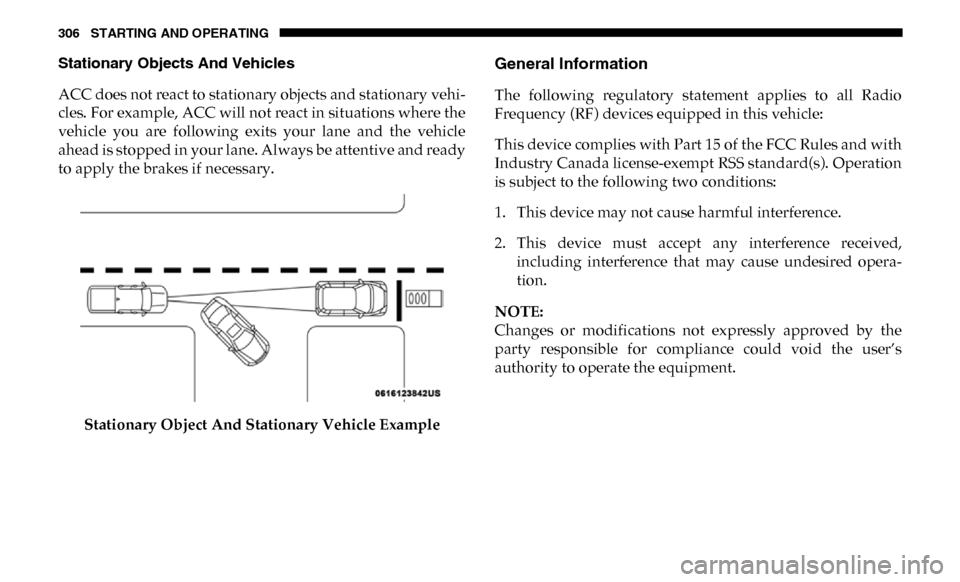
ACC does not react to stationary objects and stationary vehi-
cles. For example, ACC will not react in situations where the
vehicle you are following exits your lane and the vehicle
ahead is stopped in your lane. Always be attentive and ready
to apply the brakes if necessary.
Stationary Object And Stationary Vehicle ExampleGeneral Information
The following regulatory statement applies to all Radio
Frequency (RF) devices equipped in this vehicle:
This device complies with Part 15 of the FCC Rules and with
Industry Canada license-exempt RSS standard(s). Operation
is subject to the following two conditions:
1. This device may not cause harmful interference.
2. This device must accept any interference received,including interference that may cause undesired opera -
tion.
NOTE:
Changes or modifications not expressly approved by the
party responsible for compliance could void the user’s
authority to operate the equipment.
Page 316 of 607

314 STARTING AND OPERATING
The vehicle is close to the obstacle when the warning display shows one flashing arc and sounds a continuous tone. The
following chart shows the warning alert operation when the system is detecting an obstacle:
NOTE:
ParkSense will reduce the volume of the radio, if on, when
the system is sounding an audio tone.Adjustable Chime Volume Settings
The rear chime volume settings are programmable through
the Uconnect system. Refer to “Uconnect Settings” in “Multi
-
media” for further information.
The chime volume settings include low, medium, and high.
The factory default volume is medium.
WARNING ALERTS
Rear Distance (inches/cm) Greater than
79 inches (200 cm) 79-59 inches
(200-150 cm) 59-47 inches
(150-120 cm) 47-39 inches
(120-100 cm) 39-25 inches
(100-65 cm) 25-12 inches
(65-30 cm) Less than
12 inches (30 cm)
Audible Alert Chime NoneSingle 1/2
Second Tone Slow Slow Fast
Fast Continuous
Arcs-Left None None None None None 2nd Flashing 1st Flashing
Arcs-Center None 6th Solid 5th Solid 4th Solid 3rd Flashing 2nd Flashing 1st Flashing Arcs-Right None None None None None 2nd Flashing 1st Flashing Radio
Volume
Reduced No
Yes YesYesYesYesYes
Page 318 of 607

316 STARTING AND OPERATING
(Continued)
Cleaning The ParkSense System
Clean the ParkSense sensors with water, car wash soap and
a soft cloth. Do not use rough or hard cloths. Do not scratch
or poke the sensors. Otherwise, you could damage the
sensors.
ParkSense System Usage Precautions
NOTE:
• Ensure that the rear bumper is free of snow, ice, mud, dirtand debris to keep the ParkSense system operating prop -
erly.
• Jackhammers, large trucks, and other vibrations could affect the performance of ParkSense.
• When you move the gear selector into REVERSE with ParkSense turned off, the instrument cluster display will
show "Off" on the vehicle graphic arcs for as long as the
vehicle is in REVERSE.
• ParkSense, when on, will reduce the volume of the radio when it is sounding a tone. • Clean the ParkSense sensors regularly, taking care not to
scratch or damage them. The sensors must not be covered
with ice, snow, slush, mud, dirt or debris. Failure to do so
can result in the system not working properly. The Park -
Sense system might not detect an obstacle behind the
fascia/bumper, or it could provide a false indication that
an obstacle is behind the fascia/bumper.
• Ensure the ParkSense system is OFF if objects such as bicycle carriers, trailer hitches, etc., are placed within
18 inches (45 cm) of the rear fascia/bumper while driving
the vehicle. Failure to do so can result in the system misin -
terpreting a close obstacle as a sensor problem, causing the
"Rear ParkSense Unavailable Service Required" message
to appear in the instrument cluster display.
WARNING!
• Drivers must be careful when backing up even when using ParkSense. Always check carefully behind your
vehicle, look behind you, and be sure to check for
pedestrians, animals, other vehicles, obstructions, and
blind spots before backing up. You are responsible for
safety and must continue to pay attention to your
surroundings. Failure to do so can result in serious
injury or death.