brake light Ram 5500 Chassis Cab 2011 User Guide
[x] Cancel search | Manufacturer: RAM, Model Year: 2011, Model line: 5500 Chassis Cab, Model: Ram 5500 Chassis Cab 2011Pages: 476, PDF Size: 7.32 MB
Page 284 of 476
The “SVC 4WD Warning Light” monitors the electronic
shift four-wheel drive system. If this light remains on
after engine start up or illuminates during driving, it
means that the four-wheel drive system is not function-
ing properly and that service is required.
WARNING!
Always engage the parking brake when powering
down the vehicle if the “SVC 4WD Warning Light” is
illuminated. Not engaging the parking brake may
allow the vehicle to roll, which may cause personal
injury.
NOTE: Do not attempt to make a shift while only the
front or rear wheels are spinning, as this can cause
damage to driveline components. When operating your vehicle in 4WD LOW, the engine
speed is approximately three times that of the 2WD or
4WD LOCK positions at a given road speed. Take care
not to overspeed the engine and do not exceed 25 mph
(40 km/h).
Proper operation of four-wheel drive vehicles depends
on tires of equal size, type and circumference on each
wheel. Any difference in tire size can cause damage to the
transfer case.
Because four-wheel drive provides improved traction,
there is a tendency to exceed safe turning and stopping
speeds. Do not go faster than road conditions permit.
5
STARTING AND OPERATING 283
Page 288 of 476
NOTE:
•If Steps 1 or 2 of either the Preferred or Alternate
Procedure are not satisfied prior to attempting the
shift, then the desired position indicator light will flash
continuously while the original position indicator light
is ON, until all requirements have been met.
•The ignition switch must be in the ON position for a
shift to take place and for the position indicator lights
to be operable. If the ignition switch is not in the ON
position, the shift will not take place and no position
indicator lights will be on or flashing.
LIMITED-SLIP DIFFERENTIAL
The limited-slip differential provides additional traction
on snow, ice, mud, sand and gravel, particularly when
there is a difference between the traction characteristics
of the surface under the right and left rear wheels. Duringnormal driving and cornering, the limited-slip unit per-
forms similarly to a conventional differential. On slip-
pery surfaces, however, the differential delivers more of
the driving effort to the rear wheel having the better
traction.
The limited-slip differential is especially helpful during
slippery driving conditions. With both rear wheels on a
slippery surface, a slight application of the accelerator
will supply maximum traction. When starting with only
one rear wheel on an excessively slippery surface, slight
momentary application of the parking brake may be
necessary to gain maximum traction.
5
STARTING AND OPERATING 287
Page 291 of 476
CAUTION! (Continued)
•Driving through standing water may cause dam-
age to your vehicle’s drivetrain components. Al-
ways inspect your vehicle’s fluids (i.e., engine oil,
transmission/transaxle, axle, etc.) for signs of con-
tamination (i.e., fluid that is milky or foamy in
appearance) after driving through standing water.
Do not continue to operate the vehicle if any fluid
appears contaminated, as this may result in further
damage. Such damage is not covered by the New
Vehicle Limited Warranty.
•Getting water inside your vehicle’s engine can
cause it to lock up and stall out, and cause serious
internal damage to the engine. Such damage is not
covered by the New Vehicle Limited Warranty.
WARNING!
•Driving through standing water limits your vehi-
cle’s traction capabilities. Do not exceed 5 mph
(8 km/h) when driving through standing water.
•Driving through standing water limits your vehi-
cle’s braking capabilities, which increases stop-
ping distances. Therefore, after driving through
standing water, drive slowly and lightly press on
the brake pedal several times to dry the brakes.
•Getting water inside your vehicle’s engine can
cause it to lock up and stall out, and leave you
stranded.
•Failure to follow these warnings may result in
injuries that are serious or fatal to you, your
passengers, and others around you.
290 STARTING AND OPERATING
Page 294 of 476
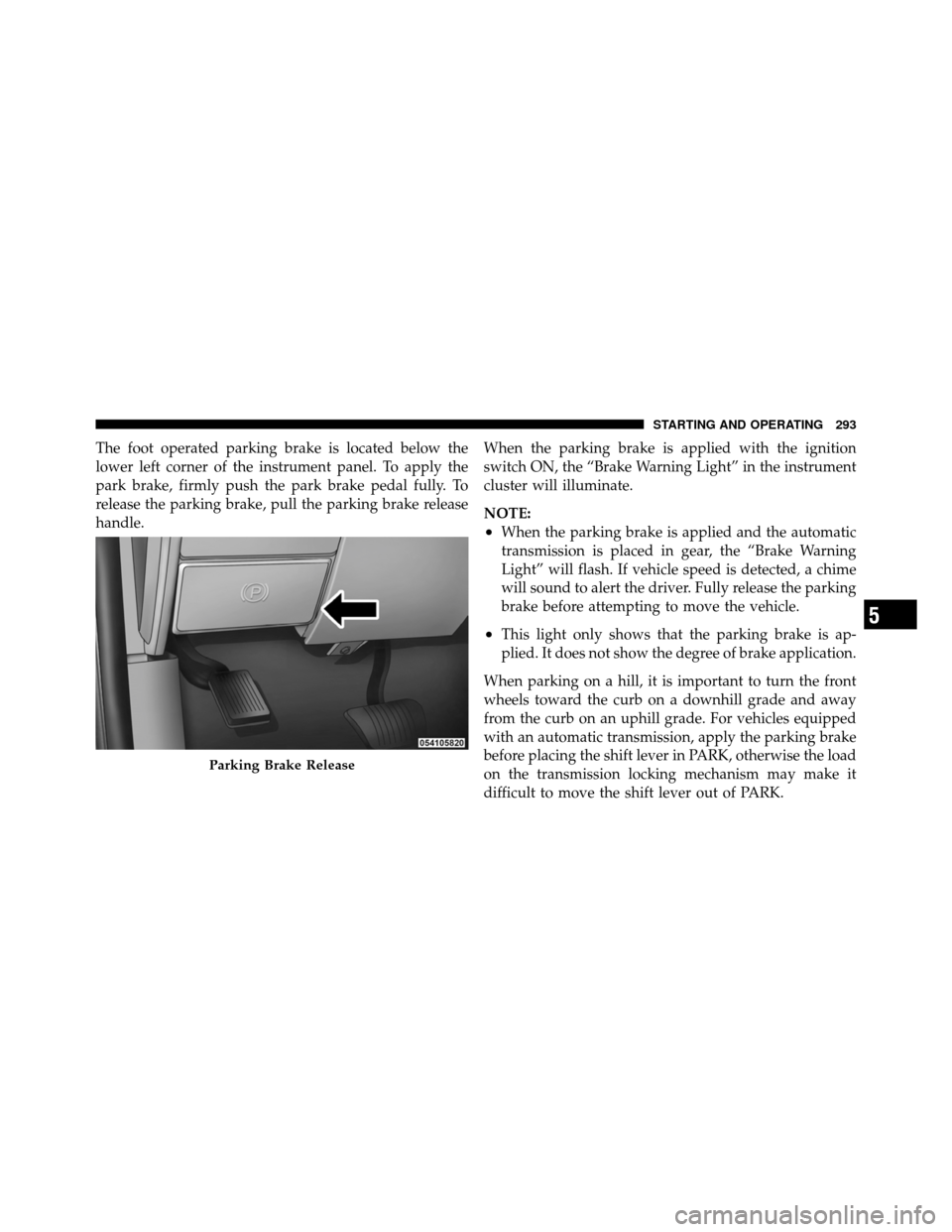
The foot operated parking brake is located below the
lower left corner of the instrument panel. To apply the
park brake, firmly push the park brake pedal fully. To
release the parking brake, pull the parking brake release
handle.When the parking brake is applied with the ignition
switch ON, the “Brake Warning Light” in the instrument
cluster will illuminate.
NOTE:
•When the parking brake is applied and the automatic
transmission is placed in gear, the “Brake Warning
Light” will flash. If vehicle speed is detected, a chime
will sound to alert the driver. Fully release the parking
brake before attempting to move the vehicle.
•This light only shows that the parking brake is ap-
plied. It does not show the degree of brake application.
When parking on a hill, it is important to turn the front
wheels toward the curb on a downhill grade and away
from the curb on an uphill grade. For vehicles equipped
with an automatic transmission, apply the parking brake
before placing the shift lever in PARK, otherwise the load
on the transmission locking mechanism may make it
difficult to move the shift lever out of PARK.
Parking Brake Release
5
STARTING AND OPERATING 293
Page 295 of 476

The parking brake should always be applied whenever
the driver is not in the vehicle.
WARNING!
•Never leave children alone in a vehicle. Leaving
unattended children in a vehicle is dangerous for a
number of reasons. A child or others could be
seriously or fatally injured.
•Do not leave the key fob in the ignition switch. A
child could operate power windows, other con-
trols, or move the vehicle.
•Be sure the parking brake is fully disengaged
before driving; failure to do so can lead to brake
failure and an accident.(Continued)
WARNING! (Continued)
•Always fully apply the parking brake when leav-
ing your vehicle or it may roll and cause damage or
injury. Also, be certain to leave an automatic
transmission in PARK, a manual transmission in
REVERSE or first gear. Failure to do so may cause
the vehicle to roll and cause damage or injury.
CAUTION!
If the “Brake Warning Light” remains on with the
parking brake released, a brake system malfunction
is indicated. Have the brake system serviced by an
authorized dealer immediately.
294 STARTING AND OPERATING
Page 296 of 476
BRAKE SYSTEM
If power assist is lost for any reason (for example,
repeated brake applications with the engine off), the
brakes will still function. However, you will experience a
substantial increase in braking effort to stop the vehicle.
If either the front or rear hydraulic system loses normal
braking capability, the remaining system will still func-
tion with some loss of overall braking effectiveness. This
will be evident by increased pedal travel during applica-
tion, greater pedal force required to slow or stop, and
activation of the “Brake Warning Light” and the “ABS
Warning Light” (if equipped) during brake use.
Dual Rear Wheel Models Only
The brake system power assist is provided by a hydro-
boost unit which shares fluid with the power steering
system. You may experience some clicking or hissing
noises from the hydro-boost system during hard braking
conditions.NOTE:
Under cold temperatures, pedal effort will be
higher than normal until the power steering fluid reaches
operating temperature.
Four-Wheel Anti-Lock Brake System
WARNING!
The Four-Wheel Anti-Lock Brake System contains
sophisticated electronic equipment. It may be sus-
ceptible to interference caused by improperly in-
stalled or high output radio transmitting equipment.
This interference can cause possible loss of anti-lock
braking capability. Installation of such equipment
should be performed by qualified professionals.
The Four-Wheel Anti-Lock Brake System (ABS) is de-
signed to aid the driver in maintaining vehicle control
under adverse braking conditions. The system operates
5
STARTING AND OPERATING 295
Page 297 of 476
with a separate computer to modulate hydraulic pressure
to prevent wheel lockup and help avoid skidding on
slippery surfaces.
The system’s pump motor runs during an ABS stop to
provide regulated hydraulic pressure. The pump motor
makes a low humming noise during operation. This is
normal.
The ABS conducts a low-speed selftest at about 10 mph
(16 km/h). If you have your foot lightly on the brake
while this test is occurring, you may feel slight pedal
movement. The movement can be more apparent on ice
and snow. This is normal.
When you are in a severe braking condition involving
use of the ABS, you will experience some pedal drop as
the vehicle comes to a complete stop. This is the result of
the system reverting to the base brake system and is
normal.Engagement of the ABS may be accompanied by a
pulsing sensation. You may also hear a clicking noise.
These occurrences are normal, and indicate that the
system is functioning.
ABS Warning Light
The ABS includes an amber warning light. When the light
is illuminated, the ABS is not functioning. The system
reverts to standard, non-anti-lock brakes.
WARNING!
•Pumping of the anti-lock brakes will diminish
their effectiveness and may lead to an accident.
Pumping makes the stopping distance longer. Just
press firmly on your brake pedal when you need
to slow down or stop.
(Continued)
296 STARTING AND OPERATING
Page 340 of 476

NOTE:This module is designed for only electric trailer
brakes. To determine the type of brakes on your trailer,
check with your trailer manufacturer or dealer. The user interface consists of the following:
GAIN/ Brake Output Power Display
Shows the current GAIN setting.
This display may also be used to display diagnostic
information, if needed.
•SC — Short Circuit to Ground
•Sb — Short to Battery
•CF — Controller Fault – If this message appears on the
display, see your authorized dealer.
When the vehicle brakes are applied, the display will no
longer show GAIN and will change to the output to the
trailer brakes.
1 — GAIN/Brake Output Power Display
2 — Manual Brake Control Lever
3 — Trailer Brake Status Indicator Light
4 — GAIN Adjustment Buttons
5
STARTING AND OPERATING 339
Page 341 of 476

Manual Brake Control Lever
Slide the manual brake control lever to the right to
activate power to the trailer’s electric brakes independent
of the tow vehicle’s brakes. If the manual brake control
lever is activated while the brake is also applied, the
greater of the two inputs determines the power sent to
the trailer brakes.
The trailer and the vehicle’s brake lamps will come on
when either vehicle braking or manual trailer brakes are
applied.
Trailer Brake Status Indicator Light
This light indicates the trailer electrical connection status.
If no electrical connection is detected after the ignition is
turned on, pressing the GAIN adjustment button or
sliding the manual brake control lever will display the
GAIN setting for 10 seconds and the “Trailer Brake Status
Indicator Light” will not be displayed.If a fault is detected in the trailer wiring or the Integrated
Trailer Brake Module (ITBM), the “Trailer Brake Status
Indicator Light” will flash.
GAIN Adjustment Buttons (+/-)
Pressing these buttons will adjust the brake control
power output to the trailer brakes in 0.5 increments. The
GAIN setting can be increased to a maximum of 10 or
decreased to a minimum of 0 (no trailer braking).
GAIN
The GAIN setting is used to set the trailer brake control
for the specific towing condition and should be changed
as towing conditions change. Changes to towing condi-
tions include trailer load, vehicle load, road conditions
and weather.
340 STARTING AND OPERATING
Page 343 of 476

CAUTION!
Connecting a trailer that is not compatible with the
ITBM system may result in reduced or complete loss
of trailer braking. There may be a increase in stop-
ping distance or trailer instability which could result
in damage to your vehicle, trailer, or other property.
WARNING!
Connecting a trailer that is not compatible with the
ITBM system may result in reduced or complete loss
of trailer braking. There may be a increase in stop-
ping distance or trailer instability which could result
in personal injury.
NOTE: A aftermarket controller may be available for
use with trailers with air or electric-over-hydraulic trailer brake systems. To determine the type of brakes on your
trailer and the availability of controllers, check with your
trailer manufacturer or dealer.
Towing Requirements – Trailer Lights and Wiring
Whenever you pull a trailer, regardless of the trailer size,
stop lights and turn signals on the trailer are required for
motoring safety.
NOTE:
Do not cut or splice wiring into the vehicle’s
wiring harness.
WARNING!
Any work done to the vehicle’s electrical system or
wiring should be performed by a qualified automo-
tive technician. If done improperly it may cause
damage to the electrical system wiring and could
result in serious or fatal injury.
342 STARTING AND OPERATING