warning Ram 5500 Chassis Cab 2011 Workshop Manual
[x] Cancel search | Manufacturer: RAM, Model Year: 2011, Model line: 5500 Chassis Cab, Model: Ram 5500 Chassis Cab 2011Pages: 476, PDF Size: 7.32 MB
Page 150 of 476

NOTE:The pedals cannotbe adjusted when the vehicle
is in REVERSE or when the Electronic Speed Control is
set.
CAUTION!
Do not place any article under the adjustable pedals
or impede its ability to move as it may cause damage
to the pedal controls. Pedal travel may become lim-
ited if movement is stopped by an obstruction in the
adjustable pedal’s path.
WARNING!
Do not adjust the pedals while the vehicle is moving.
You could lose control and have an accident. Always
adjust the pedals while the vehicle is parked.
HEATED STEERING WHEEL — IF EQUIPPED
The steering wheel contains a heating element that helps
warm your hands in cold weather. The heated steering
wheel has only one temperature setting. Once the heated
steering wheel has been turned on it will operate for
approximately 58 to 70 minutes before automatically
shutting off. The heated steering wheel can shut off early
or may not turn on when the steering wheel is already
warm.
The heated steering wheel switch is located on the switch
bank below the climate controls.
Press the switch to turn on the heated
steering wheel. The light on the switch
will illuminate to indicate the steering
wheel heater is on. Pressing the switch
a second time will turn off the heated
steering wheel and light indicator.
3
UNDERSTANDING THE FEATURES OF YOUR VEHICLE 149
Page 151 of 476
NOTE:
•The engine must be running for the heated steering
wheel to operate.
•The heated steering wheel can be programmed to
come on during a remote start. Refer to “Remote
Starting System — If Equipped” in Section 4 for
further information.
WARNING!
•Persons who are unable to feel pain to the skin
because of advanced age, chronic illness, diabetes,
spinal cord injury, medication, alcohol use, ex-
haustion, or other physical conditions must exer-
cise care when using the steering wheel heater. It
may cause burns even at low temperatures, espe-
cially if used for long periods.(Continued)
WARNING! (Continued)
•Do not place anything on the steering wheel that
insulates against heat, such as a blanket or cush-
ion. This may cause the steering wheel heater to
overheat.
ELECTRONIC SPEED CONTROL — IF EQUIPPED
When engaged, Electronic Speed Control takes over the
accelerator operation at speeds greater than 25 mph
(40 km/h). The Electronic Speed Control lever is located
on the right side of the steering wheel.
150 UNDERSTANDING THE FEATURES OF YOUR VEHICLE
Page 153 of 476
WARNING!
Leaving the Electronic Speed Control system on
when not in use is dangerous. You could accidently
set the system or cause it to go faster than you want.
You could lose control and have an accident. Always
leave the Electronic Speed Control system off when
you are not using it.
To Set a Desired Speed
When the vehicle has reached the desired speed, press
the SET lever downward and then release. Lift your foot
off the accelerator and the vehicle will operate at the
selected speed.
Deactivating Electronic Speed Control
A soft tap on the brake pedal or pulling the Electronic
Speed Control lever (CANCEL) toward you will deacti-
vate the Electronic Speed Control without erasing the setspeed memory. Pushing the ON/OFF button to the OFF
position or turning OFF the ignition erases the set speed
memory.
To Resume Speed
To resume a previously set speed, raise the Electronic
Speed Control lever (RESUME ACCEL) upwards and
release. Resume can be used at any speed above 30 mph
(50 km/h).
Varying The Speed Setting
When the Electronic Speed Control is set, you can in-
crease speed by pushing up and holding the RESUME
ACCEL lever. If the lever is continually held in the
RESUME ACCEL position, the set speed will continue to
increase until the lever is released, then the new set speed
will be established.
Raising the Electronic Speed Control lever RESUME
ACCEL upwards once will result in a 1 mph (1 km/h)
152 UNDERSTANDING THE FEATURES OF YOUR VEHICLE
Page 155 of 476
WARNING!
Electronic Speed Control can be dangerous where the
system cannot maintain a constant speed. Your ve-
hicle could go too fast for the conditions, and you
could lose control. An accident could be the result.
Do not use Electronic Speed Control in heavy traffic
or on roads that are winding, icy, snow-covered or
slippery.
OVERHEAD CONSOLE — IF EQUIPPED
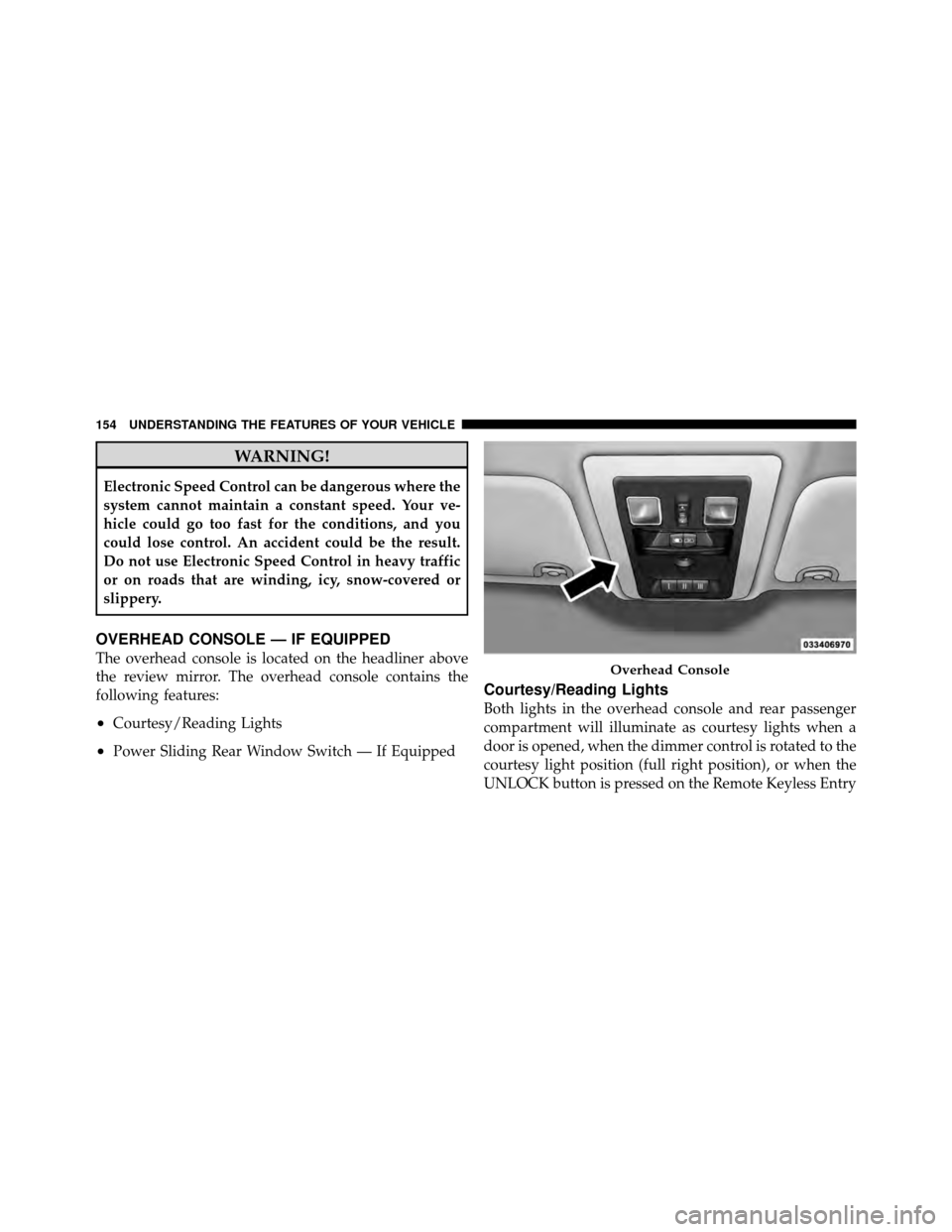
The overhead console is located on the headliner above
the review mirror. The overhead console contains the
following features:
•Courtesy/Reading Lights
•Power Sliding Rear Window Switch — If Equipped
Courtesy/Reading Lights
Both lights in the overhead console and rear passenger
compartment will illuminate as courtesy lights when a
door is opened, when the dimmer control is rotated to the
courtesy light position (full right position), or when the
UNLOCK button is pressed on the Remote Keyless Entry
Overhead Console
154 UNDERSTANDING THE FEATURES OF YOUR VEHICLE
Page 159 of 476

WARNING!
To avoid serious injury or death:
•Only devices designed for use in this type of
outlet should be inserted into any 12 Volt outlet.
•Do not touch with wet hands.
•Close the lid when not in use and while driving
the vehicle.
•If this outlet is mishandled, it may cause an
electric shock and failure.
CAUTION!
•Many accessories that can be plugged in draw
power from the vehicle’s battery, even when not in
use (i.e., cellular phones, etc.). Eventually, if
plugged in long enough, the vehicle’s battery will
discharge sufficiently to degrade battery life
and/or prevent the engine from starting.
•Accessories that draw higher power (i.e., coolers,
vacuum cleaners, lights, etc.), will discharge the
battery even more quickly. Only use these inter-
mittently and with greater caution.
•After the use of high power draw accessories, or
long periods of the vehicle not being started (with
accessories still plugged in), the vehicle must be
driven a sufficient length of time to allow the
generator to recharge the vehicle’s battery.
158 UNDERSTANDING THE FEATURES OF YOUR VEHICLE
Page 162 of 476
NOTE:
•When the power inverter switch is pressed, there will
be a delay of approximately one second before the
power inverter status indicator turns on. The status
indicator of the AC power inverter indicates whether
the inverter is producing AC power.
•Due to built-in overload protection, the power inverter
will shut down if the power rating is exceeded.
WARNING!
To avoid serious injury or death:
•Do not use a three-prong adapter.
•Do not insert any objects into the receptacles.
•Do not touch with wet hands.
•Close the lid when not in use.
•If this outlet is mishandled it may cause an electric
shock and failure.
CUPHOLDERS
Front Instrument Panel Cupholders — (40–20–40
Seats)
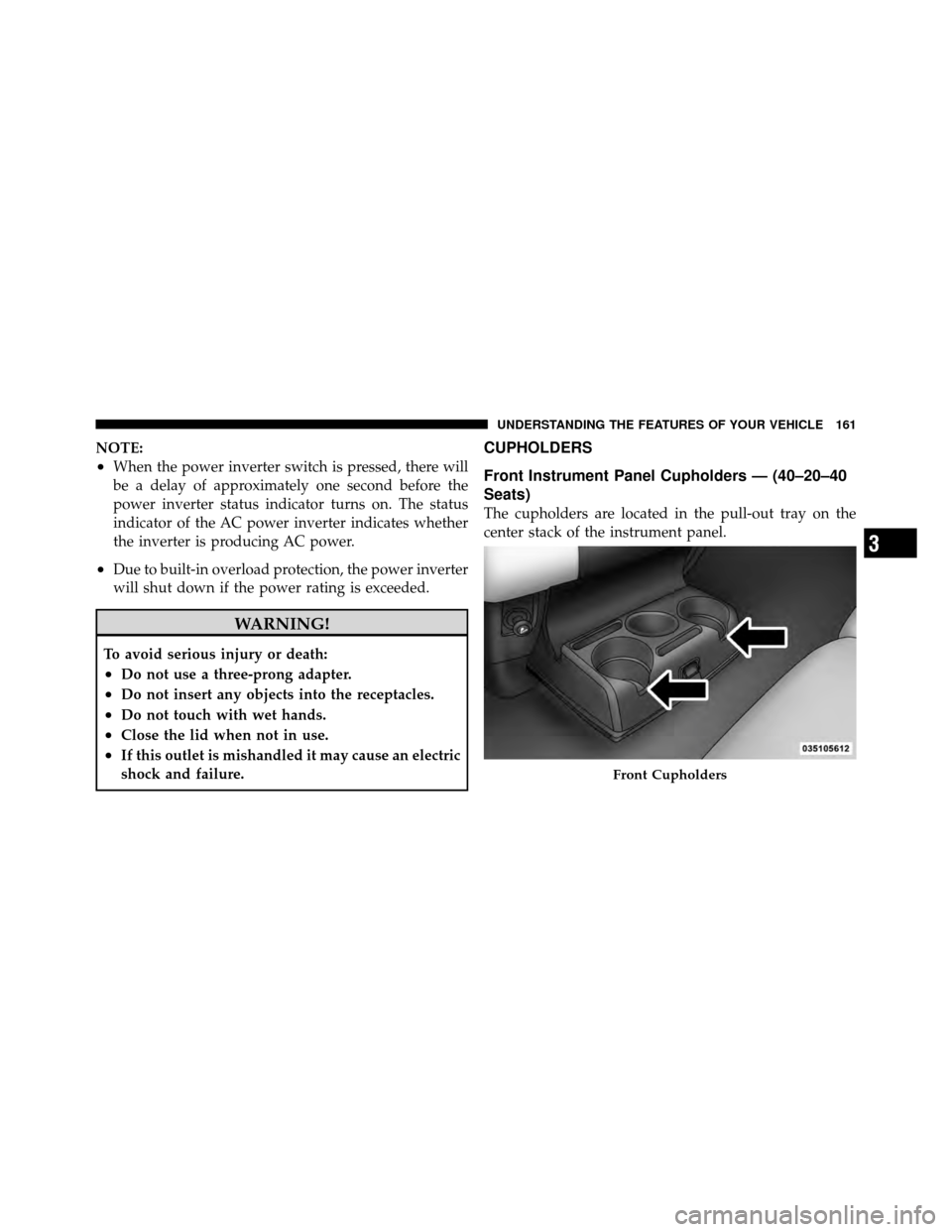
The cupholders are located in the pull-out tray on the
center stack of the instrument panel.
Front Cupholders
3
UNDERSTANDING THE FEATURES OF YOUR VEHICLE 161
Page 167 of 476
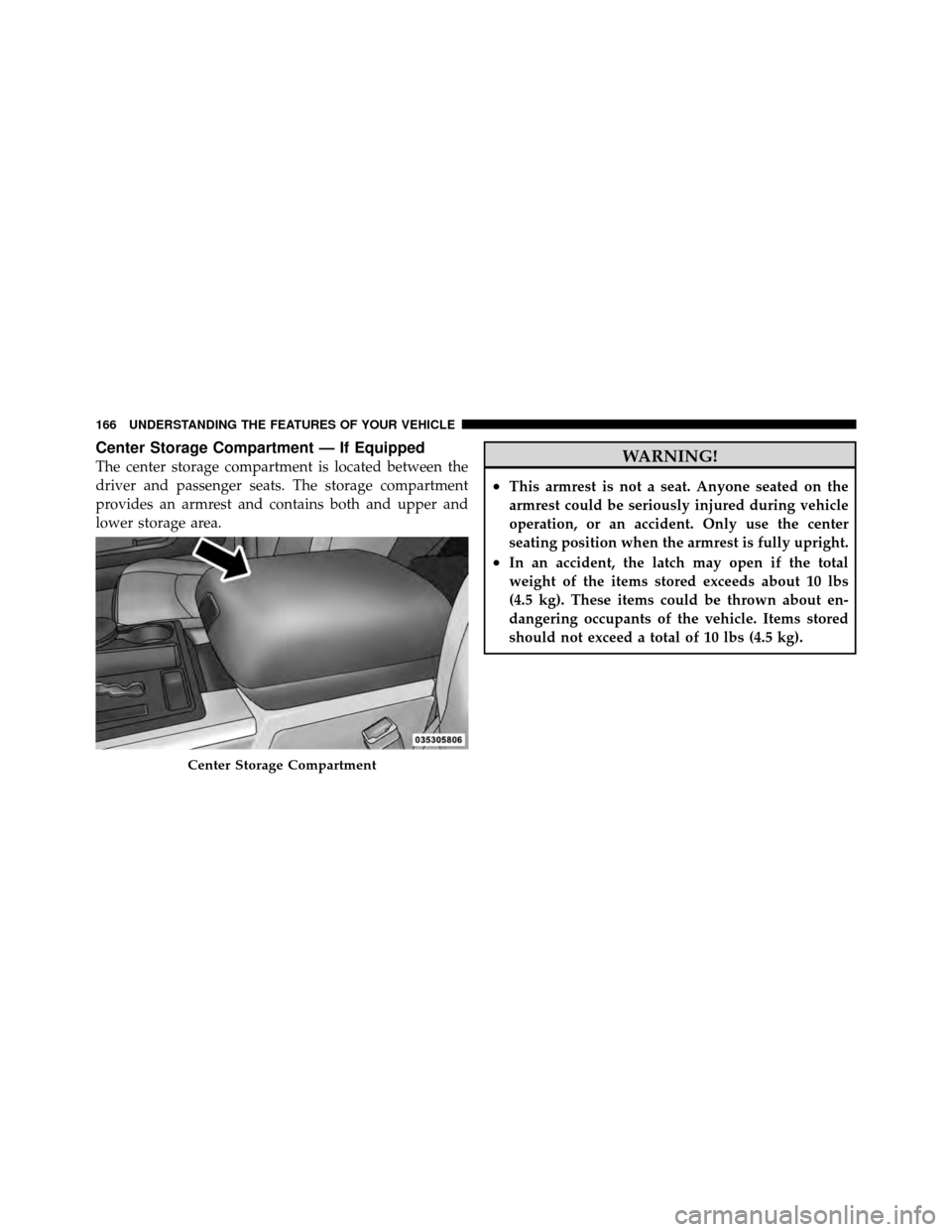
Center Storage Compartment — If Equipped
The center storage compartment is located between the
driver and passenger seats. The storage compartment
provides an armrest and contains both and upper and
lower storage area.WARNING!
•This armrest is not a seat. Anyone seated on the
armrest could be seriously injured during vehicle
operation, or an accident. Only use the center
seating position when the armrest is fully upright.
•In an accident, the latch may open if the total
weight of the items stored exceeds about 10 lbs
(4.5 kg). These items could be thrown about en-
dangering occupants of the vehicle. Items stored
should not exceed a total of 10 lbs (4.5 kg).
Center Storage Compartment
166 UNDERSTANDING THE FEATURES OF YOUR VEHICLE
Page 182 of 476
CAUTION!
Driving with a hot engine cooling system could damage
your vehicle. If temperature gauge reads “H” pull over
and stop the vehicle. Idle the vehicle with the air
conditioner turned off until the pointer drops back into
the normal range. If the pointer remains on the “H” and
you hear continuous chimes, turn the engine off imme-
diately, and call an authorized dealership for service.
WARNING!
A hot engine cooling system is dangerous. You or others
could be badly burned by steam or boiling coolant. You
may want to call an authorized dealership for service if
your vehicle overheats. If you decide to look under the
hood yourself, see “Maintaining Your Vehicle”. Follow
the warnings under the Cooling System Pressure Cap
paragraph.
5. Speedometer
The speedometer shows the vehicle speed in miles per
hour and/or kilometers per hour (mph/km/h).
6. 4 LOWThis light alerts the driver that the vehicle is in
the four-wheel drive LOW mode. The front and
rear driveshafts are mechanically locked to-
gether forcing the front and rear wheels to
rotate at the same speed. Low range provides a greater
gear reduction ratio to provide increased torque at the
wheels.
7. Electronic Throttle Control (ETC) Light This light informs you of a problem with the
Electronic Throttle Control (ETC) system. The
light will come on when the ignition is first
turned ON and remain on briefly as a bulb
check. If the light does not come on during starting, have
the system checked by an authorized dealer.
4
UNDERSTANDING YOUR INSTRUMENT PANEL 181
Page 185 of 476
service, so that you can be sure that it is properly reset, or
that the door jamb sticker is accurate if the odometer
must be reset at zero.
The two trip odometers show individual trip mileage. To
switch from odometer to trip odometers, press and
release the TRIP ODOMETER button.
To reset a trip odometer, display the desired trip odom-
eter to be reset then push and hold the button for
approximately two seconds until the display resets.
Vehicle Odometer Messages
When the appropriate conditions exist, the following
messages will display in the odometer:
noFUSE.......................... Fuse Fault
CHAngE OIL ............... Oil Change Required
LoWASH .................... LowW asher FluidNOTE:
There is also an engine hour function. This
indicates the total number of hours the engine has been
running. To display the engine hours on the base cluster,
perform the following: Place the ignition in RUN, but do
not start the engine. With the odometer value displayed,
hold the TRIP button down for a period of six seconds.
The odometer will change to trip value first, then it will
display the engine hour value. The engine hours will be
displayed for a period of 30 seconds until the ignition is
turned OFF or the engine is started.
Some of the above warnings will be displayed in the
Electronic Vehicle Information Center (EVIC) Display
Area located in the instrument cluster. Refer to ”Elec-
tronic Vehicle Information Center (EVIC) — If Equipped”
for further information.
184 UNDERSTANDING YOUR INSTRUMENT PANEL
Page 187 of 476
2. Fully depress the accelerator pedal slowly three
times within 10 seconds.
3. Turn the ignition switch to the OFF/LOCK position.
NOTE: If the indicator message illuminates when you
start the vehicle, the oil change indicator system did not
reset. If necessary repeat this procedure.
15. Engine Temperature Warning Light This light warns of an overheated engine condi-
tion. As temperatures rise and the gauge ap-
proaches H,this indicator will illuminate and a
single chime will sound after reaching a set threshold.
Further overheating will cause the temperature gauge to
pass H,the indicator will continuously flash and a
continuous chime will occur until the engine is allowed
to cool.
If the light turns on while driving, safely pull over and
stop the vehicle. If the A/C system is on, turn it off. Also, shift the transmission into NEUTRAL and idle the ve-
hicle. If the temperature reading does not return to
normal, turn the engine off immediately and call for
service. Refer to “If Your Engine Overheats” in “What To
Do In Emergencies” for further information.
For vehicles equipped with a premium cluster this indi-
cator will display in the Electronic Vehicle Information
Center (EVIC). Refer to ”Electronic Vehicle Information
Center (EVIC) — If Equipped” for further information.
16. Shift Lever Indicator
The Shift Lever Indicator is self-contained within the
instrument cluster. It displays the gear position of the
automatic transmission.
NOTE:
In vehicles with a 4.7L or 5.7L engine, the
highest available transmission gear is displayed in the
lower right corner of the Electronic Vehicle Information
Center (EVIC) whenever the Electronic Range Select
(ERS) feature is active. Use the +/- selector on the shift
186 UNDERSTANDING YOUR INSTRUMENT PANEL