warning lights Ram 5500 Chassis Cab 2012 Owner's Manual
[x] Cancel search | Manufacturer: RAM, Model Year: 2012, Model line: 5500 Chassis Cab, Model: Ram 5500 Chassis Cab 2012Pages: 508, PDF Size: 7.01 MB
Page 29 of 508
WARNING!
•Do not start or run an engine in a closed garage or
confined area. Exhaust gas contains Carbon Mon-
oxide (CO) which is odorless and colorless. Car-
bon Monoxide is poisonous and can cause serious
injury or death when inhaled.
•Keep Remote Keyless Entry (RKE) transmitters
away from children. Operation of the Remote Start
System, windows, door locks or other controls
could cause serious injury or death.
Remote Start Abort Message On Electronic Vehicle
Information Center (EVIC) — If Equipped
The following messages will display in the EVIC if the
vehicle fails to remote start or exits remote start prema-
turely:
•Remote Start Aborted — Door Ajar
•Remote Start Aborted — Hood Ajar
•Remote Start Aborted — Fuel Low
•Remote Start Aborted — System Fault
•Remote Start Disabled — Start Vehicle to Reset
The EVIC message stays active until the ignition is turned
to the ON/RUN position.
To Enter Remote Start Mode
Press and release the REMOTE START button
on the RKE transmitter twice within five sec-
onds. The parking lights will flash and the horn
will chirp twice (if programmed). Once the
vehicle has started, the engine will run for 15 minutes.
NOTE:
•If your power door locks were unlocked, Remote Start
will automatically lock the doors.
2
THINGS TO KNOW BEFORE STARTING YOUR VEHICLE 27
Page 58 of 508
Advanced Front Air Bag Features
The Advanced Front Air Bag system has multistage
driver and front passenger (if equipped) air bags. This
system provides output appropriate to the severity and
type of collision as determined by the Occupant Restraint
Controller (ORC).
The first stage inflator is triggered immediately during an
impact that requires air bag deployment. This low output
is used in less severe collisions. A higher energy output is
used for more severe collisions.
WARNING!
•No objects should be placed over or near the air
bag on the instrument panel, because any such
objects could cause harm if the vehicle is in a
collision severe enough to cause the air bag to
inflate.
(Continued)
WARNING! (Continued)
•Do not put anything on or around the air bag
covers or attempt to open them manually. You may
damage the air bags and you could be injured
because the air bags may no longer be functional.
The protective covers for the air bag cushions are
designed to open only when the air bags are
inflating.
•Do not drill, cut or tamper with the knee bolster in
any way.
•Do not mount any accessories to the knee bolster
such as alarm lights, stereos, citizen band radios,
etc.
Knee Impact Bolsters
The Knee Impact Bolsters help protect the knees of the
driver and the front passenger, and position front occu-
pants for the best interaction with the Advanced Front
Air Bags.
56 THINGS TO KNOW BEFORE STARTING YOUR VEHICLE
Page 84 of 508
WARNING! (Continued)
•Always make sure that objects cannot fall into the
driver footwell while the vehicle is moving. Ob-
jects can become trapped under the brake pedal
and accelerator pedal causing a loss of vehicle
control.
•If required, mounting posts must be properly
installed, if not equipped from the factory.
Failure to properly follow floor mat installation or
mounting can cause interference with the brake
pedal and accelerator pedal operation causing loss
of control of the vehicle.
Periodic Safety Checks You Should Make Outside
The Vehicle
Tires
Examine tires for excessive tread wear and uneven wear
patterns. Check for stones, nails, glass, or other objectslodged in the tread or sidewall. Inspect the tread for cuts
and cracks. Inspect sidewalls for cuts, cracks and bulges.
Check the wheel nuts for tightness. Check the tires
(including spare) for proper cold inflation pressure.
Lights
Have someone observe the operation of exterior lights
while you work the controls. Check turn signal and high
beam indicator lights on the instrument panel.
Door Latches
Check for positive closing, latching, and locking.
Fluid Leaks
Check area under vehicle after overnight parking for fuel,
engine coolant, oil, or other fluid leaks. Also, if gasoline
fumes are detected or if fuel, power steering fluid, or
brake fluid leaks are suspected, the cause should be
located and corrected immediately.
82 THINGS TO KNOW BEFORE STARTING YOUR VEHICLE
Page 136 of 508

WARNING!
•Persons who are unable to feel pain to the skin
because of advanced age, chronic illness, diabetes,
spinal cord injury, medication, alcohol use, ex-
haustion or other physical condition must exercise
care when using the seat heater. It may cause burns
even at low temperatures, especially if used for
long periods of time.
•Do not place anything on the seat that insulates
against heat, such as a blanket or cushion. This
may cause the seat heater to overheat. Sitting in a
seat that has been overheated could cause serious
burns due to the increased surface temperature of
the seat.
Front Heated Seats
There are two heated seat switches that allow the driver
and passenger to operate the seats independently. Thecontrols for each seat are located near the bottom center
of the instrument panel (below the climate controls).
You can choose from HIGH, LOW or OFF heat settings.
Amber indicator lights in each switch indicate the level of
heat in use. Two indicator lights will illuminate for
HIGH, one for LOW and none for OFF.
Press the switch once to select HIGH-
level heating. Press the switch a sec-
ond time to select LOW-level heating.
Press the switch a third time to shut
the heating elements OFF.
NOTE:
•Once a heat setting is selected, heat will be felt within
two to five minutes.
•The engine must be running for the heated seats to
operate.
134 UNDERSTANDING THE FEATURES OF YOUR VEHICLE
Page 149 of 508
WARNING!
Be sure the hood is fully latched before driving your
vehicle. If the hood is not fully latched, it could open
when the vehicle is in motion and block your vision.
Failure to follow this warning could result in serious
injury or death.
LIGHTS
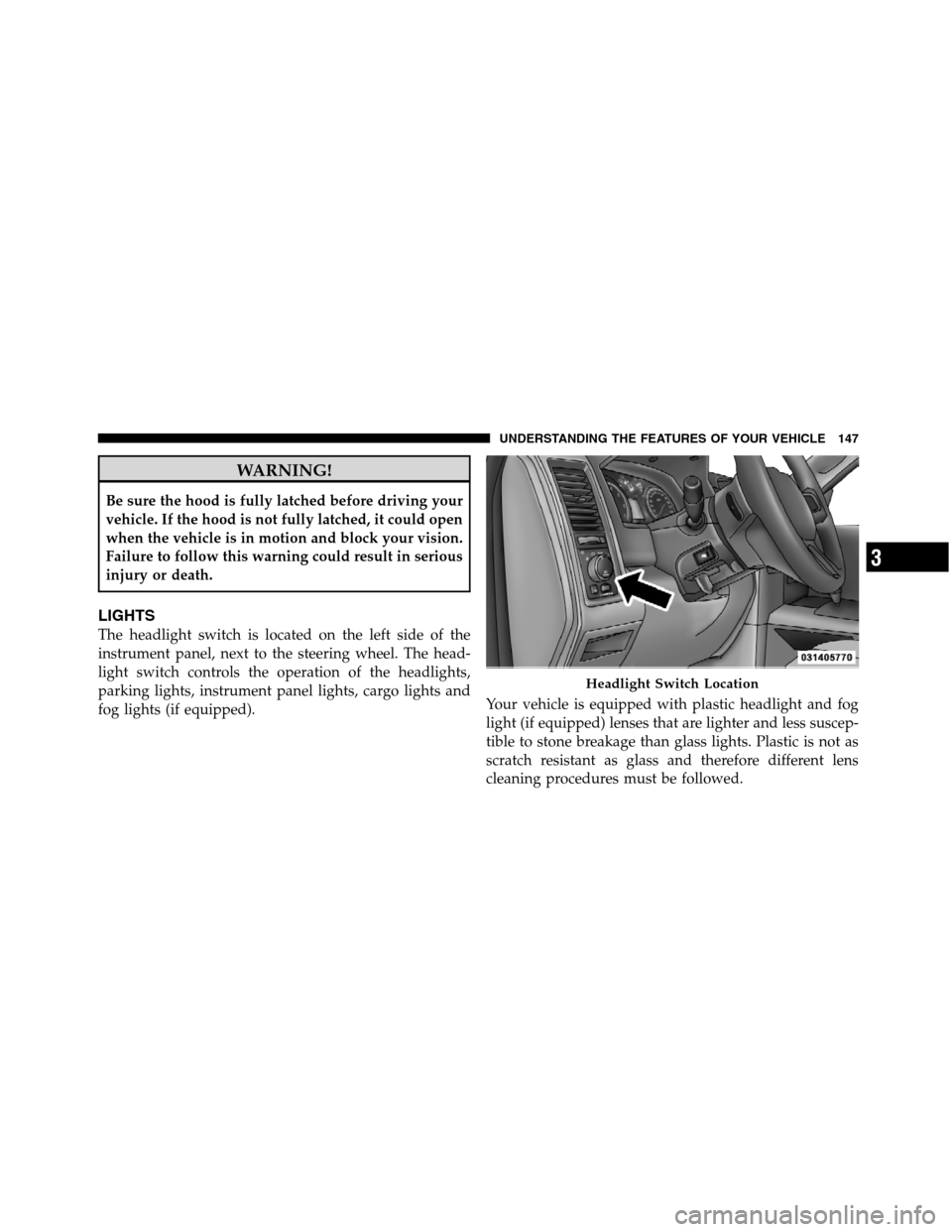
The headlight switch is located on the left side of the
instrument panel, next to the steering wheel. The head-
light switch controls the operation of the headlights,
parking lights, instrument panel lights, cargo lights and
fog lights (if equipped).Your vehicle is equipped with plastic headlight and fog
light (if equipped) lenses that are lighter and less suscep-
tible to stone breakage than glass lights. Plastic is not as
scratch resistant as glass and therefore different lens
cleaning procedures must be followed.
Headlight Switch Location
3
UNDERSTANDING THE FEATURES OF YOUR VEHICLE 147
Page 165 of 508
decrease until the button is released. Release the button
when the desired speed is reached, and the new set speed
will be established.
Pressing the SET (-) button once will result ina1mph
(1.6 km/h) decrease in set speed. Each subsequent tap of
the button results in a decrease of 1 mph (1.6 km/h).
To Accelerate For Passing
Press the accelerator as you would normally. When the
pedal is released, the vehicle will return to the set speed.
Using Electronic Speed Control On Hills
The transmission may downshift on hills to maintain the
vehicle set speed.
NOTE:The Electronic Speed Control system maintains
speed up and down hills. A slight speed change on
moderate hills is normal.On steep hills, a greater speed loss or gain may occur so
it may be preferable to drive without Electronic Speed
Control.
WARNING!
Electronic Speed Control can be dangerous where the
system cannot maintain a constant speed. Your ve-
hicle could go too fast for the conditions, and you
could lose control and have an accident. Do not use
Electronic Speed Control in heavy traffic or on roads
that are winding, icy, snow-covered or slippery.
OVERHEAD CONSOLE — IF EQUIPPED
The overhead console is located on the headliner above
the review mirror. The overhead console contains the
following features:
•Courtesy/Reading Lights
3
UNDERSTANDING THE FEATURES OF YOUR VEHICLE 163
Page 204 of 508
25. Front Fog Light Indicator — If Equipped
This indicator will illuminate when the front fog
lights are on.
26. Anti-Lock Brake (ABS) Light
This light monitors the Anti-lock Brake System
(ABS). The light will turn on when the ignition
switch is turned to the ON/RUN position and
may stay on for as long as four seconds.
If the ABS light remains on or turns on while driving, it
indicates that the anti-lock portion of the brake system is
not functioning and that service is required. However,
the conventional brake system will continue to operate
normally if the BRAKE warning light is not on.
If the ABS light is on, the brake system should be serviced
as soon as possible to restore the benefits of anti-lock
brakes. If the ABS light does not turn on when the
ignition switch is turned to the ON/RUN position, have
the light inspected by an authorized dealer.27. Transmission Temperature Warning Light
This light indicates that there is excessive trans-
mission fluid temperature that might occur
with severe usage such as trailer towing. It may
also occur when operating the vehicle in a high
torque converter slip condition, such as 4-wheel-drive
operation (e.g., snow plowing, off-road operation). If this
light comes on, stop the vehicle and run the engine at idle
or faster with the transmission in NEUTRAL until the
light goes off.
CAUTION!
Continuous driving with the Transmission Tempera-
ture Warning Light illuminated will eventually cause
severe transmission damage or transmission failure.
202 UNDERSTANDING YOUR INSTRUMENT PANEL
Page 209 of 508
•Trailer Brake Connected
•Trailer Brake Disconnected
•Lights On
•Keyfob Battery Low
•ECO (Fuel Saver Indicator) — If Equipped
•Wrong Key
•Damaged Key
•Key not programmed
•Key In Ignition
•Turn Signal On
•Oil Change Due > Dealer Info
•System Setup Unavailable
•Warning Object Detected
•System Setup Unavailable - Vehicle in Motion
•Service Four Wheel Drive System
•Adjustable pedals unavail.
•Cruise engaged
•Adjustable pedals unavail. Veh. in reverse
•Clean Park Assist sensors
•Front Park Assist Not available - Blinded
•Rear Park Assist Not available - Blinded
•Low Fuel
•Personal Settings Not Available — Vehicle Not in Park
•Service blind spot system
4
UNDERSTANDING YOUR INSTRUMENT PANEL 207
Page 211 of 508
•Adjustable Pedals Unavail — Cruise Engaged
EVIC Warning Lights
•
Door Ajar
This light will turn on to indicate that one or
more doors may be ajar.
•Oil Pressure Warning Light
This light indicates low engine oil pressure. The
light should turn on momentarily when the engine
is started. If the light turns on while driving, stop the
vehicle and shut off the engine as soon as possible. A
chime will sound for four minutes when this light turns
on.
Do not operate the vehicle until the cause is corrected.
This light does not show how much oil is in the engine.
The engine oil level must be checked under the hood.
•Charging System Light
This light shows the status of the electrical charg-
ing system. The light should come on when the
ignition switch is first turned ON and remain on briefly
as a bulb check. If the light stays on or comes on while
driving, turn off some of the vehicle’s non-essential
electrical devices or increase engine speed (if at idle). If
the charging system light remains on, it means that the
vehicle is experiencing a problem with the charging
system. Obtain SERVICE IMMEDIATELY. See an autho-
rized dealer.
•Electronic Speed Control Light
This light will turn on when the electronic
speed control is ON.
4
UNDERSTANDING YOUR INSTRUMENT PANEL 209
Page 306 of 508
NOTE:
•If Steps 1 or 2 of either the Preferred or Alternate
Procedure are not satisfied prior to attempting the
shift, then the desired position indicator light will flash
continuously while the original position indicator light
is ON, until all requirements have been met.
•The ignition switch must be in the ON position for a
shift to take place and for the position indicator lights
to be operable. If the ignition switch is not in the ON
position, the shift will not take place and no position
indicator lights will be on or flashing.
LIMITED-SLIP DIFFERENTIAL
The limited-slip differential provides additional traction
on snow, ice, mud, sand and gravel, particularly when
there is a difference between the traction characteristics of
the surface under the right and left rear wheels. During
normal driving and cornering, the limited-slip unit per-
forms similarly to a conventional differential. On slipperysurfaces, however, the differential delivers more of the
driving effort to the rear wheel having the better traction.
The limited-slip differential is especially helpful during
slippery driving conditions. With both rear wheels on a
slippery surface, a slight application of the accelerator
will supply maximum traction. When starting with only
one rear wheel on an excessively slippery surface, slight
momentary application of the parking brake may be
necessary to gain maximum traction.
WARNING!
On vehicles equipped with a limited-slip differential
never run the engine with one rear wheel off the
ground since the vehicle may drive through the rear
wheel remaining on the ground. You could lose
control of the vehicle.
304 STARTING AND OPERATING