keyless entry Ram 5500 Chassis Cab 2015 Owner's Guide
[x] Cancel search | Manufacturer: RAM, Model Year: 2015, Model line: 5500 Chassis Cab, Model: Ram 5500 Chassis Cab 2015Pages: 599, PDF Size: 4.51 MB
Page 170 of 599
if the pedals are attempted to be adjusted when the
system is locked out (“Adjustable Pedal Disabled —
Cruise Control Engaged” or “Adjustable Pedal
Disabled — Vehicle In Reverse”.
NOTE:
•Always adjust the pedals to a position that allows full
pedal travel.
• Further small adjustments may be necessary to find
the best possible seat/pedal position.
• For vehicles equipped with Driver Memory Seat, you
can use your Remote Keyless Entry (RKE) transmitter
or the memory switch on the driver ’s door trim panel
to return the adjustable pedals to pre-programmed
positions. Refer to “Driver Memory Seat” in “Under-
standing The Features Of Your Vehicle” for further
information.
CAUTION!
Do not place any article under the adjustable pedals
or impede its ability to move as it may cause damage
to the pedal controls. Pedal travel may become lim-
ited if movement is stopped by an obstruction in the
adjustable pedal’s path.
WARNING!
Do not adjust the pedals while the vehicle is moving.
You could lose control and have an accident. Always
adjust the pedals while the vehicle is parked.
HEATED STEERING WHEEL — IF EQUIPPED
The steering wheel contains a heating element that helps
warm your hands in cold weather. The heated steering
wheel has only one temperature setting. Once the heated
steering wheel has been turned on it will operate for up
168 UNDERSTANDING THE FEATURES OF YOUR VEHICLE
Page 177 of 599
Courtesy/Reading Lights
Both lights in the overhead console and rear passenger
compartment will illuminate as courtesy lights when a
door is opened, when the dimmer control is rotated to the
courtesy light position (full right position), or when the
UNLOCK button is pressed on the Remote Keyless Entry(RKE) transmitter, if equipped. These lights are also
operated individually as reading lights by pressing on
the corresponding lens.
Overhead Console
Front Courtesy/Reading Lights
3
UNDERSTANDING THE FEATURES OF YOUR VEHICLE 175
Page 270 of 599
indicating that the setting had been selected. Press the
back arrow button on the touchscreen to return to the
previous menu.
•Rain Sensing Auto Wipers
When this feature is selected, the system will automati-
cally activate the windshield wipers if it senses moisture
on the windshield. To make your selection, press the
“Rain Sensing” button on the touchscreen, until a check-
mark appears next to the setting, showing that setting has
been selected. Press the back arrow button on the touch-
screen to return to the previous menu.
• Hill Start Assist — If Equipped
When this feature is selected, the Hill Start Assist (HSA)
system is active. Refer to “Electronic Brake Control
System” in “Starting And Operating” for system function
and operating information. To make your selection, press
the “Hill Start Assist” button on the touchscreen, until a
check-mark appears next to the setting, showing that the setting has been selected. Press the back arrow button on
the touchscreen to return to the previous menu.
Lights
After pressing the “Lights” button on the touchscreen the
following settings will be available:
•
Headlight Illumination On Approach
When this feature is selected, the headlights will activate
and remain on for 0, 30, 60, or 90 seconds when the doors
are unlocked with the Remote Keyless Entry (RKE)
transmitter. To change the Illuminated Approach status,
press the “+” or “–” button on the touchscreen to select
your desired time interval. Press the back arrow button
on the touchscreen to return to the previous menu.
• Headlights With Wipers — If Equipped
When this feature is selected, and the headlight switch is
in the AUTO position, the headlights will turn on ap-
proximately 10 seconds after the wipers are turned on.
268 UNDERSTANDING YOUR INSTRUMENT PANEL
Page 271 of 599
The headlights will also turn off when the wipers are
turned off, if they were turned on by this feature. To
make your selection, press the “Headlights With Wipers”
button on the touchscreen, until a check-mark appears
next to the setting, showing that setting has been se-
lected. Press the back arrow button on the touchscreen to
return to the previous menu.
•Auto Dim High Beams — If Equipped
When this feature is selected, the high beam headlights
will deactivate automatically under certain conditions. To
make your selection, press the “Auto High Beams”
button on the touchscreen, until a check-mark appears
next to the setting, showing that setting has been se-
lected. Press the back arrow button on the touchscreen to
return to the previous menu. Refer to “Automatic High
Beam — If Equipped” in “Understanding The Features
Of Your Vehicle” for further information. •
Flash Lamps With Lock
When this feature is selected, the exterior lights will flash
when the doors are locked or unlocked with the Remote
Keyless Entry (RKE) transmitter. This feature may be
selected with or without the Sound Horn on Lock feature
selected. To make your selection, press the “Flash Lamps
with Lock” button on the touchscreen, until a check-mark
appears next to the setting, showing that setting has been
selected. Press the back arrow button on the touchscreen
to return to the previous menu.
Doors & Locks
After pressing the “Doors & Locks” button on the touch-
screen the following settings will be available:
• Auto Unlock On Exit
When this feature is selected, all doors will unlock when
the vehicle is stopped, the transmission is in the PARK
or NEUTRAL position and the driver’s door is opened.
4
UNDERSTANDING YOUR INSTRUMENT PANEL 269
Page 272 of 599

To make your selection, press the “Auto Unlock On Exit”
button on the touchscreen, until a check-mark appears
next to the setting, showing that the setting has been
selected. Press the back arrow button on the touchscreen
to return to the previous menu.
•Sound Horn With Lock
When this feature is selected, the horn will sound when
the door locks are activated. To make your selection,
press the “Sound Horn With Lock” button on the touch-
screen, until a check-mark appears next to the setting,
showing that the setting has been selected. Press the back
arrow button on the touchscreen to return to the previous
menu. •
Sound Horn With Remote Start
When this feature is selected, the horn will sound when
the remote start is activated. To make your selection,
press the “Sound Horn With Remote Start” button on the
touchscreen, until a check-mark appears next to the
setting, showing that the setting has been selected. Press
the back arrow button on the touchscreen to return to the
previous menu.
• 1st Push Of Key Fob Unlocks
When 1st Push Of Key Fob Unlocks is selected, only the
driver’s door will unlock on the first push of the Remote
Keyless Entry (RKE) transmitter UNLOCK button. When
1st Push Of Key Fob Unlocks is selected, you must push
the RKE transmitter UNLOCK button twice to unlock the
passenger’s doors. When Unlock All Doors On 1st Push
is selected, all of the doors will unlock on the first push of
the RKE transmitter UNLOCK button.
270 UNDERSTANDING YOUR INSTRUMENT PANEL
Page 273 of 599
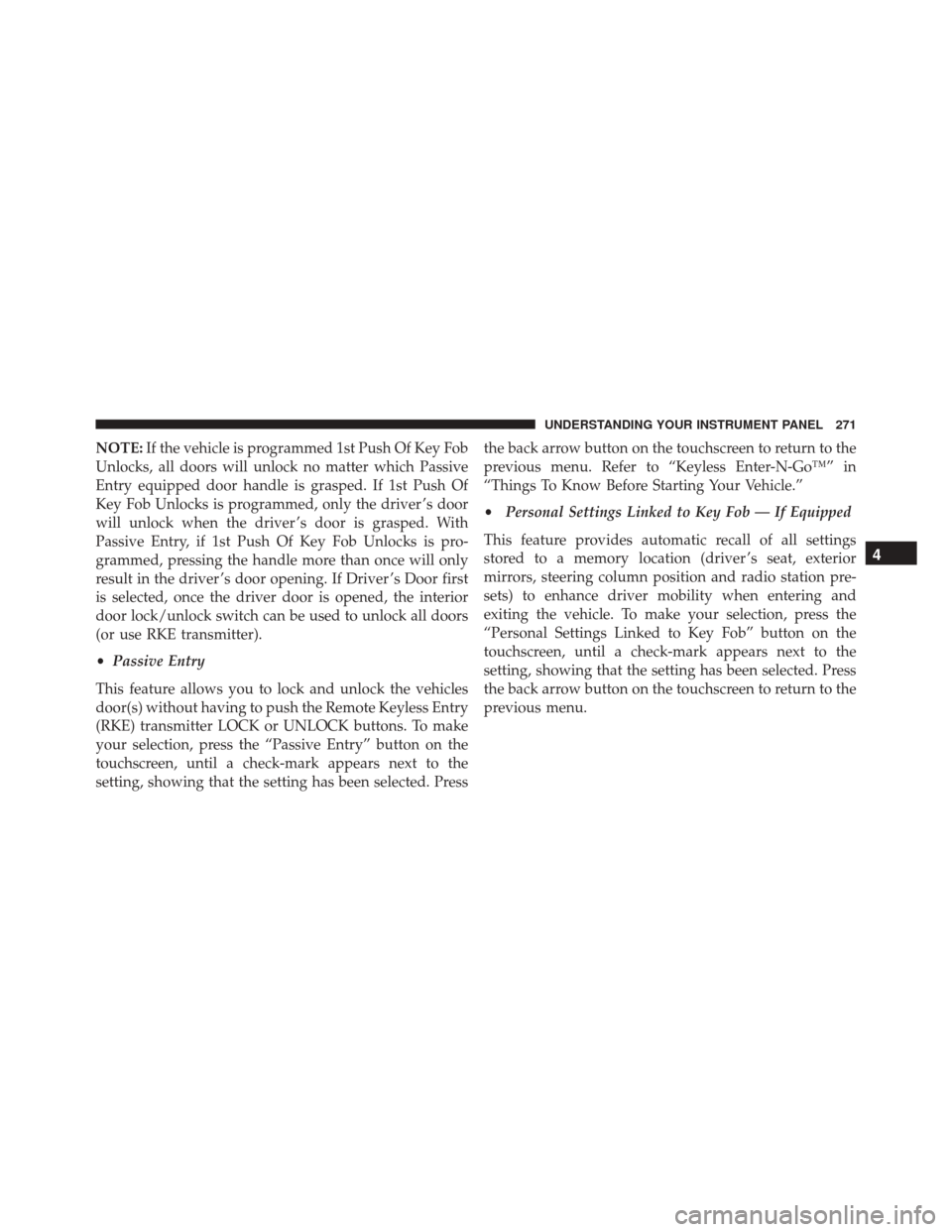
NOTE:If the vehicle is programmed 1st Push Of Key Fob
Unlocks, all doors will unlock no matter which Passive
Entry equipped door handle is grasped. If 1st Push Of
Key Fob Unlocks is programmed, only the driver ’s door
will unlock when the driver ’s door is grasped. With
Passive Entry, if 1st Push Of Key Fob Unlocks is pro-
grammed, pressing the handle more than once will only
result in the driver ’s door opening. If Driver ’s Door first
is selected, once the driver door is opened, the interior
door lock/unlock switch can be used to unlock all doors
(or use RKE transmitter).
• Passive Entry
This feature allows you to lock and unlock the vehicles
door(s) without having to push the Remote Keyless Entry
(RKE) transmitter LOCK or UNLOCK buttons. To make
your selection, press the “Passive Entry” button on the
touchscreen, until a check-mark appears next to the
setting, showing that the setting has been selected. Press the back arrow button on the touchscreen to return to the
previous menu. Refer to “Keyless Enter-N-Go™” in
“Things To Know Before Starting Your Vehicle.”
•
Personal Settings Linked to Key Fob — If Equipped
This feature provides automatic recall of all settings
stored to a memory location (driver ’s seat, exterior
mirrors, steering column position and radio station pre-
sets) to enhance driver mobility when entering and
exiting the vehicle. To make your selection, press the
“Personal Settings Linked to Key Fob” button on the
touchscreen, until a check-mark appears next to the
setting, showing that the setting has been selected. Press
the back arrow button on the touchscreen to return to the
previous menu.
4
UNDERSTANDING YOUR INSTRUMENT PANEL 271
Page 274 of 599

NOTE:The seat will return to the memorized seat
location (if Personal Settings Linked to Key Fob is set to
ON) when the Remote Keyless Entry (RKE) transmitter is
used to unlock the door. Refer to “Driver Memory Seat”
in “Understanding The Features Of Your Vehicle” for
further information.
Auto Comfort Systems — If Equipped
After pressing the “Auto-On Comfort & Remote Start”
button on the touchscreen the following settings will be
available:
• Horn With Remote Start
When this feature is selected, the horn will sound when
the remote start is activated. To make your selection,
press the “Sound Horn With Remote Start” button on the
touchscreen, until a check-mark appears next to the
setting, showing that the setting has been selected. Press
the back arrow button on the touchscreen to return to the
previous menu. •
Auto-On Driver Heated/Ventilated Seat & Steering
Wheel With Vehicle Start — If Equipped
When this feature is selected the driver’s heated seat and
heated steering wheel will automatically turn ON when
temperatures are below 40° F (4.4° C). When tempera-
tures are above 80° F (26.7° C) the driver vented seat will
turn ON. To make your selection, press the “Auto Heated
Seats” button on the touchscreen, then select either “Off,”
“Remote Start” or “All Starts” until a check-mark ap-
pears next to setting, showing that setting has been
selected. Press the back arrow button on the touchscreen
to return to the previous menu.
272 UNDERSTANDING YOUR INSTRUMENT PANEL
Page 583 of 599
Coolant Pressure Cap (Radiator Cap)...........517
Cooling System .......................... .513
Adding Coolant (Antifreeze) ...............515
Coolant Capacity ...................... .554
Coolant Level ......................... .513
Disposal of Used Coolant .................518
Drain, Flush, and Refill ...................514
Inspection ........................... .518
Points to Remember .....................520
Pressure Cap ......................... .517
Radiator Cap ......................... .517
Selection of Coolant (Antifreeze) .............514
Corrosion Protection ...................... .528
Cupholders ............................ .184
Customer Assistance ...................... .569
Data Recorder, Event .......................74
Daytime Running Lights ....................152
Dealer Service ........................... .492Defroster, Rear Window
.....................193
Defroster, Windshield ......................110
Delay (Intermittent) Wipers ..................163
Differential, Limited-Slip ....................361
Dipsticks Automatic Transmission ..................526
Power Steering ........................ .366
Disabled Vehicle Towing ....................481
Disposal Antifreeze (Engine Coolant) ................518
Door Locks Door Locks ............................34
KeyFob...............................34
Remote ...............................34
Remote Keyless Entry (RKE) ................34
Door Locks, Automatic ......................37
Driving Through Flowing, Rising, or Shallow Standing
Water ............................... .363
10
INDEX 581
Page 587 of 599
Head Restraints......................... .139
Heated Mirrors .......................... .128
Heater ................................ .283
High Beam/Low Beam Select (Dimmer) Switch . . . .162
Hitches Trailer Towing ........................ .435
Hoisting ............................... .472
Hood Release ........................... .148
Hub Caps .............................. .469
Ignition .................................15
Key..................................11
Ignition Key Removal .......................15
Illuminated Entry ..........................22
Immobilizer (Sentry Key) ....................17
Inflation Pressure Tires .....................406
Information Center, Vehicle ..................213
Inside Rearview Mirror .....................117
Instrument Cluster ....................... .201Instrument Panel and Controls
................198
Instrument Panel Lens Cleaning ...............533
Integrated Trailer Brake Controls ..............441
Interior Appearance Care ....................532
Interior Lights .......................... .157
Intermittent Wipers (Delay Wipers) .............163
Introduction ..............................4
Inverter Outlet (115V) ..................... .183
Jack Location ........................... .464
Jump Starting ........................... .472
Key Fob Programming Additional Key Fobs ...........19
Programming Additional Transmitters .........19
Key-In Reminder ..........................17
Keyless Enter-N-Go ........................39
Keyless Enter-N-Go™ .......................39
Lock The Vehicle’s Doors ..................269
10
INDEX 585
Page 588 of 599
Passive Entry...........................39
Passive Entry Programming .................39
Unlock Liftgate ........................ .269
Keyless Entry System .......................23
Key, Replacement ..........................18
Keys ...................................11
Key, Sentry (Immobilizer) ....................17
Lane Change and Turn Signals ................160
Lane Change Assist ....................... .161
Lap/Shoulder Belts .........................50
Latches ................................112
Lead Free Gasoline ....................... .421
Leaks, Fluid .............................112
Life of Tires ............................ .404
Light Bulbs ..............................112
Lights .................................112
Airbag ................................71
Alarm .............................. .206Anti-Lock
............................ .201
Anti-Lock Warning ..................... .372
Automatic Headlights ....................151
Brake Assist Warning ....................379
Brake Warning ........................ .203
Bulb Replacement ...................... .546
Cap Top Clearance ..................... .552
Cargo .............................. .160
Center Mounted Stop ....................550
Check Engine (Malfunction Indicator) .........201
Courtesy/Reading ..................... .158
Daytime Running ...................... .152
Electronic Stability Program (ESP) Indicator .....379
Exterior ..............................112
Fog ................................ .155
Four-Wheel Drive Indicator ................355
Hazard Warning Flasher ..................460
Headlights ........................... .151
High Beam ........................... .162
586 INDEX