clock Ram Cargo Van 2015 User Guide
[x] Cancel search | Manufacturer: RAM, Model Year: 2015, Model line: Cargo Van, Model: Ram Cargo Van 2015Pages: 671, PDF Size: 5.05 MB
Page 421 of 671
CAUTION!(Continued)
just behind the sliding door. Do not block or place
objects directly in front of the inlet grille or heater
outlets. The electrical system could overload, causing
damage to the blower motor.
Rear Temperature Control
The rear mode selection REAR,allows the settings to be
controlled by the rear mode control knob.
To change the temperature in the rear of the vehicle,
rotate the temperature control knob counterclockwise for
cold air, and clockwise for heated air.
When rear controls are locked by the front system, the
lock symbol on the temperature knob is illuminated, and
the rear overhead adjustments are inoperable.
Rear Mode Control
Headliner Mode
Air comes from the outlets in the headliner. Each
of these outlets can be individually adjusted to
direct the flow of air. Moving the air vanes of the outlets
to one side will shut off the airflow.
Bi-Level Mode
Air comes from both the headliner outlets and the
floor outlets.
NOTE: In many temperature positions, the Bi-Level
mode is designed to provide cooler air out of the head-
liner outlets and warmer air from the floor outlets.
Floor Mode
Air comes from the floor outlets.
4
UNDERSTANDING YOUR INSTRUMENT PANEL 419
Page 431 of 671
2. Rotate the Rear Blower, Rear Temperature and theRear Mode Control knobs to suit your comfort needs.
3. ATC is selected by adjusting the rear blower knob counterclockwise to AUTO.
Once the desired temperature is displayed, the ATC
System will automatically achieve and maintain that
comfort level. When the system is set up for your comfort
level, it is not necessary to change the settings. You will
experience the greatest efficiency by simply allowing the
system to function automatically.
NOTE:
•
It is not necessary to move the temperature settings. The
system automatically adjusts the temperature, mode and
fan speed to provide comfort as quickly as possible.
• The temperature can be displayed in English or Metric
units by selecting the “Display Units of Measure in”
customer-programmable feature. Refer to the “Elec-
tronic Vehicle Information Center (EVIC) — Customer-
Programmable Features” in this Section.
Rear Blower Control
The rear blower control knob can be manually set to off,
or any fixed blower speed, by rotating the knob from low
to high. This allows the rear seat occupants to control the
volume of air circulated in the rear of the vehicle.
CAUTION!
Interior air enters the Rear Automatic Temperature
Control System through an intake grille, located in
the right side trim panel behind the third row seats.
The heater outlets are located in the right side trim
(Continued)
4
UNDERSTANDING YOUR INSTRUMENT PANEL 429
Page 432 of 671
CAUTION!(Continued)
panel, just behind the sliding door. Do not block or
place objects directly in front of the inlet grille or
heater outlets. The electrical system could overload
causing damage to the blower motor.
Rear Temperature Control
To change the temperature in the rear of the vehicle,
rotate the temperature knob counterclockwise to lower
the temperature, and clockwise to increase the tempera-
ture. The rear temperature settings are displayed in the
front ATC panel.
When rear controls are locked by the front system, the
Rear Temperature Lock symbol on the temperature knob
is illuminated and any rear overhead adjustments are
ignored.
Rear Mode Control
•Headliner Mode
Air comes from the outlets in the headliner. Each
of these outlets can be individually adjusted to
direct the flow of air. Moving the air vanes of the outlets
to one side will shut off the airflow.
• Bi-Level Mode
Air comes from both the headliner outlets and the
floor outlets.
NOTE: In many temperature positions, the Bi-Level
mode is designed to provide cooler air out of the head-
liner outlets and warmer air from the floor outlets.
• Floor Mode
Air comes from the floor outlets.
430 UNDERSTANDING YOUR INSTRUMENT PANEL
Page 563 of 671
3. Align the valve notch in the wheel cover with thevalve stem on the wheel. Install the cover by hand,
snapping the cover over the two lug nuts. Do not use
a hammer or excessive force to install the cover.
4. Install the remaining lug nuts with the cone shaped end of the nut toward the wheel. Lightly tighten the
lug nuts.
WARNING!
To avoid the risk of forcing the vehicle off the jack,
do not tighten the wheel nuts fully until the vehicle
has been lowered. Failure to follow this warning may
result in personal injury.
5. Lower the vehicle to the ground by turning the jack handle counterclockwise.
6. Refer to “Torque Specifications” in this section for proper wheel lug nut torque. 7. After 25 miles (40 km) check the lug nut torque with a
torque wrench to ensure that all lug nuts are properly
seated against the wheel.
Vehicles Without Wheel Covers
1. Mount the road tire on the axle.
2. Install the remaining lug nuts with the cone shapedend of the nut toward the wheel. Lightly tighten the
lug nuts.
WARNING!
To avoid the risk of forcing the vehicle off the jack,
do not tighten the wheel nuts fully until the vehicle
has been lowered. Failure to follow this warning may
result in personal injury.
3. Lower the vehicle to the ground by turning the jack handle counterclockwise.
6
WHAT TO DO IN EMERGENCIES 561
Page 616 of 671
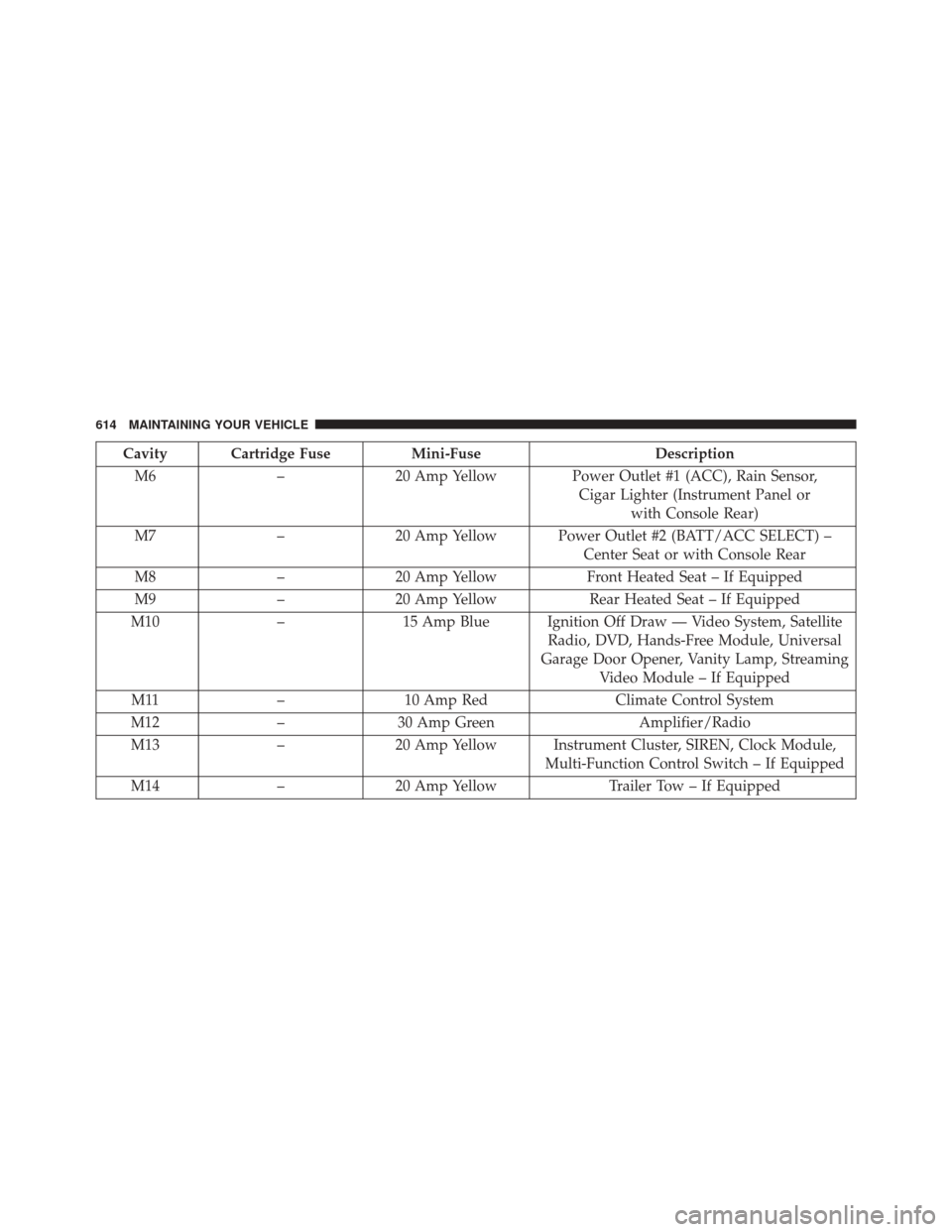
Cavity Cartridge FuseMini-FuseDescription
M6 –20 Amp Yellow Power Outlet #1 (ACC), Rain Sensor,
Cigar Lighter (Instrument Panel or with Console Rear)
M7 –20 Amp Yellow Power Outlet #2 (BATT/ACC SELECT) –
Center Seat or with Console Rear
M8 –20 Amp Yellow Front Heated Seat – If Equipped
M9 –20 Amp Yellow Rear Heated Seat – If Equipped
M10 –15 Amp Blue Ignition Off Draw — Video System, Satellite
Radio, DVD, Hands-Free Module, Universal
Garage Door Opener, Vanity Lamp, Streaming Video Module – If Equipped
M11 –10 Amp Red Climate Control System
M12 –30 Amp Green Amplifier/Radio
M13 –20 Amp Yellow Instrument Cluster, SIREN, Clock Module,
Multi-Function Control Switch – If Equipped
M14 –20 Amp Yellow Trailer Tow – If Equipped
614 MAINTAINING YOUR VEHICLE
Page 652 of 671
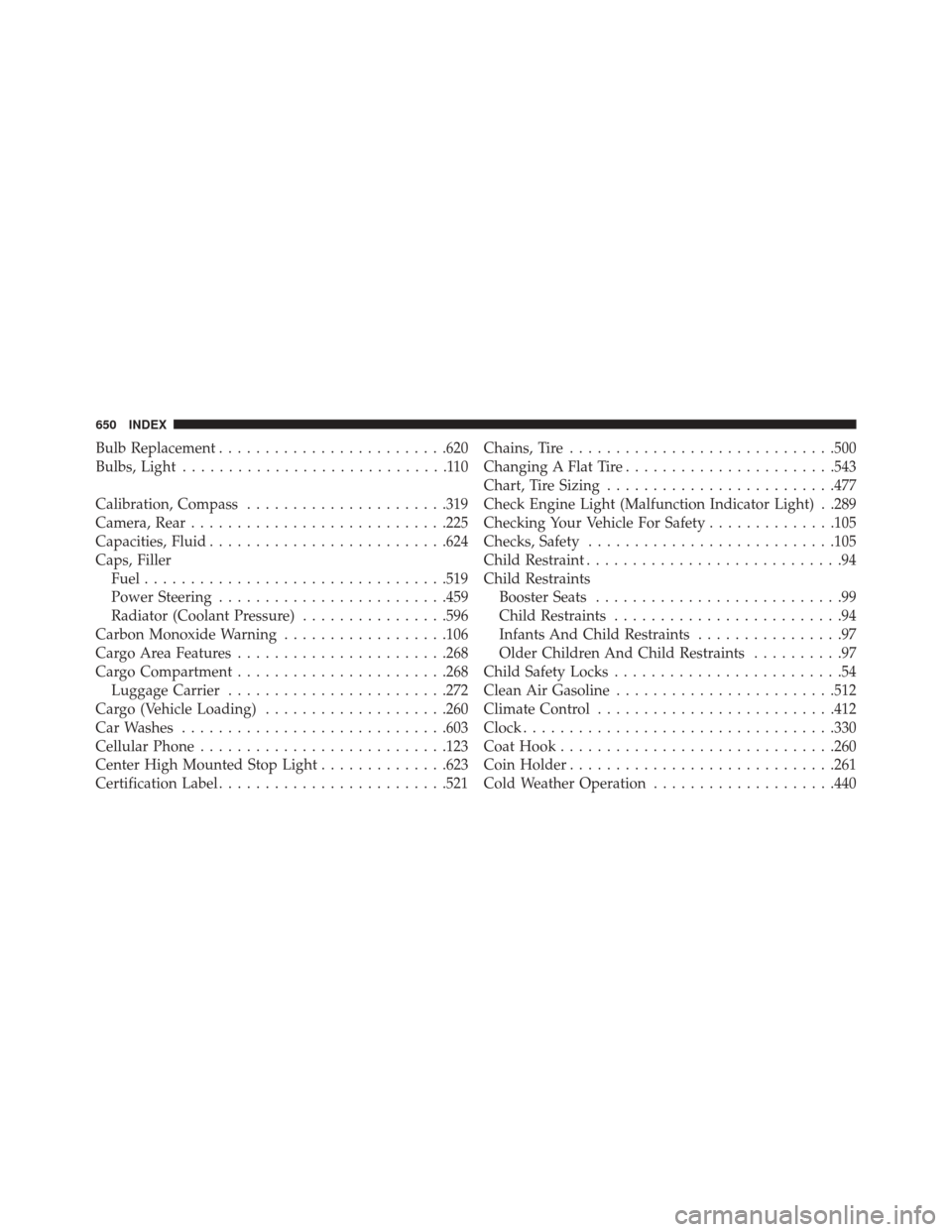
Bulb Replacement........................ .620
Bulbs, Light .............................110
Calibration, Compass ..................... .319
Camera, Rear ........................... .225
Capacities, Fluid ......................... .624
Caps, Filler Fuel ................................ .519
Power Steering ........................ .459
Radiator (Coolant Pressure) ................596
Carbon Monoxide Warning ..................106
Cargo Area Features ...................... .268
Cargo Compartment ...................... .268
Luggage Carrier ....................... .272
Cargo (Vehicle Loading) ....................260
Car Washes ............................ .603
Cellular Phone .......................... .123
Center High Mounted Stop Light ..............623
Certification Label ........................ .521Chains, Tire
............................ .500
Changing A Flat Tire ...................... .543
Chart, Tire Sizing ........................ .477
Check Engine Light (Malfunction Indicator Light) . .289
Checking Your Vehicle For Safety ..............105
Checks, Safety .......................... .105
Child Restraint ............................94
Child Restraints Booster Seats ...........................99
Child Restraints .........................94
Infants And Child Restraints ................97
Older Children And Child Restraints ..........97
Child Safety Locks .........................54
Clean Air Gasoline ....................... .512
Climate Control ......................... .412
Clock ................................. .330
Coat Hook ............................. .260
Coin Holder ............................ .261
Cold Weather Operation ....................440
650 INDEX
Page 664 of 671
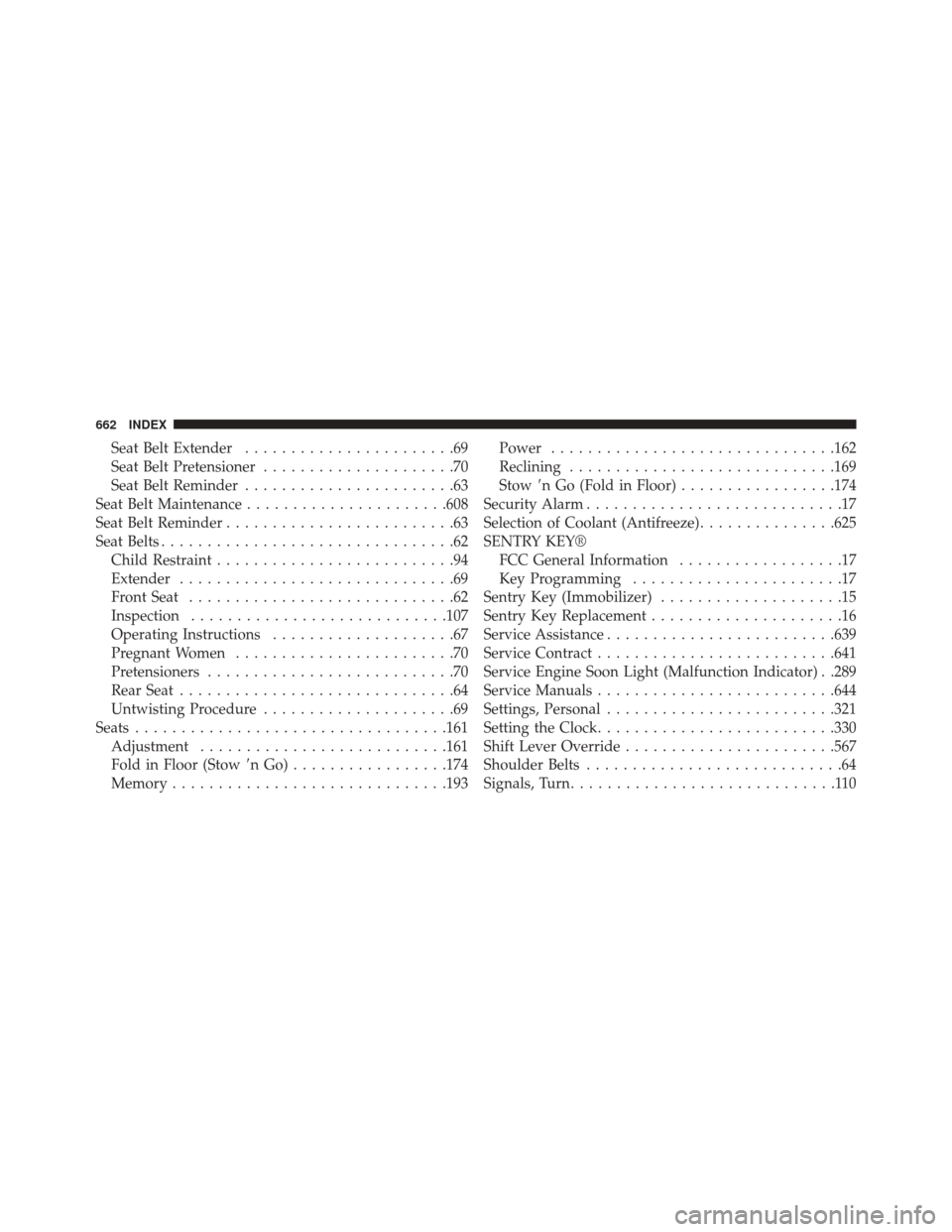
Seat Belt Extender.......................69
Seat Belt Pretensioner .....................70
Seat Belt Reminder .......................63
Seat Belt Maintenance ..................... .608
Seat Belt Reminder .........................63
Seat Belts ................................62
Child Restraint ..........................94
Extender ..............................69
Front Seat .............................62
Inspection ........................... .107
Operating Instructions ....................67
Pregnant Women ........................70
Pretensioners ...........................70
Rear Seat ..............................64
Untwisting Procedure .....................69
Seats ................................. .161
Adjustment .......................... .161
Fold in Floor (Stow nGo).................174
Memory ............................. .193Power
.............................. .162
Reclining ............................ .169
Stow n Go (Fold in Floor) .................174
Security Alarm ............................17
Selection of Coolant (Antifreeze) ...............625
SENTRY KEY® FCC General Information ..................17
Key Programming .......................17
Sentry Key (Immobilizer) ....................15
Sentry Key Replacement .....................16
Service Assistance ........................ .639
Service Contract ......................... .641
Service Engine Soon Light (Malfunction Indicator) . .289
Service Manuals ......................... .644
Settings, Personal ........................ .321
Setting the Clock ......................... .330
Shift Lever Override ...................... .567
Shoulder Belts ............................64
Signals, Turn .............................110
662 INDEX