clutch RAM CHASSIS CAB 2007 User Guide
[x] Cancel search | Manufacturer: RAM, Model Year: 2007, Model line: CHASSIS CAB, Model: RAM CHASSIS CAB 2007Pages: 532, PDF Size: 2.69 MB
Page 279 of 532

NOTE: If the vehicle has not been driven in several
days, the first few seconds of operation after shifting the
transmission into gear may seem sluggish. This is due to
the fluid partially draining from the torque converter into
the transmission. This condition is normal and will not
cause damage to the transmission. The torque converter
will refill within five seconds of shifting from Park into
any other gear position.
MANUAL TRANSMISSION
WARNING!You or others could be injured if you leave the
vehicle unattended without having the parking
brake fully applied. The parking brake should al-
ways be applied when the driver is not in the
vehicle, especially on an incline. Truck models with manual transmission are equipped
with a clutch interlocking ignition system. The clutch
pedal must be fully depressed to start the vehicle.
Fully depress the clutch pedal before shifting gears. As
you release the clutch pedal, lightly depress the accelera-
tor pedal.
To shift into Reverse, come to a complete stop. Depress
the clutch and pause briefly to allow the gear train to
stop. Move the shift lever from the Neutral position
straight across and back into Reverse.
Never drive with your foot resting on the clutch pedal, or
attempt to hold the vehicle on a hill with the clutch pedal
partially engaged, as this will cause abnormal wear on
the clutch. STARTING AND OPERATING 279
5
Page 280 of 532

Manual Transmission — 6 Speed (G56)
Your vehicle may be equipped with the G56 manual
transmission. This transmission has a “creeper” 1st gear
which should be used to start from a standing position
when carrying a payload or towing a trailer. Damage to
the clutch can result from starting in 2nd or 3rd gear with
a loaded vehicle. An unloaded vehicle may be launched
in 2nd gear. Use each gear in numerical order – do not
skip a gear.
For most city driving you may find it easier to use only
1st through 5th gear ranges. For steady highway driving
with light accelerations, 6th gear is recommended. To
shift into 5th gear, move the shift lever to the right
beyond the spring pressure point and push it forward.
When shifting from 5th to 4th gear, pull the lever down
toward you in one motion. Do not pull the lever sharply left as you may shift accidentally into 2nd gear and
damage the transmission.
To shift into Reverse, come to a complete stop. Depress
the clutch and pause briefly to allow the gear train to
stop. Reverse has a “crash-through” lockout feature.
Move the shift lever from the Neutral position straight
across, in one swift motion, and down into Reverse.
Recommended Vehicle Shift Speeds
To utilize your manual transmission efficiently for both
fuel economy and performance, it should be upshifted as
listed in recommended shift speed chart. Shift at the
vehicle speeds listed for acceleration. Earlier upshifts
during cruise conditions (steady speeds) will result in
increased fuel economy, and may be used as indicated.280 STARTING AND OPERATING
Page 281 of 532

6 Speed Manual Transmission Shift Speeds in mph
(km//h)
Engine Mode 2 to 3 3 to 4 4 to 5 5 to 6
6.7L
Turbo
Diesel
Engine Accel
&
Cruise 15 (24) 25 (40) 40 (64) 45 (72)
6 Speed Manual Transmission Shift Speeds in mph
(km//h)
En-
gine Mode 1to2 2to3 3to4 4to5 5to6
5.7L
Gas
En-
gine Accel
&
Cruise 15 (24) 25
(40) 40 (64) 45
(72) 50 (81) Downshifting – Gas Engine
Moving from a high gear down to a lower gear is
recommended to preserve brakes when driving down
steep hills. In addition, downshifting at the right time
provides better acceleration when you desire to resume
speed. For acceleration at speeds less than 20 mph (30
km/h), 2nd gear is recommended.
CAUTION!When descending a hill, be very careful to downshift
one gear at a time to prevent overspeeding the
engine which can cause valve damage.
To prevent clutch and transmission damage, your vehicle
should be downshifted at speeds no greater than those
listed in the Maximum Recommended Downshifting
Speed chart. STARTING AND OPERATING 281
5
Page 282 of 532
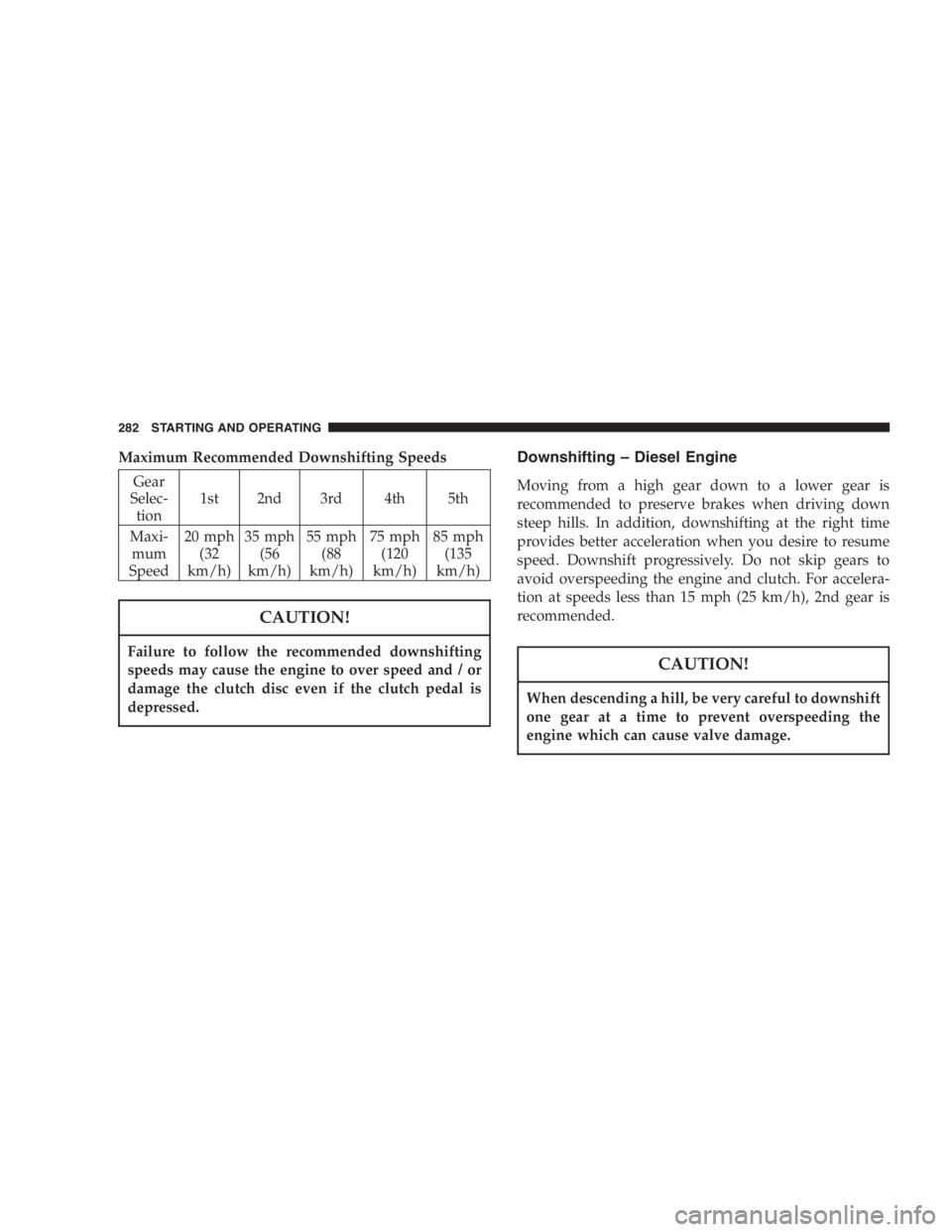
Maximum Recommended Downshifting Speeds
Gear
Selec-
tion 1st 2nd 3rd 4th 5th
Maxi-
mum
Speed 20 mph
(32
km/h) 35 mph
(56
km/h) 55 mph
(88
km/h) 75 mph
(120
km/h) 85 mph
(135
km/h)
CAUTION!Failure to follow the recommended downshifting
speeds may cause the engine to over speed and / or
damage the clutch disc even if the clutch pedal is
depressed. Downshifting – Diesel Engine
Moving from a high gear down to a lower gear is
recommended to preserve brakes when driving down
steep hills. In addition, downshifting at the right time
provides better acceleration when you desire to resume
speed. Downshift progressively. Do not skip gears to
avoid overspeeding the engine and clutch. For accelera-
tion at speeds less than 15 mph (25 km/h), 2nd gear is
recommended.
CAUTION!When descending a hill, be very careful to downshift
one gear at a time to prevent overspeeding the
engine which can cause valve damage.282 STARTING AND OPERATING
Page 283 of 532
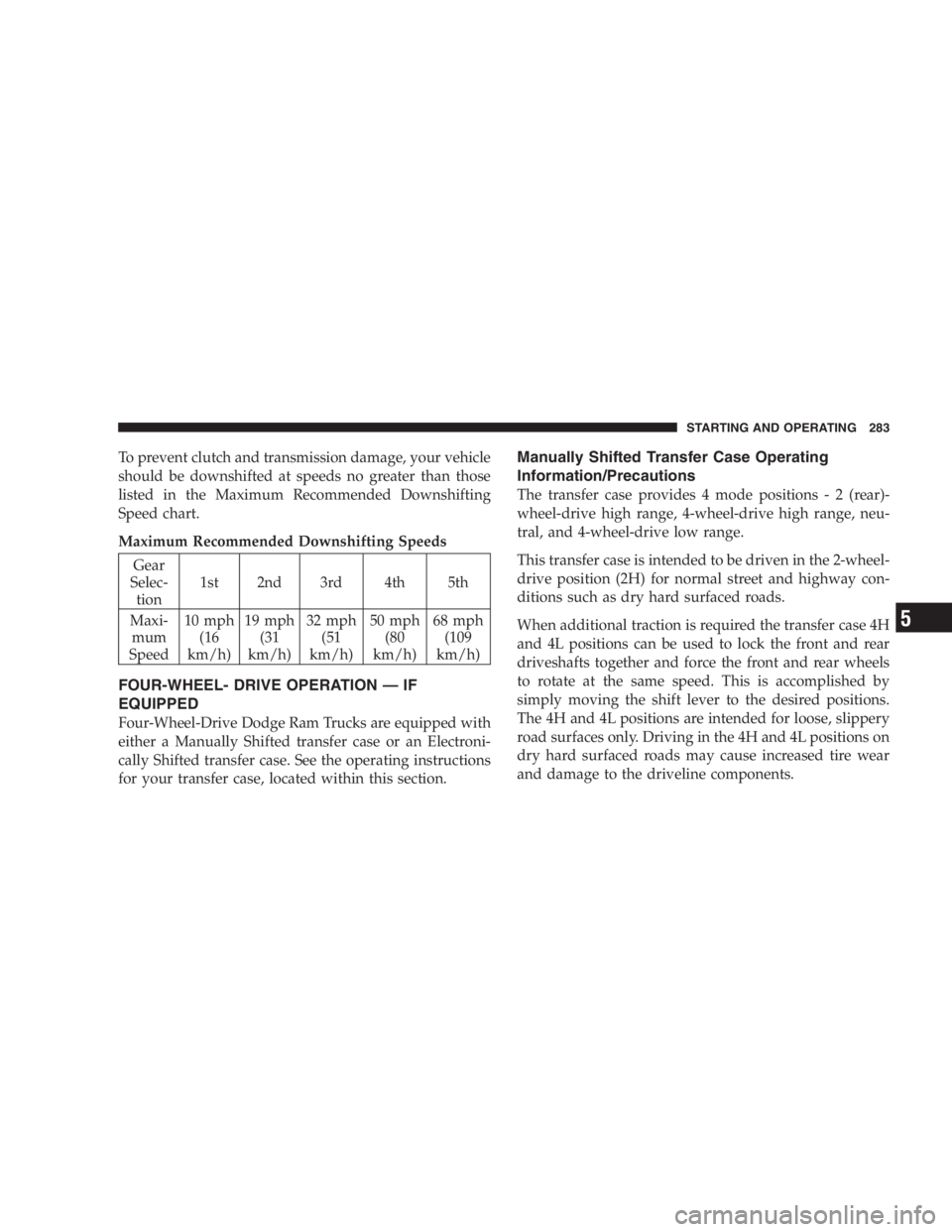
To prevent clutch and transmission damage, your vehicle
should be downshifted at speeds no greater than those
listed in the Maximum Recommended Downshifting
Speed chart.
Maximum Recommended Downshifting Speeds
Gear
Selec-
tion 1st 2nd 3rd 4th 5th
Maxi-
mum
Speed 10 mph
(16
km/h) 19 mph
(31
km/h) 32 mph
(51
km/h) 50 mph
(80
km/h) 68 mph
(109
km/h)
FOUR-WHEEL- DRIVE OPERATION — IF
EQUIPPED
Four-Wheel-Drive Dodge Ram Trucks are equipped with
either a Manually Shifted transfer case or an Electroni-
cally Shifted transfer case. See the operating instructions
for your transfer case, located within this section. Manually Shifted Transfer Case Operating
Information/Precautions
The transfer case provides 4 mode position s-2(r ear)-
wheel-drive high range, 4-wheel-drive high range, neu-
tral, and 4-wheel-drive low range.
This transfer case is intended to be driven in the 2-wheel-
drive position (2H) for normal street and highway con-
ditions such as dry hard surfaced roads.
When additional traction is required the transfer case 4H
and 4L positions can be used to lock the front and rear
driveshafts together and force the front and rear wheels
to rotate at the same speed. This is accomplished by
simply moving the shift lever to the desired positions.
The 4H and 4L positions are intended for loose, slippery
road surfaces only. Driving in the 4H and 4L positions on
dry hard surfaced roads may cause increased tire wear
and damage to the driveline components. STARTING AND OPERATING 283
5
Page 287 of 532

vehicle in motion, the transfer case will engage / disen-
gage faster if you momentarily release the accelerator
pedal after completing the shift. Apply a constant force
when shifting the transfer case lever.
2H or 4H ⇔ 4L
With the vehicle rolling at 2 to 3 mph (3 to 5 km/h), shift
an automatic transmission to N (Neutral) or depress the
clutch on a manual transmission. While the vehicle is
coasting at 2 to 3 mph (3 to 5 km/h), shift the transfer
case lever firmly to the desired position. Do not pause in
transfer case N (Neutral).
NOTE: Pausing in transfer case N (Neutral) in vehicles
equipped with an automatic transmission may require
shutting the engine OFF to avoid gear clash while
completing the shift. If difficulty occurs, shift automatic
transmission to N (Neutral), hold foot on brake, and turn
engine OFF. Make shift to the desired mode. NOTE: Shifting into or out of 4L is possible with the
vehicle completely stopped, however difficulty may oc-
cur due to the mating clutch teeth not being properly
aligned. Several attempts may be required for clutch
teeth alignment and shift completion to occur. The pre-
ferred method is with the vehicle rolling 2 to 3 mph (3 to
5 km/h). Avoid attempting to engage or disengage 4L
with the vehicle moving faster than 2 to 3 mph (3 to 5
km/h).
NOTE: Do not attempt to shift to or from 4L while the
transmission is in gear or clutch is engaged.
Transfer Case Reminder Light
The four-wheel-drive operating light (4WD), located in
the instrument cluster, is used to alert the driver that the
front axle is fully engaged and all four wheels are
driving. STARTING AND OPERATING 287
5
Page 294 of 532

Preferred Procedure
1. With engine RUNNING, slow vehicle to 2 to 3 mph (3
to 5 km/h).
2. Shift the transmission into NEUTRAL (depress clutch
on manual transmissions).
3. While still rolling, rotate the transfer case control
switch to the desired position.
4. After the desired position indicator light is ON (not
flashing), shift transmission back into gear (release clutch
on manual transmissions).
Alternate Procedure
1. Bring the vehicle to complete stop.
2. With the key ON and the engine either OFF or
RUNNING, shift the transmission into NEUTRAL (de-
press clutch on manual transmissions). 3. Rotate the transfer case control switch to the desired
position.
4. After the desired position indicator light is ON (not
flashing), shift transmission back into gear (release clutch
on manual transmissions).
NOTE: If steps 1 or 2 of either the Preferred or Alternate
Procedure are not satisfied prior to attempting the shift
then the desired position indicator light will flash con-
tinuously while the original position indicator light is
ON, until all requirements have been met.
NOTE: The ignition key must be ON for a shift to take
place and for the position indicator lights to be operable.
If the key is not ON then the shift will not take place and
no position indicator lights will be on or flashing.
NOTE: If your are leaving your vehicle stored for longer
than 21 days, refer to the section on “Vehicle Storage.”294 STARTING AND OPERATING
Page 296 of 532

POWER TAKE OFF OPERATION – IF EQUIPPED
The 3500 Dodge Chassis Cab vehicle, when equipped
with either the automatic 6 speed or manual G-56 6 speed
transmissions, will allow for an aftermarket upfit with a
transmission driven PTO (power take off). The customer
will have the ability to operate the PTO in either a
“stationary” or “mobile” mode. The vehicles will be
factory set to the “stationary” mode. In order to select the
“mobile” mode a DaimlerChrysler Dealership is required
to modify the vehicles settings using their proprietary
Dealer service tool.
Stationary Mode
To operate the PTO in this mode the vehicle must meet
the following conditions:
• Be in “park” position (vehicles equipped with auto-
matic transmission)
• Upfitter provider (on/off) switch has been activated • Parking brake applied (vehicles equipped with
manual transmission)
• Vehicle must be running
• No vehicle, brake or clutch switch faults present
• PTO must be correctly installed using the vehicle
provided circuits
The customer has the choice to operate the PTO by
utilizing the cruise control switches or by utilizing a
remote control (provided by the PTO supplier). To oper-
ate the feature using the cruise control switches the
customer must first activate the up fitter provided on/off
switch. Next, the cruise control “on” switch is selected.
Following this step the “set” switch must be depressed.
The vehicle is now in the PTO mode and is ready for use.
In order to increase or decrease the engine idle speed, to
optimize the PTO function, the “accel” and “decel” cruise
switches can be used respectively. To disengage PTO296 STARTING AND OPERATING
Page 297 of 532

operation and return to “standard vehicle operation”
simply turn the up fitter provided on/off switch to the off
position.
To operate the PTO via a remote switch the customer
must make sure the above conditions are met. It is vital
for proper operation that the PTO and remote have been
installed correctly paying special attention to ensure the
vehicle provided wiring has been connected properly.
This is the responsibility of the installer of the PTO and
switches/remote system. It is the responsibility of the
PTO manufacturer to ensure that their electrical (switches
and remote) system is compatible with the vehicle’s
electrical architecture and software functionality.
Mobile Mode
To operate the PTO in this mode the vehicle must meet
the following conditions: • Dealer selected “mobile” mode activated via Dealer
proprietary service tool
• Upfitter provider (on/off) switch has been activated
• Vehicle must be in “park” or “drive” position (vehicles
equipped with automatic transmission)
• Parking brake must not be applied
• No vehicle, brake or clutch switch faults present
• Vehicle must be running
• PTO must be correctly installed using the vehicle
provided circuits
The customer may choose to use the PTO while the
vehicle is moving. To do so the PTO function must be
activated prior to taking the vehicle out of “park”. This is
accomplished by activating the up fitter provided PTO
on/off switch. At this point the customer may place the
vehicle in a forward or reverse gear and have PTO STARTING AND OPERATING 297
5
Page 353 of 532

If using a manual transmission vehicle for trailer towing,
all starts must be in FIRST gear to avoid excessive clutch
slippage.
Towing Tips — Automatic Transmission
The “D” range can be selected when towing. However, if
frequent shifting occurs while in this range, the “TOW
HAUL” or “OD/OFF” range should be selected.
NOTE: Using the “TOW HAUL” or “OD/OFF” range
while operating the vehicle under heavy operating con-
ditions will improve performance and extend transmis-
sion life by reducing excessive shifting and heat build up.
This action will also provide better engine braking.
The automatic transmission fluid and filter should be
changed if you REGULARLY tow a trailer for more than
45 minutes of continuous operation. See Schedule “B” in
section 8 of this manual for transmission fluid change
intervals. NOTE: Check the automatic transmission fluid level
before towing.
Towing Tips — Tow/Haul (If Equipped)
To reduce potential for automatic transmission overheat-
ing, turn the “TOW HAUL OD/OFF” feature ON when
driving in hilly areas or shift the transmission to Drive
position 2 on more severe grades.
Towing Tips — Electronic Speed Control (If
Equipped)
Don’t use in hilly terrain or with heavy loads.
When using the speed control, if you experience speed
drops greater than 10 mph (16 km/h), disengage until
you can get back to cruising speed.
Use speed control in flat terrain and with light loads to
maximize fuel efficiency. STARTING AND OPERATING 353
5